 Dynamics 365
 Power Platform
 Dynamics
 Cloud & Productivity

Payables Agent
Process vendor invoices faster, with less data entry
The Payables Agent is an AI agent built into Business Central. It picks up PDF invoices from your accounts payable inbox, identifies the vendor, and suggests how each line should be coded. Your team reviews every draft before it becomes a purchase invoice, so AP gets faster without giving up control.
Business challenge
Vendor invoices pile up faster than AP can key them in
Most vendors email their invoices as PDFs, and someone on your team has to open each one, find the vendor, and type the details into Business Central. Deciding which account each line belongs to takes judgment, and that work slows down as volume grows. When invoices back up, closing the month and paying vendors on time both get harder.

Manual data entry
Copying amounts, dates, and line items from PDFs into Business Central takes hours each week and invites typing errors.

Inconsistent coding
Different team members code similar invoices in different ways, which makes reporting less reliable and month-end reviews longer.

Invoices that slip through
When the inbox gets busy, invoices sit unprocessed, putting payment terms and vendor relationships at risk.
Features
Process vendor invoices without the manual data entry
The Payables Agent handles the repetitive parts of accounts payable inside Business Central. It works from your own vendor list, chart of accounts, and purchase history, and it hands every draft to your team for review.
Get more accurate coding with every invoice
The agent looks at how your team has coded similar invoices in the past and uses that history to make its suggestions. The more invoices you process, the better its account suggestions become.
The agent can:
- Suggest general ledger accounts that match how your team codes similar costs
- Recommend deferral templates for costs that span more than one period
- Recognize items that already exist in your inventory
- Propose matching purchase order lines and flag price differences
Stay in control before anything posts
The agent prepares the work, but your team signs off on it. It asks for help when it is unsure, and it never posts an invoice on its own.
Your AP team can:
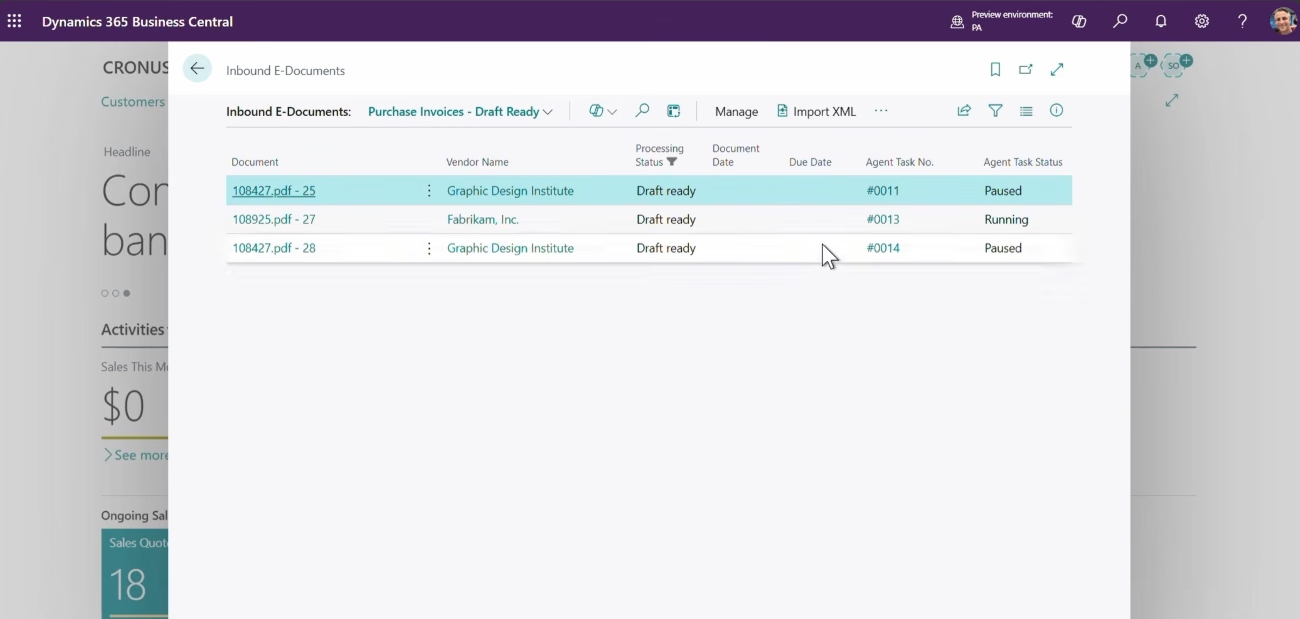
- Review every draft before it becomes a purchase invoice
- Step in when the agent is unsure about a vendor or a line
- Approve new vendors before they can be used
- Decide which senders’ invoices need review, which can be processed right away, and which are blocked
- Follow every step the agent took on each invoice
- Post each purchase invoice themselves once it is ready

Take vendor invoices off your team's plate
We'll help you get your vendor records ready, connect the right mailbox, and decide how your team will review the agent's work. Book a call to see how the Payables Agent could fit your accounts payable process.
How it works
What happens when an invoice lands in your inbox
The agent follows a clear path for every invoice, checking in with your team at the points that matter.
Receive the invoice
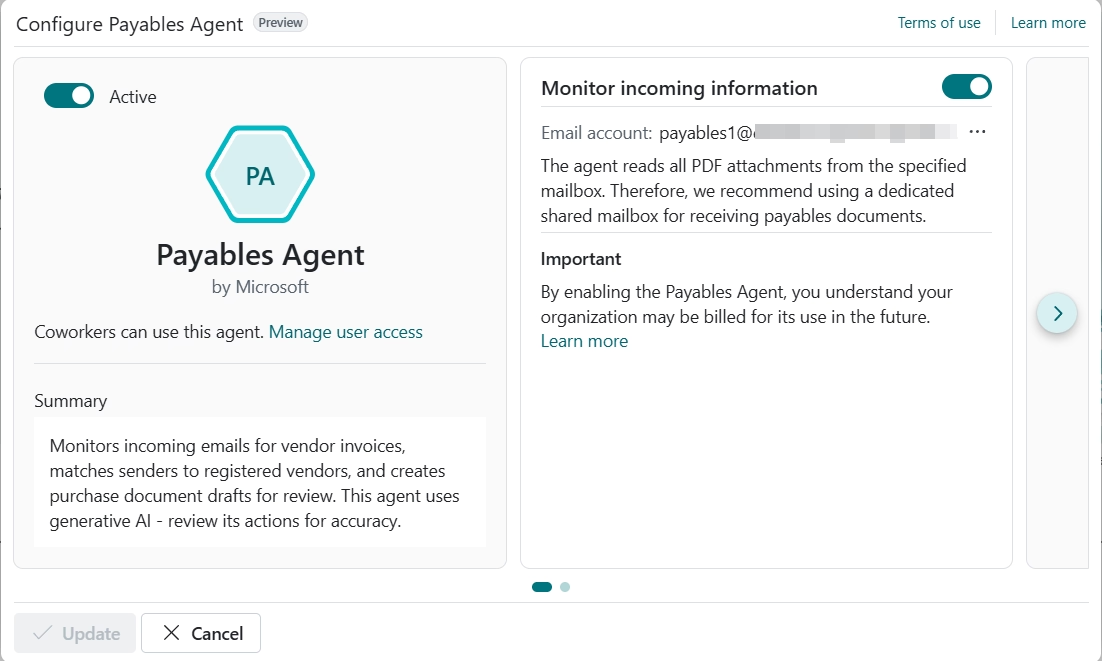
The agent watches the mailbox your vendors send invoices to and picks up each new email with a PDF attached.
Read the details
It pulls the vendor information, amounts, dates, and line items from the PDF, so nobody has to type them in.
Find the vendor
The agent matches the invoice to a vendor in Business Central using registration numbers, names, and addresses.
Code each line
It suggests the right accounts, items, or purchase order lines for every line on the invoice.
Review and finalize
Your team checks the draft, the agent turns it into a purchase invoice, and a team member posts it when ready.
Compatibility & requirements
Getting started with the Payables Agent
The Payables Agent is included in Dynamics 365 Business Central online, so there is nothing extra to install, and you pay only for the invoices it processes through Copilot Credits. You can also try it on your first 50 invoices without using any credits. Our team can take care of the setup for you.
Here’s what we’ll set up together:
- A Dynamics 365 Business Central subscription
- Copilot Credits connected to your environment so the agent can run
- A Microsoft 365 mailbox where vendors send their invoices
- Vendor records with the registration numbers and addresses that help the agent recognize them
- User access for the people who will review the agent’s drafts
- Purchase order matching, if you want invoices checked against open orders

Why partner with Rand Group?
Accounts payable know-how from day one
We look at how invoices reach your team today, from the mailbox vendors use to the way each line gets coded. Then we prepare your vendor records and settings so the agent recognizes your suppliers and codes invoices the way your accountants would.
Experience you can build on
With more than 3,000 engagements behind us, we know AP automation works best when it is tuned over time. We stay involved after launch to review results, adjust settings, and help you add purchase order matching when you are ready.
Close to your finance team
With consultants based across the United States and Canada, help is close by when invoice volume peaks at month-end. We train AP staff to review drafts, answer the agent’s questions, and confirm new vendors with confidence.
Business Central expertise, proven in the field
Rand Group is a Microsoft Solutions Partner named to Accounting Today’s VAR 100 and ERP Global Insights’ Top 100 VARs. We also build our own Business Central apps and AI agents, so we can tell you when the Payables Agent covers your needs and when a custom solution makes more sense.
Frequently Asked Questions (FAQs)
What is the Business Central Payables Agent?
The Payables Agent is an AI agent from Microsoft that is built into Dynamics 365 Business Central. It reads vendor invoices that arrive by email, matches them to the right vendor, and prepares purchase invoice drafts with suggested coding for your team to review. To learn how it works alongside other agents, read our guide to AI agents in Dynamics 365 Business Central.
Does the Payables Agent post invoices automatically?
No. The agent prepares a draft, your team reviews it, and the agent then turns it into an unposted purchase invoice. A team member reviews that invoice and posts it, so nothing reaches your books without a person signing off.
How does the agent know which vendor sent an invoice?
The agent first looks for exact matches on details such as VAT registration numbers. If that doesn’t work, it compares names and addresses and searches your vendor list and past transactions. When it can’t find a match, it offers to create a new vendor, which stays blocked until someone on your team reviews and approves it.
How is the Payables Agent priced?
The agent is included in Business Central online, and its work runs on Copilot Credits. You are charged for each invoice it processes, plus each invoice line, while emails without a valid invoice attachment cost nothing. New users can also try the agent on their first 50 invoices in a production environment without using any credits. For more detail, see our breakdown of how Microsoft Copilot Credits work, including usage, costs, and limits.
Can the agent match invoices to purchase orders?
Yes. When an open purchase order exists, the agent proposes matching order lines, and Business Central checks the vendor, quantities, units of measure, currency, receipts, and prices. Purchase order matching is optional and doesn’t yet support item charge lines or order lines with prepayments.
What kinds of invoices can the agent handle?
The agent works with PDF invoices attached to emails. Each PDF can be up to 5 MB and 10 pages, and the agent can process up to 100 emails and 500 invoices per day. Emails with more than 10 attachments are skipped.
Does Microsoft use our invoice data to train its AI?
No. Microsoft doesn’t use your company data, prompts, or responses to train AI models. Prompts and responses are stored securely in Business Central for 20 days to help with support requests, and only Microsoft support staff can access them.
Can Rand Group customize the Payables Agent?
The Payables Agent is a Microsoft product, so its core behavior isn’t something partners can rewrite. Your organization still has meaningful control over how it runs, from which mailbox it monitors to how purchase order matching and price tolerances are set. When your accounts payable process calls for more, Rand Group can design a custom agent built around it.