Dynamics 365
 Power Platform
 Dynamics
 Cloud & Productivity
How to print bill of lading from Dynamics 365 Business Central

Distribution and manufacturing organizations rely on the bill of lading (BOL) as a critical document for outbound logistics. It serves as a legally binding contract between shipper and carrier, outlining what is being transported, where it is going, and the terms of delivery. Because Dynamics 365 Business Central manages sales orders, inventory, and fulfillment, many teams expect BOL generation to be available—and are surprised to discover the system does not include a native bill of lading report.
In this blog, we’ll walk through why this gap exists, what your options look like, and how organizations streamline the entire process using a structured shipment workflow powered by Shipment Builder for Business Central.
What is a bill of lading and why it matters
A bill of lading acts as a contract between the shipper and the carrier. It outlines what is being shipped, where it is going, and under what conditions. For manufacturers, distributors, or any business with outbound logistics, it’s a required document for:
- Freight pickups and carrier transfers
- Proof of delivery workflows
- Customs and compliance
- Shipment-level visibility
- Customer communication
For manufacturers and distributors that ship frequently or in high volume, the BOL is non-negotiable. Without a streamlined process for generating it, shipping operations quickly become disorganized or error-prone.
How to generate a bill of lading in Business Central
Business Central does not include native bill of lading functionality. While the platform provides shipment posting, warehouse documents, and carrier information, the BOL document itself must either be created manually or introduced through an extension or customization. This gap creates several challenges for organizations that rely on Business Central for their shipping workflow.
However, organizations can fully enable BOL printing—and dramatically simplify outbound shipments—by adopting a consolidated shipment workflow using Rand Group’s Shipment Builder for Business Central. Shipment Builder introduces a structured way to create, manage, and finalize outbound shipments, including the ability to generate bill of lading documents directly from the Shipment Card.
Below is a step-by-step look at how this process works within Business Central when Shipment Builder is installed.

Strengthen your shipping workflow with Shipment Builder
A structured shipment-building process helps eliminate manual entry, reduce errors, and ensure your bill of lading is generated from accurate, consolidated data. Shipment Builder for Business Central supports this workflow by centralizing orders, shipment details, and outbound documentation in one place—helping teams move faster and ship with confidence.
Step-by-step: How to print a bill of lading using Shipment Builder
Below is a simplified version of a shipment-building process used by many Business Central teams that utilize the Shipment Builder application.
1. Create or open a Shipment record
Search for the Shipment workspace or open the Shipment Load List and select New.

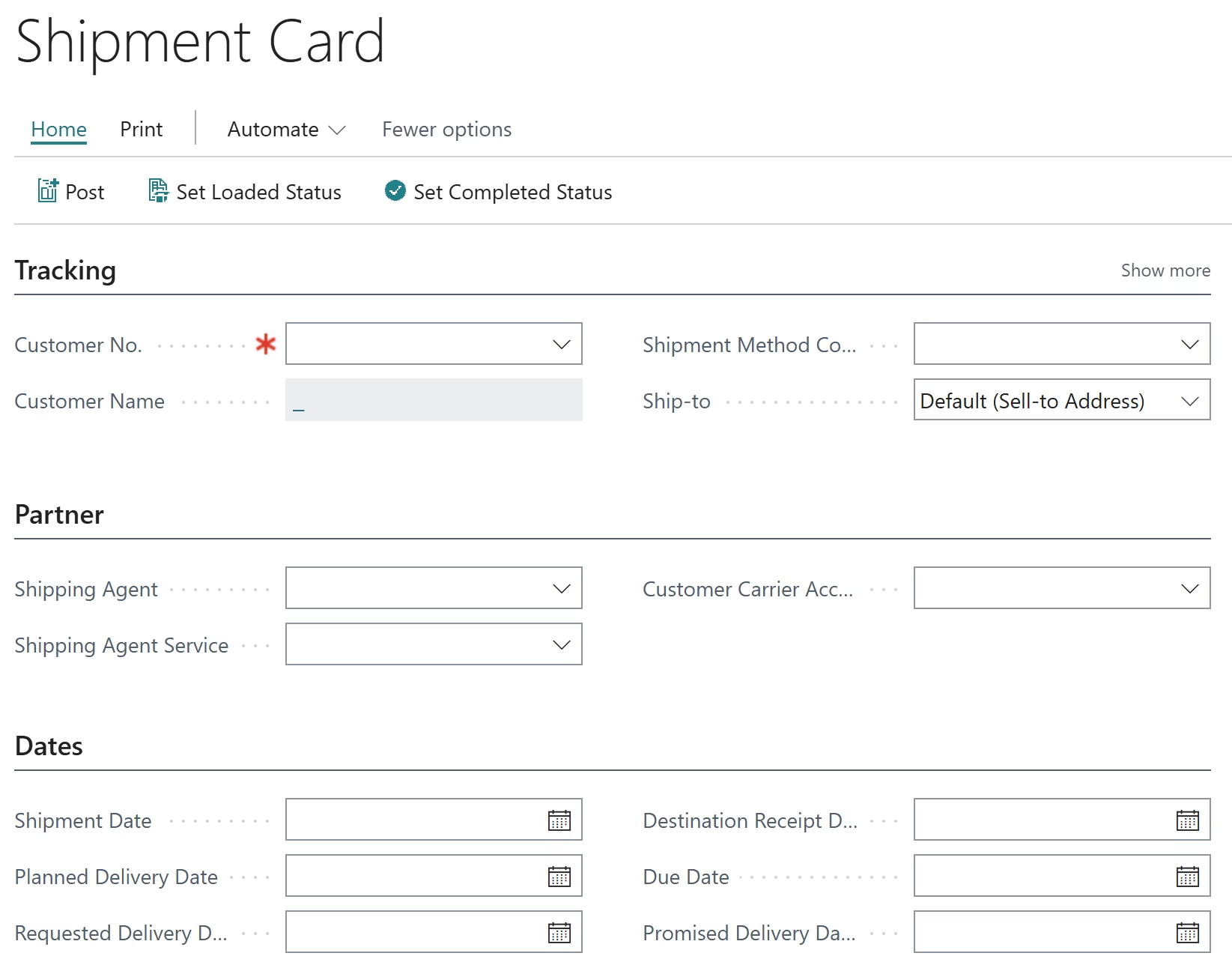
2. Enter shipment information
Add details such as:
- Customer
- Ship-to address
- Shipping Agent & Service
- Dates (shipment, planned delivery, etc.)
3. Add sales orders
Add one or multiple sales orders to the shipment using the Add to Shipment action. Bulk assignment allows multi-order selection.

4. Review assigned orders and lines
The system automatically populates all related sales lines so you can confirm quantities and details.
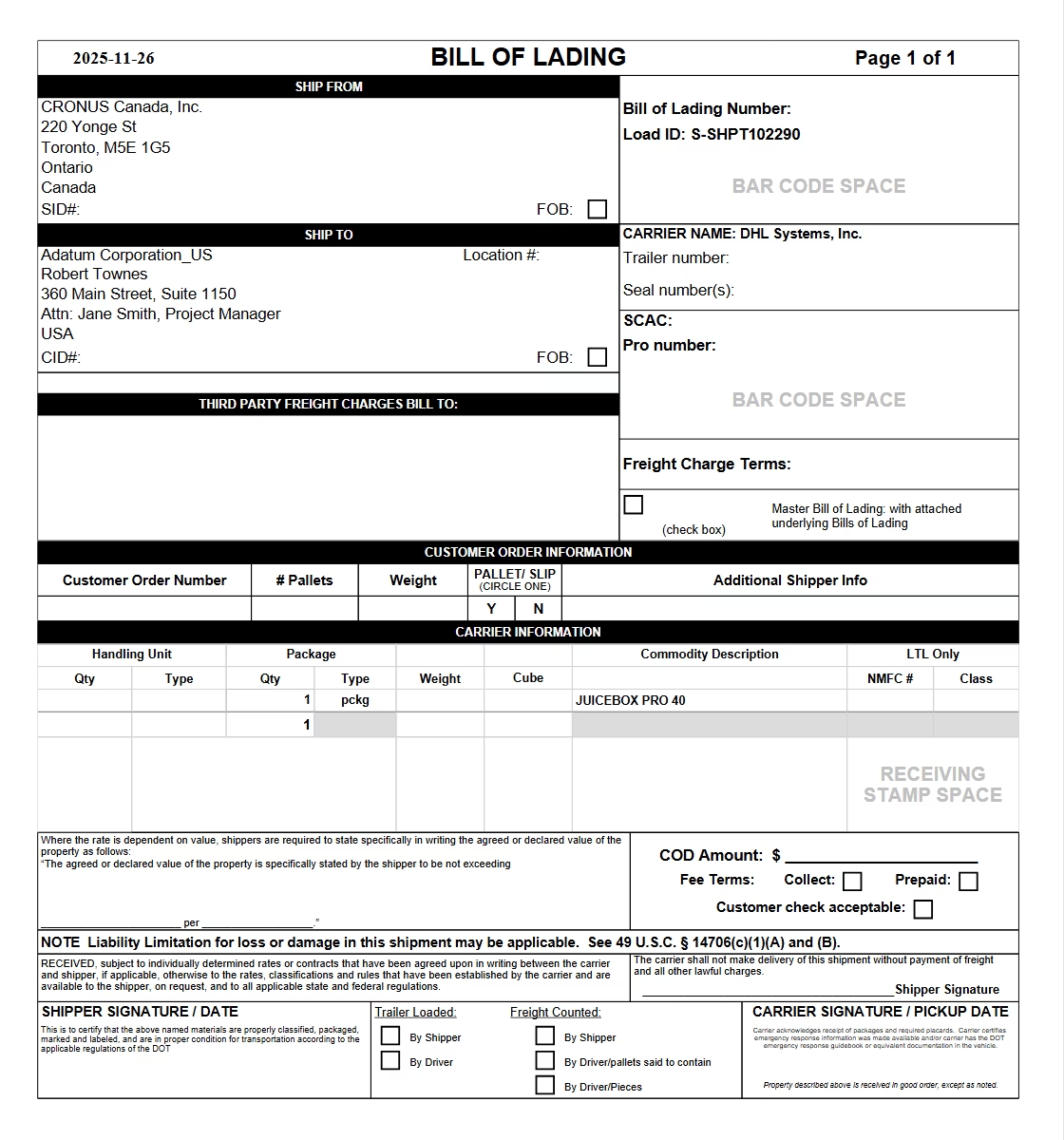
5. Print the bill of lading document
On the Shipment Card:
- Select Print
- Choose:
- Master Bill of Lading
- Bill of Lading per Sales Order
- or Commercial Invoice
- Select Preview and Close to generate a PDF
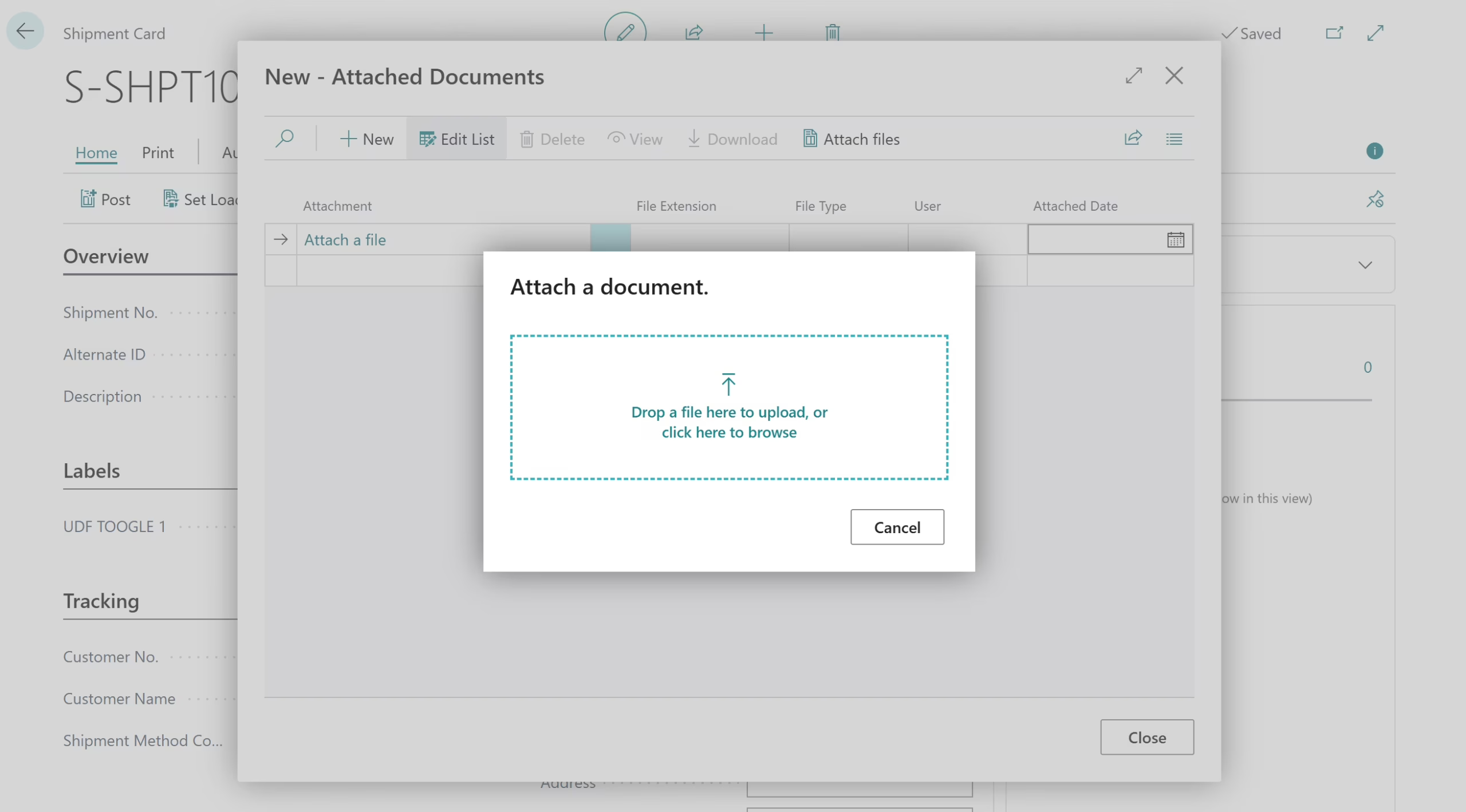
6. (Optional) Attach supporting documents
Invoices, packing lists, or customs documents can be attached directly to the Shipment Card.
More ways Shipment Builder streamlines outbound logistics
Many organizations improve their bill of lading process by adopting a shipment-building workflow within Business Central. Instead of treating each sales order individually, this approach consolidates multiple orders into one shipment record, centralizes carrier and shipment data, and allows standardized documents to be generated directly from the shipment screen.
Beyond generating bills of lading, Shipment Builder provides functionality that strengthens outbound logistics:
- Consolidate multiple sales orders into a single outbound shipment
- Assign orders in bulk using a shipment load list
- Auto-populate shipment lines and quantities
- Store tracking numbers, seal numbers, and shipping details in one place
- Print bill of lading documents from the shipment card, including master and per-order versions
- Post all assigned sales documents in one action
This makes Shipment Builder a complete outbound shipping enhancement for Business Central—especially for teams handling frequent or high-volume shipments.
Next Steps
Rand Group helps manufacturers and distributors optimize and modernize their shipping processes through implementation, support, and Business Central apps. If your team needs a reliable way to generate bills of lading, the Shipment Builder app for Business Central offers an integrated, efficient alternative. Contact Rand Group to learn how we can help strengthen your shipping and logistics operations.