Dynamics 365
 Power Platform
 Dynamics
 Cloud & Productivity
Material requirements planning (MRP) in Microsoft Dynamics 365 Business Central

Contemporary manufacturers must effectively manage the ongoing challenge of aligning supply with demand, ensuring that materials are sufficiently available to avoid both excess inventory and production disruptions caused by shortages. For many, this challenge can feel like navigating chaos. Material requirements planning (MRP) in Microsoft Dynamics 365 Business Central helps bring order to that chaos, transforming planning into a precise, data-driven process.
In this blog, we’ll explore how MRP works in Business Central, its key features, best practices for implementation, and how to unlock its full potential for smarter manufacturing and supply chain planning.
What is MRP in Business Central?
Material requirements planning (MRP) is the backbone of effective manufacturing and inventory management. It’s a planning tool that ensures material availability aligns with production schedules, helping you produce the right items at the right time without excess inventory.
Business Central’s MRP engine evaluates:
- Forecasted demand: Based on sales forecasts or historical trends
- Inventory levels: Including current stock and safety buffers
- Lead times: Accounting for supplier delivery schedules and production times
The result is a dynamic plan — a set of recommended production and purchase orders that help manufacturers respond proactively to changing demand and maintain steady operations.
Key features of MRP in Business Central
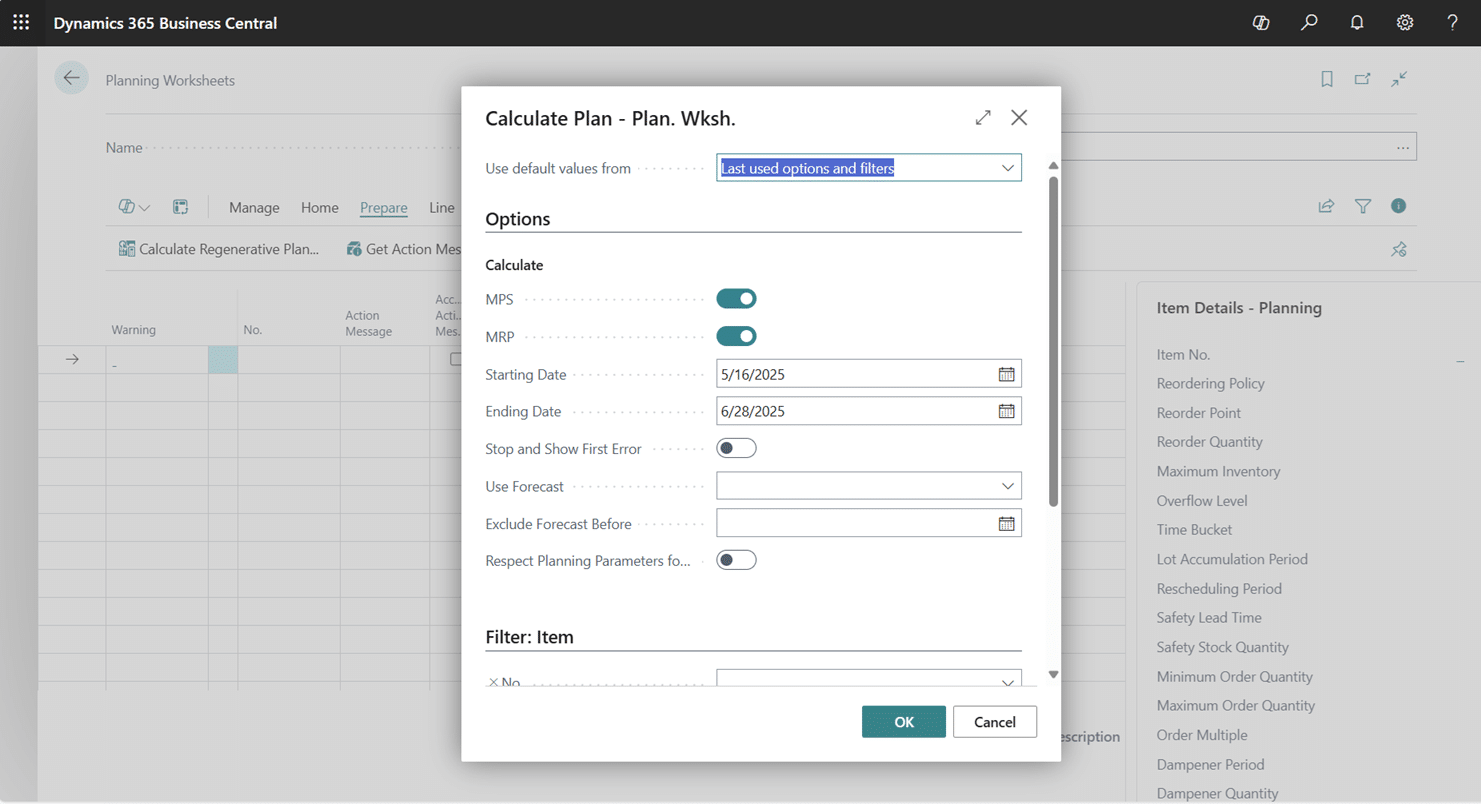
- Planning worksheet: The Planning Worksheet is your main control center for MRP. It reviews forecasts, sales orders, and inventory to generate actionable recommendations for production, purchasing, or transfers. From there, planners can adjust quantities, consolidate orders, or create firm orders directly.
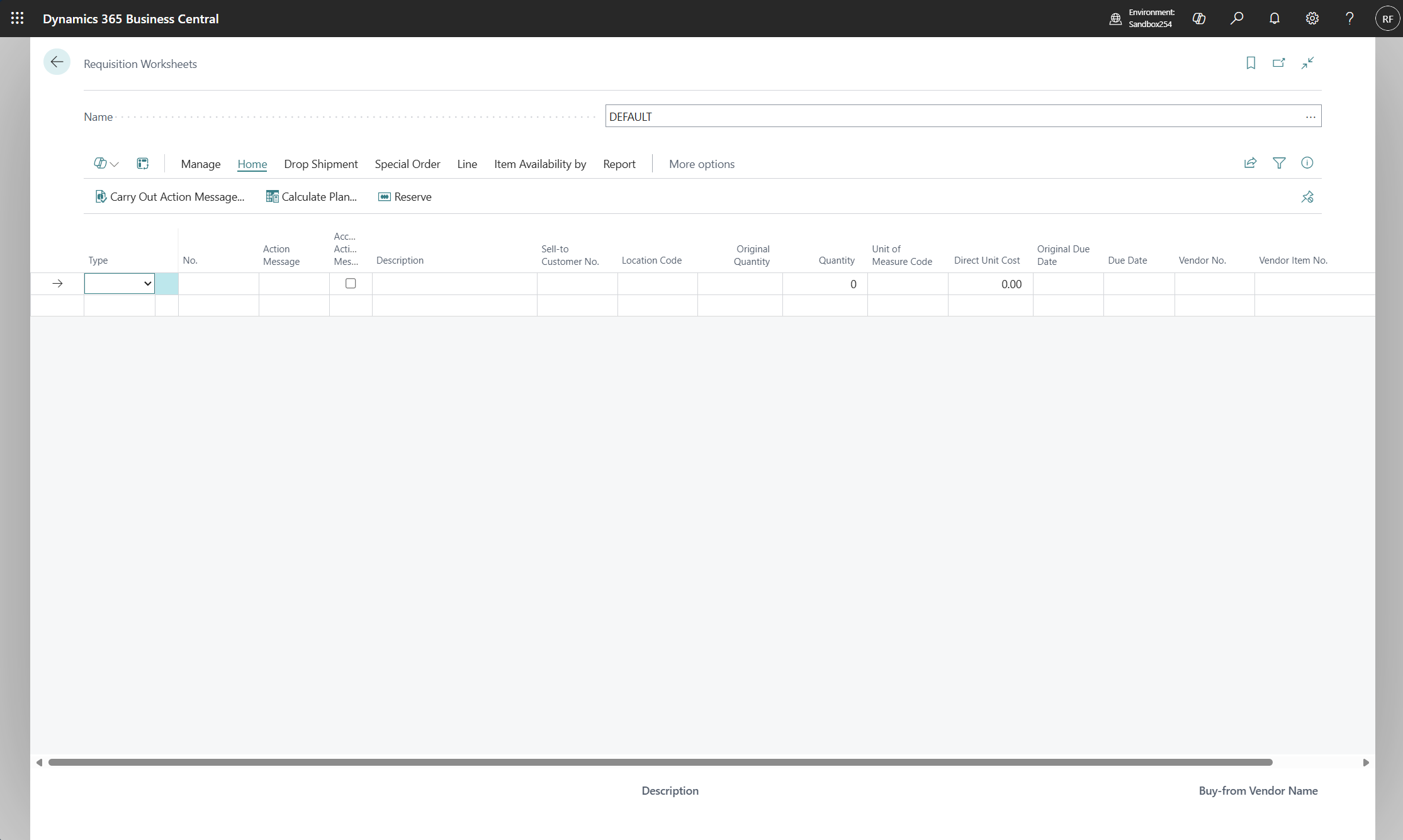
- Requisition worksheet: The Requisition Worksheet focuses on procurement. It’s ideal for buyers or supply chain planners responsible for ensuring raw materials and components are available when needed.
- Integration with BOMs and routings: MRP seamlessly integrates with your Bill of Materials (BOM) and Routings. BOMs define the materials and quantities needed, while routings outline the production steps and required resources — allowing Business Central to schedule activities accurately.
- Capacity planning: Beyond materials, Business Central’s MRP considers work center capacity and resource constraints, ensuring that recommended plans are feasible based on available production time and labor.

See MRP in action with a personalized demo
Discover how material requirements planning in Dynamics 365 Business Central can transform your manufacturing operations. Contact Rand Group today to schedule a live demo and explore how MRP can optimize your production, purchasing, and inventory processes.
How MRP works in Business Central: A practical example
To understand how MRP in Microsoft Dynamics 365 Business Central functions, let’s look at a real-world manufacturing scenario and break it down step by step.
Scenario:
A bicycle manufacturer wants to plan production for the upcoming quarter. They need to meet forecasted demand without running out of stock or overproducing.
Each bicycle requires the following components:
- 2 wheels
- 1 frame
- 1 chain
- 1 set of brakes
Step 1: Input data:
Before running MRP, the manufacturer defines key planning data:
- Safety stock: 50 bicycles
- Forecast: 200 bicycles for the next quarter
- Lead times: Wheels (2 weeks), frames (3 weeks), chains (1 week)
This data forms the basis for Business Central’s calculations. The system uses it to understand what’s needed, what’s already available, and how long replenishment will take.
Step 2: Run MRP:
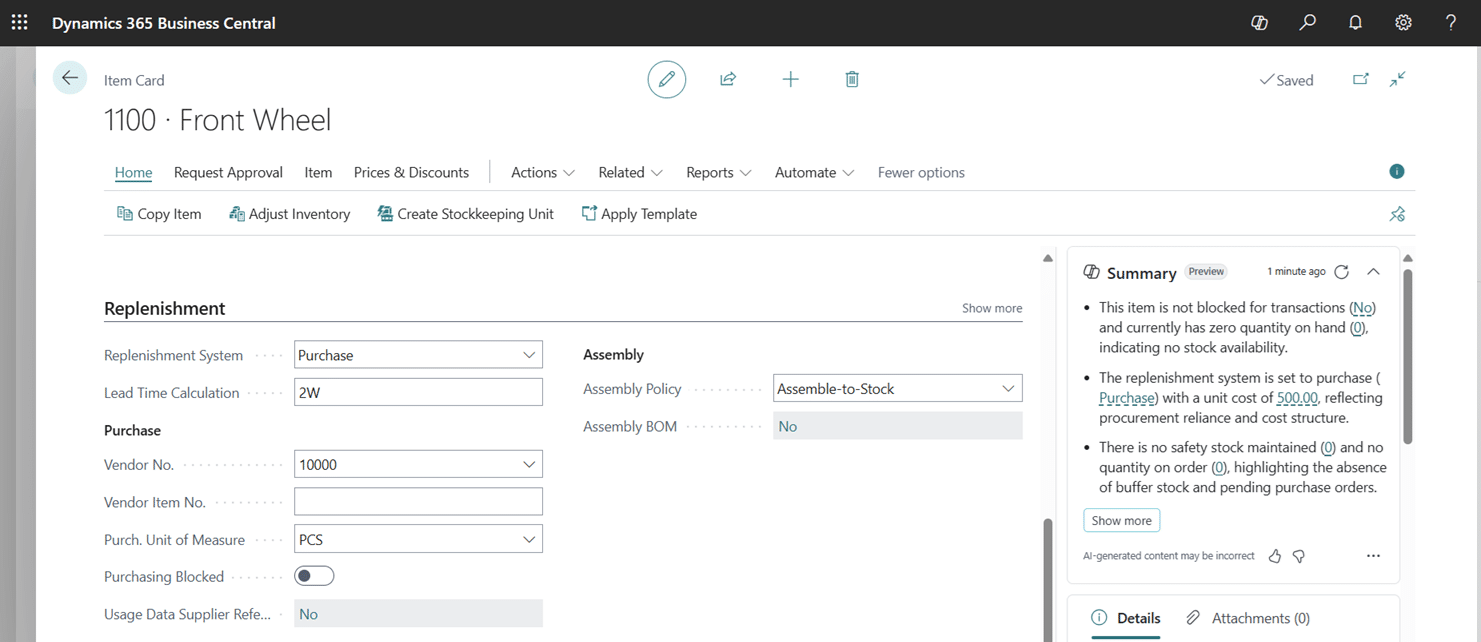
Once the data is in place, the planner uses the Planning Worksheet to run MRP. Business Central evaluates current inventory, open sales orders, demand forecasts, and BOMs to generate a comprehensive list of suggested production and purchase orders.
Step 3: Review recommendations:
After processing, Business Central presents the results in the Planning Worksheet. For this scenario, the output might look like this:
- Planned Production Orders: Build 200 bicycles.
- Planned Purchase Orders: Buy 400 wheels, 200 frames, and 200 chains.
Each recommendation includes details such as required quantities, due dates, and vendor lead times. Planners can sort, filter, and adjust the results directly within the worksheet before converting them into firm orders.
Step 4: Adjust and execute:
Finally, planners convert these planned orders into firm orders directly within Business Central. Once firmed, the system updates production schedules, purchasing timelines, and inventory projections in real time. If new sales orders come in or suppliers experience delays, MRP can be re-run to immediately recalculate and reoptimize the plan.
By following these four steps, manufacturers can move from manual, reactive scheduling to a proactive planning model. Business Central’s MRP ensures every material is available exactly when needed — no overstock, no shortages, just efficient production.
Once you understand the basics, the next question is how to manage this at scale.
Scaling MRP with order tracking and action messages
Implementing MRP in Microsoft Dynamics 365 Business Central is a game-changer for manufacturers looking to automate, streamline, and scale their production planning. But once you move beyond basic configuration, how do you handle hundreds—or even thousands—of items with confidence? Business Central empowers planners to work at scale by using action messages, order tracking, and filtering strategies to stay focused, stay efficient, and stay in control.
From manual planning to scalable MRP
Before MRP, many production planners rely on manual tools—Excel sheets, emails, and paper-based systems—to manage inventory and production schedules. But manual planning has limits. A planner might be able to manage 300 items manually, but scaling beyond that becomes a challenge. With Business Central’s MRP engine properly configured, that same planner can manage ten times the number of items using automation and exception-based workflows.
Action messages: Your daily to-do list
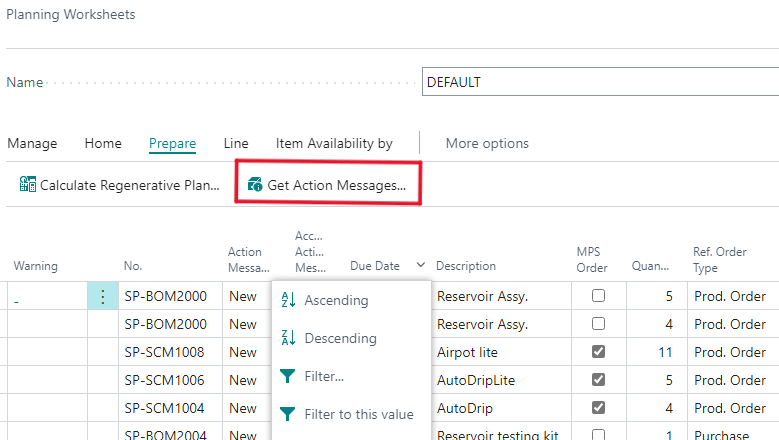
One of the most powerful features in Business Central’s planning engine is the use of action messages. These are system-generated recommendations that tell you exactly what to do—whether that’s to create, change, cancel, or expedite a production or purchase order.
The system analyzes every item’s supply and demand situation and produces a set of suggestions organized by urgency:
- Emergency: Action needed now to avoid stockouts or missed shipments
- Attention: Orders that are borderline or need review
- New: Recommendations to place new orders
Using these filters, planners can focus on what matters most without being overwhelmed by data. Instead of reacting to everything, you work through a prioritized list of tasks, allowing you to move faster with more confidence.
Order tracking: Understanding the why behind every recommendation
While MRP is designed to automate planning, it’s not a black box. Business Central provides complete visibility into the “why” behind each planning decision through the Order Tracking function, controlled by the Order Tracking Policy setting on the item card.
When enabled, this feature links each supply document (like a planned production order) directly to the demand that triggered it. When you open a planned production or purchase order, you can view the exact sales order, forecast, or safety stock parameter that created the requirement. Planners can see which sales order a production order is meant to fulfill—helping avoid confusion and simplifying change management.
This transparency is especially helpful during onboarding or training when users are still learning to trust the system’s logic. It not only builds confidence in MRP—it also supports faster troubleshooting, improved internal communication between teams, and provides manufacturers with the ability to understand and audit every step of their supply chain.
Setting your team up for success
Scaling MRP isn’t just about enabling more features—it’s about enabling your team. When action messages, order tracking, and filtered views are used together, planners can manage thousands of SKUs with clarity and precision.
But the real key to success lies in accurate setup:
- Reordering policies must match your business model
- Lead times and safety stock levels must reflect reality
- Reservation and tracking settings must be clearly defined
Once these foundational settings are aligned, Business Central becomes an extension of your planning team—an intelligent assistant that never misses a calculation or deadline.
With these tools in place, planners can confidently run MRP across thousands of items. Next, it’s critical to ensure your foundation setup supports consistent results.
Best practices for preparing to implement MRP in Business Central
To fully leverage MRP’s capabilities, you need a solid foundation. Before implementation, focus on these best practices:
Ensure your data is accurate and up-to-date
Accurate data is the lifeblood of any MRP system. Inconsistent or outdated information can produce unreliable recommendations. Maintain current records for:
- Inventory quantities and locations
- Production schedules
- Procurement lead times
Regularly review and update these details to keep planning results reliable and aligned with reality.
Set up item master data correctly
Your item master data defines everything MRP needs to function — product codes, descriptions, units of measure, and BOMs. Ensure that:
- BOMs reflect actual production structures
- Units of measure are consistent across all processes
- Product codes are clear and unique
Use forecasting to plan for demand
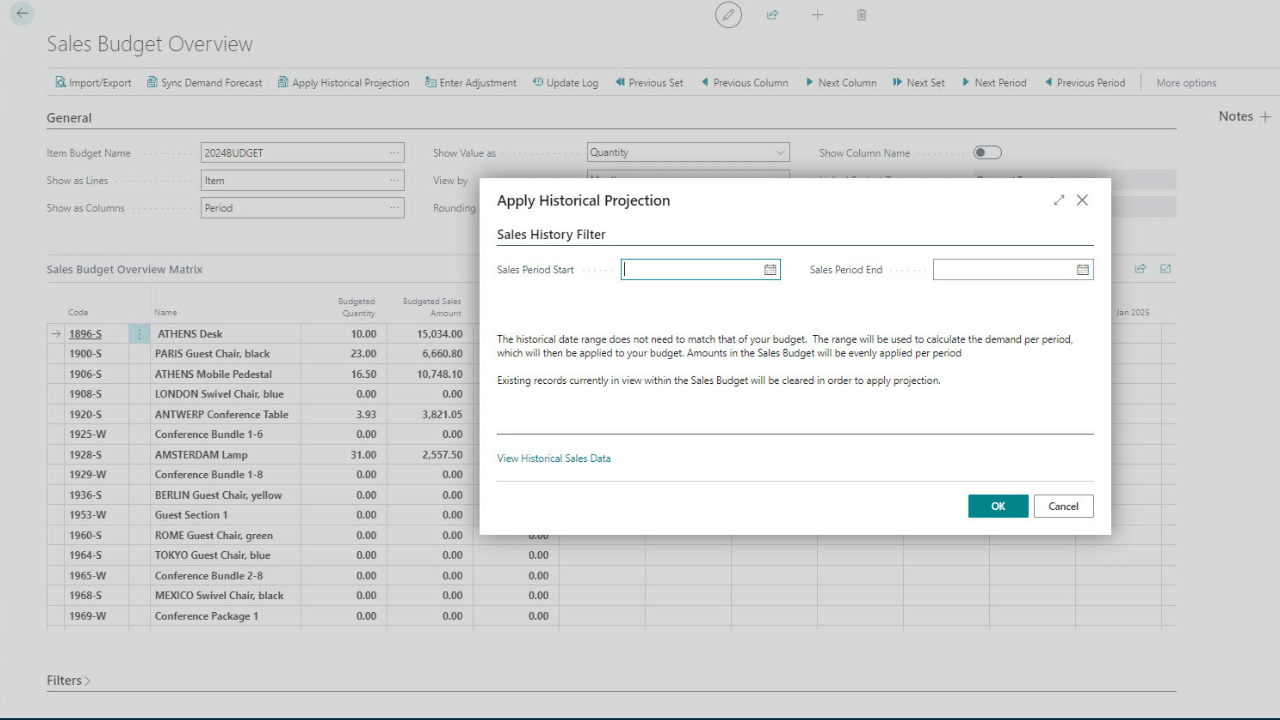
Forecasting provides the demand signals MRP needs. Business Central includes built-in forecasting tools that use historical sales data, or you can integrate advanced forecasting apps for greater accuracy.
A robust Sales and Operations Planning (S&OP) process also enhances your forecasting accuracy and overall supply chain performance.
Configure planning parameters properly
Fine-tuning your planning parameters—such as safety stock levels, order quantities, and reorder points—is key to aligning MRP with your operational strategy. These parameters determine how Business Central calculates when and how much to order or produce.
Review MRP recommendations regularly
MRP isn’t a “set it and forget it” process. Market trends, customer orders, and supplier lead times change frequently. Regularly review and adjust MRP outputs to keep your production aligned with evolving business goals.
Tips for effective MRP use
Even after implementation, success depends on how well you maintain and monitor the system.
• Start small: Begin with one product or work center to build confidence before scaling
• Keep data current: Regular updates ensure recommendations remain accurate
• Monitor performance: Use Business Central’s reports and dashboards to analyze results and continuously improve
With a disciplined approach, MRP becomes a continuous improvement tool that empowers planners to make data-driven decisions, reduce waste, and improve customer satisfaction.
Next Steps
Material requirements planning in Microsoft Dynamics 365 Business Central gives manufacturers a clear path from chaos to clarity. By integrating demand forecasting, inventory data, and production schedules, it enables smarter decision-making, shorter lead times, and optimized resource use.
Successful MRP adoption goes beyond software — it requires proper implementation, configuration, and user training. Rand Group’s team of manufacturing and Business Central experts provides end-to-end support, from system setup and parameter design to hands-on training that empowers your team to confidently manage planning cycles and interpret MRP results.
Contact Rand Group today to learn how MRP in Business Central can be tailored to your unique manufacturing environment and business goals.