Dynamics 365
 Power Platform
 Dynamics
 Cloud & Productivity
Zendesk to Dynamics 365 Customer Service migration: Costs, data, and planning

Migrating from Zendesk to Microsoft Dynamics 365 Customer Service can help organizations connect customer support with sales, operations, and other business processes. While Zendesk offers strong ticketing and support capabilities, Dynamics 365 Customer Service provides a more integrated CRM platform with advanced automation, AI, and access to customer information across departments.
However, moving from Zendesk to Dynamics 365 Customer Service requires careful planning to protect customer data and maintain service operations. This guide covers the key differences between the platforms, what data to migrate, the migration process, costs, timelines, and common challenges to help your organization prepare for a successful transition.
At a glance
A Zendesk to Dynamics 365 Customer Service migration involves transferring customer records, support tickets, conversation history, attachments, and other essential data into Microsoft’s CRM platform. Organizations must also configure workflows, integrations, and service processes that do not transfer automatically. A Zendesk to Dynamics 365 Customer Service migration can cost approximately $20,000 to $150,000 or more and take 6–12 weeks for simpler projects or 3–6 months or longer for complex implementations. Proper data mapping, testing, and user training help reduce risks and maintain customer service continuity.
What is Zendesk?
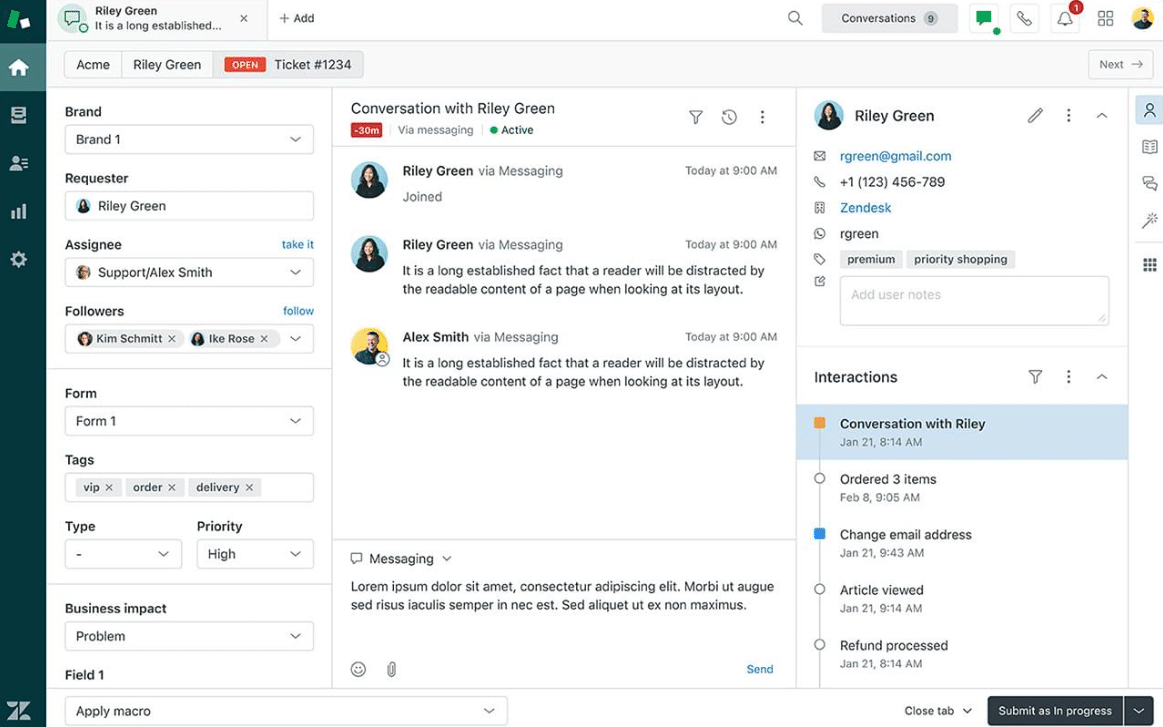
Zendesk is a cloud-based customer service platform that helps businesses manage customer inquiries, support tickets, and service interactions. Its ticketing system brings requests from email, chat, messaging, phone, and other channels into a central workspace. Support teams can assign tickets, track issues, manage customer conversations, and monitor service performance.
Zendesk also offers knowledge management, self-service portals, reporting, workflow automation, and artificial intelligence (AI) capabilities. These tools help organizations manage support requests and improve agent productivity. However, businesses that need to connect customer service with sales, finance, and other operations may require additional integrations to share data across systems. As these needs become more complex, organizations may consider moving to a more integrated CRM platform.
What is Dynamics 365 Customer Service?
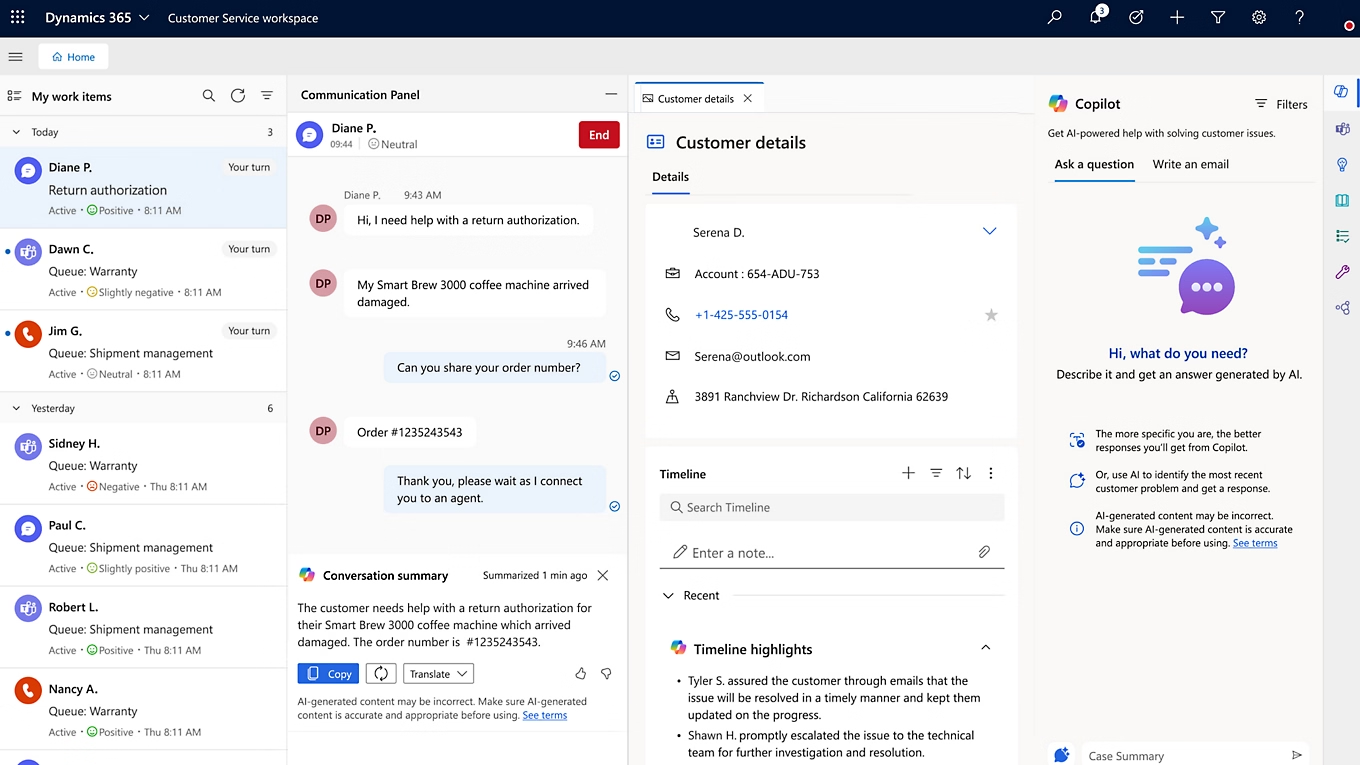
Microsoft Dynamics 365 Customer Service is a cloud-based customer relationship management (CRM) application that helps organizations manage customer support and service operations. It provides tools for case management, knowledge management, service-level agreements (SLAs), intelligent routing, and customer insights. Service representatives can track customer issues from intake to resolution while accessing relevant customer information and interaction history.
As part of the broader Dynamics 365 platform, Customer Service connects with other Microsoft business applications, including Dynamics 365 Sales, Dynamics 365 Business Central, Microsoft 365, and Power Platform. It also offers AI capabilities through Microsoft Copilot and AI agents to summarize cases, draft responses, find relevant knowledge articles, and automate supported tasks. These capabilities help organizations connect customer service with other business processes while improving agent productivity and access to customer information.
Zendesk vs. Dynamics 365 Customer Service: Key differences
Both Zendesk and Dynamics 365 Customer Service help businesses manage support requests, automate workflows, and improve customer experiences. However, Zendesk primarily focuses on customer support and ticket management, while Dynamics 365 Customer Service provides a more connected approach through Microsoft’s CRM platform. For organizations that need to integrate customer service with sales, operations, and other business systems, Dynamics 365 Customer Service offers greater flexibility and integration across the Microsoft ecosystem.
Why migrate from Zendesk to Dynamics 365 Customer Service?
Organizations migrate from Zendesk to Dynamics 365 Customer Service to better connect customer support with their broader business operations. As service needs grow, teams may require more advanced workflows, access to customer data across departments, and greater flexibility to adapt their systems. Dynamics 365 Customer Service provides a connected CRM platform that can support these needs while helping organizations make better use of their Microsoft investments.
Common reasons to migrate include:
- Unify customer information: Bring service cases, customer accounts, contacts, and sales activity together to give agents a more complete view of each customer.
- Connect business applications: Integrate customer service with Dynamics 365 Sales, Business Central, Microsoft Teams, Outlook, and other Microsoft applications.
- Expand AI and automation: Use Copilot, AI agents, and automated workflows to summarize cases, draft responses, reduce manual tasks, and improve agent productivity.
- Manage complex service operations: Configure intelligent routing, escalations, service-level agreements (SLAs), and entitlements to support different teams and service requirements.
- Increase customization and flexibility: Use Microsoft Dataverse and Power Platform to tailor case management, workflows, and applications to changing business needs.
- Improve reporting and visibility: Connect service data with Power BI and other business information to monitor performance, identify trends, and support better decisions.
What data should you migrate from Zendesk to Dynamics 365 Customer Service?
A Zendesk to Dynamics 365 Customer Service migration involves more than copying support tickets into a new system. Zendesk and Dynamics 365 organize customer information differently, so data must be reviewed, cleaned, and mapped before it can be transferred. Organizations need to account for ticket relationships, conversation history, attachments, custom fields, agent assignments, and knowledge articles.
Not every Zendesk record needs to move into Dynamics 365 Customer Service. Active tickets and current customer information are typically essential for daily operations, while older records may be more useful in an archive. Defining what to migrate, retain, or exclude helps reduce unnecessary work and keeps the new CRM focused on accurate, relevant information. For more guidance, read our ERP data migration checklist, which covers the core steps for preparing business data for a new system.
How to migrate from Zendesk to Dynamics 365 Customer Service
Migrating from Zendesk to Dynamics 365 Customer Service involves five key steps: assessing your existing system, preparing data, configuring Dynamics 365, testing, and going live. Following a structured migration process helps protect customer information, reduce disruptions, and prepare your service team for the new platform.

Step 1: Assess your Zendesk environment
Review your Zendesk environment, including tickets, customer records, workflows, SLAs, support channels, and integrations. Document current processes, identify areas for improvement, and define your requirements for Dynamics 365 Customer Service. Determine whether a one-time migration or phased approach best fits your business needs.

Step 2: Clean and map data
Export the required Zendesk data using supported export tools or APIs. Remove duplicates, correct incomplete records, and exclude outdated information. Map the remaining data to Microsoft Dataverse tables and fields, making sure customer relationships, ticket histories, and attachments can be preserved during migration.

Step 3: Configure Dynamics 365 Customer Service
Set up Dynamics 365 Customer Service to support your case management processes, security roles, queues, SLAs, and knowledge management needs. Rebuild essential Zendesk workflows, automations, and routing rules using Dynamics 365 and Power Platform. Configure integrations with Microsoft applications and other business systems as needed.
Step 4: Test and validate
Perform a test migration to identify data errors and configuration issues before go-live. Verify that customer records, cases, conversation histories, and attachments transferred correctly. Test workflows, routing, SLAs, and integrations, and involve service representatives in user acceptance testing to confirm the system meets their daily needs.

Step 5: Go live and train users
Complete the final data transfer and transition customer support operations to Dynamics 365 Customer Service. Follow a cutover plan to manage incoming requests and prevent lost or duplicate tickets. Provide role-based training, monitor system performance, and address issues after launch to support user adoption and maintain service continuity.

Ready to migrate from Zendesk to Dynamics 365 Customer Service?
Planning a migration but unsure where to start? Rand Group can help you assess your Zendesk environment, understand your requirements, and develop a migration plan that fits your business.
How much does it cost to migrate from Zendesk to Dynamics 365 Customer Service?
A Zendesk to Dynamics 365 Customer Service migration can cost approximately $20,000 to $150,000 or more, depending on the project’s size and complexity. Smaller organizations with standard service processes and limited integrations typically fall toward the lower end, while complex migrations involving extensive customization and historical data require a larger investment. This estimate covers migration and implementation costs only and does not include Dynamics 365 Customer Service licensing or ongoing subscription fees, which are additional expenses.
The total cost of migrating from Zendesk to Dynamics 365 Customer Service depends on several factors:
- Data volume and complexity: Large ticket histories, attachments, customer records, and knowledge articles require more time to prepare, transfer, and validate.
- Customization requirements: Rebuilding custom fields, routing rules, automations, and specialized service workflows increases implementation costs.
- Integrations: Connecting Dynamics 365 Customer Service with ERP systems, telephony platforms, and other business applications may require additional development.
- Migration approach: Phased migrations or running Zendesk and Dynamics 365 in parallel may require additional configuration and data synchronization.
- Testing and validation: Complex data relationships, workflows, and integrations require more extensive testing to confirm the system works as expected.
- Training and support: Employee training, system documentation, and post-migration support contribute to the overall project cost.
How long does a Zendesk to Dynamics 365 Customer Service migration take?
A Zendesk to Dynamics 365 Customer Service migration typically takes 6–12 weeks for a straightforward project or 3–6 months or longer for a complex implementation. Organizations with clean data, standard workflows, and few integrations can often migrate faster. More complex environments require additional time for configuration, testing, and deployment.
Several factors can extend the Zendesk to Dynamics 365 Customer Service migration timeline:
- Data quality and preparation: Duplicate records, incomplete information, and complex ticket histories can delay data migration.
- Workflow complexity: Advanced routing, SLAs, escalations, and custom processes require additional configuration and testing.
- Integration requirements: Connecting multiple business applications and communication channels can extend development and testing.
- Phased deployment: Running both platforms during the transition may require additional time for data synchronization and final cutover.
- Testing and approvals: User acceptance testing, issue resolution, and internal approvals can delay the final deployment.
- Internal resource availability: Limited staff availability for decisions, testing, and training can slow project progress.
Common Zendesk to Dynamics 365 Customer Service migration challenges and solutions
Migrating from Zendesk to Dynamics 365 Customer Service can present challenges related to data compatibility, workflow configuration, and service continuity. Without proper planning, organizations risk losing customer information, disrupting support processes, or delaying deployment. Understanding these challenges and how to address them helps reduce migration risks.
- Data mapping differences: Zendesk fields, ticket statuses, and record relationships may not match Dynamics 365 Customer Service directly. Define field mappings, preserve record relationships, and test data accuracy before the final migration.
- Incomplete ticket history and attachments: Some Zendesk export methods exclude ticket comments or require attachments to be retrieved separately. Use supported APIs and verify that conversations and files remain linked to the correct cases.
- Recreating workflows and SLAs: Zendesk triggers, macros, routing rules, and SLAs do not automatically transfer to Dynamics 365. Rebuild essential processes using Dynamics 365 and Power Platform, then test them against your service requirements.
- Disruptions to active customer support: New or updated tickets during migration can result in missing or duplicate cases. Establish a cutover plan with clear ticket ownership, final data synchronization, and validation procedures.
- Integration compatibility: Existing Zendesk integrations with communication channels, websites, and business applications may not work with Dynamics 365. Review integration requirements and test replacement connections before go-live.
- User adoption challenges: Service agents may need time to adjust to new interfaces, case management processes, and workflows. Involve employees in testing and provide role-based training before deployment.
An experienced migration partner can help organizations identify these risks early and develop a plan to address them. By coordinating data migration, system configuration, testing, and deployment, the right partner can help prevent costly errors and maintain customer service operations throughout the transition.
Why partner with Rand Group for your Zendesk to Dynamics 365 Customer Service migration?
A successful Zendesk to Dynamics 365 Customer Service migration requires more than technical expertise. The right Microsoft partner understands your customer service operations and helps you improve existing processes rather than simply recreate them in a new system. From migration planning to deployment and ongoing support, an experienced partner can help reduce risks, maintain service continuity, and ensure Dynamics 365 Customer Service meets your business needs.
Rand Group has delivered Microsoft business solutions since 2003, completing more than 3,000 successful engagements with a 90% client retention rate. Our consultants combine technical, business process, and industry expertise to help organizations implement and optimize Dynamics 365 solutions. Recognized as the Microsoft Americas Channel Emerging Partner of the Year, Rand Group provides the expertise needed to support your migration and maximize the long-term value of your Microsoft investment.
Our Zendesk to Dynamics 365 Customer Service migration services include:
- Migration planning and strategy: Assess your Zendesk environment, define requirements, and develop a migration roadmap.
- Data migration and validation: Clean, map, transfer, and validate customer records, tickets, conversations, and other essential data.
- Implementation and configuration: Configure case management, routing, SLAs, security roles, and service workflows.
- Integrations and development: Connect Dynamics 365 Customer Service with Microsoft applications, ERP systems, and third-party tools.
- AI and automation: Implement Copilot, AI agents, and Power Platform automation to improve customer service processes.
- Training and ongoing support: Prepare employees for the new platform and provide continued support, troubleshooting, and optimization.
H3: What our clients say about us
“We have always felt like a top priority when working with Rand Group’s team and have the utmost confidence in their industry and technical knowledge.”
– Christa Curette, VP of Engineering & Technology, Conquest Completion Services, LLC
“There’s a deep level of knowledge at Rand Group. The team was attentive, well organized, and the entire process was clearly planned from the start. Everything we asked, Rand Group was able to accommodate.”
– Sam Rentz, Corporate Controller, Dairy Products Inc.
“One of the biggest reasons we value Rand Group is the stability of the team. We work with the same people year after year, and that continuity matters. Their consistency and responsiveness have made a real difference for our organization. Rand Group has been a really great partner for us. I absolutely recommend them.”
– Julia Petty, Controller, The Museum of Fine Arts, Houston
Key takeaways
- Migrating from Zendesk to Dynamics 365 Customer Service connects customer support with CRM data, Microsoft applications, and advanced automation.
- Key Zendesk data to migrate includes active tickets, customer records, conversation history, attachments, and knowledge articles.
- Zendesk data must be cleaned and mapped to Microsoft Dataverse, while workflows, routing rules, and SLAs require reconfiguration.
- A successful migration involves five steps: assessment, data preparation, configuration, testing, and go-live.
- Zendesk to Dynamics 365 Customer Service migration costs can range from $20,000 to $150,000 or more, depending on project complexity.
- Migration timelines typically range from 6–12 weeks for simpler projects to 3–6 months or longer for complex implementations.
Frequently asked questions (FAQs)
What is a Zendesk to Dynamics 365 Customer Service migration?
A Zendesk to Dynamics 365 Customer Service migration is the process of moving customer support data and operations from Zendesk to Microsoft’s CRM platform. This includes transferring tickets, customer records, and service history while configuring workflows, automations, and integrations in Dynamics 365.
How much does it cost to migrate from Zendesk to Dynamics 365 Customer Service?
A Zendesk to Dynamics 365 Customer Service migration typically costs $20,000 to $150,000 or more, depending on project complexity. Costs vary based on data volume, customization, integrations, testing, and training requirements.
How long does a Zendesk to Dynamics 365 Customer Service migration take?
A Zendesk to Dynamics 365 Customer Service migration typically takes 6–12 weeks for a straightforward project or 3–6 months or longer for a complex implementation. The timeline depends on data quality, workflow complexity, integrations, and testing requirements.
What data can be migrated from Zendesk to Dynamics 365 Customer Service?
Zendesk tickets, customer records, conversation histories, attachments, knowledge articles, and custom fields can be migrated to Dynamics 365 Customer Service. Some data requires additional mapping, transformation, or extraction using Zendesk APIs.
Can you continue using Zendesk during a Dynamics 365 Customer Service migration?
Yes, organizations can continue using Zendesk during a phased migration to Dynamics 365 Customer Service. Both platforms can operate in parallel while data is transferred and the new system is tested. However, data synchronization and a clear cutover plan are needed to prevent missing or duplicate tickets.
Do you need to migrate all historical Zendesk data to Dynamics 365 Customer Service?
No, organizations do not need to migrate all historical Zendesk data to Dynamics 365 Customer Service. Active tickets and relevant customer records should be prioritized, while older tickets and inactive records can be archived based on business, reporting, and compliance requirements.
Do Zendesk workflows and automations transfer automatically to Dynamics 365 Customer Service?
No, Zendesk workflows, triggers, macros, and automations do not automatically transfer to Dynamics 365 Customer Service. These processes must be reviewed and rebuilt using Dynamics 365 and Power Platform tools to support your organization’s service requirements.
Plan your Zendesk to Dynamics 365 Customer Service migration with Rand Group
Moving from Zendesk to Dynamics 365 Customer Service is an opportunity to modernize customer support and connect service operations with the rest of your business. A successful transition starts with understanding your current environment, preparing essential data, and developing a migration plan that minimizes disruption while supporting your long-term goals.
Rand Group helps organizations plan, implement, and optimize Dynamics 365 Customer Service solutions. Our team provides expertise in data migration, system configuration, integrations, automation, and ongoing support to help you get the most from your new platform. Contact us to discuss your Zendesk to Dynamics 365 Customer Service migration and take the next step toward a more connected customer service solution.