 Dynamics 365
 Power Platform
 Dynamics
 Cloud & Productivity
Job Shop Manufacturing
Manufacture custom products without rigid project constraints
Job shop manufacturers are often forced to tie production directly to projects in Microsoft Dynamics 365 Business Central, limiting flexibility and adding complexity. The Job Shop Production Manager app removes this constraint, letting teams manufacture items independently, hold them in inventory, and apply them to projects only when needed. It supports build-ahead production, ensures accurate project costing based on actual usage, and eliminates workarounds. Designed for complex, made-to-order manufacturing, it creates a smoother, more natural workflow from the shop floor to financial reporting.
Free 30 day trial
$100
per month/per tenant
Supported Editions

Dynamics 365 Business Central
Premium
Supported Countries
USA & Canada

Complimentary sandbox

Onboarding assistance

Complimentary upgrades

Online training & support

About

Are project constraints slowing down your manufacturing process?
Remove rigid links between production and projects. Manufacture items independently, hold them in inventory, and associate them with a project only when the timing is right—giving job shop teams the flexibility they need to build custom and complex products efficiently.

Do production schedules rarely match project timelines?
Build ahead without disrupting project accounting. The app supports natural job shop workflows by allowing manufacturing to progress independently, preventing premature cost consumption and eliminating production delays caused by project dependencies.

Struggling to keep project costs clean and accurate?
Apply costs only when items are actually consumed by a project. This ensures project financials reflect real usage, not production timing, resulting in more reliable costing, clearer reporting, and better decision-making for high-value, engineered manufacturing.
Features
Features
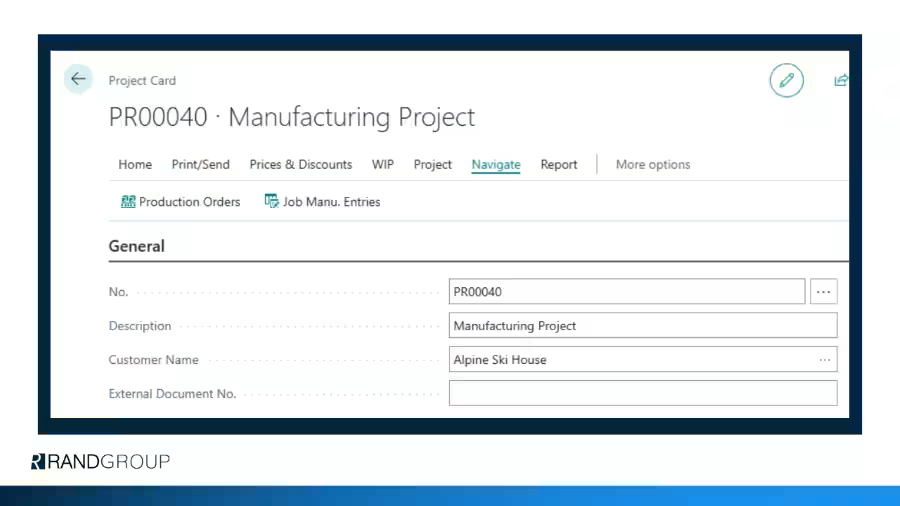
The Job Shop Production Manager app extends Dynamics 365 Business Central to support flexible, project-aware manufacturing without forcing rigid dependencies. It enables manufacturers to build inventory independently, align production with real-world project timelines, and apply costs at the right moment. Designed for complex, made-to-order environments, the app eliminates workarounds, improves costing accuracy, and delivers a smoother, more intuitive experience for both production and finance teams.
- Manufacture items without requiring immediate project assignment
- Hold completed items in inventory until they are ready to be applied to a project
- Consume manufactured items into projects at the appropriate time
- Prevent premature project cost posting during production
- Support build-ahead manufacturing without blocking production workflows
- Maintain clean, accurate, and controlled project costing
- Align manufacturing output with evolving project schedules
- Eliminate manual workarounds and system constraints
- Support complex, high-value, engineered, and custom manufacturing scenarios
- Improve visibility across production, inventory, and project financials
Screenshots
Screenshots




Supported Languages
Supported Languages
English
App Interactions
- Real-Time Cost Visibility – Instantly see the accrued landed cost associated with each container.
- Seamless Integration – The View Accrued Landed Cost window (Purch. Inv. page) displays the Container ID for easy reference.
- Automated Accrual Management – Effortlessly trigger or reverse landed cost accruals directly from the container, ensuring precise cost allocatio
Optimize job shop workflows and reduce errors
%
of manufacturing companies say improving inventory accuracy is a key priority
%
still rely on spreadsheets for at least some production planning processes
%
identify attracting and retaining skilled talent as their biggest business challenge
Why purchase an app from Rand Group?
Business Central experts
A specialized team of architects, engineers, and advisors dedicated solely to Dynamics 365 Business Central—supporting you from initial evaluation through ongoing optimization.
Apps designed for how businesses work
Our proven apps are created to enhance Business Central in real-world scenarios. Continuously updated with each Microsoft release and supported by thorough documentation and no-risk trials.
Easy onboarding with long-term support
Structured implementation, self-paced learning resources, and fast, reliable support—plus included upgrades to keep your solution current without added effort.
Integration across the platform
Native integration across the Microsoft ecosystem. Link Business Central with Power BI, Power Automate, and Microsoft 365 to automate processes and gain richer, more actionable insights.