Dynamics 365
 Power Platform
 Dynamics
 Cloud & Productivity
Dynamics 365 Finance & Supply Chain Management fall 2026 update: What’s new

Microsoft Dynamics 365 Finance and Supply Chain Management, commonly referred to as Dynamics 365 Finance & Operations (F&O), received new enhancements in version 10.0.49. The fall 2026 update introduces improvements to bank reconciliation, payment settlement, Planning Optimization, manufacturing, and supplier collaboration.
Microsoft has also changed how it communicates upcoming features, moving away from release-wave labels such as 2026 release wave 2. As explained in Dynamics 365 roadmap moves to AI at Work as Microsoft ends release waves, Microsoft has replaced its twice-yearly release wave plans with the continuously updated AI at Work roadmap. Regular Finance & Operations service updates continue. In this article, Rand Group’s Dynamics 365 experts highlight five key feature areas from the fall 2026 update and explain how they can help organizations improve financial and operational processes.
At a glance
The Dynamics 365 Finance & Supply Chain Management fall 2026 update, version 10.0.49, introduces enhancements to financial management, production planning, and supplier collaboration. Finance updates include improved automatic bank reconciliation reviews and delayed payment settlement. Supply Chain Management enhancements focus on Planning Optimization, same-batch selection for raw materials, and Supplier Engagement.
What's new in Dynamics 365 Finance for fall 2026
The fall 2026 release introduces improvements to cash and bank management that give finance teams more control over reconciliation and payment processing. Two important enhancements focus on reviewing automatic bank matches and managing settlement separately from journal posting.
Review automatic bank reconciliation matching results before posting
Automatic bank reconciliation helps finance teams match transactions from bank statements against records in Dynamics 365 Finance. However, organizations often need to review the results before finalizing a reconciliation, especially when processing large volumes of transactions. Version 10.0.49 introduces the ability to preview and approve automatic bank reconciliation matching results before transactions are posted and marked as matched. This additional review step gives finance users an opportunity to check the results produced by their reconciliation matching rules before completing the process.
Key benefits include:
- Greater control: Review matching results before the system finalizes them.
- Improved accuracy: Identify potential matching issues before posting.
- Stronger financial controls: Add a review point to the reconciliation process.
- More efficient reconciliation: Continue using automated matching while allowing users to validate the results.
For organizations processing hundreds or thousands of bank transactions, reviewing automated matches before posting can help reduce correction work and support more reliable financial records.
Delay settlement for customer and vendor payments
Payment processing and settlement are closely connected, but they do not always need to happen at the same time. In some situations, settlement issues can interrupt payment journal posting and require additional investigation. The new Delay settlement from journal posting feature separates these processes.
With delayed settlement, Dynamics 365 Finance can successfully post customer and vendor payment journals even when the related settlement cannot be completed immediately. The payment posts first, while settlement is queued for separate processing. Settlement can then be completed automatically in the background or manually through a dedicated page.
This provides several operational advantages:
- Fewer posting interruptions: Settlement problems do not necessarily prevent payment journal posting.
- More flexible processing: Finance teams can handle payment posting and settlement as separate activities.
- Better exception handling: Users can investigate settlement issues without stopping the initial posting process.
- Improved processing continuity: Organizations can continue payment operations while outstanding settlements are addressed.
For businesses processing large payment volumes, delayed settlement can help maintain payment processing continuity while exceptions are investigated. However, failed settlements are not automatically retried. Finance teams must review the error and manually retry the settlement from the Settlement in queue page; otherwise, it remains open indefinitely. Organizations should assign responsibility for monitoring this queue and confirm the feature’s configuration requirements before enabling it.

Get more value from your Dynamics 365 Finance & Operations investment
New functionality can affect financial processes, planning configurations, integrations, and customizations. Understanding which changes are relevant to your organization is an important part of preparing for an update. Rand Group helps organizations evaluate new Dynamics 365 capabilities, test features, optimize existing processes, and prepare their environments for upcoming updates.
What's new in Dynamics 365 Supply Chain Management for fall 2026
The fall 2026 update introduces several improvements to Dynamics 365 Supply Chain Management, focusing on planning accuracy, production controls, and supplier collaboration. These capabilities help organizations manage complex supply requirements, maintain manufacturing consistency, and improve procurement processes.
Planning Optimization enhancements improve supply and production planning
Planning Optimization helps organizations calculate material requirements and plan supply based on demand, inventory, production requirements, and other planning parameters. Version 10.0.49 introduces three new Planning Optimization features and makes three previously previewed capabilities generally available. Together, these updates give planners more control over supply requirements, scheduling, and delivery commitments.
The enhancements include:
- Filter derived requirements by coverage time fence: Limits derived requirements according to the configured coverage time fence, helping planners focus calculations on the relevant planning horizon. This can reduce unnecessary planning activity for organizations with complex production structures.
- Consider sub-BOM and sub-route in supply forecast reduction: Allows Planning Optimization to consider specified sub-bill of materials (sub-BOM) and sub-route values when reducing supply forecasts. This helps manufacturers manage forecast reduction more accurately when different production configurations or routes are involved.
- Consider closed-for-pickup policies on transport calendars: Accounts for the Closed for pickup setting on transport calendars when scheduling planned transfer orders. Shipping dates must be available for pickup on both the issuing warehouse and transport calendars, helping businesses plan transfers around transportation availability.
- Keep supply for confirmed demand: Helps preserve planned supply, pegging relationships, and related planning information for qualifying confirmed sales orders across planning runs. This supports more consistent delivery commitments, subject to applicable planning and coverage settings.
- Optimize confirmed dates for CTP line changes: Updates confirmed shipping and receipt dates when changes to a sales order line affect transportation time, such as changes to the delivery method, warehouse, or delivery address.
- Soft issue margins with Planning Optimization: Provides additional flexibility in how Planning Optimization handles issue margins when calculating supply dates and responding to demand requirements.
These enhancements are particularly relevant for manufacturers and distributors managing multiple production configurations, warehouse transfers, or customer delivery commitments. For example, a distributor transferring inventory between warehouses can use the updated transport calendar functionality to account for pickup restrictions when calculating planned transfer dates. This can help create more realistic supply schedules and reduce planning adjustments caused by unavailable transportation dates.
Organizations should review their existing planning parameters and feature settings before enabling these capabilities, particularly when planning calculations support established production or delivery commitments.
Same-batch selection improves raw material consistency in production
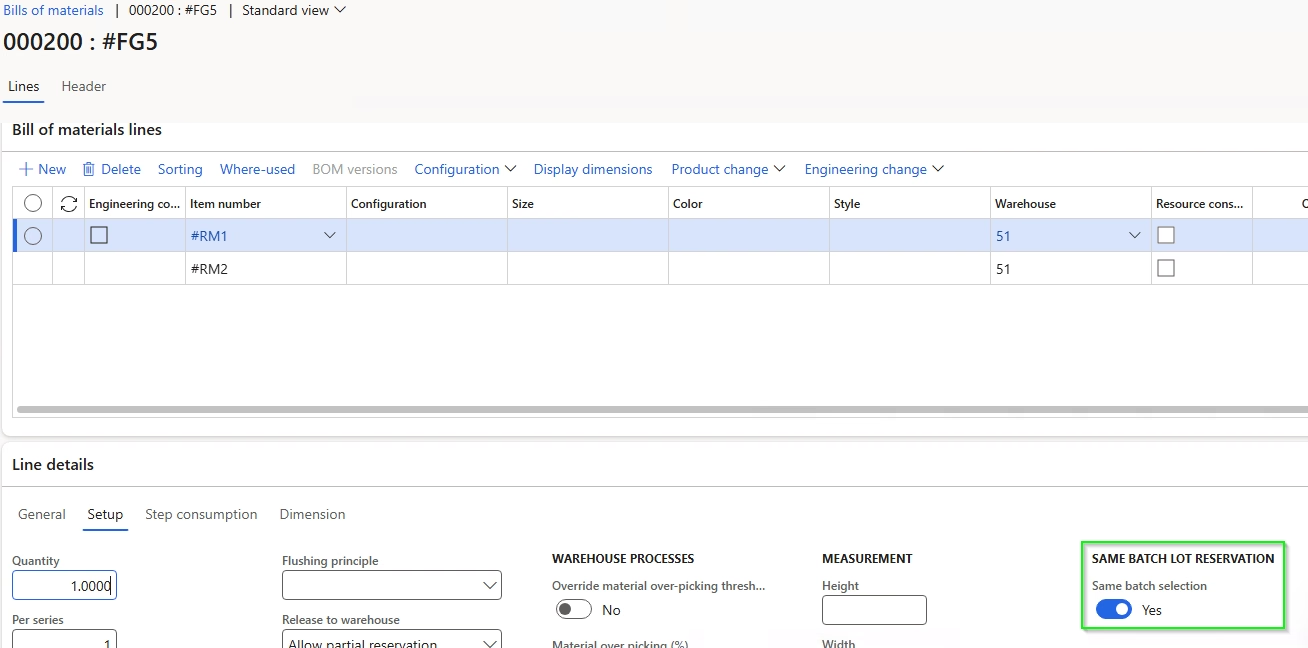
Manufacturers that work with batch-controlled materials often need to ensure that specific ingredients or components come from the same inventory batch. Version 10.0.49 introduces a preview capability that extends same-batch selection to production orders and batch orders.
When enabled, organizations can configure same-batch requirements for raw materials, with settings that flow to bill of materials (BOM) and formula lines. Users can also override the default requirement on individual BOM or formula lines when different production rules apply.
When the system reserves raw materials for production, it attempts to reserve the full required quantity from a single inventory batch. If one batch contains enough available inventory, the system can reserve the required quantity from that batch. If no single batch can satisfy the requirement, the system does not automatically reserve the material across multiple batches. During manual reservation, users can review the conflict and may choose to override the same-batch requirement, allowing inventory to be reserved from multiple batches when appropriate.
This capability provides several benefits:
- Improved batch traceability: Maintain a clearer connection between raw material batches and production orders.
- Greater manufacturing consistency: Avoid mixing inventory from different batches when production requirements call for a single batch.
- Stronger production controls: Apply same-batch requirements at the product, BOM, or formula line level.
- Greater operational flexibility: Allow authorized users to address reservation conflicts when sufficient inventory is unavailable in a single batch.
For food and beverage, chemical, and other process manufacturers, maintaining material consistency can be essential to production quality and traceability. Same-batch selection provides an additional control for operations where ingredients or components must come from one inventory batch.
Supplier Engagement introduces new supplier collaboration capabilities
Procurement teams often manage supplier communication across multiple systems, including email, spreadsheets, purchasing applications, and supplier portals. This can make it difficult to maintain consistent supplier information and track procurement activities. The new Supplier Engagement solution introduces a more connected approach to managing supplier relationships within Dynamics 365 Supply Chain Management.
The preview solution brings together three components:
- Internal Supplier Engagement application: A Power Platform model-driven app that supports supplier management and procurement collaboration processes.
- Supplier-facing portal: A Microsoft Power Pages portal that allows suppliers to interact with procurement teams and access relevant information.
- Dynamics 365 Supply Chain Management: The ERP system that maintains purchasing transactions and related business processes.
Together, these components support activities across the supplier lifecycle, including:
- Supplier registration and onboarding: Register, qualify, and approve suppliers through defined processes.
- Supplier information management: Maintain supplier details, contacts, certifications, and other records.
- Requests for quotation: Allow suppliers to review and respond to RFQs.
- Purchase order and invoice collaboration: Provide suppliers with access to purchasing information and invoice submission processes.
- Consignment inventory: Support supplier participation in consignment inventory processes.
One important addition is global vendor management. This allows organizations to manage common supplier information across multiple legal entities while maintaining the local vendor records required for transactions. For organizations operating across multiple companies or locations, this can reduce duplicate supplier data maintenance and help standardize supplier information.
By connecting supplier information and procurement interactions, Supplier Engagement can also improve visibility into supplier activities and reduce the need to manage information across disconnected systems.
How to prepare for the Dynamics 365 Finance & Supply Chain Management fall 2026 update
Although version 10.0.49 introduces useful functionality, not every feature will be relevant to every organization. Organizations researching Dynamics 365 Finance & Supply Chain Management 2026 release wave 2 updates should evaluate which capabilities align with their financial and operational needs. Some features require activation through Feature management, while others may need additional configuration or testing.
Recommended preparation steps include:
- Review release documentation: Identify updates that affect financial management, planning, manufacturing, and procurement.
- Assess current processes: Determine which features can address operational challenges or reduce manual work.
- Check feature availability: Confirm which capabilities are generally available, enabled by default, or still in preview.
- Test changes in a sandbox: Validate reconciliation rules, payment settlement, planning calculations, and manufacturing behavior before enabling changes in production.
- Review integrations and customizations: Confirm that new functionality does not interfere with connected applications or existing processes.
- Prepare users: Update procedures and train employees who will work with new functionality.
Organizations should also continue monitoring Microsoft’s release documentation and AI at Work roadmap for changes to feature availability and future enhancements.
How Rand Group helps you prepare for Dynamics 365 updates
Getting value from new ERP functionality requires more than enabling a feature. Organizations need to understand how changes affect accounting procedures, manufacturing requirements, integrations, reporting, and day-to-day operations.
With over 20 years of ERP consulting experience, Rand Group combines technical expertise with knowledge of finance, supply chain management, and industry-specific processes. Our consultants help organizations evaluate new functionality, identify configuration requirements, and implement changes that support their business goals.
Rand Group’s Dynamics 365 Finance & Operations support services include release management assistance, process optimization, system configuration, custom development, and end-user training.
With experience supporting complex ERP environments across manufacturing, distribution, and other industries, Rand Group helps organizations prioritize relevant updates and prepare their teams for new functionality.
Key takeaways
- Finance enhancements provide greater control over bank reconciliation matching and payment settlement.
- Planning Optimization updates improve supply planning, transportation scheduling, and management of confirmed demand.
- Manufacturing and procurement capabilities introduce same-batch selection and Supplier Engagement, both of which remain in preview.
- Feature adoption requires planning, including reviewing configuration requirements, testing relevant functionality, and confirming availability before production use.
Frequently asked questions
When is Dynamics 365 Finance & Supply Chain Management version 10.0.49 available?
Microsoft made version 10.0.49 available for preview in July 2026 and for self-update in September 2026. General availability for automatic updates is scheduled for October 2026. Organizations should review their environment’s update schedule and complete testing before production deployment.
How does automatic bank reconciliation matching review work in Dynamics 365 Finance?
The feature allows finance users to review and approve results generated by automatic bank reconciliation matching rules before transactions are posted and marked as matched. This provides an additional control point for identifying potential reconciliation issues before completing the process.
What is delayed settlement in Dynamics 365 Finance?
Delayed settlement allows customer and vendor payment journals to post even when the related settlement cannot be completed immediately. Dynamics 365 Finance queues the settlement for separate processing, either automatically in the background or manually. This helps prevent settlement issues from interrupting payment journal posting.
What are the new Planning Optimization enhancements in Dynamics 365 Supply Chain Management?
Version 10.0.49 adds support for coverage time fence filtering, sub-BOM and sub-route considerations during forecast reduction, and closed-for-pickup transport calendar policies. Three additional capabilities become generally available: keeping supply for confirmed demand, optimizing confirmed dates when capable-to-promise (CTP) sales order lines change, and soft issue margins.
How does same-batch selection work in Dynamics 365 Supply Chain Management?
Same-batch selection allows manufacturers to reserve the required quantity of a batch-tracked raw material from one inventory batch for a production or batch order. If no single batch has enough available inventory, the system does not automatically split the reservation across multiple batches. During manual reservation, users may override the requirement when appropriate. The feature remains in preview in version 10.0.49.
Is Supplier Engagement generally available in Dynamics 365 Supply Chain Management?
No. Supplier Engagement is a preview feature in version 10.0.49. It introduces supplier onboarding, global vendor management, RFQ responses, purchase order collaboration, invoice submission, and other supplier lifecycle processes through connected applications and a supplier portal. Organizations can evaluate it in test environments, but the preview is not intended for production use.
Prepare your organization for the next Dynamics 365 Finance and Supply Chain Management update
The Dynamics 365 Finance & Supply Chain Management fall 2026 update gives organizations new opportunities to improve financial controls, production planning, and supplier collaboration. Evaluating the features that are most relevant to your operations can help you make informed decisions about configuration, testing, and adoption. Whether you need help evaluating new functionality, testing changes, or optimizing existing processes, contact Rand Group to discuss how your organization can prepare for upcoming updates.