Dynamics 365
 Power Platform
 Dynamics
 Cloud & Productivity
Dynamics 365 Field Service inventory management: Parts, truck stock, and warehouses

A technician can arrive at a customer site on time and still be unable to complete the job if the right part is sitting in another warehouse, on another technician’s truck, or missing from the inventory record. For service organizations, knowing what inventory is available is only useful when they also know where it is and whether a technician can use it.
Dynamics 365 Field Service inventory management connects parts inventory with work orders and field operations. Microsoft Dynamics 365 Field Service can track inventory across warehouses and technician vehicles, record parts used during service, transfer inventory between locations, support purchasing, and manage returns. This blog explains how those capabilities work and when additional ERP integration may be needed.
At a glance
Dynamics 365 Field Service can track service parts across physical warehouses and technician trucks, record parts used on work orders, transfer inventory between locations, replenish stock with purchase orders, make adjustments, and process returns. Its inventory capabilities are designed primarily to support field service operations. Organizations that need broader procurement, inventory planning, warehouse management, financial controls, or multi-entity processes may need to connect Field Service with an ERP such as Business Central or Dynamics 365 Finance & Operations.
What is Dynamics 365 Field Service?
Dynamics 365 Field Service is a field service management application that helps organizations manage work performed at customer locations. It connects work orders, scheduling, technicians, customer assets, service history, mobile field work, and inventory in one environment.
Inventory is one part of that larger service process. Parts can be stored at central warehouses, regional locations, branches, service depots, or technician vehicles. Field Service connects those locations with the technicians and work orders that use the parts.
The inventory process typically involves:
- Products that define the physical parts technicians use.
- Warehouses that represent fixed or mobile inventory locations.
- Product inventory records that maintain quantities by warehouse.
- Work order products that identify parts expected and actually used during service.
- Inventory transfers and adjustments that record movements and corrections.
- Purchase orders that support basic inventory replenishment.
- Returns for products coming back from customers or going back to vendors.
- Inventory journals that record inventory transactions.
Together, these records connect parts inventory with day-to-day field service operations.
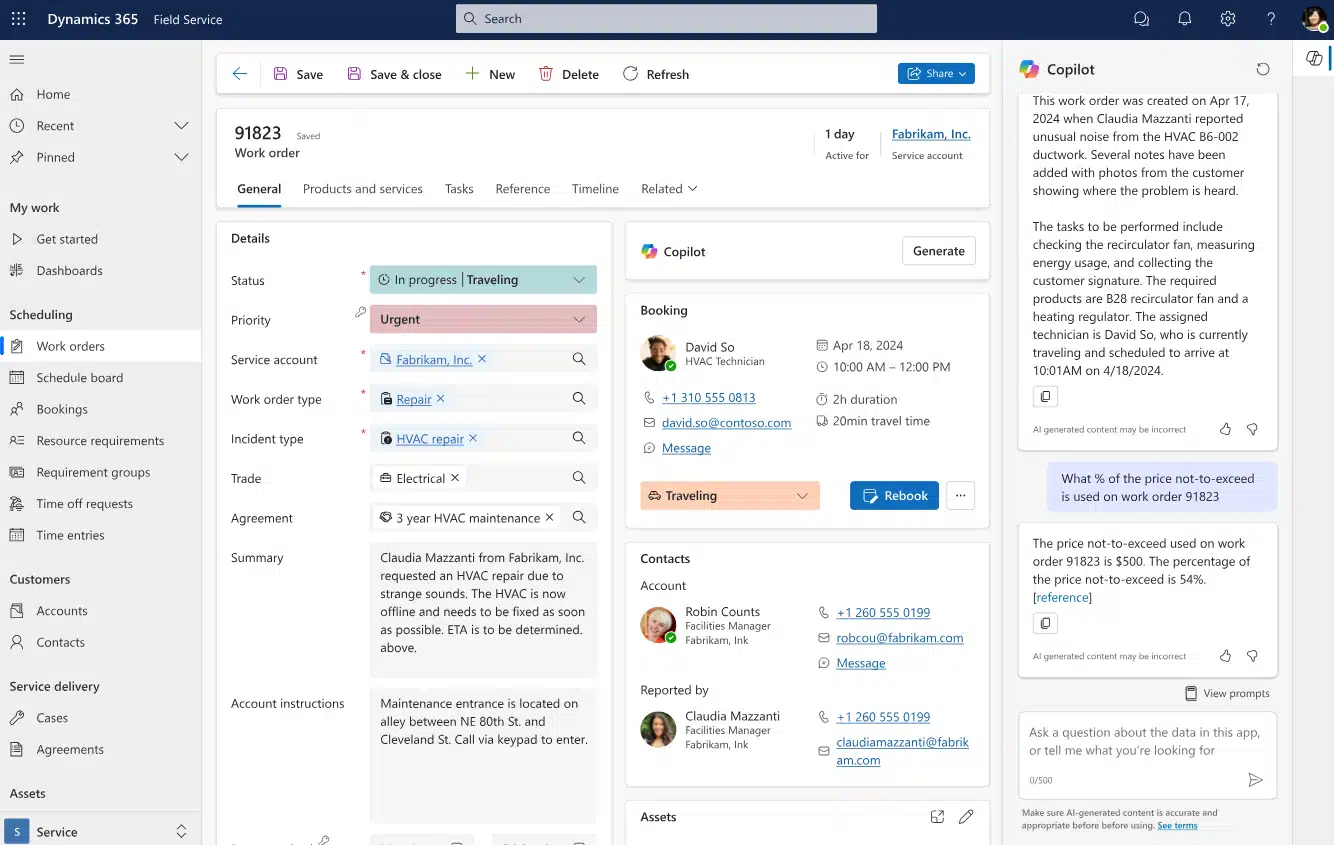
How Dynamics 365 Field Service manages warehouse and truck inventory
Warehouses form the foundation of inventory management in Field Service. A warehouse represents a location where the organization stores inventory and maintains product quantities. Optional bin and row information can provide additional detail about where a product resides within the warehouse.
Static warehouses and distribution centers
A Field Service warehouse can represent fixed inventory locations such as a:
- Central parts warehouse
- Regional distribution center
- Branch office
- Service depot
Separating inventory by location gives service teams more useful information than one company-wide quantity.
For example, having 15 units available company-wide does not help a technician in Dallas if all 15 are sitting in Houston. Warehouse-level inventory provides the location context needed to determine whether a part can realistically support an upcoming service call.
Trucks and vans as mobile warehouses
Field Service can also use warehouses to represent technician trucks and other mobile inventory locations. A default warehouse can be associated with a bookable resource so inventory used by that technician can come from the appropriate truck or van.
This model helps service teams answer questions such as:
- Which technician currently carries the required part?
- Does the assigned technician have enough stock for upcoming jobs?
- Does a truck need to be replenished?
- Could another technician transfer the needed part?
Truck inventory should reflect the organization’s operating model. Some businesses keep a standard set of parts on every vehicle, while others stock trucks based on technician skills, territory, equipment type, or expected service calls.
How inventory products are defined in Field Service
Not every product in the Field Service product catalog affects inventory. The Field Service Product Type must be set to Inventory for inventory movements to be tracked for that product.
Organizations should determine which physical service parts require inventory tracking and maintain consistent item names, units of measure, and product information.
A clean product catalog also makes work order and inventory reporting more useful. If technicians record the same replacement part under several different product records, usage and inventory data become harder to trust.
How Dynamics 365 Field Service tracks parts and product inventory
Good field service inventory management answers more than one question. Service managers need to know not only how much inventory exists, but also where it is and whether it is available for another job. Field Service maintains inventory information at the warehouse level. Work order consumption, purchasing, transfers, adjustments, and returns can all affect the inventory records associated with a product and location.
Inventory adjustments can be used to establish starting quantities or correct differences caused by physical counts, shrinkage, defects, loss, or theft. Inventory journals provide a transaction history of those increases and decreases. The goal is to give service teams reliable answers to four practical questions:
Do we have the part? Where is it? Is it available? Which location or technician currently holds it?
That visibility can help teams make better decisions before a technician arrives at the customer site.
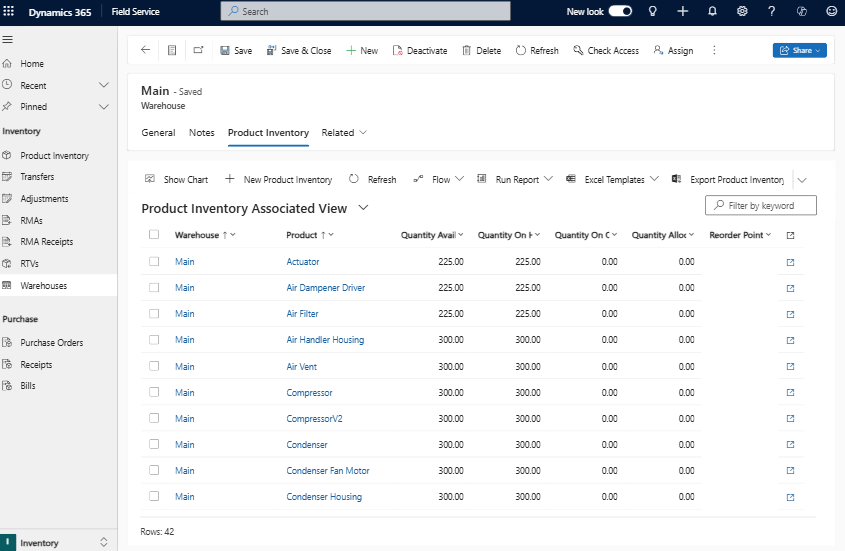
What inventory quantities does Dynamics 365 Field Service track?
Dynamics 365 Field Service maintains several inventory quantities for each inventory-controlled product at a warehouse. Understanding the difference between them helps service teams determine what stock they physically have, what is already committed, and what is expected to arrive.
- Quantity Available: The quantity currently available for use after allocated inventory is considered.
- Quantity Allocated: Inventory that has been allocated to work orders but has not yet been consumed.
- Quantity on Hand: The physical quantity currently recorded at the warehouse, including inventory that may already be allocated.
- Quantity on Order: Inventory included on purchase orders that has not yet been received.
For example, a warehouse may physically have 10 replacement parts on hand, but if three are allocated to upcoming work orders, only seven are available for other service calls.
These quantities give dispatchers, technicians, and inventory managers more context around whether a part is physically present, already committed, or on its way.
How work orders affect Field Service inventory
Inventory becomes most valuable when it connects directly to service work. Field Service work orders can contain products technicians expect to use and products they actually consume. The work order product record distinguishes between an Estimated line and a Used line and identifies the warehouse supplying the product.
For an inventory-controlled product, changing the work order product’s Line Status to Used deducts the used quantity from the specified warehouse. That inventory change occurs when the product becomes Used, not when the work order is later posted for billing.
For example, a technician may expect to use two filters but discover on-site that only one needs to be replaced. Recording the actual quantity used keeps inventory aligned with what physically left the truck or warehouse.
Work order product information can also support billing. When the completed work order is posted, Field Service can create invoice lines for products and services marked as Used, depending on the organization’s billing configuration.
Accurate parts recording supports:
- Current inventory quantities
- Truck replenishment
- Parts accountability
- Service cost visibility
- Customer billing

How inventory moves between warehouses and technician trucks
Service inventory rarely stays in one place. Parts arrive at a central location, move onto technician vehicles, get consumed during service, return to a warehouse, or move between technicians.
Dynamics 365 Field Service uses inventory transfers to move products between warehouses. Common examples include:
- Central warehouse to technician truck
- Regional warehouse to technician truck
- Technician truck back to a warehouse
- One technician truck to another technician truck
A transfer decreases the Quantity on Hand at the source warehouse and increases it at the destination. Field Service prevents a transfer when the requested quantity exceeds the Quantity on Hand at the source warehouse.
For example, after a technician uses several common replacement parts during the day, the service team can transfer replacement stock from the central warehouse to that technician’s truck. The transaction creates a record of where the inventory moved instead of relying on manual quantity corrections.
How Field Service replenishes inventory with purchase orders
Dynamics 365 Field Service includes basic purchasing capabilities for service inventory. Organizations can create purchase orders to add products to a warehouse or purchase products associated with customer work.
As an inventory-controlled purchase order progresses, the related product inventory can reflect quantities that are on order. Once the organization receives the items, the warehouse inventory is updated.
This can work well for straightforward service replenishment. Purchasing is also one of the areas where organizations need to decide whether Field Service or an ERP should own the process.
A company with supplier agreements, formal approval policies, company-wide procurement, inventory planning, or more detailed financial requirements may benefit from managing purchasing through Business Central or Dynamics 365 Finance & Operations instead.
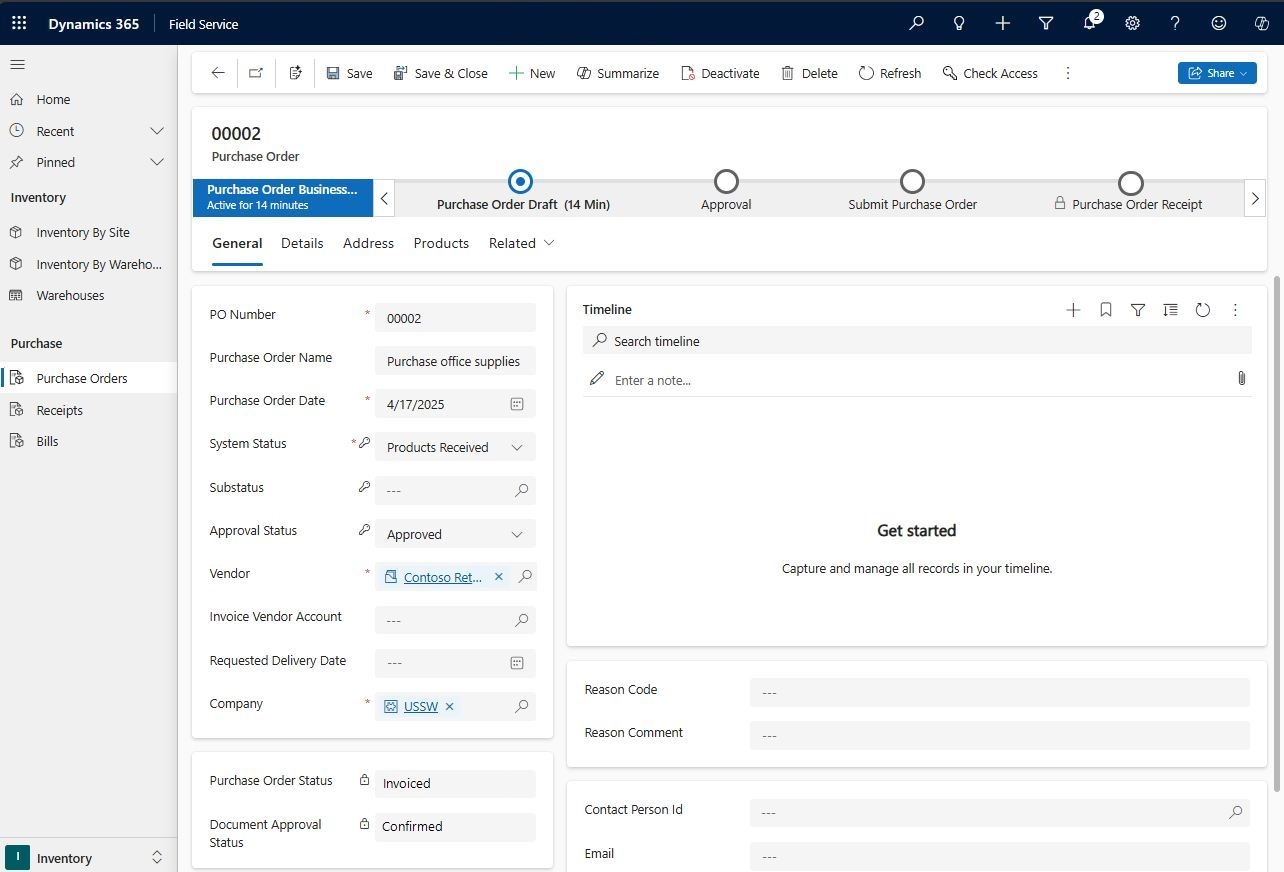
How Dynamics 365 Field Service handles returns
Service organizations also need a controlled process for products that come back from the field. Dynamics 365 Field Service uses return merchandise authorizations, or RMAs, to manage returned products and customer assets. A returned product can go back into a warehouse or continue through a return-to-vendor process.
Returning inventory to a warehouse
A part may need to return to inventory because it was unused, removed during a service call, exchanged with a customer, or sent back for inspection. When an inventory-controlled product is received through an RMA and returned to a warehouse, an inventory journal increases that warehouse’s on-hand quantity.
Organizations still need rules for determining whether returned inventory is suitable for immediate reuse. Field Service records the movement, but the business should define any required inspection or quality process.
Returning inventory to a vendor
If a defective or unwanted item needs to go back to the supplier or manufacturer, Field Service can use a Return to Vendor, or RTV, process.
Keeping the return within the inventory workflow helps maintain visibility as a part moves from the customer site back through the service organization and, if necessary, to the vendor.

Understand Dynamics 365 Field Service licensing and pricing
Before planning a Field Service deployment, organizations also need to understand how different users, technicians, and resources will be licensed. Download the complete guide to Dynamics 365 Field Service licensing and pricing for a closer look at licensing options, pricing considerations, user types, and Resource Scheduling Optimization.
When to integrate Dynamics 365 Field Service with an ERP
Dynamics 365 Field Service includes inventory functionality designed primarily to support technicians and service work. ERP integration becomes more important when inventory needs to connect with broader purchasing, accounting, warehouse, planning, or multi-location processes.
The system of record should be determined during solution design. If Field Service primarily manages technician inventory, its native capabilities may be sufficient. If inventory needs to connect with company-wide procurement, financial reporting, planning, or more advanced warehouse processes, integrating Field Service with an ERP may be the better approach.
When Business Central makes sense with Field Service
Dynamics 365 Business Central can make sense when a growing service organization needs Field Service connected with broader finance, purchasing, inventory, sales, and operational processes.
In an integrated environment:
- Field Service manages work orders, scheduling, technicians, customer assets, and field execution.
- Business Central can provide the financial, purchasing, inventory, invoicing, and operational backbone.
- Locations and warehouse inventory can connect across the two applications.
- Field activity can flow into back-office processes without relying on duplicate manual entry.
Learn more about integrating Business Central with Dynamics 365 Field Service.
Customer example: Petroplex connects Field Service with Business Central
The Petroplex Business Central and Dynamics 365 Field Service case study shows what this connected architecture can look like in practice. Petroplex was relying on Dynamics NAV alongside paper field tickets, spreadsheets, whiteboards, and other manual processes. Rand Group migrated the company to Business Central and implemented Field Service to connect its field and back-office operations.
Business Central became the financial and operational backbone, while Field Service supported scheduling, work orders, and digital field ticketing. The results included:
- 100% elimination of lost or missing field tickets
- 32 hours saved each month on reporting
- Faster access to completed field information for invoicing
- Better visibility between field and finance teams
The example shows how Field Service can focus on field execution while Business Central supports broader financial and operational processes.
When Dynamics 365 Finance & Operations makes sense
Organizations with more complex operations may need Field Service connected with Dynamics 365 Finance & Operations. Finance & Operations, or F&O, can provide an ERP foundation for complex financial, warehouse, procurement, and operational requirements.
This approach can make sense when Field Service needs to connect with:
- Advanced warehouse and inventory operations
- Enterprise procurement
- Inventory and supply planning
- Manufacturing
- Multi-entity financial management
- Broader inventory and financial controls
Field Service can manage technician execution while Finance & Operations supports the more complex ERP processes behind it.
Customer example: Conquest Connects Dynamics 365 Field Service with Finance & Operations
The Conquest Completion Services Field Service case study provides a real example. Rand Group implemented Dynamics 365 Field Service and integrated it with Conquest’s Dynamics 365 Finance & Operations environment, connecting field activity with the ERP for invoicing.
Conquest achieved:
- 80% improved efficiency
- 1,300 hours saved each year in the load-out process
- Faster movement of completed field tickets into invoicing
- Greater visibility into field operations and maintenance
The right architecture depends on operational complexity and which application needs to serve as the system of record.
Best practices for Dynamics 365 Field Service inventory management
Inventory accuracy depends on both system configuration and consistent processes. These practices can create a stronger foundation:
- Design warehouse and truck locations carefully. Identify which branches, depots, warehouses, and technician vehicles need separate inventory records.
- Standardize the product catalog. Decide which parts should be inventory-controlled and maintain consistent item names and units of measure.
- Assign the correct warehouse to technicians. This helps parts usage come from the appropriate truck or inventory location.
- Define replenishment and transfer processes. Establish when trucks should be restocked and use transfers when inventory physically moves between locations.
- Create rules for adjustments and returns. Define how lost, damaged, unused, defective, and returned parts should be handled.
- Choose the system of record early. If an ERP owns company-wide inventory and procurement, design Field Service around that architecture instead of creating duplicate processes.
For a broader look at service operations, learn more about improving field service efficiency with Dynamics 365 Field Service.

Plan your Dynamics 365 Field Service project
Field Service inventory is only one part of a successful service operation. Rand Group can help connect work orders, technicians, scheduling, inventory, mobile processes, and ERP requirements into a solution designed around how your organization works.
Why work with Rand Group for Dynamics 365 Field Service?
A successful Dynamics 365 Field Service implementation requires more than configuring work orders or inventory. Scheduling, mobile workflows, ERP integration, reporting, billing, and user adoption also need to work together.
Rand Group has more than 20 years of experience implementing Microsoft business applications and was named the 2025 Microsoft Americas Channel Emerging Partner of the Year. Our team combines Field Service, ERP, Power Platform, integration, and industry experience to address both field and back-office requirements.
Rand Group can support:
- Field Service process and solution design
- Business Central and Finance & Operations integration
- Mobile and offline requirements
- Custom applications and automation
- Data migration, testing, and training
- Long-term Field Service support
This cross-functional approach helps organizations design Field Service around the entire service operation rather than treating scheduling, inventory, mobile work, and ERP integration as separate initiatives.
Key takeaways
- Dynamics 365 Field Service can track service parts across physical warehouses and technician trucks.
- Work orders connect planned and actual parts usage with inventory and billing processes.
- Field Service tracks available, allocated, on-hand, and on-order quantities to provide more context around parts availability.
- Transfers, purchasing, adjustments, and returns help maintain inventory records as parts move through service operations.
- Organizations with broader financial, procurement, planning, or warehouse requirements may benefit from integrating Field Service with Business Central or Dynamics 365 Finance & Operations.
Frequently asked questions
How does Dynamics 365 Field Service track truck stock?
Dynamics 365 Field Service can represent a technician’s truck or van as a warehouse and associate a default warehouse with a bookable resource. Inventory-controlled parts used by that technician can then come from the appropriate truck inventory. Learn more about Dynamics 365 Field Service features and capabilities.
Can Field Service handle inventory without a separate ERP?
Yes, depending on the organization’s requirements. Field Service includes native capabilities for warehouses, technician truck stock, inventory transfers and adjustments, work order consumption, purchasing, returns, and inventory journals. Organizations that need more complex procurement, planning, warehouse, or financial processes should evaluate ERP integration.
Does Field Service update inventory from work orders?
Yes, for inventory-controlled products. When a work order product’s Line Status changes to Used, Field Service deducts the used quantity from the specified warehouse. Posting the work order later handles billing-related processes rather than creating the original inventory deduction.
Can technicians transfer inventory between trucks?
Field Service supports inventory transfers between warehouses, including one technician truck to another. Inventory transfers are not included in the Field Service mobile app by default, so organizations that need technicians to perform transfers from mobile devices need to plan for additional mobile configuration.
Can Dynamics 365 Field Service create purchase orders?
Yes. Field Service can create purchase orders to replenish warehouse inventory or purchase products associated with customer work. Receiving inventory through the purchasing process updates the related inventory records.
How do returns work in Dynamics 365 Field Service?
Field Service uses RMAs to manage returned products and customer assets. Returned inventory can go back to a warehouse or continue through a Return to Vendor process. Receiving an inventory-controlled product back into a warehouse increases the warehouse’s on-hand inventory.
Improve parts visibility with Dynamics 365 Field Service inventory management
Effective Dynamics 365 Field Service inventory management gives service teams visibility into where parts are located, what technicians have available, what has been used, and what needs to be replenished or returned.
For organizations with more complex inventory and financial requirements, Business Central or Dynamics 365 Finance & Operations can connect field activity with broader ERP processes. To determine the right approach for your service organization, contact Rand Group.