Dynamics 365
 Power Platform
 Dynamics
 Cloud & Productivity
Dynamics 365 Field Service implementation guide

Dynamics 365 Field Service is a cloud solution enabling organizations to efficiently manage, schedule, and execute on-site service operations proactively. It’s designed to boost technician productivity, customer satisfaction, and leverage the Internet of Things (IoT) and AI. These tools empower technicians to resolve cases fast and deliver amazing customer experiences.
A successful Dynamics 365 Field Service implementation means optimized workflows, data integration, and using the system to its full potential. Conversely, a poor deployment can mean inefficiencies, higher costs, and missed opportunities. By following a strategic approach and working with experts, your business can innovate and deliver amazing customer experiences.
This guide covers the following topics for implementing Dynamics 365 Field Service:
- What is Dynamics 365 Field Service?
- What is a Dynamics 365 Field Service implementation?
- What are the benefits of a Dynamics 365 Field Service implementation?
- Dynamics 365 Field Service licensing options
- Steps for a successful Dynamics 365 Field Service implementation
- How long does the implementation take?
- Implementation approaches
- Common Dynamics 365 Field Service implementation pitfalls
- Benefits of working with the right implementation partner
- Why Choose Rand Group for Dynamics 365 Field Service implementation?
- Implementation FAQs
What is Dynamics 365 Field Service?
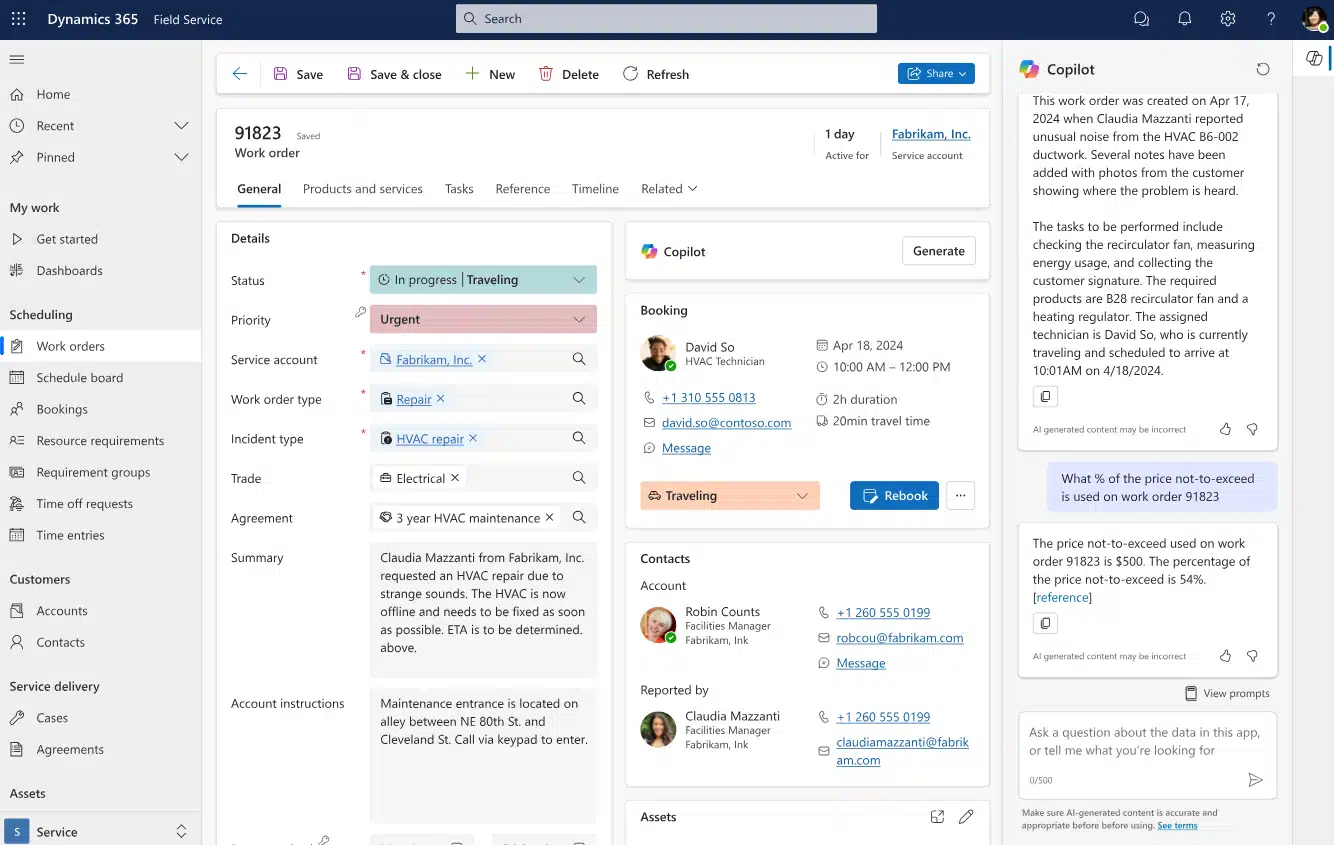
Dynamics 365 Field Service is an integrated solution for small to mid-sized business that integrates work order management, smart scheduling, asset tracking, and mobile tools to optimize every step of the service journey. Firstly, by connecting people, data and devices, Field Service enables teams to boost technician efficiency, cut costs. and consistently exceed customer expectations. Secondly, powerful features including IoT, mixed reality, Artificial Intelligence, and Machine Learning boost technician efficiency and customer satisfaction. Lastly, with built-in analytics and AI-driven insights, D365 Field Service allows teams to make informed data-driven decisions to optimize operational performance. Key features of Dynamics 365 Field Service:
- Document access: Give technicians instant access to manuals and guides
- Track and maintain assets: Manage customer assets with detailed service history and warranty tracking
- Proactive maintenance: Use IoT to detect and resolve issues before they happen
- Real-time inventory visibility: Monitor stock levels and allocate resources efficiently
- Streamlined adjustments: Simplify inventory transfers and updates for accuracy
- Automated work orders: Generate orders from IoT alerts or service agreements
- Mobile technician tools: Give technicians schedules, maps and asset details
- Optimized resource scheduling: Use AI to assign the right technician efficiently
- Cost reduction: Minimize travel time and operational expenses
- Self-service customer portals: Enable customers to book, track and manage appointments
- Feedback integration: Collect insights through satisfaction surveys
- Real-time collaboration: Use video and mixed reality for remote troubleshooting
What is a Dynamics 365 Field Service implementation?
Dynamics 365 Field Service implementation means deploying and customizing the solution to fit your business’s specific field service needs. Whether it’s to improve maintenance schedules, track inventory, or empower technicians with real-time data, the implementation process is about embedding the platform into your operations. A successful implementation typically involves:
- Aligning with business goals: Ensuring the solution addresses key pain points in field operations
- Custom configuration: Customizing Dynamics 365 Field Service to manage unique service models, SLAs (service-level agreements), and asset requirements
- Seamless integration: Extending functionality by integrating with existing tools like Microsoft 365, Power BI, and other third-party systems
- Empowering teams: Providing comprehensive user training and system adoption strategies to help teams get the most out of the solution
Many businesses still rely on whiteboards, spreadsheets, and paper tickets. However, a modern Field Service system can streamline operations and improve outcomes by:
- Centralizing scheduling: Reduces errors while enhancing communication between teams and customers
- Automating workflows: Saves time and ensures tasks are completed on schedule
- Better visibility: Real-time updates about field operations and resource availability
Unlike other field service solutions, Dynamics 365 Field Service offers comprehensive features and seamless integration with Microsoft applications. Moreover it provides actionable, real-time insights. Key benefits include:
- Powerful data-driven reporting capabilities: Aids in better decision-making
- Enhanced operational efficiency: Through optimized scheduling and dispatch
- Improved first-time fix rates: For greater customer satisfaction
- Increased technician productivity: Provides mobile accessibility

Complete digital transformation with Dynamics 365 Field Service
Conquest Completion Services, LLC, a large oilfield services company, faced many challenges managing remote services and extensive equipment. After implementing Dynamics 365 Field Service they transformed operations through digitization and automation. Learn how they enhanced service delivery through optimized workflows and better resource management.
What are the benefits of a Dynamics 365 Field Service implementation?
Implementing Dynamics 365 Field Service delivers measurable improvements in efficiency, productivity, and financial performance. For example, a Forrester study on field service ROI found optimized workflows and resource allocation boosted technician productivity by 14%. The same study revealed a remarkable 346% ROI over three years, with a payback period of less than six months.
Similarly, Rand Group clients have significantly boosted efficiency after implementing Dynamics 365 Field Service. Conquest Completion Services and Petroplex, both oil services companies streamlined operations, gaining efficiency and visibility.
Enhanced efficiency and productivity
- Conquest Completions achieved an impressive 80% efficiency gain by digitizing field tickets and automating scheduling, significantly reducing manual workloads.
- Petroplex streamlined operations by replacing paper-based processes with a unified, cloud-based system, saving valuable administrative time.
Accelerated invoicing and improved cash flow
- Conquest Completions reduced their invoicing time from weeks to hours, improving cash flow and shifting resources to higher-value tasks.
- Petroplex accelerated its invoice cycles by enabling immediate billing through digital tickets.
Improved maintenance and equipment reliability
- Conquest Completions transitioned to predictive, meter-based maintenance, ensuring optimal equipment performance and reducing downtime.
- Petroplex enhanced equipment reliability by implementing proactive maintenance scheduling driven by real-time data. These improvements not only reduced operational disruptions but also extended the lifespan of critical assets.
Dynamics 365 Field Service licensing options
Dynamics 365 Field Service offers flexible licensing to fit different business needs. You can license Field Service as a standalone application or integrate it with other Dynamics 365 solutions like Business Central or Dynamics 365 Finance & Operations for even more capabilities. Understanding these licensing options helps you avoid overpaying and support your operational needs. For more information, see the Dynamics 365 Field Service pricing guide.
- Attach license ($20 per user per month): If you already have another Dynamics 365 solution, you can purchase additional licenses for Field Service at a lower cost
- Base license ($105 per user per month): Includes all the features you need to manage field operations

Five ways to know if connected field service is right for your business
By leveraging IoT and the cloud, your field service team can transition from a reactive repair model to a proactive, profitable approach. This shift enhances KPIs and strengthens your competitive position. Download the whitepaper to explore how real businesses implemented connected field service and utilized Dynamics 365 Field Service effectively.
Steps for a successful Dynamics 365 field service implementation
A successful implementation of Dynamics 365 Field Service involves a phased approach. Here are the five key steps:

Envisioning & Design
The implementation process kicks off with Rand Group collaborating with your team to identify and refine your business requirements. We map out process scenarios and create a conceptual design of Dynamics 365 Field service tailored specifically to your organization. This critical step ensures the project aligns with your strategic goals.

Build
In this phase, our software engineers configure Dynamics 365 Field Service based on the approved design. They tailor settings, customizations, and data to your workflows, ensuring the solution meets your unique business needs.

Test
Rand Group partners closely with clients during the testing phase to ensure the system performs as expected. This includes comprehensive business testing, performance evaluations, and data migration validation, ensuring the solution is ready for production without disruptions.

Deploy
After successful testing and system approval, the deployment phase begins. Rand Group ensures a go-live, supporting your team during the transition to minimize disruptions and guarantee a successful rollout.

User Adoption
Post-deployment, Rand Group prioritizes user adoption to ensure your team is fully trained and confident with the new system. We provide in-depth training and ongoing post-go-live support, empowering users to leverage the system’s full potential and drive business success.
How long does the implementation take?
The time it takes to implement Dynamics 365 Field Service can vary widely depending on several factors. Understanding these variables is key to setting a realistic timeline. Factors including business complexity, integrations, and customizations impact the duration. Also, unexpected challenges can also add time to the project.
Here are some factors that can affect the implementation timeline:
- Business complexity: More intricate operations or multiple business units may require more time
- Customization level: Extensive customizations need extra time for development and testing
- Data migration: The amount and complexity of data to be migrated can impact the schedule
- Integration needs: Connecting Dynamics 365 Field Service to other systems, D365 applications, or third-party applications adds time
- User training: The more users that need training, the longer the final phase may take
- Resource availability: The speed of the project depends on the availability of internal and external resources
Implementation approaches
There are two main implementation approaches: traditional and rapid activation.
- Traditional implementation: Typically takes 3 to 6 months
- Rapid activation: can be completed in 6 to 12 weeks
Traditional implementation
A traditional Dynamics 365 Field Service implementation suits organizations with complex needs or significant customization and integration requirements. It typically takes 3 to 6 months to complete. This approach uses a structured methodology based on best practices. The goal is to ensure a thorough and well-planned deployment.
Envisioning & Design
Build
Test
Deploy
User Adoption
Rapid activation implementation
Rand Group offers rapid activation services tailored for organizations that need a rapid deployment, with minimal customization or integration. This approach focuses on streamlining the implementation process and getting the solution live in 6 to 12 weeks.
The rapid activation methodology differs from traditional implementation, reducing the need for custom configurations and integrations. Despite this, it still delivers a solid and functional solution.
Pre-configuration
Configuration
Train and Test
Production cutover
Common Dynamics 365 Field Service implementation pitfalls
Implementing Dynamics 365 Field Service can be challenging, and organizations often face various obstacles during the process. Studies indicate that 55-75% of software projects fail to meet their objectives, often due to factors that disrupt the implementation process. Common challenges include poor planning, misalignment between business needs and system capabilities, lack of user adoption, and unexpected technical issues. These can lead to delays, cost overruns, and poorly executed implementations that fail to deliver the expected business value. Common issues:
- Insufficient project planning and unclear scope
- Lack of stakeholder alignment or executive sponsorship
- Poorly defined business processes or requirements
- Inadequate data migration or integration strategies
- Limited user training and change management
- Over-customization, increasing system complexity
- Miscommunication between IT and business teams
Implementing Dynamics 365 Field Service requires significant investments in time and resources, but the potential business impact is substantial. With failure rates up to 75%, choosing the right implementation team is crucial to reduce risks and ensure success. A trusted partner offers expertise, best practices, and a proven methodology. This approach maximizes Dynamics 365 Field Service benefits, improving operational efficiency and decision-making. It also creates a strong foundation for future growth.
Benefits of working with the right implementation partner
Working with a Microsoft partner boosts Dynamics 365 success through expertise, proven methods, and tailored solutions for your business. Firstly, they simplify deployment, reduce disruptions, and ensure the system meets your unique needs. Secondly, their experience provides best practices, support, and strategic guidance. This results in smoother implementation and long-term business value.
Why Choose Rand Group for Dynamics 365 Field Service implementation?
Rand Group is your strategic partner throughout the Dynamics 365 Field Service implementation journey. With decades of experience and industry-specific knowledge, we ensure your technology aligns with your business strategy. As a Microsoft Partner with expertise in ERP and CRM systems, we have a strong track record of delivering successful implementations across various industries. Our comprehensive approach ensures every phase—from planning and design to post-go-live support—drives long-term success. We don’t just implement solutions; we work with you to solve complex business challenges, optimize processes, and drive sustainable growth. Services we offer:
- Post-deployment: Includes troubleshooting, system enhancements, and process optimization to ensure ongoing success.
- Comprehensive implementation services: Ensures your Dynamics 365 solution aligns with business goals while minimizing disruptions during planning and deployment.
- Certified consultants: expert guidance to overcome challenges, optimize systems, and maximize the value of your technology investment.
- Structured, best-practice methodology: Ensures efficient project management, timely delivery, and reduced risks.
Implementation FAQs
Can I implement Dynamics 365 Field Service on my own?
Yes, but self-implementation is not recommended unless you have deep internal expertise. Because it can be risky, time-consuming, and prone to costly mistakes, many organizations choose to work with a Microsoft partner.
How much does a Dynamics 365 Field Service implementation cost?
Costs typically range from $25,000 to $250,000, depending on factors like customization, integrations, and business complexity. This includes licensing, configuration, data migration, training, and more.
Is Dynamics 365 Field Service easy to implement?
While the platform is user-friendly, implementing it to meet specific business needs can be complex. Expert support is often necessary to ensure a smooth and successful process.
What are the stages of a Dynamics 365 Field Service implementation?
The main stages include envisioning and design, build, test, deployment, and user adoption. Each phase ensures alignment with your business needs and prepares the system for successful use.
How long does it take to implement Dynamics 365 Field Service?
Traditional implementations take 3 to 6 months, depending on complexity. Rand Group also offers a rapid activation option, which can be completed in 6 to 12 weeks for simpler projects.
Next steps
Implementing Dynamics 365 Field Service provides a unified platform to streamline operations and improve efficiency. At Rand Group, we guide you through every phase of your implementation journey. We ensure your solution meets business objectives. Our comprehensive services, expert support, and proven methodologies provide the foundation for a successful Dynamics 365 Field Service implementation.
We help you unlock the full potential of your investment, driving long-term success and delivering measurable business value. Contact us today to learn more about how we can support your implementation.