Dynamics 365
 Power Platform
 Dynamics
 Cloud & Productivity
Dynamics GP to Business Central migration guide

Dynamics GP is approaching end of life, and organizations need a clear plan for what comes next. A Dynamics GP to Business Central migration is not just a system upgrade. It is a shift to a modern, cloud-based ERP platform that supports automation, real-time reporting, and long-term scalability. Understanding your options, timelines, and risks is critical to making the right decision.
This guide walks through everything you need to know about a Dynamics GP to Business Central migration, including the roadmap, key differences between systems, migration strategies, costs, and real-world outcomes.
- Dynamics GP roadmap and current state
- What is Dynamics 365 Business Central?
- Dynamics GP vs Business Central
- Why migrate from Dynamics GP to Business Central now?
- Dynamics GP to Business Central migration strategies
- How long does it take and how much does the migration cost?
- Dynamics GP to Business Central migration packages
- Cost of staying on Dynamics GP vs migrating
- Common challenges when migrating from Dynamics GP
- Why choose Rand Group for your Dynamics GP migration?
- Dynamics GP to Business Central migration success stories
- Frequently asked questions (FAQs)

Dynamics GP to Business Central migration workshop
This on-demand workshop provides a clear, practical view of the Dynamics GP to Business Central migration landscape. Learn what a migration actually looks like, how Business Central compares to GP, and the key factors to consider when deciding if and when to move.
Dynamics GP roadmap and current state
Understanding the Dynamics GP roadmap is critical for planning your next steps. Microsoft has defined a clear end-of-life timeline, which directly impacts support, costs, and long-term risk. For organizations evaluating a Dynamics GP to Business Central migration, these deadlines create urgency and help guide when to transition.
Microsoft support timeline for Dynamics GP
Microsoft has announced the end of life of Dynamics GP, with support gradually being reduced before ending completely. While the system will continue to run, it will no longer receive updates, improvements, or full support after key deadlines.
When product support ends in December 2029, Dynamics GP will stop receiving new features, regulatory and tax updates, service packs, and technical support. After April 30, 2031, even security updates will end, meaning organizations will be responsible for maintaining and securing the system on their own.
Key Dynamics GP roadmap dates:
- April 1, 2025: Sales for new perpetual licenses ended
- April 1, 2026: Sales for new subscription licenses ended
- December 31, 2029: End of product enhancements, regulatory updates, service packs, and technical support
- April 30, 2031: End of security updates and official end of life for Dynamics GP

Risks of staying on Dynamics GP
As Dynamics GP approaches end of life, the risks of staying on the platform increase. Organizations that delay a Dynamics GP to Business Central migration will face growing operational, financial, and compliance challenges as support phases out.
Key risks of staying on Dynamics GP:
- No regulatory or tax updates after 2029
- Increased cybersecurity risk after security updates end in 2031
- Limited or no technical support from Microsoft
- Higher reliance on internal IT or third-party support
- Rising maintenance and infrastructure costs
- Increased audit and compliance exposure
- Reduced ability to integrate with modern systems and AI tools
What is Dynamics 365 Business Central?
Dynamics 365 Business Central is a cloud-based enterprise resource planning (ERP) system from Microsoft that brings your core business processes into one connected platform. Instead of relying on separate systems for accounting, inventory, sales, and reporting, Business Central allows organizations to manage everything in a single database. Finance teams can handle general ledger, accounts payable, and cash flow, while operations teams manage purchasing, inventory, and order fulfillment. This unified approach gives leadership real-time visibility across the business without manual data consolidation.
Because Business Central is built for the cloud, it includes automatic updates, built-in security, and scalable infrastructure managed by Microsoft. The platform connects seamlessly with Microsoft 365 and the Power Platform, enabling better collaboration and data flow across teams. It also includes automation, reporting, and AI capabilities that help reduce manual work and improve decision-making. For organizations planning a Dynamics GP to Business Central migration, this shift represents more than a system change. It is a move to a modern ERP platform designed for growth, efficiency, and continuous innovation.

Dynamics GP vs Business Central
For organizations planning a Dynamics GP to Business Central migration, understanding the differences between the two systems helps clarify what is changing and why it matters. Both solutions support core ERP functions like financials, sales, and operations, but they are built on very different architectures and long-term strategies.
Dynamics GP is a legacy, on-premises ERP system that is approaching end of life. It requires ongoing maintenance, manual updates, and separate infrastructure. Dynamics 365 Business Central is Microsoft’s modern ERP platform, designed for the cloud with built-in automation, real-time reporting, and seamless integration across the Microsoft ecosystem. This shift impacts how users work, how systems are managed, and how organizations scale over time.
To learn more, read our blog on Dynamics GP vs Business Central.

Compare Dynamics GP and Business Central side by side
Understand the key differences in functionality, cost, and long-term value between Dynamics GP and Dynamics 365 Business Central. Get a clear comparison to help you evaluate your next step.
Why migrate from Dynamics GP to Business Central now?
A Dynamics GP to Business Central migration is not just about replacing an older system. Microsoft has positioned Dynamics 365 Business Central as the successor to Dynamics GP, making it the long-term path forward for small and mid-sized organizations. As technology, data, and user expectations evolve, Business Central provides the foundation for better efficiency, visibility, and long-term growth.
Benefits of migrating to Dynamics 365 Business Central
Dynamics 365 Business Central delivers a range of business and technology advantages that are not available in Dynamics GP. It is designed to help organizations streamline operations, reduce manual work, and adapt as the business grows.
- Cloud-based platform: Business Central runs in the cloud, eliminating the need for on-premises servers and infrastructure. This reduces IT overhead while enabling secure, remote access from anywhere.
- Automation and workflow efficiency: Built-in workflows automate approvals, data entry, and routine processes. This reduces manual work, improves accuracy, and speeds up day-to-day operations.
- Scalability for growth: Business Central scales with your organization as it grows, supporting multiple entities, currencies, and locations. You can expand without needing to redesign your system or infrastructure.
- Access to AI and Copilot: Business Central includes AI capabilities like Copilot that help analyze data, automate tasks, and generate insights. This allows teams to make faster, more informed decisions.
- Integration with Microsoft ecosystem: Business Central integrates seamlessly with Microsoft 365, Power BI, Teams, and the Power Platform. This creates a unified system where data flows across the organization without silos.
- Real-time visibility and reporting: Built-in dashboards and analytics provide real-time insights into financials and operations. Leadership can make decisions based on current data instead of waiting for manual reports.
Unlock AI, Copilot, and intelligent automation in Business Central
One of the most significant advantages of a Dynamics GP to Business Central migration is access to built-in AI and Copilot capabilities. Dynamics GP does not include native AI functionality. Dynamics 365 Business Central embeds AI directly into daily workflows, helping teams automate tasks, generate insights, and make faster decisions. These tools go beyond basic automation by using data and context to improve accuracy, reduce manual effort, and streamline operations across finance, sales, and reporting.
Business Central AI and Copilot capabilities include:
- Sales order agent: Automates the quote-to-order process by reading emails, creating orders, and checking inventory availability
- Payables agent: Reads invoices, matches them to purchase orders, and reduces manual data entry and errors
- Analysis agent: Generates reports using natural language, allowing users to ask questions and get instant insights
- AI-powered bank reconciliation: Automatically matches transactions using rules and historical patterns
- Copilot summaries: Provides quick, contextual summaries of customers, orders, and transactions
- Autofill and data entry assistance: Suggests values and learns patterns to reduce manual input
- AI search (“Tell Me”): Enables faster navigation and access to records like customers, vendors, and items
These capabilities are built into Business Central and help organizations improve productivity, reduce errors, and get more value from their ERP system.
Economic impact of Business Central
A Dynamics GP to Business Central migration is not only about reducing risk. It also creates measurable financial and operational benefits. Organizations that move to Business Central often improve efficiency, reduce manual work, and lower ongoing costs.
According to The Total Economic Impact™ of Microsoft Dynamics 365 Business Central study by Forrester Consulting, organizations reported the following results:
0 %
ROI over 3 years
0 %
productivity improvement
$ 0
in annual savings
These results are based on a modeled composite organization, but they highlight the potential impact of modernizing your ERP system. Delaying a Dynamics GP to Business Central migration delays the ability to capture these benefits.
Waiting to migrate creates a bottleneck
Many organizations assume they can delay a Dynamics GP to Business Central migration until closer to Microsoft’s end-of-support deadlines. On paper, this seems reasonable. In reality, migration timing is not only driven by Microsoft’s roadmap, but also by partner capacity.
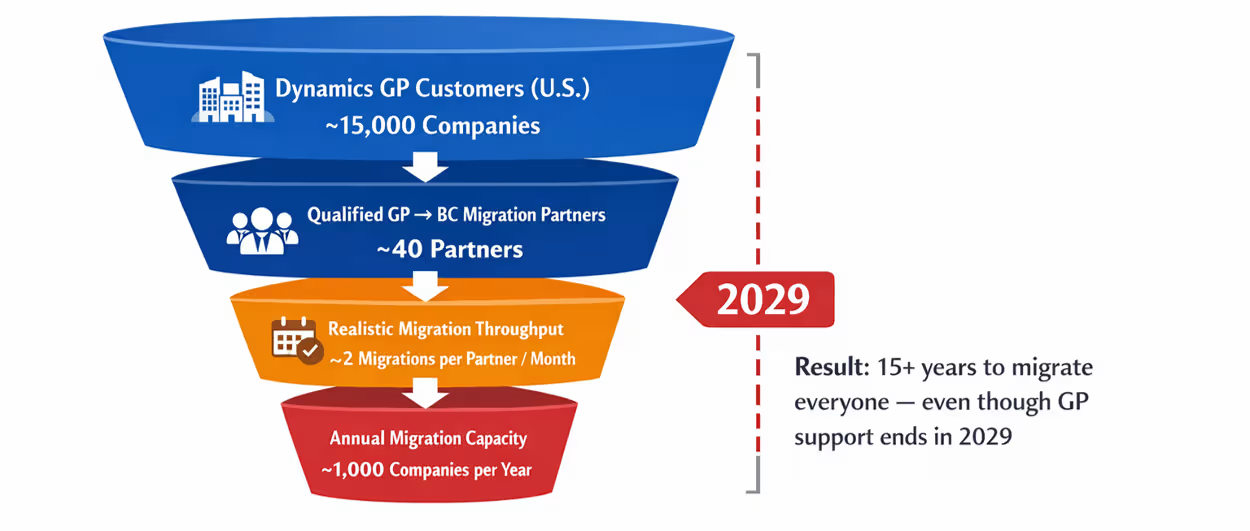
There are an estimated 15,000 companies in the U.S. still running Dynamics GP, but only about 40 qualified partners with deep experience executing GP to Business Central migrations at scale. With an average capacity of 2 migrations per partner per month, the entire ecosystem can complete roughly 1,000 migrations per year.
At that pace, it would take 15+ years to migrate all remaining GP customers, even though mainstream support ends in 2029. As more organizations delay, demand increases while capacity remains fixed. This creates a backlog that leads to longer timelines, higher costs, and limited partner availability. Starting earlier helps avoid this bottleneck and reduces the risk of delays and pricing pressure.

Get the complete Dynamics GP migration guide
Learn what to expect, how to plan, and how to choose the right approach for your Dynamics GP to Business Central migration. Get a clear roadmap to move forward with confidence.
Dynamics GP to Business Central migration strategies
There is no single approach to a Dynamics GP to Business Central migration. The right strategy depends on your current system, data quality, customizations, and long-term goals. Most organizations fall into one of three paths: using the Microsoft migration tool, taking a hybrid approach, or performing a full reimplementation.
Microsoft Dynamics GP to Business Central migration tool
The Microsoft GP to Business Central migration tool is the most direct migration path. It moves data from Dynamics GP into Business Central while preserving existing processes, primarily within core financial modules.
This approach works best for organizations with clean data, minimal customizations, and well-defined processes they want to keep. While the tool accelerates migration, data cleanup is still recommended to remove inactive vendors, customers, or items before moving to the new system.
- Best for: Core financial migrations with limited complexity
- Approach: Direct data migration with minimal process changes
- Data handling: Clean and convert existing data into Business Central
- Timeline: Typically 2–3 months
Hybrid approach
The hybrid approach combines the migration tool with selective reimplementation. It allows organizations to migrate core financial data while modernizing operational processes using Business Central’s enhanced functionality and integrations.
This is the most common approach because it balances speed with modernization. Organizations can retain familiar financial structures while taking advantage of new capabilities in areas like inventory, reporting, and integrations.
- Best for: Organizations with stable financial processes but evolving operational needs
- Approach: Migrate core modules, redesign operational workflows
- Data handling: Partial migration with targeted process improvements
- Timeline: Typically 3–6 months
Reimplementation
A reimplementation rebuilds your ERP system in Business Central based on current business requirements rather than replicating your Dynamics GP environment. Instead of migrating everything, only essential data such as master records, opening balances, and open transactions are brought into the new system.
This approach is best for organizations with heavy customizations, poor data quality, or outdated processes. It allows teams to remove technical debt, clean historical data, and align with modern best practices in Business Central.
- Best for: Highly customized environments or organizations needing process redesign
- Approach: Full system rebuild aligned to current and future business needs
- Data handling: Clean start with selective historical data migration
- Timeline: Typically 6–9 months
Migration tool vs hybrid vs reimplementation
Choosing the right Dynamics GP to Business Central migration strategy can be challenging. Determining which path fits your environment depends on your system setup, data quality, and business goals. Most organizations cannot make that decision without evaluating their system first.
The table below provides a high-level comparison of the three migration strategies to help you understand where you may fit.
Rand Group developed a free assessment tool to evaluate your current Dynamics GP environment and help you identify the best migration strategy. It walks your team through key questions about your system, including module usage, integrations, and overall complexity.
The assessment also includes a SQL-based analysis of your GP database. This allows for a deeper evaluation of data structure and compatibility with the Microsoft migration tool. It helps identify potential risks, required cleanup, and whether your system meets the technical requirements for different migration paths.
Based on the results, your team receives a clear recommendation on the best migration approach, along with high-level timelines and next steps. This ensures your Dynamics GP to Business Central migration starts with a plan that aligns with your current system and future goals.

Not sure which migration path is right for you?
Get a clear recommendation on your migration strategy, timeline, and next steps based on your current system. Know which approach fits your environment before you start your Dynamics GP to Business Central migration.
How long does it take and how much does the migration cost?
The timeline and cost of a Dynamics GP to Business Central migration depend on the approach you choose and the complexity of your environment. For organizations using the Microsoft migration tool, projects typically take 2–3 months and focus on core financial data. A hybrid approach, which combines data migration with process improvements, usually takes 3–6 months. For more complex or highly customized systems, a full reimplementation can take 6–9 months to complete.
Cost varies based on scope, users, and required functionality. Fixed-fee migration packages can start around $66,000 for core financials and $90,000 for sales and operations, with more advanced scenarios such as project accounting or manufacturing priced based on requirements. While the upfront investment depends on your needs, starting earlier helps control costs, avoid resource constraints, and reduce the risk of delays as more organizations move off Dynamics GP.
Dynamics GP to Business Central migration packages
Rand Group offers fixed-fee Dynamics GP to Business Central migration packages designed to help organizations move to the cloud quickly and with less risk. Each package follows a structured migration methodology and uses Microsoft’s migration tools to standardize the process, control cost, and accelerate time to go-live.
These packages are designed to align with common business needs, starting with core financials and expanding into operations, projects, and manufacturing. This allows organizations to choose a package that matches their current requirements while leaving room to scale in Business Central over time.
Each package includes data conversion from Dynamics GP to Business Central, along with standard functionality required to support your operations. Power BI reporting is also included to provide visibility into financial and operational performance from day one.
Because these are structured packages, they provide a faster and more predictable approach to a Dynamics GP to Business Central migration. Organizations can start with a defined scope, reduce implementation risk, and expand functionality over time as needed.
Cost of staying on Dynamics GP vs migrating
The cost of a Dynamics GP to Business Central migration is often evaluated as a one-time project. In reality, the more important comparison is long-term cost. When organizations assess total cost of ownership, many find that staying on Dynamics GP becomes more expensive over time due to rising maintenance, infrastructure, and operational costs.
To learn more, read our blog on the Economic impact of staying on Dynamics GP.
Total cost of ownership (TCO): Dynamics GP vs Business Central
Total cost of ownership (TCO) includes all costs associated with running an ERP system over time. For Dynamics GP, this goes far beyond the initial license. It includes ongoing maintenance, infrastructure, IT support, and upgrade projects. In contrast, Dynamics 365 Business Central operates on a subscription model that bundles infrastructure, updates, and support into a predictable monthly cost.
Key TCO differences between Dynamics GP and Business Central:
- Annual maintenance costs: Dynamics GP requires ongoing Enhancement or Advantage Plan fees that increase over time, even as the product approaches end of life.
- Infrastructure and servers: GP requires physical or hosted servers, including hardware, storage, and ongoing maintenance. Business Central eliminates these costs with cloud deployment.
- Software licensing: GP environments require additional licenses for SQL Server and operating systems. Business Central includes infrastructure in the subscription.
- IT labor and support: Internal teams or partners must manage updates, patches, backups, and performance for GP. Business Central shifts this responsibility to Microsoft.
- Upgrade projects: GP upgrades require time, testing, and consulting resources. Business Central delivers automatic updates with minimal disruption.
- Operational inefficiencies: Manual processes and limited automation in GP increase administrative workload. Business Central includes automation and integration out of the box.
- End-of-life replacement costs: Organizations must eventually replace GP. Migrating earlier allows for more predictable planning and cost control.
To learn more, read our blog on Total Cost of Ownership of Dynamics GP vs. Cloud Solutions.

Microsoft is increasing the cost of staying on Dynamics GP
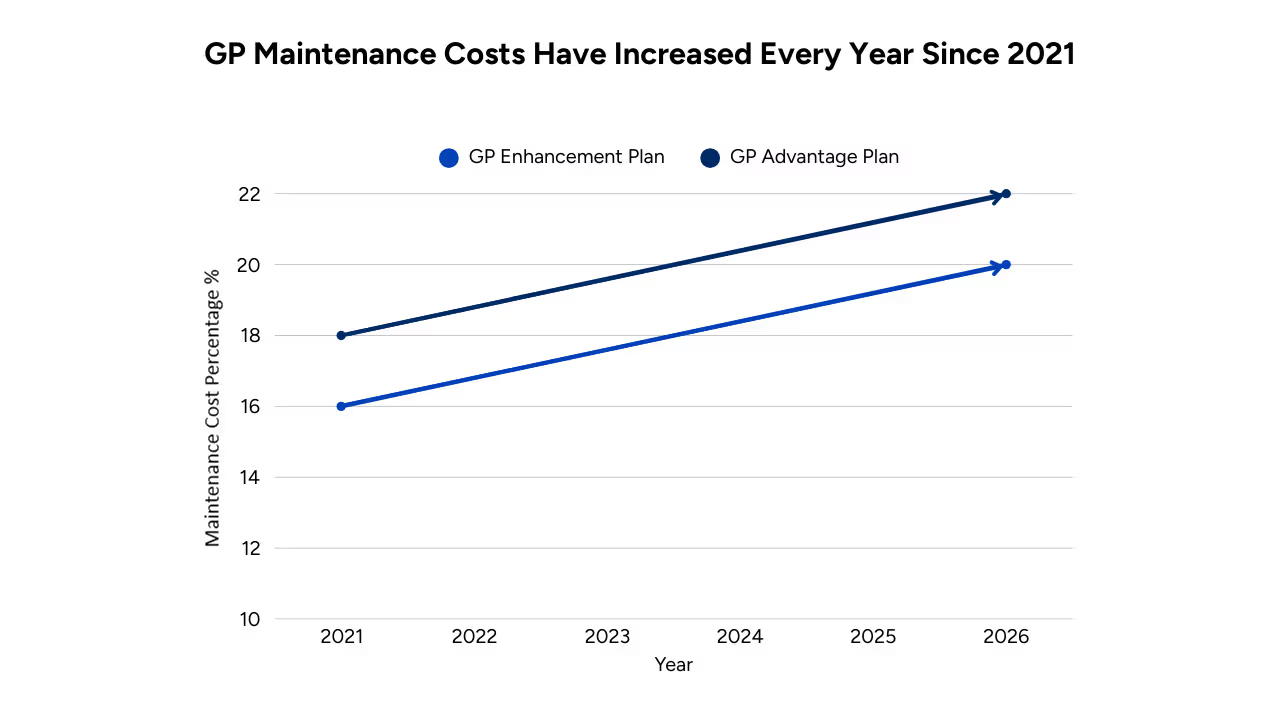
As Dynamics GP approaches end of life, Microsoft’s licensing changes are increasing the financial impact of delaying migration. Maintenance costs continue to rise, while transition incentives for moving to Business Central are decreasing. Together, these trends widen the cost gap between migrating now and waiting.
Over time, this creates a compounding effect. Organizations are paying more each year to maintain a system with a fixed sunset timeline, while the financial benefit of migrating continues to decline.
Key cost trends impacting Dynamics GP customers:
- Rising maintenance costs: Enhancement Plan costs increased from 16% in 2021 to 20% in 2026. Advantage Plan costs increased from 18% to 22% over the same period.
- Declining transition incentives: Migration discounts dropped from 60% in 2021 to around 30% today, representing a 50% reduction in incentive value.
- Compounding financial impact: Higher recurring costs combined with lower migration discounts increase the total cost of delaying migration.
Common challenges when migrating from Dynamics GP
A Dynamics GP to Business Central migration is a structured process, but it comes with common challenges that organizations need to plan for. These challenges typically relate to data, customizations, integrations, and user adoption. Identifying them early helps reduce risk and ensures a smoother transition to Business Central.
Common challenges include:
- Converting customizations: Heavily customized Dynamics GP environments often require redevelopment or replacement using Business Central extensions.
- Deciding what data to migrate: Organizations must determine how much historical data to move versus archive for reporting.
- Rebuilding integrations: Existing integrations with third-party systems may need to be reconfigured or replaced.
- Aligning workflows: Legacy processes in GP may not map directly to Business Central’s standard functionality.
- User adoption and change management: Teams must adjust to new workflows and a different system experience.
- Training users: Employees need training on the modern, web-based Business Central interface.
- Validating data accuracy: Financial data must be tested and reconciled to ensure accuracy after migration.
- Controlling scope: Expanding requirements during the project can lead to delays and increased costs.
Working with an experienced Dynamics GP to Business Central migration partner helps mitigate these risks. A structured approach ensures data is validated, integrations are properly rebuilt, and users are prepared to adopt the new system. This reduces disruption and helps your organization transition to Business Central with confidence.
Why choose Rand Group for your Dynamics GP migration
A successful Dynamics GP to Business Central migration requires more than moving data from one system to another. It requires a clear strategy, deep product knowledge, and a structured approach that aligns your system with how your business operates today. Rand Group brings experience across Dynamics GP and Dynamics 365 Business Central, helping organizations navigate complexity, reduce risk, and make informed decisions throughout the migration process.
Our approach is built around a diagnostic-first methodology. Before any migration begins, we evaluate your current Dynamics GP environment, including data quality, customizations, integrations, and business processes. This ensures your Dynamics GP to Business Central migration is aligned with the right strategy—whether that is using the migration tool, a hybrid approach, or a full reimplementation. Combined with our fixed-fee migration packages, this approach provides clarity on scope, timeline, and cost from the start.
How Rand Group supports your Dynamics GP to Business Central migration:
- Diagnostic-first approach: We assess your current system to identify risks, define requirements, and recommend the best migration path.
- Deep platform experience: Our team has extensive experience across Dynamics GP and Dynamics 365 Business Central, including complex and customized environments.
- Structured migration methodology: We follow a proven process to manage data migration, system configuration, testing, and go-live.
- Fixed-fee migration packages: Predefined packages help control cost, reduce uncertainty, and accelerate implementation timelines.
- Data and integration strategy: We define what data to migrate and how to rebuild or replace integrations within Business Central.
- End-to-end support: From assessment through go-live and beyond, we guide your team through every stage of the migration.
This combination of strategy, experience, and structured delivery helps ensure your Dynamics GP to Business Central migration is predictable, efficient, and aligned with your long-term goals.
Dynamics GP to Business Central migration success stories
Organizations across industries have partnered with Rand Group to successfully complete their Dynamics GP to Business Central migration. These real client examples highlight how companies have improved visibility, automated processes, and modernized operations while reducing manual work and supporting long-term growth.
From manual spreadsheets to real-time project visibility
DoubleDigit Sales (formerly Fusion Learning Inc.) partnered with Rand Group to modernize its financial and project management processes as part of its transition toward a more scalable ERP environment. As the organization grew, manual spreadsheets and disconnected reporting tools made it difficult to track project profitability, time, and expenses. By implementing a centralized, cloud-based system with integrated project accounting and time tracking, the company gained real-time visibility into both financial and operational performance—laying the foundation for a successful Dynamics GP to Business Central migration path.
- Improved visibility into project profitability and financial performance
- Reduced manual reporting and duplicate data entry
- Faster and more efficient month-end close
- Increased accuracy in time and expense tracking
- Centralized system for projects, finance, and reporting
To learn more, read the full DoubleDigit Sales case study.
Modernizing financial reporting and operations in manufacturing – Industrial equipment manufacturer
A leading industrial equipment manufacturer partnered with Rand Group to migrate from an outdated Dynamics GP system to Dynamics 365 Business Central. As financial complexity increased, manual processes and limited reporting capabilities made it difficult to maintain control and visibility across the business. By moving to a modern, cloud-based ERP, the organization streamlined financial and operational workflows while gaining real-time insight into performance.
- Enhanced financial reporting with real-time visibility and improved decision-making
- Automated collections processes to improve cash flow management
- Reduced manual effort across accounts payable, receivable, and operations
- Streamlined financial and operational workflows across departments
- Improved scalability to support continued business growth
To learn more, read the full case study.
Modernizing financial processes and reporting with Business Central
A professional services firm partnered with Rand Group to migrate from Dynamics GP to Dynamics 365 Business Central and modernize its financial operations. The organization relied on manual processes, disconnected systems, and spreadsheet-based reporting, which limited visibility and slowed decision-making. By moving to a cloud-based ERP, the company automated reporting, improved financial controls, and gained real-time access to performance data.
- Automated commission and financial reporting, reducing manual effort and errors
- Improved financial visibility with real-time reporting and dashboards
- Strengthened approval workflows and financial controls
- Enabled cloud access for teams to work from anywhere
- Created a scalable foundation to support future growth
To learn more, read the full case study.
Scaling multi-entity operations with a modern cloud ERP
A growing pharmacy chain partnered with Rand Group to migrate from Dynamics GP to Dynamics 365 Business Central and support expansion across more than 65 subsidiaries. Their legacy system struggled with performance, manual processes, and limited visibility across entities. By moving to a cloud-based ERP, the organization improved financial controls, streamlined operations, and gained real-time access to enterprise-wide data.
- Scalable management of 65+ subsidiaries within a single system
- Improved financial visibility and reporting across all entities
- Streamlined accounts payable and receivable processes
- Simplified intercompany transactions and bank reconciliation
- Reduced manual effort across finance and operations teams
To learn more, read the full case study.
Frequently asked questions (FAQs)
What is a Dynamics GP to Business Central migration?
A Dynamics GP to Business Central migration is the process of moving data, processes, and functionality from Microsoft Dynamics GP to Dynamics 365 Business Central. It typically includes data conversion, system configuration, and process alignment to a modern ERP platform.
Is Dynamics GP still supported?
Yes, but support is ending. Microsoft will provide full support until December 31, 2029, and security updates until April 30, 2031. After that, Dynamics GP will no longer be supported.
What are my Dynamics GP to Business Central migration options?
There are three main options:
- Migration tool: Direct data migration for simpler environments
- Hybrid approach: Combination of migration and process improvement
- Reimplementation: Full rebuild for complex or highly customized systems
What is the difference between Dynamics GP and Business Central?
Dynamics GP is a legacy, on-premises ERP system with limited updates. Dynamics 365 Business Central is a modern, cloud-based ERP with automation, real-time reporting, AI capabilities, and continuous updates.
What happens to my customizations during migration?
Customizations in Dynamics GP are not directly transferred. They are either rebuilt using Business Central extensions, replaced with standard functionality, or supported through third-party apps.
Do I need to move to the cloud when migrating to Business Central?
No. While most organizations choose the cloud, Dynamics 365 Business Central can also be deployed on-premises. However, the cloud version provides the most benefits, including automatic updates and scalability.
Does Business Central include AI capabilities?
Yes. Dynamics 365 Business Central includes AI features such as Copilot, automation, and predictive insights to improve efficiency and decision-making.
When is the right time to start planning a Dynamics GP to Business Central migration?
The best time to start is now. Planning early helps avoid rising costs, limited partner availability, and delays as more organizations migrate before Dynamics GP support ends.
Next steps
A Dynamics GP to Business Central migration is a strategic decision that impacts your systems, processes, and long-term growth. With clear timelines from Microsoft, rising costs, and increasing demand for modern capabilities like automation and AI, organizations need to plan their next steps carefully. Starting early helps reduce risk, control cost, and ensure you have the right approach in place.
Whether you are evaluating your options, planning your migration, or ready to move forward, having a clear strategy is key. Contact us today to assess your current environment, identify the best migration path, and build a plan for your Dynamics GP to Business Central migration.