Dynamics 365
 Power Platform
 Dynamics
 Cloud & Productivity
How to use Copilot Assistant and Global Search in Business Central

Dynamics 365 Business Central has taken a big step forward with the introduction of two AI-powered features—Copilot Assistant and Global Search. These tools are designed to simplify navigation, streamline workflows, and help users get more out of the system. In this blog, we look at how they work, their benefits, and how you can use them to find what you need.
How Copilot Assistant and Global Search enhance your ERP experience
Enterprise resource planning (ERP) systems like Microsoft Dynamics 365 Business Central are critical to managing complex business operations. But as these systems get more functionality, navigating through menus or manually searching for information can be time-consuming and overwhelming. That’s where Copilot Assistant and Global Search prove invaluable. Copilot Assistant is your intelligent guide, helping you do tasks, find data, and learn about the system with ease. Global Search lets you find what you need in seconds, whether it’s a specific record, report, or feature, without digging through layers of menus. By using these tools, users can save time, reduce frustration, and focus on driving business success. Whether you’re an experienced user or new to the system, these features are here to make your experience more intuitive and efficient.

Want to learn more about how to use AI in Business Central?
With built-in AI capabilities including Copilot Assistant and Global Search, Business Central empowers businesses by enhancing operations, forecasting, and decision-making. Contact us today to learn how Business Central’s AI capabilities can benefit your business.
How to use Copilot Assistant and Global Search in Business Central
Activating the Copilot Assistant
The Copilot Assistant is your gateway to these tools. Here’s how to activate it:
- Log in to your Business Central account
- Locate the Copilot button on the interface (it’s prominently displayed in newer versions)
- Click the button to open the Copilot Assistant pane
Once activated, you’ll have access to a variety of functions aimed at simplifying your tasks and improving user interaction.

Performing a global search
The Global Search feature saves you the hassle of navigating multiple pages by letting the system do all the legwork for you. To perform a search:
- Open the Copilot Assistant pane
- Think of a specific query (e.g., looking up a customer’s account details or invoice data)
- Type your question using natural, conversational language—for instance, “Show me invoices for Adatum customer.”
The system’s AI instantly searches the database and presents relevant results, including:
- Customer cards
- Contact details
- Ledger entries (e.g., financial records such as sales or tax information)
Each search result provides direct links for quick access. By clicking one, you’ll open the associated record and explore further.
Example Scenario:
Suppose you’re tasked with reviewing customer data for the corporation Adatum. By typing “Adatum customer information” into the Global Search bar, you’ll quickly see customer records, invoices, and other related data without needing to manually browse through menus.

Navigating between records
Once you retrieve search results, Business Central allows you to easily navigate between records:
- Click any result, such as a Ledger Entry or Customer Card
- Drill down into related data, such as item details, sales taxes, or source documents
- Move through records to extract the exact information you need
This navigational ease is particularly beneficial for executives who prefer quick overviews rather than navigating complex workflows.

Using the Assistant as a learning resource
The Copilot Assistant isn’t just about retrieving information; it also serves as a learning aid. Follow these steps to use it:
- Think of a task you’re unsure how to do, such as creating an invoice
- Ask the Assistant, “How do I create a sales invoice?”
- The AI pulls step-by-step instructions directly from Business Central’s knowledge base and Microsoft Learn articles.
You can keep these instructions open while performing the task, saving time and removing the need to search through documentation or consult a support team.
Pro Tip:
If faced with an unfamiliar process, ask a targeted question, for example: “How can I modify a customer record?” or “How do I adjust posted invoices?” The Assistant provides instant, actionable guidance.

Key benefits of Copilot Assist and Global Search
- Saves time for executives and power users: No more memorizing navigation paths or searching through menus. Get exact data points in a few keystrokes.
- Real-time learning: Do tasks and learn new skills at the same time with the AI’s help. Reduce dependency on external resources.
- Faster data access: Information retrieval is faster and more accurate. No more bottlenecks caused by traditional navigation.
- Fewer errors: With step-by-step guidance at your fingertips, you’ll make fewer mistakes especially when doing specialized tasks like invoicing or record adjustments.
- Broader user adoption: For companies rolling out Business Central, these features lower the learning curve and encourage more users across the organization to adopt.
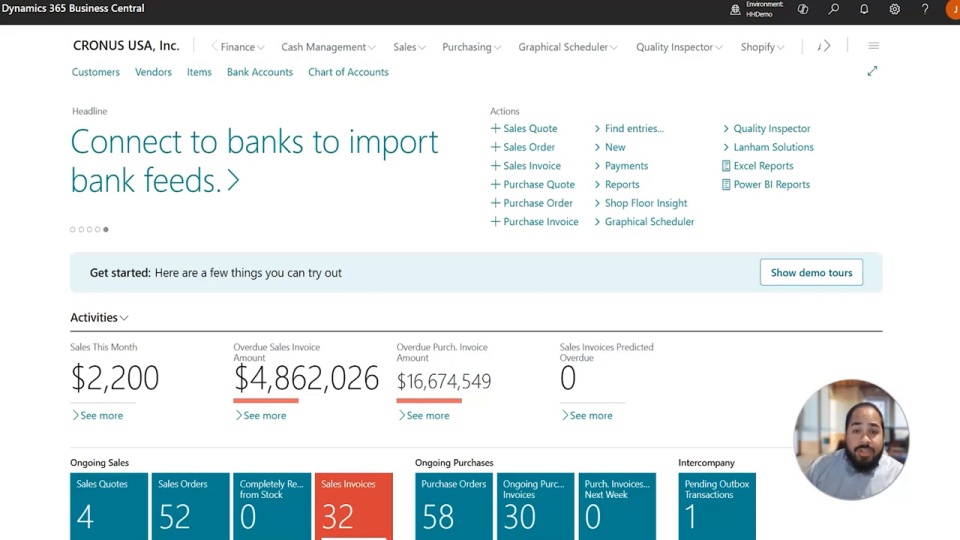
Discover Copilot Assistant and Global Search in Business Central
Discover how Copilot Assistant and Global Search transform Dynamics 365 Business Central by simplifying tasks, reducing search time, and guiding actions, enabling smarter workflows, fewer errors, and a more productive experience.
Conclusion
Copilot Assistant and Global Search in Dynamics 365 Business Central are not just technology. They’re practical tools to get more done with less effort by simplifying navigation, providing real-time guidance, and enabling faster access to critical data. Whether you’re a seasoned Business Central user or just getting started, AI-powered features make managing your ERP system more intuitive and efficient. Contact us to learn more about Copilot and other AI tools in Business Central and how they can benefit your business.