 Dynamics 365
 Power Platform
 Dynamics
 Cloud & Productivity
Sales Order Agent
Turn customer emails into sales quotes and orders, faster
The Sales Order Agent is an AI agent built into Dynamics 365 Business Central. It reads customer requests from your sales inbox, checks item availability, and drafts a quote and reply for your team. Once the customer confirms, the agent converts the quote into a sales order, so your team spends less time on data entry and more time with customers.
Business challenge
Manual order entry slows down your sales team
Many customers still send orders by email, often as a PDF purchase order or a quick note. Someone on your team has to read each message, find the customer, check stock, and key the details into Dynamics 365 Business Central. When volume spikes, quotes go out late and small errors slip through.

Hours lost to data entry
Copying line items from emails and PDFs into Business Central takes time away from customers and higher-value work.

Slow quote turnaround
Customers wait while your team checks stock and builds quotes by hand, which can cost you orders to faster competitors.

Errors and missed details
Typos in quantities, the wrong item, or a missed delivery date lead to rework, delayed shipments, and unhappy customers.
Features
Automate the quote-to-order process from your inbox
The Sales Order Agent handles the repetitive steps between a customer’s email and a confirmed sales order. It works inside Business Central using your own customers, items, and inventory data, and it asks your team to step in at the points that matter.
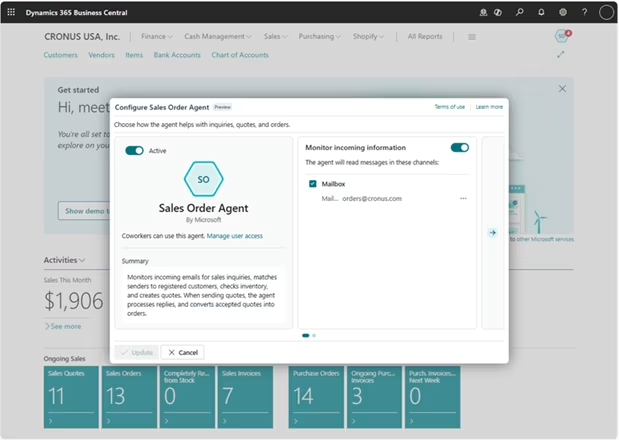
Handle real-world customer requests
Customer orders rarely arrive in a neat format. The Sales Order Agent works with the way your customers already send requests, whether that’s a quick note in an email, a scanned purchase order, or a long back-and-forth about quantities and dates.
The agent can:
- Read purchase orders sent as PDF or image attachments, not just plain emails
- Keep the whole conversation in one task, even when customers reply with changes
- Ask customers for missing details before it builds the quote
- Run as separate agents for different mailboxes, each with its own rules
Stay in control with built-in review and tracking
You decide where people review the agent’s work, from incoming emails to quotes, orders, and outgoing replies. Every request becomes a task with a timeline, so you can see what the agent did, why it did it, and where it needs help.
Your team can:
- Approve or edit replies before they go to customers
- Step in when the agent is blocked or needs more information
- Track quotes and orders created and time saved in the role center
- Trace every agent action back to the agent’s own user account


Ready to put the Sales Order Agent to work?
Every business handles orders a little differently, so the right setup depends on your process. Talk with our team about how the Sales Order Agent can fit your inbox, your review steps, and your customers.
How it works
From customer email to sales order in five steps
The agent follows the same process your team uses today. It works through each step on its own and pauses for review wherever you have set one up.
Read incoming requests
The agent checks your chosen mailbox on a schedule and reads each new email and its PDF or image attachments to find what the customer wants.
Match the customer
It matches the sender’s email address to a contact in Business Central and links the request to that customer.
Check availability
The agent checks stock for the requested delivery date and location, and it can include items you can promise for a later date.
Create and send the quote
It creates a sales quote and drafts a reply with the quote attached as a PDF, ready for your team to review.
Convert to a sales order
When the customer confirms, the agent turns the quote into a sales order for your team to fulfill.
Compatibility & requirements
What you need to run the Sales Order Agent
The Sales Order Agent is included in Business Central online, so there is nothing extra to install, and you pay only for the work it does through Copilot Credits. A few settings need to be in place before it starts processing orders, and our team can set them up for you.
To get the agent up and running, you’ll need
- Dynamics 365 Business Central online (Copilot and agents aren’t available on premises)
- Billing for agents set up in the Business Central admin center, using prepaid Copilot Credits or pay-as-you-go through Azure
- A Microsoft 365 mailbox for customer requests, with Full Access and Send As permissions for the person setting it up
- Customer contacts with accurate email addresses, since the agent uses them to identify customers
- The Configure All Agents permission for admins, plus Essential or Premium licenses for the users who manage agent tasks

Why partner with Rand Group?
AI that fits how you work
Before you turn on the agent, we help you decide where it adds the most value and check that your customer contacts, item names, and inventory data are ready for it. We then set up review steps, permissions, and credit limits that match how your team already works, so the agent supports your process instead of reshaping it.
A long-term partner
With 750+ clients, 2,500+ engagements, and a 90% client retention rate, we build relationships that last well beyond go-live. As Microsoft adds new agent capabilities to Business Central, we help you understand what has changed and decide what is worth turning on for your business.
Local teams across North America
Our consultants work from offices across the United States and Canada, so you get support in your time zone from people who understand Business Central. When the agent needs an adjustment or your team has questions, you can reach someone who already knows your environment.
Business Central expertise you can trust
As a Microsoft Solutions Partner, we implement, support, and build apps for Business Central, including our own AI agents. That hands-on development experience helps us understand how agents work behind the scenes, so we can tell you when Microsoft’s agent is the right fit and when a custom agent makes more sense.
Frequently Asked Questions (FAQs)
What is the Business Central Sales Order Agent?
The Sales Order Agent is an AI agent from Microsoft that is built into Dynamics 365 Business Central. It reads customer emails, checks item availability, creates sales quotes, and converts confirmed quotes into sales orders. Your team reviews its work at the steps you choose.
To learn how other agents work across the platform, read our guide to AI agents in Dynamics 365 Business Central.
Does the agent send emails or create orders without approval?
Only if you allow it. You can require a review of incoming emails, quotes, orders, and outgoing replies. By default, the agent asks for a review of the first message in each conversation and of every message from unknown senders.
How is the Sales Order Agent priced?
The agent is included in Business Central online, so there is no separate license fee. Each step it completes, such as reading an email or creating a quote, uses Copilot Credits. You can buy prepaid credit packs or pay as you go through an Azure subscription.
For more detail, see our breakdown of how Microsoft Copilot Credits work, including usage, costs, and limits.
Can the agent read PDF purchase orders?
Yes. The agent reads the email body and PDF or image attachments, such as a scanned purchase order. PDFs need to be 20 MB or smaller and no more than 50 pages.
What can't the Sales Order Agent do?
The agent doesn’t post documents, create new customers or items, or change prices and discounts. It works with item lines on sales quotes and orders only, and it performs best with 15 or fewer lines per document. Requests outside these limits go to your team.
Can Rand Group customize the Sales Order Agent?
Microsoft doesn’t allow partners to change how this agent works. Rand Group can configure it to fit your environment and train your team to work alongside it. If you need something the agent can’t do, we can also build a custom agent around your process.
Does Microsoft use our data to train its AI models?
No. Microsoft doesn’t use your company data, prompts, or responses to train AI models. Prompts and responses are stored securely in Business Central for 20 days to support troubleshooting.