 Dynamics 365
 Power Platform
 Dynamics
 Cloud & Productivity
Case Management Agent
Take the busywork out of every case, from first contact to closure
The Case Management Agent is an AI agent built into Dynamics 365 Customer Service. It helps create and update cases using information from customer emails, chats, and voice conversations. The agent automatically populates case details when sufficient information is available, keeps records updated, and can assist with customer replies and follow-ups. This reduces administrative work so your service representatives can focus on resolving customer issues.
Business challenge
Case admin pulls your service team away from customers
Every email, chat, and call needs a case that is filled in correctly and kept current. Service reps end up retyping details, updating fields after each conversation, and chasing customers who stop replying. That admin work adds up, and it slows down the help your customers are waiting for.

Manual case entry
Reps copy names, products, and issue details into case forms by hand, which takes time and leads to mistakes.

Records that fall behind
When updates wait until a rep has a spare moment, case records go stale and managers lose sight of where things stand.

Cases that never close
Open cases pile up while reps wait on customers who have gone quiet, cluttering queues and skewing your service metrics.
Features
Automate routine work across the case lifecycle
The Case Management Agent helps automate case creation, updates, and customer communication within Dynamics 365 Customer Service. It supports workflows involving email, chat, digital messaging, and voice, with available capabilities depending on the channel and configuration. Organizations can configure supported automation settings and determine when service representatives should review the agent’s work.
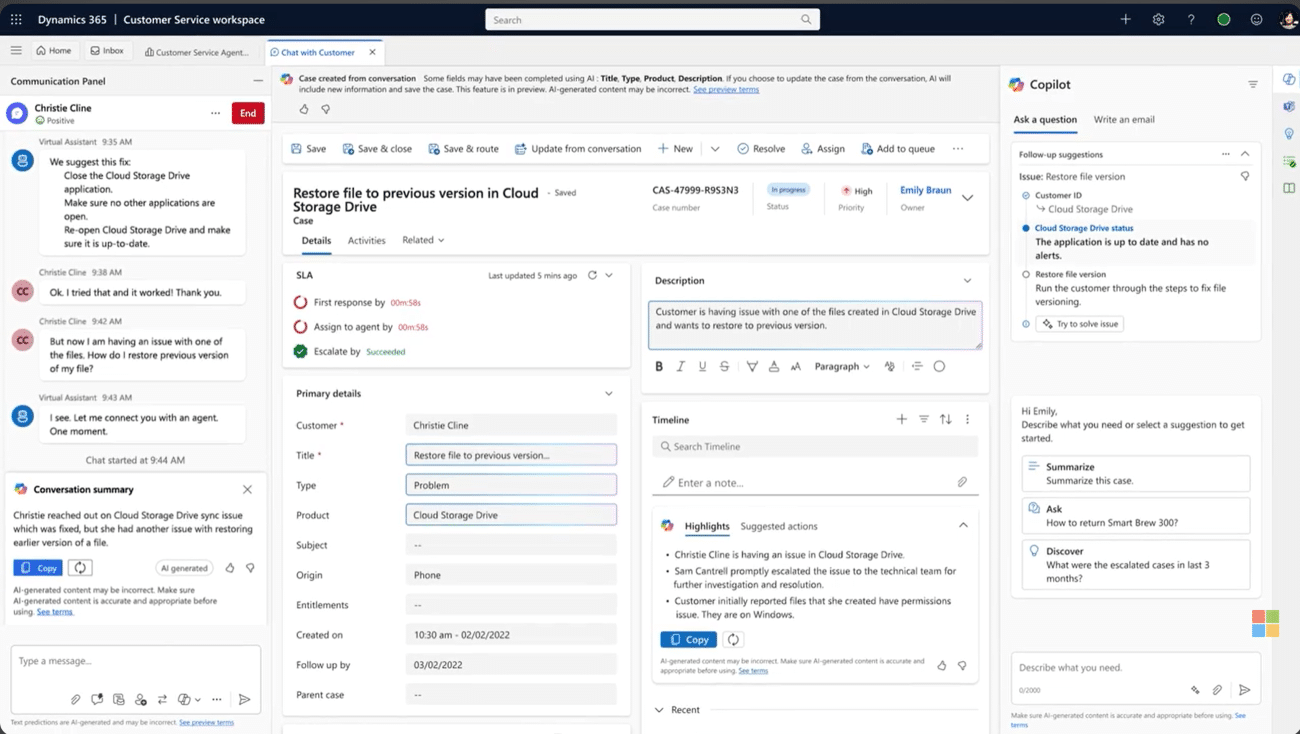
Keep every case complete and current
The agent reduces manual data entry by extracting relevant information from customer conversations and emails to populate configured case fields. When sufficient information is available, it automatically updates records, helping service representatives maintain more complete and accurate case information.
The agent can:
- Automatically create cases from supported chat, digital messaging, and voice conversations when sufficient information is available
- Populate configured case fields using relevant details from customer emails and conversations
- Add conversation summaries to case records to provide context for service representatives
- Update selected case fields according to configured rules while protecting manual changes when required
Resolve and close cases with less manual follow-up
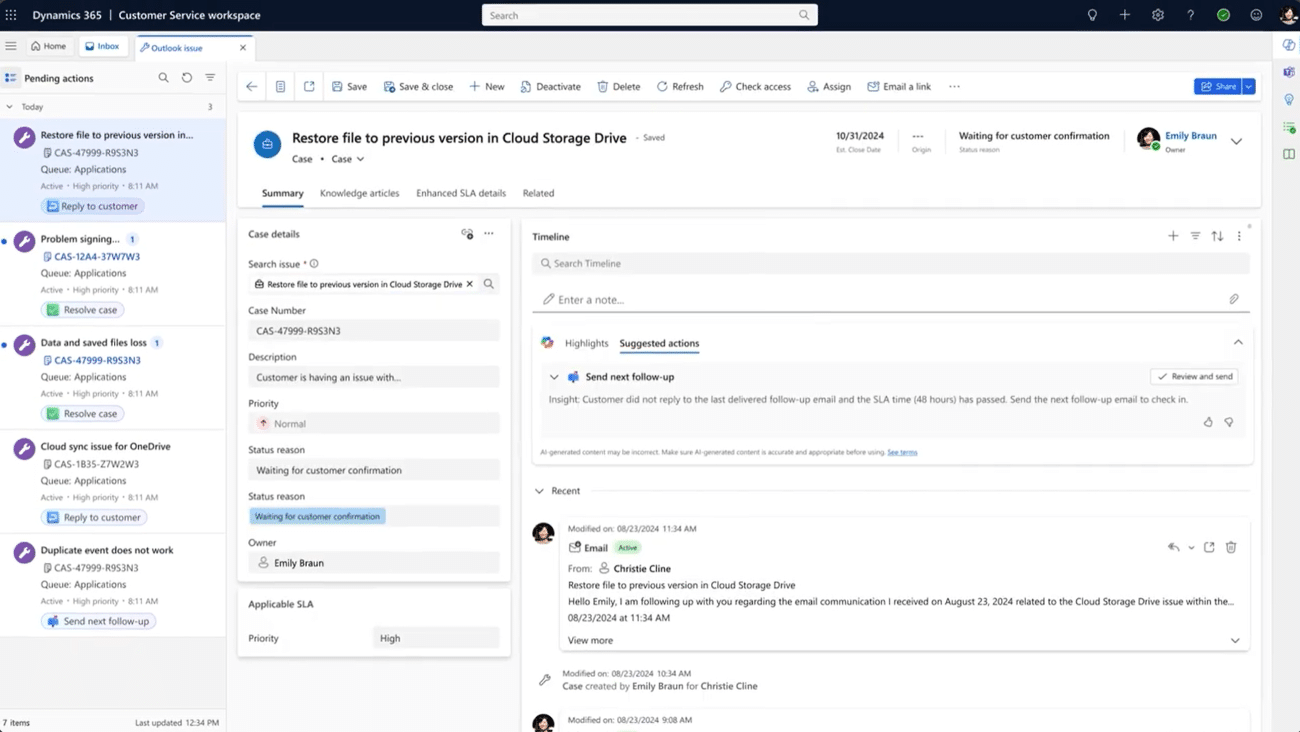
Customer service cases often stall when representatives are waiting for additional information or preparing routine responses. The Case Management Agent helps reduce this workload by supporting automated customer communication, follow-ups, and resolution workflows. When human assistance is needed, representatives can review the available case history and continue working toward a resolution.
With the appropriate configuration, the agent can:
- Analyze incoming customer emails and generate responses to supported requests using configured knowledge and business instructions
- Send follow-up emails according to configured schedules and business rules
- Populate resolution details and automatically close qualifying cases when customers do not respond
- Operate autonomously for supported tasks or require service representatives to review and approve actions before completion
Feature availability varies. Autonomous case follow-up, closure, and email resolution capabilities are currently documented as production-ready previews. Functionality and availability may change as Microsoft continues developing these features.

Let your service team get back to customers
Rand Group can help you identify which parts of the case lifecycle to automate first, configure the agent's rules, and determine where human oversight is needed. Whether you're looking to streamline case creation, improve customer follow-ups, or introduce autonomous resolution, we'll help you evaluate how the Case Management Agent fits your service processes.
How it works
What happens when a customer reaches out
The Case Management Agent supports service representatives throughout the case lifecycle, helping automate administrative tasks and customer communication based on configured rules and supported capabilities.
Capture the request
A customer sends an email or contacts your service team through a supported chat, messaging, or voice channel. The agent uses available conversation information to identify relevant case details.
Build the case
For supported conversations, the agent can automatically create a case when sufficient information is available. For incoming emails, configured automatic record creation rules handle case creation, while the agent helps populate relevant fields.
Keep it up to date
As new information becomes available, the agent can update configured case fields using details from customer interactions. Fields are updated according to your organization’s settings, helping keep records current without unnecessary manual entry.
Work toward a resolution
For supported requests, the agent can analyze customer needs and generate appropriate responses. Depending on the workflow, it may send a response automatically or prepare one for representative review. Issues requiring human assistance can be directed to a service representative.
Follow up and close
For qualifying cases, the agent can send follow-up emails according to configured schedules. If a customer does not respond after the required follow-up attempts, the agent can resolve the case automatically when autonomous closure is enabled. Alternatively, representatives can review and complete the resolution.
Compatibility & requirements
Getting started with the Case Management Agent
The Case Management Agent is available with Dynamics 365 Customer Service Professional, Enterprise, and Premium. Its activities consume Copilot Credits, and organizations must configure the appropriate features, permissions, and channel settings before enabling automation.
Some capabilities have additional prerequisites, particularly autonomous customer email resolution and case follow-up. Rand Group can help evaluate your requirements and configure the agent for your service environment.
To get the agent up and running, you’ll need
- A Dynamics 365 Customer Service Professional, Enterprise, or Premium license
- Sufficient Copilot Credits and the appropriate billing configuration
- AI form fill assistance, security permissions, and required Power Platform settings
- Automatic record creation rules for incoming customer emails
- Supported chat and voice channels, including authenticated chat and voice transcription where applicable
- Customer Intent Agent, email templates, and application user configurations for supported autonomous resolution and follow-up scenarios

Why partner with Rand Group?
Automation where it helps most
We assess how cases move through your service team and identify where representatives spend the most time on administrative tasks. From there, we help configure supported automation capabilities in stages, starting with high-impact opportunities and expanding as your team becomes comfortable with the agent.
A partner your team can lean on
Our 90% client retention rate reflects the long-term relationships we build with our customers. After implementation, we can help you evaluate the agent’s performance, refine its configuration, and adopt additional capabilities as Microsoft releases them.
Service experts near you
Our consultants work across the United States and Canada, providing support aligned with your team’s needs. We help service representatives and supervisors understand how to review agent activities, monitor performance through the Agent Feed, and determine when human intervention is appropriate.
Customer Service know-how you can rely on
As a Microsoft Solutions Partner, Rand Group implements and supports Dynamics 365 Customer Service for organizations across North America. Our experience developing AI agents also helps us evaluate when Microsoft’s Case Management Agent meets your requirements and when a custom solution may be a better fit.
Frequently Asked Questions (FAQs)
What is the Dynamics 365 Case Management Agent?
The Case Management Agent is an AI agent built into Dynamics 365 Customer Service. It helps create and update cases using customer emails and conversations, generate responses to supported requests, and automate follow-up and resolution workflows. Organizations can configure which supported tasks the agent performs and when human review is required.
Which channels does the Case Management Agent work with?
The Case Management Agent supports workflows involving customer emails, live chat, digital messaging, and voice conversations. It can automatically create cases from supported conversations and update case information using customer interactions. Authenticated chat is required for autonomous case creation and updates from chat, and available capabilities depend on the channel and configuration.
To see how it fits with the other agents in the platform, read our overview of AI agents in Dynamics 365 Customer Service.
Can the agent resolve cases on its own?
Yes, for supported scenarios when autonomous resolution is enabled. The agent can analyze incoming requests, generate responses, and help resolve qualifying cases according to configured business rules. Organizations can configure whether supported actions occur automatically or require representative review. When a request needs human assistance, the case and available conversation details can be passed to a service representative for further investigation.
How is the Case Management Agent priced?
The Case Management Agent consumes Copilot Credits based on the activities it performs. Dynamics 365 Customer Service Premium includes base Copilot Credit capacity, while Professional and Enterprise customers generally need to purchase credits separately. Organizations can use prepaid Copilot Credit capacity or pay-as-you-go billing through Azure. Actual consumption depends on the agent’s activities, configuration, and applicable billing rates.
For more detail, see our breakdown of how Microsoft Copilot Credits work, including usage, costs, and limits.
Will the agent overwrite changes my reps make?
Organizations can configure whether the agent is allowed to update fields that service representatives have already modified. This helps protect manual changes when needed. The agent also evaluates the information available before populating fields and may leave fields unchanged when there is insufficient context.
How do reps know what the agent has changed?
Cases created or updated by the agent display notifications on the case form. Representatives can review audit history to identify field changes, while agent-generated emails are recorded in the case timeline. Supervisors can also use the Agent Feed to monitor supported agent activities and understand when intervention may be needed.
Can we test the agent before turning it on?
Yes. Organizations can run simulations using up to 100 existing records to evaluate how accurately the agent predicts case information before enabling it. Shadow mode, currently in preview, also allows organizations to evaluate proposed agent actions on live cases without sending customer emails or changing records. Testing activities may consume Copilot Credits, so organizations should monitor usage during evaluation.
Can Rand Group customize the Case Management Agent?
Microsoft develops and maintains the Case Management Agent, but organizations can configure supported settings, including case fields, automation rules, follow-up schedules, and resolution workflows. Rand Group can help configure these capabilities to align with your service processes. For requirements that extend beyond the standard agent’s functionality, we can also evaluate and develop custom AI solutions tailored to your organization.