 Dynamics 365
 Power Platform
 Dynamics
 Cloud & Productivity
Account Reconciliation Agent
Find and fix reconciliation differences before they slow down your close
The Account Reconciliation Agent is an AI agent built into Dynamics 365 Finance. It regularly compares your subledgers against the general ledger, identifies differences, and recommends actions for supported reconciliation exceptions. Your accountants stay in control of every resolution while the agent helps reduce last-minute reconciliation work and supports a more efficient month-end close.
Business challenge
Reconciliation waits until month-end, and so do the problems
Many finance teams reconcile their subledgers to the general ledger only when the period closes, often by working through long reports. By then, small differences have had weeks to build up. Tracking down the cause takes time your team doesn’t have during close, and every delay pushes back your financial reporting..

Late surprises
Differences between a subledger and the general ledger often surface only at period end, when there is the least time to fix them.

Slow investigations
Accountants dig through vouchers and reports to work out why balances don’t match, which takes hours for each exception.

Fixes that are hard to trace
When adjustments are made in a rush, it becomes difficult to show auditors what changed, who changed it, and why.
Features
Stay reconciled all month, not just at close
The Account Reconciliation Agent turns reconciliation into an ongoing process inside Dynamics 365 Finance. Instead of waiting until period-end, your team can identify differences through scheduled reconciliation runs and work through supported exceptions with AI-powered recommendations.
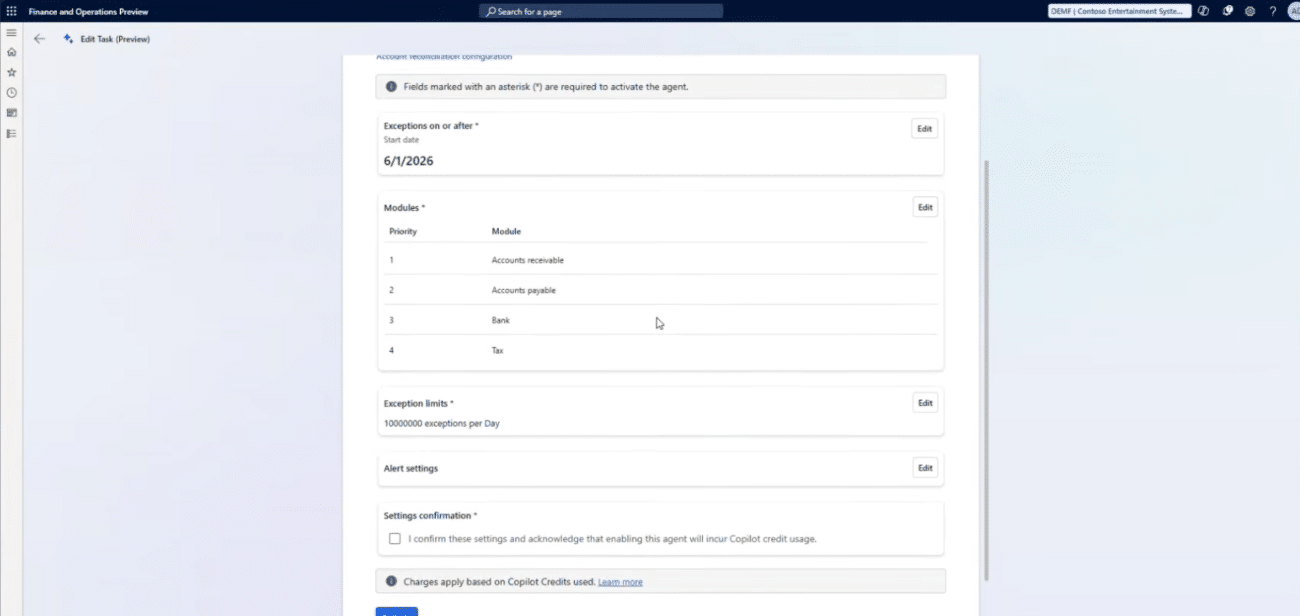
Catch differences before month-end
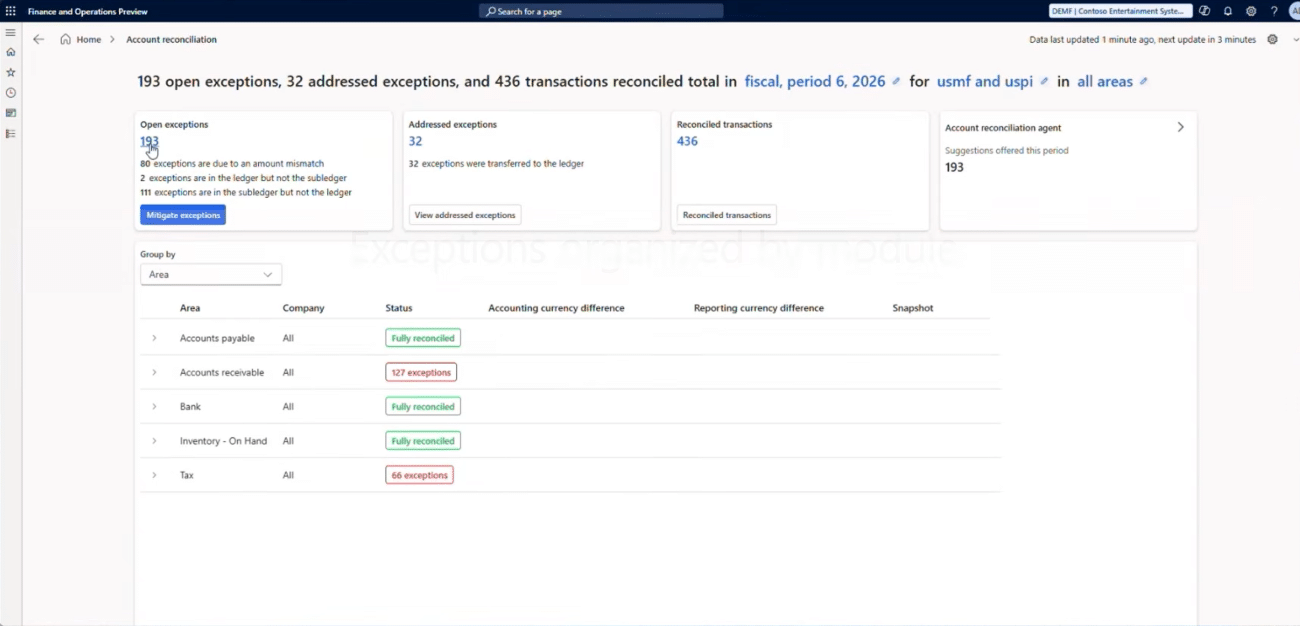
A background process compares your subledgers against the general ledger on a configurable schedule. Identified differences appear in the Account reconciliation workspace, allowing your team to monitor reconciliation activity and determine which areas need attention.
With the agent, your finance team can:
- Reconcile accounts payable, accounts receivable, tax, and bank subledgers against the general ledger
- View reconciliation exceptions across configured modules and legal entities in one workspace
- Identify differences such as mismatched amounts and missing transactions
- Run reconciliation checks automatically on a configurable schedule without relying entirely on manual reports
Resolve exceptions with AI-powered recommendations
The agent goes beyond identifying reconciliation differences. For supported exception types, it analyzes potential causes and recommends actions to help accountants investigate and resolve discrepancies. Your team reviews the recommendations and decides how to proceed.
For supported exceptions, the agent can:
- Suggest corrective actions with supporting analysis and justification
- Group similar exceptions for more efficient review and resolution
- Help accountants create adjusting journal entries, with support for posting through the bulk mitigation process
- Record resolution actions in the exception history and support reopening addressed exceptions when necessary

Close the books with fewer surprises
We can help you get the agent activated, choose the modules to reconcile first, and set limits that keep usage predictable. Get in touch to see how the Account Reconciliation Agent would fit your close process.
How it works
Inside the reconciliation cycle
The Account Reconciliation Agent helps finance teams monitor and address reconciliation differences throughout the accounting period. It combines scheduled reconciliation checks with AI-powered recommendations while keeping accountants involved in resolution decisions.
Set the scope
Choose which supported modules and legal entities to include, configure the reconciliation starting date, and establish daily or monthly exception-processing limits.
Compare the balances
The system compares configured subledgers against the general ledger on a recurring schedule to identify differences that require investigation.
Flag exceptions
Identified reconciliation differences appear in the Account reconciliation workspace, where accountants can review outstanding exceptions and prioritize their work.
Recommend a fix
For supported exception types, the agent analyzes the discrepancy and recommends an appropriate action with supporting justification.
Review and resolve
An accountant reviews the recommendation and selects an appropriate resolution. Depending on the action and workflow, additional journal entry processing or posting may be required. Resolution decisions are recorded in the exception history.
Compatibility & requirements
Getting started with the Account Reconciliation Agent
The Account Reconciliation Agent is available with Dynamics 365 Finance and Finance Premium as a production-ready preview. Running the agent consumes Copilot Credits, and organizations can configure daily or monthly exception-processing limits to manage workloads. Credit consumption can also be monitored to help manage costs.
To get the agent up and running, you’ll need
- Dynamics 365 Finance or Finance Premium, running version 10.0.46 or later
- Required Copilot components, feature settings, and Power Platform configurations
- A dedicated agent identity with appropriate security permissions that does not require a separate Finance user license
- Reconciliation enabled for the supported modules and legal entities you want to include
- Account configurations based on your existing posting profiles, bank accounts, and tax settings
- Sufficient Copilot Credits, with an Azure subscription linked to your environment if you choose pay-as-you-go billing

Why partner with Rand Group?
Built around your close process
We assess how your team closes the books today and identify which modules and legal entities could benefit most from scheduled reconciliation. We then help configure the agent’s reconciliation scope, exception-processing limits, and usage monitoring to support your financial close process.
Support well beyond go-live
Across more than 3,000 engagements, we have helped finance teams improve their systems one period at a time. Once the agent is running, we stay involved to review its results, adjust settings, and roll out Microsoft’s updates as the agent moves toward general availability.
Local teams who know finance
Our consultants work from offices across the United States and Canada, providing access to experienced professionals who understand finance processes and enterprise applications. We also help accountants and controllers learn how to review agent recommendations and use the reconciliation workspace confidently.
Trusted Dynamics 365 Finance expertise
Rand Group is a Microsoft Solutions Partner recognized in Accounting Today’s VAR 100. Our experience implementing Dynamics 365 Finance and developing AI agents helps organizations understand where Microsoft’s standard capabilities fit their requirements and where custom solutions may provide additional value.
Frequently Asked Questions (FAQs)
What is the Account Reconciliation Agent in Dynamics 365 Finance?
The Account Reconciliation Agent is a Microsoft AI agent built into Dynamics 365 Finance. It helps organizations regularly compare subledger and general ledger balances, identify reconciliation differences, and recommend actions for supported exception types. Accountants review the recommendations and determine how to resolve discrepancies.
To learn more about the platform it runs on, read our guide to what Dynamics 365 Finance includes.
Is the Account Reconciliation Agent generally available?
Not yet. Microsoft currently offers the Account Reconciliation Agent as a production-ready preview. Organizations can use the agent in production environments while Microsoft continues developing and refining its capabilities. Rand Group can assist with configuration and help your team prepare for future updates.
Which accounts does the agent reconcile?
The agent supports reconciliation of accounts payable, accounts receivable, tax, and bank subledgers against the general ledger. Reconciliation accounts are initially populated using existing posting profiles, bank accounts, and tax configurations. Administrators can review and adjust which accounts are included for each supported module and legal entity.
Does the agent post journal entries on its own?
The agent does not independently decide to post adjusting journal entries. It provides recommendations that accountants review before taking action. Depending on the resolution method, journal entries may require manual or batch posting. The bulk mitigation process can also create and post adjusting journals after the user confirms the action.
How is the Account Reconciliation Agent priced?
The Account Reconciliation Agent is available with Dynamics 365 Finance and Finance Premium. Running the agent consumes Copilot Credits, and Finance Premium includes 1,000 Copilot Credits per licensed user each month. Dynamics 365 Finance customers can purchase credits separately through prepaid capacity or pay-as-you-go billing. Organizations can also configure daily or monthly exception-processing limits and monitor credit consumption to help manage usage.
For more detail, see our breakdown of how Microsoft Copilot Credits work, including usage, costs, and limits.
How often does the agent check for differences?
By default, the reconciliation process runs every six hours in the background. The schedule can be configured to support your organization’s reconciliation requirements, allowing accountants to identify differences throughout the accounting period rather than waiting until month-end.
What if we disagree with the agent's recommendation?
Your accountants remain responsible for resolution decisions. Depending on the exception, users can select another supported resolution action, such as reversing a transaction, linking related entries, or accepting the difference without making changes. Resolution decisions are recorded in the exception history, and addressed exceptions can be reopened when further investigation is required.
Can Rand Group customize the Account Reconciliation Agent?
Microsoft develops and maintains the Account Reconciliation Agent. Organizations can configure supported settings, including reconciliation scope, schedules, and exception-processing limits. Rand Group can help configure these capabilities to align with your business processes. For requirements that extend beyond the standard agent’s functionality, we can also evaluate opportunities for custom AI solutions.