Dynamics 365
 Power Platform
 Dynamics
 Cloud & Productivity
Financial tags in Dynamics 365 Finance & Operations

Managing financial data accurately and efficiently is crucial for organizations looking to make informed decisions. Dynamics 365 Finance and Operations (D365 F&O) offers powerful features that can help businesses stay on top of their financial data. One of these features, financial tags, is an excellent tool for businesses looking to add an extra layer of flexibility and granularity to their financial tracking.
Financial tags allow you to categorize and track financial transactions based on customizable criteria such as departments, cost centers, projects, or regions. This feature enhances the ability to report and analyze financial data, providing clearer insights into business performance.
The benefit of financial tags in D365 Finance & Operations
Financial tags in D365 F&O give you the ability to apply additional metadata to your financial transactions, making it easier to categorize and track specific financial data across different aspects of your business. With this feature, you can create detailed reports that help improve budgeting, forecasting, and overall financial analysis.
Key Benefits of Financial Tags:
- Enhanced Categorization: Track transactions based on custom tags, such as departments, locations, or projects.
- Improved Reporting and Audit Trails: Use tags to filter and group financial data, allowing for more detailed and tailored financial reports. By categorizing transactions with specific tags, organizations can improve data visibility, track financial performance more accurately, and streamline audits by ensuring that transactions are easily traceable and well-documented.
- Integration Across Multiple Modules: Financial tags are seamlessly integrated across various modules such as General Ledger, Accounts Payable, Accounts Receivable, and Project Management.
- Real-Time Financial Tracking: Financial tags allow businesses to track and update financial data in real time. This means that as transactions are entered into the system, they are immediately tagged with relevant financial dimensions
- Increased Flexibility: Apply tags to various financial dimensions (e.g., cost centers, projects, regions), making it easier to analyze data in different ways.
- Streamlined Financial Analysis: Financial tags allow for better analysis of specific cost drivers or revenue streams, supporting more informed decision-making.

How to use financial tags in Dynamics 365 Finance
Financial tags in D365 F&O can be easily utilized once the appropriate configurations are in place. The following steps outline the process to get started:
Prerequisite
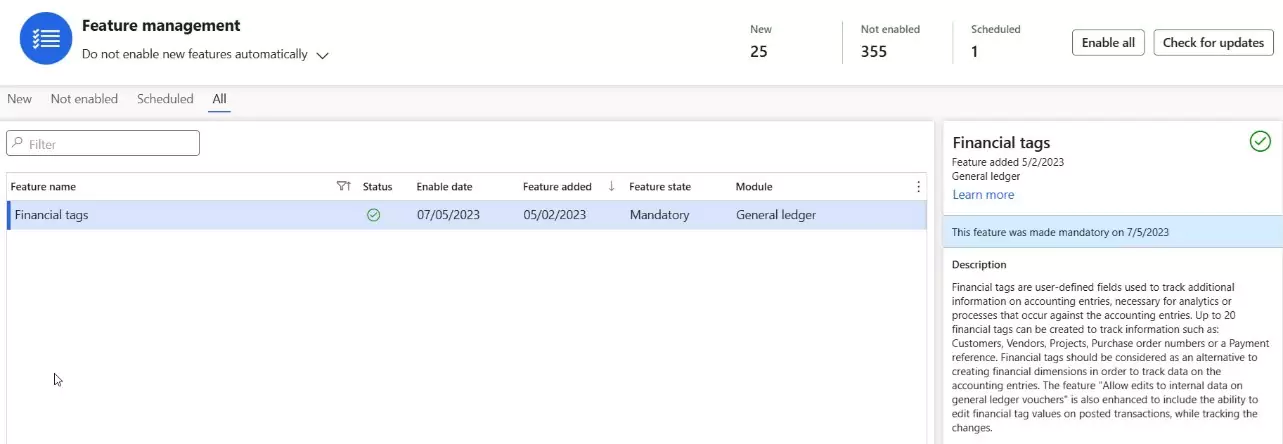
- The Financial tags feature in the Feature management workspace must be enabled. The feature can be disabled at any time.
Creating Financial Tags
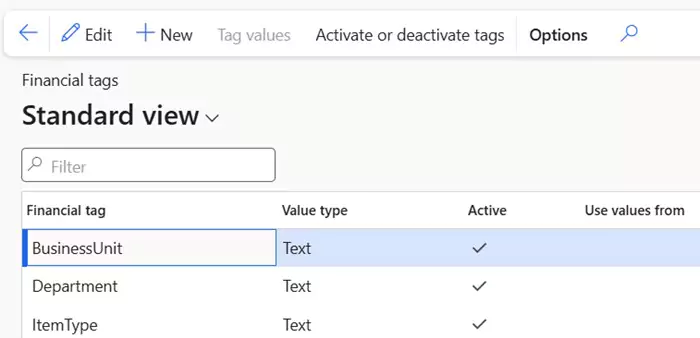
- Navigate to General ledger > Chart of accounts > Financial tags > Financial tags.
- Select New to create a tag.
- Provide a label for the tag (it must start with a letter or underscore and can only contain letters, numbers, or underscores).
- Select the Value type for the tag:
- Text: Free text value.
- List: Predefined list of values that can be selected during transaction entry.
- Custom list: Create a custom set of values for selection.
- After entering the required details, click Activate to enable the tag.
Using financial tags in transactions
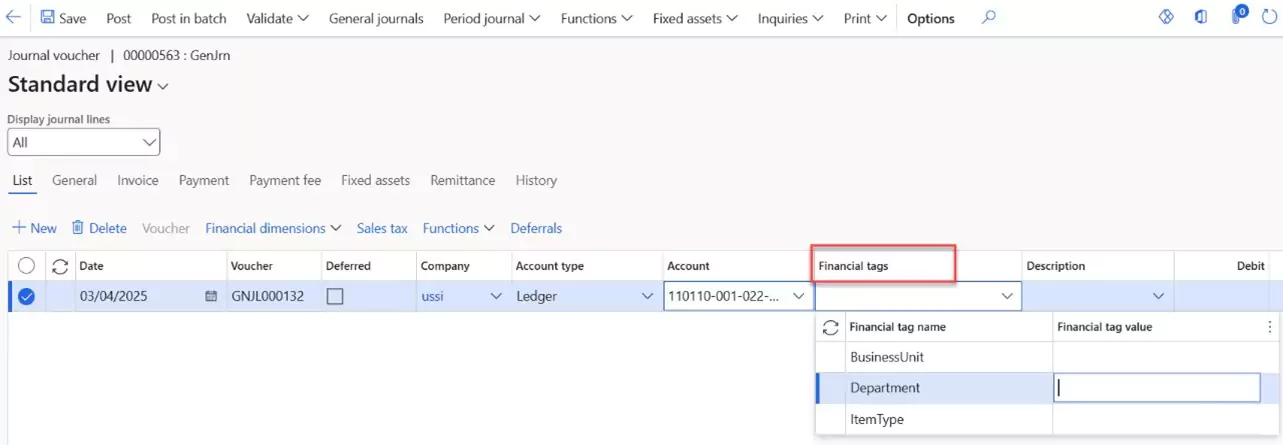
Tags are visible in transaction reports, but they don’t contribute to summarized financial data. Once tags are created and activated, they can be used on various types of transactions such as:
- Journal Entries: General, vendor, customer, fixed asset, and project journals
- Vendor & Customer Transactions: Purchase & sales invoices, expense reports
- Budgeting: Budget register entries, budget control transactions
- Financial Reporting: Trial balance, Management Reporter, custom reports
- Allocations & Distributions: Cost allocations, revenue & expense distributions
- Project Accounting: Project costs, revenues, and journal entries
Enhance your financial reporting in D365 F&O with financial tags
Financial tags in D365 F&O offer businesses a simple yet powerful way to enhance financial reporting. By categorizing financial transactions and applying custom tags, organizations gain better visibility, more control over their data, cost optimization, and the ability to generate highly detailed reports that support informed decision-making.
Additionally, applying financial tags can greatly improve reporting processes, providing greater control over how financial data is grouped and analyzed. Whether tracking expenses across multiple cost centers or analyzing revenue by product line, financial tags help maintain organized and easily accessible data.
For companies looking to unlock the potential of financial tags or learn more about their benefits, Rand Group is ready to help. Contact our team today for more information and let us optimize your D365 F&O system to drive growth and efficiency.

Rand Group’s Services
At Rand Group, we understand the importance of utilizing D365 Finance and Operation’s full range of features to streamline your financial processes and enhance reporting capabilities. Our team of experts works closely with businesses to ensure they are leveraging the most impactful tools and features in D365 F&O, like financial tags, to drive operational efficiency.
Rand Group provides personalized support to assist users in setting up and customizing Dynamics 365 F&O tailored to their specific business needs, including help with financial tags. Whether financial tags are being implemented for project tracking, cost center analysis, or geographic reporting, Rand Group offers expert guidance, training, and support to ensure a smooth adoption process.
Whether you’re looking to improve customer relationship management, financial processes, or operations, our team’s unique qualifications and hands-on expertise allow us to deliver scalable solutions that drive success. Our approach focuses on creating measurable results that enhance productivity, drive innovation, and foster long-term sustainability.
If you have any questions or need assistance with Dynamics 365, contact our team of software specialists who can help you maximize the value of your system.
Subscribe to our Insights
Follow Us
Related Insights

What are AI Agents in Microsoft Dynamics 365 Finance & Operations?
AI agents in Dynamics 365 Finance & Operations are intelligent capabilities that analyze ERP data, apply business context, and execute tasks or recommendations with limited human input. They are designed to support finance and operations teams as transaction...

How professional Dynamics 365 Finance & Operations training drives user adoption
Investing in Microsoft Dynamics 365 Finance & Operations training is more than a technology decision, it’s a strategic move to transform how your organization operates. Today, what was formerly known as Microsoft Dynamics AX has evolved into two integrated...

Dynamics 365 pricing guide: Costs, licensing, and implementation explained
Understanding how Dynamics 365 pricing works is key to planning your investment and building a system that fits your business. Dynamics 365 offers flexible, per-user licensing with multiple applications that cover both ERP and CRM functionality. The total cost depends...