Dynamics 365
 Power Platform
 Dynamics
 Cloud & Productivity
Microsoft Dynamics 365 Finance and Operations demo: Videos, features, and how to schedule a demo

Organizations evaluating enterprise ERP systems often want to see how the software works before making a decision. A Dynamics 365 Finance & Operations demo provides a practical way to explore the platform’s capabilities, understand how financial and operational workflows function, and evaluate whether the system fits your organization’s needs. Watching the system in action helps finance leaders, operations teams, and IT stakeholders better understand how the ERP platform supports real business processes.
In this guide, we explain what Dynamics 365 Finance & Operations is, what features and capabilities are typically demonstrated, and how to watch demo videos or schedule a personalized walkthrough. If you want to see Dynamics 365 Finance & Operations in action, this article will help you understand what to expect and how to get started with a tailored demo.
- What is Dynamics 365 Finance & Operations?
- Key features and capabilities in Dynamics 365 Finance & Operations
- Watch our Dynamics 365 Finance & Operations demo videos
- How a personalized Dynamics 365 Finance & Operations demo works
- How to prepare for a Dynamics 365 Finance & Operations demo
- What to expect during a Dynamics 365 Finance & Operations demo
- Why work with Rand Group for your Dynamics 365 Finance & Operations demo
- Frequently asked questions
What is Dynamics 365 Finance & Operations?
Dynamics 365 Finance & Operations (D365 F&O), also known as Dynamics 365 Finance & Supply Chain Management (D365 F&SCM), is Microsoft’s cloud-based enterprise resource planning (ERP) system designed to manage complex financial and operational processes in one unified platform. It connects core business functions such as financial management, procurement, inventory, manufacturing, supply chain planning, and distribution. By centralizing these processes in a single system, organizations gain real-time visibility into operations and can make more informed business decisions.
Dynamics 365 Finance & Operations is made up of two primary applications: Dynamics 365 Finance and Dynamics 365 Supply Chain Management. Dynamics 365 Finance focuses on financial operations such as accounting, budgeting, financial reporting, and compliance. Dynamics 365 Supply Chain Management supports operational processes including procurement, inventory management, manufacturing, logistics, and warehouse operations. These applications can be used independently, but many organizations deploy both together to create a complete enterprise ERP platform.
The platform is designed primarily for medium to large organizations that require an ERP system capable of supporting global operations, large transaction volumes, and complex supply chains. Because of the breadth of capabilities within the system, many organizations request a Dynamics 365 Finance & Operations demo to see how the platform works in real business scenarios before making an ERP decision. A live or recorded demo allows stakeholders to explore financial workflows, supply chain operations, and reporting capabilities in action.
To learn more, read our blog on What is Dynamics 365 Finance & Operations?
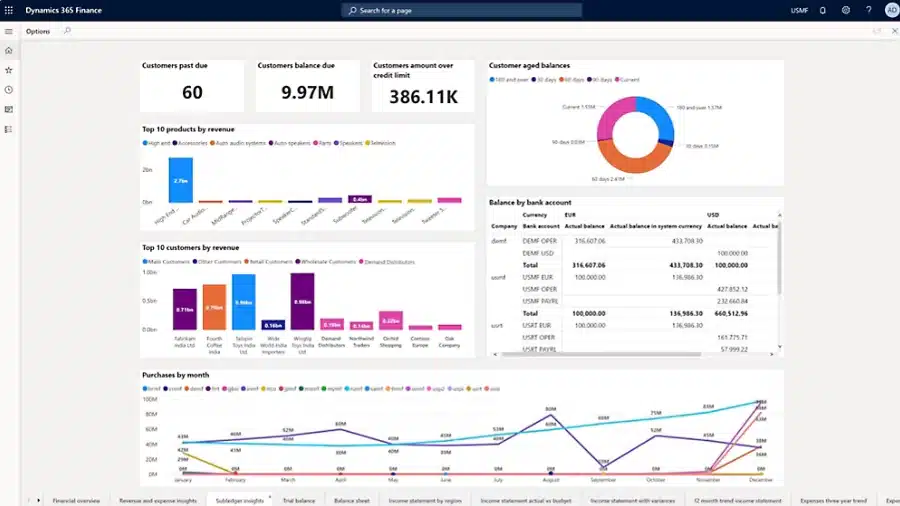
Key features and capabilities in Dynamics 365 Finance & Operations
Dynamics 365 Finance & Operations includes a wide range of capabilities designed to support complex financial processes, global supply chains, and large-scale operations. The platform helps organizations centralize financial data, manage operational workflows, and gain real-time visibility across departments. Through automation, embedded analytics, and configurable business processes, teams can monitor performance, reduce manual work, and make more informed decisions.
A Dynamics 365 Finance & Operations demo typically highlights these capabilities in action. During a demo, organizations can see how financial transactions are processed, how supply chain operations are managed, and how reporting and planning tools provide visibility into business performance. Seeing these workflows live helps decision makers understand how the system supports day-to-day operations across finance, manufacturing, procurement, and logistics.
Key capabilities in Dynamics 365 Finance & Operations include:
- Financial management and global accounting
- General ledger, accounts payable, and accounts receivable
- Cash and bank management
- Budgeting, forecasting, and financial planning
- Cost accounting and financial reporting
- Procurement and sourcing management
- Inventory and warehouse management
- Demand planning and master planning
- Manufacturing and production control
- Order management and pricing
- Transportation and logistics management
- Asset management and equipment maintenance
- Project management and project accounting
- Sales and service operations within the ERP platform
To learn more, explore Dynamics 365 Finance & Operations capabilities or our blog on the Dynamics 365 Finance & Operations modules.
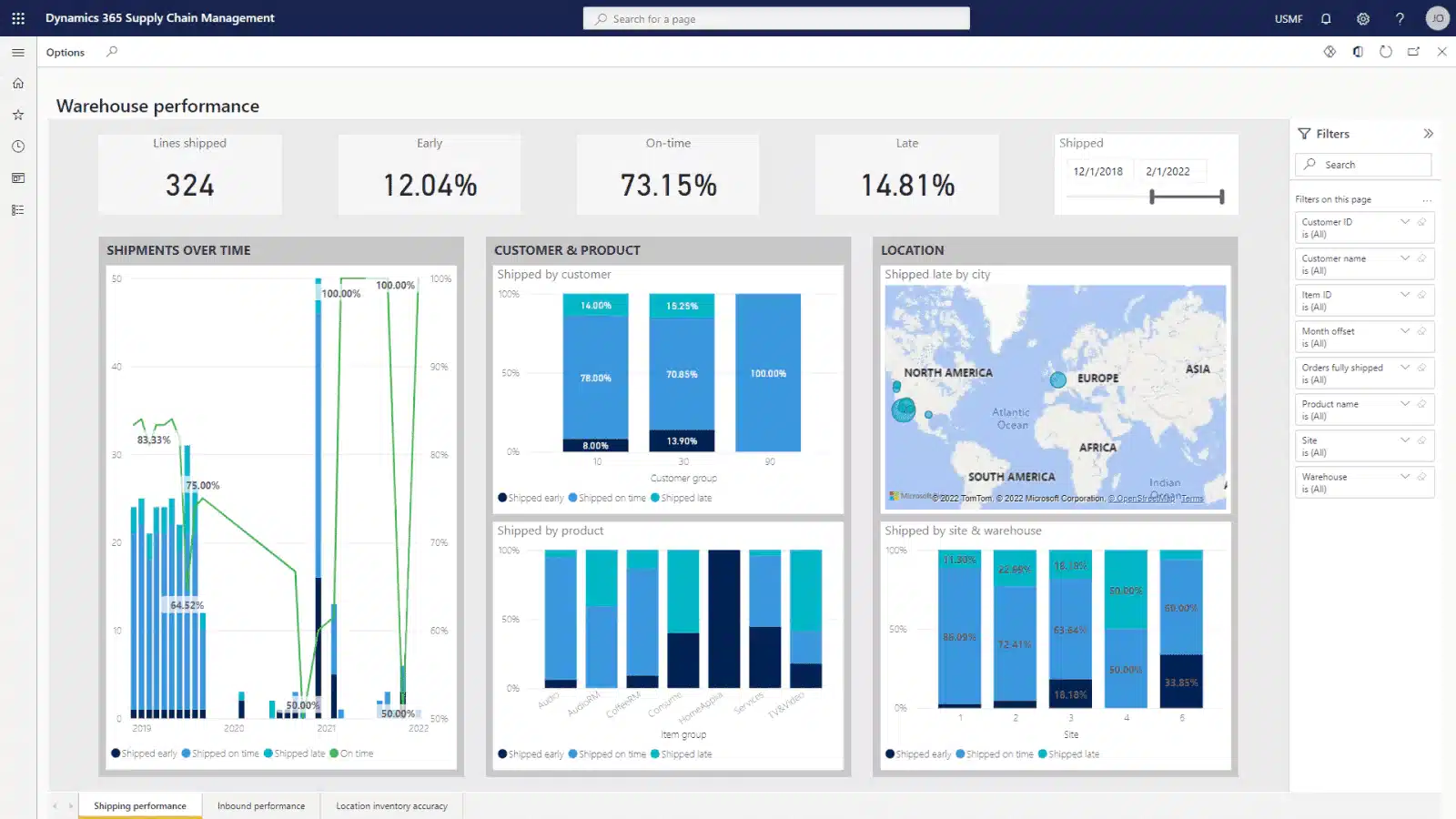
Watch our Dynamics 365 Finance & Operations demo videos
These Dynamics 365 Finance & Operations demo videos show real workflows across finance, operations, and AI so you can see how the platform works in practice.
Dynamics 365 Finance & Supply Chain Management overview
See Microsoft Dynamics 365 Finance and Supply Chain Management running live in this comprehensive platform overview. The video demonstrates how organizations can manage finance, procurement, inventory, manufacturing, warehousing, and supply chain operations within one connected ERP system.
You will also see how users navigate modules and role-based workspaces, access real-time financial and operational information, manage purchase orders and inventory, and support warehouse processes. The walkthrough also explores native integrations with Excel, Microsoft Teams, Power BI, Power Automate, and Copilot.
In this video, you will learn:
- How users navigate Dynamics 365 Finance and Supply Chain Management through modules, workspaces, global search, and personalized views
- How the platform connects financial management, procurement, inventory, and warehouse operations using shared real-time data
- How Microsoft 365, Power Platform, and Copilot capabilities are integrated into everyday ERP workflows
Financial management demos
These demos highlight how finance teams use Dynamics 365 Finance to manage budgeting, expenses, compliance, and financial controls.
Advanced budgeting in Dynamics 365 Finance & Operations
See how organizations manage the full budgeting lifecycle using Dynamics 365 Finance. The walkthrough shows how budgets are created, reviewed, approved, and enforced through automated workflows that connect finance teams, operational leaders, and executives. You will also see how real-time visibility and budget enforcement help ensure spending stays aligned with approved financial plans.
In the advanced budgeting in D365 F&O video, you will learn:
- How to build, review, approve, and post budgets using automated, workflow-driven processes in Dynamics 365 Finance
- How advanced budgeting improves visibility, control, and collaboration across departments and leadership
- How budget enforcement and reporting ensure spend stays aligned with approved financial plans
Expense management reporting and audit workbench
Learn how organizations manage employee expenses while maintaining strong financial controls. The session explores how Expense Management and the Audit Workbench work together to enforce policies, detect anomalies, and strengthen expense governance. You will also see how finance teams identify duplicate expenses, flag policy violations, and maintain financial transparency without slowing down approvals.
In this video, you will learn:
- How to configure expense policies and workflows to enforce spending limits, receipt requirements, and approvals
- How to use Audit Workbench to detect duplicate expenses, run random sampling, and flag policy exceptions
- How to track audit findings to resolution and strengthen compliance, risk mitigation, and financial transparency
Operational and supply chain demos
These demos show how Dynamics 365 Finance & Operations connects operational processes with financial data to maintain accurate records and support asset tracking.
Inventory to fixed asset transfer workflow
This Dynamics 365 Finance & Operationsdemo shows how organizations can transfer items from inventory to fixed assets when equipment is sold, rented, or repurposed. The video demonstrates how this native capability helps maintain accurate financial records while supporting asset tracking and depreciation. You will also see how the process connects operational inventory management with financial accounting.
In this video, you will learn:
- How to navigate the Fixed Assets module and locate key features
- How to post and verify inventory-to-fixed-asset transactions
- How to track and review the related journal and ledger entries
AI and automation demos
These demos show how artificial intelligence improves productivity and decision-making inside Dynamics 365 Finance & Operations.
AI-powered Copilot in Dynamics 365 Finance & Operations
Discover how AI-powered Copilot helps finance and operations teams work more efficiently inside the ERP system. The session shows how users interact with data using natural language, automate repetitive tasks, and generate insights that support faster decision-making. You will also see how Copilot simplifies complex workflows while helping teams analyze data and take action more quickly.
In this video, you will learn:
- How Copilot uses natural language prompts to retrieve insights and summarize data
- How AI-powered automation helps reduce manual work across finance and operations processes
- How Copilot supports faster decision-making with real-time insights and recommendations

Get a personalized Dynamics 365 Finance & Operations demo
Video demos provide a helpful overview of Dynamics 365 Finance & Operations, but every organization has unique workflows, data, and operational requirements. A personalized demo allows you to see how the system works with your specific processes, giving you a clearer understanding of how it can support your finance and supply chain operations.
How a personalized Dynamics 365 Finance & Operations demo works
A personalized Dynamics 365 Finance & Operations demo is designed to show how the system supports your organization’s specific financial and operational processes. Before the demo, your team typically meets with a Microsoft partner to discuss your current systems, key business workflows, and the challenges you want to solve. This discovery step helps ensure the demo focuses on the areas most relevant to your organization, such as financial management, supply chain operations, manufacturing, or reporting.
Because Dynamics 365 Finance & Operations is a highly configurable ERP platform, demos are typically scoped to focus on the areas most relevant to your organization. Rather than attempting to cover every feature, the session is designed around your key workflows, such as financial management, supply chain operations, or manufacturing processes.
In some cases, additional configuration or data setup may be completed in advance to reflect your business scenarios more accurately. For more complex environments, organizations may participate in multiple demo sessions over time to explore different functional areas in greater depth.
During the demo, you will see real workflows inside Dynamics 365 Finance & Operations that mirror how your team works. The walkthrough may include financial transactions, budgeting, procurement processes, inventory management, or operational reporting depending on your priorities. This approach helps decision makers understand how the ERP platform supports day-to-day operations and whether it fits the complexity, scale, and goals of the business.
How to prepare for a Dynamics 365 Finance & Operations demo
Preparing in advance helps ensure your Dynamics 365 Finance & Operations demo focuses on the areas that matter most to your business. Because D365 Finance & Operations supports a wide range of financial and operational processes, identifying your priorities beforehand allows the demo to show relevant workflows, reports, and integrations. A little preparation also helps your team ask better questions and evaluate whether the ERP system fits your organization’s needs.
How to prepare for a Dynamics 365 Finance & Operations demo:
- Identify any limitations you want to address in your current ERP or accounting system
- Outline the key business processes you want to see in the demo, such as financial management, inventory, procurement, or manufacturing
- Prepare examples of reporting, forecasting, or operational insights your team needs
- Consider integration requirements with systems like CRM, eCommerce platforms, or data analytics tools
- Invite key stakeholders from finance, operations, supply chain, and IT to attend the session
- Document specific challenges or inefficiencies you want the system to solve
What to expect during a Dynamics 365 Finance & Operations demo
A Dynamics 365 Finance & Operations demo is designed to show how the platform supports real financial and operational workflows across your organization. Rather than reviewing features in isolation, the session typically walks through practical business scenarios so you can see how the system works in context.
Most demos are tailored to your priorities, focusing on the processes that matter most to your team. Depending on your requirements, this may include financial management, supply chain operations, manufacturing, or reporting. For organizations with more complex needs, the demo may be delivered across multiple sessions, each focused on a specific functional area.
During a Dynamics 365 Finance & Operations demo, you may see:
- Financial workflows such as general ledger, budgeting, and financial reporting
- Procurement and purchasing processes
- Inventory, warehouse, and supply chain management workflows
- Manufacturing and production planning scenarios
- Operational reporting and dashboards
- Integration with other Microsoft technologies such as Power BI or Microsoft 365
- Examples of automation, AI capabilities, and workflow approvals
- Discussion of implementation considerations and next steps
This approach helps stakeholders understand how the system supports day-to-day operations, how it aligns with existing processes, and what a successful implementation could look like within their organization.

Why work with a Rand Group for your Dynamics 365 Finance & Operations demo
A Dynamics 365 Finance & Operations demo is most valuable when it is guided by experts who understand enterprise ERP systems and the complexities of financial and operational processes. Rand Group has decades of experience helping organizations evaluate, implement, and optimize Microsoft business applications. Our team works closely with finance leaders, operations teams, and IT stakeholders to ensure demos focus on the workflows, reporting, and operational scenarios that matter most to your organization.
As a Microsoft Solutions Partner and 2025 Microsoft Partner of the Year, Rand Group brings deep product expertise and real-world implementation experience to every engagement. Our consultants regularly design and deliver Dynamics 365 Finance & Operations solutions for organizations with complex supply chains, global operations, and advanced financial requirements. During your demo, we focus on showing how the platform supports your business processes and how a successful ERP implementation could be structured.
- Deep expertise in Dynamics 365 Finance and Dynamics 365 Supply Chain Management
- Experience delivering ERP solutions for complex financial and operational environments
- Guidance from consultants who have led real Dynamics 365 implementations
- Industry knowledge across manufacturing, distribution, services, and other sectors
- A tailored demo focused on your organization’s workflows, challenges, and goals
- Strategic insight into architecture, integrations, and long-term ERP planning
Contact us today to schedule your personalized demo.
Frequently asked questions
What is a Dynamics 365 Finance & Operations demo?
A Dynamics 365 Finance & Operations demo is a guided walkthrough of Microsoft’s enterprise ERP system that shows how the platform manages financial processes, supply chain operations, and business workflows. The demo typically highlights real scenarios such as budgeting, procurement, inventory management, reporting, and automation. Organizations use demos to understand how Dynamics 365 Finance and Dynamics 365 Supply Chain Management support their operational and financial requirements.
How long does a Dynamics 365 Finance & Operations demo take?
The length of a Dynamics 365 Finance & Operations demo depends on how the session is structured and what areas of the system you want to explore. Introductory demos typically last 60 to 90 minutes and focus on a specific set of workflows, such as financial management, supply chain operations, or reporting, rather than the entire platform.
Because Dynamics 365 Finance & Operations is a highly configurable and comprehensive ERP system, most organizations participate in multiple demo sessions to explore different functional areas in more depth. Additional sessions may focus on areas such as manufacturing, advanced finance, integrations, or industry-specific processes.
Is a Dynamics 365 Finance & Operations demo free?
Yes. Most Microsoft partners offer a Dynamics 365 Finance & Operations demo at no cost as part of the evaluation process. These sessions are designed to help organizations understand how the ERP system works and evaluate whether it fits their financial and operational requirements.
In some cases, more in-depth sessions may be scoped separately if they require significant configuration or are tailored to highly specific business scenarios.
What should I prepare before a Dynamics 365 Finance & Operations demo?
Before a Dynamics 365 Finance & Operations demo, organizations should identify the key processes they want to evaluate in the ERP system. This may include financial management workflows, procurement processes, inventory management, reporting requirements, and integrations with existing systems.
Providing examples of current challenges, desired outcomes, and relevant data or scenarios can help ensure the demo is tailored to your organization’s needs and focuses on the most important business workflows.
Can a Dynamics 365 Finance & Operations demo be customized for my industry?
Yes. A Dynamics 365 Finance & Operations demo is typically tailored to reflect the workflows and operational requirements of your industry. Rather than covering every feature, demos are scoped to focus on the processes most relevant to your business.
For example, organizations in manufacturing may focus on production planning and shop floor management, while distribution companies may prioritize inventory, warehouse, and logistics workflows. This approach helps decision makers evaluate how the ERP system supports their specific business processes.
What happens after a Dynamics 365 Finance & Operations demo?
After a Dynamics 365 Finance & Operations demo, organizations typically discuss next steps with the Microsoft partner who led the session. This may include deeper solution discussions, architecture planning, licensing guidance, or an implementation roadmap. The goal is to determine whether the platform aligns with the organization’s operational needs and long-term ERP strategy.
How do I sign up for a personalized Dynamics 365 Finance & Operations demo?
To sign up for a personalized Dynamics 365 Finance & Operations demo, contact us today and request a tailored walkthrough. The partner will schedule a discovery conversation to understand your business processes, systems, and priorities before preparing a demo focused on your organization’s workflows. This approach helps ensure the session shows how Dynamics 365 Finance & Operations can support your specific financial and operational requirements.
Next steps
Watching demo videos is a great way to understand how Dynamics 365 Finance & Operations works, but the best way to evaluate the platform is through a personalized walkthrough. A tailored demo allows you to see the system using workflows that reflect your financial processes, operational requirements, and reporting needs. This approach helps your team better understand how the ERP system could support your organization’s day-to-day operations.
Rand Group’s Dynamics 365 experts can guide you through the platform, answer questions about implementation and architecture, and demonstrate the areas of the system most relevant to your business. Whether you want to explore financial management, supply chain operations, manufacturing, or reporting, our team can build a demo tailored to your priorities. Contact us today to schedule your personalized Dynamics 365 Finance & Operations demo.