Dynamics 365
 Power Platform
 Dynamics
 Cloud & Productivity
How Expense Management and Audit Workbench work together in Dynamics 365 Finance & Operations

Managing employee expenses is rarely just about reimbursement. For finance leaders, expense management sits at the intersection of policy enforcement, financial control, audit readiness, and employee experience. As organizations grow, manual reviews and after-the-fact audits quickly become unsustainable, increasing the risk of duplicate payments, policy violations, and compliance gaps.
Microsoft Dynamics 365 Finance & Operations addresses this challenge by pairing Expense Management with the Audit Workbench. Together, these capabilities help organizations enforce policies at the point of entry while continuously monitoring compliance across approved expense activity. The result is a more proactive, transparent, and auditable expense process that scales with the business.
This blog explains how Expense Management and Audit Workbench work together in Dynamics 365 Finance, what each module is responsible for, and how organizations can use them in combination to strengthen financial integrity without slowing down operations.
Strengthening expense controls with audit insights in Dynamics 365 Finance & Operations
Expense Management in D365 F&O focuses on capturing, validating, and processing employee spend in a structured and policy-driven way. It ensures that expense reports are complete, categorized correctly, and approved before financial posting.
Key capabilities include:
- Defining expense categories such as lodging, meals, transportation, or entertainment
- Configuring expense policies with thresholds, requirements, and enforcement logic
- Routing expense reports through approval workflows
- Posting expenses to the general ledger and creating employee reimbursements
- Supporting itemization and detailed expense tracking
Expense Management is where organizations translate policy into system behavior. It shapes how employees submit expenses and how managers review them.
How expense policies enforce compliance at submission in Dynamics 365 Finance & Operations
Expense policies are the foundation of control within the Expense Management module. They determine what employees can submit, what information is required, and when exceptions must be justified or escalated.
A typical expense policy configuration may include:
- Spending limits by category, such as a maximum nightly hotel rate
- Receipt requirements for certain expense types or dollar thresholds
- Mandatory justifications when receipts are missing
- Required fields such as number of hotel nights or itemized breakdowns
- Conditional approvals, including escalations for high-value expenses
These rules are enforced during expense entry. If an employee exceeds a threshold or omits required documentation, the system prompts for corrective action before allowing submission.
This approach reduces errors early and minimizes back-and-forth between employees and approvers. At the same time, it ensures that compliant expenses move through the process efficiently.

Using workflows to control approvals and posting in Dynamics 365 Finance & Operations
Once an expense report meets policy requirements, it moves through workflow. Approval workflows in Dynamics 365 Finance & Operations can be configured to reflect organizational hierarchy, delegation rules, and escalation paths.
Workflow controls allow organizations to:
- Automatically approve low-risk expenses
- Route exceptions to managers or finance for review
- Require additional approvals for high-value or sensitive categories
- Ensure consistent review before posting to the general ledger
After approval, expenses can be posted to the appropriate accounts and processed for reimbursement. At this point, Expense Management has fulfilled its role—but audit oversight is just beginning.

What the Audit Workbench adds to the process in Dynamics 365 Finance & Operations
Audit Workbench is designed for post-submission and post-approval analysis. Rather than enforcing rules during entry, it evaluates expense data against audit policies to identify anomalies, trends, and exceptions that warrant review.
Audit Workbench enables organizations to:
- Detect duplicate expense submissions
- Perform random sampling for audit purposes
- Flag expenses based on keywords, categories, or thresholds
- Track audit cases from identification to resolution
- Maintain a documented audit trail of findings and actions

Get more value from Dynamics 365 Finance & Operations
Dynamics 365 Finance & Operations plays a critical role in financial control and operational visibility—but only when it’s configured to support your processes and risk requirements. Rand Group helps organizations assess, optimize, and extend D365 F&O to improve governance, scalability, and confidence in financial operations.
How audit policies differ from expense policies in Dynamics 365 Finance & Operations
Expense policies and audit policies serve different but complementary purposes.
Expense policies define what is allowed and what is required at the time of submission. Audit policies define what should be reviewed after the fact.
Audit policies can be configured to evaluate expense data in ways that are impractical or disruptive to enforce during entry, such as identifying patterns across multiple reports or sampling transactions for periodic review.
Examples of audit policy use cases include:
- Identifying duplicate hotel expenses submitted on the same date for the same amount
- Reviewing a percentage of all expense reports each month
- Flagging expenses over a certain dollar amount for additional scrutiny
- Monitoring specific categories such as meals or conferences
This separation of responsibilities allows organizations to maintain a smooth employee experience while still meeting internal control and audit requirements.

Detecting duplicate expenses with Audit Workbench
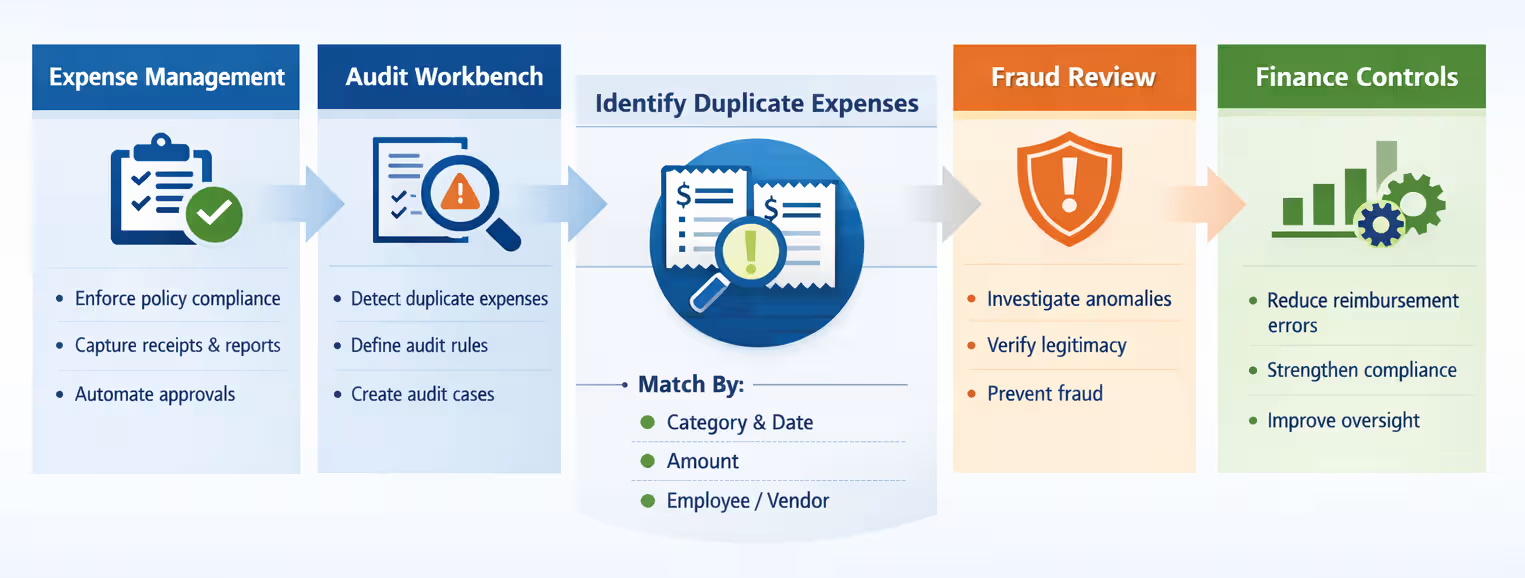
Duplicate expenses are a common and costly risk. While Expense Management in D365 Finance & Operations (D365 F&O) enforces policy at the individual report level, it does not automatically compare reports against each other.
Audit Workbench fills this gap by evaluating expense data across reports and lines. Duplicate detection rules can be based on:
- Expense category
- Transaction date
- Amount
- Employee or vendor
When a match is identified, Audit Workbench creates an audit case that groups related reports for review. Finance teams can quickly assess whether the duplication was accidental or requires follow-up.
This approach reduces the risk of duplicate reimbursements and strengthens financial controls within D365 F&O.
Expense Management reporting and Audit Workbench in Dynamics 365 Finance & Operations
See expense management and audit controls in action within D365 Finance & Operations. This short walkthrough highlights how organizations can strengthen financial governance, reduce risk, and improve oversight directly within the platform.

Using random sampling to support audit requirements
Many organizations are required to perform periodic audits of expense activity, even when no specific issue is suspected. Random sampling allows finance teams to review a representative subset of expense reports without examining every transaction.
Within Audit Workbench, random sampling policies can be configured to:
- Select a defined percentage of expense reports
- Apply sampling over a specific date range
- Run automatically on a recurring schedule
For example, an organization may choose to review 10 percent of all expense reports submitted in a month. The system automatically identifies the sample and creates audit cases for review.
This approach supports audit compliance while minimizing operational overhead.
Running audits continuously, not just at month-end
One of the key advantages of Audit Workbench is continuous auditing. Instead of relying on month-end or quarter-end reviews—often after reimbursements have been processed—organizations can monitor expense activity on an ongoing basis.
Audit policies can run automatically on a defined cadence, whether daily, weekly, or at custom intervals aligned to business risk. This allows finance teams to identify duplicate expenses, policy violations, or unusual patterns closer to the time of submission or approval—often before payments are finalized.
By reviewing exceptions continuously, teams can address smaller volumes of issues throughout the month rather than managing large backlogs at period close. The result is faster resolution, improved responsiveness, and a more sustainable approach to expense oversight.
Managing audit cases from identification to resolution
When an audit policy identifies an exception, Audit Workbench automatically creates an audit case. Audit cases act as a centralized workspace where finance and audit teams can review flagged expense activity, understand why it was identified, and manage the resolution process in a controlled and documented way.
Each audit case brings together the information needed to evaluate an issue efficiently, including:
- The audit policy that triggered the case, providing context on why the exception was flagged
- The related expense reports or expense lines, with direct access to transaction details
- Status tracking, such as open, in progress, or closed, to reflect review progress
- Notes, actions, and supporting documentation captured during the investigation
As reviewers work through a case, they can update statuses, add commentary, and assign follow-up actions directly within Audit Workbench. This ensures that issues are actively managed rather than passively reported.
By tracking audit cases from identification through resolution in a single system, organizations establish clear accountability and maintain a complete audit trail. This structured approach supports internal controls, simplifies external audits, and helps finance teams demonstrate that exceptions are identified, reviewed, and resolved consistently.
How Expense Management and Audit Workbench work together
Expense Management and Audit Workbench are most effective when implemented as a unified control framework rather than separate tools. Each supports a different stage of the expense lifecycle, creating a balance between ease of use and strong financial oversight.
Together, they provide:
- Preventive controls through expense policies, validations, and workflows
- Detective controls through audit policies and continuous monitoring
- Visibility into individual transactions and broader spending trends
- Documentation and traceability for compliance and audit readiness
Expense Management enforces spending rules at submission. Audit Workbench evaluates activity over time to ensure those rules—and their intent—are consistently followed.
Combined, they help organizations shift from reactive reviews to a more disciplined, end-to-end approach to expense governance.
When aligned with structured budgeting in D365 Finance & Operations, expense controls can also support approved financial plans and spending limits. For more on this topic, explore our guide on future-proofing financials with advanced budgeting in Dynamics 365 Finance & Operations.
Real-world benefits for finance and operations teams
Organizations that deploy Expense Management and Audit Workbench together typically see meaningful improvements in both control and operational efficiency. By combining upfront policy enforcement with ongoing audit visibility, finance teams gain greater confidence in expense data while reducing manual effort.
Common benefits include:
- Reduced duplicate and erroneous reimbursements through automated detection and earlier intervention
- Faster identification of policy violations, enabling timely resolution before issues escalate
- Lower audit effort by leveraging automation, continuous monitoring, and targeted sampling
- Improved confidence in expense data accuracy for reporting, forecasting, and decision-making
- Greater transparency for finance leadership into spending behavior and compliance trends
These outcomes become increasingly important as organizations scale. Growing workforces, distributed teams, and evolving regulatory expectations all increase the need for controls that are both effective and sustainable. Together, Expense Management and Audit Workbench help organizations meet those demands without relying on manual oversight alone.
Best practices for implementation
To get the most value from Expense Management and Audit Workbench, organizations should take a deliberate and coordinated approach to configuration. The goal is to apply controls that address real risk while preserving a positive experience for employees and approvers.
Key best practices include:
- Align expense policies with actual business behavior and risk tolerance rather than enforcing theoretical or overly restrictive limits
- Avoid over-enforcing rules that slow down compliant submissions or create unnecessary exceptions
- Start with high-value audit scenarios, such as duplicate detection and dollar thresholds, before expanding to more complex rules
- Schedule audits frequently enough to identify issues before reimbursements are finalized and payments are made
- Establish clear ownership and defined processes for reviewing, resolving, and closing audit cases
A thoughtful design ensures that controls support the business rather than hinder it. When Expense Management and Audit Workbench are configured with intention, they become enablers of transparency, accountability, and scalable financial governance.
Why partner with Rand Group for D365 Finance & Operations
Successfully leveraging Dynamics 365 Finance & Operations requires more than technical configuration. It requires a clear understanding of your financial processes, internal control requirements, reporting needs, and long-term growth strategy.
Rand Group brings deep experience implementing and optimizing D365 F&O for organizations that need scalable financial governance. Our consultants combine functional finance expertise with technical platform knowledge to ensure that system design supports real-world operations—not just theoretical best practices.
We help organizations:
- Align D365 F&O configurations with internal control and compliance objectives
- Design practical governance frameworks that balance usability and oversight
- Optimize financial workflows for efficiency and transparency
- Strengthen reporting and visibility across finance operations
- Support continuous improvement as business requirements evolve
Because we focus exclusively on Microsoft solutions, our team understands how D365 F&O fits within the broader Microsoft ecosystem—including Power Platform, Azure, and analytics capabilities that extend financial insight.
Our approach is consultative and outcome-driven. We work alongside finance and IT leaders to ensure D365 F&O supports operational discipline, risk management, and scalable growth.
Frequently asked questions about D365 Finance & Operations expense controls
What is the difference between Expense Management and Audit Workbench in Dynamics 365 Finance & Operations?
Expense Management and Audit Workbench in Dynamics 365 Finance & Operations (D365 F&O) serve complementary but distinct purposes. Expense Management focuses on preventing non-compliant expenses at the point of submission by enforcing policies, validations, and approval workflows. Audit Workbench, on the other hand, is designed to detect issues after expenses are created or approved by analyzing expense data against audit policies. Together, they provide a layered control model that combines prevention with continuous oversight.
Can Audit Workbench detect duplicate expense reports in D365 F&O?
Yes, Audit Workbench in D365 F&O can be configured to detect duplicate expense reports. Audit policies can evaluate expense data using criteria such as expense category, transaction date, amount, and employee. When potential duplicates are identified, Audit Workbench generates audit cases that group related expense reports together for review. This helps organizations reduce the risk of duplicate reimbursements and strengthen financial controls without relying on manual reviews.
Do audit policies in D365 F&O block expense submissions?
No, audit policies do not block expense submissions in D365 F&O. Expense submissions are governed by Expense Management policies and workflows. Audit policies run separately in Audit Workbench and are used to flag exceptions for review, not to prevent transactions from being submitted or approved. This separation allows organizations to maintain a smooth employee experience while still meeting audit and compliance requirements.
How often can audits run in Audit Workbench?
Audit policies in Audit Workbench can run on a flexible, recurring schedule based on business needs. Organizations can configure audits to run daily, weekly, or at custom intervals. This enables continuous auditing rather than relying solely on month-end or quarter-end reviews. Running audits more frequently allows finance teams to identify and address issues earlier, often before reimbursements are finalized.
How are audit findings tracked and resolved in D365 F&O?
When Audit Workbench identifies an exception, it creates an audit case that serves as a centralized workspace for review and resolution. Each audit case includes the triggering policy, related expense reports or lines, status tracking, and documentation such as notes and follow-up actions. Finance and audit teams can track cases from identification through resolution, creating a clear audit trail that supports internal controls and external audit requirements.
Next steps
Expense Management and Audit Workbench in Dynamics 365 Finance & Operations work best when implemented together as part of a broader financial control strategy. Expense Management helps employees submit compliant expenses efficiently, while Audit Workbench provides the oversight and assurance finance teams need to manage risk and meet audit requirements.
Rand Group helps organizations design, configure, and optimize Dynamics 365 Finance & Operations to support real-world expense and audit processes. From defining expense policies to implementing audit rules and workflows, our consultants bring deep Microsoft expertise and practical industry experience.
If you are evaluating Dynamics 365 Finance & Operations or looking to strengthen your existing expense and audit controls, contact Rand Group for an assessment or consultation to discuss your goals and next steps.