Dynamics 365
 Power Platform
 Dynamics
 Cloud & Productivity
Dynamics GP 2025 year-end update: What changed and what didn’t

The Dynamics GP 2025 year-end update is one of the most straightforward year-end updates in recent years. There are no major IRS form changes, no payroll filing updates, and no system-wide regulatory shifts. However, there are still important fixes, improvements, and compliance reminders you should understand before you close the year. In this blog, we’ll walk through the key changes and enhancements introduced in the 2025 Year-End Update.
Microsoft has also formally announced the end of life plan for Dynamics GP, which changes how organizations must think about the future of the platform. Product enhancements will end in September 2029, followed by the end of security updates in April 2031. While GP will continue to run, it will no longer evolve or receive protection against emerging risks.
Dynamics GP 2025 year-end update
The 2025 update focuses on stability and maintenance instead of regulatory change. There were no IRS form revisions for 2025 reporting, and Microsoft did not issue payroll-specific changes tied to new legislation.
Here is what you need to know.
What is not changing in 2025
There are no core code changes in the following areas:
- Payables 1099 processing
- Payroll W-2 and W-3 forms
- ACA 1095-C reporting
- Electronic W-2 filing
- Payroll Secure Act rules
- W-2 overtime premium rules
The IRS has confirmed that the OBBB legislation will be rolled out in phases, beginning with the 2026 tax year. There are no OBBB-related updates for 2025 filings.
What is included in this update
Although there are no IRS form changes, the 2025 update still includes important fixes and enhancements.
- Fixed Assets luxury auto depreciation updates
- Quality fixes to payroll reporting
- Updates included for GP versions 18.5 through 18.8
- Support for the latest GP 18.8 improvements
If you skipped updates earlier in the year, this release will automatically include them.

Schedule your year-end update
Ensure a seamless year-end by applying the latest Dynamics GP update. Remember that Microsoft requires at least one update a year be applied to stay current on Dynamics GP. Sign up for a personalized consultation with a Dynamics GP expert to apply the update.
Fixed Assets update: Luxury auto depreciation rules
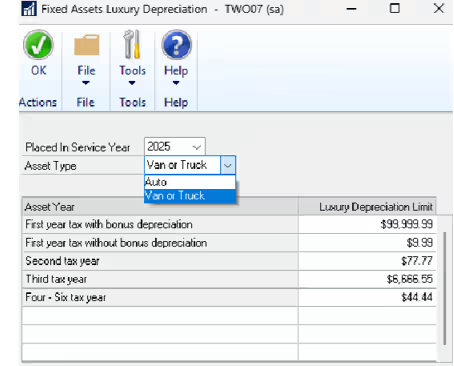
The most significant functional change in the Dynamics GP 2025 year-end update affects the Fixed Assets module. Each year, the IRS adjusts depreciation limits for luxury vehicles, and in the past, keeping GP compliant required installing annual system updates. That process frequently created delays and added risk during already busy close periods. For 2025, the maximum depreciation deduction amounts have been updated for assets placed in service during the calendar year, ensuring your records remain aligned with current IRS requirements.
With Dynamics GP 18.8, Microsoft introduced a dedicated Luxury Auto Depreciation table that stores depreciation values by year directly in the system. This removes the need to wait for full updates to apply annual IRS changes. Finance teams can now view, manage, and update depreciation limits internally, which reduces downtime and gives organizations more control over compliance. Rather than relying on patches alone, GP now supports proactive management of regulatory changes as they occur.
This update improves accuracy and reporting while reducing administrative overhead. Your Fixed Assets values remain aligned with IRS guidance, financial reports reflect current depreciation rules, and year-end processing becomes more predictable. Over the long term, this structure also helps future-proof your system during the remaining lifecycle of Dynamics GP by making it more flexible as requirements evolve.
U.S. Payroll updates
Payroll remains unchanged from a regulatory standpoint in the Dynamics GP 2025 year-end update. There are no new IRS form requirements, no updates to W-2 processing, and no changes related to electronic filing. For most organizations, this means payroll compliance remains stable heading into year-end with no action required beyond applying the standard update.
Although no new rules were introduced, Microsoft did resolve two payroll reporting issues from last year. The update corrects a display issue in the Payroll 941 Preparation Report that appeared in GP 18.8, where the values calculated correctly but text failed to display as expected. It also fixes W-2 printing for employees who received Medicaid waiver payments but had no gross pay. In those cases, a W-2 will now print correctly with Box 12 Code II populated and zero reported in Box 1. If you experienced either issue in 2024, install this update.
Prepare for year-end close
Year-end close in Dynamics GP is a structured process that finalizes your organization’s financial records and prepares the system for the new fiscal year. It includes reconciling balances, posting final transactions, clearing year-to-date values, and rolling key totals forward. Because data flows across multiple modules, the close must happen in the correct sequence. General Ledger, Payables, Receivables, Inventory, Fixed Assets, and Payroll all depend on one another, and errors in one area can affect reporting across the system.
Skipping steps, closing modules out of order, or failing to back up data can create reconciliation problems, tax issues, and audit challenges that are difficult to resolve later. Errors made during close often surface months later, when corrections are far more painful. A well-planned close protects both your financial integrity and your ability to report with confidence.
For step-by-step guidance, read our blog on Year-end closing procedures for Dynamics GP or our Dynamics GP year-end close best practices blog.
Next steps
Install the Dynamics GP 2025 year-end update as early as possible to allow sufficient time for testing, validation, and issue resolution before year-end. Applying the update in advance reduces the risk of unexpected downtime and gives your team confidence that the system is ready for closing and reporting.
If you have questions related to compliance, Fixed Assets, payroll, or reporting changes, it is best to address them before your close window begins. In addition, if your organization is planning to move away from Dynamics GP due to Microsoft’s end-of-life timeline, now is the time to begin that conversation. Rand Group helps organizations stabilize GP today and transition to modern ERP platforms when they are ready. Contact our team to discuss support options, year-end readiness, and long-term ERP strategy.


Subscribe to our Insights