
 Dynamics 365
 Power Platform
 Dynamics
 Cloud & Productivity
Introducing Sales Order Agent for Dynamics 365 Business Central

Imagine having a smart assistant that never sleeps, working around the clock to handle your customer orders through email. That’s exactly what Sales Order Agent does in Microsoft Dynamics 365 Business Central. This AI-powered tool automates the entire process of capturing sales orders, from the first customer email to the final order confirmation.
What is a Sales Order Agent?
Benefits of a Sales Order Agent:
- Saves time on repetitive tasks: Instead of manually reviewing emails, searching for product details, checking inventory, and building quotes from scratch, the agent handles it all. This frees up your team to focus on more strategic efforts like closing deals and building customer relationships.
- Works around the clock—even when you don’t: This means faster turnaround times and a competitive edge, especially when serving customers across multiple time zones or industries that demand quick responses like wholesale, distribution, or e-commerce.
- Reduces errors and avoids rework: Manual entry errors, like incorrect product codes or quantities, can lead to costly delays. The agent eliminates those risks by pulling real-time data from Business Central and validating product availability before creating the quote. This reduces rework and minimizes back-and-forth communication.
- Produces professional, polished communications: The agent delivers clear, professional communications with every quote, including pricing, taxes, delivery dates, and a branded PDF—leaving a strong impression and reducing confusion.
- Keeps your team in control at every step: Importantly, nothing goes out without human approval. Your team can review and fine-tune quotes before the agent sends anything, ensuring accuracy and control at every step.
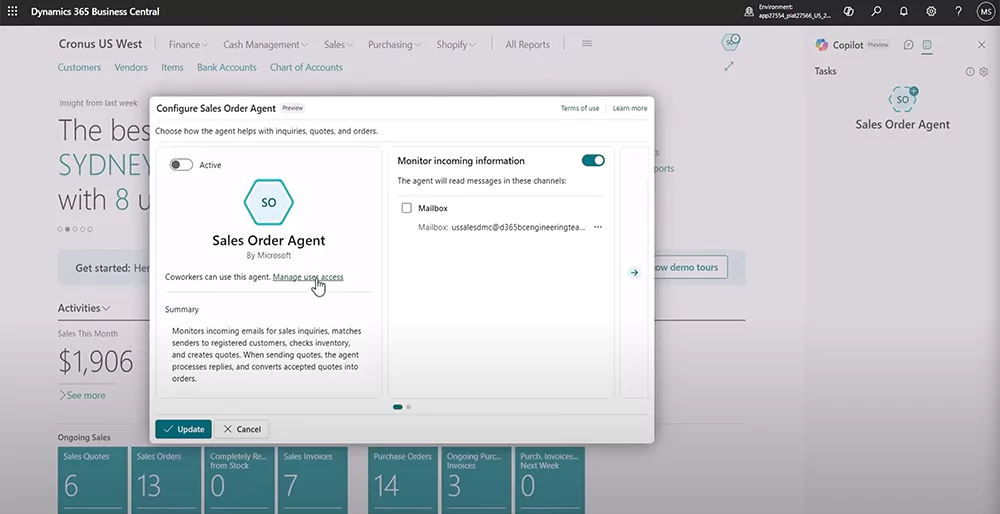
What does a Sales Order Agent actually do?
The agent performs a sequence of intelligent tasks, from the first customer email to the final sales order.
Here’s what the agent takes care of:
- Email monitoring: It watches your shared inbox 24/7, looking for customer emails that request quotes or orders.
- Customer recognition: When an email arrives, it checks the sender’s address against your Business Central contacts and customer records.
- Product search: The agent reads the message and finds the correct items in your inventory, even if the customer used vague or non-standard descriptions.
- Availability checking: It verifies whether you have enough stock and when the items can be delivered.
- Quote creation: It puts together a complete sales quote, including prices, quantities, taxes, and delivery dates.
- Ongoing email conversations: If anything is unclear, the agent can reply to the customer, asking for more details or offering options.
- Order conversion: Once the quote is approved, it converts the quote into a sales order and prepares a confirmation email.

Start automating your sales process today
Ready to see how Sales Order Agent can save time and boost accuracy? Contact us to learn how to activate and configure it in your Business Central environment.
Real-World Scenario: What It Looks Like in Action
Imagine a customer emails:
“Hi, can I get 12 of the adjustable standing desks and 6 office chairs delivered by the 20th?”
Here’s what happens next:
- The Sales Order Agent picks up the email instantly.
- It matches the sender to your customer list.
- It interprets the vague product names and finds the correct SKUs.
- It checks stock availability for both items.
- It creates a complete quote with prices, delivery date, and taxes.
- It drafts a professional email reply with a PDF quote attached.
- It routes the email to your team for approval before sending.
Why it works: smart, secure, and sales-ready
Microsoft designed the Sales Order Agent with real-world sales teams in mind. It’s more than just a flashy AI feature; it’s built to be secure, practical, and reliable for everyday business use.
- It’s secure by design. The agent functions as its own user in Business Central, with limited permissions. It only accesses the data, pages, and actions required for its tasks, nothing more. This reduces risk and keeps sensitive information safe. Admins can also fine-tune what the agent can see and do, ensuring security policies and compliance standards are met.
- You stay in control. Every action the agent takes is logged in a detailed task timeline. You can track everything from email reviews to quote approvals. If something changes, such as a price or quantity, you get to approve it before it’s sent out. Outbound emails and PDFs are always reviewed by a human first, ensuring you maintain control over the customer experience.
- It’s human-first AI. Sales Order Agent isn’t here to replace your team—it’s here to support them. It handles repetitive tasks, such as reading emails and building quotes, so your team can focus on building relationships and closing deals. AI handles the process, your team handles the people.

Next Steps
Sales Order Agent is like hiring a dedicated sales assistant who never takes breaks, never makes mistakes, and always follows your exact process. It takes care of the routine work—like reading emails, checking item availability, and building quotes, so your team can focus on building relationships and closing bigger deals.
We’ll help you get started, configure it properly, and unlock the full value of AI-driven sales automation. Contact us today!
Subscribe to our Insights
Related Blogs

Microsoft Dynamics 365 Business Central segregation of duties
Segregation of duties is a critical control in any ERP system, especially as organizations rely on a single platform to manage finance and operations. When users have too much access, the risk of errors, fraud, and audit findings increases. In cloud ERPs like...

Updates to 1099 reporting in Microsoft Dynamics 365 Business Central
Year-end 1099 reporting is often time-consuming and highly manual, especially for organizations managing large volumes of vendor payments. Recent updates to Microsoft Dynamics 365 Business Central introduce new capabilities that simplify how US organizations prepare,...

Essential supply chain apps to extend Dynamics 365 Business Central
For organizations running Dynamics 365 Business Central, supply chain execution is often where operational complexity becomes most visible. Receiving overseas shipments, managing containers, tracking landed costs, and ensuring inventory is accurately valued can...
