Dynamics 365
 Power Platform
 Dynamics
 Cloud & Productivity
Microsoft Dynamics 365 Business Central segregation of duties

Segregation of duties is a critical control in any ERP system, especially as organizations rely on a single platform to manage finance and operations. When users have too much access, the risk of errors, fraud, and audit findings increases. In cloud ERPs like Microsoft Dynamics 365 Business Central, where transactions move quickly and roles often overlap, access control must be designed with intent.
Business Central segregation of duties means configuring roles, permissions, and approvals so that no single user can initiate, approve, and complete critical transactions without oversight. This topic is especially relevant for finance, audit, and compliance teams responsible for internal controls, financial accuracy, and governance.
In this blog, we explain how segregation of duties works in Business Central, where common conflicts arise, and how organizations can implement and maintain effective controls over time.
What is Microsoft Dynamics 365 Business Central?
Microsoft Dynamics 365 Business Central is a cloud-based enterprise resource planning (ERP) system designed for small to mid-sized organizations. It brings core business processes into a single platform, allowing teams to manage financials, operations, and data from one system. Because Business Central is delivered through the cloud, it supports continuous updates, remote access, and scalability as organizations grow. This centralized structure makes Business Central segregation of duties especially important, since many users rely on the same system to perform critical tasks.
Business Central covers key functional areas including finance, operations, supply chain management, and reporting. Users can enter transactions, approve documents, post financial entries, and analyze results without leaving the system. While this centralized access improves efficiency, it also increases risk if permissions are not properly controlled. Strong permission management ensures that no single user has excessive authority, helps protect financial integrity, and supports internal controls as transaction volume and system usage expand.

What is segregation of duties in ERP systems?
Segregation of duties, often called SoD, is a control principle that separates critical tasks among different users. The goal is to prevent any single individual from controlling an entire process from start to finish. In the context of Business Central segregation of duties, this means dividing responsibilities such as creating records, approving transactions, and posting entries. By splitting these activities, organizations reduce the chance of errors, misuse, or intentional fraud going unnoticed.
In ERP systems, segregation of duties applies across both financial and operational processes. For example, the person who sets up a vendor should also not be able to approve and post payments. Likewise, users who create sales orders should not have unrestricted rights to post invoices or adjust customer balances. When segregation of duties is properly designed in Business Central, it strengthens internal controls, improves accountability, and supports reliable financial reporting without slowing down daily operations.
Why segregation of duties matters in Business Central
Business Central segregation of duties plays a direct role for internal controls that protect financial data and maintain trust in system outputs. Because Business Central centralizes transactions, approvals, and reporting, weak access controls can quickly lead to errors or control failures. Proper segregation ensures that critical actions are reviewed, validated, and documented, rather than executed by a single user without oversight. This structure supports reliable operations while allowing teams to work efficiently within the system.
- Financial reporting accuracy and internal controls: Separating entry, approval, and posting activities reduces the risk of incorrect or unsupported financial statements.
- Fraud prevention and operational risk management: Business Central segregation of duties limits opportunities for unauthorized activity by removing end-to-end control from individual users.
- Audit readiness and governance expectations: Clearly defined roles and permissions make it easier to demonstrate control effectiveness during internal and external audits.
- Alignment with common compliance frameworks: While not enforcing specific regulations, segregation of duties supports widely accepted control principles used across finance and governance models.

Need help with Business Central segregation of duties?
Whether you are setting up roles for the first time or addressing control gaps, Business Central segregation of duties can be complex to manage alone. Rand Group works with finance and IT teams to design practical, scalable controls.
How Business Central handles segregation of duties
Business Central segregation of duties is supported through a combination of role-based permissions, approval workflows, and built-in control points that separate critical actions across users. Together, these features define who can access data, who can approve transactions, and who can finalize or review results within the system.
It is important to note that Business Central provides the tools to implement segregation of duties, but organizations are responsible for designing and maintaining those controls.
User permissions and role-based security
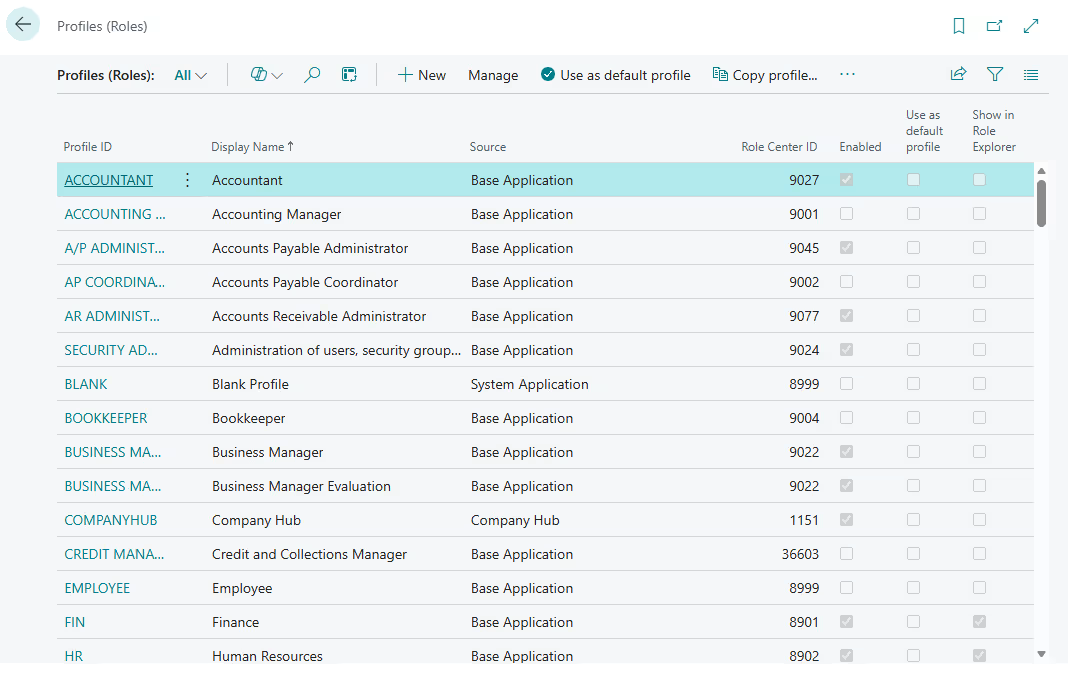
Business Central uses a role-based framework to organize the user experience, but actual access control and segregation of duties are enforced through permission sets. Understanding the difference between Profiles (Roles) and Permission Sets is essential for designing effective Business Central segregation of duties. While Profiles define what users see, Permission Sets define what users can actually do.
User Profiles (roles)
A Profile (Role) in Business Central determines the Role Center assigned to a user. The Role Center controls the user’s dashboard layout, navigation menus, and which pages and reports are visible by default. Profiles are designed to improve usability by tailoring the interface to specific job functions, such as accounting, purchasing, or sales.
Profiles do not control system security or enforce segregation of duties. Assigning a Profile alone does not grant or restrict access to data, posting, or processing actions.
Key points about Profiles (Roles):
- Define the Role Center and default user interface
- Control which pages, menus, and reports are visible
- Improve navigation and efficiency for different job functions
- Do not grant permissions or enforce segregation of duties
Permission sets
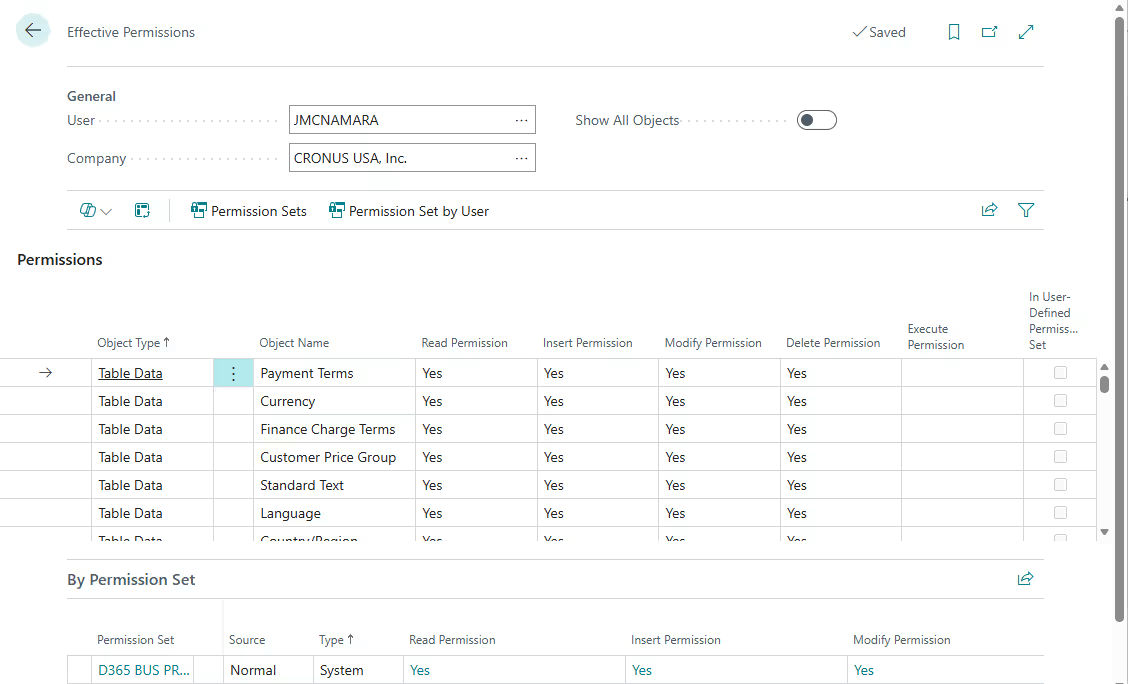
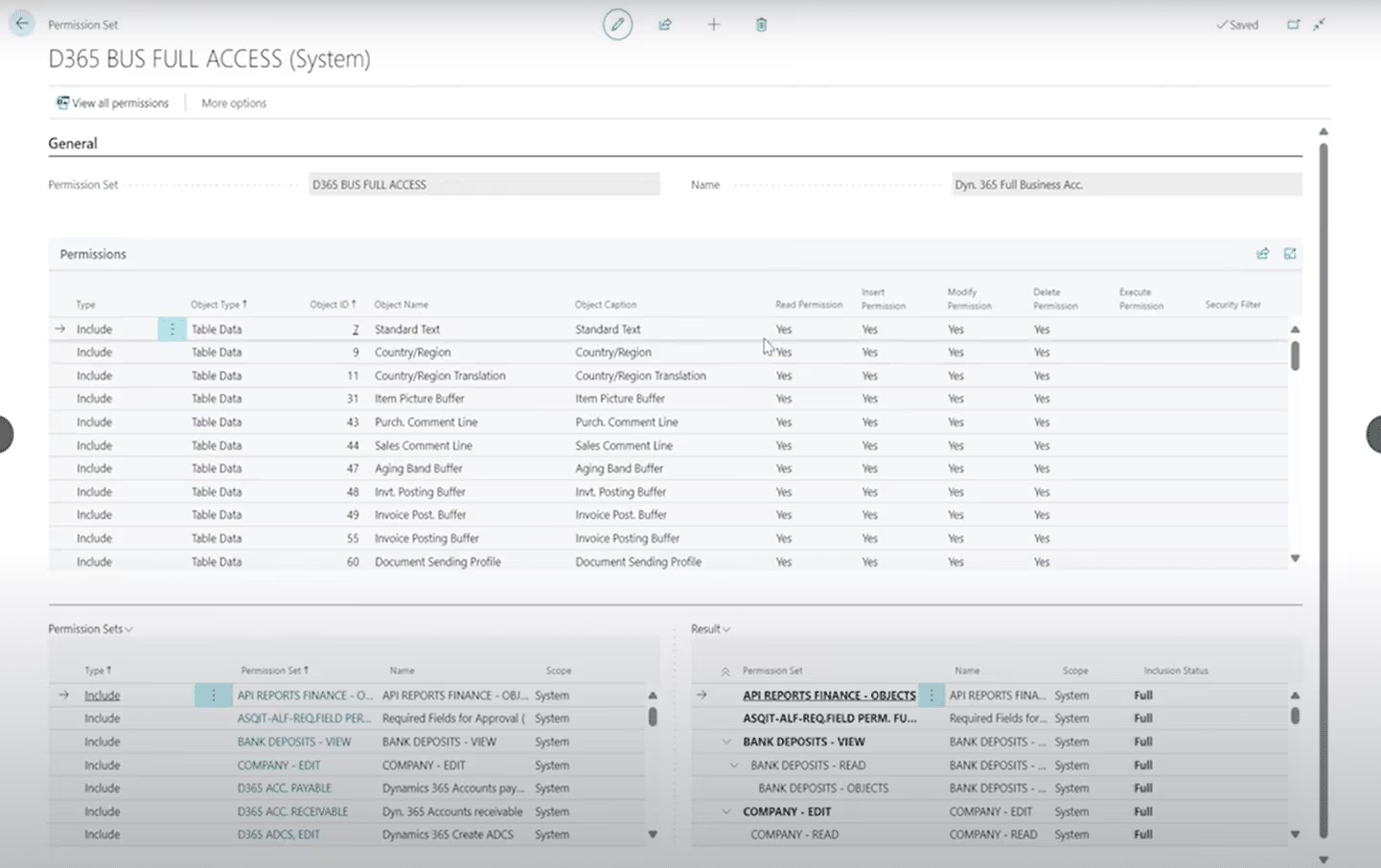
Permission Sets define what users can actually do in Business Central. They control access at the data and process level by specifying whether a user can Read, Insert, Modify, or Delete records, as well as whether they can execute posting, processing, or administrative actions. Permission Sets are the primary mechanism used to enforce Business Central segregation of duties.
Segregation of duties is achieved by carefully assigning and limiting Permission Sets so that no single user has end-to-end control over a transaction lifecycle. Because users can be assigned multiple Permission Sets, it is important to evaluate combined access to avoid unintended SoD conflicts.
Key points about Permission Sets:
- Control access at the table, page, and process level
- Define Read, Insert, Modify, and Delete rights on records
- Users can be assigned multiple Permission Sets
- Combined permissions determine a user’s effective access
- Permission Sets enforce segregation of duties
Approval workflows
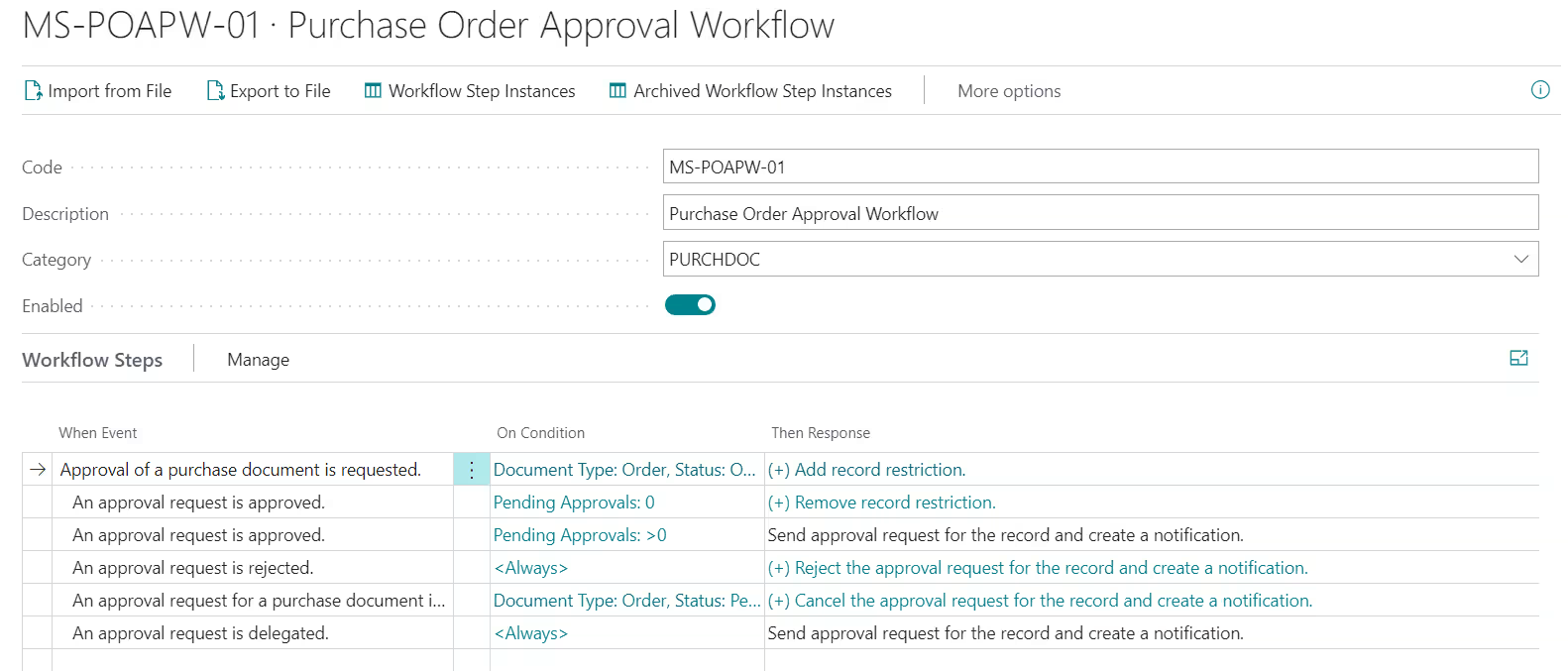
Approval workflows introduce formal review steps into key business processes. In Business Central, workflows can require designated approvers to review and approve transactions before they are posted or completed. This adds a critical layer of oversight when full segregation of duties is not possible through permissions alone.
- Approvals can be configured for purchases, payments, journals, and other transactions
- Workflow rules define when approval is required and who must approve
- Transactions remain blocked until approval is completed
- Approval workflows act as compensating controls for SoD gaps
Control points and review layers
Business Central also supports segregation of duties through posting controls and review layers that separate entry, approval, and finalization activities. These control points ensure that transactions are validated and reviewed before impacting financial results. When combined with permissions and workflows, they help enforce accountability throughout financial and operational processes.
- Entry, approval, and posting can be handled by different users
- Posting rights can be restricted to specific roles
- Review processes support audit trails and accountability
- Control points reduce risk without slowing daily operations
Standard roles and permissions in Business Central
Business Central segregation of duties is enforced through two related concepts: user profiles (roles) and user permissions. User profiles define the user experience by controlling which pages, actions, and workflows are visible, while permission sets determine what actions a user is authorized to perform. Business Central includes a wide range of out-of-the-box profiles and permission sets for common roles such as accounting, purchasing, sales, and warehouse operations. These defaults help organizations get started quickly, but they are designed to be broad rather than tightly controlled.
In addition to standard roles, Business Central allows organizations to create custom profiles and permission sets at a granular level. Administrators can tailor access down to specific tables, pages, reports, and posting actions, or build new permission sets from scratch. This flexibility is essential for enforcing business central segregation of duties, especially as roles evolve or responsibilities overlap.
Without refinement, users may become over-permissioned, meaning they have access to actions they do not need to perform their job. Over-permissioning increases risk, weakens internal controls, and often creates segregation of duties conflicts. As a result, standard roles frequently require adjustment to align with real job functions, control requirements, and audit expectations rather than relying solely on default configurations.
Examples of segregation of duties conflicts in Business Central
Business Central segregation of duties conflicts most often occur when permissions overlap across related processes. Because Business Central integrates finance and operations in a single system, users may unintentionally gain control over multiple steps in a transaction lifecycle. Understanding where these conflicts may appear and how to mitigate them is critical for maintaining effective internal controls.
Procure-to-pay conflicts
Procure-to-pay conflicts arise when a single user can manage multiple stages of purchasing and payment. In Business Central, this often shows up when a user can create vendors, enter purchase documents, and post or pay invoices. Without separation, there is little oversight before cash leaves the organization.
How this conflict shows up in Business Central
- User can create or modify vendor master records
- Same user can enter and post purchase invoices
- Same user can process payments or payment journals
How to address it in Business Central
- Separate vendor setup permissions from invoice posting permissions
- Restrict payment posting to a limited finance role
- Use approval workflows for purchase invoices and payments
Record creation versus posting conflicts
A common issue in Business Central segregation of duties is allowing users to both prepare and post transactions. This applies to journals, invoices, and other financial entries. When creation and posting are combined, errors or improper entries can bypass review.
How this conflict shows up in Business Central
- User can create and post general ledger journals
- User can enter and post vendor or customer documents
- No independent review before transactions hit the ledger
How to address it in Business Central
- Assign separate permission sets for entry and posting
- Limit posting rights to senior finance roles
- Use approvals or batch review processes before posting
For invoice-specific posting controls, administrators can also use invoice posting policies to define whether individual users are allowed to post invoices, prohibited from posting invoices directly, or required to post invoices together with shipments or receipts. For step-by-step guidance, read our Tip of the Month on configuring invoice posting policies in Dynamics 365 Business Central.
Best practices for Business Central segregation of duties
Business Central segregation of duties is most effective when it is treated as an ongoing control strategy rather than a one-time setup. As organizations grow, roles change, and system usage expands, access that once made sense can quickly become a risk. Strong segregation of duties balances control with usability by aligning permissions to real responsibilities while maintaining visibility and accountability across financial and operational processes.
Maintaining effective segregation also requires continuous oversight. New users, employee turnover, and system updates can all introduce unintended access changes. Without regular review, even well-designed permission structures can drift over time. Applying consistent governance practices ensures segregation of duties remains intact as Business Central evolves.
- Design roles around job functions, not individuals: Build permission sets based on what a role must do, not who currently holds the role.
- Limit super users and administrative access: Restrict broad access to a small number of trusted users and document their responsibilities clearly.
- Use approvals as compensating controls: Approval workflows help offset unavoidable segregation gaps in lean teams.
- Perform regular permission reviews and internal audits: Scheduled reviews identify over-permissioned users and emerging SoD conflicts.
- Monitor and maintain access over time: Review user access periodically, adjust roles during employee changes, and reassess permissions after system updates or new features are introduced.
Beyond high-level best practices, organizations also benefit from applying a few practical, system-level techniques to manage segregation of duties day to day.
Practical tips for managing segregation of duties in Business Central
Even well-designed roles and approval workflows can fall short if day-to-day user access is not actively reviewed and governed. The following practical tips help organizations identify hidden SoD conflicts, reduce over-permissioning, and strengthen internal controls.
Use Effective Permissions to identify real access
One of the most overlooked tools in Business Central segregation of duties is the Effective Permissions feature. Because users are often assigned multiple permission sets, it can be difficult to understand what access a user truly has by reviewing permission sets individually. Effective Permissions shows the combined result of all assigned permissions, including inherited and indirect access.
This view often reveals posting, setup, or administrative rights that are not immediately obvious, making it a critical tool for identifying segregation of duties conflicts.
Why this matters
- Users may accumulate permissions over time as roles change
- Multiple permission sets can unintentionally grant posting or setup access
- SoD conflicts are often hidden unless effective access is reviewed
Best practice
- Review Effective Permissions during access audits
- Use it when investigating unexpected user behavior
- Validate effective access before assigning additional permission sets
Avoid granting SUPER or SUPER (DATA) permissions
Granting SUPER or SUPER (DATA) permission sets bypasses nearly all segregation of duties controls in Business Central. These permission sets provide unrestricted access to data and system functions, making them incompatible with effective internal controls and audit expectations.
While SUPER access may be required in rare administrative scenarios, it should never be assigned to standard finance or operational users.
Why this creates risk
- Users can create, modify, approve, and post transactions without restriction
- Approval workflows and posting controls can be bypassed
- Audits commonly flag unrestricted SUPER access as a control failure
Best practice
- Limit SUPER or SUPER (DATA) to a very small number of system administrators
- Remove SUPER access from finance and operational roles
- Document and periodically review any remaining SUPER assignments
- Use targeted permission sets instead of broad administrative access
Create custom permission sets instead of modifying out-of-the-box permissions
Business Central includes many out-of-the-box permission sets, but modifying these standard permission sets is not recommended. Microsoft maintains and updates default permission sets as part of ongoing product releases, which means custom changes can be overwritten or altered during system updates.
Creating custom permission sets allows organizations to design stable, auditable access controls that align with real job responsibilities and segregation of duties requirements.
Why this matters
- Out-of-the-box permission sets are intentionally broad and often grant more access than required
- Changes to standard permission sets may be lost during updates
- Modified defaults blur the line between standard behavior and intentional access design
- Auditors prefer clearly defined, purpose-built permission structures
Best practice
- Use out-of-the-box permission sets as reference models only
- Create custom permission sets tailored to specific job functions
- Layer multiple smaller permission sets instead of assigning one broad role
- Assign custom permission sets to users rather than modifying standard ones
- Document the purpose and scope of each custom permission set
How Rand Group supports Business Central segregation of duties
Partnering with an experienced Business Central partner is critical for implementing and maintaining effective segregation of duties. Business Central segregation of duties requires more than assigning default roles, and Rand Group is a Business Central consulting partner that helps organizations design practical controls that align with real system usage rather than theoretical models. This approach strengthens internal controls without slowing daily operations or overburdening users.
Rand Group works with finance, operations, and IT teams to assess risk, design roles, and refine permissions as Business Central evolves. Support extends beyond initial setup to ensure segregation of duties remains effective through growth, system updates, and changing business requirements.
- Role design and permission modeling: Design roles and permission sets that align with real job functions and SoD requirements.
- Risk assessment and segregation of duties reviews: Identify conflicts, over-permissioned users, and control gaps within Business Central.
- Optimization during implementations and upgrades: Refine roles and controls during new implementations, migrations, and release updates.
- Training, tools, and ongoing support: Help teams understand permissions, approvals, and governance best practices.
- Custom applications to strengthen controls: Extend Business Central with purpose-built apps, including advanced approval solutions that reinforce segregation of duties through structured review.
Custom Workflow Approvals app for Business Central
Custom Workflow Approvals is a Rand Group–developed application designed to strengthen Business Central segregation of duties through flexible, rule-based approvals. Standard approval workflows in Business Central are often limited, which can leave gaps in review and oversight. This app expands approval capabilities so organizations can enforce consistent, auditable controls that match how their business operates.
- Create group-based approvals with multiple tiers
- Configure chained approvers and multiple approval administrators
- Apply approvals across finance, sales, purchasing, and operations
- Improve visibility into approval status, ownership, and next steps
- Use custom email notifications for clearer communication
- Apply approvals to nearly any module, including purchasing, sales, banking, and warehouse processes
Learn more about the Custom Workflow Approvals app to see how advanced approvals can strengthen segregation of duties and reduce risk in Business Central.

Frequently asked questions about Business Central segregation of duties
What does “segregation of duties” mean in Business Central?
In Business Central, segregation of duties means setting up the system so that no single user can complete a critical business process from start to finish on their own. Duties are divided among multiple people or roles. For example, one user might create a purchase order, but a different user must approve it, and yet another posts the payment. This ensures checks and balances – it’s an internal control to prevent errors or fraud by requiring collaboration and oversight in every major transaction.
How do I implement segregation of duties in Business Central?
Business Central segregation of duties is implemented through a combination of permission sets, user profiles, and approval workflows. Start by defining job-based roles, then assign permissions that allow users to perform only the tasks required for their role. Approval workflows can be added to introduce review steps where full separation is not possible. Regular testing and review ensure the setup continues to meet control requirements.
Does Business Central enforce segregation of duties automatically?
No, Business Central does not automatically enforce segregation of duties. The system provides the tools needed to implement controls, but organizations must design and maintain them. Out-of-the-box roles are intentionally broad, which means segregation of duties requires refinement through custom permission sets, role adjustments, and workflows. Without this effort, users may become over-permissioned.
Can workflows replace full segregation of duties?
Approval workflows cannot fully replace segregation of duties, but they can act as effective compensating controls. In smaller teams or lean organizations, it may not be possible to separate every task across different users. In these cases, workflows add oversight by requiring approvals before transactions are finalized. This approach strengthens Business Central segregation of duties when structural separation is limited.
How often should permissions be reviewed?
Permissions should be reviewed on a regular schedule, typically quarterly or semi-annually, and whenever roles change. Reviews are also recommended after employee turnover, system upgrades, or the introduction of new functionality. Regular access reviews help identify over-permissioned users and prevent segregation of duties conflicts from developing over time.
Our company is small, is segregation of duties really necessary?
Yes, segregation of duties is still important for small organizations. While smaller teams may rely more on approval workflows and compensating controls, basic separation of responsibilities helps reduce risk and improve accountability. Business Central segregation of duties can be scaled to fit company size without adding unnecessary complexity.
Next steps
Business Central segregation of duties is essential for protecting financial data, supporting audits, and reducing operational risk. When roles and permissions are left unrefined, users often gain more access than intended, creating control gaps that grow as the system evolves. Thoughtful role design, approval workflows, and ongoing review help ensure Business Central remains both secure and usable.
Effective segregation of duties is not a one-time configuration. It requires ongoing attention as users change, processes evolve, and new functionality is introduced. Partnering with an experienced Business Central partner can help you identify risks, refine permissions, and strengthen controls without disrupting daily operations. Contact us to review your Business Central environment and build a segregation of duties strategy that supports accuracy, accountability, and growth.