
 Dynamics 365
 Power Platform
 Dynamics
 Cloud & Productivity
Key features and updates in the 2025 release wave 2 of Dynamics 365 Business Central

The 2025 release wave 2 of Microsoft Dynamics 365 Business Central (D365 BC) brings powerful enhancements for small and mid-sized businesses. It increases automation, improves reporting, and supports compliance. With deeper Copilot and AI agent capabilities, expanded financial and analytical tools, and ongoing improvements in localization and integration, this release delivers measurable value for companies that want to modernize and scale.
Enhanced Sales Order Agent
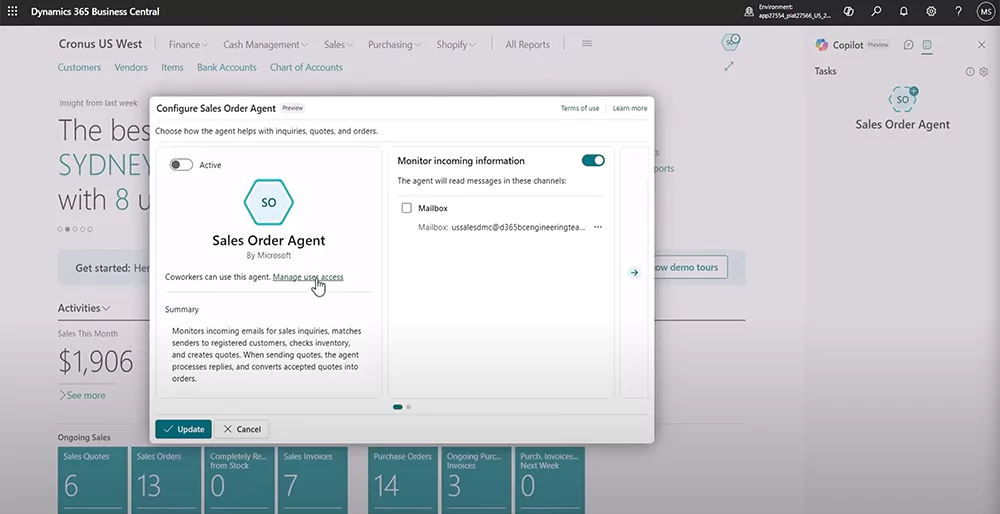
The Sales Order Agent receives significant upgrades, helping sales, customer service, and order processing teams manage high volumes of sales-related emails faster and with greater accuracy. These updates streamline data entry, improve quote precision, and reduce the need for manual intervention in repetitive tasks.
Users can now complete the entire sales order process through Copilot. Using natural language prompts, Copilot can draft and finalize sales orders based on real-time product availability, customer profiles, and business data. This accelerates order fulfillment and frees sales teams to focus on building stronger customer relationships.
Key updates include:
- Attachment processing: The agent can read and extract information from attached files, like PDFs or images, containing quote requests. It uses this data to create a sales quote, even if the request is unstructured.
- Support for multiple ship-to addresses: If a customer specifies a different delivery location, the agent detects and applies the correct ship-to address from the profile. This improves fulfillment accuracy and avoids manual corrections.
- Capable-to-promise responses: The agent can include items not immediately available but deliverable within a reasonable timeframe. This uses Business Central’s built-in planning tools and can be enabled via a new setting.
- Automatic email processing: For trusted, recurring customers, the agent can begin processing emails automatically without waiting for manual approval. This saves time and improves responsiveness, especially for high-frequency interactions.
- Resume with user input: If a user steps in to assist with or modify a sales quote during processing, they can provide instructions using natural language directly in the Agent pane. The agent then resumes the task without restarting, incorporating the user’s guidance into the workflow.
These enhancements enable businesses to automate more of the quote-to-order process while still allowing for seamless human oversight when needed.
Copilot performance and usability enhancements
This release improves Copilot’s performance and contextual awareness across Business Central. Whether reviewing a customer card, analyzing a large order, or viewing any other record, Copilot now provides faster, clearer insights in just a few sentences. This reduces the time spent navigating data and helps users plan their next steps efficiently.
When the Summarize with Copilot capability is enabled, the following improvements apply:
• Deeper insights on popular pages, such as the Customer card
• Visibility into recent changes, including who last modified the record
• Highlights from autonomous agents that created or modified the record
• Expanded support for 20 additional languages
• Faster summary generation for quicker access to key information
These updates make Copilot more intuitive across departments, helping users cut tedious tasks, boost productivity, and make faster, informed decisions.

Financial management updates
With increasing regulatory pressure and growing financial complexity, businesses need tools that provide visibility, traceability, and flexibility. The financial management enhancements in this release deliver on those needs—particularly in the areas of asset management and audit readiness.
Multiple fixed asset cards: Business Central now streamlines asset management by automatically creating multiple fixed asset cards when a purchase invoice is posted. This feature is particularly useful for organizations managing bulk asset purchases, such as a large quantity of computers or equipment, by eliminating the need to manually create individual asset records. For example, if a company purchases 200 computers, Business Central will automatically generate 200 fixed asset cards, ensuring each item is accurately recorded and tracked.
Audit trail reporting: The new Audit trail report enhances financial transparency and supports stronger compliance by providing a complete, traceable record of all transactions. The report pulls detailed information from both the G/L Register and G/L Entry tables, ensuring that every transaction is accurately recorded and easy to trace. This level of clarity helps businesses meet regulatory requirements, enforce internal controls, and streamline the audit process.
Excise tax framework: Business Central now includes a new excise tax feature that helps businesses automate the calculation of excise tax amounts based on specific rules and regional requirements. This new feature reduces the risk of manual errors and non-compliance by providing a flexible framework that supports various calculation models.
Electronic IRS 1099 submission
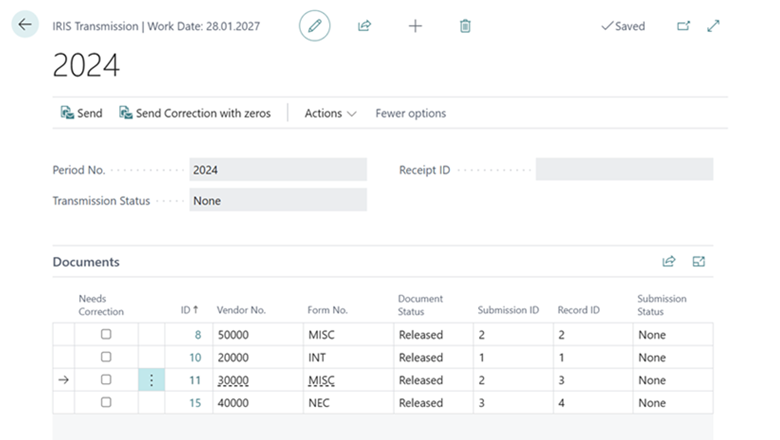
U.S.-based businesses can now streamline their tax reporting process by submitting IRS 1099 forms electronically through a direct integration with the IRIS platform. This update eliminates the need for manual data entry, printing, and mailing physical forms—saving time, reducing costs, and lowering the risk of errors or delays. The integration simplifies compliance by keeping submissions aligned with IRS regulations and allows users to track the status of their filings through the IRIS Transmission page.

Unlock the power of Dynamics 365 Business Central 2025 release wave 2
See how the latest Dynamics 365 Business Central 2025 release wave 2 can transform your operations. Schedule a personalized demo and experience the updates in action.
Enhanced financial reporting
The enhanced financial reporting feature delivers significant improvements for both report viewers and authors, helping finance teams work faster and more efficiently. Report viewers benefit from better automation and visibility, while report authors enjoy streamlined creation and editing tools that reduce manual work and minimize errors. These enhancements support more flexible, currency-aware reporting and improve the overall reporting experience across the organization.
For financial report viewers:
• Schedule reports to be delivered automatically via email or the report inbox
• Run financial reports across all values in a selected dimension
For financial report authors:
• Autofill the No. and Description fields in row definitions
• Receive notifications when changes in the G/L impact report definitions
• Edit row definitions directly in Excel
• Use dynamic naming for column headings in column definitions
• Support for both local currency (LCY) and additional reporting currency (ACY) in column definitions
• Enhanced UI for managing row/column definitions, including the ability to move name fields and add descriptions
• Demote certain fields to additional fields within the Options menu for more control over report layout
Power BI sales reporting and analytics improvements
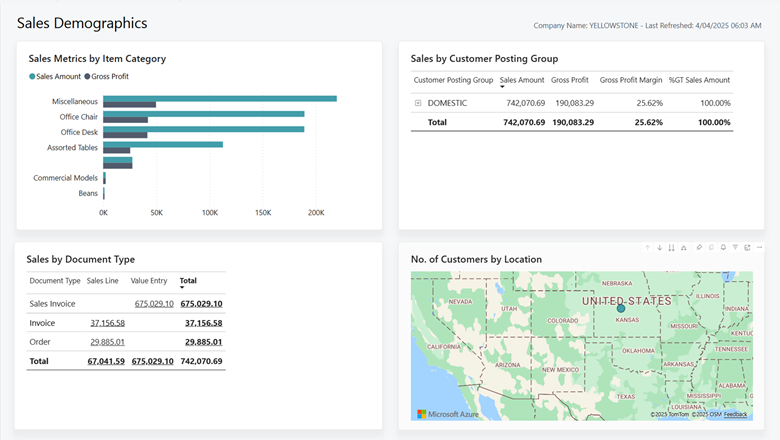
Enhancements to reporting and analytics in the sales area provide businesses with deeper insight and greater flexibility in tracking key performance indicators (KPIs). With expanded Power BI capabilities, enriched datasets, and modernized reports, users can perform more comprehensive analyses and tailor reporting outputs to specific business needs. Customizable Excel layouts also allow teams to refine and present data in formats that align with their internal workflows.
Power BI enhancements:
• Leverage data from projects and the general ledger in sales analyses
• Analyze sales forecasts to support demand planning and pipeline visibility
Modernized sales reports are now available with customizable Excel layouts:
• Customer List
• Customer – Order Summary
• Customer – Order Detail
• Sales Statistics
• Customer/Item Sales
• Customer Balance to Date
• Customer Trial Balance
• Sales Reservation Availability
• Inventory Order Details
• Inventory Sales Back Orders
These improvements empower sales teams and decision-makers to uncover trends, evaluate performance, and respond more proactively to business opportunities.
Next Steps
The 2025 Release Wave 2 for Dynamics 365 Business Central delivers transformative AI-powered automation through intelligent agents, enhanced financial management capabilities, comprehensive compliance tools, and advanced analytics that fundamentally change how businesses operate. These innovations enable organizations to achieve higher levels of efficiency, better decision-making capabilities, and improved customer experiences while maintaining the flexibility and scalability needed for growth.
Whether you’re looking to modernize your finance department, simplify sales workflows, or stay compliant with evolving regulations, the latest updates in Business Central offer meaningful improvements across the board. If you’re ready to explore how these new features can help your business grow, please contact us today to schedule a tailored demo or consultation.
Subscribe to our Insights
Related Blogs

Microsoft Dynamics 365 Business Central segregation of duties
Segregation of duties is a critical control in any ERP system, especially as organizations rely on a single platform to manage finance and operations. When users have too much access, the risk of errors, fraud, and audit findings increases. In cloud ERPs like...

Updates to 1099 reporting in Microsoft Dynamics 365 Business Central
Year-end 1099 reporting is often time-consuming and highly manual, especially for organizations managing large volumes of vendor payments. Recent updates to Microsoft Dynamics 365 Business Central introduce new capabilities that simplify how US organizations prepare,...

Essential supply chain apps to extend Dynamics 365 Business Central
For organizations running Dynamics 365 Business Central, supply chain execution is often where operational complexity becomes most visible. Receiving overseas shipments, managing containers, tracking landed costs, and ensuring inventory is accurately valued can...
