
 Dynamics 365
 Power Platform
 Dynamics
 Cloud & Productivity
The complete guide to Dynamics 365 Contact Center

Customer expectations are rising, and businesses need tools that provide reliable, personalized, and user-friendly service. Dynamics 365 Contact Center is Microsoft’s solution for managing customer interactions across both digital and voice channels. Generally available since summer 2024, this product replaces older Dynamics add-ons with a fully cloud-based, AI-first contact center solution.
By combining cloud infrastructure, AI-powered tools, and omnichannel capabilities, Dynamics 365 Contact Center helps organizations streamline operations and improve service quality. In addition, it enhances customer engagement. As part of the Microsoft Dynamics 365 ecosystem, the platform integrates customer service, sales, and marketing into a unified solution, giving teams a complete view of customer interactions.
What is Dynamics 365 Contact Center
Dynamics 365 Contact Center allows businesses to connect with customers across voice calls, live chat, email, SMS, web, mobile apps, and social media channels. Agents can manage all interactions from a single workspace. This ensures inquiries are handled efficiently and consistently. Smart routing and queues assign each interaction to the most qualified agent. As a result, resolution times improve and overall satisfaction increases. Key benefits:
- Multi-channel engagement from a single agent workspace
- Intelligent routing based on agent skills, availability, and customer context
- Cloud-based scalability to handle changing demand without additional infrastructure
- Modern voice self-service with generative-AI conversational IVR, providing natural, human-like interaction
These features allow teams to maintain smooth service across all channels, while supervisors monitor activity in real time.

Transform your contact center with expert guidance
Dynamics 365 Contact Center is packed with powerful features. Rand Group helps you compare plans to find what’s right for your business, ensures proper setup, trains your team, and fine-tunes automations—so you start seeing results right away.
Dynamics 365 Contact Center vs. Dynamics 365 Customer Service
To decide when to use Dynamics 365 Contact Center, it helps to understand how it differs from Dynamics 365 Customer Service. While the two products work together, they serve different purposes.
Dynamics 365 Customer Service
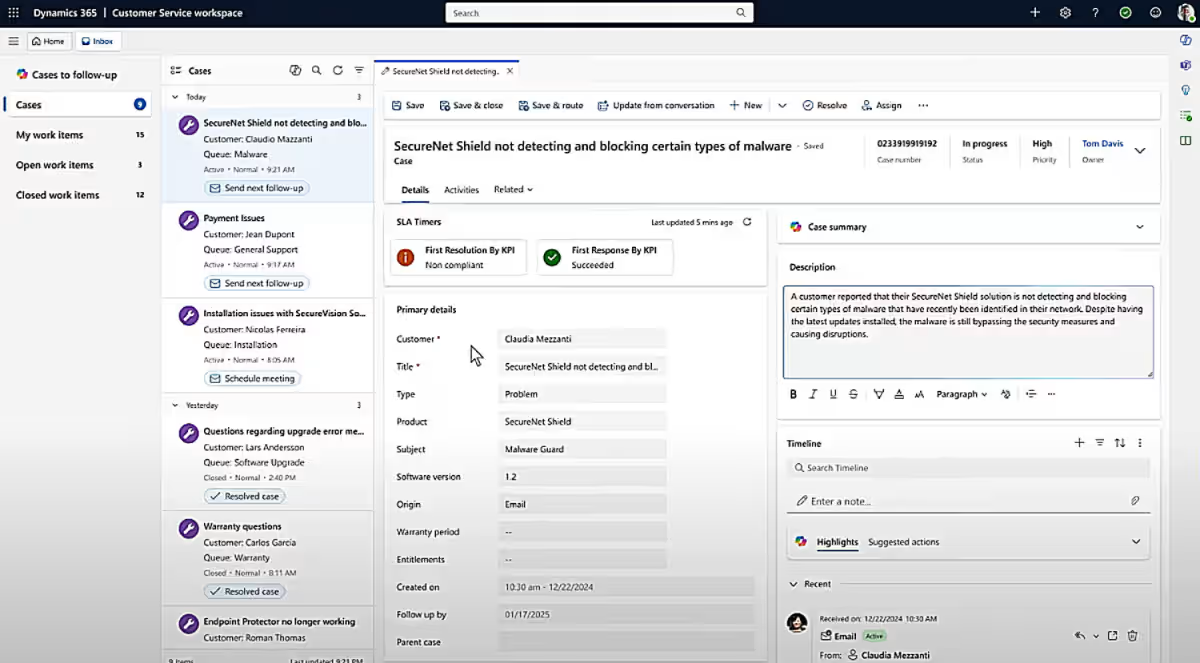
As the core service application, Dynamics 365 Customer Service focuses on case management, knowledge articles, SLAs, and customer history. It’s designed to help teams track and resolve issues efficiently and is a good fit for organizations with traditional support teams or lower interaction volumes.
Dynamics 365 Contact Center
Building on Customer Service, Dynamics 365 Contact Center adds full contact center capabilities for high-volume, omnichannel interactions. It supports real-time voice and digital conversations and is designed for environments where scale and speed matter.
Key differences
- Omnichannel engagement: Contact Center supports high-volume voice, chat, messaging, email, and social channels in a single agent workspace. Customer Service is primarily case-driven.
- Voice and telephony: Contact Center includes call routing, IVR, call recording, transcription, voicemail, outbound dialing, and integration with Microsoft Teams Phone or Azure Communication Services.
- AI capabilities: Contact Center adds Copilot-powered features such as conversational IVR, real-time sentiment analysis, conversation summaries, agent guidance, and intent detection.
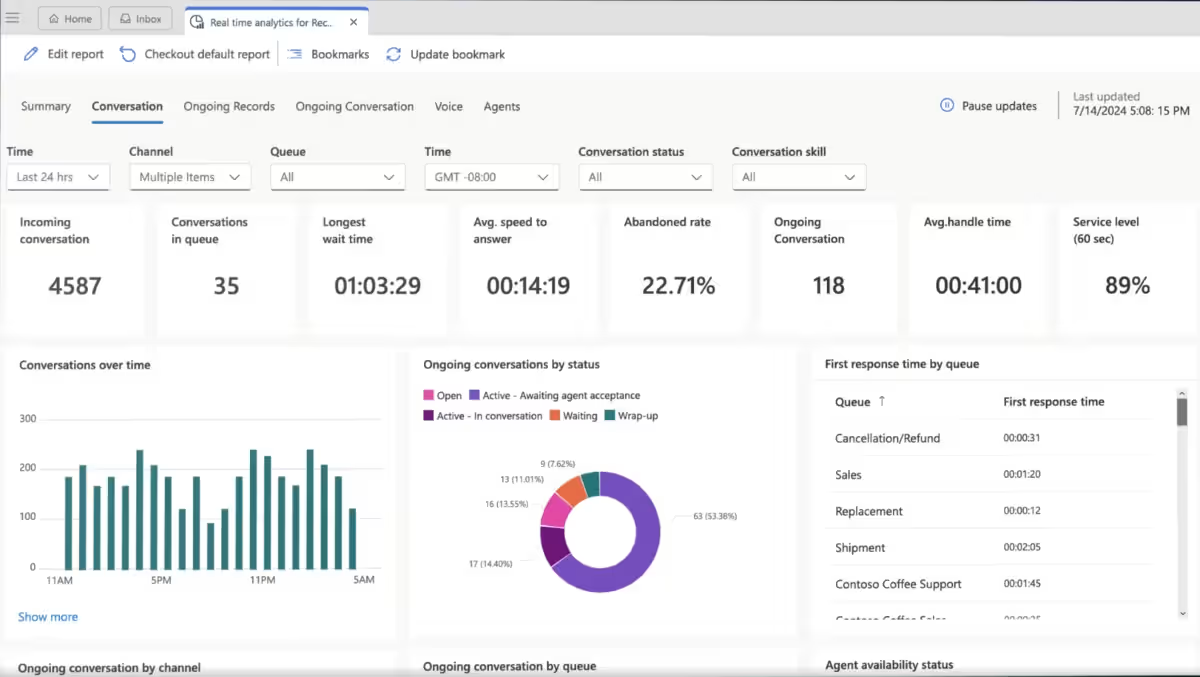
- Supervision and performance management: Contact Center provides real-time visibility into queues, agent workloads, service levels, and quality metrics to support staffing and performance decisions.
In most implementations, Dynamics 365 Customer Service serves as the system of record, while Dynamics 365 Contact Center adds the channels, AI, and scale needed for a modern contact center. Together, they provide a single service platform that connects interactions directly to cases, knowledge, and reporting.
With a clear understanding of how Dynamics 365 Contact Center extends Customer Service, the next step is deciding whether it aligns with your organization’s service model and operational needs.
AI and automation in action
AI is central to Dynamics 365 Contact Center. Tools like Copilot Studio enable organizations to create AI agents that handle routine inquiries and more complex tasks. By automating repetitive processes, AI frees human agents to focus on tasks that require judgment and expertise. Highlights:
- Virtual agents answer FAQs and provide basic support
- Copilot Studio supports custom AI agents for complex scenarios
- Built-in agent assistance offers suggested responses, conversation summaries, real-time sentiment analysis, translation, and knowledge search
- Automation reduces manual workloads and accelerates case resolution
- Advanced analytics track agent and system performance for continuous improvement
Example scenarios
- Customer support during high volume: AI can handle common questions about order status, returns, or shipping, allowing agents to focus on complex troubleshooting.
- Language translation for global customers: AI translates live chats or emails in real time, helping agents communicate effectively without language barriers.
- Conversation summarization: After a long support call, AI generates a concise summary of the interaction and suggested next steps, saving agents time on documentation.
- Sentiment analysis: AI detects frustrated or angry customers in chat or voice calls and alerts agents with tips on how to handle the interaction to improve satisfaction.
- Knowledge retrieval: When a customer asks a detailed product question, AI suggests relevant articles or past cases to the agent, reducing search time and improving accuracy.
Because the platform is cloud-native and Copilot-first, organizations can leverage modern AI capabilities. These capabilities were not available in previous Dynamics contact center solutions.

Customer service management and analytics
Dynamics 365 Customer Service is the core of the platform. It helps organizations manage cases, track interactions, and deliver personalized experiences. Self-service portals enable customers to resolve common issues independently. Meanwhile, supervisors gain real-time insight into agent performance and trends. Key features:
- 360-degree customer view with unified data in Microsoft Dataverse
- Case management for efficient issue resolution
- Real-time dashboards and reporting with actionable insights
- Integration with Power BI for advanced visual analytics
- Workforce management tools for skills-based scheduling, capacity planning, and performance monitoring
These capabilities support data-driven decision-making. They also improve agent productivity and enhance the overall customer experience.

White Paper:
Choosing the right implementation partner
Selecting an ERP implementation partner is a strategic decision that can shape your organization’s long-term success. Learn what to look for in an implementation partner and how to confidently choose the right fit for your business.
Integration and customization
Dynamics 365 Contact Center integrates with Microsoft Teams, allowing agents and teams to collaborate without leaving the platform. It also connects with other CRM systems and third-party applications, enabling organizations to leverage existing technology.
The Power Platform allows businesses to customize workflows, dashboards, and apps to meet specific service requirements. Optional telephony integration with Microsoft Teams Phone or Azure Communication Services further streamlines voice interactions. Integration benefits:
- Unified collaboration through Microsoft Teams
- Connection with other CRM systems and third-party apps
- Customization with Power Platform to extend functionality
- Simplified telephony management for voice channels
The platform’s architecture supports integrated operations. It also provides flexibility for evolving business needs.
Deployment and licensing
Dynamics 365 Contact Center is cloud-based. This allows organizations to scale quickly and reduce infrastructure costs. Licensing is available in three plans: Contact Center, Contact Center Digital, and Contact Center Voice. Each plan includes different channel and AI capabilities. Organizations can also add Copilot credits for advanced agent automation. Considerations for adoption:
- Implementation and customization require planning and technical expertise
- Agents may need training to maximize AI-assisted features
- Organizations should review integration requirements and licensing options
- As a new product, it receives frequent updates and feature enhancements
These factors help organizations adopt the platform efficiently. They also help maximize its value.
Compare plans to find the right fit
Is Dynamics 365 Contact Center right for your organization?
Dynamics 365 Contact Center is built for organizations that handle a high volume of customer interactions and want consistent service across multiple channels, supported by AI. It’s a good option for teams looking to modernize their contact center while staying within the Microsoft ecosystem.
Dynamics 365 Contact Center is a good fit for organizations that:
- Use Dynamics 365, Microsoft Teams, or the Power Platform and want native integration across service, collaboration, and automation tools
- Support customers through voice, chat, email, messaging, and social channels and want one unified agent workspace
- Manage moderate to high interaction volumes and need intelligent routing, queues, and real-time visibility into operations
- Want to use AI for self-service, agent guidance, conversation summaries, sentiment analysis, and knowledge search
- Need real-time dashboards and analytics to track service levels, agent performance, and customer sentiment
- Plan to evolve their contact center over time using low-code tools and AI agents built with Copilot Studio
By bringing channels, AI, and customer service data into one platform, Dynamics 365 Contact Center helps organizations move from reactive support to more efficient, scalable, and personalized customer experiences.
Conclusion
Dynamics 365 Contact Center is a cloud-native, AI-first platform designed to improve customer engagement and streamline operations. With automation, omnichannel support, agent-assist AI, and real-time analytics, organizations can manage interactions more effectively. It also provides agents with intelligent tools and supports service scaling as needed.
By leveraging AI features such as conversation summarization, sentiment analysis, and knowledge retrieval, organizations can reduce agent workloads, resolve customer issues faster, and improve overall satisfaction. These capabilities translate directly into more efficient operations and higher-quality service.
For businesses seeking a modern, integrated contact center solution, Dynamics 365 offers the tools and intelligence required to meet customer expectations and operational goals. Contact Rand Group to configure and optimize Dynamics 365 Contact Center. We ensure each feature is set up correctly, train your team, and fine-tune automations so you see the impact immediately.



Subscribe to our Insights
