Dynamics 365
 Power Platform
 Dynamics
 Cloud & Productivity
Dynamics 365 Project Operations implementation guide: From planning to go-live

For project-based businesses, margin visibility is critical. When quoting, scheduling, time tracking, and billing sit in separate tools, profitability becomes a guess instead of a number you can trust. Microsoft Dynamics 365 Project Operations brings those pieces into one connected system. But the software only pays off when it reflects how your teams actually deliver work. That is what an implementation is for. This guide walks through what the work involves, how to prepare, what it costs, how long it takes, and where projects tend to go wrong.
At a glance: Dynamics 365 Project Operations implementation
A Dynamics 365 Project Operations implementation is the process of planning, configuring, testing, deploying, and adopting the platform around your project delivery and financial processes. A successful implementation goes beyond configuration. It also addresses data, integrations, security, reporting, training, and user adoption.
- Implementation can be self-led or partner-led. The right choice depends on your Dynamics 365 knowledge, resources, project complexity, and timeline.
- Scope drives everything. Project types, billing rules, and integrations shape the cost and the calendar more than anything else.
- Finance belongs in the room early. Project accounting and revenue recognition are core to Project Operations, not an afterthought.
- Licensing needs planning. Project Operations has a 20-seat minimum purchase requirement, so review your user roles and licensing needs before finalizing your implementation scope.
- Adoption decides the outcome. Billable teams trust the system only when their time, budgets, and reports are accurate from day one.
Table of contents
- What is Microsoft Dynamics 365 Project Operations?
- What is a Dynamics 365 Project Operations implementation?
- What is typically included in a Dynamics 365 Project Operations implementation?
- What are my Dynamics 365 Project Operations implementation options?
- How do I choose the right Dynamics 365 Project Operations implementation approach?
- What should I prepare before a Dynamics 365 Project Operations implementation?
- What are the steps for a successful Dynamics 365 Project Operations implementation?
- How long does it take to implement Dynamics 365 Project Operations?
- Rapid activation vs. traditional implementation
- How much does it cost to implement Dynamics 365 Project Operations?
- Common Dynamics 365 Project Operations implementation issues
- Benefits of working with a Dynamics 365 Project Operations implementation partner
- Why organizations work with Rand Group for Dynamics 365 Project Operations implementation
- Key takeaways
- Dynamics 365 Project Operations implementation FAQs
What is Microsoft Dynamics 365 Project Operations?
Dynamics 365 Project Operations is Microsoft’s application for project-based businesses. It manages the full project lifecycle in one place, from the initial quote through delivery, billing, and financial reporting.
Project Operations is part of Microsoft’s Customer Engagement (CE) family of Dynamics 365 apps. Because it lives inside the Microsoft ecosystem, it can connect with the tools your teams already use. It integrates with Dynamics 365 Finance for advanced accounting and with Dynamics 365 Business Central for finance in growing organizations. It also works alongside Microsoft Teams, Outlook, and Excel.
In practice, the platform pulls four functions into one system:
- Sales and quoting, so estimates are built on real project data
- Project planning and scheduling, with tasks, milestones, and dependencies
- Resource management, so you staff the right people at the right time
- Project accounting, so cost, revenue, and profitability stay current
For a closer look at each area, see our breakdown of Dynamics 365 Project Operations modules and functionality.
AI is also becoming part of the Project Operations experience through Microsoft Copilot and other AI-assisted capabilities. These tools can help users work more efficiently with project information, reduce manual effort, and support day-to-day activities across project delivery. While AI is not the primary reason most organizations implement Project Operations, it is worth considering during implementation planning so the right data, processes, and security foundation are in place to support current and future AI capabilities.
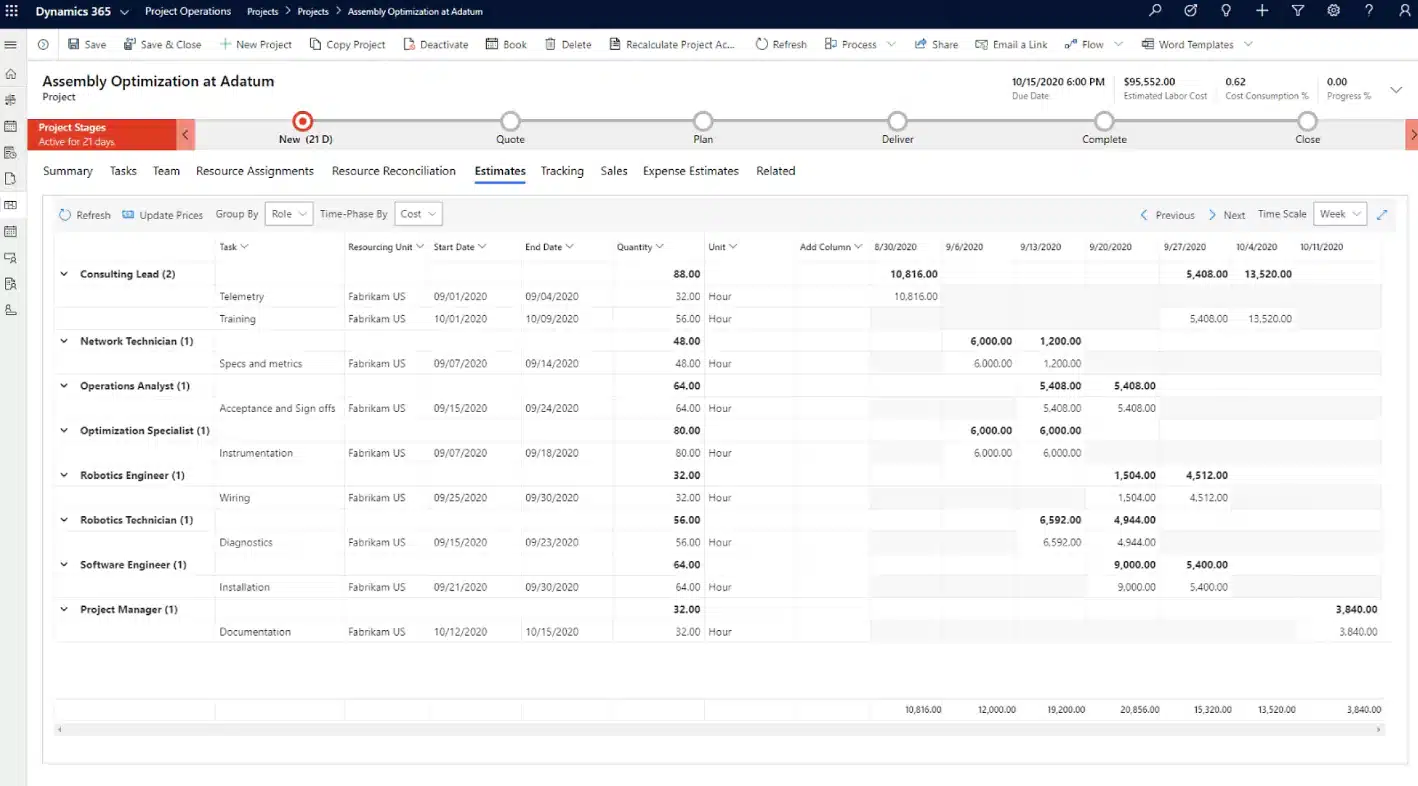
What is a Dynamics 365 Project Operations implementation?
A Dynamics 365 Project Operations implementation turns the software into a working system aligned with how your organization delivers projects. Successful deployment requires careful planning across processes, configuration, data, integrations, testing, training, and adoption.
The project starts by defining what the business needs. Your team then configures Project Operations, prepares and migrates data, and connects required systems. Testing, training, and deployment follow. Rand Group’s methodology covers these areas from initial design through post-go-live adoption.
During implementation, you will answer practical questions such as:
- Which project types do you deliver, such as fixed-price or time-and-materials?
- What resource roles, skills, and rates should the system track?
- Which stages should a project move through from quote to close?
- Who should have access to project, cost, and billing data?
- What information do leaders need in dashboards and reports?
- Which systems need to exchange data with Project Operations?
A strong implementation should not simply copy every field and workflow from your current tools. The project is also an opportunity to review how work is delivered, identify unnecessary steps, and determine where standard functionality, automation, and emerging AI capabilities can support more efficient project processes.
What is typically included in a Dynamics 365 Project Operations implementation?
Every implementation has a different scope, but most projects touch the same core areas of work.
Typical activities include:
- Delivery and billing design: Map your project types, billing rules, and price lists. This design work shapes almost everything that follows.
- System configuration: Set up project types, resource roles, security roles, workflows, and approvals to match your processes.
- Data migration: Clean, map, and move active projects, resources, rate cards, and open financials, then validate the results.
- Integrations: Connect Project Operations to your ERP, CRM, finance, and reporting systems so data flows without rekeying.
- Reporting and dashboards: Build the views that project managers, finance, and leaders rely on to watch delivery and margin.
- Testing: Run realistic, end-to-end scenarios to confirm that processes, permissions, data, and integrations behave as expected.
- Training and deployment: Prepare users and administrators, then deploy the approved solution into production.
- User adoption and support: Help teams settle in, resolve early issues, and keep improving the system after launch.
Two of these deserve early attention rather than a spot at the end. Billing design and data migration both ripple through the whole project, so treat them as day-one work. Rand Group’s Project Operations implementation services cover this full scope, from design through adoption.
What are my Dynamics 365 Project Operations implementation options?
You have two broad choices. Your internal team can lead the project, or you can work with a Dynamics 365 implementation partner. Neither option removes the need for business involvement. Even with a partner, your people still explain requirements, make decisions, test the build, and champion adoption.
Self-implementation
A self-implementation means your internal team takes primary responsibility for the project, including requirements, configuration, billing setup, data migration, testing, training, and support. This approach is only practical in limited cases where the organization has strong in-house Dynamics 365 skills, simple billing requirements, and few integrations. Even then, teams should be realistic about the time, product knowledge, and change management required.
Partner-led implementation
A partner-led implementation brings experienced Dynamics 365 specialists into the project while keeping your internal team involved in requirements, decisions, testing, and adoption. The partner typically leads solution design, configuration, data migration, integrations, testing, deployment, and knowledge transfer.
This approach is particularly useful when your organization has complex billing requirements, multiple integrations, significant data migration, limited internal Dynamics 365 expertise, or a firm implementation timeline. The trade-off is additional professional services cost, but the organization gains access to skills and implementation capacity it may not maintain internally.
How do I choose the right Dynamics 365 Project Operations implementation approach?
Choosing the right implementation approach depends on more than budget. Organizations should evaluate whether they have the internal capacity, product knowledge, technical skills, and business availability needed to complete the project successfully. The following questions can help clarify the right approach:
- Internal Dynamics 365 expertise: Do you have staff who understand Project Operations configuration, security, and administration?
- Available resources: Can those people commit meaningful time without dropping their regular work?
- Delivery complexity: Are your project types and billing simple, or do they involve specialized rules and approvals?
- Data quality: Where does your project and financial data live today, and how much cleanup does it need?
- Integration requirements: Does Project Operations need to connect with ERP, CRM, finance, or reporting systems?
- Customization needs: Can standard configuration support your process, or will you need custom development?
- Training requirements: How many users need training, and how different will the new system be?
- Timeline: Is there a firm date by which the platform needs to be live?
- Long-term ownership: Who will administer and improve Project Operations after go-live?
If your answers reveal significant gaps in internal expertise, available capacity, data readiness, or integration skills, bringing in an implementation partner can reduce execution risk and give your team access to specialized resources. Organizations with experienced Dynamics 365 staff, straightforward processes, and enough internal capacity may be able to keep more of the implementation work in-house.
What should I prepare before a Dynamics 365 Project Operations implementation?
Good preparation shortens the project and cuts rework. Before kickoff, get clear on a few fundamentals.
Start with goals and process. Define what you want the platform to improve, whether that is resource utilization, billing speed, or margin visibility. Then document how you deliver projects today. Name the people who will take part, including project leadership, finance, IT, and end users.
Turn to data and licensing next. Decide which projects, resources, rate cards, and financial records need to move, then clean and validate them. Plan your licensing requirements early. Project Operations has a 20-seat minimum purchase requirement, and the right license mix depends on how different users will work in the system. Reviewing those requirements before implementation helps avoid unexpected licensing costs or access limitations later.
Finally, list your integrations. Identify every system that needs to exchange data, such as your ERP, CRM, or finance platform, so those requirements are in scope from the start.

See Project Operations working for your business
Every project-based business bills and delivers a little differently. The fastest way to know if Project Operations fits yours is to see it mapped to your process. Rand Group can walk you through it and help you scope a realistic plan.
What are the steps for a successful Dynamics 365 Project Operations implementation?
The strongest implementations move through a clear sequence instead of jumping straight to configuration. Rand Group runs every project through five phases: envision and design, build, test, deploy, and user adoption. Each phase sets up the next, so the work stays organized and risk stays low from kickoff through go-live.

Envision and design
Learn how your teams deliver projects and where they struggle. Capture requirements and define the future state, including project types, billing, resources, security, integrations, and reporting.

Build
Configure Project Operations against the approved design. This phase covers project types, billing rules, price lists, resource roles, workflows, integrations, approved customizations, and initial data.

Test
Validate the system with realistic, end-to-end scenarios. Check quoting, scheduling, time and expense, billing, integrations, permissions, and migrated data before go-live.

Deploy
Move the approved solution into production on a defined go-live plan. Finish deployment steps, migrate production data, validate the environment, and support users through the switch.

User adoption
Build confidence through training and hands-on support. Reinforce the new processes, gather feedback, and resolve adoption challenges after launch.
How long does it take to implement Dynamics 365 Project Operations?
Implementation timelines vary based on the scope and complexity of the project. A focused rollout can go live in a matter of weeks, while a more complex implementation typically takes months. Three factors drive much of that difference:
- Scope and complexity: More entities, project types, approvals, and customization add time to design, build, and testing.
- Data and integrations: Larger or less structured data sets and connections to ERP, CRM, finance, or reporting systems increase implementation effort.
- Team readiness: The ability to make decisions, test the solution, provide feedback, and complete training affects the overall pace.
Rand Group offers two implementation approaches based on the organization’s requirements: Rapid Activation for limited scope deployments and traditional implementation for organizations that need a broader or more tailored solution.
Traditional implementation
A traditional implementation fits organizations with complex delivery models, specialized billing requirements, meaningful customization, or multiple integrations. It typically runs three to six months and follows Rand Group’s full five-phase methodology, allowing adequate time for design, configuration, testing, deployment, and user adoption.
The ranges below reflect typical phase durations. Phases may overlap depending on project requirements, so they should not be added together to calculate the total implementation timeline.
Envisioning and design
Build
Test
Deploy
User adoption
Rapid activation
For organizations with straightforward requirements and limited customization or integration needs, Rand Group offers a rapid activation approach. This option uses a more defined scope to reduce the configuration and integration effort required for a traditional project, helping organizations deploy a functional Project Operations solution in six to twelve weeks.
Rapid activation is best suited to organizations that can rely primarily on standard Project Operations functionality and established best practices. The narrower scope provides a faster implementation path while still including the configuration, testing, training, and production deployment needed to prepare users for the new system.
Pre-configuration
Configuration
Train and test
Production cutover
Rapid activation vs. traditional implementation
Both rapid activation and traditional implementation provide a structured path to deploying Dynamics 365 Project Operations, but they are designed for different levels of complexity. Rapid activation uses a more defined scope to support organizations with straightforward requirements and limited customization or integration needs, while a traditional implementation provides greater flexibility for more complex processes, integrations, data, and configuration requirements. The comparison below highlights the key differences to consider when determining which approach is the better fit.
How much does it cost to implement Dynamics 365 Project Operations?
Budget for two separate costs: software licensing and implementation services. Microsoft prices Project Operations per user, per month, and the right license depends on how each person uses the system:
- Full user license, around $135 per user per month, for project managers, resource managers, and finance users who work in the system daily.
- Attach license, around $30 per user per month, for users who already hold a qualifying base license.
- Team Member license, around $8 per user per month, for light users who mainly enter time and expenses or view project data.
An attach license is Microsoft’s way of rewarding customers who already run Dynamics 365. Under this model, each user’s most capable app is licensed as the base at full price. You can then add related apps for that same user at the lower attach price. For example, a project manager who already holds a Dynamics 365 Sales Enterprise license can add Project Operations as an attach license for about $30 per user per month, rather than the full $135. Across a team that already uses another Dynamics 365 app, those savings add up quickly.
Because Project Operations has a 20-seat minimum purchase requirement, organizations buying full user licenses should plan for a minimum licensing commitment of approximately $2,700 per month, or $32,400 per year, before implementation services, add-on licenses, integrations, or support are considered. For the full picture, see our complete guide to Dynamics 365 Project Operations pricing.
Implementation services are separate from software licensing. Based on the scope and complexity Rand Group typically sees in Project Operations projects, implementation services can range from approximately $25,000 to $250,000 or more. A focused deployment with limited integrations and customization will generally fall toward the lower end, while complex implementations involving significant data migration, integrations, specialized billing requirements, custom development, or extensive training require a larger investment.
Common Dynamics 365 Project Operations implementation issues
Many implementation challenges stem from planning, process, and adoption rather than the technology itself. Across the Dynamics projects Rand Group has delivered since 2003, several common issues continue to surface. Identifying these risks early can help organizations avoid rework, delays, and disruption during and after go-live.
- Choosing the wrong deployment model. Project Operations offers different deployment options, from a lightweight model built on Dataverse to a full model integrated with Dynamics 365 Finance for deep project accounting. Pick the wrong one and you invite costly rework. Match the model to your accounting and billing needs before you build.
- Leaving finance out of early design. Project Operations ties delivery to project accounting. When finance joins late, billing rules and revenue recognition get bolted on, and the numbers stop reconciling.
- Skipping the rate card and pricing groundwork. Cost rates, bill rates, and price lists drive every project estimate and invoice. Define them before configuration, not during testing.
- Treating resource management as an afterthought. Scheduling only works when roles, skills, and availability are modeled well. Vague resource setup leads to overbooking and idle capacity.
- Migrating messy data. Duplicate projects, stale rates, and incomplete records erode trust the moment users log in. Clean the data before it moves.
- Over-customizing too soon. Custom development solves real problems, but unnecessary customization inflates testing and long-term maintenance. Start with standard configuration and extend only where the business truly needs it.
- Underestimating time-entry adoption. Billable staff often resist tracking time in a new tool. Without clear training and leadership support, your cost and margin data stays incomplete.
A partner who has seen these patterns can steer around them, which is a large part of the value an experienced implementation team brings.
Benefits of working with a Dynamics 365 Project Operations implementation partner
A Project Operations implementation combines process design, product configuration, project accounting, data migration, integrations, testing, and change management. An experienced implementation partner can supplement the skills and capacity your internal team already has while helping coordinate those workstreams from design through go-live.
Working with a partner can give you:
- A more structured implementation process. Established methods, defined responsibilities, and experience with similar projects can help teams identify risks earlier and keep implementation decisions moving.
- A design aligned with your delivery model. Project Operations specialists can help translate your billing, resource management, project delivery, and financial requirements into a practical system design.
- Guidance on licensing and deployment choices. A partner can help evaluate deployment architecture, user requirements, and licensing options before configuration begins, reducing the likelihood of costly changes later.
- A deep bench on demand. You tap functional consultants, developers, and integration specialists without hiring for a one-time need.
- Custom development when it counts. A partner can handle Project Operations development for the requirements standard configuration cannot meet.
- Support that outlasts go-live. The same team can keep improving the system as your processes, integrations, and reporting needs evolve.

Deliver projects on time, on budget, and on the same data
Project Operations should help your teams manage delivery and profitability with less friction. It should not create another administrative burden. Rand Group can help you plan, implement, integrate, and support Project Operations around your business.
Why organizations work with Rand Group for Dynamics 365 Project Operations implementation
Organizations choose Rand Group when they want one Microsoft partner to support both the implementation and the long-term evolution of their Dynamics environment. Rand Group has implemented Microsoft Dynamics solutions since 2003 and reports a 90% client retention rate. Our teams support Project Operations projects across implementation, data migration, integrations, training, development, and ongoing support.
Clients tend to describe the experience the same way:
“Rand Group has been top-notch, professional, responsive, and very proactive. You can tell their internal processes are really sound, especially in how they manage and follow up on support requests. We come up with ideas, and they help us figure out what will actually work in the system, whether it’s configuration, reporting, or technical support.” — Derek Atwood, Subs for Pools
“Rand Group’s knowledge base is expansive. Whenever we come up with an idea to be explored, they always have someone on staff that has relevant experience. Anytime we have an issue pop up, Rand Group is always available, dependable, and helpful.” — Travis Hardwick, President & CEO, TCC Multi-Family Interiors
Key takeaways
- A successful Project Operations implementation starts with clear goals, defined delivery processes, reliable data, and early planning for billing, integrations, and adoption.
- Organizations can choose a self-led or partner-led approach based on their expertise, resources, complexity, and timeline.
- Scope has the greatest impact on cost and timing. Billing design, data migration, integrations, customization, and training all increase effort.
- Plan licensing early. Project Operations has a 20-seat minimum purchase requirement, and organizations should evaluate user roles, qualifying licenses, and subscription costs separately from implementation services.
- Long-term success depends on more than go-live. Plan for adoption, data quality, support, and ownership from the start.
Dynamics 365 Project Operations implementation FAQs
How long does it take to implement Dynamics 365 Project Operations?
It depends on scope. A traditional implementation typically runs 3 to 6 months, while Rand Group’s rapid activation approach can go live in 6 to 12 weeks for simpler projects. Complexity, integrations, and data all shift the timeline.
How much does a Dynamics 365 Project Operations implementation cost?
Plan for roughly $25,000 to $250,000 or more in implementation services, plus licensing. The final number depends on scope, data migration, integrations, customization, and billing complexity.
What is an attach license?
An attach license lets a user who already holds a qualifying Dynamics 365 base license add Project Operations at a reduced rate, around $30 per user per month. It rewards organizations already invested in the Microsoft ecosystem.
Can I implement Dynamics 365 Project Operations myself?
Technically, yes, but Rand Group generally does not recommend a self-led implementation. Project Operations involves complex configuration across billing, project accounting, security, data migration, integrations, testing, and user adoption. Without deep Dynamics 365 expertise, internal teams can easily underestimate the effort or make early design decisions that lead to costly rework later.
What are the main stages of a Dynamics 365 Project Operations implementation?
Rand Group uses five phases: envision and design, build, test, deploy, and user adoption. They carry the project from requirements through go-live and continued enablement.
What data should I migrate to Dynamics 365 Project Operations?
Most organizations move active projects, resources, rate cards, price lists, and open financial records. Bring historical data across only when there is a clear business, reporting, or compliance reason.
What happens after Dynamics 365 Project Operations goes live?
After go-live, monitor adoption, data quality, integrations, billing, and support requests. Additional training and ongoing optimization help the system keep pace with changing delivery and financial needs.
Make your Dynamics 365 Project Operations implementation a long-term success
A strong implementation begins long before configuration. Clear goals, clean data, a realistic scope, and engaged users turn Project Operations into a system your teams rely on every day. Whether you are weighing a focused rollout or a wider transformation, an experienced partner can help you scope the work and build a plan that fits. Contact Rand Group to talk through your Dynamics 365 Project Operations goals.