Dynamics 365
 Power Platform
 Dynamics
 Cloud & Productivity
What is Dynamics 365 Project Operations?

Microsoft Dynamics 365 Project Operations is a cloud-based solution designed to help organizations manage the full lifecycle of a project—from sales and planning to delivery and financial reporting. Built within the Microsoft Dynamics 365 ecosystem, it connects project management, resource planning, time tracking, and financial management into one unified platform.
Organizations that deliver services through projects often struggle with disconnected systems, limited visibility into project performance, and difficulty tracking profitability in real time. Dynamics 365 Project Operations solves these challenges by bringing project planning, execution, and financials into a single system. In this blog, we explore what Dynamics 365 Project Operations is, what it does, who uses it, and how organizations can implement it successfully.
What is Dynamics 365 Project Operations?
Dynamics 365 Project Operations is a Microsoft cloud application built for project-based businesses. It connects the full project lifecycle — from winning a deal to delivering work and getting paid — in one unified system.
It is part of the broader Dynamics 365 suite, which means it works natively with other Microsoft tools like Dynamics 365 Finance & Operations, Dynamics 365 Business Central, Microsoft Teams, and the Power Platform. Instead of juggling multiple systems, your sales, project delivery, and finance teams all work from the same data.
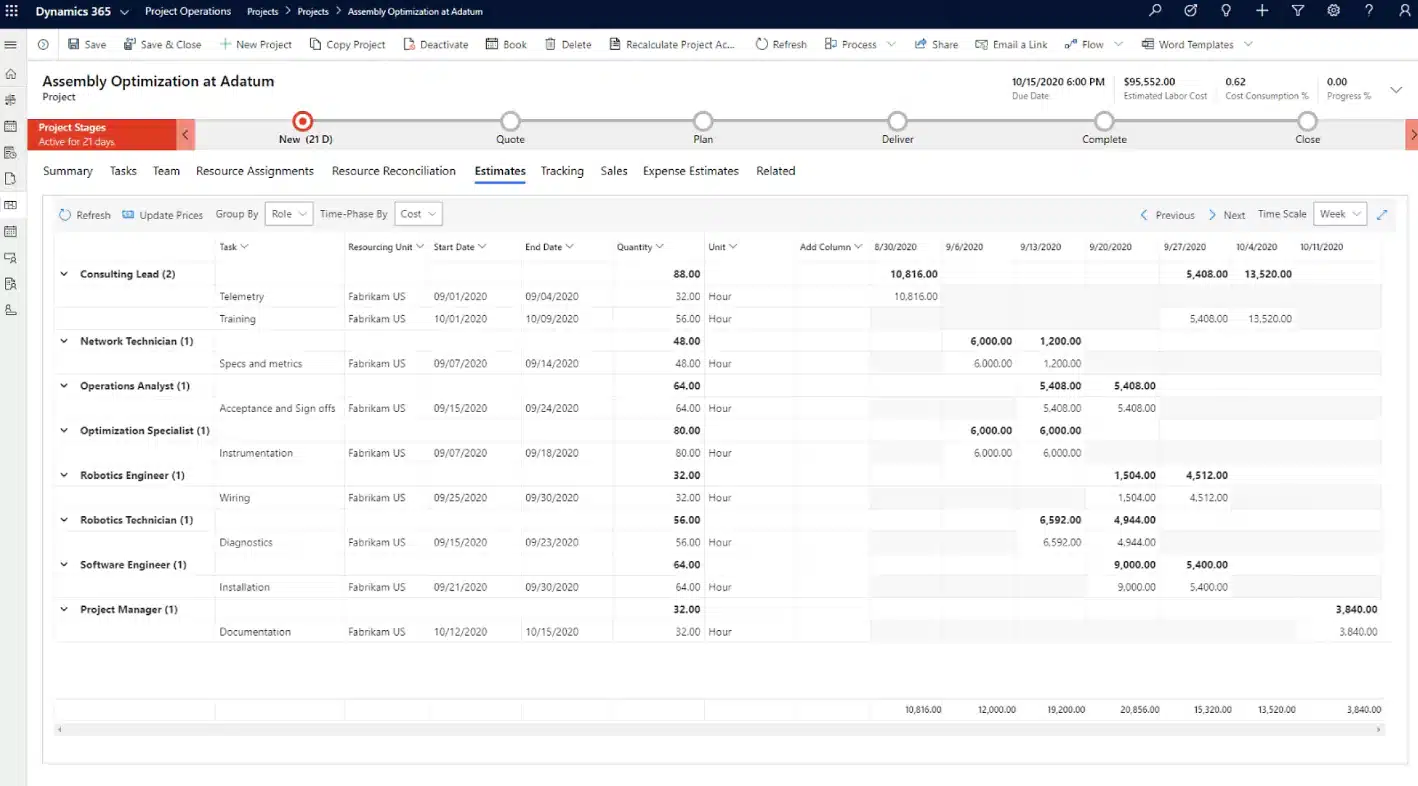
What Does Dynamics 365 Project Operations Do?
Dynamics 365 Project Operations handles the end-to-end workflow of a project-based business. It covers four major areas:
- Sales and opportunity management. Teams can create project quotes and estimates directly from a CRM opportunity. This means the numbers your sales team promises are built on real project data — not guesswork.
- Project planning and delivery. Project managers can build work breakdown structures, assign tasks, track milestones, and monitor progress in real time. The system supports multiple project types, including time-and-materials, fixed-price, and internal projects.
- Resource management. You can see who is available, what skills they have, and how they are currently allocated. This makes it easier to staff projects without overbooking your team or leaving capacity on the table.
- Project financials and accounting. Costs, revenue, and profitability are tracked throughout the life of a project. Finance teams can manage billing, process invoices, and control project profitability in real time — not just at the end.
Who Uses Dynamics 365 Project Operations?
Dynamics 365 Project Operations is built for organizations where projects are the main way they deliver value to clients. It is common in industries like consulting, engineering, construction, IT services, professional services, and managed services.
Within those organizations, different roles rely on it in different ways. Project managers use it to plan and track work. Resource managers use it to allocate and optimize their teams. Finance teams use it for billing and reporting. Sales teams use it to build accurate project quotes. And executives use it to see performance across all active projects.

Start delivering more profitable projects
Managing projects with disconnected systems can make it difficult to track resources, control costs, and maintain profitability. Dynamics 365 Project Operations brings project planning, resource management, and financial tracking together in one platform. Rand Group can help you evaluate the solution, implement it successfully, and ensure it aligns with your business goals.
The Benefits of Dynamics 365 Project Operations
Implementing Dynamics 365 Project Operations gives project-based businesses a platform to operate more efficiently and profitably. Here are the key benefits:
- Better visibility across all projects. Leaders can see the health of every active project in one place. No more piecing together status updates from emails or spreadsheets.
- More accurate project estimates. Because your sales and delivery teams share the same system, quotes are built on real data — actual resource rates, task structures, and past project history.
- Improved resource utilization. You can see where your team is allocated and find available capacity quickly. This reduces bench time and helps you staff projects faster.
- Faster billing and revenue recognition. With automated billing milestones and real-time cost tracking, you can invoice clients sooner and recognize revenue more accurately.
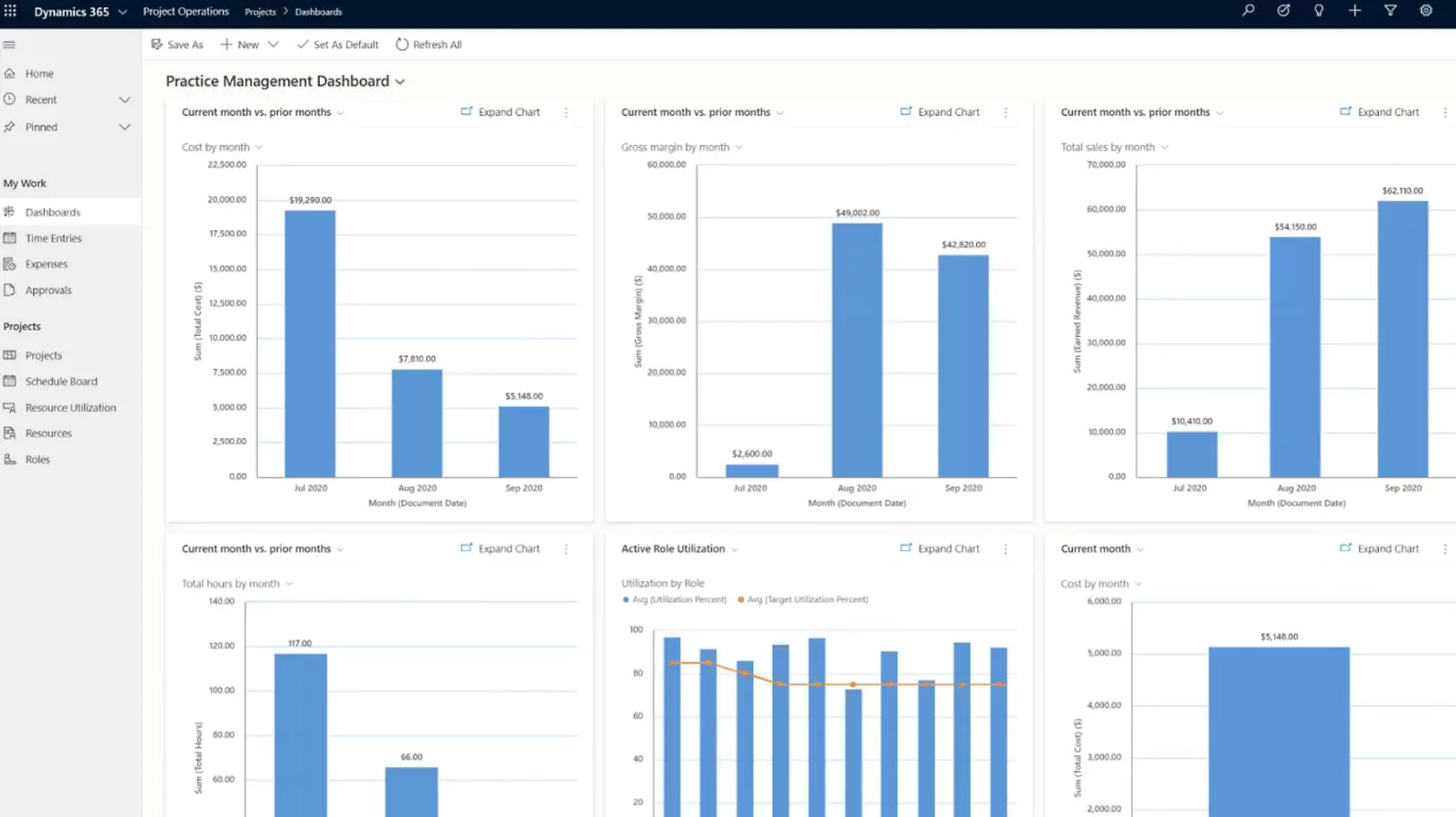
- Real-time profitability tracking. Finance teams do not have to wait until a project closes to see how it is performing. Dashboards and reports give live insight into cost vs. budget at every stage.
- Built-in AI with Copilot. Dynamics 365 Copilot in Project Operations can help teams generate project summaries, surface risks, and automate routine tasks — saving time and reducing manual work.
- Seamless Microsoft integration. Because Project Operations lives in the Microsoft ecosystem, it connects naturally with Teams, Outlook, Excel, and Power BI. Your team does not have to learn an entirely new way of working.
Key features of Dynamics 365 Project Operations
Dynamics 365 Project Operations includes several powerful capabilities that support project delivery and financial management.
Key features include:
- Project planning and scheduling: Project managers can create detailed project plans that include tasks, milestones, dependencies, and timelines. These plans help ensure projects stay on track and meet deadlines.
- Resource management: The platform allows organizations to assign resources based on skills, availability, and workload. Managers can easily identify resource gaps and make adjustments when needed.
- Time and expense tracking: Employees can log time and expenses directly within the system. This ensures accurate project costing and simplifies billing processes.
- Project financial management: Project Operations tracks project costs, revenue, and profitability in real time. This helps organizations monitor project performance and make informed financial decisions.
- Project forecasting: The solution provides forecasting tools that allow leaders to predict revenue, resource demand, and project profitability.
- Reporting and analytics with Power BI: Built-in dashboards show project health, resource utilization, financial performance, and delivery metrics. You can drill into any project or roll up to the portfolio level.
- Copilot and AI assistance: Microsoft Copilot helps project managers write status updates, summarize risks, and spot issues before they become problems — making it easier to stay on top of a full portfolio. AI agents can go further by taking autonomous actions within defined boundaries, such as automating routine project tasks, flagging budget variances, and keeping workflows moving without manual intervention.
- Microsoft 365 integration: Work in Microsoft Teams, Outlook, and Excel while staying connected to your project data. This reduces context switching and improves team communication.
For a more detailed breakdown, explore this blog on Dynamics 365 Project Operations modules and functionality.

What does Dynamics 365 Project Operations cost?
Dynamics 365 Project Operations uses a subscription-based licensing model. Organizations pay a monthly fee per user based on the type of access required.
- Full user license: Gives complete access to project management, resource scheduling, time and expense tracking, project accounting, and AI tools. This is the right license for project managers, resource managers, and finance users who work in the system daily.
- Attach license: If a user already has a qualifying Dynamics 365 base license (such as Sales Premium or Finance), they can add Project Operations at a reduced price.
- Team Member License: Team Member licenses are designed for employees who need limited access, such as submitting time entries or viewing project information.
For a deeper breakdown of pricing options, visit our Dynamics 365 Project Operations pricing page.
Dynamics 365 Project Operations implementation process
Implementing Dynamics 365 Project Operations is a structured process that helps organizations successfully adopt the platform while aligning it with their business operations. Because every organization manages projects differently, implementations are typically tailored to each company’s workflows, reporting needs, and operational requirements. At a high level, an implementation typically covers things like configuring project types and billing rules, setting up resource roles, migrating data from existing tools, integrating with other systems, and training your team.
The scope of work — and how long it takes — varies from one organization to the next. A smaller business with straightforward needs will have a very different experience than a large enterprise with multiple entities, complex integrations, or highly customized billing models. Rand Group works with organizations to determine the right implementation approach from the start. That means understanding your current state, your goals, and the level of change your team can manage. From there, we build a plan that fits — not a one-size-fits-all deployment.
Is Dynamics 365 Project Operations right for your company?
Dynamics 365 Project Operations is a strong fit for organizations where projects are the primary way they generate revenue and serve clients. If your business delivers services through engagements — whether that is IT consulting, engineering projects, construction management, or creative services — this platform is designed for you.
It may be the right choice if:
- Your teams use spreadsheets, emails, or disconnected tools to manage projects
- You struggle to get a clear picture of project profitability in real time
- Resource scheduling and capacity planning are time-consuming and manual
- Your sales team quotes projects without input from delivery or finance
- Billing takes too long because cost and time data is scattered across systems
- You want your project management and financial systems to share the same data
When Dynamics 365 Project Operations may not be the right fit
While Dynamics 365 Project Operations is a powerful platform for managing complex, project-based businesses, it may not be the best fit for every organization. One important consideration is licensing requirements. Dynamics 365 Project Operations requires a minimum of 20 full user licenses, which means the platform is generally better suited for mid-sized to large organizations with established project management processes and multiple team members working across sales, delivery, and finance.
Because of this licensing structure, smaller companies or teams with fewer than 20 users may find the platform difficult to justify from a cost perspective. Organizations that primarily need lightweight project tracking, task management, or simple time and expense tracking may be better served by other Microsoft tools such as Microsoft Project. Working with a Microsoft partner like Rand Group can help determine whether Dynamics 365 Project Operations is the right solution for your organization, or whether another platform within the Microsoft ecosystem would better align with your size, processes, and long-term growth plans.
How Rand Group helps you succeed with Dynamics 365 Project Operations
Rand Group provides end-to-end services to ensure your Dynamics 365 Project Operations solution is implemented successfully and continues to deliver long-term value.
- Implementation and deployment expertise: Our team guides organizations through the full implementation process, from discovery and solution design to configuration, testing, and go-live. We help ensure Dynamics 365 Project Operations is aligned with your business processes so your teams can start delivering projects efficiently.
- Customization and integration services: Every organization manages projects differently. Rand Group can tailor Dynamics 365 Project Operations to your customized workflows and integrate it with other systems such as Dynamics 365 Sales, Microsoft 365, or third-party applications.
- Training and ongoing support: Successful adoption requires the right training and support. Rand Group provides user training, documentation, and ongoing support services to help your team get the most value from your Project Operations investment.
Frequently asked questions about D365 Project Operations
What is Dynamics 365 Project Operations?
Microsoft Dynamics 365 Project Operations is a cloud-based project management solution that helps organizations plan, manage, and deliver projects while tracking financial performance. It combines project planning, resource management, time tracking, and project accounting in one platform. Businesses use it to manage the full lifecycle of a project from sales through delivery and billing.
How much does Dynamics 365 Project Operations cost?
The full user license is $135 USD/$183.20 CAD per user per month. Attach licenses are available at around $30 USD/$40.70 CAD per user per month for qualifying base license holders. Team Member licenses are $8 USD/$10.90 CAD per user per month for users with limited access needs. Read more about our pricing in our Dynamics 365 Project Operations pricing guide.
Who needs a full Project Operations license vs. a Team Member license?
Full licenses are for users who actively manage projects, handle resources, or work with financials — such as project managers, resource managers, and accountants. Team Member licenses work for users who mainly submit time and expenses or view project data.
How long does a Dynamics 365 Project Operations implementation take?
Implementation timelines vary depending on project complexity and system requirements. Many organizations complete implementations within several months. Larger organizations with complex integrations, custom workflows, or advanced financial requirements may require longer implementation timelines.
Does Dynamics 365 Project Operations include AI?
Yes. Microsoft Copilot is built into Project Operations. It can help with generating project summaries, flagging risks, drafting status updates, and automating routine tasks. This helps project managers stay on top of their full portfolio more easily.
Does Dynamics 365 Project Operations integrate with other Microsoft applications?
Yes. Dynamics 365 Project Operations integrates with Microsoft tools such as Dynamics 365 Sales, Dynamics 365 Finance & Operations, Dynamics 365 Business Central, Microsoft Teams, Power BI, and Microsoft 365. These integrations allow organizations to connect project data with customer information, collaboration tools, and business analytics. Learn more about integrating with Finance & Operations and integrating with Business Central
Can Dynamics 365 Project Operations handle fixed-price and time-and-materials contracts?
Yes. It supports multiple contract types including time-and-materials, fixed-price, and retainer-based billing. You can set different billing rules and revenue recognition methods for each project or contract.
Next steps
D365 Project Operations gives project-based businesses the tools they need to plan, deliver, and bill projects more effectively. From resource scheduling and project accounting to AI-powered insights and Microsoft 365 integration, it is built to help your entire organization work from the same information.
If you are evaluating Dynamics 365 Project Operations or ready to move forward, Rand Group can help. We work with businesses across North America to find the right fit, design the right solution, and deliver implementations that make a measurable difference. Contact Rand Group today to start the conversation.