Dynamics 365
 Power Platform
 Dynamics
 Cloud & Productivity
Dynamics 365 Project Operations pricing

Understanding the pricing of Dynamics 365 Project Operations is crucial for business owners, IT managers, and project leaders planning their next implementation. This guide breaks down what Dynamics 365 Project Operations is, how its licensing works, and what costs to expect for subscriptions, integrations, and implementation. We’ll also explore total cost of ownership considerations, tips to optimize licensing, and frequently asked questions. By the end, you’ll have a clear roadmap to budget for Dynamics 365 Project Operations and make informed purchasing decisions.
- What is Dynamics 365 Project Operations?
- How is D365 Project Operations licensed?
- How is D365 Project Operations priced?
- Integration and implementation costs
- D365 Project Operations Total cost of ownership (TCO)
- How to purchase D365 Project Operations
- Licensing tips and best practices
- D365 Project Operations pricing FAQs
What is Dynamics 365 Project Operations?
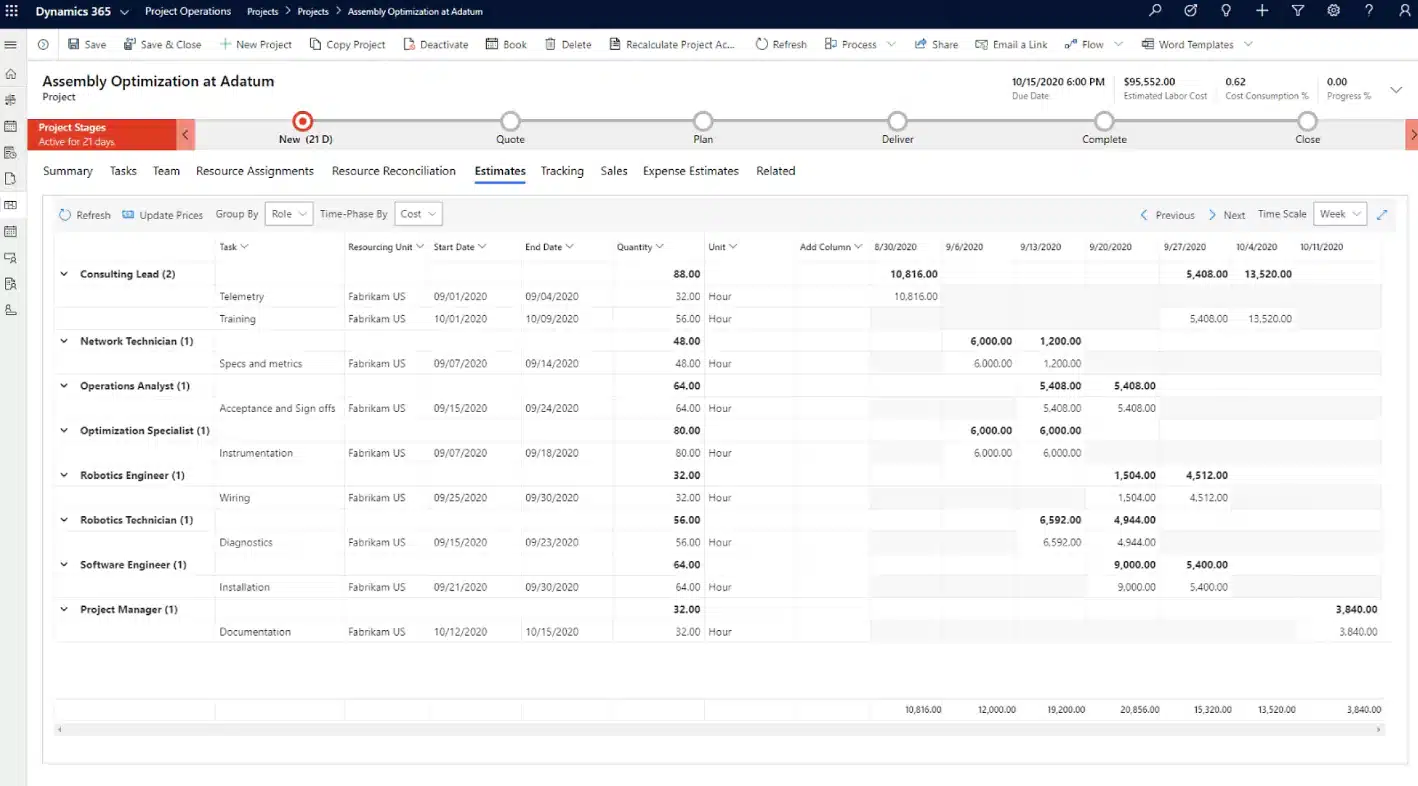
Dynamics 365 Project Operations is a cloud-based project management solution in the Microsoft Dynamics 365 suite. It is designed to help businesses plan, execute, and track projects from end to end. The application brings together your sales, resource scheduling, project management, and financial teams within a single tool. This means all project-related data from initial quotes and contracts through project delivery and finances lives in one system, fostering visibility and collaboration across departments. Companies can use D365 Project Operations to win more deals with accurate project estimates, manage project delivery and resources efficiently, and maximize project profitability through better cost tracking and invoicing.
Dynamics 365 Project Operations provides an integrated platform that spans CRM and ERP capabilities for project-based organizations. For example, your sales team can forecast and quote projects, project managers can plan and monitor execution, consultants can enter time and expenses, and finance teams can handle billing and revenue recognition all within the same application. This unified approach eliminates data silos and supports informed decision-making in real time. By leveraging built-in analytics and AI-driven insights, organizations gain improved project forecasting, optimized resource utilization, and actionable insights to keep projects on time and on budget. The solution is highly scalable and part of the broader Dynamics 365 ecosystem, meaning it can integrate with other Microsoft apps like Teams, Power BI, or Dynamics 365 Finance to further extend its capabilities as your business grows.

See Dynamics 365 Project Operations in action
Discover how Dynamics 365 Project Operations streamlines project management, improves resource allocation, and enhances project profitability. Schedule a personalized demo with our experts today.
How is Dynamics 365 Project Operations licensed?
Dynamics 365 Project Operations uses a per-user, subscription-based licensing model. Each person who accesses the system must have their own assigned license, licenses are tied to named users and cannot be shared or rotated among multiple people. If a licensed user leaves your organization, that license can be reassigned, but only to a new individual.
Microsoft offers three subscription term options. These terms provide different levels of flexibility and pricing:
- Monthly term: This option gives you the ability to scale licenses up or down with minimal restrictions. It’s suited for organizations with fluctuating staffing needs or seasonal workers. The tradeoff is cost, as monthly licenses usually carry a premium of around 20% over longer-term options.
- Annual term: Most small and mid-sized businesses choose the annual term. It provides stable pricing and allows you to pay monthly or upfront. During the 12-month term, you can add users at any time at a prorated cost, but removing or downgrading licenses usually must wait until renewal.
- Multi-year term: For businesses seeking budget predictability, Microsoft also supports longer commitments, typically over three years. These agreements lock in your pricing for the full term, protecting you from announced increases. While less flexible, they offer long-term savings and cost stability.
No matter the term or user type, the licensing model requires one license per person. If your organization has 20 users with varying responsibilities, you’ll assign the appropriate license type to each based on their role in the system.
How is D365 Project Operations priced?
Dynamics 365 Project Operations is licensed on a per-user, per-month subscription model. Each individual who needs to use the system must have an appropriate user license. Microsoft requires a minimum purchase of 20 licenses for Dynamics 365 Project Operations.
There are two primary user license types for D365 Project Operations:
- Full User license: This license is for core users who require complete access to all features and modules of Dynamics 365 Project Operations. Full users can utilize all capabilities of the app from project planning and resource scheduling to time/expense entry and project financials.
- Team Member license: This lighter license type is intended for users with limited involvement in the system. Team Member licenses allow participation in basic or restricted scenarios, like entering time sheets, updating task status, or approving expenses, but not full project management functionality. The Team Member license is significantly lower in cost and is ideal for team members who only need to perform light tasks or consume information, rather than configure or manage projects in depth.
Microsoft offers a cost-saving mechanism when a single user needs access to multiple Dynamics 365 apps. The first app a user is licensed for is considered the Base license paid at full price. Any additional Dynamics 365 apps for that same user can often be purchased as Attach licenses at a discounted rate. In the context of D365 Project Operations, if a user already has a base license for another Dynamics 365 application like Dynamics 365 Finance, you can add Project Operations for that user as an attach license at a lower price. The attach license grants the same functionality as a full license.
The pricing for Dynamics 365 Project Operations is straightforward, with costs defined per user license type.

Get the complete Dynamics 365 Project Operations pricing guide
Understand detailed pricing structures, licensing options, and costs associated with implementing Dynamics 365 Project Operations. Download our comprehensive whitepaper to plan your investment effectively.
Integration and implementation costs
Purchasing licenses is only one part of the overall investment. Implementation and integration costs refer to the one-time, or initial, expenses of getting Dynamics 365 Project Operations up and running to suit your business. These costs can vary depending on the scope and complexity of your deployment.
For a typical Dynamics 365 implementation, companies can expect to spend anywhere from $35,000 to $150,000 in one-time services and setup costs. D365 Project Operations, being an enterprise-class system, often involves several key implementation components:
- Solution design and configuration: This includes business analysis, process mapping, and configuring D365 Project Operations to fit your workflows. A smaller business with out-of-the-box needs might lean on default configurations and incur lower costs, whereas a larger enterprise with complex processes will spend more time tailoring the system.
- Customization and development: If the standard capabilities of D365 Project Operations don’t fully meet your needs, you may require custom extensions. This could involve building custom forms, automating specific project calculations, or integrating with external systems. Every customization adds effort and cost.
- Data migration: Most organizations migrating to Project Operations will want to bring in data from previous systems such as ongoing project records, customer contracts, or historical project financials. Extracting, cleaning, and importing this data can be a labor-intensive part of implementation. The cost depends on data volume and complexity.
- Training and user adoption: A new system’s success relies on users knowing how to use it. Training costs should be factored in whether it’s the time to create custom training materials, conduct workshops for your project managers and team members, or the cost of any official training courses. Investing in good training upfront can prevent costly productivity loss or errors down the line.
- Integration with other systems: D365 Project Operations can be used standalone, but many companies integrate it with other software. Common integrations include D365 Project Operations and Business Central, Dynamics 365 Finance, DevOps tools, CRM systems, or even payroll and HR systems. Each integration point has an associated cost to develop or configure.
While it’s possible to find partners offering lower-cost Dynamics 365 Project Operations implementations, these providers typically depend on offshore resources. Often, offshore teams lack experience with U.S. project accounting standards, compliance requirements, and industry-specific processes. Communication can also pose a significant challenge, as language barriers, cultural differences, and varied time zones frequently result in delays, misalignment, or overlooked details.
Many businesses opting for cheaper implementations end up with systems that don’t effectively support their project management or financial needs. In some cases, deployments fail entirely, forcing companies to start over and spend significantly more on remediation. Fixing a failed implementation can easily cost double the initial investment required to get it right from the outset. For most project-driven organizations, investing in a properly planned and expertly executed Project Operations implementation tailored to their exact requirements proves far more valuable in the long run.
D365 Project Operations Total cost of ownership (TCO)
When planning for Dynamics 365 Project Operations, it’s wise to look beyond just the initial price tag or implementation fee and consider the Total Cost of Ownership (TCO) over several years. TCO includes all costs of the software over its life in your organization both upfront and ongoing expenses.
Dynamics 365 Project Operations is delivered as a cloud-based solution, which fundamentally changes how businesses calculate the total cost of ownership (TCO) compared to traditional, on-premises software. With on-premises systems, organizations must consider significant upfront license investments, costly infrastructure, database licensing fees, annual maintenance agreements, and periodic, often expensive upgrades. These expenses add complexity to budgeting, resulting in a higher and less predictable TCO over time.
In contrast, Dynamics 365 Project Operations operates on a predictable, subscription-based pricing model. This means businesses pay a consistent monthly fee per user, which simplifies budgeting and provides clear visibility into ongoing expenses. Infrastructure, maintenance, database licensing, and upgrades are fully managed within Microsoft’s cloud services, eliminating hidden costs and reducing internal IT overhead. By removing these traditional on-premises costs and consolidating them into a straightforward monthly subscription, organizations typically achieve a lower, more transparent, and more manageable total cost of ownership over the long term.

Upfront Licensing Cost
On-premises software has high upfront cost for purchasing the software
Infrastructure Investments
Requires significant investment in hardware, servers, networking, and infrastructure
SQL Server Licenses
Additional cost for SQL Server licenses for on-premises deployment
Database Maintenance
Ongoing costs for database management and updates
Annual Maintenance Fees
Annual fee for maintaining the software
Costly Upgrades
High costs and time investment for upgrading the solution
Monthly Subscription Cost
Monthly cost for the software that encompasses license subscription, upgrades, and maintenance
How to purchase D365 Project Operations
Dynamics 365 Project Operations is sold through Microsoft’s extensive network of certified partners. These partners specialize in implementing and supporting Dynamics 365 applications, offering in-depth industry knowledge, technical expertise, and guidance tailored to each business’s unique needs. By working with a certified partner, companies gain access to experienced consultants who understand best practices, industry standards, and how to effectively align D365 Project Operations with specific business processes and objectives.
Selecting the right implementation partner is essential for ensuring your Dynamics 365 Project Operations deployment is successful. An effective partner should provide clear guidance, comprehensive project planning, ongoing support, and training services to maximize user adoption and ROI. Rand Group stands out as a trusted Microsoft partner, with extensive experience delivering Dynamics 365 solutions tailored to project-based organizations. Our team of experts offers end-to-end support from initial solution design and implementation through post-deployment enhancements, ensuring your investment achieves its intended value.
Ready to explore Dynamics 365 Project Operations? Contact us today to discuss how Rand Group can help your organization optimize your project management, resource scheduling, and financial processes with Dynamics 365.

Get Dynamics 365 Project Operations
Ready to start transforming your project operations today? Our experts will guide you through every step—from licensing to implementation—ensuring a smooth transition.
Licensing tips and best practices
Strategic licensing can save money. Here are some recommendations:
- Match licenses to user roles: Carefully map user roles to required capabilities and assign lower-cost Team Member licenses to casual users handling basic tasks. Reserve full licenses for power users such as project managers or finance teams who need comprehensive access.
- Leverage the Base and Attach model: If your users need multiple Dynamics 365 apps, select the highest-priced app as the base license and attach lower-priced apps at a discounted rate. This strategy can significantly reduce overall licensing costs.
- Monitor license usage: Regularly review and adjust license assignments to reflect actual usage, reclaiming licenses from inactive users. This proactive management helps avoid paying for unused seats.
- Stay informed on licensing updates: Microsoft periodically updates Dynamics 365 licensing rules, introducing new licenses or changing terms. Regularly check for updates to maintain compliance and leverage new cost-saving opportunities.
- Plan for non-production environments: When budgeting licenses, include those required for developers or testers accessing sandbox environments. Each user, even in test scenarios, typically needs at least a Team Member license.
- Consider future growth: Anticipate future user expansions and discuss scalable licensing options or enterprise agreements with your provider. Plan ahead to seamlessly transition from trial to production environments.
- Utilize Microsoft promotions: Check regularly for any available promotions, bundles, or special pricing offers from Microsoft, especially if you qualify as a nonprofit or academic institution. These discounts can significantly lower costs.
- Engage experts for licensing questions: Dynamics licensing is complex, work closely with licensing specialists or trusted partners to ensure your plan aligns with your actual business needs. Expert advice can prevent compliance issues and unnecessary expenses.
D365 Project Operations pricing FAQs
Below are answers to common questions businesses ask when evaluating D365 Project Operations pricing:
- How much does Dynamics 365 Project Operations cost per user?
A full user license is $135 USD per user/month, while eligible attach licenses cost about $30 per user/month. Team Member licenses for limited functionality are available at $8 per user/month. - Can I mix and match license types?
Yes, you can combine full and Team Member licenses based on user roles. Team Member licenses are suitable for limited tasks, while full licenses cover comprehensive use. - What does the subscription include—are updates and support included?
Your subscription includes software access, ongoing updates, and basic technical support. Additional support services or extra storage beyond default limits may incur extra costs. - How much does implementation typically cost, and how long does it take?
Implementation costs range significantly from $35,000 to over $150,000, depending on complexity. Typical projects take from a few months up to a year for highly customized implementations. - Can I try Project Operations for free before deciding?
Yes, a free 30-day trial is available, allowing full system exploration with sample data. Trials can often be extended or transitioned seamlessly into a paid subscription. - How do I buy licenses if I decide to proceed?
D365 Project Operations is sold through Microsoft-certified partners. Partners usually handle setup, deployment, and ongoing license management.
Next steps
Dynamics 365 Project Operations offers a powerful solution to unify and optimize project-based businesses. With predictable subscription costs, robust capabilities, and seamless integrations, this tool can significantly improve your organization’s project performance and profitability.
Whether you’re ready to start immediately, need guidance on licensing, or simply have questions about Dynamics 365 Project Operations, Rand Group can help. Our team of experienced professionals will ensure you have the right solution tailored to your unique business needs, contact Rand Group today.
Subscribe to our Insights
Related Blogs

Dynamics 365 pricing guide: Costs, licensing, and implementation explained
Understanding how Dynamics 365 pricing works is key to planning your investment and building a system that fits your business. Dynamics 365 offers flexible, per-user licensing with multiple applications that cover both ERP and CRM functionality. The total cost depends...

Your guide to Microsoft Dynamics 365 CRM pricing
Understanding Dynamics 365 CRM pricing is essential when planning your CRM investment and evaluating the total cost of ownership. The platform offers flexible licensing, multiple CRM applications, and scalable subscription options, which makes it important to...

Explore the Dynamics 365 Project Operations 2025 release wave 2
Explore the Dynamics 365 Project Operations 2025 release wave 2 By Kevin DePree on August 5, 2025 Microsoft’s 2025 release wave 2 brings many updates for Dynamics 365 Project Operations. The feature enhancement in this wave expands Copilot capabilities in D365 Project...