Dynamics 365
 Power Platform
 Dynamics
 Cloud & Productivity
Your guide to Microsoft Dynamics 365 CRM pricing

Understanding Dynamics 365 CRM pricing is essential when planning your CRM investment and evaluating the total cost of ownership. In our experience helping organizations evaluate and implement Dynamics 365 CRM, pricing confusion usually comes from two areas: choosing the wrong license mix and underestimating implementation and long-term support costs. Many businesses initially focus only on monthly license pricing, but the biggest long-term cost drivers are often integrations, user adoption, customization decisions, and scalability planning.
The platform offers flexible licensing, multiple CRM applications, and scalable subscription options, which makes it important to understand how each piece affects your budget. This guide breaks down the full pricing picture, from license types and subscription terms to implementation costs, long-term ownership, and best practices — so you can make an informed decision and select the right solution for your organization.
- What is Dynamics 365 CRM?
- How is Dynamics 365 CRM licensed?
- How much does Dynamics 365 CRM cost?
- Dynamics 365 CRM pricing & licensing scenarios
- How to choose the right Dynamics 365 CRM applications
- Common Dynamics 365 CRM licensing mistakes we see
- How much does a Dynamics 365 CRM implementation cost?
- Seeing the ROI: A Dynamics 365 CRM implementation story
- Dynamics 365 CRM total cost of ownership (TCO)
- How to purchase Dynamics 365 CRM
- Licensing tips and best practices
- Dynamics 365 CRM pricing FAQs
What is Dynamics 365 CRM?
Dynamics 365 is Microsoft’s cloud-based suite of business applications that brings ERP and CRM capabilities together on one unified platform. It supports core business functions, including finance, supply chain, sales, marketing, service, and project delivery. Each application works independently, yet they operate even more effectively when combined, as data, workflows, and AI insights flow seamlessly across the entire system.
Dynamics 365 CRM, also known as Dynamics 365 Customer Engagement, focuses specifically on the applications that support customer acquisition, service delivery, and long-term relationship management. It gives teams a connected platform for managing leads, tracking customer interactions, resolving service issues, and coordinating sales and service activities with clarity and speed.
The following applications are part of the Dynamics 365 CRM suite:
- Dynamics 365 Sales: Dynamics 365 Sales helps sales teams manage pipelines, automate follow-ups, score leads, and use AI insights from Microsoft 365 and LinkedIn to close deals more effectively.
- Dynamics 365 Customer Insights: Dynamics 365 Customer Insights (formerly Dynamics 365 Marketing) unifies customer data, builds targeted journeys, and supports multichannel campaign orchestration to improve lead nurturing and conversion.
- Dynamics 365 Field Service: Dynamics 365 Field Service supports organizations that manage technicians in the field. It optimizes scheduling, uses IoT alerts for proactive service, and equips technicians with mobile tools to complete work efficiently.
- Dynamics 365 Customer Service: Dynamics 365 Customer Service provides case management, knowledge tools, and AI-driven support features that help teams resolve issues quickly and deliver consistent, high-quality service.
- Dynamics 365 Project Operations: Dynamics 365 Project Operations serves project-based businesses by connecting project planning, resource management, execution, and billing to improve profitability and delivery accuracy.
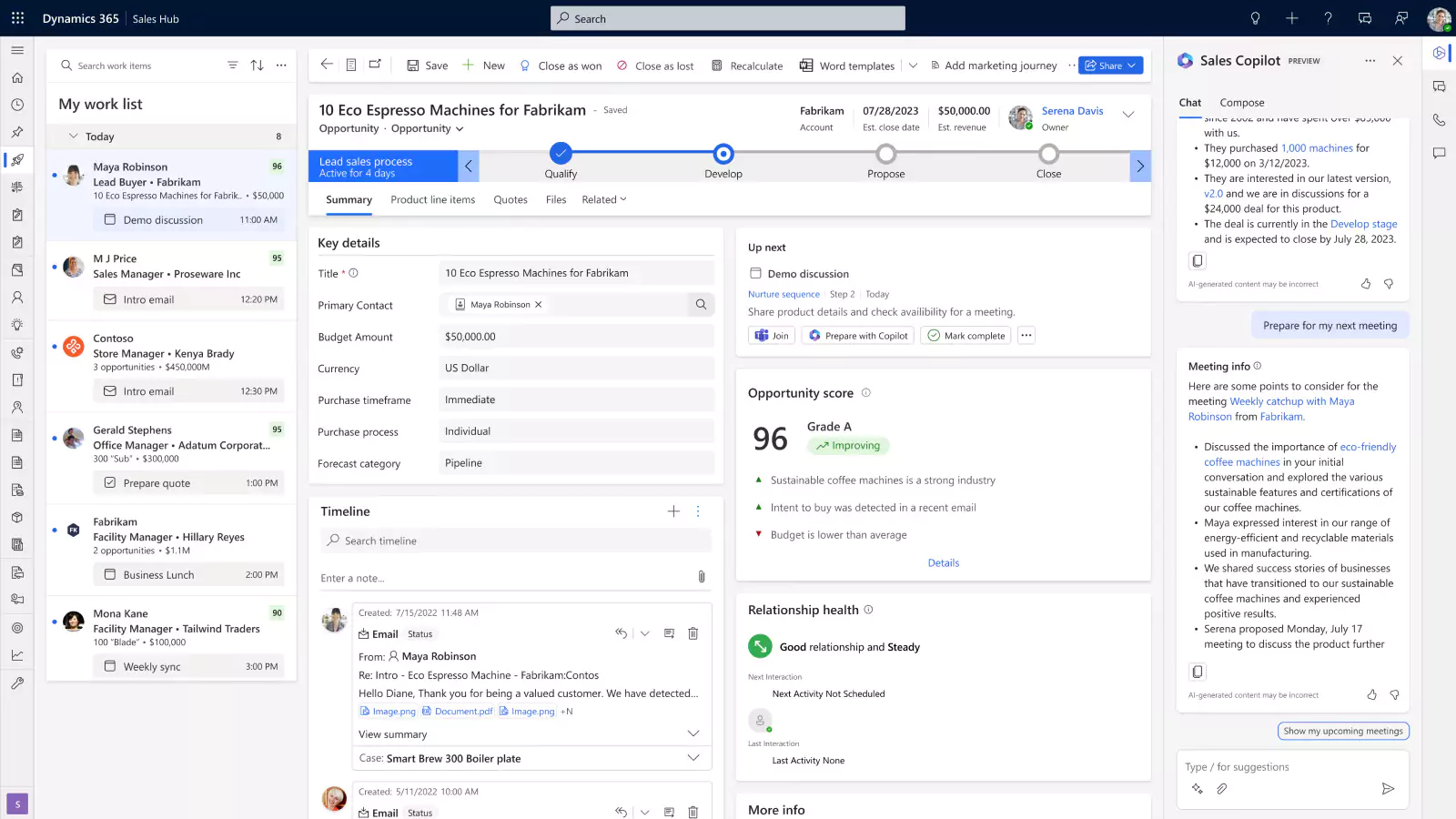
Different editions of Dynamics 365 CRM applications
Dynamics 365 CRM includes several applications with multiple editions, allowing organizations to select the level of functionality that aligns with their sales, service, and field operations.
- Dynamics 365 Sales:
D365 Sales is available in Professional, Enterprise, and Premium editions. Professional provides essential pipeline and opportunity management. Enterprise adds deeper customization, automation, and analytics. Premium includes advanced AI capabilities for complex sales operations.
To learn more, read our blog on Dynamics 365 Sales Professional vs Enterprise. - Dynamics 365 Customer Service:
D365 Customer Service is offered in Professional, Enterprise, and Premium editions. Professional includes core case management and knowledge tools. Enterprise adds routing, analytics, and extensibility. Premium expands capabilities with AI-driven features for high-volume support teams.
To learn more, read our blog on Dynamics 365 Customer Service Professional vs Enterprise. - Dynamics 365 Field Service:
D365 Field Service includes two license options: the full Field Service license and the Field Service Contractor license. The full license supports advanced scheduling, work orders, and mobile workflows. The contractor license provides limited access for external technicians who only need to complete assigned tasks.

Find the right Dynamics 365 CRM solution for you
Choosing the right CRM apps can be challenging. Our team will assess your needs and recommend the best Dynamics 365 CRM mix for your business.
How is Dynamics 365 CRM licensed?
Dynamics 365 CRM uses a per-user, subscription-based licensing model. Every person who needs access to a CRM application must have their own named user license, and licenses cannot be shared across employees. This structure ensures secure, role-based access while giving organizations the ability to scale quickly as teams grow, shift, or reorganize.
Dynamics 365 CRM pricing is determined by the specific CRM applications a business selects and the type of access each user requires. You can mix licenses across D365 Sales, Customer Service, Customer Insights, Field Service, and Project Operations, allowing each department to use the tools that match their daily workflows. Because CRM apps are modular, organizations pay only for the capabilities they need, which helps control costs and improve long-term planning.
Microsoft offers several subscription terms to support different budgeting and staffing models:
- Monthly term: Provides maximum flexibility for adding or removing CRM users as workloads change. Monthly pricing is higher but ideal for seasonal or temporary staff.
- Annual term: Offers predictable pricing with the ability to add users throughout the year. Most organizations choose this option for its balance of cost and stability.
- Multi-year term: Locks in Dynamics 365 CRM pricing for multiple years, protecting against future price increases. This option is best for companies with long-term CRM roadmaps and stable headcount projections.
How much does Dynamics 365 CRM cost?
Dynamics 365 CRM pricing is built around Microsoft’s per-user licensing model, where costs depend on user type and the CRM applications each role requires. Microsoft offers several license categories, giving organizations the flexibility to align access with actual usage. This structure keeps costs predictable while ensuring every user has the right level of functionality for their daily work.
Dynamics 365 license types:
- User license: A full user license gives complete access to a specific CRM app, such as Sales, Customer Service, Field Service, Customer Insights, or Project Operations. Pricing varies by app and edition. This license fits employees who work in the system every day.
- Team members license: The team members’ license costs $8 per user per month and offers light access for reading data, approving tasks, and making minor updates. It is best for occasional users who do not manage transactions or daily operations.
- Device license: A device license is assigned to a shared workstation instead of an individual user. Multiple employees can access CRM apps from one licensed device. It is ideal for shift-based or shared environments like service counters or field depots.
Base & Attach licensing options
Microsoft uses a modular approach called the Base and Attach licensing model to make Dynamics 365 pricing more flexible and cost-efficient. This model allows organizations to purchase a primary application (the Base License) and then add related apps (the Attach Licenses) at discounted rates. It’s designed to support businesses that want to expand functionality across sales, service, marketing, and operations without paying full price for each application.
To make Dynamics 365 CRM pricing more cost-efficient, Microsoft uses a modular structure called Base and Attach licensing. This approach allows organizations to purchase one primary application at full price (the Base License) and then add additional applications at a discounted rate (Attach Licenses). It is designed for businesses that need multiple workloads across finance, sales, service, field teams, or project delivery without paying full price for every app.
- Base license: The base license is the first full-price application purchased for a user. It includes the primary capabilities they need, whether that’s managing pipelines in Dynamics 365 Sales, resolving customer cases in Customer Service, or scheduling technicians in Field Service.
- Attach license: After selecting a base license, users can add related applications at a reduced cost. For example, a sales rep using Dynamics 365 Sales can add Customer Service or Field Service at a lower monthly rate. This model helps organizations build a connected CRM environment while controlling total licensing spend.
It’s important to note that only certain Dynamics 365 applications qualify as base licenses, and eligibility varies by product; and the higher-priced license must always serve as the base. Contact us today to determine the best combination and pricing strategy for your organization.
The table below summarizes Dynamics 365 pricing for each application under Microsoft’s Base and Attach licensing structure. Prices shown are per user, per month, in USD.

Get the full pricing breakdown
Looking for a complete view of Dynamics 365 CRM pricing, license types, and what each user can access? Download our Dynamics 365 pricing and licensing guide for clear comparisons and detailed cost insights.
Dynamics 365 CRM pricing and licensing scenarios
Because Dynamics 365 CRM licensing is modular, pricing varies based on your application mix, user roles, and subscription terms. The scenarios below illustrate how different organizations might structure their CRM licenses and what typical monthly costs may look like. These examples are for planning purposes only, final pricing depends on discounts, subscription terms, promotions, and your exact license mix.
Scenario 1: Growing B2B sales organization using Sales + Customer Insights
Company profile:
A 20-person B2B organization with a straightforward sales process and a growing need for structured email journeys and lead nurturing. D365 Sales Professional provides the core CRM functionality they need, while D365 Customer Insights adds targeted marketing automation.
License mix:
- 11 Sales Professional full users — $65 each (base)
- 1 Customer Insights tenant license — $1,000 per tenant (attach)
Estimated monthly subscription cost:
- Sales Professional: 11 × $65 = $715
- Customer Insights tenant = $1,000
Total monthly cost: $1,715
Why this is common:
Organizations with standard sales processes often choose D365 Sales Professional for essential pipeline and opportunity management. D365 Customer Insights attaches at the discounted rate, giving marketing teams access to segmentation, journeys, and behavioral insights without paying full tenant pricing.
Scenario 2: Customer service team using Sales + Customer Service
Company profile:
A 35-person professional services company with a dedicated support team and an internal sales group. D365 Customer Service Enterprise is the primary application, while D365 Sales Enterprise is added at the discounted attach rate.
License mix:
- 12 Customer Service Enterprise full users — $105 each (base)
- 10 Sales Enterprise full users — $20 each (attach)
- 8 Team Member users — $8 each
Estimated monthly subscription cost:
- Customer Service Enterprise: 12 × $105 = $1,260
- Sales Enterprise: 10 × $20 = $200
- Team Members: 8 × $8 = $64
Total monthly cost: $1,524
Why this is common:
Service-first organizations often anchor their CRM environment on D365 Customer Service Enterprise. Adding D365 Sales Enterprise as an attach license gives account managers access to pipeline tracking at a much lower cost. Team Member licenses provide affordable, read-centric access for leaders who only need visibility into cases, accounts, and dashboards.
How to choose the right Dynamics 365 CRM applications
Selecting the right CRM applications requires more than reviewing a feature list. The right fit depends on your business model, team structure, sales process, and service delivery model. Below is guidance on when each application tends to be the right choice and when it may not be, based on patterns we see across real CRM deployments.
In our experience, organizations that take the time to map out which teams need which applications before purchasing licenses avoid significant rework during implementation. Buying the wrong application for a department — or adding an application before the organization is ready for it is one of the most common sources of licensing waste and budget overruns we see.
Dynamics 365 Sales
We typically recommend Dynamics 365 Sales when:
- Organizations have longer B2B sales cycles involving multiple stakeholders
- Teams are already using Microsoft 365 and want seamless integration with Outlook and Teams
- Inconsistent pipeline visibility or unreliable forecasting is a current pain point
- Leadership wants standardized sales reporting across the organization
Dynamics 365 Sales may not be the best fit when:
- The organization is very small with simple contact management needs
- There is no willingness to standardize sales processes
- The team is looking for minimal CRM adoption effort
In our experience, Dynamics 365 Sales delivers the most value when leadership actively enforces CRM adoption and pipeline discipline — without that commitment, the platform will be underused regardless of how well it is configured.
Dynamics 365 Customer Service
We typically recommend Dynamics 365 Customer Service when:
- Case volumes are high enough to require structured routing, prioritization, and SLA tracking
- The team needs a centralized knowledge base and omnichannel support across email, chat, and phone
- The service team is growing and needs a scalable platform to support that growth
- Consistency and accountability in service delivery are strategic priorities
Dynamics 365 Customer Service may not be the best fit when:
- Case volumes are low and handled informally by a small group
- There is no appetite for standardizing service workflows
- An existing helpdesk tool is already deeply embedded and performing well
A common challenge we see is underestimating the process design work required before configuring service queues and routing rules — teams that skip this step often end up reconfiguring the system multiple times after go-live.
Dynamics 365 Field Service
We typically recommend Dynamics 365 Field Service when:
- The organization manages technicians or contractors in the field
- Work order scheduling is complex or high in volume
- Proactive or IoT-triggered maintenance is a goal
- Mobile access for field staff is a current operational gap
Dynamics 365 Field Service may not be the best fit when:
- There are no recurring field operations or technician dispatch needs
- Service is delivered entirely in-office or remotely
- Scheduling needs are simple enough to manage without dedicated tooling
What we have found works best is deploying Field Service in phases — starting with work orders and scheduling before introducing more advanced features like predictive maintenance and IoT integration.
Dynamics 365 Project Operations
We typically recommend Dynamics 365 Project Operations when:
- The business delivers work through projects with defined scopes, timelines, and budgets
- Resource planning and utilization across multiple projects is a current challenge
- Project billing, revenue recognition, and profitability tracking need to be tightly connected
- Sales-to-delivery handoffs are manual, inconsistent, or causing margin leakage
Dynamics 365 Project Operations may not be the best fit when:
- The organization does not deliver project-based work as a core part of its business model
- Project management needs are simple enough to handle with spreadsheets or lightweight tools
- Finance and operations are managed in a separate system with no need for integration
- The team lacks the process maturity to support structured resource and budget management
In our experience, Project Operations delivers the most value for professional services firms, consulting organizations, and contractors where visibility across the full project lifecycle — from opportunity to invoice — directly impacts profitability. Organizations that attempt to deploy it without first aligning their project delivery and finance processes typically see slower adoption and limited ROI.
Dynamics 365 Customer Insights
We typically recommend Dynamics 365 Customer Insights when:
- The marketing team needs segmentation, journey automation, and multichannel coordination
- Lead nurturing is currently disconnected from sales pipeline activity
- Building unified customer data profiles is a strategic goal
- The organization is ready to invest in managing and enriching customer data
Dynamics 365 Customer Insights may not be the best fit when:
- The marketing team is very small with basic email-only needs
- There is no strategy in place for managing or enriching customer data
- The organization is still early in overall CRM adoption
Organizations often discover that Customer Insights delivers stronger ROI once the sales CRM is stable and lead data is clean and consistent — deploying it too early, before the underlying data foundation is in place, limits what the platform can actually do.
Common Dynamics 365 CRM licensing mistakes we see
Licensing mistakes are more common than most organizations expect, and many of them are avoidable with the right planning. Here are the patterns we see most frequently across CRM projects:
- Assuming all CRM editions include the same AI capabilities: Advanced AI features such as predictive forecasting, conversation intelligence, and relationship analytics are not available in all editions. Selecting Professional when Premium capabilities are required leads to mid-contract upgrades — which are disruptive and more expensive than planning for them upfront.
- Buying full licenses for users who only need Team Member access: Support staff who only review records or approve tasks do not need a full CRM license. Assigning full licenses as a default inflates monthly costs significantly, especially in larger organizations.
- Not planning Base and Attach licensing properly: Many buyers are unaware of the Base and Attach model until after they have purchased licenses. Organizations that plan this structure in advance consistently lower their per-user costs.
- Underestimating storage and integration costs: Dynamics 365 CRM includes a default data storage allotment, but organizations with large datasets, complex integrations, or heavy file attachments often exceed it. Additional storage fees can add up quickly and are frequently excluded from early budget estimates.
- Selecting monthly licensing when long-term usage is predictable: Monthly licenses offer flexibility, but they cost noticeably more than annual agreements. Organizations that expect stable or growing CRM usage should default to annual terms unless there is a specific reason for short-term flexibility.
- Purchasing licenses before process mapping is complete: This is one of the most costly mistakes. Organizations that buy licenses before they have clarity on their sales, service, or field workflows often discover mid-implementation that they purchased the wrong applications or wrong editions.
How much does a Dynamics 365 CRM implementation cost?
Beyond licensing, every organization should budget for a one-time Dynamics 365 CRM implementation cost. This investment covers the full setup required to deploy the platform successfully, process mapping, requirements gathering, system configuration, customization, integrations, data migration, training, and go-live support. Because every business has different sales, service, and field processes, project timelines and effort vary widely.
How much does a Dynamics 365 CRM implementation cost? Most Dynamics 365 CRM implementations range from $25,000 to more than $250,000, depending on scope and complexity. Several factors have the greatest impact on total implementation cost:
- Complexity of operations: Businesses with multiple entities, locations, currencies, or complex industry-specific workflows require more advanced configuration and testing.
- Data migration: A common challenge we see is organizations underestimating the effort required for data cleanup before migration. Migrating accounts, contacts, leads, opportunities, cases, service history, or project data can be far more involved than anticipated, particularly when data quality in the source system is poor.
- Customization needs: Adding custom fields, role-based forms, workflow automation, AI rules, or Power Platform extensions increases development time.
- System integrations: Connecting Dynamics 365 CRM to ERP systems, websites, telephony platforms, customer portals, or scheduling tools often requires custom API work or middleware.
- Training and user adoption: Ensuring users understand the system, especially sales, service, and field teams, requires training sessions, documentation, and ongoing support.
While low-cost implementation offers may seem attractive, many rely on offshore teams unfamiliar with U.S. accounting standards, compliance regulations, and localization requirements. Time zone differences and communication challenges can lead to misalignment or delayed go-lives.
Many businesses that pursue low-cost implementations end up with underperforming systems that never fully support their operations. Others find themselves dealing with failed deployments that require a complete rework. Fixing a failed implementation can cost twice as much as doing it right the first time. For most companies, the smarter investment is a well-executed, properly supported implementation tailored to their specific needs.
Seeing the ROI: A Dynamics 365 CRM implementation story
Company: Sapphire Gas Solutions
Challenge: Sapphire Gas Solutions needed to replace a difficult-to-use CRM environment that limited visibility into sales performance and created disconnected workflows between sales and accounting teams.
Solution: Rand Group implemented Dynamics 365 Sales and integrated it with Dynamics 365 Business Central to create a unified CRM and ERP environment. The solution included customized workflows, automation, and integrations tailored to Sapphire’s project-based sales process.
Outcome: After implementation, Sapphire achieved:
- 50% reduction in manual data entry
- 40% faster onboarding for new sales reps
- 200+ recurring back-and-forth emails between departments eliminated
The company gained real-time visibility into project and sales data, improved collaboration across sales and accounting, and replaced many spreadsheet-based workflows with automated processes inside the CRM.
What this means for your business: In our experience, organizations often underestimate how much disconnected systems and manual processes impact CRM adoption and reporting accuracy. Projects like Sapphire Gas Solutions demonstrate that the value of Dynamics 365 CRM extends well beyond licensing costs — it can fundamentally improve visibility, collaboration, and operational efficiency when implemented correctly.
Dynamics 365 CRM total cost of ownership (TCO)
When evaluating Dynamics 365 pricing, it is important to consider the full cost of owning and operating a CRM system, not just the monthly license fees. Total cost of ownership (TCO) captures every expense tied to a long-term deployment, including implementation, integrations, training, data management, and ongoing support. Understanding TCO gives organizations a realistic view of what it takes to run Dynamics 365 CRM effectively and helps build a budget that supports long-term growth and scalability.
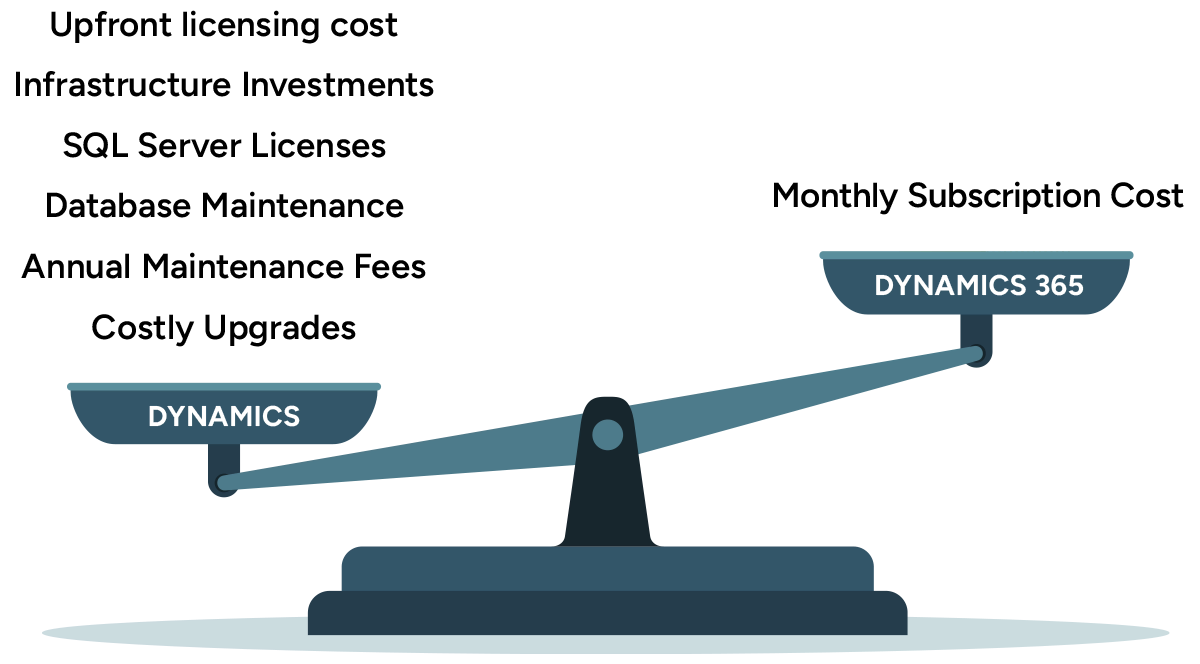
Dynamics 365 CRM operates as a cloud-based SaaS platform, which significantly reduces TCO compared to traditional on-premises CRM systems. On-premises environments require hardware, storage, backups, security layers, and internal IT resources to maintain them. These costs accumulate quickly. By contrast, Dynamics 365 CRM runs entirely on Microsoft Azure, and Microsoft handles hosting, updates, uptime, security, and performance. This removes the burden of server maintenance and infrastructure costs while ensuring reliable access and automatic improvements.
In many CRM projects, operational inefficiencies create hidden costs that are difficult to measure until systems become unified. For example, Sapphire Gas Solutions achieved a 50% reduction in manual data entry and eliminated more than 200 recurring interdepartmental emails after implementing Dynamics 365 Sales integrated with Business Central. What we have found works best is accounting for these hidden costs, manual data entry, duplicate records, delayed reporting and disconnected communication when building the TCO case for CRM investment.
This cloud model keeps Dynamics 365 CRM pricing predictable and flexible. Organizations can add or remove users, expand into additional CRM applications, or adopt new Microsoft AI capabilities without hardware investments or disruptive upgrades. Automatic updates deliver new features throughout the year, improving productivity and security without extra fees. As a result, Dynamics 365 CRM offers a lower total cost of ownership over time while giving businesses a modern, scalable platform that supports changing customer and operational demands.
How to purchase Dynamics 365 CRM?
Dynamics 365 CRM is purchased through Microsoft’s certified partner network,. These partners provide far more than license transactions; they bring product expertise, industry knowledge, and the technical skills required to implement and optimize the CRM applications your teams rely on. Selecting the right partner is one of the most important steps in ensuring your CRM system is configured correctly and aligned with your business goals.
A qualified Microsoft Partner will help you define requirements, evaluate CRM applications, and determine the best licensing mix based on your roles and workloads. They also guide you through Dynamics 365 CRM pricing, recommend Base and Attach combinations, and build an implementation plan that fits your operations, timeline, and budget. Whether you need a single CRM workload or a multi-app deployment, the right partner ensures your environment is cohesive and scalable.
After go-live, a certified partner can continue supporting your business through updates, enhancements, user training, and system optimization. This long-term relationship can reduce operational risk and help your teams take advantage of new CRM capabilities as Microsoft introduces them.
Rand Group is a Microsoft Solutions Partner with deep experience deploying Dynamics 365 CRM across industries and was recognized as a best Microsoft Dynamics 365 CRM partner for 2026. We work with organizations to select the right applications, streamline licensing, and build CRM environments designed for long-term success. Contact us to speak with a certified Microsoft expert and learn how we can help you choose the right combination of applications and licensing options.

Get Dynamics 365 CRM today
Ready to move forward with Dynamics 365 CRM? Rand Group will help you choose the right applications, optimize licensing, and plan your deployment with confidence.
Licensing tips and best practices
Licensing Dynamics 365 CRM is more than selecting an application; it requires a strategy that aligns user needs, operational goals, and long-term cost management. The tips below will help you get the most value from your Dynamics 365 CRM pricing while maintaining flexibility and compliance.
- Map out user roles before purchasing: Not everyone in your organization needs a full Dynamics 365 CRM license. Identify roles that require complete CRM functionality and assign full user licenses to them. Light users who only need to review records, approve tasks, or enter basic updates can use Team Member or Device licenses to control costs without losing visibility.
- Plan for growth and scalability: If you expect to expand your sales team, introduce customer service operations, or add D365 Field Service or D365 Customer Insights later, build flexibility into your license plan. Choosing scalable subscription terms or planning for Base and Attach combinations helps stabilize Dynamics 365 CRM pricing as you add more applications or users.
- Evaluate subscription terms carefully: Monthly licenses offer flexibility but come at a higher price. Annual or multi-year agreements provide cost stability and help control CRM spending over time. Select the term that matches your budgeting cycle and anticipated staffing changes.
- Regularly review license usage: As teams change roles or new CRM features roll out, user needs can shift. Conduct periodic license reviews to ensure you are not paying for unused seats or assigning full licenses to users who no longer need them. Reassign or downgrade licenses where appropriate to optimize spending.
- Work with a certified Microsoft Partner: Dynamics 365 licensing can be complex, especially when mixing applications. A partner can help you select the right mix, optimize Base and Attach pricing, and ensure your licensing stays aligned with Microsoft rules. They also support renewals, scaling, and system evolution over time.
Dynamics 365 CRM pricing FAQs
Below are answers to the most common questions organizations ask when evaluating Dynamics 365 CRM pricing and planning their CRM investment.
How much does Dynamics 365 CRM cost?
Dynamics 365 CRM pricing varies by application, license type, and subscription term. Full-user CRM licenses typically range from $50 to $150 per user per month, depending on which application you choose. Team member licenses cost $8 per user per month, and device licenses vary by application. Pricing increases when advanced or premium editions are required.
What should I budget for Dynamics 365 CRM implementation?
Implementation costs are separate from subscription fees and depend on the number of users, the CRM apps being deployed, and the level of customization. Most Dynamics 365 CRM implementations fall between $25,000 and $250,000 or more. This investment covers process evaluation, configuration, integrations, data migration, training, testing, and go-live support.
How do I buy Dynamics 365 CRM?
Dynamics 365 CRM can be purchased through a certified Microsoft Partner. Partners help assess your requirements, recommend the right mix of CRM applications, and build a licensing plan that keeps Dynamics 365 CRM pricing aligned with your business goals. They also manage deployment, training, and long-term support to ensure your CRM environment is implemented correctly and optimized over time.
Can I switch or upgrade license types after?
Microsoft allows upgrades and reassignment of CRM licenses as business needs evolve. You can move users from Team Member to full user or switch between editions like Sales Premium and Sales Enterprise. Downgrades typically must wait until your renewal period. A partner can help you plan these adjustments while maintaining compliance and cost control.
Are there discounts for multiple applications?
Microsoft’s Base and Attach licensing model provides discounted pricing when you license more than one CRM application. After you purchase a Base License at full price, you can add eligible CRM apps as Attach Licenses for as little as $20–$30 per user per month. This approach reduces overall costs and makes it easier to expand your CRM capabilities over time.
Are there any other discounts available for Dynamics 365 CRM?
Yes. Microsoft offers several discounts that can lower Dynamics 365 CRM pricing for eligible organizations. Nonprofits receive reduced pricing across most CRM applications. Microsoft also provides a 40% discount for customers migrating from legacy Dynamics CRM on-premises deployments. A certified Microsoft Partner can confirm eligibility and help you apply these programs to reduce overall licensing costs.
Next steps
Understanding Dynamics 365 CRM pricing and the factors that influence total cost is essential for making a confident investment. Licensing choices, subscription terms, implementation scope, and long-term ownership all play a direct role in shaping both your budget and your results. A thoughtful approach helps you control costs while building a CRM environment that can scale with your organization.
Working with an experienced partner ensures your licensing strategy, deployment plan, and long-term roadmap stay aligned with your business goals. Rand Group helps organizations evaluate options, streamline pricing, and implement Dynamics 365 CRM with clarity and precision.
Contact us today to speak with a certified Microsoft expert and learn how to make the most of your Dynamics 365 CRM pricing strategy.