Dynamics 365
 Power Platform
 Dynamics
 Cloud & Productivity
How LinkedIn Sales Navigator enhances Dynamics 365 Sales

Sales organizations are under increasing pressure to do more than manage pipelines—they are expected to build meaningful relationships, identify buying signals early, and engage the right stakeholders at the right time. While platforms like Dynamics 365 Sales provide a strong foundation for managing customer relationships and sales processes, modern selling also requires access to real-time external insights about prospects and accounts.
This is where LinkedIn Sales Navigator becomes valuable. When integrated with Dynamics 365 Sales, it bridges internal CRM data with LinkedIn’s extensive professional network, enabling sales teams to operate with greater context, precision, and confidence.
In this blog, we explore how LinkedIn Sales Navigator enhances Dynamics 365 Sales, what capabilities it unlocks, and how organizations can use it to improve sales execution.
Understanding the role of LinkedIn Sales Navigator in Dynamics 365 Sales
At its core, Dynamics 365 Sales is designed to manage customer relationships, track opportunities, and support structured sales processes. If you’re new to the platform, it helps to understand what Dynamics 365 Sales is and how it supports modern CRM strategies.
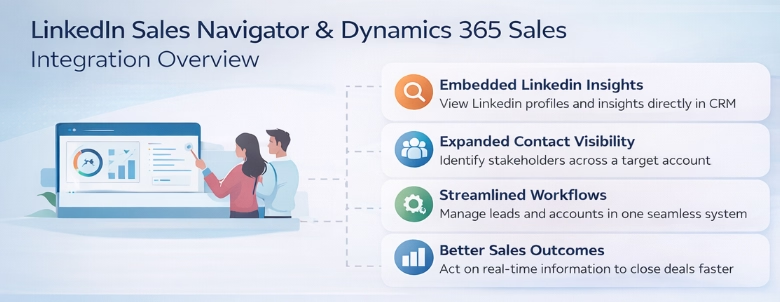
Modern selling requires more than internal data, it requires awareness of people, organizations, and evolving relationships. LinkedIn Sales Navigator addresses this gap by embedding LinkedIn insights directly into Dynamics 365. This integration connects your CRM records with LinkedIn’s data graph, giving sellers access to relevant information without leaving their workflow.
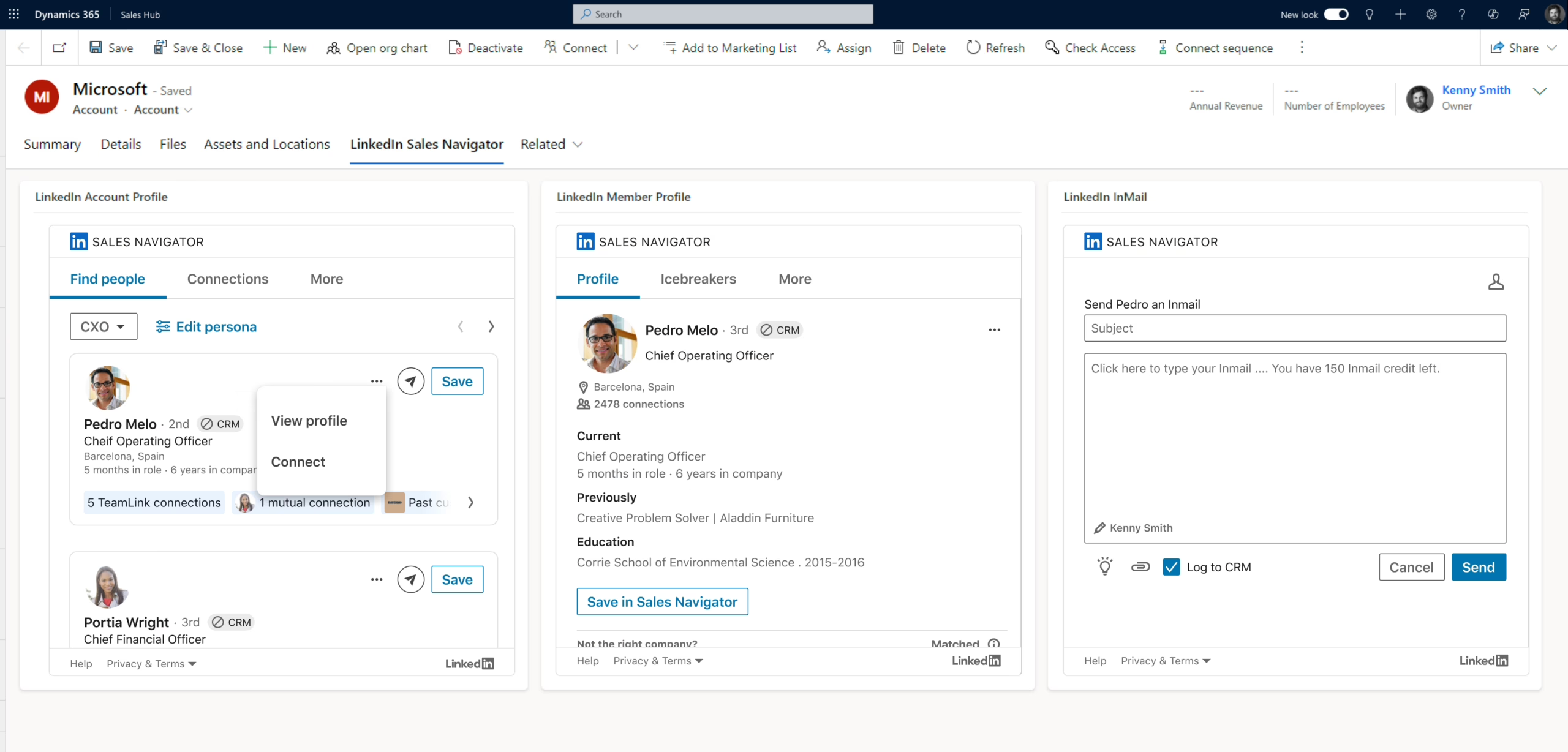
Rather than switching between systems, sales teams can view LinkedIn profiles, company updates, and relationship insights directly within account, contact, and opportunity records. This creates a more complete view of prospects and helps sellers engage in a more informed and personalized way.
For organizations focused on digital transformation, this integration represents a shift from reactive CRM usage to proactive, insight-driven selling.
This broader value is especially important for growing organizations, where platforms like Dynamics 365 Sales help streamline processes, improve visibility, and ultimately support revenue growth, as explored in how Dynamics 365 Sales drives revenue growth for SMBs.
Key capabilities of the integration
The integration between LinkedIn Sales Navigator and Dynamics 365 Sales introduces several capabilities that directly support day-to-day selling activities. These features are embedded within the CRM interface, making them accessible where sellers already work.
Some of the most impactful capabilities include:
- Access to LinkedIn member profiles within CRM: Sellers can view detailed LinkedIn profile information, including role, experience, and recent activity, directly within lead or contact records. This helps contextualize conversations and tailor outreach.
- Company insights: Account-level information such as company news, growth trends, and organizational updates is surfaced within Dynamics 365, enabling sellers to stay informed about changes that may impact buying decisions.
- Relationship mapping and introductions: The integration highlights mutual connections and provides opportunities for warm introductions, helping sales teams build trust more effectively.
- Recommended leads and stakeholders: Sales Navigator suggests additional contacts within an organization who may influence or participate in purchasing decisions, expanding visibility beyond a single point of contact.
- AI-driven account insights: Features like Account IQ provide summarized insights into company priorities, challenges, and market positioning, helping sellers prepare for more strategic conversations.
Together, these capabilities transform Dynamics 365 Sales from a static database into a dynamic, insight-rich selling platform.
These features are especially valuable in complex B2B sales cycles, where understanding stakeholders and timing outreach correctly can significantly influence outcomes.
How embedded LinkedIn insights improve sales execution
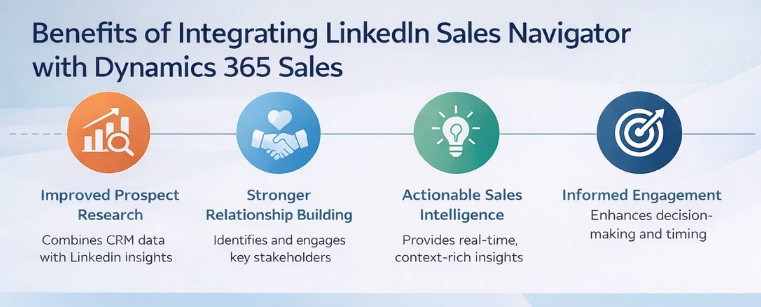
One of the most practical advantages of this integration is how it enhances everyday sales execution. Rather than requiring a separate research process, insights are embedded directly into workflows.
When a seller opens a lead or opportunity record, they can immediately see relevant LinkedIn information such as recent job changes, shared connections, or company updates. These insights serve as natural conversation starters and help tailor outreach.
For example, a seller might notice that a prospect recently changed roles. This creates an opportunity to initiate a conversation around new priorities or initiatives. Similarly, visibility into shared connections can support more effective introductions, increasing the likelihood of engagement.
Another key benefit is the ability to identify additional stakeholders within an account. Sales cycles often involve multiple decision-makers, and relying on a single contact can limit visibility. With LinkedIn insights, sellers can uncover relevant individuals across departments and roles, improving account coverage.
Over time, this leads to more informed engagement, stronger relationships, and better alignment with customer needs. This approach aligns with broader innovations like AI-powered selling with Copilot in Dynamics 365 Sales, where AI-driven insights help sellers act faster and with greater context across the sales cycle.
Supporting account-based selling strategies
For organizations adopting account-based selling approaches, LinkedIn Sales Navigator integration plays a critical role in execution.
Account-based strategies require a deep understanding of target organizations, including their structure, priorities, and key stakeholders. The integration supports this by providing:
- Visibility into organizational structure: Sellers can identify key roles and relationships within a target account, helping them navigate complex buying groups.
- Insights into company activity and priorities: News and updates help teams understand what matters most to the organization at a given time.
- Alignment with ideal customer profiles: Advanced capabilities allow teams to identify leads that match specific buyer personas, improving targeting accuracy.
- Expanded stakeholder identification: Recommended leads help uncover additional influencers who may not be captured in the CRM.
- Improved collaboration across teams: Shared insights enable sales and marketing teams to align around target accounts and messaging strategies.
These capabilities allow organizations to move beyond generic outreach and toward more focused, strategic engagement with high-value accounts. By integrating these insights directly into Dynamics 365, teams can execute account-based strategies without disrupting their existing workflows.

Case Study
Transforming sales and customer management with Dynamics 365 Sales
Explore how Sapphire Gas Solutions modernized its CRM and supported rapid growth. Read the case study to see how Dynamics 365 Sales helped streamline operations and improve performance.
Best practices for maximizing value
To fully realize the benefits of LinkedIn Sales Navigator within Dynamics 365 Sales, organizations should focus on both technology and process alignment.
Key best practices include:
- Align the integration with your sales process: Ensure that LinkedIn insights are incorporated into defined sales stages and activities, rather than treated as optional tools.
- Train sellers on how to use insights effectively: Provide guidance on how to interpret LinkedIn data and apply it to outreach, relationship building, and account planning.
- Prioritize data quality in CRM: Accurate and complete CRM records improve the matching process between Dynamics 365 and LinkedIn profiles, leading to better insights.
- Leverage relationship intelligence strategically: Encourage teams to use mutual connections and introductions thoughtfully, focusing on relevance and timing.
- Monitor adoption and usage: Track how frequently sellers engage with Sales Navigator features and identify opportunities to improve adoption.
By focusing on these areas, organizations can move beyond basic usage and integrate LinkedIn insights into their broader sales strategy.
Ultimately, the goal is not just to provide more data, but to enable better decision-making and more effective engagement.

Ready to enhance your sales strategy?
Integrating LinkedIn Sales Navigator is one way to strengthen your sales strategy, but success depends on how well it’s aligned with your processes and goals. Start a conversation with Rand Group to evaluate your current setup and identify opportunities for improvement.
When to consider the LinkedIn Sales Navigator integration
Not every organization will require LinkedIn Sales Navigator integration, but there are clear scenarios where it delivers significant value.
Organizations should consider this integration if they:
- Sell into complex B2B environments with multiple stakeholders
- Rely on relationship-driven sales processes
- Need better visibility into prospect organizations and decision-makers
- Are adopting account-based selling strategies
- Want to improve personalization and relevance in outreach
In these scenarios, the combination of Dynamics 365 Sales and LinkedIn Sales Navigator provides a more complete and actionable view of customers.
For organizations already using Dynamics 365, the integration represents an opportunity to extend the platform’s capabilities without introducing entirely new systems.
Why partner with Rand Group
Selecting the right technology is only part of the equation. The success of a LinkedIn Sales Navigator and Dynamics 365 Sales integration depends on how well it aligns with your sales processes, data strategy, and overall business objectives.
Rand Group brings both technical expertise and practical sales experience to help organizations get the most out of Microsoft solutions. Our approach goes beyond implementation; we focus on ensuring that the technology supports real-world selling scenarios and delivers measurable value.
We work with clients to configure Dynamics 365 Sales and LinkedIn Sales Navigator in a way that fits their unique needs. This includes designing CRM structures, optimizing data quality, and embedding LinkedIn insights into daily workflows so that sales teams can act on them effectively.
Our team also helps organizations address common challenges, such as low user adoption, disconnected systems, and unclear sales processes. By aligning technology with strategy, we help ensure that your investment translates into improved sales performance.
Whether you are implementing Dynamics 365 Sales for the first time or enhancing your current environment, Rand Group provides the guidance and expertise needed to move forward with confidence.
Frequently asked questions: LinkedIn Sales Navigator integration with Dynamics 365 Sales
What is LinkedIn Sales Navigator integration with Dynamics 365 Sales?
LinkedIn Sales Navigator integration with Dynamics 365 Sales connects your CRM data with LinkedIn’s professional network. This allows sales teams to view LinkedIn profiles, company insights, and relationship data directly within Dynamics 365, helping them better understand prospects and engage more effectively without switching between platforms.
What are the benefits of using LinkedIn Sales Navigator with Dynamics 365 Sales?
Using LinkedIn Sales Navigator with Dynamics 365 Sales provides benefits such as real-time prospect insights, improved relationship mapping, better identification of decision-makers, and more personalized outreach. It enhances sales productivity by embedding relevant LinkedIn data directly into CRM workflows.
Do you need a special license to use LinkedIn Sales Navigator with Dynamics 365 Sales?
Yes. Full integration typically requires either Microsoft Relationship Sales or LinkedIn Sales Navigator Advanced Plus. Microsoft Relationship Sales bundles Dynamics 365 Sales Enterprise (around $95/user/month) with Sales Navigator Advanced Plus (typically $100–$150+/user/month), though pricing may vary based on agreements.
How does LinkedIn Sales Navigator improve B2B sales processes in Dynamics 365?
LinkedIn Sales Navigator improves B2B sales processes in Dynamics 365 by providing insights into buyer roles, company changes, and mutual connections. This helps sales teams identify key stakeholders, time their outreach more effectively, and build stronger relationships throughout the sales cycle.
Can LinkedIn Sales Navigator data sync with Dynamics 365 Sales activities?
Yes, when CRM sync and activity writeback are enabled, certain LinkedIn Sales Navigator activities—such as InMails and messages—can be recorded in Dynamics 365 Sales. This ensures that communication history is centralized and visible to the broader sales team.
Next steps
Integrating LinkedIn Sales Navigator with Dynamics 365 Sales allows organizations to move beyond traditional CRM usage and toward a more connected, insight-driven sales approach. By combining internal data with real-time external insights, sales teams can better understand their prospects, engage more effectively, and navigate complex buying environments.
However, realizing this value requires more than enabling a feature. It involves aligning the integration with your sales processes, configuring it appropriately, and ensuring that your team knows how to use it strategically.
Rand Group works with organizations to design, implement, and optimize Dynamics 365 Sales solutions, including integrations like LinkedIn Sales Navigator. Our team helps ensure that the technology supports your business goals and delivers measurable impact.
If you are evaluating how to enhance your sales capabilities or want to better leverage Dynamics 365 Sales, we can help. Connect with Rand Group to start a conversation, assess your current environment, and identify the right approach for your organization.