Dynamics 365
 Power Platform
 Dynamics
 Cloud & Productivity
Dynamics 365 Sales 2026 release wave 1: A closer look at the top new features

Microsoft releases updates to Dynamics 365 Sales twice a year through its release wave program. The Dynamics 365 Sales 2026 release wave 1 focuses heavily on AI-powered selling, smarter automation, and tools that help sellers spend less time on admin work and more time closing deals. This blog covers some of the most exciting features coming in this release. There is a lot to explore, so we have highlighted the updates that we think will make the biggest impact for sales teams.
Integrated inbound and outbound calling with Sales Hub dialer
Sellers spend a lot of time on the phone. Switching between apps during a call breaks focus and slows things down. The new Sales Hub dialer solves this by bringing a fully built-in calling experience directly into Dynamics 365 Sales. You can make and receive calls without leaving the app. Customer history and context appear right away. Notes are easy to take mid-call. Calls are automatically logged as activities, so nothing falls through the cracks.
Key capabilities include:
- Click-to-call: Click any phone number in Contacts, Leads, Opportunities, or Accounts to dial instantly.
- Inbound call handling: See who is calling and pull up their context before you even say hello.
- AI-powered conversation intelligence: Get real-time transcription, sentiment analysis, action items, and call summaries powered by AI.
- Call recording and playback: Review recorded calls with speaker separation and easy navigation to key moments.
Smarter email templates in Sequences
Sequences help sellers run consistent, repeatable outreach. But today, adding or changing an email template while building a sequence forces sellers to leave what they are doing. That slows them down and discourages them from improving their outreach.
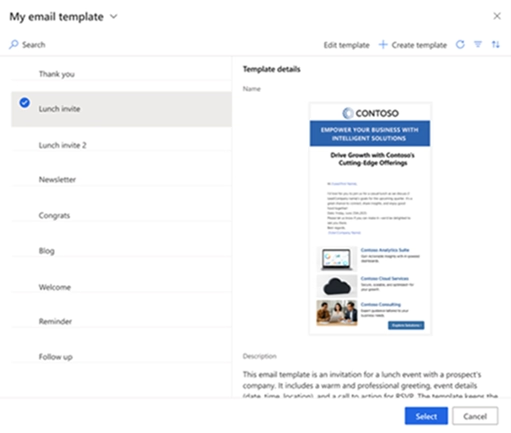
The new in-flow email template picker fixes this. Sellers can now find, create, and edit email templates without ever leaving the sequence.
With this update, you can:
- Browse templates using organized views like My templates, Team templates, and Approved templates.
- Create a new template on the spot and use it right away.
- Edit an existing template in context so it fits the specific step or audience.

Ready to get the most out of Dynamics 365 Sales?
The 2026 release wave 1 introduces powerful new tools, but knowing which features to prioritize and how to configure them takes expertise. Rand Group helps organizations make the most of every Microsoft update — from planning to implementation to training.
Sales Qualification Agent updates
The Sales Qualification Agent continues to improve in this release. This wave adds four updates that make lead qualification smarter, faster, and more personalized.
- Identify the best leads using any data source: Previously, the agent evaluated leads using CRM fields and specific websites. With this expanded assessment capability, admins can now connect any data source — including public web searches and custom sources through Copilot Studio — to help the agent make better qualification decisions. The setup experience has also been simplified. New users can get started quickly using AI-generated suggested criteria, while existing configurations continue to work without any changes.
- Personalize outreach emails: The agent already drafts outreach emails on behalf of sellers. Now, admins can customize how those emails are written to better match your brand and selling style. You can define the goal of the outreach, set tone guidelines, specify a call to action, control message length, and even set rules around approved phrases and words to avoid. The result is outreach that feels more relevant and on-brand — which leads to better response rates.
- Prioritize your hottest leads first: Not all leads deserve equal attention. The next best actions feature surfaces hot and high-intent leads directly in the leads grid in Dynamics 365 Sales. Sellers can see at a glance which leads have shown clear purchase intent, why they stand out, and what topic they are interested in. From there, they can jump straight into the agent’s research and pre-generated email suggestions without any extra steps.
- Deploy multiple agents in one environment: Organizations can now run multiple Sales Qualification Agents in the same environment. Each agent can be configured for a specific product line, region, or sales team — with its own qualification criteria, templates, and knowledge sources. Leads are routed automatically to the right agent, and a fallback agent ensures nothing goes unprocessed.

Sales Research Agent updates
The Sales Research Agent is designed for sales managers and operations teams who need to answer complex business questions quickly. This wave adds three major updates.
- Explore complex sales insights: The complex insights capability lets you have a natural language conversation with your data. You can ask questions, branch into multiple lines of research, and get answers through narrative explanations and rich visualizations.
- Plan your sales portfolio: Portfolio planning turns CRM data, financial signals, and web context into a continuously updated plan — without waiting for annual planning cycles. The agent helps you run scenario-driven planning for common workflows, including account overviews, deal rescue, renewal risk, territory rebalancing, and segment performance. Plans refresh automatically as signals change, so they stay current. Every recommendation comes with an explanation of the reasoning behind it.
- Get sales operations insights: The sales operations insights function is built for ops teams who spend too much time pulling data from different places. It unifies CRM data with operational data from Fabric lakehouse — including targets, quotas, actuals, and budgets — in one AI-powered experience.
Sales Close Agent enhancements
The Sales Close Agent helps sellers stay on top of active deals. This wave brings six meaningful updates to how it works.
- Delta-first deal guidance: Deals move fast. The delta-first guidance feature makes sure you always know what changed since your last check-in, why it matters for the current stage, and what to do next. Built-in stage coverage spans Qualify, Develop, Propose, and Close.
- Ask-and-refine deal insights: The ask-and-refine experience lets you ask questions right inside an opportunity. Start with a quick summary and go deeper only when you need to — whether you are preparing for a meeting, assessing a risk, or getting ready to advance a deal. Admins can configure which insights refresh automatically when important signals change.
- Insights from historical deal patterns: The historical deal patterns feature surfaces recurring themes from past wins and losses — like common objections, competitor entries, or procurement slowdowns — and pairs each one with a clear next action. You do not just learn what happened before. You get guidance on what to do now.
- Personalized opportunity research: The opportunity research personalization feature lets sellers set up persistent focus areas — like stakeholders, competition, deal health, or pricing — and add their own notes and priorities. Admins can set guardrails to keep things consistent across the team while still giving sellers flexibility.
- Learning and tuning loop: The learning and tuning feature lets sellers flag guidance as helpful, outdated, off-stage, or missing context. Those signals feed continuous improvements. Sales operations teams can apply tuning changes with a full audit trail so guidance gets sharper over time.
- Signal-based triggers: The signal-based trigger feature keeps insights current by refreshing them automatically when meaningful deal changes happen. When you need more depth, you can request it on demand. Admins control which signals trigger updates to keep costs in check.
Frequently asked questions
When will the Dynamics 365 Sales 2026 release wave 1 features be available?
The 2026 release wave 1 rolls out between April and September 2026. Not all features are released at the same time — some will be available earlier in the wave while others follow later. Some features also go through a public preview period before they are generally available, which gives organizations a chance to test them before full rollout.
What is the difference between the Sales Qualification Agent, the Sales Close Agent, and the Sales Research Agent?
Each agent serves a different part of the sales process. The Sales Qualification Agent focuses on the early stages — researching leads, scoring them, and drafting personalized outreach emails. The Sales Close Agent helps sellers manage active deals by providing stage-specific guidance, surfacing risks, and recommending next actions. The Sales Research Agent is built for managers and operations teams, helping them answer complex business questions around pipeline health, quota attainment, and territory planning. Together, they cover the full sales cycle. To learn more, read our blog on What are AI agents in Dynamics 365 Sales?
Can the Sales Hub dialer replace our current third-party calling solution?
It depends on your current setup and business needs. The new Sales Hub dialer offers a strong set of built-in capabilities, including click-to-call, inbound call handling, automatic call logging, and AI-powered conversation intelligence. For many organizations, this may reduce or eliminate the need for a third-party tool. However, every organization is different. Contact Rand Group to assess whether the Sales Hub dialer is the right fit for your team.
Are these Sales 2026 release wave 1 features automatically turned on, or do they need to be configured by an admin?
It varies by feature. Some features are automatically enabled for all users, while others need to be turned on and configured by an admin before sellers can use them. For example, the in-flow email template picker in Sequences is automatically enabled, while the Sales Hub dialer and multiple Sales Qualification Agents require admin setup. It is also worth noting that these features are not all released at the same time. The 2026 release wave 1 rolls out between April and September 2026, so some features will be available sooner than others.
Next steps
The Dynamics 365 Sales 2026 release wave 1 brings meaningful improvements across the entire sales process. From smarter calling tools to AI agents that help qualify leads and guide deals to close, these updates are designed to help sellers work faster and smarter. This blog only covers some of what is included in this release — there are many more updates worth exploring.
Getting the most out of these new features takes the right plan and the right partner. Contact Rand Group today to learn how these updates can work for your organization and what steps make sense for your team.