Dynamics 365
 Power Platform
 Dynamics
 Cloud & Productivity
Is Dynamics 365 an ERP or CRM?

One of the most common questions organizations ask when evaluating Microsoft Dynamics 365 is whether it is a CRM or ERP system. The short answer is: it is both.
Microsoft Dynamics 365 is a suite of business applications that includes both Customer Relationship Management (CRM) and Enterprise Resource Planning (ERP) solutions. Some applications focus on customer relationships and sales processes, while others manage finance, operations, inventory, and supply chain workflows.
This is where confusion often happens. Dynamics 365 is not a single product. It is a connected ecosystem of applications designed to work together across departments.
In this blog, we’ll break down what Dynamics 365 is and explore whether it’s primarily a CRM, an ERP, or a combination of both.
CRM vs ERP: Understanding the difference
Enterprise Resource Planning (ERP) and Customer Relationship Management (CRM) systems are both essential software tools used by organizations to streamline their operations, but they serve distinct purposes and functions.
ERP systems are primarily focused on managing internal processes and resources. They integrate various business functions like finance, human resources, inventory management, and production, providing a holistic view of an organization’s operations. ERP systems aim to improve efficiency, reduce costs, and enhance decision-making by offering a centralized platform for data and process management.
In contrast, CRM systems are specifically designed to manage interactions with customers and prospects. They store customer information, track sales leads, and manage marketing and customer support activities. CRM systems help organizations build and maintain strong customer relationships, improve sales and marketing efforts, and provide a personalized customer experience.
ERP and CRM systems are complementary but distinct tools that help organizations operate efficiently and enhance customer relationships, respectively. To maximize their potential, organizations often integrate both ERP and CRM systems to create a comprehensive business management solution that combines efficient internal operations with effective customer engagement.
Why people confuse Dynamics 365 CRM and ERP
The confusion around Dynamics 365 often comes from Microsoft’s product structure.
Unlike traditional business software platforms that separate CRM and ERP systems completely, Microsoft groups multiple business applications under the Dynamics 365 brand.
As a result, some Dynamics 365 applications are CRM solutions, some are ERP systems, and others support analytics, automation, AI, and productivity. For example:
- Dynamics 365 Sales is a CRM application
- Dynamics 365 Business Central is an ERP system
- Dynamics 365 Customer Service supports customer support operations
- Dynamics 365 Finance manages enterprise financial operations
Organizations can start with one application and add more over time. However, in our experience, that same flexibility is also what creates the initial confusion.
Is Dynamics 365 an ERP or CRM?:
Microsoft Dynamics 365 is a comprehensive suite of business applications that empowers organizations to manage a wide range of functions. Unlike traditional software, Dynamics 365 offers a modular structure, where you can pick and choose the specific apps you need to meet your business requirements.
So, to answer the pressing question: Is Dynamics 365 a CRM or ERP? It’s both. Dynamics 365 is a versatile platform that combines CRM and ERP functionalities under one roof. The choice between CRM or ERP largely depends on your specific business requirements. Companies can choose to leverage each application on its own or both CRM and ERP modules simultaneously, ensuring a holistic approach to business management.
Dynamics 365 CRM applications
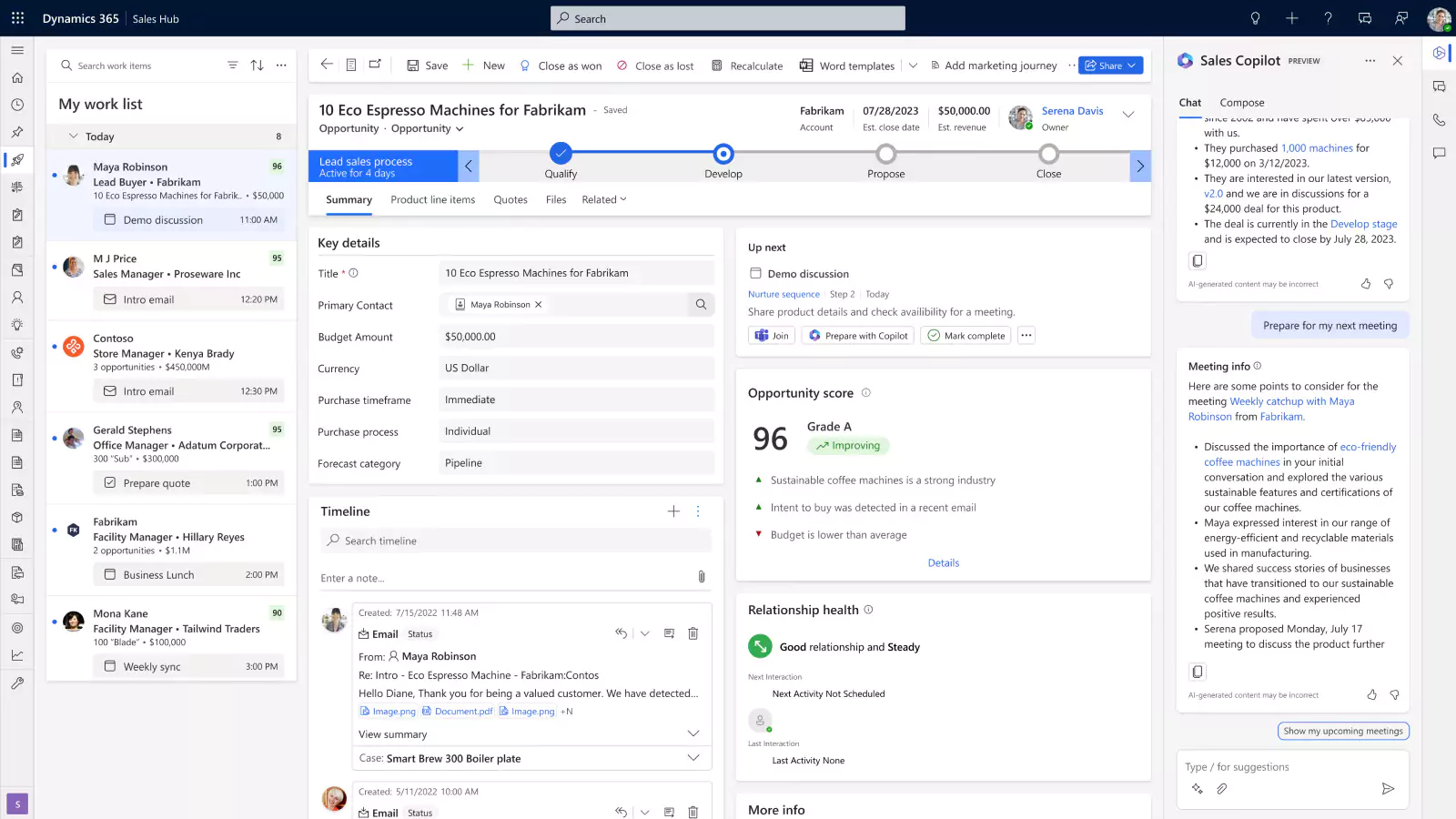
Dynamics 365 includes several CRM applications designed for sales, customer service, marketing, and more. These apps allow businesses to manage their customer data, track sales opportunities, provide top-notch customer support, and execute marketing campaigns seamlessly. The following CRM applications are available in the Dynamics 365 suite:
- Dynamics 365 Sales – Dynamics 365 Sales is a powerful sales solution that combines the capabilities of AI, Office 365, and LinkedIn to streamline repetitive tasks and create successful sales strategies that your team can utilize to increase win rates.
- Dynamics 365 Customer Insights – Microsoft Dynamics 365 Customer Insights (previously known as Dynamics 365 Marketing) is a marketing automation tool that helps you build targeted campaigns, track and nurture prospects along the buyers journey, and successfully transition qualified leads to sales.
- Dynamics 365 Field Service – Dynamics 365 Field Service is a connected field service solution that uses IoT technology, mixed reality, and machine learning to drive technician productivity and customer satisfaction.
- Dynamics 365 Customer Service – Dynamics 365 Customer Service is a powerful end-to-end customer service automation tool that combines the capabilities of AI and IoT technology to help your team deliver personalized customer experiences across all channels, build loyalty, and earn customers for life.

Get started with a free Dynamics 365 assessment
Ready to unlock the full potential of Dynamics 365 for your business? Contact us today to see if you are eligible for a free assessment to help you select the right applications tailored to your unique needs.
Dynamics 365 ERP applications
Dynamics 365 also includes several powerful ERP systems. Its ERP app include Business Central, Finance, Supply Chain Management, and Project Operations. These apps help organizations manage their finances, optimize supply chain operations, and effectively oversee their workforce. If your organization needs a comprehensive solution for managing its core business processes, Dynamics 365’s ERP capabilities are indispensable. The following ERP applications are available in the Dynamics 365 suite:
- Dynamics 365 Business Central – Business Central is a comprehensive business management solution for small to mid-size companies that enables you to manage your entire business in a single app, including finance, manufacturing, sales, shipping, project management, services, and more.
- Dynamics 365 Finance – Dynamics 365 Finance is a robust financial management application for medium to large organizations that allows you to manage finances across the globe, automate business processes, drive financial visibility, and more.
- Dynamics 365 Supply Chain Management – Dynamics 365 Supply Chain Management is an intelligent solution that automates and optimizes all aspects of the supply chain from production to transportation through AI, machine learning, and mixed reality.
- Dynamics 365 Project Operations – Dynamics 365 Project Operations is an all-in-one solution for project-centric businesses to drive success through enhanced project management. It connects the entire project cycle from sales to financials and unifies operations across the organization.

Real-world example: Using Dynamics 365 CRM and ERP together
One of the best ways to understand how Dynamics 365 works in practice is to look at a real implementation.
Sapphire Gas Solutions is a fast-growing provider of LNG and CNG fuel solutions. When they came to Rand Group, their business was scaling quickly, but their systems were not keeping up. Financial reporting was slow and manual. Their CRM was not integrated with their back-office operations. Sales, finance, and operations teams were working from disconnected data, which made collaboration difficult and slowed decision-making.
Rand Group implemented both Microsoft Dynamics 365 Business Central and Microsoft Dynamics 365 Sales, then integrated the two systems so that data flowed freely between them. This gave every team a single, real-time view of the business. Sales reps could see up-to-date pricing and project margins. Finance had visibility into customer activity. Leadership could pull accurate reports without waiting days for someone to compile the data manually.
The results were significant:
- Month-end close was completed 67% faster
- Manual data entry dropped by 50%
- Sales rep onboarding became 40% faster
This is exactly the kind of outcome we see when CRM and ERP are implemented as a connected solution rather than two separate solutions. In our experience, organizations that integrate both systems unlock value that neither application can deliver on its own.
Preston McDonald, Sales Director at Sapphire Gas Solutions, described what made the difference:
“Dynamics 365 Sales is a complete game-changer for us. It’s so much easier to use than our previous CRM, and the integration with Business Central means I always have the most up-to-date data, whether it’s pricing or project margins.”
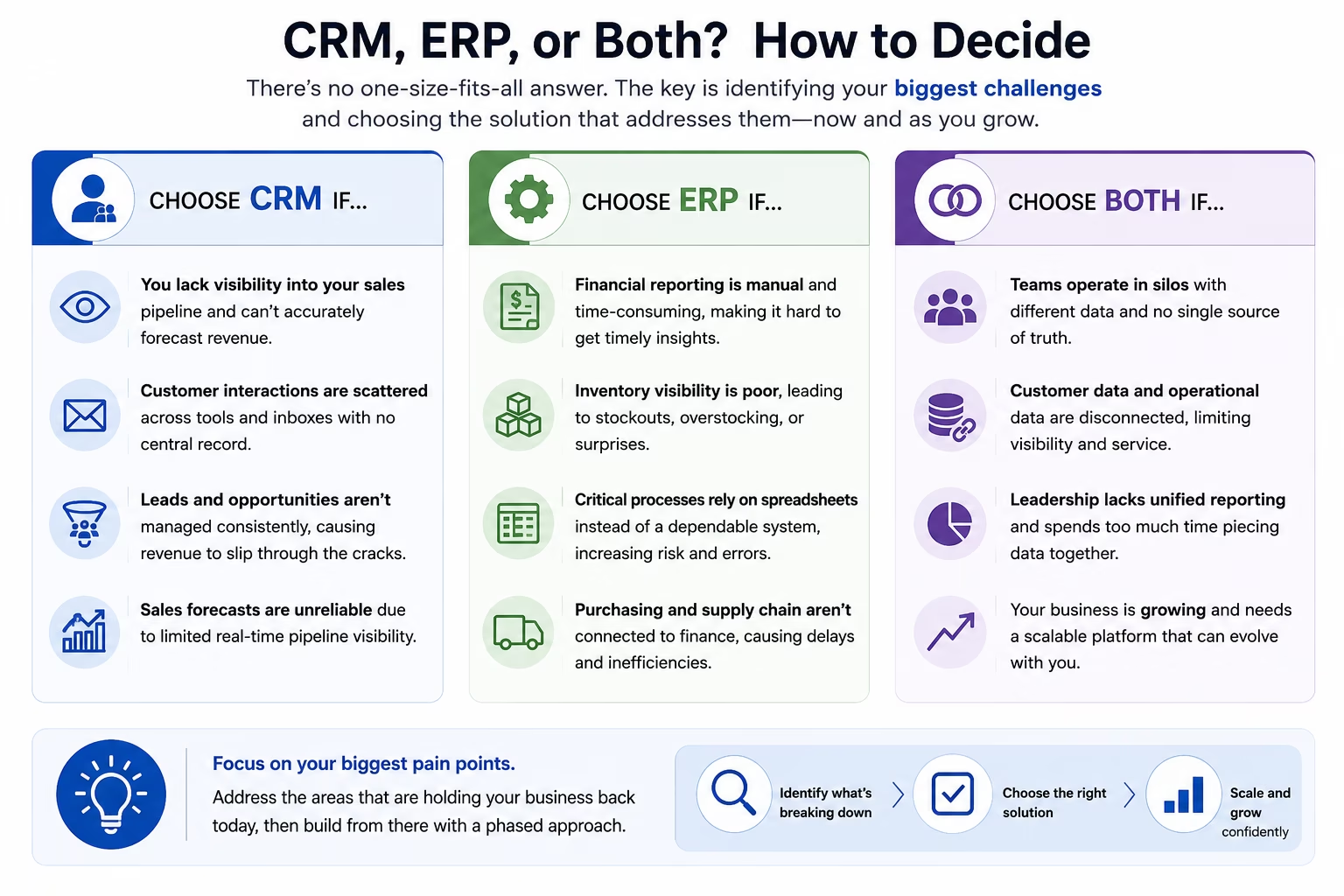
Should your business use CRM, ERP, or both?
There is no single right answer, and in our experience, organizations that try to implement everything at once often struggle more than those that take a phased approach. What matters most is understanding where your biggest gaps are today.
Your organization may need CRM if:
- Your sales processes lack visibility, making it hard to forecast revenue or understand where deals stand at any given moment.
- Customer communication is fragmented across email, spreadsheets, and individual reps, with no centralized record of interactions.
- Lead tracking is inconsistent, meaning opportunities are falling through the cracks because there is no structured process for managing them.
- Sales forecasting is unreliable because leadership has no clear, real-time view of the pipeline.
Your organization may need ERP if:
- Financial reporting is largely manual, requiring staff to consolidate data from multiple sources before any meaningful analysis can happen.
- Inventory visibility is limited, leaving operations teams guessing at stock levels or discovering shortfalls only after they become a problem.
- Core business processes still rely on spreadsheets for purchasing, job costing, or order management that should be handled in a system of record.
- Purchasing and supply chain processes are disconnected from finance, creating delays, errors, and a lack of accountability.
Your organization may need both if:
- Departments are operating in silos, with sales, operations, and finance each maintaining their own version of the truth.
- Customer and operational data are disconnected, so your sales team does not know inventory levels and your finance team cannot easily see a customer’s full history.
- Leadership lacks centralized reporting, forcing executives to manually compile data from multiple systems before making informed decisions.
- Your business is scaling rapidly and needs a platform that can grow with you, rather than one that will require a full replacement in a few years.
In our experience, a common mistake is spending months evaluating feature lists when the real question is simpler: what is actually breaking down in your business today? Start there, and the right application usually becomes clear.
Selecting the right Dynamics 365 applications for your needs
Choosing the right mix of Dynamics 365 applications is one of the most important decisions your organization will make. It is not just about CRM vs. ERP. It is also about picking the right modules, sequencing the rollout correctly, and making sure the solution fits your actual business processes.
The ERP-first pattern we see most often
In our experience, most organizations implement an ERP system first. Then they add CRM in a later phase. This is the pattern we saw with Sapphire Gas Solutions, and it is one we recommend frequently.
The reasoning is straightforward. Getting financial operations, inventory management, and back-office processes onto a solid foundation is usually the higher-urgency need. It also makes the CRM implementation smoother. When the ERP is already in place, the CRM can connect to real financial data from day one, which is where a lot of the integration value comes from.
That said, this is not a universal rule. What we recommend is making that sequencing decision based on where the business is losing the most time or revenue today, not based on a predetermined order.
What we see as organizations grow
As businesses scale on the Dynamics 365 platform, teams consistently discover the same need: better visibility between departments. For example:
- Sales teams need real-time inventory data so they can make accurate commitments to customers without calling operations first.
- Finance teams need customer payment history so they can manage risk and recognize revenue without chasing information from sales.
- Service teams need access to order records so they can resolve issues quickly without being passed between departments.
- Leadership teams need centralized reporting so they can make strategic decisions without waiting for a weekly data pull from multiple systems.
This is why connecting CRM and ERP within Dynamics 365 becomes a priority for most growing organizations. Because both applications are built on the same platform, that integration is far more seamless than connecting products from different vendors.
How Rand Group helps you get it right
Rand Group specializes in helping clients navigate the Dynamics 365 landscape. Our approach covers every stage of the process:
- Evaluation and selection: We work closely with clients to understand their business goals and challenges. A common mistake we see at this stage is organizations that arrive already committed to a specific product before they have mapped their processes. In most cases, we recommend completing that process review first so the application decision is driven by your business, not the other way around.
- Implementation: Once we’ve helped you determined the right mix of applications, our skilled professionals will assist you in the implementation process. We ensure that the deployment is smooth and minimizes disruption to your operations.
- Integration: We connect Dynamics 365 applications to each other and to third-party tools, making sure data flows seamlessly across the business. This is often where the most meaningful efficiency gains come from.
- Customization: We tailor Dynamics 365 to fit your specific workflows. What we have found works best, especially early in an implementation, is to adopt standard processes where possible and reserve customization for areas that genuinely differentiate your business.
- Ongoing support: We provide continued support after go-live to keep your environment stable, current, and improving over time.
By partnering with Rand Group, you can rest assured that your Dynamics 365 implementation will be efficient, effective, and customized to your unique needs. We’ve successfully assisted numerous clients in realizing the full potential of Dynamics 365, whether they needed CRM, ERP, or a combination of both.
Frequently asked questions
Is Dynamics 365 a CRM or ERP?
Dynamics 365 is both. It includes dedicated CRM applications like Dynamics 365 Sales and ERP applications like Dynamics 365 Business Central. Organizations can implement one or both, depending on where their most pressing needs are.
What is the difference between CRM and ERP in Dynamics 365?
CRM applications in Dynamics 365 manage customer-facing activities like sales, marketing, and service. ERP applications manage internal operations like accounting, inventory, and procurement. Both live within the same platform, which makes integration between them much simpler than connecting products from different vendors.
Can Dynamics 365 CRM and ERP work together?
Yes. Because both types of applications are built on the same Microsoft platform, they share data natively. For example, Dynamics 365 Sales integrates directly with Business Central so that sales teams can see inventory levels and finance teams can access customer history, all without manual data transfer. Learn more about our Dynamics 365 integration services.
Should I implement CRM or ERP first?
In our experience, most organizations implement ERP first to stabilize their financial and operational foundation, then add CRM in a later phase. However, this depends on where your most urgent problems are today. Rand Group can help you assess which approach fits your situation through our evaluation and selection process.
What industries does Rand Group work with for Dynamics 365 implementations?
Rand Group works across a wide range of industries including oil and gas, manufacturing, professional services, distribution and logistics, and construction and real estate, among others.
Next steps
Microsoft Dynamics 365 is not just a CRM or just an ERP. It is a connected ecosystem of business applications designed to support every part of your organization. Some applications focus on customer relationships and revenue growth. Others handle the operational and financial backbone of the business. For most organizations, the real value comes from eventually connecting both.
Whether you are evaluating Dynamics 365 for the first time or planning your next phase of implementation, Rand Group can help you make the right decisions from the start. Contact Rand Group today to talk through your options.