Dynamics 365
 Power Platform
 Dynamics
 Cloud & Productivity
How to connect Microsoft Dynamics 365 Sales with your ERP system

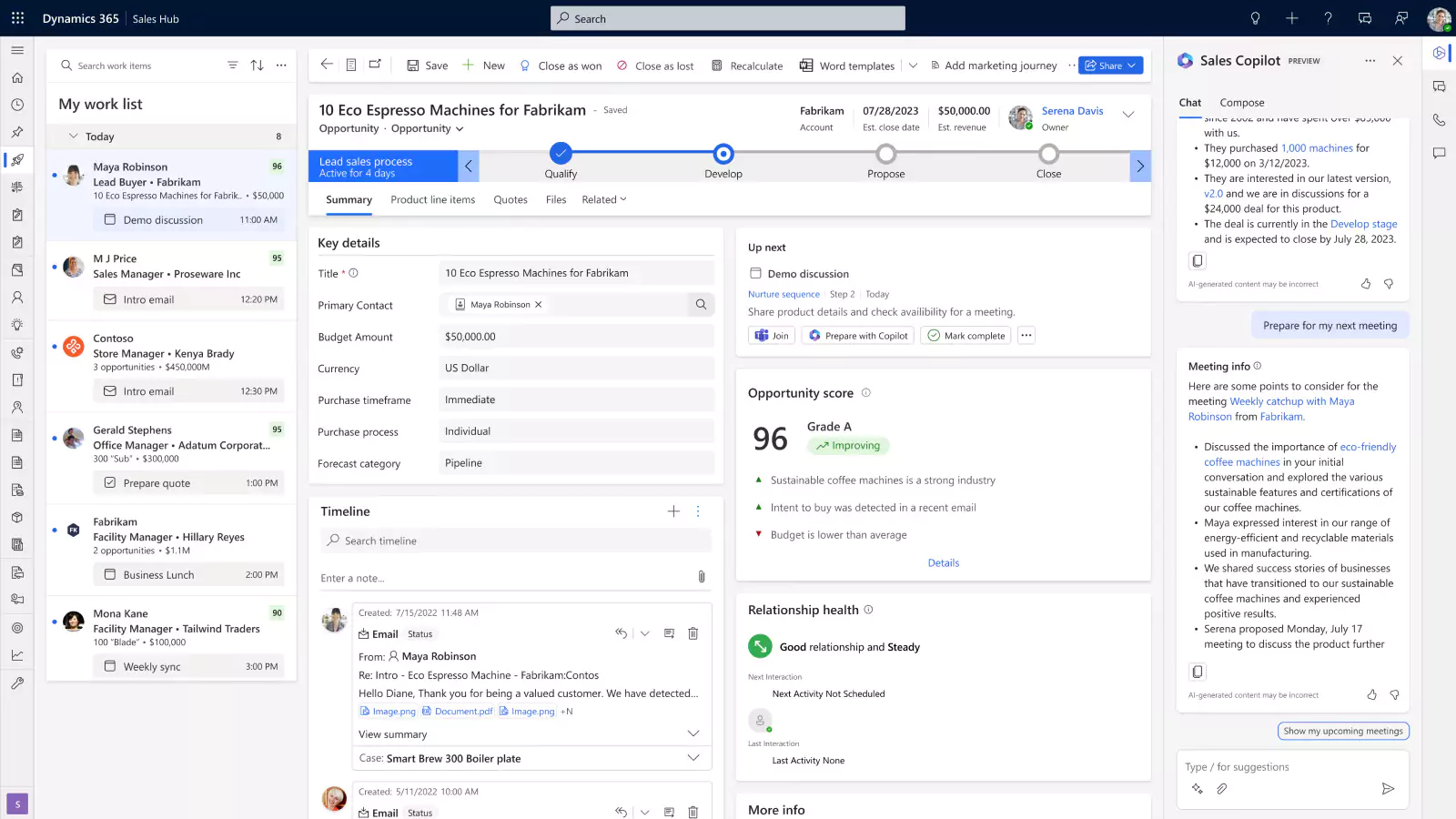
Microsoft Dynamics 365 Sales manages your leads, opportunities, quotes, and pipeline. Your ERP manages financials, inventory, orders, and fulfillment. When the two systems remain disconnected, problems follow. Sales representatives cannot easily see inventory, pricing, credit status, order history, or invoices. Finance and operations teams re-enter customer and transaction data that already exists in the CRM.
Connecting the systems creates a more consistent quote-to-cash process. Dynamics 365 Sales can integrate with Microsoft and non-Microsoft ERP systems, but the right method depends on your ERP, data requirements, transaction volumes, and business processes.
This blog explains the available integration methods, how to choose between them, and how Dynamics 365 Sales connects with Business Central, Finance and Supply Chain Management, and other ERP systems. It also covers integration best practices, common design considerations, expected costs and timelines, and real client results.
Quick answer: How does Dynamics 365 Sales connect with an ERP system?
Microsoft Dynamics 365 Sales can connect to an ERP through native Microsoft integration and Power Platform, APIs, middleware, or a third-party connector. Business Central commonly connects to Dynamics 365 Sales through Microsoft Dataverse. Dynamics 365 Finance and Supply Chain Management commonly connect through dual-write. Non-Microsoft and proprietary ERP systems typically connect through APIs, middleware, Power Platform components, or purpose-built connectors.
Table of contents
- What does Dynamics 365 Sales ERP integration do?
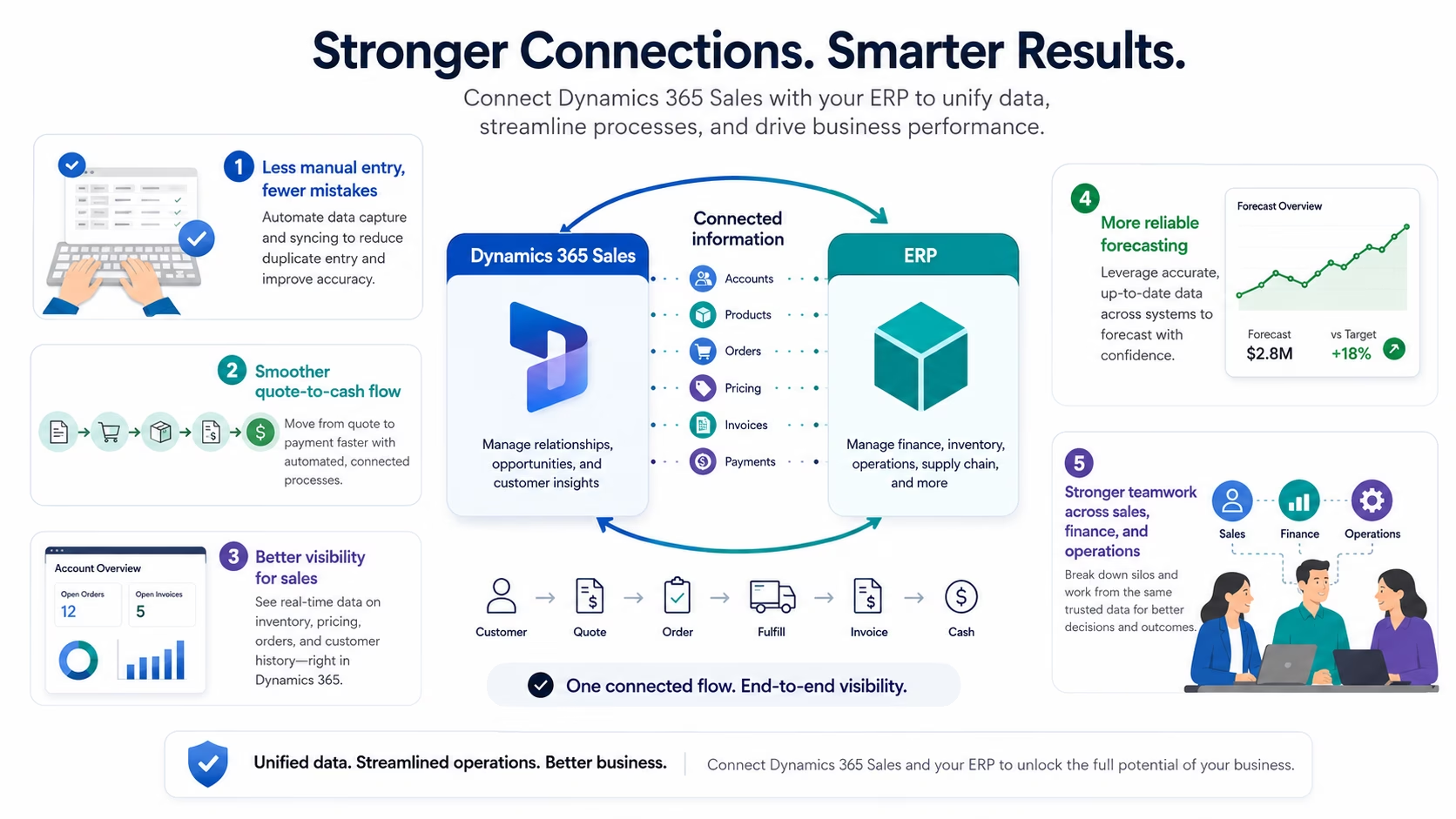
- What data should Dynamics 365 Sales and your ERP system share?
- Different ways to connect Dynamics 365 Sales with an ERP system
- Benefits of connecting Dynamics 365 Sales with an ERP system
- Best practices for integrating Dynamics 365 Sales with an ERP system
- How Dynamics 365 Sales integrates with specific ERP systems
- How long does the integration take, and what does it cost?
- Real-world results from Dynamics 365 Sales + ERP integration
- Why work with Rand Group to connect Dynamics 365 Sales and your ERP system?
- Key takeaways
- Frequently asked questions
What does Dynamics 365 Sales + ERP integration do?
CRM and ERP integration exchanges the business information that sales, finance, and operations teams rely on. The objective is not necessarily to copy every record between both systems. It is to make the right information available at the right point in each business process.
That connectivity generally takes three forms:
- Data synchronization copies or updates selected records between systems in real time, near real time, or on a schedule.
- Virtualized data access lets users view information from another system without permanently copying every record into the application they are using.
- Process integration triggers an action in one system when an event occurs in another, such as initiating an approval after a sales opportunity reaches a specified stage.
For example, a sales representative may need to see an account’s outstanding invoices without maintaining a second copy of every financial transaction in Dynamics 365 Sales. In another scenario, an approved sales order may need to transfer to the ERP so fulfillment and invoicing can begin.
The appropriate design depends on what users need to view, which transactions must move, and how quickly the information must be updated.
What data should Dynamics 365 Sales and your ERP system share?
In our experience, organizations most commonly exchange the following information between Dynamics 365 Sales and their ERP:
- Customer and account records
- Contacts and addresses
- Products and item information
- Price lists and discounts
- Inventory availability
- Sales quotes and orders
- Invoices and payment status
- Customer credit information
Not every record should automatically move in both directions. A strong integration design establishes which application owns each type of data.
Leads, opportunities, sales activities, and forecasts typically belong in Dynamics 365 Sales. Products, inventory, financial records, invoices, and customer credit information typically belong in the ERP. Customer and order records may involve shared processes, but the integration must still define where each record is created, approved, and maintained.
For example, sales may initiate a prospective customer in Dynamics 365 Sales, while finance approves the account and establishes its payment terms and credit limit in the ERP. Without that ownership model, teams can create duplicate records or overwrite information controlled by another department.
Different ways to connect Dynamics 365 Sales with an ERP system
There are four common approaches to Dynamics 365 Sales ERP integration. They are not mutually exclusive, and a complete solution may combine Microsoft integration capabilities, APIs, middleware, and third-party tools to support different parts of the same business process.
In Rand Group’s experience implementing and integrating Dynamics 365 across industries, the best fit depends on the systems, processes, transaction volumes, and support requirements—not simply on which connector can be installed fastest.
Native Microsoft integration and Power Platform
Native Microsoft integration is generally the starting point when Dynamics 365 Sales connects with Business Central or Dynamics 365 Finance and Supply Chain Management. These applications support established Microsoft integration patterns through Dataverse, dual-write, standard mappings, and related platform capabilities.
Power Platform can extend those capabilities with low-code automation, connectors, workflows, and applications. For example, Power Automate can initiate an approval before an order transfers to the ERP, notify finance when a large opportunity reaches a specified stage, or create follow-up tasks after an invoice becomes overdue.
Native integration and Power Platform can work together, but they still require configuration, data preparation, security design, testing, monitoring, and governance. High-volume transactional processes may also require additional architecture beyond Power Automate alone.
APIs and custom integration
Custom API integration fits proprietary ERP systems, specialized business processes, and requirements that standard mappings or connectors cannot support.
APIs provide control over which data moves, how it is transformed, and when it is exchanged. That flexibility can be valuable when an organization has a specialized pricing model, unique order structure, or industry-specific approval process.
The trade-off is greater responsibility for development, security, testing, monitoring, documentation, and long-term maintenance. Custom integration should therefore be selected because the business requirement demands it, not simply because custom development provides more flexibility.
Middleware or an integration platform
Middleware is commonly used when an organization needs to connect several applications or manage complex transformations and orchestration.
An integration platform can centralize:
- Connections between applications
- Data transformation and routing
- Transaction monitoring
- Retry and error handling
- Logging and operational support
Azure integration services are one Microsoft-based option, although vendor-neutral integration platforms are also available.
Middleware is generally better suited to complex environments than to a single, straightforward data exchange. It introduces another platform to license, manage, secure, and support, but it can prevent organizations from building a collection of disconnected point-to-point integrations.
Third-party connectors
Prebuilt connectors are available for many common CRM and ERP combinations. They can provide a faster starting point than building an integration from scratch.
Before selecting a connector, assess:
- The entities and fields it supports
- Whether data moves in one direction or both directions
- Its synchronization frequency and volume limits
- Its customization and transformation capabilities
- Monitoring and error-management features
- Licensing and support costs
- Compatibility with ERP and Dynamics 365 updates
A connector may be quick to deploy but expensive to adapt if it does not align with the business process. The least expensive connector is not necessarily the lowest-cost integration over its full lifecycle.
How to choose the right integration method
Choose an approach based on your systems, business processes, data requirements, and support needs. In many cases, the best design combines more than one method.
Before selecting an approach, determine:
- Which business processes need to cross between Dynamics 365 Sales and the ERP?
- Which application owns each data type?
- Does the information need to move in one direction or both directions?
- Do users need real-time, near-real-time, or scheduled updates?
- What transaction volumes and performance requirements must be supported?
- Who will monitor and maintain the integration after launch?
A distributor that needs hundreds of sales users to view frequently changing inventory may require a different architecture than a professional services firm transferring a small number of approved customers and orders each day.
Benefits of connecting Dynamics 365 Sales with an ERP system
Regardless of the method selected, integrating Dynamics 365 Sales with an ERP can deliver several benefits:
- Reduce duplicate data entry and errors. Customer, product, quote, and order information does not need to be manually entered by multiple departments.
- Create a connected quote-to-cash process. Approved quotes and orders can move from Dynamics 365 Sales into the ERP for fulfillment, invoicing, and collection.
- Give sales teams greater operational visibility. Sales representatives can access relevant inventory, order, credit, and invoice information without relying on emails or spreadsheets.
- Improve forecasting accuracy. Pipeline information can be evaluated alongside actual orders, invoices, and financial results.
- Strengthen collaboration. Sales, finance, and operations work from connected information while retaining the application designed for their responsibilities.
Best practices for integrating Dynamics 365 Sales with an ERP system
A reliable integration depends on how well it is planned, governed, and supported—not only on the technology selected.
- Start with the business process. Map the lead-to-cash process before choosing a connector or integration method. Define when customers, quotes, orders, and approvals should move between systems.
- Assign a system of record. Decide which application owns each type of information, including customers, products, pricing, inventory, orders, and invoices.
- Share only the data users need. Avoid synchronizing every available field or record. Unnecessary data movement increases complexity and makes errors harder to resolve.
- Clean data before integration. Correct duplicate accounts, inconsistent naming, obsolete products, and missing required fields before synchronization begins.
- Plan for exceptions. Define how the integration should handle missing information, credit holds, inactive items, duplicate records, and system outages.
- Test complete scenarios. Test approvals, quote conversion, partial fulfillment, returns, failed transactions, and corrected records—not just individual field mappings.
- Establish monitoring and support. Assign responsibility for reviewing failures, correcting data, maintaining mappings, and supporting the integration after launch.

Avoid the most common data integration mistakes
Poor planning, inconsistent data, and unclear system ownership can undermine an otherwise well-designed integration. Download the Top 7 data integration mistakes whitepaper to learn what commonly goes wrong and how to avoid it.
How Dynamics 365 Sales integrates with specific ERP systems
Your integration strategy should start with the ERP system you use today. Below, we break down the most common paths for connecting Dynamics 365 Sales with Microsoft ERP solutions, as well as flexible options for integrating with non-Microsoft ERP systems.
How Dynamics 365 Sales integrates with Business Central
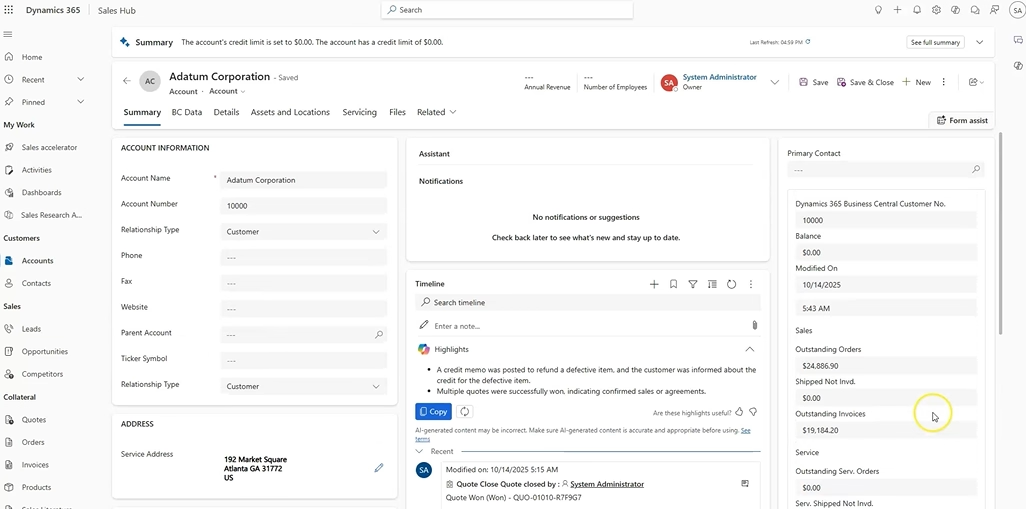
Dynamics 365 Business Central commonly connects to Dynamics 365 Sales through Microsoft Dataverse, Microsoft’s cloud-based data platform for storing and managing information across Dynamics 365 and Power Platform applications. Dynamics 365 Sales stores its application data in Dataverse. Business Central can connect to Dataverse and synchronize selected information through configured integration table mappings.
Microsoft provides standard integration capabilities and mappings for common records such as accounts, contacts, products, and sales-related transactions. Additional configuration or extensions may be required when the standard design does not meet the organization’s requirements.
Organizations can configure synchronization direction and extend mappings where necessary. Depending on the scenario, virtual tables or related integration capabilities may also make selected Business Central information available without permanently synchronizing every record.
A connected process may follow these steps:
- A lead is qualified and managed as an opportunity in Dynamics 365 Sales.
- The sales team prepares a quote using product, pricing, or availability information from Business Central where that information has been included in the integration design.
- Once approved, a sales order can transfer to Business Central for fulfillment, invoicing, and financial posting.
- Business Central processes the operational and financial transactions.
- Relevant order and invoice information becomes available to the sales team through synchronization or another configured access method.
The exact process depends on how mappings, approvals, pricing, inventory visibility, and sales-document integration have been configured. For a deeper look at how these solutions work together, explore our Dynamics 365 Sales and Business Central integration services.
How Dynamics 365 Sales integrates with Dynamics 365 Finance and Supply Chain Management
Dynamics 365 Finance and Supply Chain Management use the finance and operations application platform and data model, while Dynamics 365 Sales uses Dataverse. Dual-write is Microsoft’s integration framework that connects the two environments and keeps selected data synchronized between them. It supports tightly coupled, bidirectional integration between Dataverse and finance and operations applications.
For enabled and configured table maps, changes in one environment can trigger corresponding updates in the other. Common scenarios include:
- Prospect-to-cash processes
- Shared customer and product information
- Quote and sales-order handoff
- Inventory availability
- Credit information
- Order and invoice visibility
Dual-write requires careful design when the environment includes customization or complex organizational requirements. The main considerations generally fall into three areas:
- Data model and custom table design: Determine how standard and customized tables, fields, relationships, and integration keys should map between environments.
- Company and legal-entity structure: Define how records should be shared or separated across companies and legal entities.
- Initialization, volume, and error management: Plan the initial synchronization, expected transaction volumes, monitoring, error correction, and recovery processes.
Dual-write can provide a strong foundation for connected Microsoft business applications, but it still requires process design, data preparation, configuration, testing, and operational ownership.
Can Dynamics 365 Sales connect to a non-Microsoft ERP?
Yes. Dynamics 365 Sales can connect to a non-Microsoft or proprietary ERP through APIs, Power Platform connectors, middleware, or a third-party connector. The right architecture depends on the ERP’s integration capabilities, the required processes, the amount of data involved, and how quickly information must be updated.
A typical planning process includes:
- Confirm the APIs, connectors, integration files, or other interfaces supported by the ERP.
- Define which records and business processes need to cross between systems.
- Decide whether the integration requires real-time, near-real-time, or scheduled exchange.
- Design security, monitoring, error handling, and support for future ERP upgrades.
Key technical considerations include API availability and limits, authentication, differences between data models, transformation requirements, logging, and upgrade compatibility. Our Dynamics 365 CRM integration guide explores integration architecture across Microsoft and non-Microsoft systems in more detail.
How long does the integration take, and what does it cost?
There is no universal timeline or price for a Dynamics 365 Sales ERP integration. Both depend on:
- The ERP platform
- The number of records, entities, and fields
- The direction and frequency of data exchange
- Data quality
- Custom fields and business logic
- Transaction volumes
- Security and compliance requirements
- Testing and deployment scope
A straightforward integration typically uses standard entities, clean data, and mostly native functionality. A moderate integration may add custom fields, workflows, approvals, and transformations. A complex integration may involve multiple systems, extensive customization, legal entities, or high-volume real-time processing.
A poorly aligned solution may reduce initial development costs but increase manual work, errors, maintenance, and support requirements over time. A discovery and solution-design phase is the most reliable way to establish a realistic timeline, architecture, and cost estimate.
Real-world results from Dynamics 365 Sales + ERP integration
Sapphire Gas Solutions relied on disconnected processes, spreadsheets, and long email chains. Sales, finance, and operations had no consistent way to share customer and transaction information.
Rand Group implemented Dynamics 365 Sales for Sapphire Gas Solutions and integrated it with Dynamics 365 Business Central. The connected environment allowed teams to share business information more consistently and reduce manual handoffs.
The project delivered measurable results:
- 50% reduction in manual data entry
- 40% faster sales representative onboarding
- More than 200 back-and-forth emails eliminated
These results show that a successful integration is not simply a technical connection between applications. It should remove friction from the business process and make it easier for sales, finance, and operations to work together.

Build a connected sales and ERP environment
A successful integration should do more than transfer records. It should connect sales, finance, and operations around a reliable quote-to-cash process while reducing manual work and improving access to customer and transaction information. Rand Group can help you design and implement an integration across Dynamics 365 Sales, Business Central, Finance, Supply Chain Management, and other ERP systems.
Why work with Rand Group to connect Dynamics 365 Sales and your ERP system?
Connecting Dynamics 365 Sales with an ERP system is not just a technical integration project. A successful integration requires decisions about business processes, data ownership, security, user roles, transaction timing, exception handling, reporting, and long-term support.
Because Rand Group works across both CRM and ERP, we design integrations around the full lead-to-cash process rather than treating them as simple field-mapping projects. Our consultants understand how sales, finance, inventory, fulfillment, billing, and reporting decisions affect each other, which helps reduce rework and create integrations that support the way the business actually operates.
Rand Group helps organizations connect Dynamics 365 Sales with Microsoft ERP systems such as Dynamics 365 Business Central, Dynamics 365 Finance, and Dynamics 365 Supply Chain Management, as well as non-Microsoft and industry-specific ERP platforms. Depending on the environment, our team can support native Microsoft integration, Dataverse, dual-write, Power Platform, APIs, middleware, third-party connectors, or a combination of approaches.
Our integration services include:
- Discovery and solution design to define the business process, system of record, integration method, data ownership model, and support requirements.
- CRM and ERP expertise to ensure sales, finance, operations, and IT requirements are considered together rather than solved in isolation.
- Data mapping and migration planning to determine which records should synchronize, which data should be viewed on demand, and which system should own each field or process.
- Security and governance planning to help ensure users can access the information they need without exposing sensitive financial, credit, margin, or operational data unnecessarily.
- Testing, deployment, and support to validate end-to-end scenarios, monitor integration performance, resolve exceptions, and maintain the integration as systems and business needs change.
The Sapphire Gas Solutions project shows the value of this business-process-first approach. By connecting Dynamics 365 Sales with Dynamics 365 Business Central, Rand Group helped reduce manual data entry by 50%, accelerate sales representative onboarding by 40%, and eliminate more than 200 back-and-forth emails. The result was not just connected applications, but a more efficient way for sales, finance, and operations to work together.
Learn more about our Dynamics 365 integration services and how we help organizations connect their CRM, ERP, and operational systems.
Key takeaways
- Dynamics 365 Sales can connect with both Microsoft and non-Microsoft ERP systems.
- Business Central commonly connects through Dataverse, while Finance and Supply Chain Management commonly connect through dual-write.
- Native integration, Power Platform, APIs, middleware, and third-party connectors may be used alone or together.
- The right design depends on the business process, data ownership, transaction volumes, and support requirements.
- Data quality, exception handling, testing, and monitoring are critical to long-term integration success.
Frequently asked questions
Can Microsoft Dynamics 365 Sales integrate with an ERP system?
Yes. Dynamics 365 Sales can connect with Microsoft and non-Microsoft ERP systems through native integration, Power Platform, APIs, middleware, or third-party connectors.
How do you connect Dynamics 365 Sales with Business Central?
Business Central commonly connects to Dynamics 365 Sales through Microsoft Dataverse. Selected records can be synchronized using configured integration table mappings, while additional capabilities or extensions can support requirements that fall outside the standard design.
What is dual-write in Dynamics 365?
Dual-write is Microsoft’s bidirectional integration infrastructure for Dataverse and Dynamics 365 finance and operations applications. For enabled and configured table maps, changes in one environment can trigger updates in the other.
Can Dynamics 365 Sales connect to a non-Microsoft ERP?
Yes. Non-Microsoft ERP systems can connect through APIs, Power Platform, middleware, integration platforms, or third-party connectors, depending on the ERP’s capabilities and the required business processes.
What data should be synchronized between CRM and ERP?
Common information includes customers, contacts, products, prices, quotes, orders, invoices, inventory, payment status, and customer credit information. Organizations should only synchronize the information each team and process require.
Does all ERP data need to be copied into Dynamics 365 Sales?
No. Some information can be synchronized, while other information may be viewed through virtualized or on-demand access patterns. The appropriate approach depends on how frequently the information changes and what users need to do with it.
How much does Dynamics 365 Sales ERP integration cost?
Cost varies based on the integration method, ERP platform, data volumes, customization, security, and testing requirements. A discovery and solution-design phase provides the most reliable estimate.
Take the next step toward a connected sales and ERP environment
A successful integration should do more than transfer records. It should create a reliable business process across sales, finance, and operations while preserving appropriate control over customer, operational, and financial information.
Start by mapping your current lead-to-cash process, deciding which system owns each type of data, and evaluating whether native integration, Power Platform, middleware, APIs, or a third-party connector best fits your requirements.
Ready to connect your sales and ERP environments? Talk to a Rand Group Dynamics 365 integration expert to plan an integration built around your business processes.