Dynamics 365
 Power Platform
 Dynamics
 Cloud & Productivity
Your ultimate guide to reporting in Microsoft Dynamics 365 Finance and Operations

In an enterprise ERP, reporting supports day-to-day decisions and long-term planning. Teams need clear, timely information to monitor performance, spot issues, and take action. Dynamics 365 Finance and Operations (D365 F&O) supports this with multiple reporting options, ranging from in-app views to Power BI, financial statements, and formatted documents. This guide covers reporting in Dynamics 365 Finance and Operations, including Dynamics 365 Finance reporting and Dynamics 365 Supply Chain Management reporting.
- What is Dynamics 365 Finance & Operations?
- What does reporting mean in Dynamics 365 Finance & Operations?
- Reporting architecture in Dynamics 365 Finance & Operations
- Reporting tools in Dynamics 365 Finance & Operations
- Choosing the right reporting tool
- Types of reports in Dynamics 365 Finance & Operations
- Standard reports vs custom reports
- Common reporting challenges and best practices
- Case study: Real-life reporting improvements with Dynamics 365 Finance & Operations
- Partnering with Rand Group for reporting success
- Frequently asked questions (FAQs)
What is Dynamics 365 Finance & Operations?
Dynamics 365 Finance & Operations is Microsoft’s enterprise cloud ERP platform, previously known as Dynamics AX. It is designed for large and growing organizations that require managing complex financial and operational processes. The platform includes two primary applications. Dynamics 365 Finance focuses on financial management, including general ledger, budgeting, accounts receivable, accounts payable, project accounting, and compliance across multiple legal entities and currencies. Dynamics 365 Supply Chain Management supports operational processes such as inventory, procurement, manufacturing, warehousing, sales orders, and distribution.
Together, these applications form a single ERP environment that supports end-to-end business processes. Because of this scope, Dynamics 365 Finance and Operations reporting requirements are broader than in smaller ERP systems. Finance teams often need consolidated financial statements and audit-ready reports, while operations teams rely on inventory, production, and fulfillment data to manage daily work. Reporting in Dynamics 365 Finance and Operations must handle large data volumes, multiple entities, and strict controls while still delivering clear insights at both summary and transaction levels. The platform addresses these needs by offering multiple reporting tools and data access methods tailored to different users and scenarios.
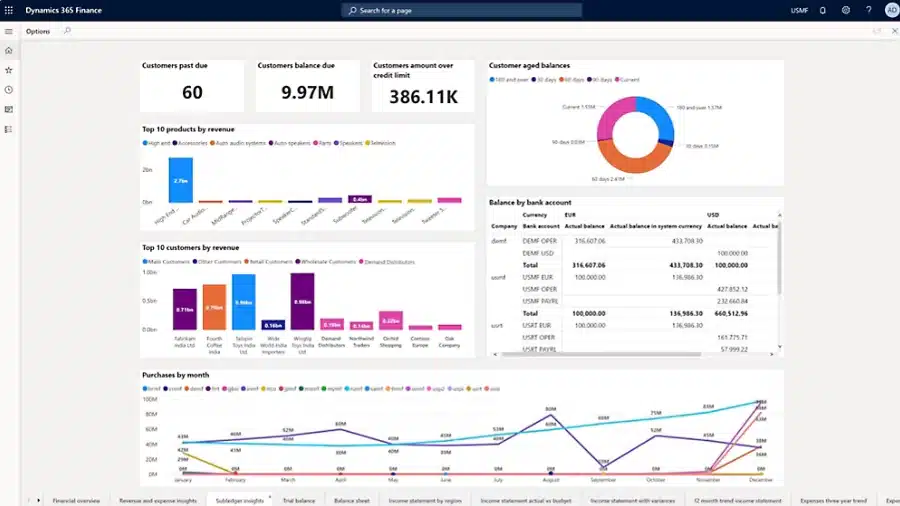
What does reporting mean in Dynamics 365 Finance & Operations?
Reporting refers to how business data is accessed, organized, and presented so users can make decisions. D365 F&O captures detailed transactional data, such as invoices, journal entries, and sales orders, and also produces summarized and analytical data, such as totals, KPIs, and trends. Reporting is the process that turns this raw data into usable information, whether it appears as a list on a screen, a dashboard, or a formal financial statement.
Because Dynamics 365 Finance and Operations reporting supports many different users and use cases, reports can take many forms. Some reports are designed for quick, daily work inside the application, while others are structured documents used for compliance, audits, or external sharing. The way a report is built and consumed depends on its purpose, audience, and level of precision required.
Key concepts to understand include:
- Transactional vs. analytical reporting: Transactional reports show detailed records, such as individual invoices or purchase orders. Analytical reports summarize data to show trends, totals, and performance, such as sales by region or budget versus actuals.
- Native reporting vs. external analytics: Dynamics 365 Finance and Operations includes built-in reporting tools for most operational and financial needs. It also supports external analytics tools, such as Power BI, when deeper analysis or cross-system reporting is required.
- Flexibility vs. layout precision: Some reports are flexible and interactive, allowing users to filter, explore, and drill into data. Others must follow strict formats, such as invoices or regulatory filings, where layout accuracy matters more than flexibility.
Overall, reporting in Dynamics 365 Finance and Operations is not one-size-fits-all. The platform provides multiple reporting approaches to support everything from daily operational tasks to formal financial and regulatory reporting.

Need help with reporting in D365 F&O?
Reporting in Dynamics 365 Finance and Operations can become complex as data volumes grow and requirements change. A focused review can help identify where standard reports are sufficient, where performance issues exist, and where the reporting approach can be simplified.
Reporting architecture in Dynamics 365 Finance & Operations
The architecture behind reporting in Dynamics 365 Finance and Operations determines how data is accessed, processed, and secured. The platform uses structured data models and services to support reporting at scale, while protecting system performance and enforcing business rules. Instead of ad-hoc access, reporting relies on defined pathways that expose data in consistent and secure ways.
Key components of the Dynamics 365 Finance and Operations reporting architecture include:
- Operational database (system of record): The Azure SQL operational database stores all transactional data and serves as the system of record. Real-time reports, such as on-screen lists and inquiries, retrieve data through the application layer, which applies security and business logic.
- Data entities and the Data Management Framework: Data entities organize underlying tables into business-friendly views, such as customers, vendors, or sales orders. These entities support reporting, integrations, and data movement, and they are used to populate analytical data stores like the Entity Store.
- Bring Your Own Database (BYOD) and data lake options: For advanced reporting and analytics, entity data can be exported to an external Azure SQL database or to Azure Data Lake. This allows organizations to run complex queries or large analytical workloads without affecting system performance.
- Azure-based reporting services: Reporting tools such as SQL Server Reporting Services (SSRS) and Power BI run on Azure services. This setup enables scalable report execution and separates reporting workloads from daily transaction processing.
- Security and role-based access: All reporting follows the same role-based security model used throughout Dynamics 365 Finance & Operations. Users only see data they are authorized to access, regardless of the reporting tool or data source.
Reporting tools in Dynamics 365 Finance & Operations
Dynamics 365 Finance and Operations reporting includes several reporting tools, each designed for a specific purpose. Rather than relying on one reporting method, the platform supports different reporting experiences based on how data is used. These include operational views inside the application, formatted business documents, analytical reporting, electronic reporting, financial statements, and integrations with tools like Excel and Power BI.
Operational views and reports
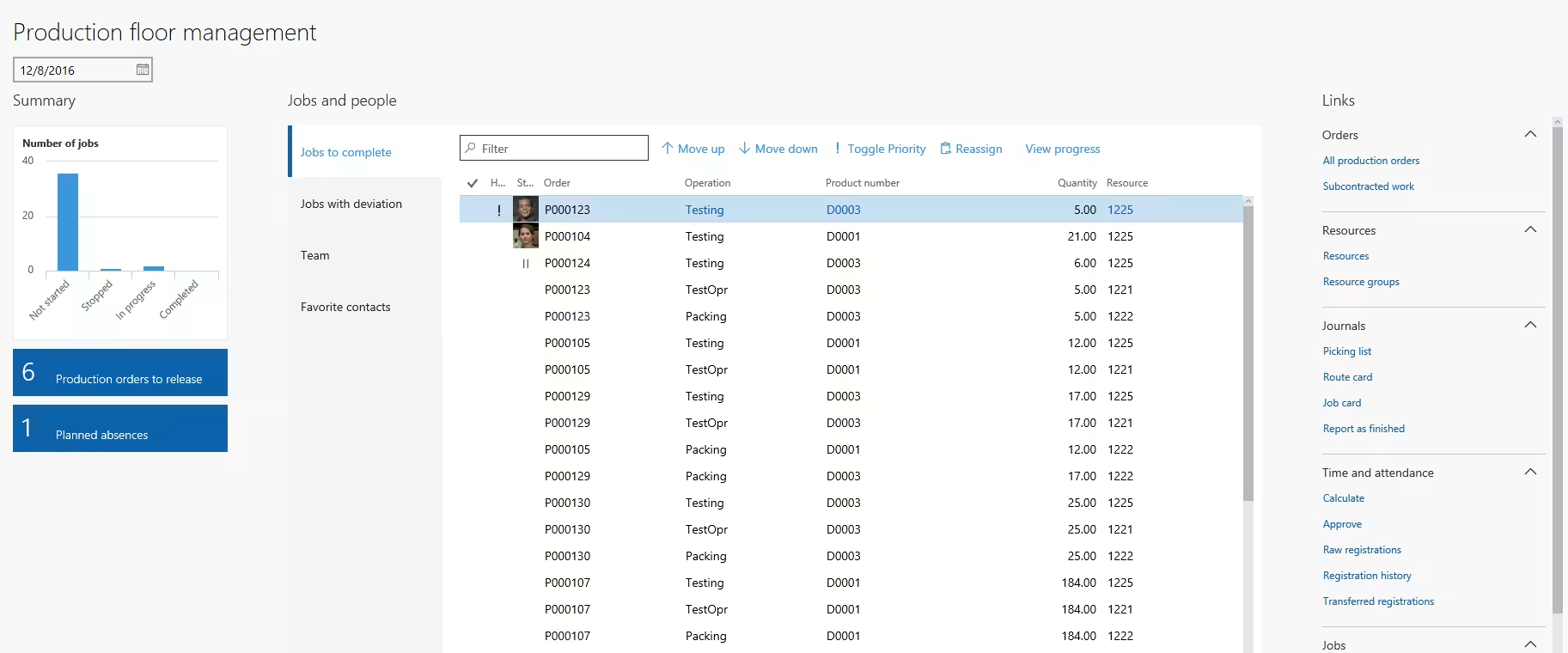
In Dynamics 365 Finance and Operations reporting, operational views are the in-app lists, inquiry pages, dashboards, and embedded charts that users rely on for daily work. These views are built directly into the application and are designed around specific roles and tasks. For example, an accounts payable user may track open vendor invoices, while a sales manager may review order status and trends from a workspace.
Key characteristics of operational views and reports include:
- Embedded in the application: Operational views appear as list pages, inquiries, and workspaces inside Dynamics 365 Finance and Operations. Users can filter, sort, and save personal views to match how they work.
- Real-time data:These views reflect current transactional data. As records are created or updated, lists, counts, and indicators update immediately within the application.
- Action-oriented design: Users can often take action directly from the view, such as approving transactions, updating records, or navigating to related details, without running a separate report.
- Integrated analytics and visuals: Many operational views include charts or KPIs alongside transactional lists. Power BI tiles can also be embedded to provide richer visual insight and drill-down capabilities.
Operational reports are primarily transactional and interactive. They support monitoring, follow-up, and decision-making as work happens.
Business documents
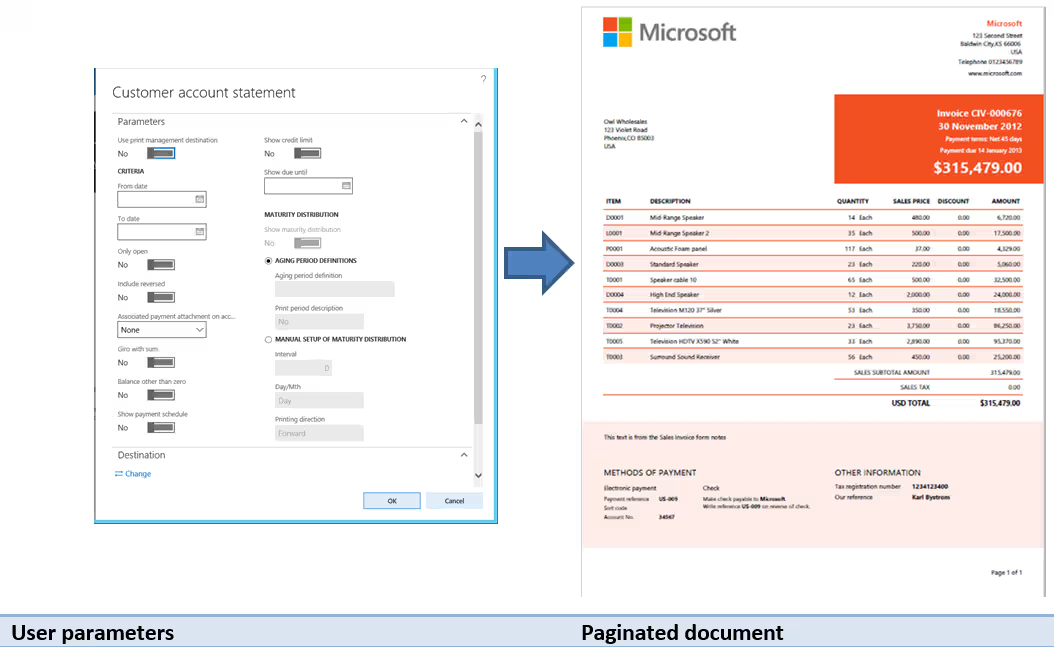
Business documents are formatted reports that capture the results of completed transactions. Common examples include sales invoices, purchase orders, packing slips, order confirmations, customer statements, and checks. These documents are typically generated as PDFs or printed outputs and are often shared outside the organization with customers, vendors, or auditors.
Key characteristics of business documents include:
- Fixed, paginated layouts: Business documents follow precise formats, such as headers, line-item tables, totals, and footers. Layout accuracy is important for branding, customer communication, and regulatory requirements.
- Parameter-driven generation: Documents are produced based on selected parameters, such as invoice numbers, date ranges, or posting status. Each document represents a snapshot of data at the time it is generated.
- Powered by SSRS: Most business documents in Dynamics 365 Finance and Operations are built using SQL Server Reporting Services (SSRS). Microsoft provides standard SSRS templates that can be customized or extended when needed.
- Batch processing and distribution: Business documents are often generated in bulk, such as nightly invoice runs or scheduled customer statements. They can be printed, emailed, or saved in formats like PDF, Word, or Excel, with support for automated routing to network printers.
Business documents support formal, external-facing reporting needs. They prioritize accuracy, consistency, and layout control, and are commonly produced as part of standard business processes, such as posting an invoice or confirming an order, within Dynamics 365 Finance & Operations.
Electronic reporting
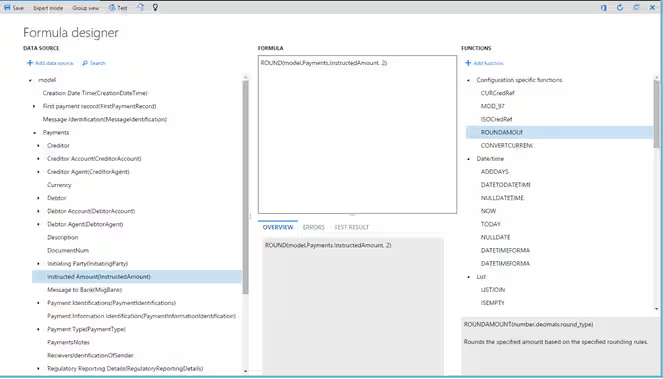
Electronic Reporting (ER) is used to generate and process electronic files rather than printed documents. Unlike business documents, which focus on PDFs or paper output, Electronic Reporting produces digital files that are transmitted to external systems. Common use cases include regulatory filings, tax submissions, and banking integrations.
Key characteristics of Electronic Reporting include:
- Configuration-driven, no-code design: Electronic Reporting uses a visual designer to map data to required formats. Power users can configure reports using formulas and mappings, without writing custom code.
- Support for multiple file formats: ER can generate and consume formats such as XML, JSON, CSV, fixed-width text, Excel, and PDF. This flexibility helps meet country-specific and industry-specific requirements.
- Built for regulatory change: Microsoft and partners provide prebuilt ER configurations for common regulatory and banking scenarios. These configurations can be updated or versioned as rules change, without redesigning reports from scratch.
- Supports both export and import scenarios: Electronic Reporting handles outbound files, such as tax declarations or payment files, as well as inbound files like bank statements. This makes it a core tool for automated data exchange.
Financial reporting
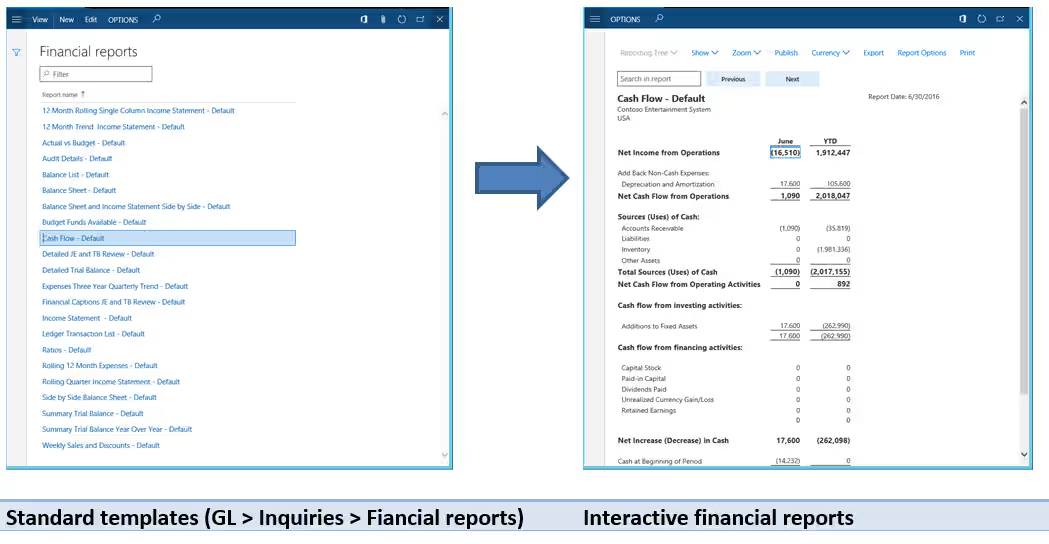
In Dynamics 365 Finance and Operations reporting, the financial reporting tool is used to create general ledger–based financial statements. This tool was previously known as Management Reporter or FRx and is built directly into the platform. It allows finance teams to produce standard and custom financial reports without relying on developers.
Key characteristics of financial reporting include:
- Designed for finance users: Financial reports are created using a dedicated report designer where users define rows, columns, and organizational hierarchies. This approach supports common statements such as profit and loss, balance sheet, and trial balance.
- Multi-entity and consolidated reporting: The tool supports reporting across multiple legal entities and business units. Users can view individual company results or consolidated totals using reporting trees.
- Near real-time general ledger data: Financial reports pull from a financial data mart that is refreshed from the general ledger. This keeps reports current while maintaining system performance.
- Interactive review and drill-down: Generated reports can be viewed directly in the application. Users can drill into balances to see underlying journal entries and adjust views, such as currency or level of detail.
- Flexible design without custom code: Reports are built from reusable components, including row definitions, column layouts, and calculations. This allows finance teams to update formats, add variances, or create new reports as requirements change.
- Export and distribution options: Financial reports can be run on demand or scheduled and shared through browser views, Excel exports, or PDF files.
The financial reporting tool is focused on financial management and statutory reporting. It is optimized for general ledger and budget data and is not intended for operational or subledger reporting, which are handled by other tools within Dynamics 365 Finance & Operations.
Excel and Office integrations
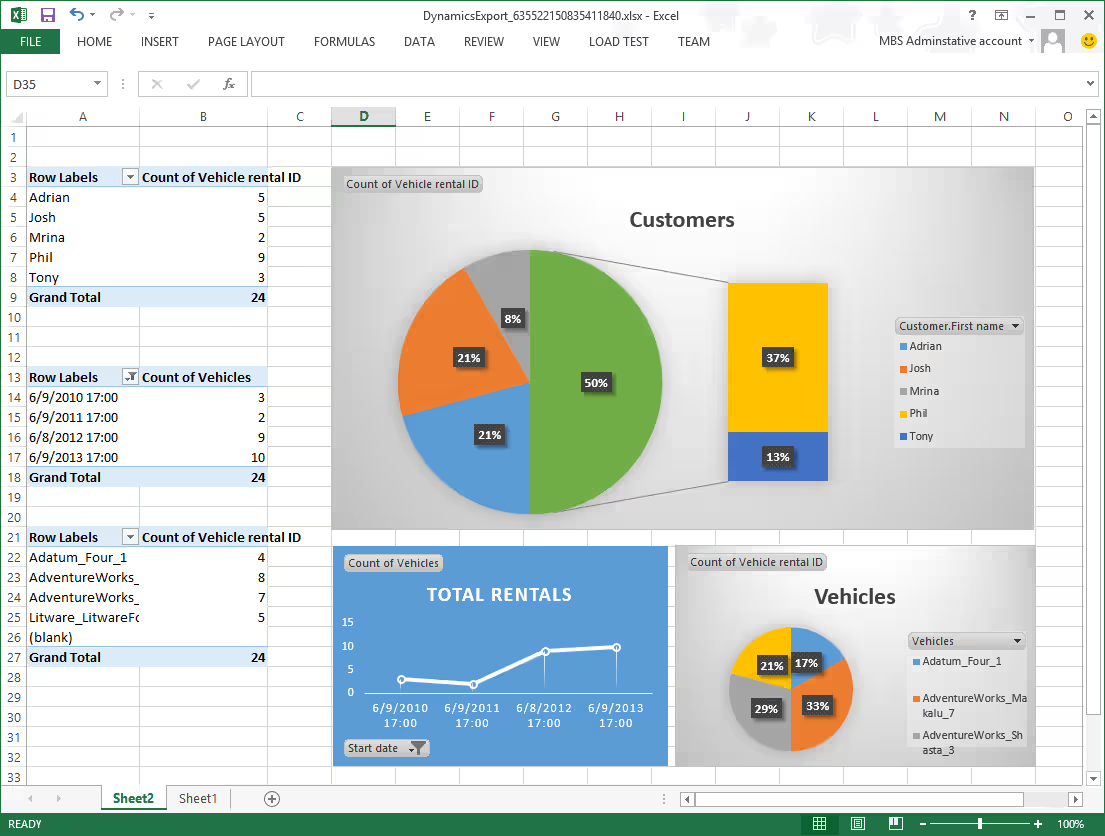
Excel plays a major role in Dynamics 365 Finance and Operations reporting, and the platform includes tight integration with Microsoft Office. Many pages in D365 F&O allow users to send data to Excel with minimal effort, making it a common tool for analysis, reporting, and even data updates.
Key Excel and Office integration options include:
- Export to Excel: Most list pages and grids can be exported to Excel. The exported file reflects the filters and sorting applied in the application, making it useful for quick analysis or sharing a snapshot of data.
- Open in Excel (live data connection): Some pages support a live Excel connection using an add-in. Data can be refreshed on demand and, in some cases, edited and published back to D365 F&O, turning Excel into both a reporting and data entry tool.
- Financial report exports: Financial statements created with the financial reporting tool can be exported to Excel. Finance teams often use this for further calculations, formatting, or inclusion in management presentations.
- Advanced analysis in Excel: Once data is in Excel, users can apply pivot tables, formulas, and charts to create custom reports. Power users frequently build Excel-based reports that combine ERP data with other sources.
- Broader Office integration: D365 F&O also supports integration with Word templates and Outlook for document generation and distribution, although Excel remains the primary tool for reporting.
Power BI
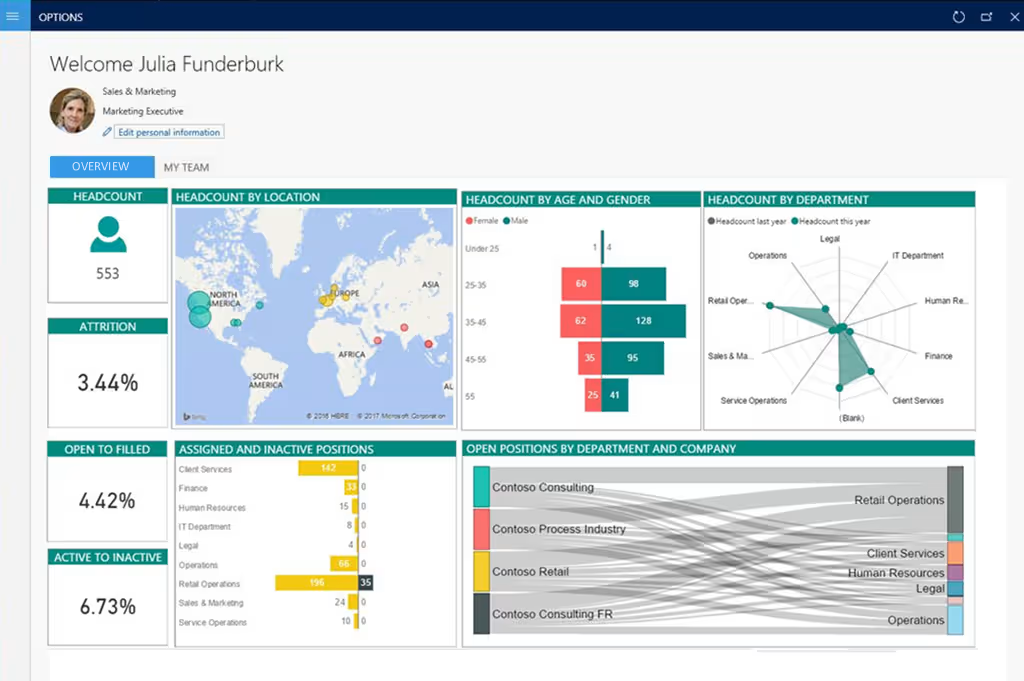
Power BI is Microsoft’s business intelligence platform and a key component of reporting in Dynamics 365 Finance and Operations for analytics and dashboards. Dynamics 365 F&O includes native Power BI integration, allowing organizations to analyze large data sets, visualize trends, and build interactive reports without overloading the transactional system.
Key aspects of Power BI integration include:
- Embedded Power BI reports: Microsoft provides prebuilt Power BI reports for many D365 F&O modules. These reports can be deployed from Lifecycle Services and appear directly in application workspaces, where users can interact with charts and visuals without needing a separate Power BI license.
- Entity Store and scheduled refresh: Embedded Power BI reports typically pull data from the Entity Store, an analytical database refreshed on a schedule. This provides near real-time insights while protecting the performance of the operational database.
- Custom Power BI reporting: Organizations can build custom Power BI reports using Power BI Desktop. Data can be sourced from OData feeds, the Entity Store, or external data warehouses and data lakes. These reports may be embedded back into D365 F&O or published externally through the Power BI service.
- Real-time vs. near-real-time reporting: Most analytical scenarios do not require real-time data. Power BI is best suited for trend analysis, KPIs, and aggregated reporting where scheduled refresh delivers reliable performance and scalability.
- Security and governance: Embedded Power BI respects Dynamics 365 F&O security roles. When reports are shared outside the application, organizations must manage permissions, data ownership, and calculation standards to ensure consistent reporting.
Power BI is ideal for analytical and executive reporting that goes beyond transactional detail. When used alongside native tools, it extends Dynamics 365 Finance and Operations reporting with powerful visualization and insight capabilities within Dynamics 365 Finance & Operations.
SQL Server Reporting Services (SSRS)
SQL Server Reporting Services (SSRS) is a core part of reporting in Dynamics 365 Finance and Operations, even if most users never see it directly. Many of the platform’s traditional, formatted reports are built on SSRS. When users run a trial balance, print an invoice, or generate an aging report, SSRS is often the engine producing the output behind the scenes.
Key characteristics of SSRS in Dynamics 365 Finance and Operations reporting include:
- Primary engine for formatted and paginated reports: SSRS is used for reports that require precise layout and multi-page output. This includes business documents, regulatory-style reports, and many detailed listings such as aging reports, inventory valuation, and transaction registers.
- Parameter-driven reporting: SSRS reports rely on user-selected parameters, such as date ranges, legal entities, or aging buckets. These parameters control what data is retrieved and how it is presented in the final report.
- Cloud-based development and deployment: In the D365 F&O cloud model, SSRS reports are developed or modified in Visual Studio within a development environment and deployed through Lifecycle Services (LCS). End users cannot edit SSRS reports directly, and changes require a controlled deployment process.
- Optimized for batch processing: SSRS reports can run interactively for smaller data sets, but they are often executed as batch jobs for large or complex outputs. This allows long-running reports to complete without impacting the user interface or system performance.
- Common usage scenarios: SSRS is commonly used for business documents, detailed operational listings needed for audits or reviews, and formatted compliance reports. While financial statements are now typically handled by the financial reporting tool, SSRS is still used for custom financial-style reports when a specific layout or logic is required.
- Extensible but best used selectively: Developers can extend standard SSRS reports or create new ones when requirements cannot be met by other tools. However, excessive SSRS customization can increase maintenance effort, so it is often best reserved for scenarios that truly require pixel-perfect formatting.
Other reporting options
In addition to the core tools, reporting in Dynamics 365 Finance and Operations can be extended through several supporting options. These are typically used for integration, advanced analytics, or specialized scenarios rather than day-to-day reporting.
- APIs and data services: Dynamics 365 F&O exposes data through OData and custom APIs. These services allow developers or integration platforms to extract data for custom applications, external dashboards, or enterprise data warehouses. While not traditional reports, APIs are a key part of the reporting ecosystem.
- Advanced analytics and AI-driven insights: The platform continues to expand its use of predictive analytics and AI. Features such as cash flow forecasting or demand prediction surface insights directly in the application, complementing standard reports with forward-looking data.
- Third-party reporting solutions: Some organizations use ISV tools to enhance document formatting, reporting design, or data visualization. These solutions can reduce development effort for specific use cases, although the native reporting tools in Dynamics 365 Finance & Operations are sufficient for most requirements.
Together, these options round out the reporting toolkit. They allow organizations to extend Dynamics 365 Finance and Operations reporting beyond standard reports while keeping core data secure, governed, and scalable.
Choosing the right reporting tool
Choosing the right approach to reporting in Dynamics 365 Finance and Operations depends on the purpose of the report, the audience, and how the data will be used. Each reporting tool is designed for a specific scenario.
Key factors to consider include:
- Who will use the report
- Daily users and operators benefit from embedded operational views and workspaces.
- Analysts and power users often prefer Excel or Power BI for self-service analysis.
- Finance and executive users rely on financial reporting for formal statements and Power BI for KPIs.
- Developer-built reports with strict formatting typically use SSRS.
- How often the report is needed
- Near real-time needs are best met with operational views or live SSRS reports.
- Daily or weekly reporting over larger data sets works well with Power BI.
- Month-end and quarter-end reporting is typically handled by financial reporting or scheduled Power BI and Excel outputs.
- Type and volume of data
- Detailed transactional data is suited for SSRS or Excel.
- Aggregated and analytical data is best handled by Power BI.
- Very large data volumes often require BYOD or data lake exports before reporting.
- Where the data comes from
- Single-source data from Dynamics 365 Finance and Operations can use any native tool.
- Multi-source or external data is best handled by Power BI or Excel Power Query.
- Strict external formats, such as banking or regulatory files, should use Electronic Reporting.
- How results are consumed and shared
- Interactive, on-screen analysis works best in workspaces or embedded Power BI.
- Printed or PDF documents require SSRS.
- Excel outputs support flexible analysis and collaboration.
- Scheduled or automated distribution can be handled by SSRS, financial reporting, or Power BI subscriptions.
There is no single best tool for every scenario. Effective Dynamics 365 Finance and Operations reporting starts with understanding the business question, then choosing the tool that balances usability, performance, and long-term maintenance.
The table below summarizes how the main reporting tools in Dynamics 365 Finance and Operations compare across common decision factors.
Types of reports in Dynamics 365 Finance & Operations
When thinking about reporting in Dynamics 365 Finance and Operations, it helps to organize reporting needs by business domain. At a high level, reporting falls into two primary domains: Dynamics 365 Finance reporting and Dynamics 365 Supply Chain Management reporting. Each domain serves different users, answers different questions, and relies on different types of reports.
Dynamics 365 Finance reporting
Dynamics 365 Finance reporting supports accounting, compliance, and financial management within Dynamics 365 Finance. These reports are primarily based on general ledger data and are used by finance teams, executives, auditors, and regulators.
Common Dynamics 365 Finance report types include:
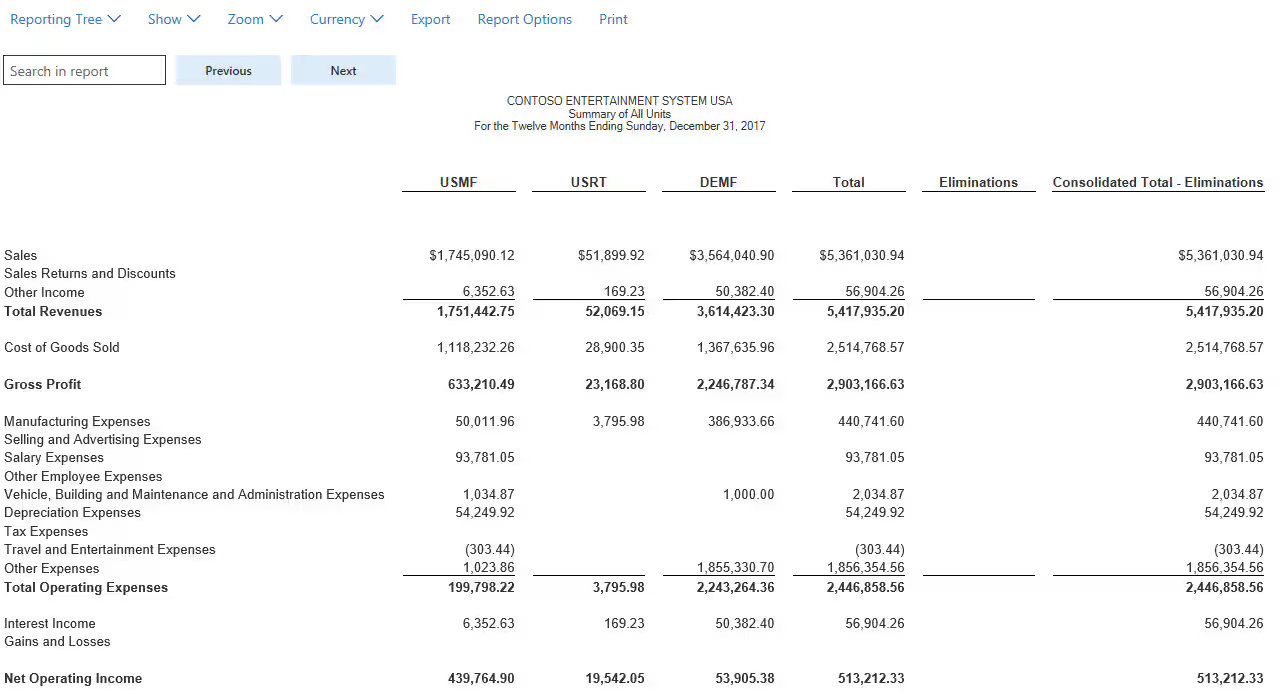
- Financial statements: Standard reports such as Profit and Loss (income statement), Balance Sheet, Cash Flow Statement, and Trial Balance. These reports follow accounting structures and support statutory and management reporting.
- Budget vs. actual reports: Reports that compare budgeted amounts to actual results. These are used to track performance, identify variances, and support forecasting and cost control.
- Consolidated and multi-entity reports: Enterprise organizations often operate multiple legal entities. Financial reporting supports consolidation across entities, currencies, and business units to provide an all-up financial view.
- Regulatory and compliance reports: Finance teams rely on reports for tax filings, audits, and regulatory requirements. Examples include tax reports, audit trails, detailed transaction listings, and statutory filings generated through financial reporting or electronic reporting tools.
- Financial analytics and management reporting: Beyond formal statements, finance teams use analytical reports such as working capital analysis, expense trends, margin analysis, and financial KPIs. These are often delivered through Excel or Power BI.
Dynamics 365 Finance reporting is typically structured, controlled, and repeatable. Accuracy, consistency, and compliance matter more than flexibility.
Dynamics 365 Supply Chain Management reporting
Dynamics 365 Supply Chain Management reporting focuses on day-to-day operational processes across inventory, procurement, manufacturing, warehousing, and fulfillment. These reports are used frequently by managers and frontline users to monitor activity, identify exceptions, and take action.
Common Dynamics 365 Supply Chain Management report types include:
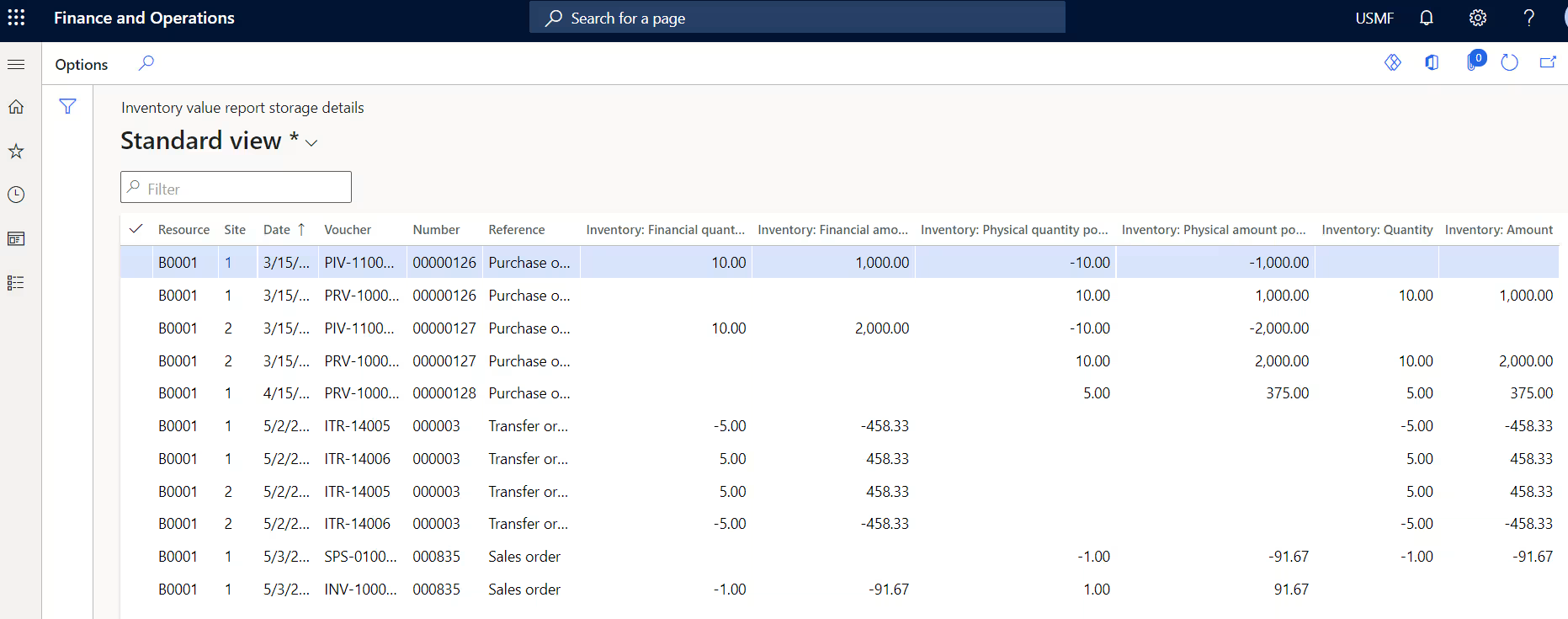
- Supply chain and inventory reports: Reports such as inventory on-hand, inventory valuation, inventory aging, and stock turnover help organizations manage inventory levels, costs, and availability.
- Procurement and vendor performance reports: Includes open purchase orders, vendor spend analysis, delivery performance, and aged payables. These reports help teams manage suppliers and cash flow.
- Manufacturing and production reports: Production order status, actual vs. estimated costs, scrap analysis, and throughput reports support production planning and performance management.
- Project and cost control reports: For project-based organizations, reports such as project actual vs. budget, work-in-progress (WIP), revenue recognition, and project billing are critical for financial and operational oversight.
- Sales, order fulfillment, and customer reports: Includes open sales orders, backorders, fulfillment performance, sales analysis by product or region, customer aging, and customer statements.
- Exception and variance reports: Operational reporting often focuses on exceptions. Examples include overdue orders, inventory shortages, production variances, late shipments, and quality issues. These reports help users focus on problems that require attention.
Dynamics 365 Supply Chain Management reporting tends to be more detailed and more frequently used than financial reporting. Many reports are delivered through operational views and workspaces, while others rely on SSRS or Power BI for larger data sets and trend analysis.
Standard reports vs custom reports
One of the strengths of reporting in Dynamics 365 Finance and Operations is the depth of standard, out-of-the-box reports included with the platform. Microsoft provides a wide range of ready-to-use reports across finance, supply chain, and operations. These include financial statements, transactional documents like invoices and purchase orders, and inquiry-style reports for day-to-day analysis. In many cases, these standard reports meet most business needs with little or no setup. They are tested, supported by Microsoft, and automatically maintained as part of the product, which reduces risk and speeds up deployment.
That said, most organizations eventually encounter reporting needs that standard reports do not fully address. This is where custom reporting becomes necessary. Common reasons include branding or layout requirements, missing data fields, unique calculations, or business-specific metrics. The key is to be selective. Custom reports should solve a clear business problem, not replace standard reports by default. Over-customization increases maintenance effort and upgrade risk, especially in enterprise environments where reporting requirements evolve over time.
Common options for custom reporting in Dynamics 365 Finance and Operations include:
- Modifying standard SSRS reports: Extend existing reports to add fields or adjust layouts while preserving Microsoft’s base logic.
- Creating new SSRS reports: Used when pixel-perfect formatting or complex, paginated output is required.
- Using Electronic Reporting (ER): A configuration-based approach for regulatory formats, structured exports, and repeatable Excel or XML outputs.
- Leveraging Power BI: Best for analytical reporting, trends, and dashboards that combine financial and operational data.
- Using Excel for ad-hoc reporting: Ideal for quick analysis, pivots, and what-if scenarios without formal report development.
- Working with an experienced D365 F&O partner: A partner can help assess whether a requirement truly needs customization, select the right reporting tool, and design solutions that minimize upgrade risk and long-term maintenance.
Common reporting challenges and best practices
Even with robust tools available, reporting in Dynamics 365 Finance and Operations can become difficult if it is not planned carefully. A common challenge is over-customization. Organizations often rebuild reports that already exist, which increases maintenance effort and creates upgrade risk. In many cases, standard reports meet most requirements with minor configuration or filtering.
Another frequent issue is performance and expectation misalignment. Reports may be slow when they query large transactional data sets in real time, or when data modeling is not designed for reporting. At the same time, users may expect a single report to be real-time, highly detailed, interactive, and printable. These competing expectations often lead to complex designs that do not perform well or meet user needs.
To avoid these issues, follow these best practices for Dynamics 365 Finance and Operations reporting:
- Choose the right tool for each scenario: Use operational views for daily activity, SSRS for formatted documents, financial reporting for statements, Power BI for analytics, and Excel for ad-hoc analysis.
- Design reports for the audience: Executives need summaries and exceptions, analysts need flexibility, and operational users need clear, actionable views.
- Balance accuracy, performance, and usability: Use aggregates, scheduled refreshes, and filters to keep reports fast and reliable without overloading the system.
- Avoid unnecessary customization: Start with standard reports and extend only when there is a clear business requirement.
- Work with an experienced Dynamics 365 F&O partner: A partner can help define reporting requirements, select the right tools, and design solutions that minimize upgrade risk and long-term maintenance.
- Establish governance and ownership: Assign responsibility for reports, control changes, apply consistent naming, and retire unused reports over time.
Following these practices helps ensure that Dynamics 365 Finance and Operations reporting remains scalable, maintainable, and useful as business needs evolve.
Case study: Real-life reporting improvements with Dynamics 365 Finance & Operations
Reporting challenges in Dynamics 365 Finance & Operations are not theoretical. Conquest Completion Services experienced them firsthand while operating on QuickBooks, spreadsheets, and paper-based processes. Financial reporting took up to three months to complete, invoicing lagged three to four weeks behind completed work, and teams spent significant time manually reconciling disconnected data. Limited visibility made timely course correction nearly impossible.
After implementing Dynamics 365 Finance & Operations with Rand Group, Conquest unified financial and operational data in a single ERP platform. Reporting shifted from a delayed, manual exercise to a near real-time management capability, giving leadership consistent visibility across finance, operations, and inventory.
Key reporting improvements included:
- Near real-time financial reporting using financial dimensions and automated statements, replacing month- or quarter-old reports
- Embedded Power BI dashboards providing operational and executive KPIs directly within D365 F&O workspaces
- Faster, more accurate invoicing and cash flow reporting, contributing to an 85% reduction in days sales outstanding
- Standardized SSRS and financial reports replacing spreadsheet-based and paper-driven reporting
- Improved operational visibility that helped reduce A/R and A/P staffing from 7 to 2.5 resources
As a result, reporting in Dynamics 365 Finance & Operations became a practical decision-support tool rather than a delayed, after-the-fact process.
To learn more, read the full Conquest Completion Services case study.

Get more value from reporting in D365 F&O
Effective reporting in D365 F&O requires more than individual reports—it requires the right architecture, governance, and long-term support. Rand Group helps organizations design, optimize, and support reporting solutions that scale with the business and remain upgrade-friendly.
Partnering with Rand Group for reporting success
Successfully implementing a comprehensive reporting strategy in Dynamics 365 Finance and Operations requires technical expertise, a strong understanding of business processes, and a clear plan. This is where partnering with experts like Rand Group makes a meaningful difference. Rand Group is a seasoned Dynamics 365 F&O partner with deep experience in financial and operational reporting across complex enterprise environments. By working with our team, organizations gain access to proven expertise that ensures reporting solutions are accurate, scalable, and aligned with real business needs.
- Reporting strategy and architecture guidance: We work with stakeholders to define a clear reporting roadmap. This includes selecting the right tools, designing data architecture, and planning for future growth so reporting supports decision-making, not just data access.
- Financial, operational, and Power BI reporting services: Our consultants support the full reporting stack, from configuring financial statements and consolidated reporting to building SSRS documents and Power BI dashboards for operational insight.
- Performance optimization and governance: We help resolve slow or unreliable reports by addressing query performance, data refresh processes, and modeling issues. We also establish governance practices to ensure consistency, accuracy, and a single source of truth for KPIs and metrics.
- Ongoing enhancements and D365 F&O support: Reporting requirements evolve as businesses grow and regulations change. Rand Group provides ongoing Dynamics 365 Finance & Operations support to maintain, enhance, and adapt reporting solutions while keeping pace with Microsoft updates and platform changes.
By partnering with Rand Group, organizations leverage deep Dynamics 365 reporting experience and best practices. The result is reporting that is technically sound, easier to maintain, and genuinely useful for the people who rely on it every day.
Frequently asked questions (FAQs)
- What reporting tools are available out of the box in Dynamics 365 Finance and Operations?
Dynamics 365 Finance & Operations includes SSRS for transactional and document reports, Financial Reporting for general ledger statements, Electronic Reporting (ER) for regulatory and electronic formats, embedded Power BI for dashboards, and Excel integration for ad-hoc analysis and exports. - Can Dynamics 365 Finance and Operations provide real-time reporting?
Yes, operational views and inquiry pages show real-time transactional data, while embedded Power BI reports are typically near real-time due to scheduled refreshes designed to protect system performance. - Do we need a developer to create or modify reports in Dynamics 365 Finance and Operations?
Not always. Finance users can modify financial statements, power users can adjust ER formats and build Power BI reports, but SSRS reports and complex data logic usually require a developer. - Are standard financial statements included, or do they need to be built from scratch?
Standard income statements, balance sheets, cash flow statements, and trial balances are included out of the box and can be used as-is or customized to match account structures. - How can Dynamics 365 Finance and Operations data be exported or integrated for reporting?
Data can be exported through Excel, BYOD (Bring Your Own Database), Azure Data Lake integration, OData APIs, or Power Platform tools, depending on data volume and refresh needs. - What is Electronic Reporting (ER) used for?
Electronic Reporting is used to create structured electronic files—such as tax submissions or bank files—without writing code, and is often maintained by trained power users rather than developers. - How do we ensure reports continue working after system updates?
Use standard reports where possible, build custom reports as extensions, test key reports in sandbox environments after updates, and maintain documentation for all custom reporting assets.
Next steps
Reporting in Dynamics 365 Finance and Operations is not about choosing a single tool. It is about building a reporting approach that matches how your organization operates, how decisions are made, and how information is consumed. When reporting is aligned to business roles, data volumes, and performance expectations, it becomes a practical asset rather than a technical burden.
Rand Group helps organizations design, optimize, and support reporting solutions that scale with the business and stay aligned with Microsoft’s platform roadmap. Contact us today to discuss your reporting goals and see how we can help you get more value from reporting in Dynamics 365 Finance and Operations.



Subscribe to our Insights