
 Dynamics 365
 Power Platform
 Dynamics
 Cloud & Productivity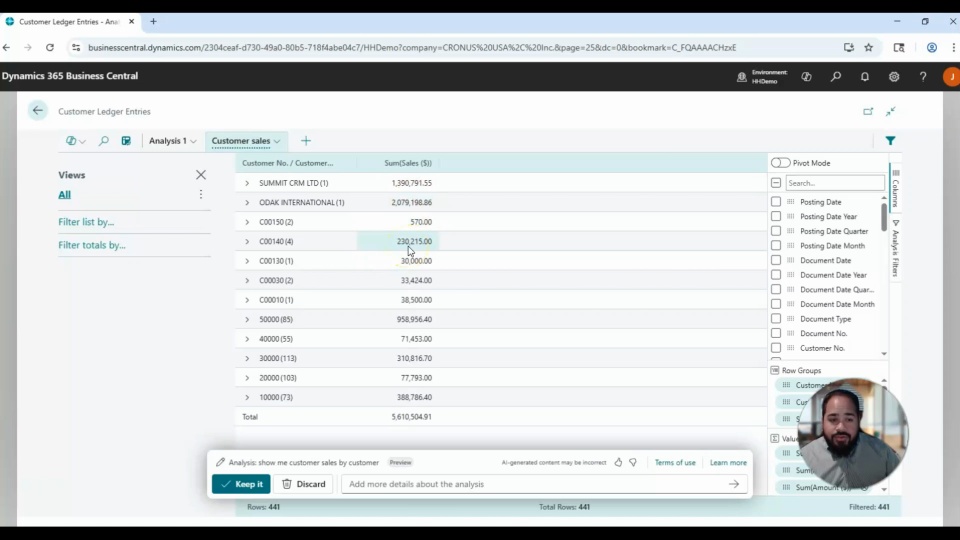
If your team relies on Business Central to manage financials, sales, or operations, the new Copilot-powered Analysis Mode can significantly improve how you interact with your data. Instead of building manual queries or exporting to Excel, you can now ask questions in plain language and get instant, structured insights right within the system.
In this video, you’ll learn how to use Copilot Analysis Mode in Business Central to simplify data analysis and uncover valuable insights faster. We’ll walk you through real-world examples that show how this AI-powered tool can help you make better decisions with less effort.
In this video you’ll learn:
Use natural language to generate sales and payment reports
Customize and save queries for future use
Filter and expand data views to explore transaction-level details
Related Videos

Create customer reminders using Outlook in Dynamics 365 Business Central
Learn how to streamline customer communication by creating and sending reminders directly from Outlook using the Business Central add-in. This video demonstrates how to access real-time customer insights, track overdue balances, and manage follow-ups without leaving your inbox. Improve efficiency and stay on top of receivables with a more connected workflow.
How to install and setup Outlook add-in for Dynamics 365 Business Central
Learn how to install and set up the Outlook add-in for Microsoft Dynamics 365 Business Central in this step-by-step overview from Rand Group. This video covers required Microsoft 365 admin permissions, centralized deployment, and how to enable Contact Insights and Document View. See how your team can access customer and vendor data and create documents directly from Outlook.
Top Copilot prompts for Dynamics 365 Business Central analysis views
Copilot is transforming how users analyze data in Dynamics 365 Business Central. In this video, we explore practical prompts for Analysis Views across customers, vendors, items, sales, and general ledger data, along with real-world limitations and optimization tips. Learn how to generate faster insights without relying on Excel.