Dynamics 365
 Power Platform
 Dynamics
 Cloud & Productivity
Build dynamic reports with Excel and Word templates in Dynamics 365

Microsoft Dynamics 365 delivers powerful reporting and data analysis capabilities, but building custom reports using SQL or XML can be complex and may require specialized technical skills or the help of a consultant. Fortunately, Dynamics 365 offers out-of-the-box Excel and Word templates that enable users to create dynamic, professional reports—no coding required.
With Excel and Word templates, you can empower your team to generate the reports and documents they need using familiar Microsoft Office tools. This approach allows you to tailor report formatting and content to your specific business requirements while ensuring consistency and accuracy across your organization.
How Excel and Word templates work in Dynamics 365
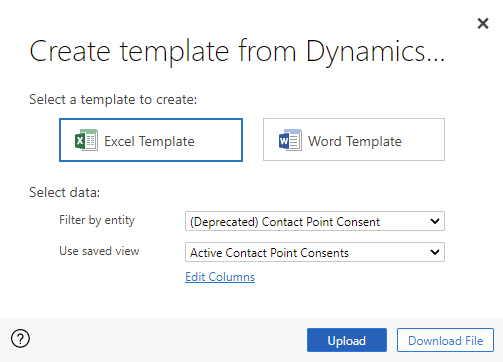
Excel and Word templates in Dynamics 365 allow you to create, share, and manage templates so your documents always maintain a consistent look and contain the right details. When configuring a template, you can select fields directly from your starting entity (such as Opportunity, Account, or Case) and use those fields as dynamic values within your Excel or Word document.
Even more powerful, you are not limited to just the fields in your starting entity—you can also select fields from related entities that have either a 1:N or N:N relationship with your starting entity. This flexibility enables you to include critical data from across your Dynamics 365 environment, ensuring your reports are comprehensive and relevant.
Benefits of using Excel and Word templates in Dynamics 365
- Generate summary reports with a single click
- Benefit from flexible formatting options
- Save time and reduce costs by leveraging templates
- Simplify configuration—no advanced technical skills required
- Utilize Excel’s powerful functions for deeper data analysis
- Easily update and upload revised templates as your needs change
- Promote consistency and standardization across your team
Real-world use cases for Excel and Word templates in Dynamics 365
Excel and Word templates in Dynamics 365 are especially valuable when teams need consistent, repeatable documents without relying on custom development or manual exports. Common use cases include:
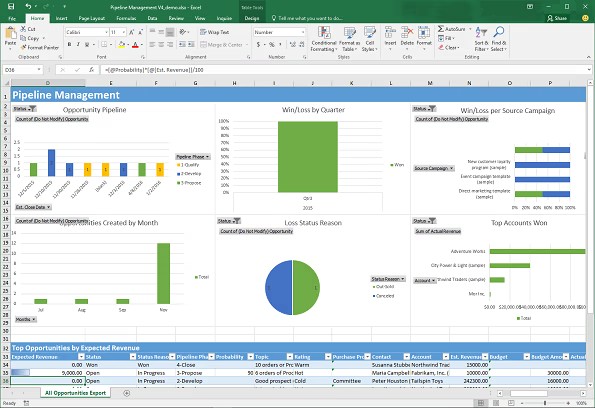
- Sales teams: Sales managers and reps can use Excel templates to generate real-time pipeline reports, forecast summaries, and opportunity reviews directly from Dynamics 365. Word templates can be used to create branded sales proposals or quotes that automatically pull in account details, product information, and pricing—ensuring accuracy while reducing preparation time.
- Finance and operations: Finance teams often rely on Excel templates to produce revenue summaries, invoice listings, or operational performance reports using live Dynamics 365 data. Because templates support Excel formulas and formatting, users can apply calculations, pivot tables, and conditional formatting without maintaining separate spreadsheets.
- Customer service and support: Support teams can use Word templates to create standardized case summaries, service reports, or customer communications that pull data from cases, accounts, and related activities. This ensures consistent documentation while eliminating manual copy-and-paste between systems.
- Project and delivery teams: Project managers can generate Excel-based status reports or resource summaries using data from projects, tasks, and related records. Templates make it easy to deliver up-to-date reports to stakeholders while preserving a consistent structure and layout.
- Executive and leadership reporting: Executives can use templates to quickly generate high-level summaries—such as performance dashboards, KPI snapshots, or customer overviews—without waiting on IT or data teams. With a single click, leadership receives standardized, professional reports built on current Dynamics 365 data.
Enabling continuous improvement in your reporting
With Excel and Word templates, you can prepare visually appealing, data-rich reports and documents that dynamically pull information from your Dynamics 365 system. If your reporting requirements evolve, simply modify your template and upload the updated version to Dynamics 365. This ensures your team always has access to the most current templates and can respond quickly to changing business needs.
Excel templates also unlock the ability to use advanced Excel features and formulas, letting you analyze your Dynamics 365 data with tools you already know and trust. Whether you need to create sales proposals, contract documents, performance summaries, or operational dashboards, templates provide a flexible and user-friendly solution.
Next steps
If you want to maximize the value of your Dynamics 365 investment, Rand Group is here to help. Our team of certified Microsoft experts can guide you through building and optimizing Excel and Word templates, training your users, and streamlining your reporting processes. We help businesses across North America unlock the full power of Dynamics 365 with tailored solutions and ongoing support.
Ready to get started? Contact Rand Group today to discuss your requirements, or explore our insights section for more tips and best practices on making the most of Dynamics 365. If you’re looking to enhance your reporting capabilities further, check out our data warehouse and analytics solutions.