Dynamics 365
 Power Platform
 Dynamics
 Cloud & Productivity
Key features and updates in Dynamics 365 Business Central 2026 release wave 1

The 2026 release wave 1 for Microsoft Dynamics 365 Business Central brings new updates to help businesses work faster and smarter. These features will roll out between April 2026 and September 2026. This release focuses on improving everyday tasks across finance, reporting, supply chain, and manufacturing. This blog doesn’t cover every change in the release. Instead, it highlights the updates we think will have the most impact for Business Central users.
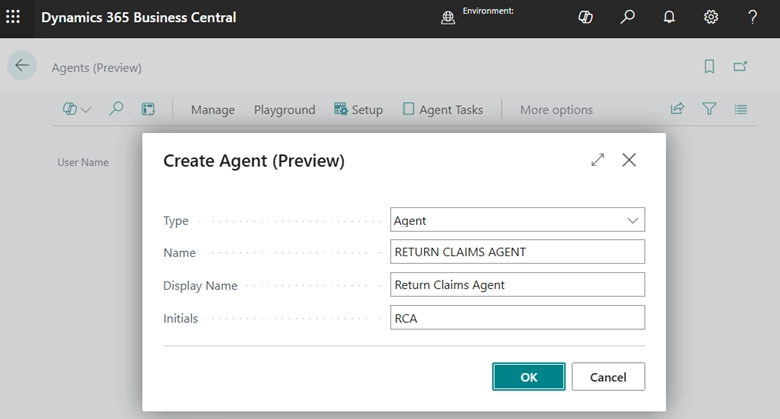
Custom AI agent designer
AI agents can now be built and tested directly within Business Central. The new Agent Designer makes it easier to prototype and refine automation without relying on lengthy development cycles.
Teams can define how an agent behaves, what data it uses, and how it interacts with processes. This opens the door to more tailored automation that aligns with how your organization actually works.
For example, an agent could monitor overdue invoices and trigger follow-ups, or flag exceptions in purchasing or inventory workflows. Instead of relying on static rules, these agents can adapt based on data and context within Business Central.
While the interface makes it easier to get started, building agents that perform reliably in production still requires careful setup. Data access, business rules, and exception handling all play a role in how effective an agent will be in real-world scenarios.
What you can do:
- Build AI agents tailored to your specific workflows
- Define data sources, behavior, and user interactions
- Prototype and test agents before going live
- Extend automation beyond standard system processes
Centralized agent task management
Microsoft is introducing a dedicated task pane for managing AI agent activity. Users can now see everything their agents are working on — all in one place.
There’s no more hunting across modules to track what agents have done or still need to do. Users get a single, consolidated view of pending and completed tasks. This keeps teams in control, supports better handoffs, and ensures nothing gets missed.

Experience the latest Business Central updates in action
Discover how the 2026 release wave 1 features can streamline your operations and improve visibility across your business. Schedule a personalized walkthrough with our team.
Employee expense reports
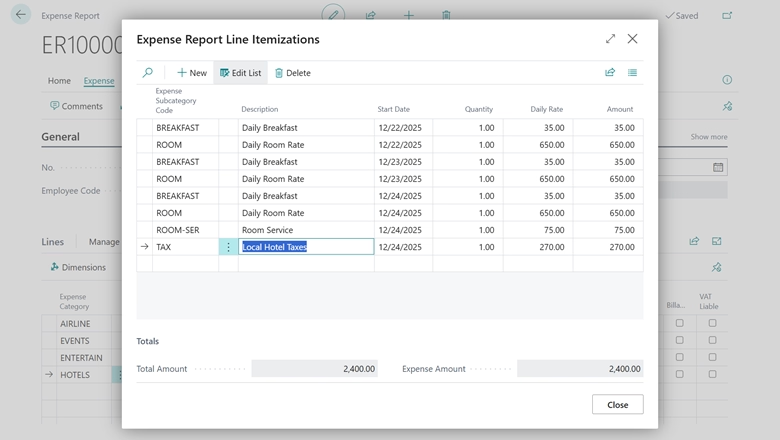
Business Central is getting a long-awaited improvement to expense management. Employees can now group multiple expenses into a single report and submit it for review.
Finance and management teams can approve or reject submissions directly in Business Central. They can also track reimbursement status without leaving the system. This reduces manual tracking and standardizes the reimbursement process across the organization.
What you can do:
- Create and submit grouped expense reports
- Review, approve, or reject submissions in Business Central
- Improve visibility into spending and reimbursement status
- Standardize processes across the organization
Advanced purchase invoice matching
Accounts payable teams are getting significantly more flexibility with invoice matching. A new Get Order Lines action replaces the previous one-to-one receipt matching approach.
A single invoice line can now be matched to multiple purchase order lines and posted receipt lines. This works even when receipts haven’t been posted yet. It’s a major improvement for organizations dealing with partial deliveries or consolidated invoices.
Key capabilities:
- Many-to-many matching — link one invoice line to multiple PO and receipt lines
- Matched order lines page — review and adjust quantities, and flag price discrepancies before posting
- Receipts-optional matching — match directly to open PO lines and handle receipts later
- Auto-receipt on invoice — a toggle on purchase orders can automatically generate a receipt when the invoice is posted
- Matched invoice lines field on POs — gives buyers real-time visibility into invoicing status per order line
Note: This feature does not support orders with prepayments, item charges, projects, subcontracting, blanket orders, or intercompany transactions.
Approval workflows for item journals and requisition worksheets
Business Central’s approval workflows are expanding. They now cover item journals and planning and requisition worksheets — two areas that previously had no approval controls.
Once a batch is submitted for approval, it is locked. Nothing can be edited, deleted, or posted until the approval is completed or canceled. This closes a meaningful gap in internal controls for organizations that need sign-off before inventory or purchasing plans move forward.
Journals now supporting approvals:
- Item Journal
- Physical Inventory Journal
- Output Journal
- Consumption Journal
Requisition and planning worksheets are also included. Batches are fully locked during the approval period. This prevents unreviewed planning data from flowing into purchase orders. Microsoft Power Automate integration is supported for organizations that want to extend approvals into broader automated processes.
Quality Management extension
A new Quality Management extension lets organizations embed formal quality checks into purchasing, production, and assembly workflows. It’s especially useful for businesses in regulated industries or those with strict product quality requirements.
Quality checks can be triggered at:
- Purchase receipts (with or without warehouse handling)
- Production output (manually or via flushing)
- Assembly output (manually or for assembly-to-order scenarios)
- Manual or scheduled intervals
Configuration options include:
- Scope by item, item group, lot, serial number, or package number
- Physical attribute testing against defined specifications
- Sample quantities set aside for third-party lab analysis
- Quarantine procedures to hold items while quality decisions are pending
- Quality test plans that define triggers and parameters per scope
The extension also includes quality certificates, certificates of analysis, a quality status overview, and a quality orders overview to support compliance and reporting needs.
Item variant images
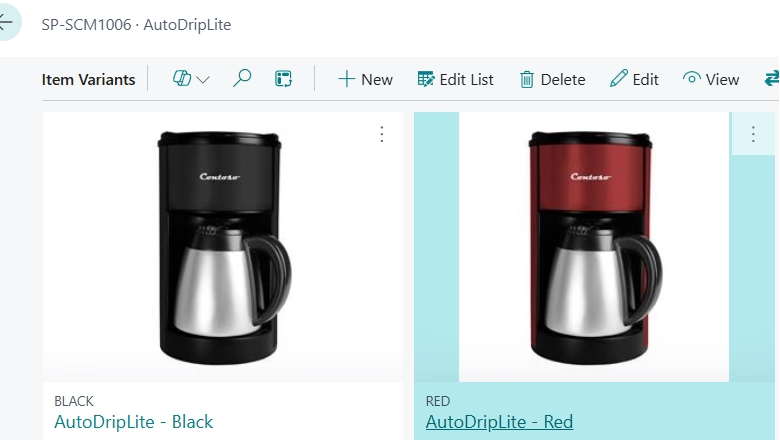
Users can now assign unique images to individual item variants in Business Central. If your products come in multiple colors, sizes, or configurations, each variant can have its own photo. This reduces confusion during sales, purchasing, and warehouse operations. Users have a visual reference when selecting items. It’s especially helpful for businesses managing large product catalogs with many similar-looking options.
Drop shipment process improvements
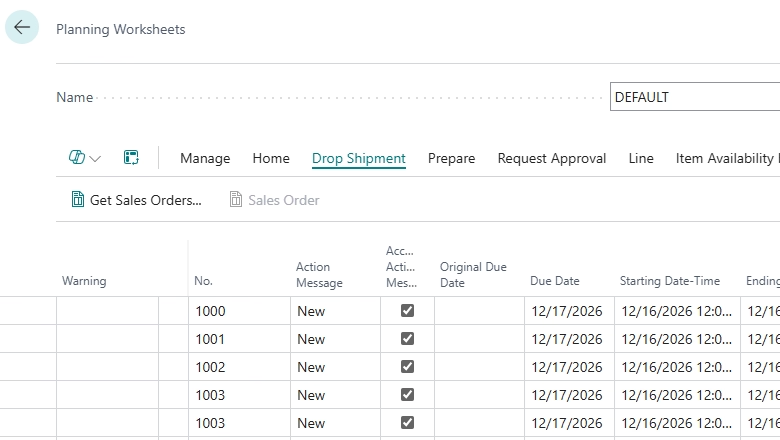
Microsoft is delivering three targeted improvements to the drop shipment workflow. Together, they give finance and operations teams more control and flexibility.
- Post purchase invoices independently from sales invoices — Business Central now allows users to post purchase invoices for drop shipments without needing to post the related sales invoice at the same time. This gives finance teams more flexibility in how they manage invoicing and timing, especially when purchase and sales processes do not align perfectly.
- Reverse drop shipments more easily — Users can now reverse drop shipment transactions even when both the sales and purchase documents have not been invoiced. This makes it easier to correct mistakes and adjust transactions without needing to follow complex workarounds.
- Create purchase orders directly from drop shipments — The updated process also improves how purchase orders are created for drop shipment scenarios. Users can generate purchase orders more efficiently, helping ensure that sales orders are fulfilled quickly and accurately while reducing manual steps
Shopify connector updates
The Shopify Connector is being updated to align with Shopify’s latest API version. This ensures a stable, supported integration going forward. The changes cover inventory management, product sync, returns, and financial data.
Notable API updates:
- Inventory now uses Shopify’s inventorySetQuantities mutation, with automatic retry logic and failure logging
- Product variant batching automatically handles Shopify’s 50,000 inventory quantity limit
- Bulk operations have been updated to use Shopify’s new GetBulkRequest pattern
- Return reason names and handles are now both stored on return lines
- Payout records now include an external trace ID to support reconciliation
- The legacy Tax Code field on product variants is being retired — users should migrate to supported alternatives
User experience improvements:
- View raw Shopify JSON for fulfillment orders to help diagnose import issues
- Product HTML descriptions from Shopify are now imported into the Marketing Text field when syncing new items
- Unit of Measure Code is now auto-filled when manually mapping Shopify order lines
- Retail location ID and name are now stored on order headers
- Unit Cost is now included in all price sync operations alongside Price and Compare at Price
Enhanced Subscription Billing Power BI app
The Subscription Billing Power BI app is receiving a comprehensive refresh. It now aligns with the broader Business Central Power BI app suite in both style and functionality. All reports share a consistent look, with KPI card pages, map visuals, conditional formatting, and drill-back navigation to source transactions.
Updated reports include:
- Subscription Billing Overview — redesigned layout with Top 5 Customer and Vendor stacked bar charts and new KPI card pages
- Revenue Year-over-Year — new Monthly Recurring Revenue by Package visual, tooltips on revenue by month, and conditional formatting
- Revenue Analysis — Item Category and Salesperson navigation added to the decomposition tree
- Revenue Development — time intelligence visual now focuses on total change, with fiscal calendar hierarchy support added for flexible date analysis
- Churn Analysis — Churn by Fiscal Period and Customer added to the decomposition tree
- Revenue by Item — new Profitability by Item Category scatter chart, Monthly Recurring Revenue by Item updated to a tree map, and conditional formatting on Monthly Profit %
- Revenue by Customer — new Customer Location Map visual surfaces geographic profitability, with conditional formatting on Monthly Net Profit %
- Revenue by Salesperson — new profitability visual with standardized legend formatting and conditional formatting on Net Profit %
- Total Contract Value Year-over-Year Growth — Total Contract Value by Calendar Year updated for consistency, with Total Contract Change added to tooltips
- Total Contract Value Analysis — Contract Value by Package and Salesperson added to the decomposition tree
- Customer Deferrals — new pie chart showing Customer Deferrals by Released Status
- Vendor Deferrals — matching pie chart added for Vendor Deferrals by Released Status
- Revenue Forecast — conditional formatting added to highlight forecast trends and outliers
- Billing Forecast — new Billing Forecast by Vendor table added for clearer vendor vs. customer analysis, with conditional formatting to surface trends and outliers
Frequently asked questions (FAQs)
When will Business Central 2026 release wave 1 be available?
The updates will be released in phases between April 2026 and September 2026, with some features available earlier through preview.
Do I need technical expertise to build AI agents in Business Central?
The Agent Designer is designed to be accessible, allowing teams to build and test AI agents directly within Business Central. However, creating agents that perform reliably in real-world scenarios requires more than just setup. Data access, business rules, and exception handling all play a role in how effective an agent will be. Working with an experienced partner can help ensure agents are designed to deliver accurate, consistent results.
Will the new invoice matching feature work with all purchase order types?
Not all. The feature does not support orders with prepayments, item charges, projects, subcontracting, blanket orders, or intercompany transactions.
Does the Shopify Connector updates require any action on my end?
Yes. The Shopify Connector released in the 2025 Release Wave 2 (October 2025) relies on API 2025-07, which is supported until June 30, 2026. To avoid any disruption to your integration, you will need to upgrade to the latest version of Business Central before that date. Additionally, the legacy Tax Code field on product variants is being retired, so users relying on that field should migrate to a supported alternative before the change takes effect.
Do I need to upgrade Business Central to access these new features?
Yes. Microsoft automatically updates Business Central online during each release wave. Updates can be scheduled and tested ahead of time, but staying current is required. It’s the only way to access new features and maintain supported integrations. Planning and testing your updates is key to a smooth transition and avoiding disruptions.
Next steps
The 2026 release wave 1 for Microsoft Dynamics 365 Business Central introduces meaningful updates across AI, finance, supply chain, and integrations. The features covered here highlight some of the most impactful changes, but they are just part of a broader set of updates being rolled out over the release cycle.
As these capabilities become available, it’s worth taking a closer look at how they align with your current processes and where they can deliver the most value.
Whether you’re exploring new automation opportunities, strengthening controls, or enhancing reporting, a thoughtful approach to adoption can make a significant difference. If you’re evaluating how these updates fit into your environment or planning next steps, contact Rand Group to connect with a Business Central expert and discuss the best path forward.