Dynamics 365
 Power Platform
 Dynamics
 Cloud & Productivity
Exploring Copilot in Dynamics 365 Finance & Operations

Microsoft has embedded powerful AI capabilities with Copilot into Dynamics 365 Finance & Operations applications. From summarizing key records to guiding decision-making in real time, Copilot helps users stay productive by reducing manual steps and delivering relevant insights directly in the workflow. This blog explores Copilot’s powerful AI-driven capabilities in Dynamics 365 F&O with features designed to simplify tasks, improve responsiveness, and drive value through intelligent assistance.
What is Dynamics 365 Copilot?
Dynamics 365 Copilot brings AI-driven assistance to D365 Finance and Operations applications: D365 Finance and D365 Supply Chain Management. Designed to reduce manual effort and improve decision-making, Copilot helps users interact with data more naturally, complete tasks faster, and focus on high-value work. Whether reviewing collections, managing purchase orders, or planning warehouse workloads, Copilot provides timely insights and automation directly within the application interface.
In D365 Finance, Copilot supports teams with account summaries, workflow analysis, and communication tools that streamline collections and approvals. In D365 Supply Chain Management, it helps planners, buyers, and warehouse staff respond to real-time data, analyze changes, and improve daily operations. From natural-language summaries to automated emails, Copilot enhances how users work, without requiring them to leave the system.

Unleash the power of AI
Ready to see how Copilot can transform the way your team works in Dynamics 365 Finance and Supply Chain Management? Discover practical ways to automate routine tasks, improve decision-making, and streamline daily operations with AI built into your ERP.
Copilot capabilities in all D365 F&O applications
Immersive Home
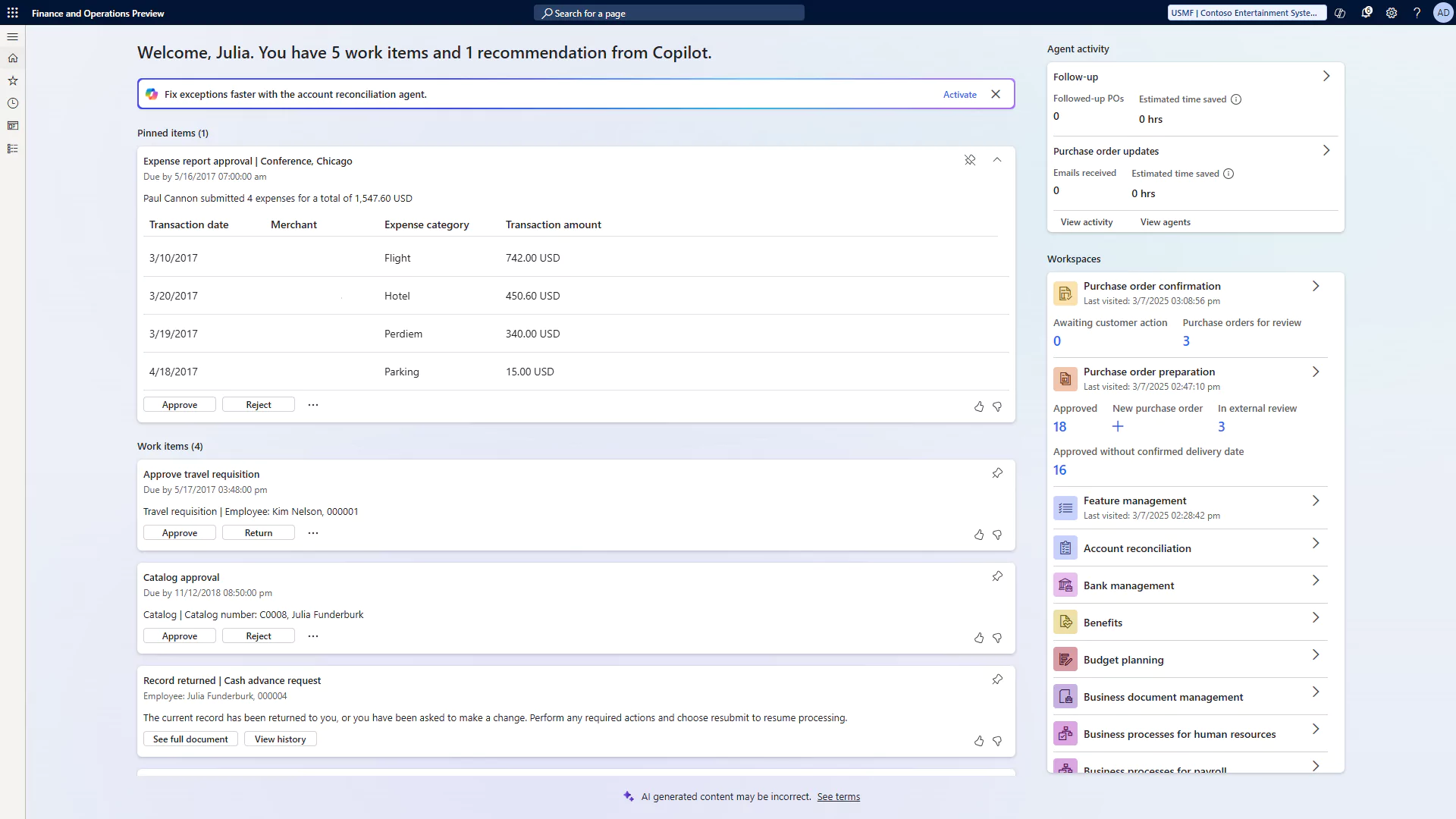
The Immersive Home is a redesigned, AI-driven start page now available across Dynamics 365 Finance and Operations. Built to reduce clicks and bring high-priority tasks to the forefront, it replaces the static dashboard with a dynamic, contextual workspace. Users are greeted by name and presented with a real-time summary of critical activities, agent suggestions, and relevant workspaces, streamlining decision-making and helping users stay focused on what matters most.
This homepage acts as both a productivity hub and an AI interaction center. Instead of navigating across modules to complete basic actions or track agent activity, users can review, manage, and complete tasks directly from the Immersive Home. It’s especially useful in environments where task volume is high and AI agents are active, offering clear visibility into automation activity and suggested next steps.
Key features include:
- Greeting and work summary: A personalized welcome with a concise overview of pending tasks and system suggestions.
- Suggestions area: Prompts tied to AI agent capabilities, such as activating a new skill or reviewing an automated action.
- Work items section: Priority-ranked activity cards that represent task steps, approvals, or agent-generated actions. Cards allow in-place completion or link to deeper task views.
- Pinned items list: Lets users track tasks they want to keep visible over time.
- Agent activity section: Shows performance metrics for each enabled agent, with links to detailed views and agent configuration areas.
- Workspaces area: Displays frequently used and favorite workspaces, ranked by usage and easily customized through pinned tiles.
By consolidating AI, task management, and workspace access in one place, the Immersive Home supports faster workflows and a more responsive user experience, without requiring users to leave the landing page.
Chat with finance and operations data
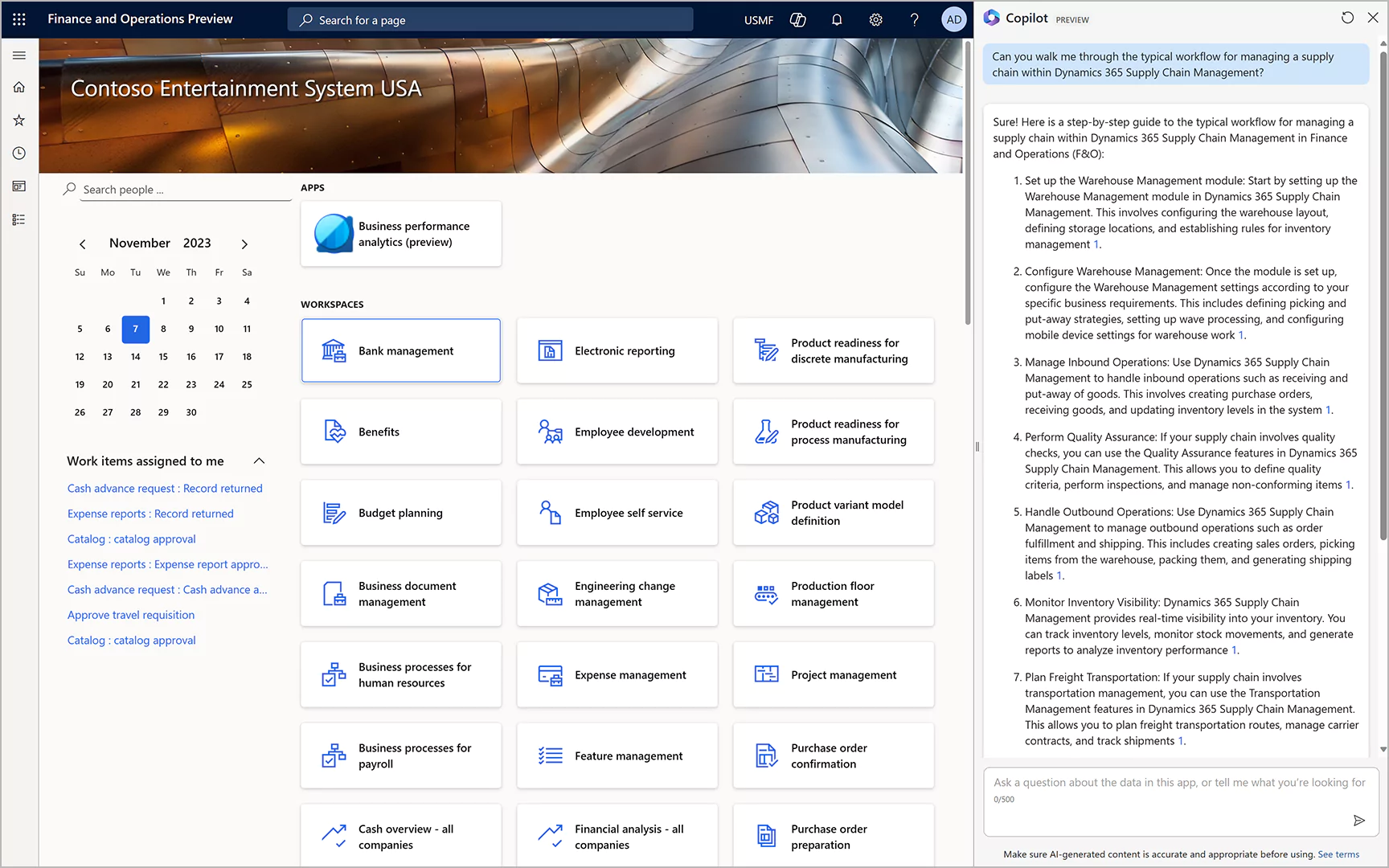
With Copilot, users can interact directly with their D365 Finance and Operations data through natural language chat. This feature brings AI-driven assistance into the core of Dynamics 365 by connecting structured ERP data to conversational agents. Users can ask questions about financial records, operational metrics, or transactions and receive responses based on the data they have permission to access, without needing to run reports or navigate to specific forms.
To support this functionality, data from D365 Finance and Operations applications can be made available to agents in several ways:
- Add finance and operations virtual entities as knowledge sources to Copilot agents
- Sync structured ERP data to Dataverse using Dual-write for use in agent responses
- Connect Dataverse tables as knowledge sources to agents in Copilot Studio
- Extend chat capabilities across D365 F&O apps, Microsoft 365 Copilot, and custom agents
Additional Copilot capabilities in D365 F&O apps
Copilot includes several built-in features that enhance user support, decision-making, and feedback collection within Dynamics 365 Finance and Supply Chain Management. These capabilities help users work more efficiently and contribute to ongoing system improvement.
Key capabilities include:
- Generative help and guidance with Copilot: A conversational sidecar enables users to ask questions directly in the app. Copilot responds using public documentation and application context to provide relevant guidance, with follow-up questions that help users quickly find answers or complete tasks.
- Workflow history summary: When reviewing document approvals, Copilot generates a concise summary of workflow actions, including submitters, dates, decisions, and comments. This helps users understand status at a glance and make faster, more informed decisions.
- Enhanced user feedback for Copilot and related experiences: Users can rate Copilot responses with a thumbs-up or thumbs-down and optionally provide detailed written feedback. Additional context, such as conversation history, can be included to help Microsoft improve response quality and system performance.
Copilot capabilities in Dynamics 365 Finance
Collections coordinator summary
The Collections coordinator summary is an AI-powered feature within the Collections workspace in Dynamics 365 Finance. It provides a concise overview of a customer’s overdue invoices, payment history, and remaining credit, helping collections agents quickly assess account status and take appropriate action. In addition, it can generate draft reminder emails to accelerate outreach efforts.
Key capabilities include:
- Customer summary by Copilot: AI generates a summary of key financial data, including past payments, outstanding balances, and recent invoice activity.
- Draft reminder emails: Copilot prepares a draft reminder letter based on the customer’s collections history, which users can review and send from their email client.
- Collections workspace insights: Coordinators see a ranked list of accounts with the highest balances or most overdue amounts, along with assigned activities, all from a single view.
Customer page summary
The Customer page summary feature in Dynamics 365 Finance provides an AI-generated overview of a customer’s account directly within the All customers workspace. Instead of manually reviewing invoices, payments, or sales activity, users see a concise summary of key account details on the Summary FastTab, saving time and supporting faster decision-making.
Copilot uses transactional data from the customer’s D365 Finance environment to generate the summary. This includes recent sales activity, payment behavior, and open balances, offering a snapshot of the customer’s current status.
Key data points used for the summary include:
- Customer invoices and payments
- Sales orders and sales agreements
- Rebates and outstanding invoices
- Delayed order lines
The result is a streamlined view of customer health that helps users take quick, informed actions without navigating across multiple pages or reports.
Copilot capabilities in D365 Supply Chain Management
AI summaries in D365 SCM with Copilot
AI summaries powered by Microsoft Copilot are available throughout Dynamics 365 Supply Chain Management, offering quick, context-aware overviews of key data across commonly used pages. These summaries help users quickly assess the status of orders, products, vendors, and warehouse workloads, reducing the need to manually review detailed records.
Depending on the page and user role, Copilot tailors its summaries to highlight the most relevant metrics and actions. Summaries appear as FastTabs, hover tooltips, or mobile app insights, making them accessible across desktop and mobile workflows.
Key summary types include:
- Warehouse workload summaries: Mobile app users see real-time insights on pick/receive tasks, active sessions, and work distribution to plan daily operations more efficiently.
- Order and vendor summaries: Sales and purchase orders include summaries of fulfillment status, overdue lines, and missing confirmations. Vendor summaries include insights into invoices, agreements, and payment status.
- Product and traceability summaries: Copilot provides hover-based product snapshots and traceability summaries, helping users understand where a product is used and its activity history across the supply chain.
Analyze demand plans with Copilot
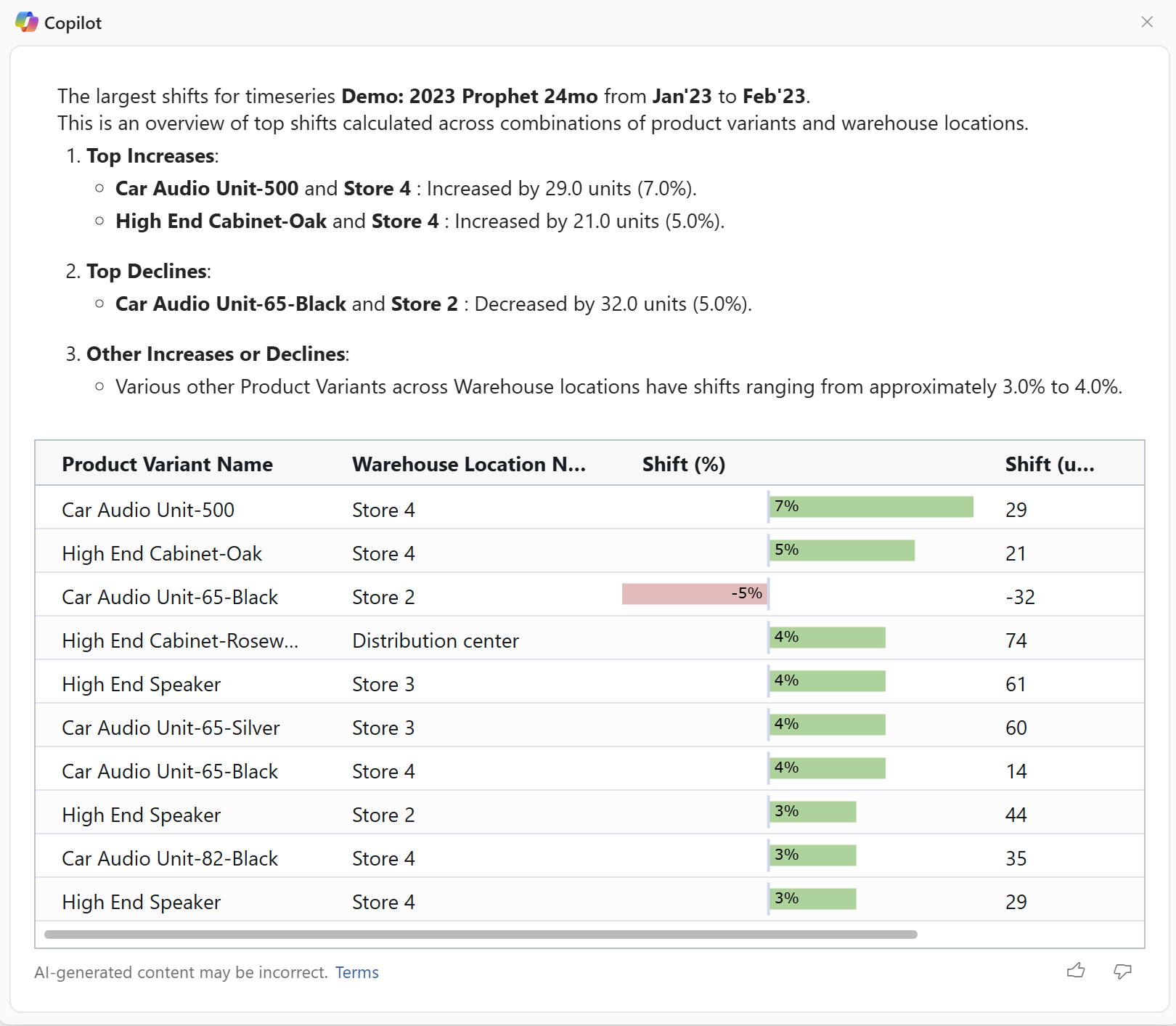
In Dynamics 365 Supply Chain Management, Copilot enhances demand planning by allowing users to analyze forecasts through natural language questions. Instead of manually reviewing data or building custom queries, planners can select predefined prompts tied to points of interest on a demand chart. Copilot then generates immediate, context-specific insights to support planning decisions.
This capability helps identify trends, outliers, and drivers of change between planning periods. It allows planners to respond more quickly to shifts in demand and make data-informed adjustments.
Key features include:
- Interactive worksheet analysis: Users can select a time period on the demand chart and choose from predefined Copilot questions to explore the data in context.
- Natural language responses: Copilot delivers explanations in plain language, helping planners understand key contributors to demand fluctuations.
- Faster decision-making: Real-time insights into plan changes reduce the need for manual investigation and support more agile supply chain responses.
Review and accept changes to confirmed purchase orders
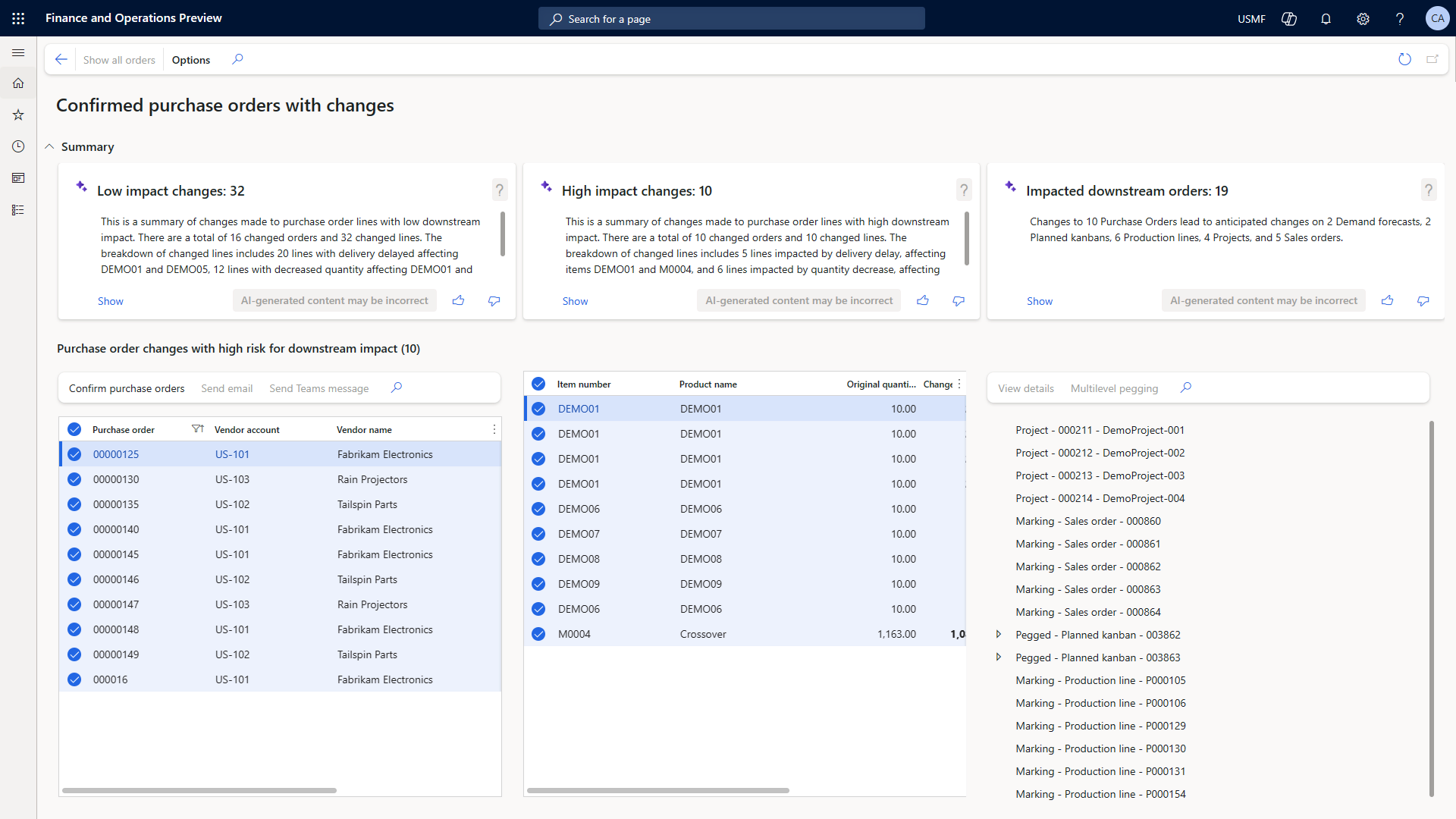
In Dynamics 365 Supply Chain Management, the Confirmed purchase orders with changes workspace helps procurement teams manage updates to purchase orders after confirmation. Copilot enhances this process by summarizing changes and highlighting their potential impact on downstream demand, allowing users to focus their attention where it matters most.
This workspace provides a centralized view of order changes and classifies them based on their downstream effects. It simplifies the review process and supports informed decision-making for both routine updates and critical changes.
Key capabilities include:
- Low impact changes: Identifies purchase order updates, such as increased quantities or earlier delivery dates, that are unlikely to disrupt production or fulfillment schedules.
- High impact changes: Flags updates that affect downstream demand, including sales orders or production plans, and summarizes the related impact for further investigation.
- Impacted downstream orders: Provides a breakdown of affected demand orders by type, helping teams trace the origin of the impact and prioritize next steps.
Workload insights with Copilot in the Warehouse Management mobile app
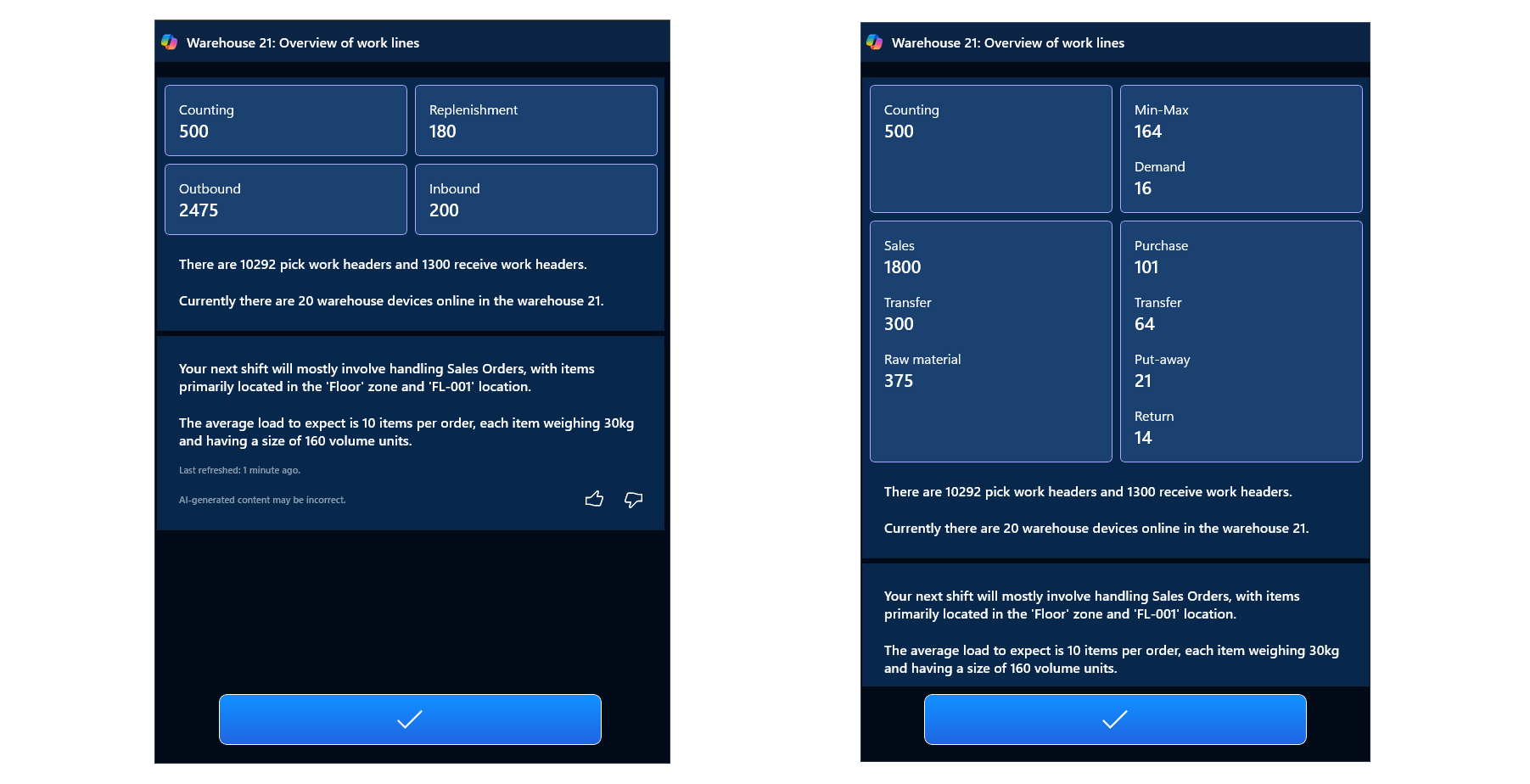
The Warehouse Management mobile app in Dynamics 365 Supply Chain Management includes a workload page powered by Copilot, giving warehouse workers real-time visibility into their tasks. With AI-generated summaries and task breakdowns, workers can plan their shifts more effectively and reduce the time spent navigating or interpreting system data. When enabled, the workload page provides a natural-language summary of upcoming tasks and key operational metrics. Workers can choose to view summaries by work headers or work lines, depending on how they prefer to structure their day.
Key insights include:
- Number of pick and receive work headers or lines
- Total active mobile sessions within the warehouse
- Workload by type, including detailed breakdowns of open tasks
- AI-generated summaries of available work to help guide daily planning
- Optional preference to display the workload page upon login for quick access to shift insights
Supplier Communications Agent
The Supplier Communications Agent uses AI to automate routine vendor interactions in Dynamics 365 Supply Chain Management. It helps reduce manual follow-ups, speeds up purchase order confirmations, and enables procurement teams to focus on higher-value activities. This feature addresses common communication pain points by interpreting vendor emails, generating responses, and identifying purchase order changes that need attention. Purchasers can choose to send emails automatically or review drafts before sending. The agent also reads incoming vendor emails, extracts key information, and surfaces only what requires user input, streamlining the update process.
Key capabilities include:
- Automatically generates and sends reminder emails to vendors for confirmations or late deliveries
- Reads vendor emails and identifies relevant purchase order references and requested changes
- Extracts and matches email content to system fields, highlighting only the necessary updates
- Reduces time spent on low-complexity communications, improving overall procurement efficiency
Next steps
Copilot in Dynamics 365 Finance & Operations is a set of real, available tools that are already transforming how finance and operations teams work. Whether you’re looking to improve collections, streamline vendor communication, or gain faster insights from supply chain data, Copilot offers practical enhancements that fit directly into your existing workflows.
If you’re ready to explore where AI can make the biggest impact in your organization, we’re here to help. Contact Rand Group today.