
 Dynamics 365
 Power Platform
 Dynamics
 Cloud & Productivity
Dynamics 365 Business Central for Professional Services
Microsoft Dynamics 365 Business Central gives professional services firms complete visibility into project profitability, resource utilization, and cash flow—all in one integrated platform. Whether you're managing consulting engagements, engineering projects, or IT services delivery, Business Central connects your project operations, financials, and billing to help you deliver on time and on budget. Purpose-built for growing services firms, Business Central scales with your business while providing the real-time insights you need to make better decisions faster.

Why Business Central works for professional services
Professional services firms face unique challenges: managing multiple projects simultaneously, tracking billable hours accurately, forecasting resource needs, and maintaining healthy margins across diverse client engagements. Rand Group understands these challenges because we’ve helped hundreds of services firms implement Business Central solutions tailored to their specific delivery models.
Dynamics 365 Business Central provides the project accounting, resource planning, and financial management capabilities you need to run a profitable services business, while Rand Group brings the industry expertise and implementation methodology to ensure you realize value quickly. Our team has deep experience across consulting, engineering, architecture, IT services, and project-based businesses, and we leverage that knowledge to configure Business Central around your unique workflows and client engagement models.

Improved project visibility and control
Business Central gives project managers and leadership real-time insight into budgets, costs, timelines, and profitability. With centralized project data, firms can identify issues early, control scope creep, and make informed decisions that protect margins.

Stronger financial oversight and forecasting
By connecting project activity directly to financials, Business Central improves accuracy in revenue recognition, expense tracking, and forecasting. Professional services firms gain clearer visibility into cash flow, utilization, and overall financial performance across engagements.

Scalable operations that support growth
As firms grow, managing more projects, clients, and resources becomes increasingly complex. Business Central scales with your organization, supporting additional users, entities, and service lines without forcing disruptive system changes.
Business Central’s professional services capabilities
Project Management
Project and life-cycle costing
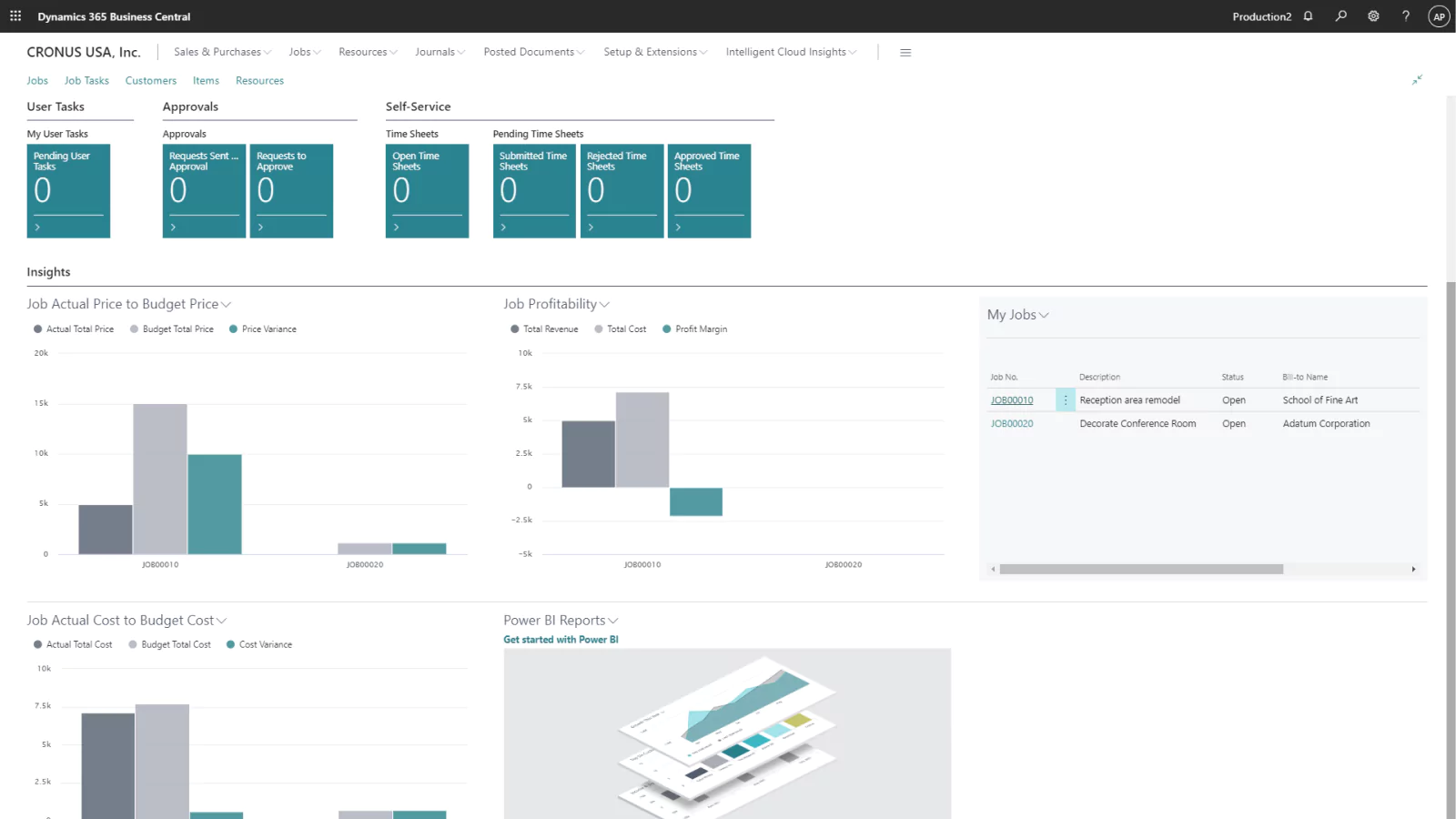
Business Central centralizes the “Project Card” to track budgets, actual costs, and billable work in real-time. This provides professional services firms with a “single source of truth” to monitor project health and ensure delivery stays aligned with financial targets.
Task planning and work breakdown structures (WBS)
Projects are structured into manageable phases and tasks with specific budgets and timelines. This hierarchy ensures consistent project setup, facilitates easier progress tracking, and clarifies accountability across delivery teams.
Project progress and work-in-progress tracking
WIP (Work-in-Process) & progress tracking firms can automate the calculation of WIP using multiple GAAP/IFRS-compliant methods (e.g., Cost Value or Percentage of Completion). This ensures that financial statements accurately reflect earned revenue and deferred costs throughout the project lifecycle.
Project versioning & change control
Business Central allows firms to adjust budgets and tasks as scope changes, maintaining a history of revisions to protect visibility into original plans and their financial impact.
Time and expense capture
Business Central includes native time and expense capabilities through Jobs, Resources, and project accounting. Users can record time against projects, track expenses, and flow that data directly into billing and financial reporting.
Financial Management
Core financials and dimensional reporting
Beyond a standard General Ledger, Business Central uses “Dimensions” to tag every transaction by department, project, or client. This allows firms to generate deep financial insights without cluttering their Chart of Accounts.
Revenue recognition and project accounting
Revenue can be recognized based on project milestones, percent complete, or billing schedules. This flexibility supports common professional services revenue models while maintaining compliance.
Project-linked expense management
Capture employee expenses via web or mobile-responsive interface and allocate costs to specific project tasks for accurate margin tracking. Approved expenses flow directly into project costing and billing processes, improving accuracy and reducing administrative cycles.
Intercompany transactions
Business Central supports transactions across multiple legal entities, allowing firms to share resources globally and automate the internal allocation of costs and revenue.

Billing and Invoicing
Time and materials (T&M) billing
Business Central supports time and materials billing based on recorded labor and expenses. Firms use this to generate accurate invoices tied directly to project activity.
Fixed-fee and milestone billing
Projects can be billed based on predefined milestones or fixed-fee structures, allowing firms to align invoicing with client agreements.
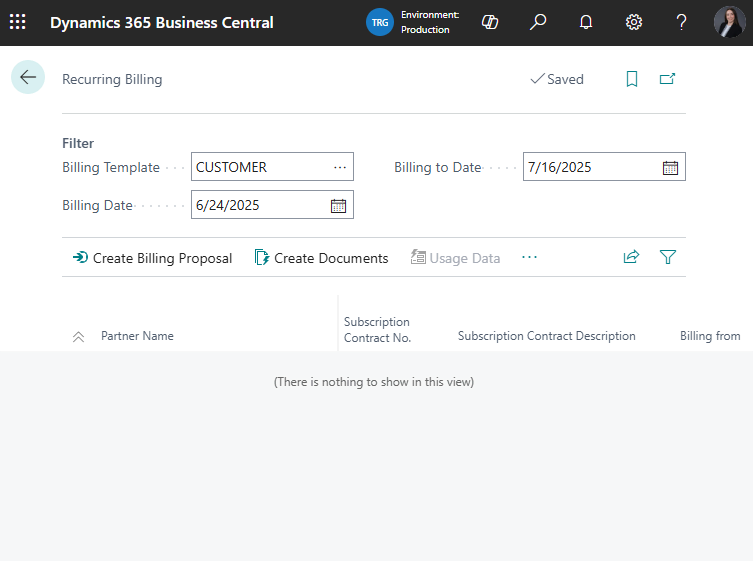
Automated billing schedules
Configure recurring or flexible billing frequencies to match client-specific requirements. This automation reduces administrative friction, shortens the “quote-to-cash” cycle, and improves firm-wide cash flow.
Subcontractor billing alignment
Subcontractor and third-party service costs can be reflected accurately in client billing, ensuring external services are captured in overall project economics.
Resource Management
Capacity and utilization tracking
Define resource availability (hours/days) and track “Billable vs. Non-Billable” utilization. Managers can identify over- or under-utilized staff at a glance to balance workloads and optimize staffing profitability.
Labor cost management
Capture the true cost of labor (including overhead) vs. billable rates. This allows for granular profitability analysis at the resource, task, or project level, helping leadership understand which services are most lucrative.

Reporting
Project and financial dashboards
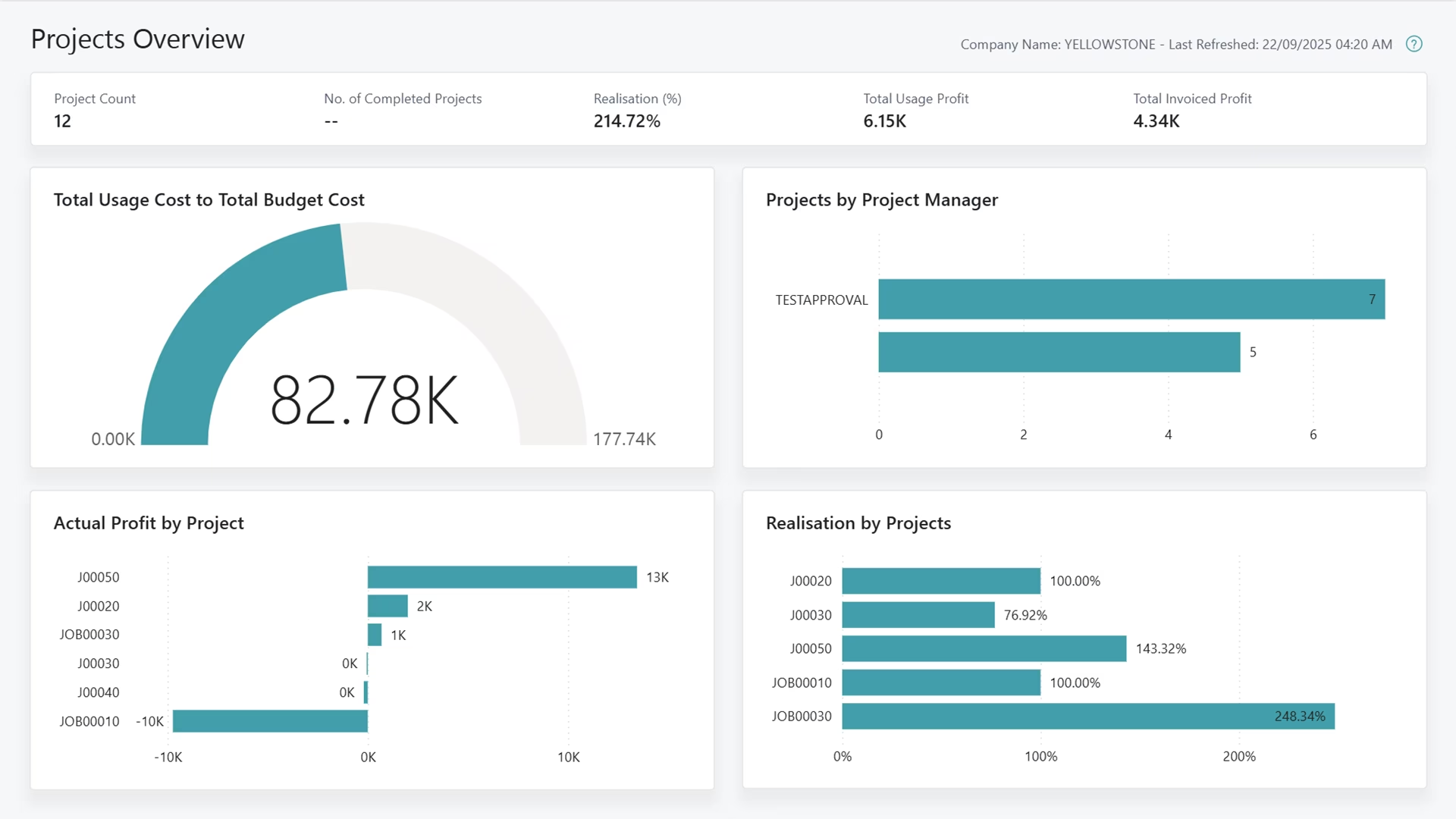
Built-in dashboards provide visibility into project performance, utilization, and financial KPIs. Leadership teams use these insights to guide operational and strategic decisions.
Power BI integration
Business Central integrates with Microsoft Power BI, enabling advanced analytics and visual reporting across projects, clients, and service lines.
AI-powered assistance with Copilot
Dynamics 365 Copilot in Business Central helps professional services firms work more efficiently by turning data into actionable insights. Teams use Copilot to summarize project status, analyze financial trends, and surface potential risks without manually digging through reports.
Why professional services firms modernize with Business Central
%
Improvement in project profitability
%
Faster financial close
%
Increase in consultant utilization rates


Business Central licensing and Rapid Activation implementation for professional services
Choosing the right Business Central license and implementation approach ensures your professional services firm gets the functionality you need at a pace that matches your capacity for change. Rand Group works with you to right-size your investment and create an implementation roadmap that delivers value quickly while positioning you for long-term success.
Business Central licenses
Essentials license
$80
$108.50
/user/month
The Business Central Essentials license provides professional services firms with the core financial, project, and reporting capabilities needed to operate efficiently—without added complexity.
Implementation plans
Starting at
$50,000
$68,000
/12 weeks
Rand Group delivers structured implementation plans designed specifically for professional services organizations. These plans focus on project setup, billing workflows, financial controls, and reporting—ensuring teams can adopt the system quickly and confidently.
Professional Services tools
Starting at
$100
$100
/month
Professional Services tools extend Business Central with a library of Rand Group–built applications, including our Supply Chain Accelerator app for Business Central. These packages are designed to support professional services firms that manage complex procurement, subcontracted services, and cost tracking tied to client engagements.
What does the Business Central professional services implementation plan include?
The Business Central Rapid Activation implementation plan for professional services includes project configuration, financial and billing setup, reporting, and user training tailored to how service firms deliver and manage client engagements. It focuses on aligning the system to your project workflows, revenue models, and operational goals to support a smooth rollout and long-term adoption.
Core Financials
General Ledger
Supports a single company setup within Business Central. This provides a centralized view of financial transactions and balances.
Accounts Payable
Includes basic accounts payable functionality using checks. Electronic payment processing is not included in this plan.
Accounts Receivable
Supports simple accounts receivable entry and tracking. This allows teams to manage customer balances and payments efficiently.
Banking
Includes basic banking functionality with manual bank reconciliation. This supports accurate cash management without automated bank feeds.
Multi-Currency
Enables transactions in multiple currencies within Business Central. Exchange rates are managed directly in the system.
Financial Reporting
Includes standard, out-of-the-box financial reports provided by Business Central. These reports support basic financial visibility without customization.
Distribution
Inventory and Non-Stock Items
Supports inventory and non-stock items with FIFO costing. Lot tracking and serialization are included when applicable to your business.
Sales Quotes, Orders, and Invoices
Enables standard sales processing within Business Central. Teams can create quotes, convert them to orders, and generate invoices.
Purchase Orders and Receiving
Supports purchase order creation and goods receiving. This helps manage vendor purchases and inventory flow.
Warehousing
Includes basic warehouse functionality with pick, pack, and putaway processes. This supports more structured inventory handling.
Jobs & Project Costing
Projects
Enables project and job tracking within Business Central. This allows teams to manage costs, timelines, and project structure in one system.
Timesheets with Approvals
Supports employee timesheets with built-in approval workflows. This helps ensure accurate time tracking and controlled project costing.
Work in Progress (WIP)
Includes work in progress tracking for active projects. This supports accurate financial reporting during project execution.
Revenue Recognition
Supports revenue recognition for project-based billing. This helps align revenue with project progress and accounting requirements.
Project Invoices
Enables invoicing directly from projects. This streamlines billing based on time, costs, or project milestones.
Other
Data Migration
Includes migration of customers, vendors, open AR, open AP, one year of general ledger history, chart of accounts, items, inventory quantities, price lists, open sales invoices and orders, open purchase orders, projects, tasks and employee resources.
Online/remote training
Includes live, remote training delivered by Rand Group consultants. Training focuses on production setup, processing, and reporting.
Business Central Insights Power BI Reports
Includes access to Business Central Insights Power BI reports. These dashboards provide visibility into manufacturing and financial performance.

Have more complex Business Central implementation requirements?
While Rapid Activation is a strong starting point for many professional services firms, it may not be the right fit for every organization. As firms grow, diversify service offerings, or require more advanced project, billing, or reporting workflows, Rand Group offers additional Business Central implementation approaches designed to support greater complexity and long-term operational maturity. Our team works with you to determine the right path based on your current processes and future growth plans.
- Full digital transformation implementation: A comprehensive, end-to-end approach that redesigns business processes, systems, and reporting to fully align Business Central with your organization.
- Hybrid Business Central implementation: A flexible option that combines Rapid Activation with tailored configuration, bridging the gap between standardized plans and full digital transformation.
Custom apps for professional services firms
Rand Group delivers custom-built apps that extend Dynamics 365 Business Central to support the day-to-day operational needs of professional services firms. These apps help streamline time entry, expense management, and internal approvals while maintaining accurate financial and project reporting.



Frequently Asked Questions (FAQs)
Is Business Central a good fit for professional services firms?
Yes. Business Central is well suited for project-based organizations that need integrated financials, project tracking, and billing. It provides flexibility for different service models without enterprise-level complexity.
Can Business Central handle project-based accounting?
Business Central includes native project accounting through the Project Management module, allowing firms to track costs, revenue, and profitability by project in real time.
How do I get expense information into Business Central?
Business Central allows easy integration with expense tracking solutions via apps and API integrations. This eliminates the need to manual re-enter expense, travel and credit card transactions. Expenses can be tracked and reported at the project level.
How long does a professional services implementation typically take?
Implementation timelines vary based on the complexity of your requirements, the number of users, and how much customization you need beyond standard Business Central functionality. A rapid implementation focusing on core project management, time tracking, and billing typically takes up to 12 weeks from kickoff to go-live.
What happens after go-live? Is post-implementation support included?
Post-go-live support is a core part of Rand Group’s delivery approach. Professional Services firms receive stabilization support, issue resolution, and guidance on optimization opportunities as users transition to the new system.
What level of training is required for users and administrators?
Business Central is designed to be intuitive, especially for users familiar with Microsoft tools. Training typically focuses on role-specific workflows such as time entry, project review, and reporting rather than system administration.
Why partner with Rand Group?
Business Central tailored for professional services
Rand Group designs Business Central implementations around the realities of professional services delivery, billing, and financial management.
Proven results with Microsoft
With decades of experience delivering Microsoft solutions, Rand Group brings proven methodologies and best practices to every engagement.
Microsoft Partner of the Year recognition
Rand Group was named Microsoft Americas Channel Emerging Partner of the Year, reflecting excellence in customer success and solution delivery.
Deep industry expertise in professional services
Our consultants understand the operational, financial, and delivery challenges professional services firms face and configure Business Central to support long-term success.