 Dynamics 365
 Power Platform
 Dynamics
 Cloud & Productivity
Microsoft Dynamics 365 Business Central & Outlook integration
Integrating Microsoft Dynamics 365 Business Central with Outlook brings your business management tools directly into your email. This powerful integration lets you handle quotes, invoices, and customer data in one place without switching between apps. This saves you time and boosts productivity for your organization. Additionally, this integration streamlines daily workflows by delivering ERP insights right to your inbox.

Why integrate Business Central with Outlook?
The Business Central & Outlook integration allows users to perform ERP tasks from within Outlook, creating seamless workflows. For example, you can view customer or vendor details and check account status—all directly from an email. You can even create sales quotes or invoices right inside Outlook. By bringing this functionality into the familiar Outlook environment, users spend less time jumping between systems and more time focusing on their core work.
While Business Central includes native integration with Outlook, Rand Group’s experts enhance this integration to fit your unique needs. We help you streamline workflows, make document management smarter, and enforce consistent data practices between Outlook and Business Central. Additionally, our team provides training and customization to tailor which data appears in Outlook, so you get the maximum value from the integration. We help clients get more value out of the tools they already own—across sales enablement, vendor invoice processing, and more.

Unified user experience
A seamless integration between Business Central and Outlook lets users manage emails, contacts, and business documents without switching between platforms. This unified experience enhances efficiency and streamlines workflows.

Real-time data syncing
This integration ensures that data between Business Central and Outlook are synced in real-time, keeping records and documents consistent and up-to-date across both platforms. This facilitates faster decision-making and reduces errors.

Enable mobile access
The integration allows users to access crucial Business Central data and documents from their mobile devices, enabling remote and field service teams to work efficiently from anywhere.

Integrate Business Central & Outlook today
Unlock the full potential of your business by integrating Microsoft Dynamics 365 Business Central with Outlook. Streamline your processes, improve data accuracy, and enhance productivity—all from within your inbox. With seamless integration, managing customer relationships, creating business documents, and syncing financial data has never been easier. Don't wait to optimize your workflows and improve efficiency.
Customer and vendor management
Managing customer and vendor relationships is simplified with the Business Central and Outlook integration. The Contact Insights add-in brings customer and vendor information right into Outlook so you can see transaction history, sales orders, and contact details without leaving your inbox. You can also create and send sales quotes or invoices and check financial status to make decisions on the fly. Plus, you can create new customer, vendor, or contact records and keep your business database up to date while managing daily communications.
- View customer and vendor information: View transaction history, sales orders, and contact details in Outlook.
- Create and send business documents: Generate and send sales quotes, invoices, and other documents from your email.
- Track financial status: Check customer financial status (outstanding balances) before responding to inquiries.
- Easily add new contacts: Create new customer, vendor, or contact records from Outlook to keep your business database up to date.

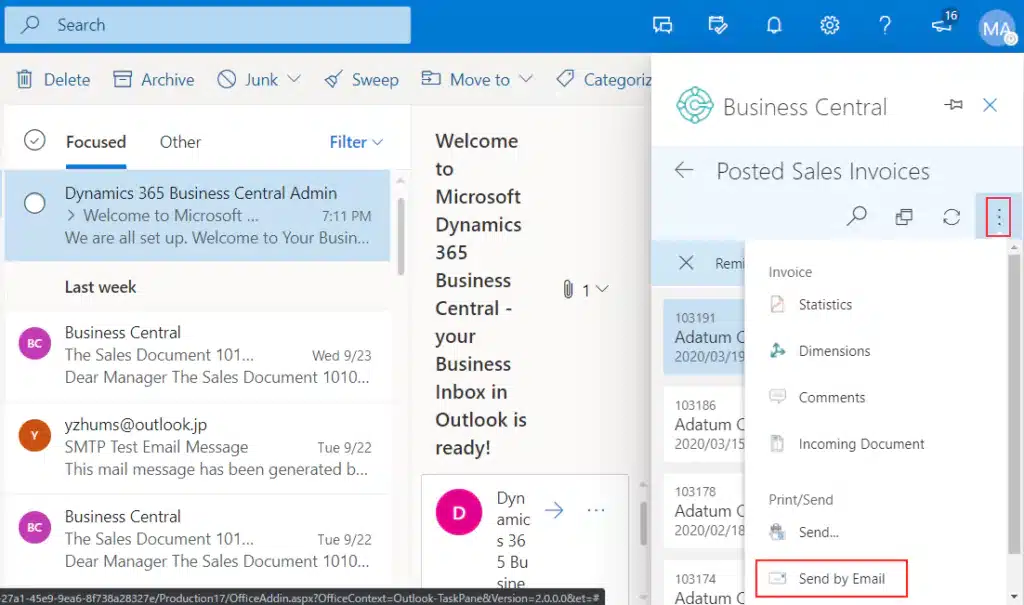
Document creation and management
With Business Central and Outlook integration, document management is streamlined. You can create and send sales quotes, purchase invoices, and other business documents from Outlook, and PDFs will be attached to the email. The integration also makes document tracking and file management easy by allowing you to upload attachments to Business Central records. With the Document View add-in and pop-out editing, you can manage, edit, and track business documents without ever leaving Outlook.
- Create and send business documents: Generate and send sales quotes, purchase invoices, and other business documents from Outlook, with PDF attachments.
- Track incoming documents: Monitor incoming business documents (purchase invoices) and send them to Business Central’s “Incoming Documents” list for further processing.
- Attach files to business records: Upload email attachments (invoices or images) to related records in Business Central for easier collaboration and tracking.
- View and edit documents in Outlook: Access Business Central documents (sales quotes) in Outlook and edit without leaving the email interface.
- Pop-out editing: Open documents in a separate window for more space while keeping changes in sync.
We needed a solution that could meet the needs of our growing organization and our customers. Our team, our needs, and our product offerings are growing rapidly, and we need systems and processes to keep up with our team’s hard work and tenacity.
We can control inventory better with our system today. We have better control on expenses because we have a better idea of what it costs.
Quote to cash without leaving your inbox
The Outlook integration accelerates the quote-to-cash process by allowing you to create and send Business Central sales documents directly from email conversations. When a customer asks for a price quote, you can create a sales quote from Outlook, with the customer’s information pre-populated. Once the quote is done, it’s sent via email with a PDF attachment, and Business Central records are updated. This works for sales quotes, invoices, and purchase orders, so all data is in sync between Outlook and Business Central.
- Instant quote/invoice creation: Build a complete sales quote or invoice from within an email thread using pre-filled customer data.
- Auto-attach PDF: Business Central generates a PDF and attaches it to the email reply so customers get a professional quote or invoice straight away.
- Real-time ERP update: Every quote, order, or invoice created via Outlook is recorded in Business Central in real-time, so all teams have one source of truth.
- Purchasing made easy: Handle vendor requests the same way—for example, create a purchase quote or PO from a supplier’s email to streamline procurement.

Why partner with Rand Group for Business Central & Outlook integration?
Top North American Business Central partner
Rand Group consistently ranks as one of the top Business Central partners in North America. We were one of the first North American partners to achieve the Small and Midsize Business Management advanced specialization, which is an advanced credential from Microsoft for partners with proven capabilities with Business Central.
Long-term partnership and support
Rand Group is committed to building long-term relationships with our clients, offering ongoing support and services to help your business grow and adapt with Business Central. Our 90% client retention rate is a testament to our dedication and effectiveness.
A dedicated US-based team
We employ no contractors, ensuring that our dedicated team in the US and Canada provides consistent, high-quality service and support throughout your implementation.
Trusted industry experience
Our team includes certified public accountants (CPAs) and industry experts who understand the unique challenges of your business and ensure your implementation aligns with best practices.
Related Insights

Excise Tax in Dynamics 365 Business Central: Setup, calculation, and reporting
Dynamics 365 Business Central can calculate, register, and track excise taxes for eligible items and fixed assets. Learn how the functionality works, what needs to be configured, and what businesses should consider before using it.

Field Service ERP software: How to connect dispatch, parts, job costs, and billing
Field service ERP software connects field operations with inventory, job costing, billing, and financial reporting. Learn how the process works, what needs to connect, and which ERP and field service combinations may fit your business.

Best AI tools for Business Central: Copilot, AI agents, forecasting, and more
AI can help Business Central users automate work, analyze ERP data, forecast demand, and reduce repetitive tasks. Explore six AI tools that can help organizations get more value from Dynamics 365 Business Central.