
 Dynamics 365
 Power Platform
 Dynamics
 Cloud & Productivity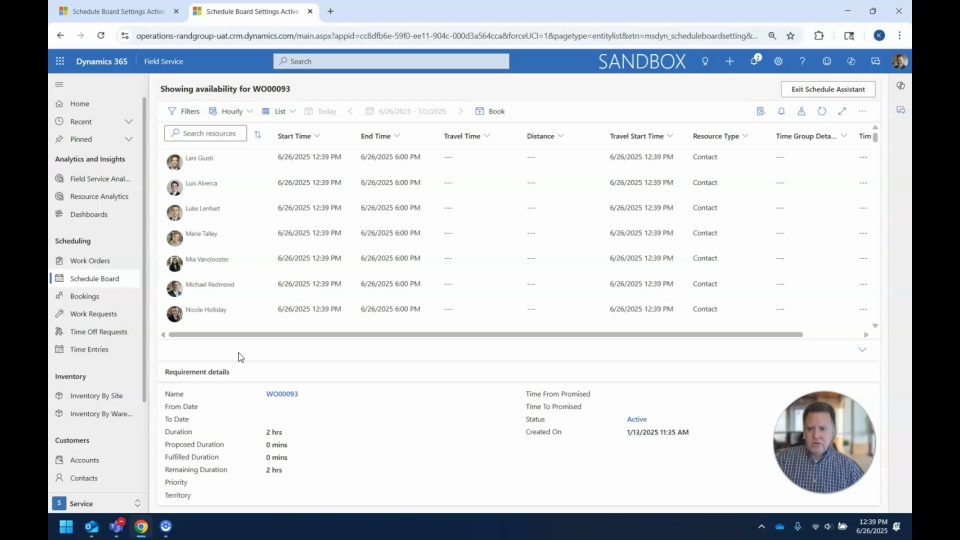
Explore three key methods for assigning work orders in Dynamics 365 Field Service: the schedule board, direct scheduling from the work order, and the “book” button. Firstly, the schedule board offers a user-friendly, drag-and-drop interface with advanced filters based on skills, certifications, and availability, ideal for dispatchers needing visual oversight. Secondly, scheduling directly from the work order uses intelligent filtering to recommend the most appropriate resources. Lastly, the “book” button provides a more traditional method for assigning both personnel and equipment. We’ll take you through each of these flexible options to optimize scheduling, improve resource utilization, and increase field service efficiency across varying operational models.
In this video you’ll learn how to:
Use the drag-and-drop schedule board for visual planning and resource filtering by skill
Schedule directly from work orders using smart filtering for best-fit resource suggestions
Use the “book” button supports traditional scheduling of staff and equipment for work orders
Related Videos

Dynamics 365 Field Service overview
Discover how Microsoft Dynamics 365 Field Service transforms service operations by connecting scheduling, work orders, inventory, and billing into one intelligent platform. Improve efficiency, increase first-time fix rates, and shift from reactive service to proactive, revenue-generating models.

Maximizing efficiency in the field: Why Dynamics 365 Field Service matters
Explore how Dynamics 365 Field Service transforms field operations from chaos into a coordinated, efficient system. Watch a live demo to see how intelligent scheduling, standardized work orders, inventory tracking, and automation improve service delivery and customer satisfaction.
AI in action: Transforming Dynamics 365 Field Service operations
This video explores how AI Copilot is transforming Dynamics 365 Field Service operations. Learn how it streamlines work orders, improves scheduling, and assists technicians in completing tasks more efficiently. See practical examples of AI in action for smarter, faster field service management.