 Dynamics 365
 Power Platform
 Dynamics
 Cloud & Productivity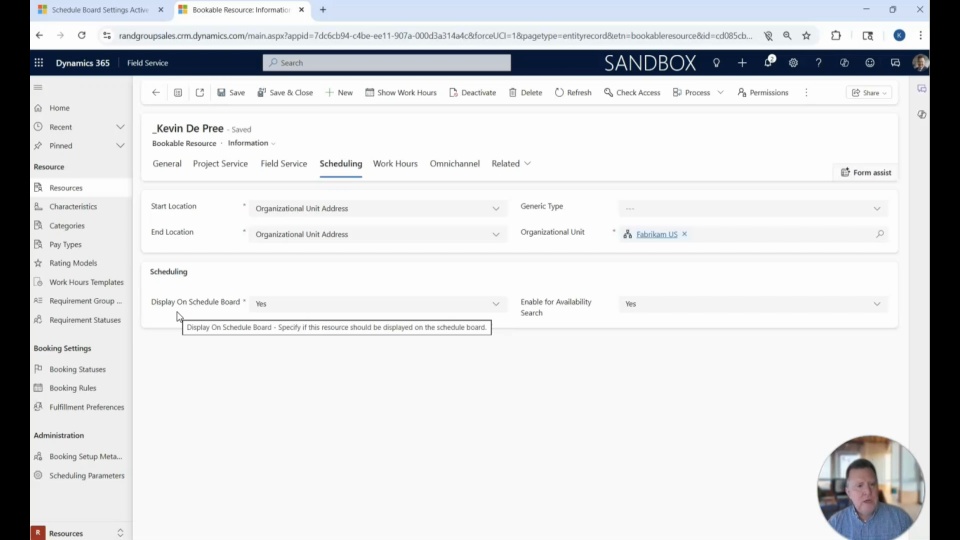
This video takes you inside Dynamics 365 Field Service to show how resource management can be streamlined and optimized. From individual users and equipment to entire crews, Field Service gives you a single place to define, organize, and oversee the people and assets that keep your operations running.
You’ll see how the system allows you to assign roles, track skills and certifications, and set up work hours that directly impact utilization and reporting on the schedule board. By giving you clear visibility into how resources are allocated, Dynamics 365 Field Service helps reduce scheduling conflicts, improve time tracking, and ensure the right people and equipment are assigned to the right jobs.
In this video you’ll learn how to:
Define and manage different types of resources, including users, crews, and equipment
Apply work hour templates to streamline scheduling and improve utilization tracking
Use the schedule board to gain visibility into resource availability and performance
Related Videos

Dynamics 365 Field Service overview
Discover how Microsoft Dynamics 365 Field Service transforms service operations by connecting scheduling, work orders, inventory, and billing into one intelligent platform. Improve efficiency, increase first-time fix rates, and shift from reactive service to proactive, revenue-generating models.

Maximizing efficiency in the field: Why Dynamics 365 Field Service matters
Explore how Dynamics 365 Field Service transforms field operations from chaos into a coordinated, efficient system. Watch a live demo to see how intelligent scheduling, standardized work orders, inventory tracking, and automation improve service delivery and customer satisfaction.
AI in action: Transforming Dynamics 365 Field Service operations
This video explores how AI Copilot is transforming Dynamics 365 Field Service operations. Learn how it streamlines work orders, improves scheduling, and assists technicians in completing tasks more efficiently. See practical examples of AI in action for smarter, faster field service management.