Dynamics 365
 Power Platform
 Dynamics
 Cloud & Productivity
Dynamics 365 Business Central dimensions: Best practices for reporting

Microsoft Dynamics 365 Business Central gives growing organizations a flexible foundation for financial reporting, operational analysis, and management visibility. However, the quality of that reporting depends heavily on how data is structured at the point of entry. One of the most important configuration decisions is how to use dimensions.
Dimensions allow organizations to categorize transactions beyond the chart of accounts. Instead of creating a separate general ledger account for every department, location, product line, project, or customer segment, businesses can use dimensions to tag transactions and analyze results across different areas of the organization.
When dimensions are planned well, finance teams can produce cleaner financial statements, compare performance across business units, support budget-to-actual analysis, and reduce manual reporting work. When dimensions are poorly designed, reporting becomes inconsistent, users lose confidence in the data, and finance teams often turn to spreadsheets to fill the gaps.
For organizations using or evaluating Business Central, dimensions should not be treated as a minor setup detail. They are a core part of the reporting strategy. The following best practices can help organizations design, govern, and use Business Central dimensions effectively.
Understand the role of dimensions in Business Central reporting
Dimensions in Business Central are values used to classify transactions for reporting and analysis. Common examples include department, location, project, customer group, product line, region, salesperson, and business unit. These values can be applied to sales documents, purchase documents, journals, budgets, and posted entries.
The primary benefit is reporting flexibility. A company can maintain a clean chart of accounts while still analyzing revenue, expenses, and balances from different business perspectives.
For example, a professional services firm may want to report profitability by practice area, project manager, and client industry. A distributor may want to analyze sales and margin by location, product category, and customer type. A nonprofit may need reporting by fund, program, restriction, and grant. Each of these scenarios can be supported through dimensions without requiring an overly complex general ledger structure.
This is especially important as organizations grow. A chart of accounts that works for a small business can become difficult to manage when every new reporting requirement leads to more accounts. Dimensions help separate the natural account structure from management reporting needs.
A well-designed dimension strategy also supports consistency across Business Central. The same dimension values can be used in financial reports, analysis views, budgets, account schedules, and Business Central reporting. This creates a more reliable reporting model because users are working from shared definitions rather than separate spreadsheet logic.
Start with reporting requirements, not configuration screens
The most effective dimension structures begin with business questions. Before configuring dimension codes and values, organizations should identify the reports, analysis, and decisions the system needs to support.
Finance, operations, sales, project management, and leadership teams should align on the most important reporting needs. This helps ensure dimensions are based on real business requirements rather than assumptions made during implementation.
Key questions to ask include:
- Which financial statements need to be filtered or grouped by department, location, project, or other categories?
- Which profitability views are required for management reporting?
- How does the organization budget, forecast, and compare actual results?
- Which reporting segments are required for board reporting, compliance, grants, or investors?
- Which dimensions need to be mandatory for accurate reporting?
- Which dimensions are useful but optional?
- Which reporting needs are better handled through master data, Power BI, or separate operational reports?
This discussion should happen before the dimension structure is finalized. It is easier to design dimensions correctly at the beginning than to correct inconsistent posted data later.
After gathering requirements, organizations should prioritize the dimensions that are truly needed for recurring reporting. Not every possible attribute should become a dimension. If a category will rarely be used, is difficult for users to maintain, or changes frequently, it may not belong in the dimension structure.
The goal is to create a reporting model that is detailed enough to support decision-making but simple enough for users to apply consistently.
Keep the chart of accounts clean
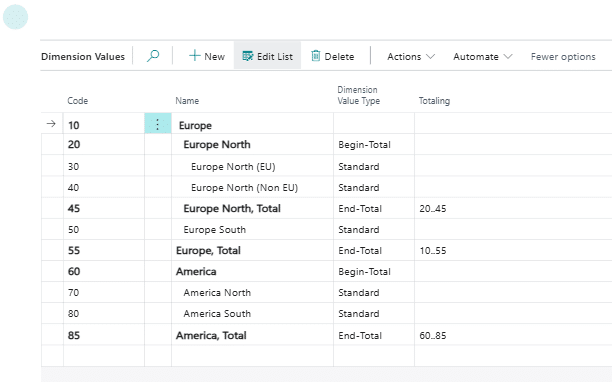
One of the most common reasons organizations adopt Business Central dimensions is to avoid an overbuilt chart of accounts. Without dimensions, businesses often create separate accounts for combinations such as department, location, and expense type. Over time, this can result in hundreds or thousands of accounts that are difficult to maintain.
For example, instead of creating separate expense accounts for travel by department, the company can use one travel expense account and apply a department dimension. This allows finance to report travel expenses by department without duplicating the account structure.
A cleaner chart of accounts improves usability and reduces maintenance. It also helps make financial statements easier to understand because the account structure reflects the nature of the transaction rather than every possible reporting segment.
That said, dimensions should not replace the chart of accounts entirely. The general ledger should still capture the core financial classification of each transaction. Dimensions should provide additional analytical context.
A practical test is to ask whether a reporting element represents “what” the transaction is or “who, where, why, or for whom” the transaction occurred. The “what” usually belongs in the chart of accounts. The additional context is often a good fit for dimensions.
Choose global and shortcut dimensions carefully
Business Central allows organizations to define two global dimensions and up to eight shortcut dimensions. These are important because they affect how easily users can enter, filter, and analyze dimension data throughout the system.
Global dimensions should be reserved for the most important reporting categories used broadly across the organization. These are typically dimensions such as department, location, business unit, or project, depending on the company’s reporting model. Because global dimensions are commonly used in filters and financial analysis, they should represent stable and widely used reporting needs.
Shortcut dimensions are also useful because they make selected dimension fields more accessible on journal lines and documents. This can improve usability and data entry accuracy when users frequently need to apply certain dimensions.
When deciding which dimensions should be global or shortcut dimensions, consider:
- How often the dimension is used in financial reporting
- Whether the dimension is required across most transaction types
- Whether users need to enter or review the value frequently
- Whether leadership expects reporting by that category
- Whether the dimension will remain stable over time
- Whether the dimension is needed in filters, reports, or analysis views
Changing global dimensions later can require careful planning and testing, so these decisions should not be rushed. Organizations should evaluate current reporting requirements as well as likely future needs.
The best approach is to reserve global dimensions for high-value reporting categories and avoid using them for narrow or temporary requirements.
Global and shortcut dimensions are only part of the overall dimension strategy. Business Central also includes default dimensions and dimension combinations, which help improve consistency and control how dimension values are used. The table below summarizes how these dimension concepts work together.
Use default dimensions to improve consistency
Default dimensions help reduce manual entry and improve reporting consistency. In Business Central, default dimensions can be assigned to records such as G/L accounts, customers, vendors, items, fixed assets, and jobs. When transactions are created using those records, the system can automatically suggest or require the appropriate dimension values.
This is valuable because dimension reporting depends on consistent transaction tagging. If users must manually select every dimension value on every transaction, errors and omissions are more likely. Default dimensions help embed reporting rules into daily processes.
For example, a company may assign a department dimension to specific expense accounts, a customer group dimension to customers, or a product line dimension to items. When transactions are posted, Business Central can carry those values into the transaction based on the setup.
Default dimensions are especially useful for:
- Repetitive transactions where the correct dimension is predictable
- Accounts that should always be tied to a certain department or function
- Customers, vendors, or items that belong to specific reporting groups
- Transactions where missing dimensions would cause reporting gaps
- Reducing the burden on users during document and journal entry
However, default dimensions should be reviewed carefully. If a default value is too broad or outdated, it can create reporting errors at scale. Finance teams should periodically validate default dimension rules and confirm they still reflect the way the business operates.
Defaults should simplify data entry, not hide weak reporting design. If users frequently override default values, that may indicate the setup needs to be refined.

Define when dimensions are required
Not every dimension needs to be mandatory on every transaction. Making too many dimensions required can slow down processing and frustrate users. Making too few dimensions required can create reporting gaps. The right balance depends on how the organization uses the data.
Business Central allows organizations to define value posting rules for dimensions. These rules can help control whether a dimension is required, whether a specific value must be used, or whether certain combinations are allowed.
A strong dimension strategy should define which dimensions are mandatory by transaction type, account, or master record. For example, department may be required on most income statement accounts but unnecessary on certain balance sheet accounts. Project may be required for project-related revenue and expense accounts but optional elsewhere.
The key is to connect required dimensions to actual reporting needs. If a dimension is used in monthly management reporting, budgeting, or profitability analysis, it may need stronger controls. If a dimension is only used occasionally, it may be better as optional.
Organizations should document these rules clearly so users understand why certain values are required. This reduces confusion and improves compliance.
Control dimension combinations
Dimension combinations are an important control for maintaining reporting accuracy. They allow organizations to define which dimensions and dimension values can be used together. This helps prevent invalid reporting combinations from being posted.
For example, a company may want to prevent transactions from being posted to a department that does not operate in a certain location. A nonprofit may need to restrict certain funds to specific programs. A project-based business may want to prevent administrative departments from being combined with billable project dimensions.
Without combination controls, incorrect dimension pairings can enter the system and create misleading reports. These errors may not be obvious during transaction entry, but they can cause issues during month-end close, reporting review, or audit preparation.
Dimension combination rules are useful when:
- Certain departments only apply to specific locations
- Programs, funds, or grants have restricted usage
- Business units should not share certain project codes
- Revenue and expense activity must follow defined reporting structures
- Certain dimension values are no longer valid for new transactions
Controls should be used thoughtfully. Too many restrictions can make legitimate transactions difficult to process. Too few restrictions can lead to inconsistent reporting. The goal is to prevent known invalid combinations while still allowing normal business activity.
Finance and operational stakeholders should review dimension combination rules together, especially in organizations with complex structures or compliance requirements.

Avoid overcomplicating the dimension structure
Business Central can support detailed dimension reporting, but more dimensions do not automatically create better reporting. A complex structure can make data entry harder, slow down posting, increase errors, and make reports more difficult to interpret.
Organizations should be selective. Each dimension should have a clear purpose, an owner, and a defined reporting use case. If a dimension does not support a recurring report or decision, it may not be necessary.
Common signs of an overcomplicated dimension structure include:
- Users frequently ask which dimension value to select
- Many dimension values are rarely used
- Reports require significant cleanup before they are trusted
- Finance maintains separate spreadsheets to correct or regroup data
- Dimension values overlap with each other or with the chart of accounts
- New values are created without a consistent naming or approval process
A simpler structure is often more effective. For many organizations, a focused set of core dimensions provides better reporting than a long list of poorly maintained attributes.
This does not mean reporting should be limited. It means the design should separate what needs to be captured in Business Central from what can be handled through other reporting tools, master data attributes, or Power BI models.
Establish governance for dimension values
Dimensions are not a one-time setup item. As the business changes, new departments, locations, projects, programs, and reporting needs may emerge. Without governance, dimension values can become inconsistent or outdated.
Organizations should define who can create, modify, block, or delete dimension values. Finance should typically own the dimension framework, while input from operations and business leaders helps ensure values reflect real reporting needs.
A governance process should address:
- Naming conventions for dimension values
- Approval requirements for new dimension values
- When to block inactive values
- How to handle reorganizations or structural changes
- How dimension changes affect budgets and reports
- How users are informed when new values are available
- How often the dimension structure is reviewed
Governance is especially important for companies with multiple entities, departments, or locations. If each team creates values independently, reporting consistency can quickly deteriorate.
A practical approach is to maintain a dimension design document that lists each dimension, its purpose, owner, allowed values, posting rules, and reporting use cases. This document becomes a reference point for finance, administrators, and implementation partners.

White Paper
Planning an ERP project?
Before implementing Business Central, it is important to define your reporting requirements, financial structure, and business processes clearly. Download our ERP software selection checklist to identify the key factors your organization should evaluate before choosing or implementing a new ERP system.
Align dimensions with budgets and analysis views
Dimensions are most powerful when they are aligned with planning and reporting processes. If the organization budgets by department and location, the actual transactions should be tagged with the same dimensions. If leadership reviews project profitability, project dimensions should be applied consistently to both revenue and costs.
Business Central supports analysis views that allow users to analyze general ledger activity by selected dimensions. This can help finance teams produce recurring views of financial performance without rebuilding reports manually each month. For organizations that need more tailored financial statements, dimensions can also support a custom income statement report in Dynamics 365 Business Central.
Dimension alignment is important for budget-to-actual analysis. If budgets are created using one structure and actuals are posted using another, reporting becomes difficult and may require manual reconciliation.
Before finalizing dimensions, organizations should review how they plan, report, and measure performance. The dimension design should support those processes directly.
For example, a company that manages performance by business unit and department should ensure those dimensions are consistently used in actuals and budgets. A services firm that evaluates profitability by project should define when project dimensions are required, how project-related costs are captured, and how indirect costs are handled.
This alignment helps Business Central become a more reliable source for management reporting rather than simply a system of record for accounting transactions.
Train users on the reporting impact of dimensions
Even a well-designed dimension structure can fail if users do not understand how their data entry affects reporting. Dimension values may seem like administrative fields, but they directly influence financial statements, department reports, profitability analysis, and leadership dashboards.
Training should explain not only how to enter dimensions but why they matter. Users should understand which dimensions they are responsible for, when values are required, and how errors affect downstream reporting.
Practical training should include:
- Examples of common transaction scenarios
- Guidance on selecting the correct dimension values
- Explanation of required versus optional dimensions
- Steps for correcting mistakes before posting
- Clear escalation paths when users are unsure
- Reporting examples that show how dimension data is used
This is particularly important for users who enter purchase invoices, sales orders, journals, project costs, or expense transactions. These users often create the data that finance and leadership rely on later.
Training should also be reinforced after go-live. As new users join the organization or reporting requirements change, dimension practices should be included in onboarding and process documentation.
Review and reconcile dimension reporting regularly
Dimension reporting should be reviewed as part of the normal close and reporting process. Waiting until year-end or a major reporting deadline to identify dimension issues can create unnecessary rework.
Finance teams should establish recurring checks to identify missing, incorrect, or unusual dimension values. These reviews can help catch problems early and improve the reliability of reports over time. Scheduling recurring reports in Business Central can also help finance teams monitor dimension activity more consistently and support a more efficient close process. For additional guidance, read our article on scheduling reports in Business Central for efficiency and accuracy.
This kind of reporting discipline is easier to maintain when financial data flows cleanly into Business Central and transactions are categorized consistently from the start. In the Dairy Products Inc. Business Central implementation, Rand Group aligned Business Central with the company’s commodity trading model by using Commodity as a global dimension. This ensured that every transaction flowing from the trading platform into Business Central was consistently categorized, supporting accurate financial reporting and reducing the need for manual data classification.
The project also helped Dairy Products create cleaner system-to-system accounting, improve cash and transaction matching, reduce spreadsheet reliance, and maintain a stable connection between trading and finance operations. As Sam Rentz, Corporate Controller at Dairy Products Inc., noted, “Everything we asked, Rand Group was able to accommodate. The process was extremely organized, the implementation plan was well thought out.”
Common review activities include checking for transactions posted without required dimensions, reviewing activity in inactive or unexpected dimension values, comparing dimension-level reports to financial statements, and validating budget-to-actual reports.
Organizations should also review whether the current dimension structure still supports the business. Changes such as acquisitions, new locations, new product lines, reorganizations, or new reporting requirements may require updates to dimension values or rules.
The review process should be practical and ongoing. The objective is not to redesign dimensions every month, but to ensure the structure remains accurate, controlled, and useful.

Ready to improve reporting in Business Central?
Dimensions are a powerful way to simplify your chart of accounts, improve financial visibility, and support more reliable reporting across departments, locations, projects, and business units. Rand Group can help you assess your current Business Central setup, refine your dimension strategy, and build a reporting foundation that supports better decision-making.
Use dimensions as part of a broader reporting strategy
Dimensions are a strong reporting tool within Business Central, but they should be part of a broader reporting strategy. Organizations should consider how dimensions interact with financial reports, analysis views, Power BI, Excel, data warehouses, and operational reporting.
Some reporting needs belong directly in Business Central. Others may be better handled through Power BI or integrated analytics, especially when combining financial data with operational, sales, inventory, or customer information. For organizations building dashboards from Business Central data, understanding how to connect Business Central and Power BI can help extend dimension-based reporting into broader analytics.
The right approach depends on the audience and use case. Finance users may rely on Business Central financial reports and analysis views for month-end reporting. Executives may prefer Power BI dashboards that combine financial and operational metrics. Department managers may need filtered reports that focus on their area of responsibility.
A good dimension structure supports all of these needs by creating a consistent foundation. When dimensions are designed well, reporting tools can use reliable categories and definitions. When dimensions are inconsistent, even advanced reporting tools will produce questionable results.
This is why dimension planning should involve both system configuration and reporting design. The question is not simply “Which dimensions should we create?” The more important question is “How will the business use this data to make decisions?”
Why partner with Rand Group for Business Central reporting
Business Central dimensions are most effective when they are designed around how the business actually reports, budgets, and manages performance. Rand Group helps organizations move beyond basic system configuration by aligning Business Central dimensions with financial reporting requirements, operational processes, and long-term growth plans.
Our consultants work with finance and business stakeholders to evaluate the chart of accounts, define meaningful dimension structures, configure default dimensions and posting rules, and establish controls that support clean, consistent data. This helps organizations reduce manual reporting work, improve visibility by department, location, project, or business unit, and build a stronger foundation for financial analysis.
Rand Group also brings broader Microsoft expertise to reporting strategy. In addition to Business Central configuration, our team can help organizations extend reporting through financial reports, analysis views, Excel, and Power BI. This allows businesses to connect dimension data to the reports and dashboards leaders need for better decision-making.
Whether your organization is implementing Business Central for the first time or improving an existing environment, Rand Group provides practical guidance across system design, process improvement, user adoption, and reporting optimization. Our team also provides ongoing Microsoft support to help organizations refine reporting processes, address system questions, and adapt Business Central as business needs change.
Frequently asked questions about Business Central dimensions for reporting
What are Business Central dimensions?
Business Central dimensions are values used to categorize transactions for financial reporting and analysis. They allow organizations to track activity by department, location, project, business unit, customer group, product line, or other reporting categories without creating a separate general ledger account for every segment.
How do dimensions improve reporting in Business Central?
Dimensions improve reporting in Business Central by adding analytical detail to transactions. When dimensions are applied consistently, finance teams can report on revenue, expenses, budgets, and profitability by areas such as department, location, project, or business unit while keeping the chart of accounts easier to manage.
What are the best practices for setting up Business Central dimensions?
The best practices for setting up Business Central dimensions include starting with reporting requirements, keeping the chart of accounts clean, choosing global dimensions carefully, using default dimensions to improve consistency, and defining rules for required dimensions and valid combinations. Organizations should also document ownership and governance so dimension values remain accurate over time.
What is the difference between global dimensions and shortcut dimensions in Business Central?
Global dimensions in Business Central are the primary reporting dimensions used across the system for filtering, analysis, and financial reporting. Shortcut dimensions make selected dimension fields easier to access during transaction entry, helping users apply commonly used dimensions more efficiently on documents and journal lines.
How can organizations avoid dimension reporting issues in Business Central?
Organizations can avoid dimension reporting issues in Business Central by keeping the dimension structure focused, training users on when and how to apply dimensions, using default dimension rules, controlling invalid dimension combinations, and reviewing posted transactions regularly. These practices help reduce missing or incorrect values and improve confidence in financial reports.
Next steps
Business Central dimensions can help organizations simplify the chart of accounts, improve reporting accuracy, and analyze financial performance across the categories that matter most to the business. With the right design, dimensions become a reliable foundation for department reporting, project profitability, budget-to-actual analysis, and management visibility.
If your organization is planning a Dynamics 365 ERP implementation or struggling with inconsistent dimension reporting in Business Central, the next step is to assess whether your current structure supports your reporting goals. Reviewing dimension setup, default dimension rules, global dimensions, and reporting outputs can help identify gaps before they create larger reporting challenges.
Rand Group can help you evaluate your Business Central reporting structure and design a practical path forward. Contact Rand Group to schedule a consultation and discuss how to improve reporting with Business Central dimensions.