Dynamics 365
 Power Platform
 Dynamics
 Cloud & Productivity
Capacity planning in Microsoft Dynamics 365 Business Central

Effective capacity planning is essential for manufacturers who need to balance demand, resources, and production throughput. When capacity is misaligned—whether overloaded or underutilized—it creates bottlenecks, idle time, and delivery delays. Microsoft Dynamics 365 Business Central for manufacturing provides a comprehensive set of tools to help manufacturers understand their available capacity, schedule workloads more accurately, optimize production resources, and make smarter operational decisions.
This blog brings together the key concepts of capacity setup, planning, scheduling, load analysis, and optimization—giving manufacturers a cohesive, end-to-end view of how Business Central supports efficient production operations.
Understanding capacity planning fundamentals
Capacity planning in Dynamics 365 Business Central is the systematic process of estimating available production capacity and aligning it with manufacturing demands. This strategic approach helps manufacturers make informed decisions about when to add shifts, invest in additional machinery, or optimize scheduling to meet production goals without overburdening resources.
The capacity planning framework in Business Central is built on four interconnected components that work together to create a comprehensive production management system:
- Work centers serve as the central points where production activities take place, representing collections of resources such as machines or labor units grouped to perform specific functions.
- Machine centers function as sub-units within work centers, each dedicated to particular tasks that require specialized equipment or skills.
- Routing defines the sequence of operations required to manufacture each product, creating a roadmap for the production process.
- Capacity variables include critical metrics such as time measurements (minutes or hours), efficiency rates, and load distribution patterns.
The flexibility of Business Central’s capacity planning depends largely on the complexity of your manufacturing operations. Some manufacturers leverage these tools extensively to prevent bottlenecks and optimize every aspect of production, while others may use them primarily for visibility into capacity requirements without full-scale management. This scalability makes the system valuable for operations of all sizes and complexities.
Setting up work centers and machine centers
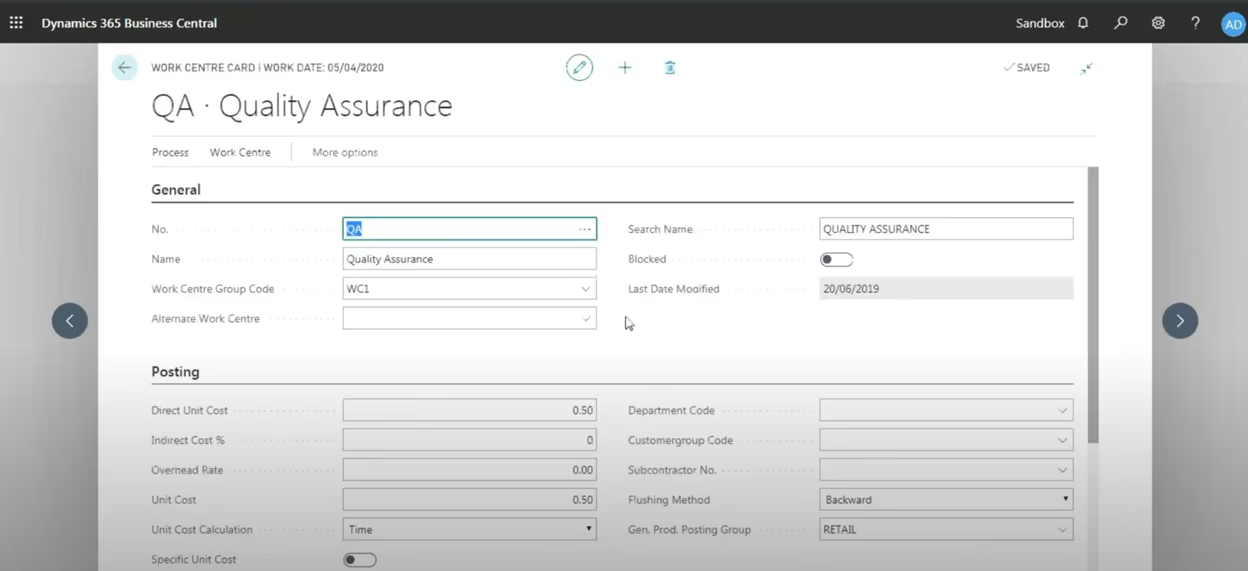
At the heart of effective Capacity Planning are properly configured work centers. These foundational units define the location, resources, and associated costs for every step in your production process.
Business Central organizes work centers into a clear, flexible hierarchy:
- Individual resources: Specific people, equipment, or tools.
- Work centers: A group of resources performing similar tasks, such as an assembly department.
- Work center groups: Collections of work centers, enabling consolidated reporting across an entire factory floor or division.
For manufacturers requiring granular detail, machine centers are assigned within a work center to track individual resource capabilities and efficiency. This setup allows you to evaluate capacity at the individual machine level while still rolling up data for departmental analysis.
Configuring work centers for optimal performance
Each work center in Business Central offers extensive flexibility in defining operational parameters.
- Capacity settings allow you to define hours of availability per day or week, adjust for efficiency factors such as lunch breaks or changeover time, and apply shop calendars that account for holidays, maintenance schedules, or planned downtime.
- Cost tracking capabilities enable you to assign both direct and indirect costs to each work center, including labor rates, machine operating costs, and overhead allocations. This granular cost tracking ensures you calculate accurate production costs that reflect the true expense of manufacturing each item.
- Routing links tie work centers to specific routing steps, streamlining the flow of components through your production process and ensuring that materials arrive at the right place at the right time.
These configuration options allow you to customize work centers to precisely match your specific production environment, creating a scalable system that grows with your business.
Calendars and work shifts
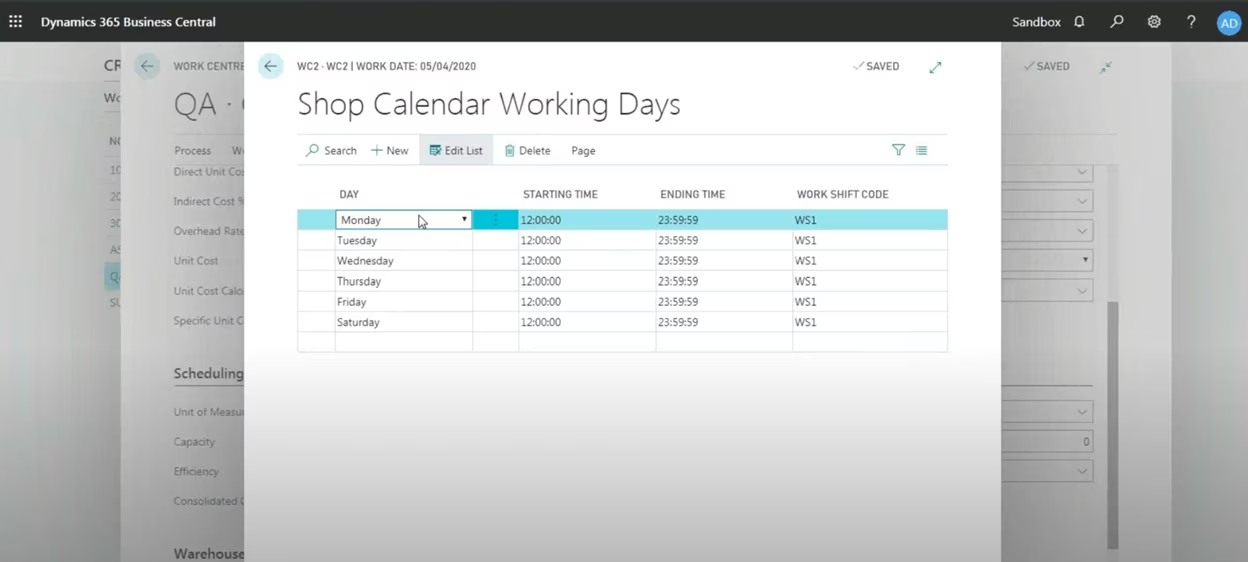
Capacity planning extends beyond simply defining work centers—it requires configuring calendars and work shifts that accurately reflect when those resources are available. Business Central’s shop calendar functionality allows you to schedule work centers for specific operating hours and days, whether that’s a standard 8-hour day shift, a 12-hour shift running from noon to midnight, or a complex multi-shift operation running Monday through Saturday.
The system automatically accounts for non-working days and holidays, adjusting capacity calculations to ensure production loads are allocated accurately based on actual resource availability. Different work centers can maintain unique calendars, providing granular control over production timing. This flexibility proves particularly valuable for manufacturers operating with varying shifts, seasonal schedules, or production lines with different operating patterns.

Ready to optimize your production workflow?
If your current Capacity Planning methods are failing to keep pace with demand, the complexity of implementation can be a barrier. Talk to an experienced manufacturing expert who can guide you through optimizing your routing, centers, and scheduling processes in Dynamics 365 Business Central.
Production scheduling and load management
Efficient production scheduling forms the backbone of capacity planning in Business Central, ensuring that production loads are distributed effectively across work centers and machine centers. The system tightly integrates scheduling with capacity planning to predict production timelines, optimize resource allocation, and prevent bottlenecks that disrupt workflow.
Understanding production order stages
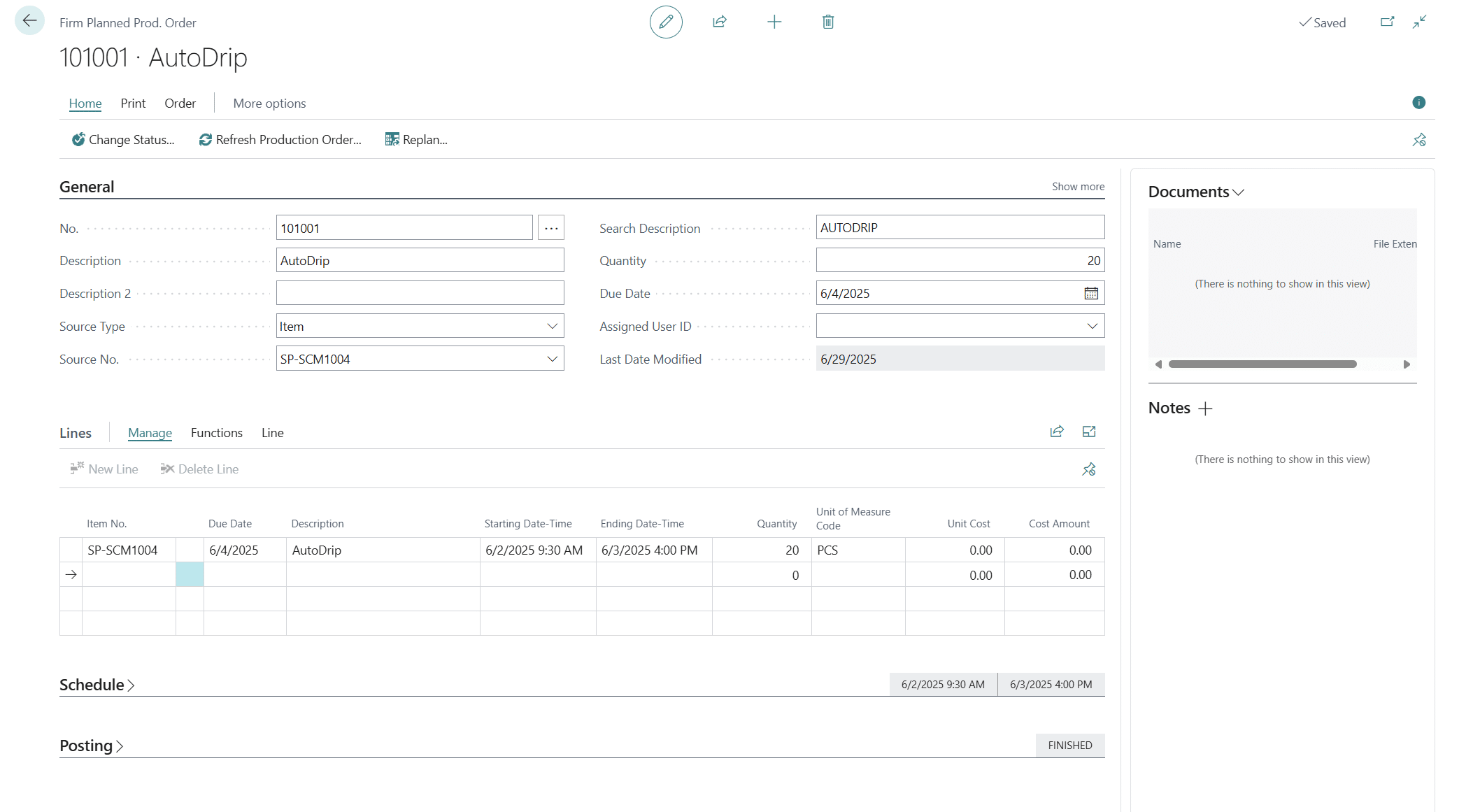
Production scheduling in Business Central revolves around three distinct stages, each impacting how load is calculated and displayed: planned, firm planned, and released production orders.
When a production order exists in the planned stage, it functions as a placeholder that doesn’t consume actual capacity in the system. This stage proves useful for initial planning activities without locking down resources or committing to specific timelines. Once a production order transitions to firm planned status, the system begins allocating capacity to specific work centers and machine centers, providing visibility into how that order will impact your production floor.
The released stage indicates that the production order is now actively consuming resources on the shop floor. At this point, the system schedules the order based on capacity availability, shop calendars, and routing configurations, with all materials allocated and the production timeline firmly established.
Understanding these distinctions allows you to manage production schedules more effectively, maintaining flexibility where needed while ensuring committed orders receive the resources required for on-time completion.
Visualizing production loads
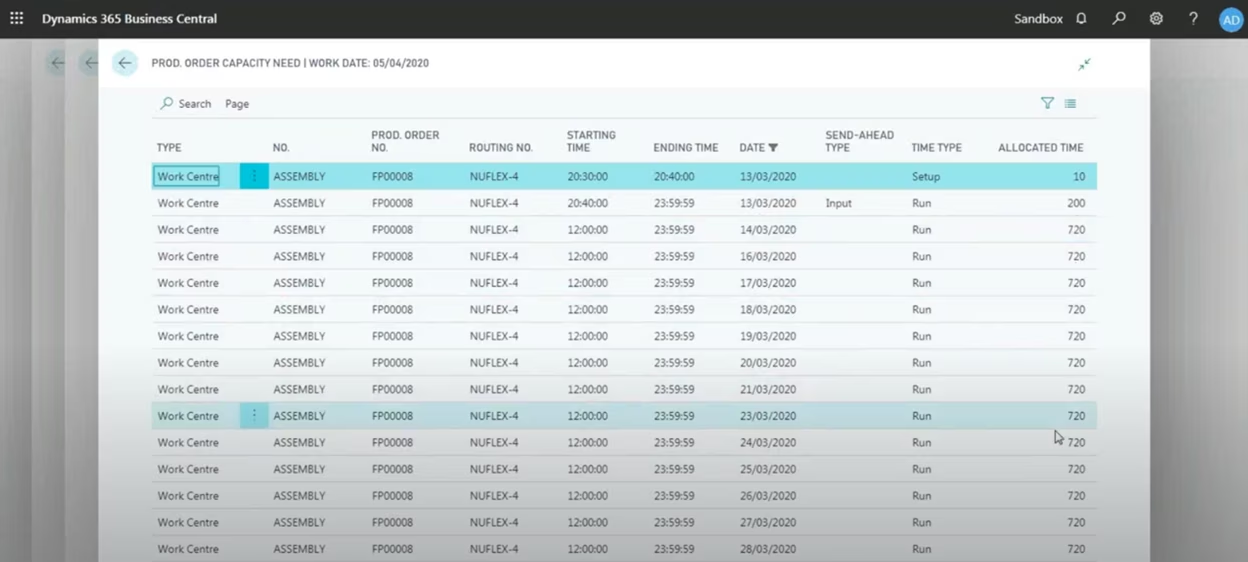
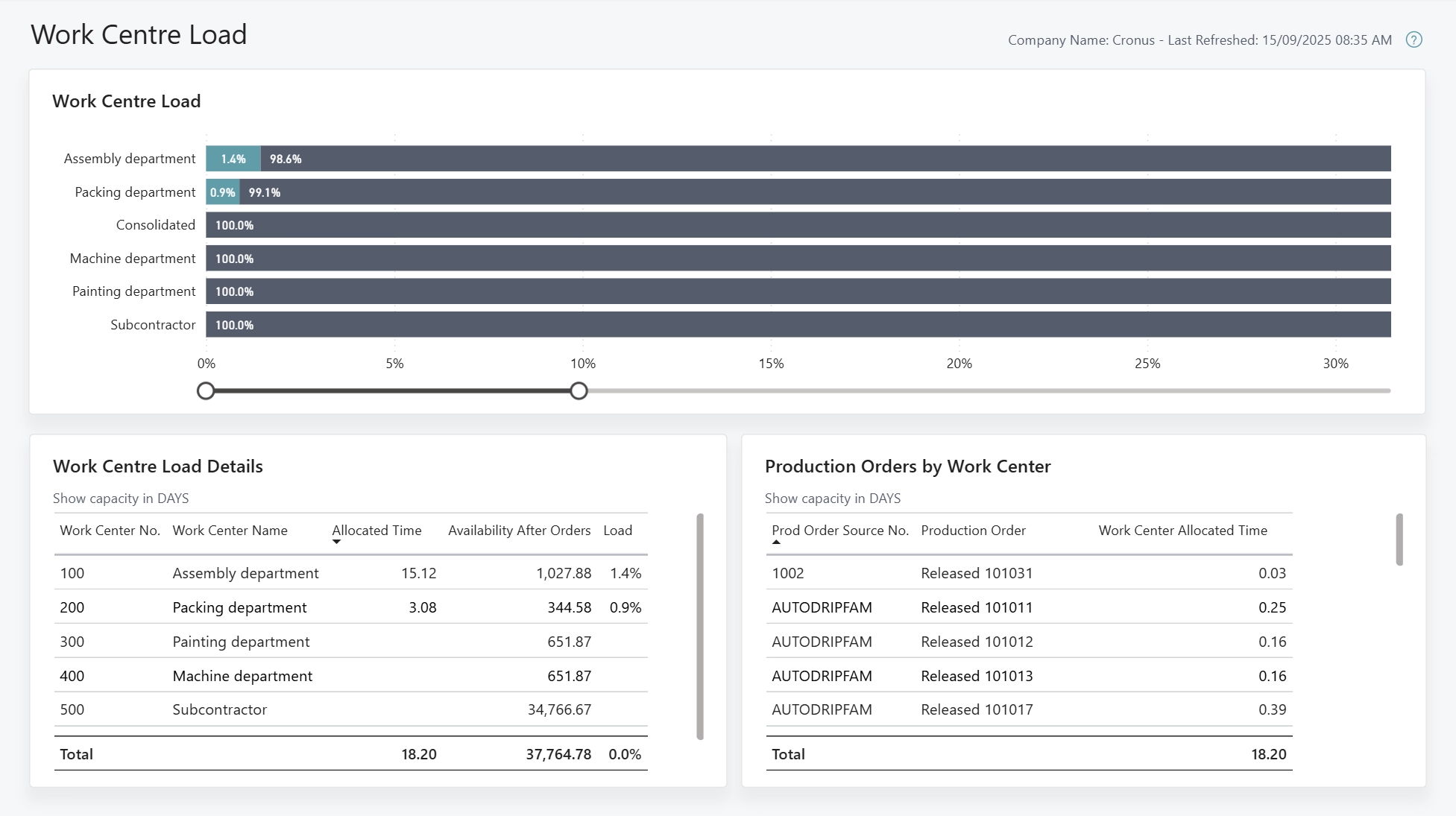
Business Central’s work center load analysis provides real-time visibility into how much work is scheduled for each work center over any given time period. You can drill into specific work centers to identify which production orders are consuming capacity, see allocated time for each operation, and predict where capacity shortages may occur.
This visibility enables proactive management—if an assembly line is overloaded, you can reassign tasks to underutilized resources, adjust schedules to distribute work more evenly, or prioritize urgent production orders to ensure critical deadlines are met. The system automatically recalculates loads based on any changes, providing immediate feedback on how adjustments impact overall capacity.
Dynamic load adjustments
One of Business Central’s standout capabilities is the ability to make real-time adjustments to production loads. If a work center becomes overburdened or experiences unexpected delays, you can shift production to other available centers through the work center capacity load screen. This flexibility allows manufacturers to react quickly to production changes without disrupting overall schedules.
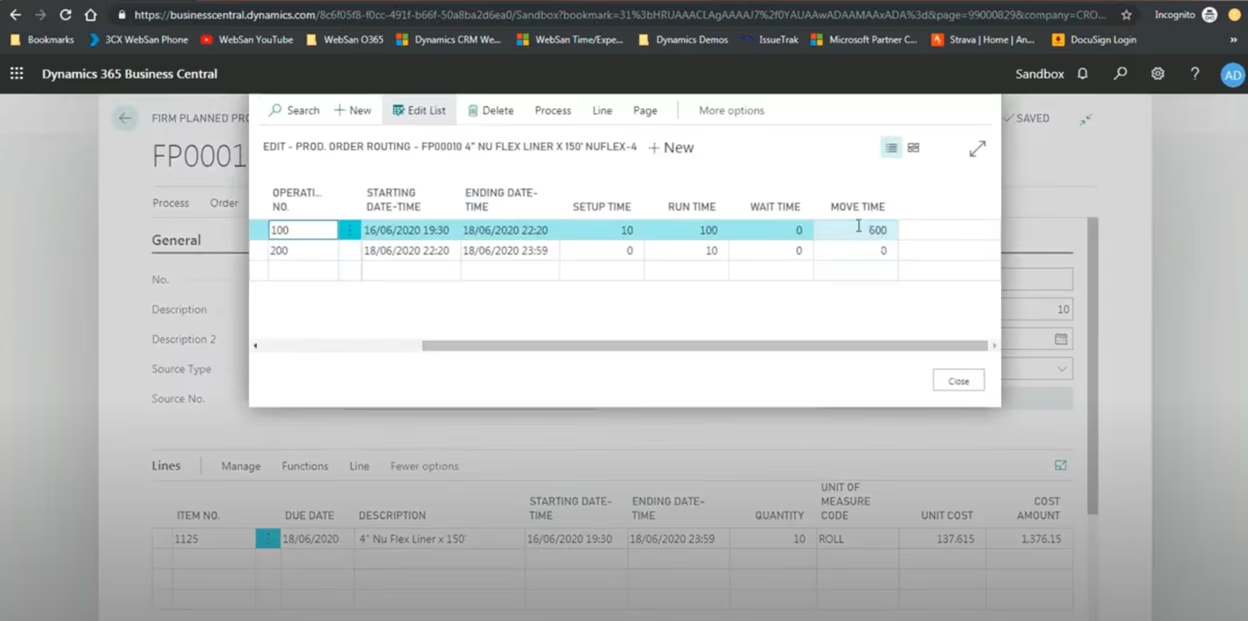
The system supports configuration of move time and wait time parameters, allowing you to factor in delays between work centers. Move time accounts for the physical transportation of materials between operations, while wait time represents idle periods before the next process begins. These parameters prove particularly valuable when a job must wait for quality assurance inspection, additional processing, or other sequential dependencies before advancing to the next production phase.
Adjustments to production orders are reflected immediately in load reports, providing real-time insight into how changes impact overall production capacity and resource utilization.
Adjusting schedules and optimizing capacity
The ability to dynamically adjust production schedules separates efficient manufacturers from those constantly fighting production delays. Business Central enables real-time schedule optimization, ensuring resources are utilized effectively and bottlenecks are minimized before they impact delivery commitments.
Real-time scheduling adjustments
Whether you’re shifting production due to machine maintenance, accommodating a rush order, or responding to unexpected delays, Business Central allows you to modify firm planned and released production orders instantly. You can adjust start and end dates, redistribute workloads across available work centers, and optimize capacity usage without disrupting your entire production line.
When you modify a production order, the system immediately recalculates capacity loads and redistributes them across the shop floor. This visibility helps prevent overloading work centers while identifying available capacity that can be leveraged for new orders or rush jobs.
Managing buffer times and wait times
Beyond simple date adjustments, Business Central supports sophisticated configuration of buffer times and wait times to optimize production flow. Buffer time refers to the gap between production steps that accounts for unexpected delays or preparation activities, while wait time represents the idle period before the next process begins.
Configuring these parameters directly within routing setup allows you to smooth production flows between work centers, prevent bottlenecks during peak production periods, and increase overall throughput by minimizing idle time. For example, if quality assurance is running behind schedule, adjusting wait times prevents idle machine centers downstream while maintaining efficient resource utilization.
Capacity load reporting for optimization
The capacity load report serves as one of the most powerful tools for capacity optimization in Business Central. This report provides a clear, graphical view of current work center loads, helping you identify bottlenecks and underutilized resources at a glance.
When dates or routing configurations change, the report updates instantly to reflect new capacity loads. This real-time feedback proves especially valuable for planning future production, as it clearly shows which work centers are overloaded and where spare capacity exists. Armed with this information, you can make proactive adjustments to prevent delays and optimize output before problems arise.
Reporting and analytics for capacity planning
Real-time visibility into production capacity drives informed decision-making and workflow optimization. Business Central empowers manufacturers with powerful reporting and analytics tools to track production loads, identify bottlenecks, and make adjustments that boost efficiency and improve throughput.
Key capacity planning reports
Business Central provides several essential reports that give you complete visibility into your production capacity:
- Work center load report: Provides a graphical representation of capacity consumption over time, displaying allocated capacity for each work center broken down by day, week, or custom time periods. You can drill down into specific work centers to view which production orders are occupying capacity and make necessary adjustments based on actual versus planned loads.
- Capacity utilization report: Measures the percentage of available capacity currently in use, helping you identify opportunities for optimization. If a work center consistently operates at 70% capacity, it may indicate opportunities to take on additional production. Conversely, operation above 100% capacity signals an overload that could lead to delays and quality issues.
- Load report: Highlights work centers running at or above maximum capacity, providing early warning of potential bottlenecks. By visualizing these overloads, you can redistribute workloads to less busy work centers, adjust production schedules to balance capacity across your facility, or evaluate whether additional resources are necessary.
Advanced analytics with Power BI integration
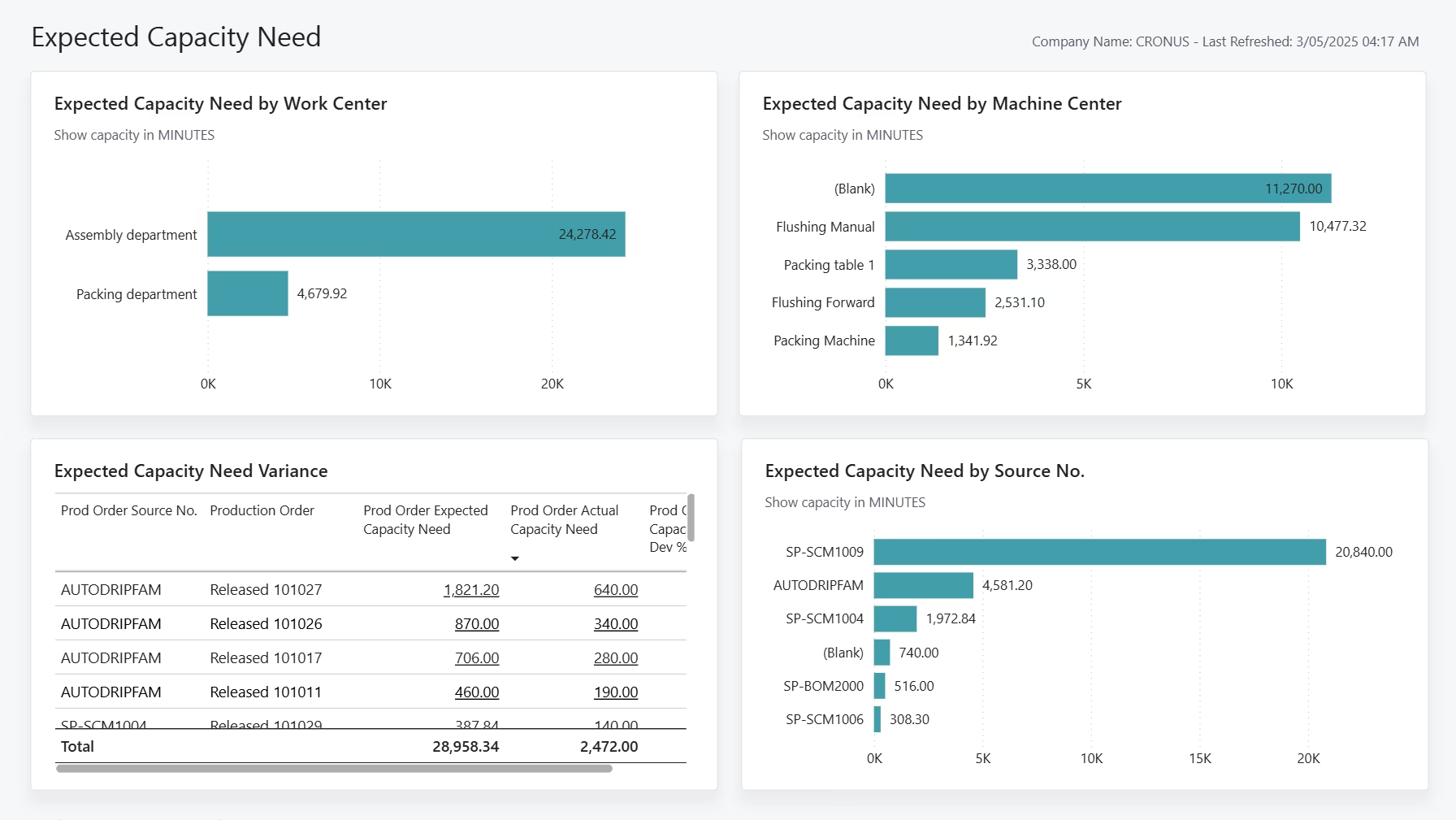
While Business Central offers robust native reporting, integrating with Power BI provides interactive dashboards and advanced data visualization. With Power BI, you can visualize long-term capacity trends, identify seasonal patterns in production demand, and create predictive models that anticipate capacity shortages before they occur. This enhanced capability helps you optimize production schedules based on both real-time data and historical trends, supporting decisions about expanding production facilities, adding new work centers, or investing in additional equipment—all critical factors in maintaining competitive advantage.
See capacity planning in action
This video walks through how to configure capacity, work centers, machine centers, and calendars—the foundation for accurate planning and scheduling.

Next steps
Capacity planning is only one part of building a reliable and scalable production environment. Whether you need help optimizing your setup, training your team, or implementing advanced planning tools, a trusted partner can ensure your system is built for long-term operational success.
Rand Group provides comprehensive implementation, support, and training services to help manufacturers leverage the full power of Dynamics 365 Business Central. If you’re ready to improve capacity planning, scheduling accuracy, and production efficiency, contact us today.