Dynamics 365
 Power Platform
 Dynamics
 Cloud & Productivity
Dynamics 365 Business Central fall 2026 update: What’s new

Microsoft Dynamics 365 Business Central is getting another round of updates for Fall 2026, with a strong focus on AI-assisted finance processes, easier reporting, and manufacturing improvements. The Business Central 2026 release wave 2 update (version 29.0) includes new and updated functionality across Copilot and agents, reporting, supply chain management, ecommerce, finance, development, and other areas.
This release arrives as Microsoft changes how it communicates future Dynamics 365 updates. Starting in September 2026, newly committed Dynamics 365 and Power Platform roadmap items are moving to the AI at Work roadmap instead of the traditional twice-yearly release plan publishing model. This changes how organizations discover upcoming functionality, but it does not mean regular product updates are ending. Learn more about the changes to the Dynamics 365 roadmap and Microsoft AI at Work roadmap.
There are many new Business Central features included in the Fall 2026 release, and this blog does not cover every change. Instead, we are focusing on several updates that stand out for businesses using Business Central for accounts payable, employee expenses, reporting, and manufacturing.
Quick answer: What is new in the Business Central 2026 wave 2 update?
The Business Central 2026 update introduces improvements to Payables Agent purchase order matching, several new Expense Agent capabilities, expanded Word-based report design, and stronger subcontracting processes. Payables Agent, Word reporting, and the subcontracting improvements covered below are generally available, while Microsoft currently lists the Expense Agent enhancements as public preview.For Business Central users, the larger theme is practical process improvement. Finance teams get more support for repetitive invoice and expense work. Users responsible for documents and reporting have more control over layouts. Manufacturers gain new tools for coordinating work performed by subcontractors.
Payables Agent improves purchase order matching
Microsoft continues to expand AI agents in Business Central, including the Payables Agent. The agent helps automate parts of accounts payable by working with incoming vendor invoices and Business Central purchasing data. Microsoft has improved how Payables Agent matches purchase invoice information to purchase order lines. The agent can now use line amount and expected receipt date as additional information when identifying the correct purchase order line.
Line amount can be especially useful when matching service-related purchase lines where quantity alone does not provide enough information. Expected receipt date gives the agent another way to distinguish between similar purchase order lines. Microsoft has also improved warnings when Payables Agent creates an invoice draft. Warnings can now identify differences in amounts as well as quantities. These warnings provide information for the user rather than automatically blocking draft finalization.
Why improved purchase order matching matters
Purchase order matching can require significant manual review when invoices, receipts, and purchase orders do not line up exactly. Adding more information to the matching process can help Payables Agent identify the right records and focus user attention on exceptions.
For an accounts payable team, that can mean:
- Less time spent comparing similar purchase order lines
- Better visibility into quantity and amount discrepancies
- More accurate first-pass matching
- More attention on invoices that actually require review
The change does not remove the need for finance controls or user oversight. Instead, it gives Payables Agent more Business Central information to use during the matching process. For a broader look at Microsoft’s AI capabilities, learn more about AI agents in Dynamics 365 Business Central.
Expense Agent adds more controls and automation
Employee expense management has traditionally been an area where many Business Central organizations relied on third-party applications. Microsoft is expanding native expense management capabilities, including expense reports and AI-assisted processing through Expense Agent. This gives businesses additional options for managing employee expenses within their ERP environment and potentially reducing their reliance on separate systems.
Expense Agent also receives several updates this fall. Unlike the Payables Agent improvement above, Microsoft currently lists these Expense Agent capabilities as public preview. Organizations should consider that status before depending on them for production expense processes. The Fall 2026 updates cover expense approvals, duplicate prevention, mileage, tax processing, localization, and project assignments.
AI-driven approvals help reviewers evaluate expenses
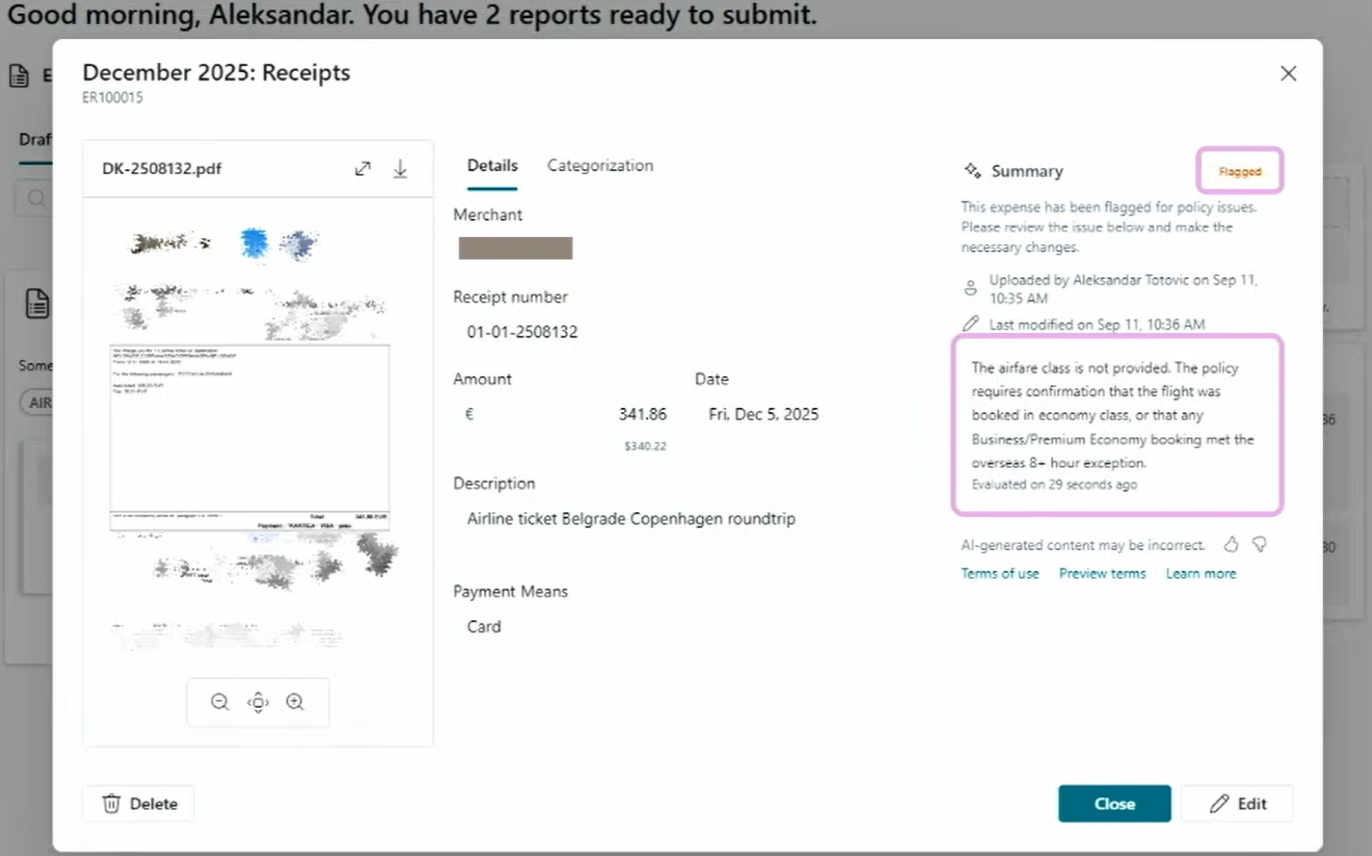
One of the more significant changes is AI-driven approvals.
Expense Agent can evaluate submitted expense reports against approval policies written in natural language. It can then provide information to the approver about possible policy violations, unusual patterns, or items that deserve closer review. The final approval decision remains with the approver.
This approach can be useful for policies that are difficult to represent with a simple dollar threshold. For example, a business may allow a certain type of travel only under specific conditions. Expense Agent can provide additional context to the person reviewing the expense.
For finance teams, the goal is not to remove approval controls. It is to help reviewers find exceptions faster and apply expense policies more consistently.
Improved duplicate prevention helps reduce reimbursement errors
Microsoft has also improved Expense Agent’s duplicate prevention capabilities. Duplicate expenses create unnecessary review work and can result in an employee receiving reimbursement twice if the duplicate is not identified. Stronger duplicate checks give finance teams another layer of control before expenses move through the reimbursement process.
Mileage calculations become more flexible
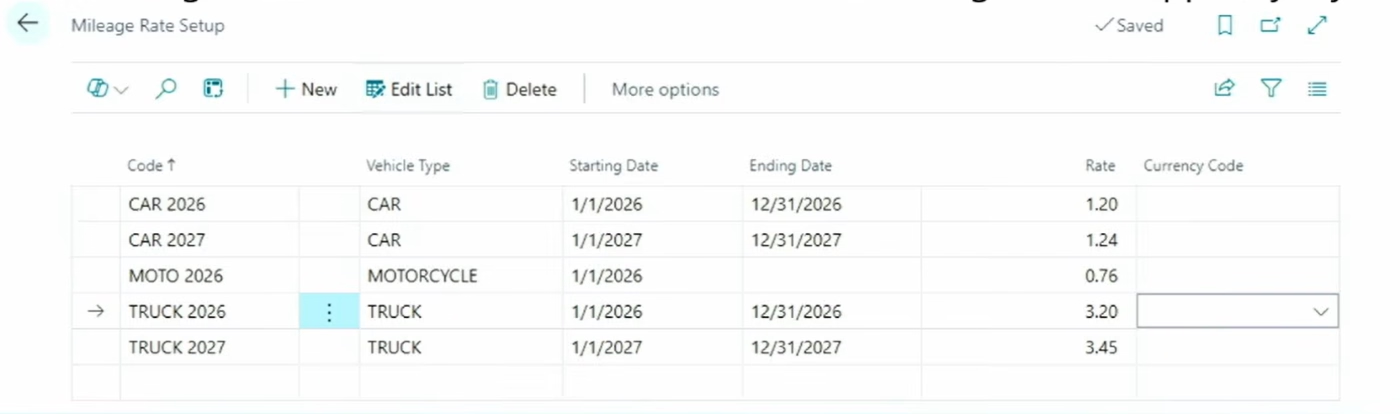
Microsoft is adding support for date ranges and vehicle types to mileage calculations. This gives organizations more flexibility when mileage rates differ based on the type of vehicle or when reimbursement rates change over time. Instead of relying on one mileage value for every situation, businesses can better align the calculation with their expense policies.
Expense Agent expands tax and localization capabilities
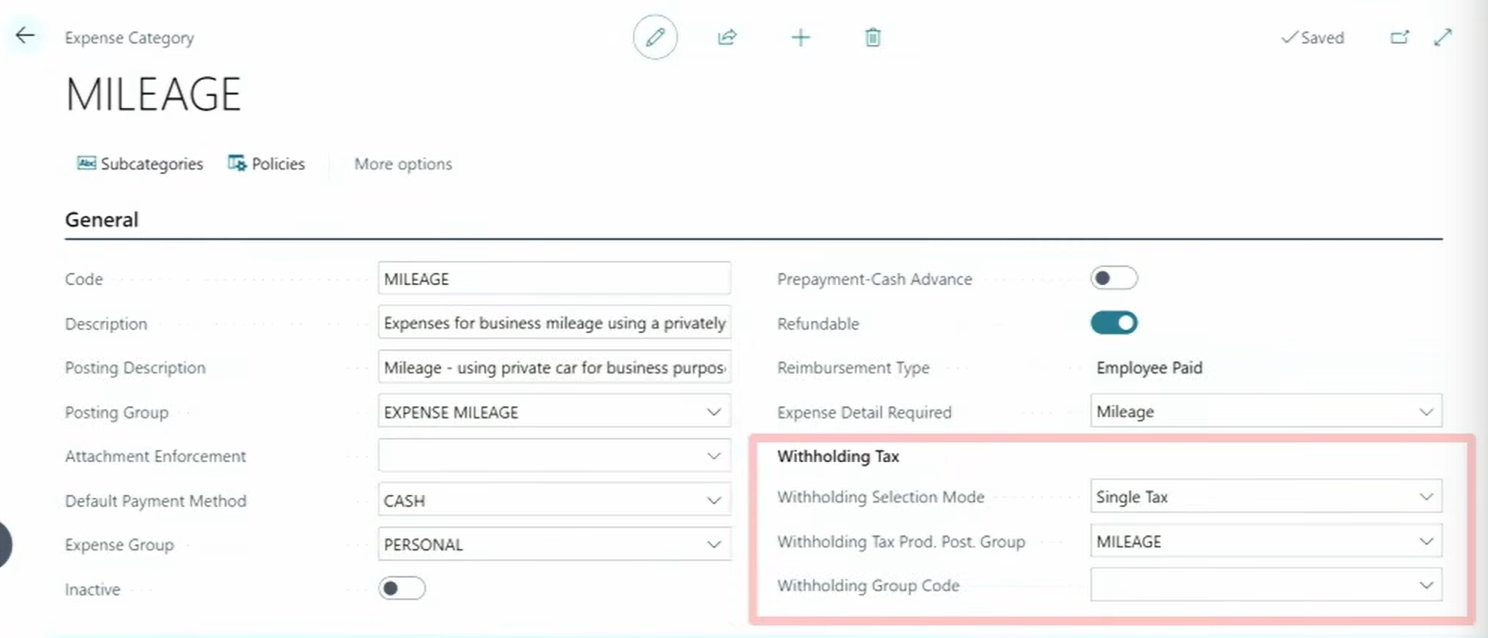
Several additional Expense Agent updates address tax and localization requirements. The public preview capabilities include:
- Calculate and report VAT from expense reports
- Calculate withholding tax automatically in expense reports
- Support more countries and languages
- Limit users in the web app to projects assigned to them
These improvements make Expense Agent more relevant to organizations with more complex expense policies, tax requirements, or project-based accounting processes. The assigned-project control is particularly useful for project expenses. Limiting employees to applicable projects can reduce coding mistakes at the point of entry and help finance teams avoid correcting project assignments later.
The updated Word add-in gives users more control over report layouts
The Fall 2026 update introduces several generally available improvements for document reporting with the updated Microsoft Word add-in. Microsoft lists new capabilities for designing document reports, themes, headers and footers, and conditional content. These features build on Business Central’s existing Word report layout capabilities and can make common document design tasks easier for users who are already comfortable working in Microsoft Word.
Design document reports with new Word controls
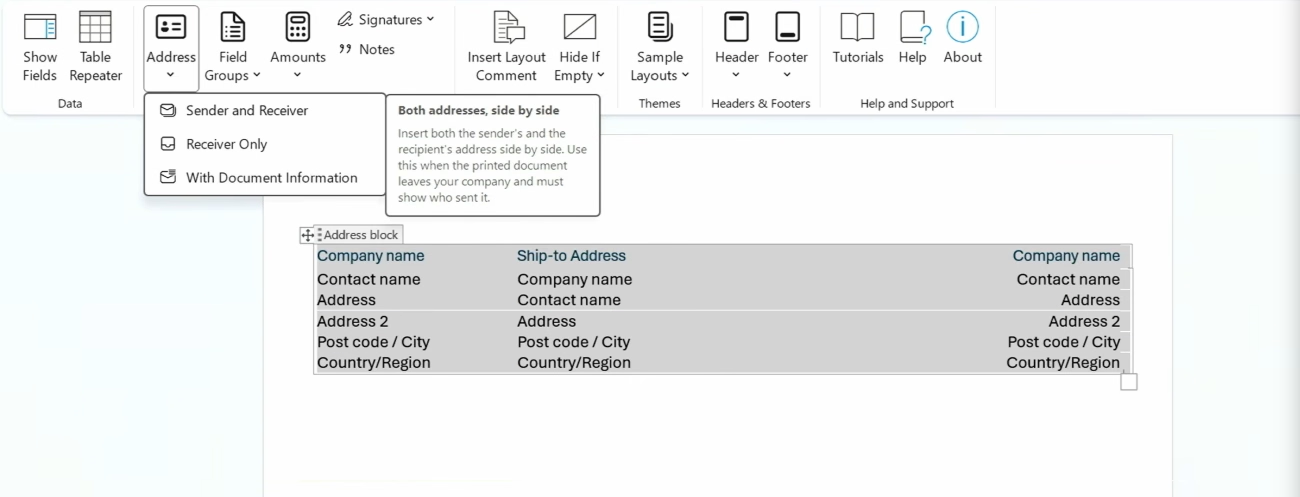
The updated Word add-in includes design controls for common parts of business documents, including:
- Addresses
- Field groups
- Amounts
- Signature lines
- Notes
These components give users more structured tools for designing documents instead of treating every layout change as a separate formatting exercise. This matters for documents such as invoices, orders, confirmations, and other reports where both Business Central data and consistent presentation are important.
Create consistent report themes
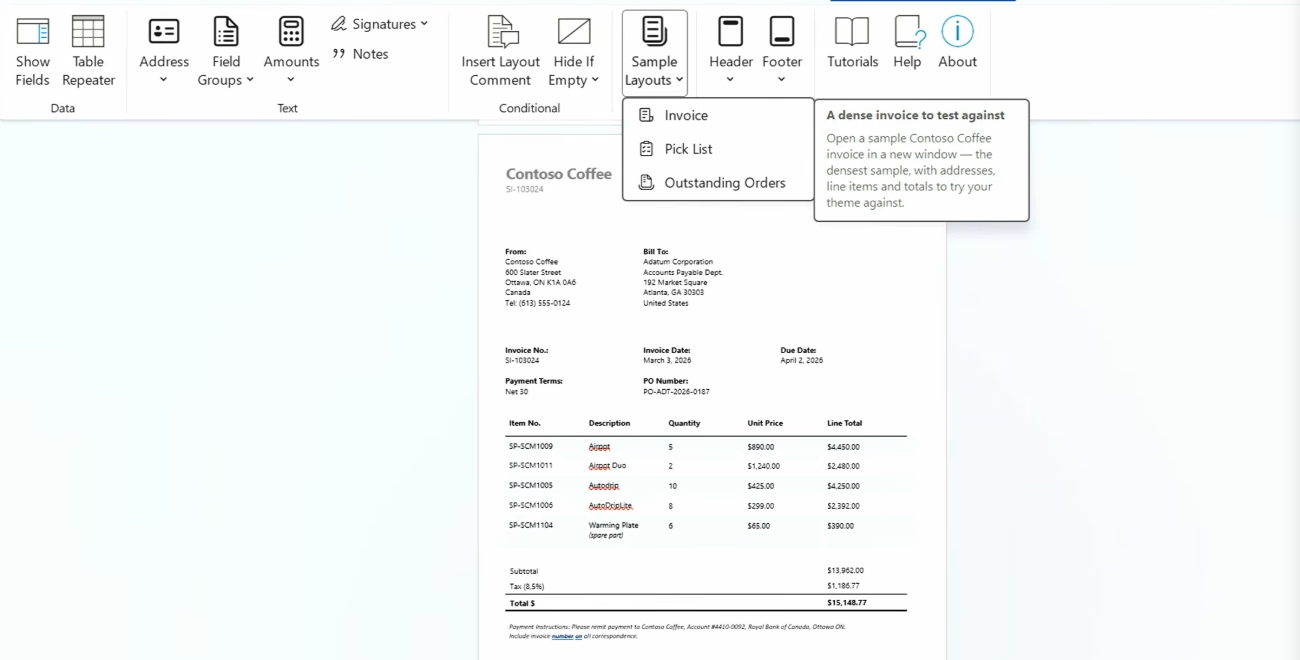
Users can also design document report themes with the updated Word add-in. Microsoft has added sample controls for common document types, including invoices, pick lists, and outstanding orders.
Themes can help organizations create a more consistent look across related Business Central documents. When a business needs to update branding or standardize how information appears, reusable design elements can reduce repetitive layout work.
Design and reuse headers and footers
The updated Word add-in also supports header and footer layout design. Microsoft provides samples that can be used for internal and external reports. Business Central separately adds the ability to reuse header and footer layouts across document reports.
For businesses that use the same company information, branding, or standard text across many documents, reusable layouts can make future changes easier to maintain.

Use conditional visibility to show information only when needed
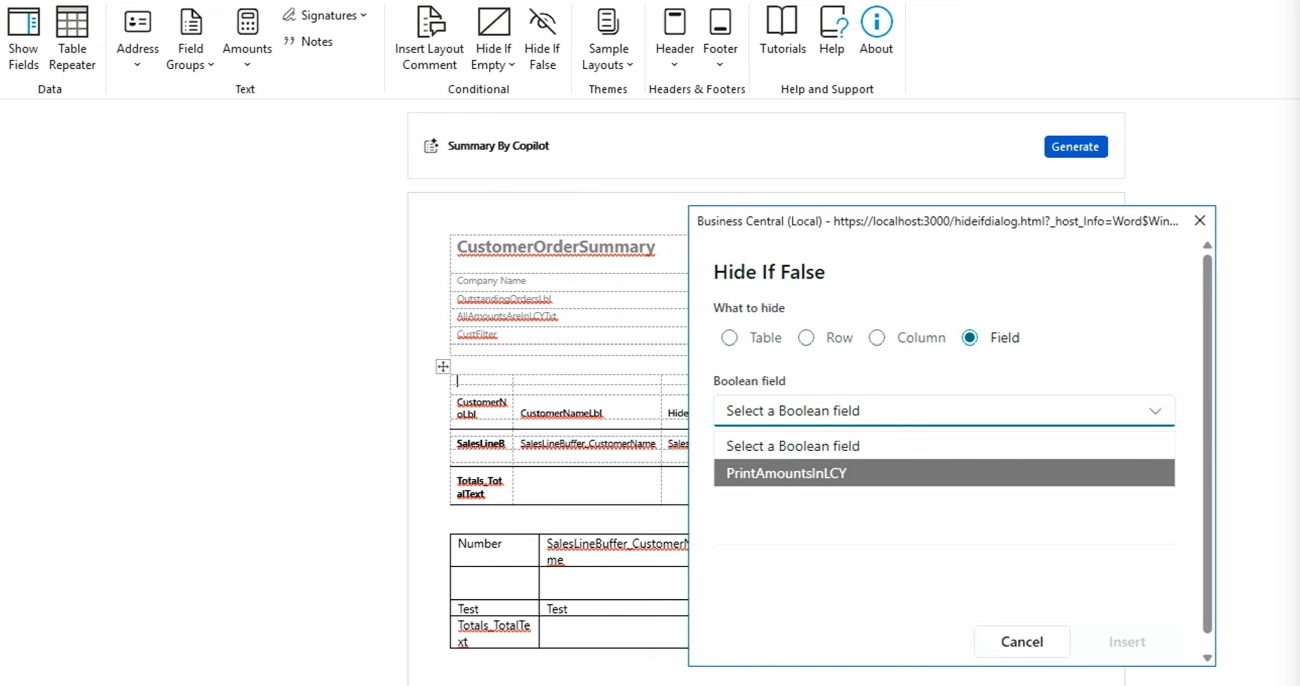
Another useful addition is conditional visibility. The updated Word add-in includes HideIf logic that can use Boolean fields in the report dataset to determine whether content appears in the finished document.
For example, an organization could use conditional logic to include a section only when a certain condition applies instead of maintaining separate layouts for every variation.
This gives users more flexibility, although advanced reports may still require report development or changes to the underlying dataset. For more information about the reporting options already available, explore Microsoft Dynamics 365 Business Central reporting capabilities.
Implementation note: Microsoft also lists the New Document Report Experience as a new optional feature and notes that it is disabled by default. Organizations evaluating the new reporting experience should review their Business Central Feature Management settings as part of testing.
Business Central expands subcontracting capabilities
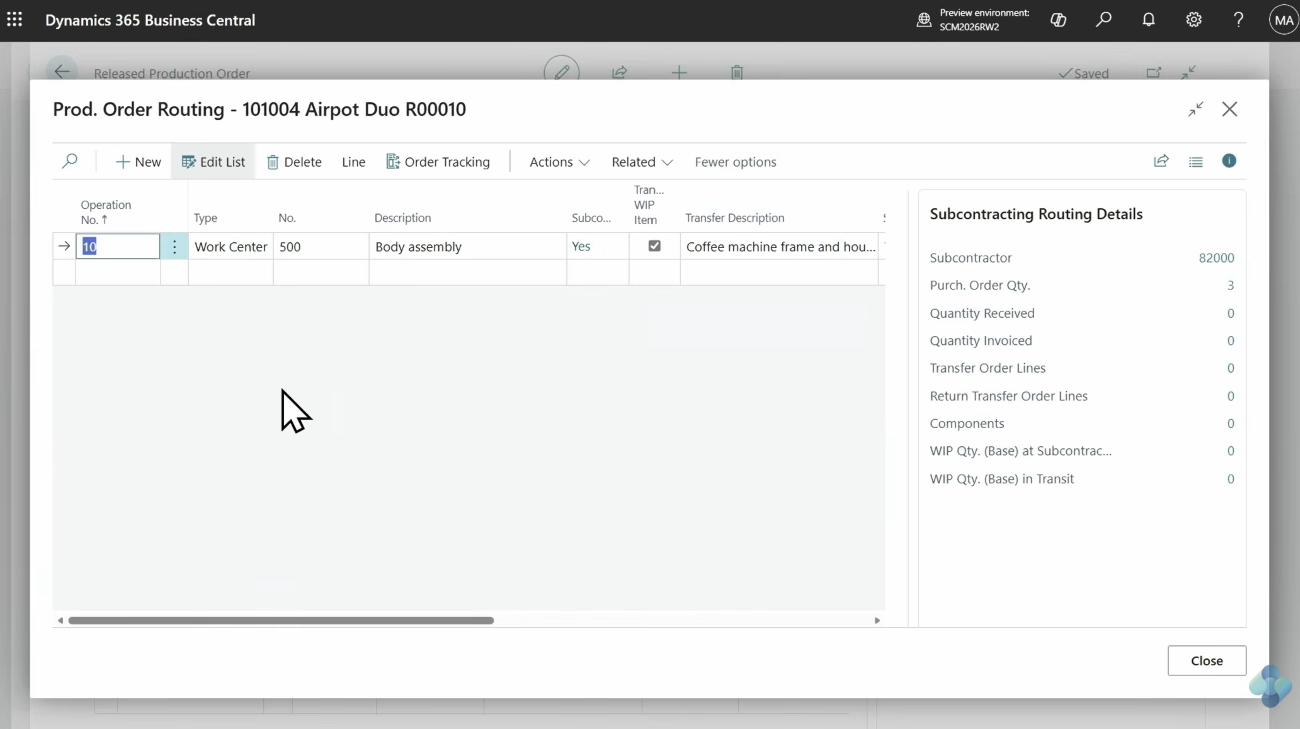
Manufacturers that send part of their production process to outside vendors also receive several meaningful improvements. Business Central already supports subcontracting as part of manufacturing routings and production processes. The Fall 2026 update adds new functionality for instructions, setup, and warehouse activity.
Carry subcontracting instructions into purchase orders
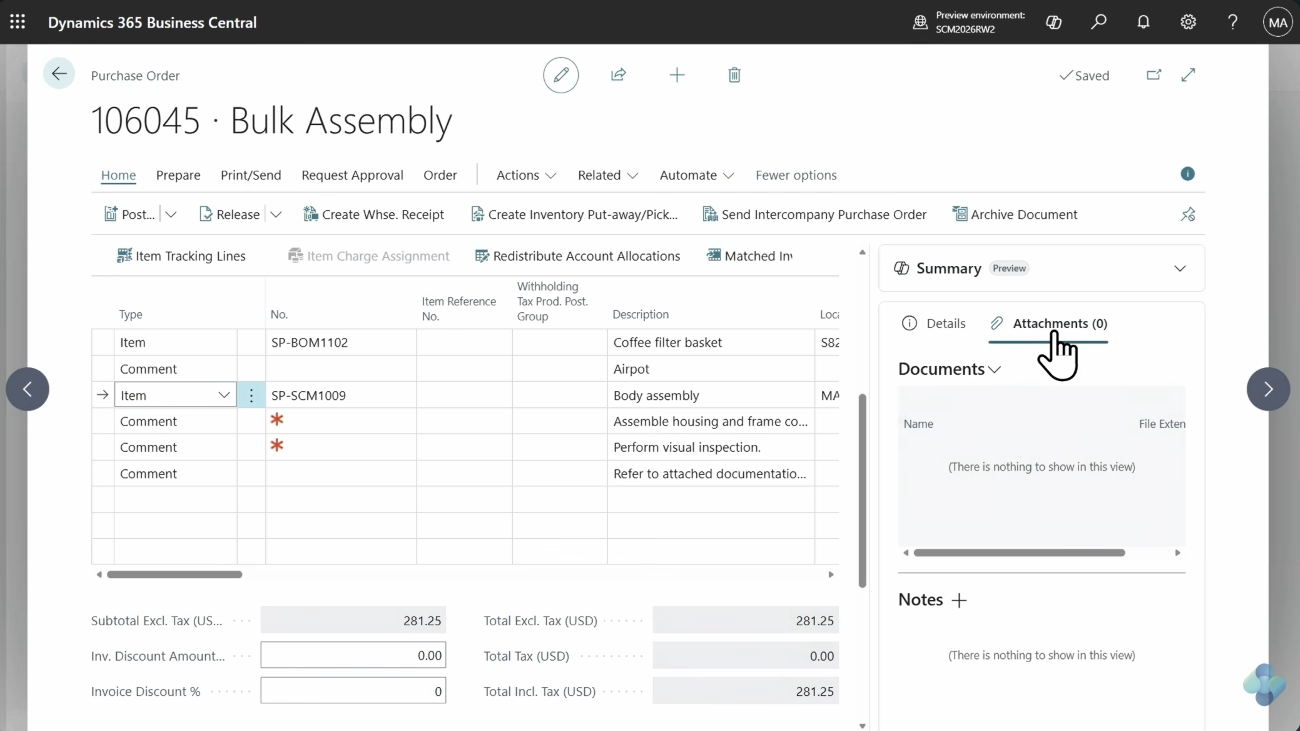
Clear information is critical when an outside vendor performs part of the production process. Business Central can now carry subcontracting comments and attachments from the production process into the related purchase order. This helps preserve production context as work moves from the routing and production order into purchasing.
Microsoft’s process allows subcontracting comments to move through several steps. Comments can originate from a standard task or routing operation, move to the production order routing operation, and then become descriptive purchase lines when the subcontracting purchase order is created.
The operational benefit is straightforward. Purchasing teams do not need to manually reenter the same production instructions on the subcontracting purchase order. That reduces duplicate work and lowers the chance that important instructions differ between production and purchasing documents.
Supporting documents can also move from the routing into related subcontracting purchase lines when the applicable attachment settings are enabled. Organizations should still review how attachments will reach vendors because Microsoft notes that purchase-line attachments are not automatically included in vendor email messages.
Set up and explore subcontracting more easily
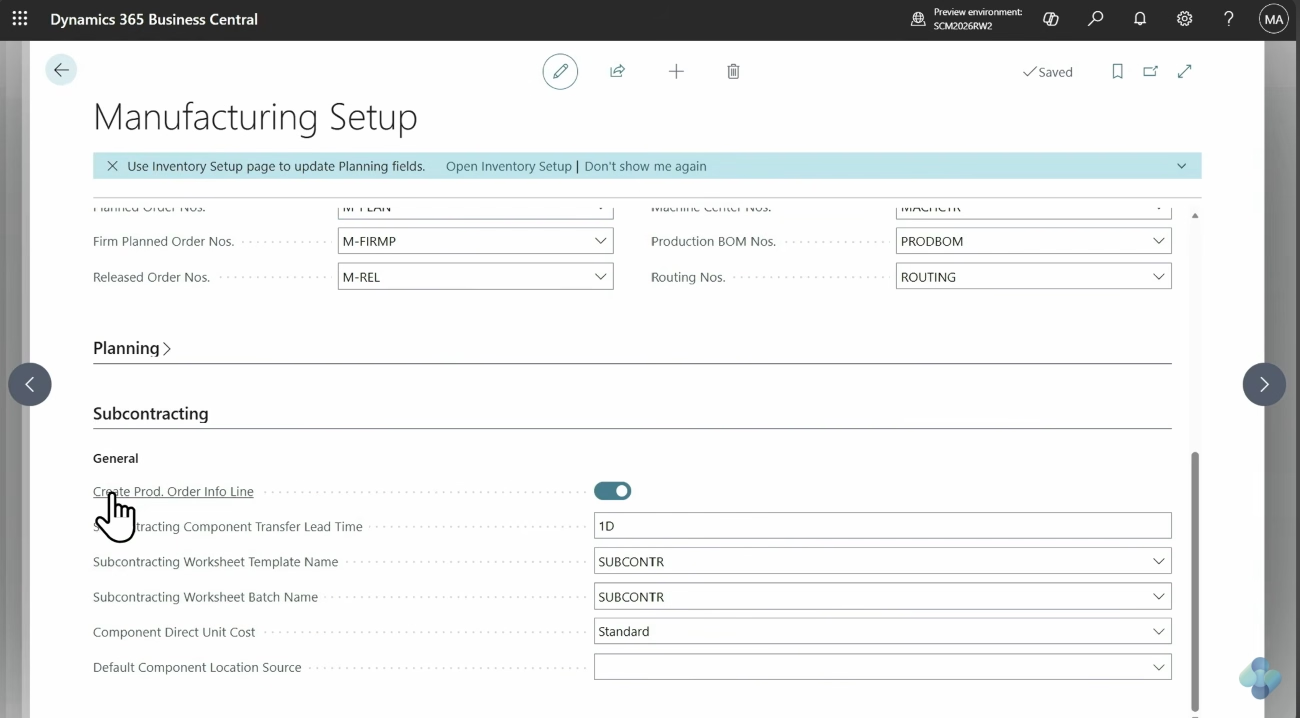
Microsoft also includes improvements that make subcontracting easier to set up and explore. The update provides more guidance around configuration so organizations can identify missing setup and better understand the subcontracting process.
That can be useful for manufacturers evaluating subcontracting in Business Central for the first time. Subcontracting touches production routings, work centers, vendors, purchasing, inventory, and costing. A clearer setup experience can make it easier to understand how those pieces work together before deploying the process more broadly.
Use inventory put-aways and picks for subcontracting
Business Central also adds support for inventory put-aways and picks in subcontracting scenarios. This provides another connection between subcontracting and Business Central warehouse processes. Manufacturers can better coordinate outsourced production with inventory activity instead of treating warehouse and subcontracting processes as separate workflows.
For organizations that rely heavily on outside processing, this can help keep materials, production activities, and inventory movements aligned. To see how subcontracting fits into the broader manufacturing process, learn more about subcontracting in Dynamics 365 Business Central manufacturing.

Evaluate the Business Central 2026 update for your organization
Not every Business Central 29.0 feature will have the same impact on every organization. Rand Group can help you evaluate the latest capabilities, determine which are relevant to your environment, and identify where new functionality could improve finance, reporting, or manufacturing processes.
What these Fall 2026 updates mean for Business Central users
The Fall 2026 release continues Microsoft’s focus on practical improvements across finance, reporting, and manufacturing. Payables Agent gains more information for purchase order matching, Expense Agent expands its support for expense management, the updated Word add-in provides more control over business documents, and manufacturers gain new subcontracting capabilities.
The most important consideration is not whether every new feature is available, but whether it addresses a meaningful process need. Organizations should also distinguish between generally available and preview functionality when deciding what to test or adopt.
Work with an experienced Business Central partner
Evaluating a Business Central update also means considering how new functionality affects existing workflows, permissions, integrations, extensions, reporting, and users. Rand Group has worked with organizations on Microsoft business applications since 2003. Our teams provide Business Central implementation, integration, development, reporting, training, support, and AI services. That experience helps organizations assess new capabilities in the context of their finance, operations, and manufacturing requirements.
Key takeaways
The Business Central 2026 update brings several practical improvements that organizations should evaluate this fall:
- Payables Agent: Uses additional purchase order information, including line amounts and expected receipt dates, to improve matching.
- Expense Agent: Adds AI-driven approvals, duplicate prevention, mileage enhancements, tax capabilities, localization, and project controls in public preview.
- Word add-in: Expands document design with new controls, themes, reusable headers and footers, and conditional visibility.
- Subcontracting: Improves how instructions move into purchase orders and expands setup and inventory processing options.
- Feature readiness: Verify availability and test new functionality against your Business Central environment before wider adoption.
Frequently asked questions
What is included in the Business Central 2026 update?
The Fall 2026 Business Central update includes new and updated features across Copilot and agents, Expense Agent, reporting, finance, ecommerce, supply chain management, development, sustainability, administration, and the user experience. This blog focuses on Payables Agent, Expense Agent, the updated Word add-in, and subcontracting.
What version is the Business Central Fall 2026 update?
Business Central 29.0 starts Microsoft’s 2026 release wave 2 and contains the Fall 2026 capabilities discussed in this article.
Is Microsoft ending Dynamics 365 release waves?
Microsoft is changing how it publishes roadmap information, rather than stopping regular Dynamics 365 product updates. Starting in September 2026, newly committed roadmap content is moving to the AI at Work roadmap instead of being published through the traditional twice-yearly release plan model.
What is new with Payables Agent in Business Central?
Payables Agent can use line amounts and expected receipt dates to improve purchase order matching. Microsoft also updated draft warnings to provide more information about quantity and amount differences.
What is new with Expense Agent in Business Central?
The Fall 2026 release introduces Expense Agent enhancements for AI-driven approvals, duplicate prevention, mileage calculations, VAT, withholding tax, languages and countries, and assigned projects. Microsoft currently lists these features as public preview.
What subcontracting improvements are included in Business Central?
The update includes the ability to carry subcontracting instructions into purchase orders, improvements to subcontracting setup, and support for inventory put-aways and picks in subcontracting processes. Microsoft lists all three as generally available.
Prepare for the latest Business Central updates
The Fall 2026 updates give Business Central users new options across accounts payable, expenses, reporting, and manufacturing. Focus on the capabilities that address specific process gaps and test them against your existing configuration before broader adoption.
If you are evaluating these updates, contact Rand Group for Dynamics 365 Business Central consulting and support to determine which new capabilities make sense for your organization.