Dynamics 365
 Power Platform
 Dynamics
 Cloud & Productivity
Subcontracting in Microsoft Dynamics 365 Business Central manufacturing

Subcontracting is an essential part of many modern manufacturing strategies, allowing organizations to leverage external vendors for specialized capabilities, overflow capacity, or processes not performed in-house. Managing outsourced operations, however, requires visibility, accurate cost tracking, and precise coordination of materials. Microsoft Dynamics 365 Business Central for Manufacturing delivers a fully integrated subcontracting framework that embeds outsourced operations directly within routing, production orders, inventory management, and cost accounting.
Business Central ensures that every outsourced operation is planned, executed, and costed using the same data and workflow structures as internal manufacturing. This blog provides a complete, consolidated breakdown of subcontracting in Business Central—what it is, how to set it up, how execution works through production orders, and how advanced real-world scenarios can be supported.
Understanding subcontracting in Dynamics 365 Business Central
Subcontracting in Business Central allows manufacturers to outsource one or more steps in their production routing to a vendor. This may include finishing, specialized treatment, assembly, or any operation that the organization chooses not to perform internally. While the work occurs outside the manufacturer’s facility, ownership of the inventory remains with the manufacturer at all times.
Business Central handles subcontracting by enabling users to assign a routing step to an outsourced work center, which is linked to a specific vendor. When the production order reaches this step, the system prompts the creation of a subcontracting purchase order. Because the step is embedded in the routing, subcontracting becomes a seamless part of the production execution process.
Organizations typically use subcontracting when:
- They lack the specialized equipment required for a process.
- A vendor is better suited to perform a specific task.
- Internal capacity is insufficient to meet demand.
Business Central supports three subcontracting scenarios:
- Vendor provides only the service – The manufacturer sends materials to the vendor and pays only for the outsourced operation.
- Manufacturer provides components to the vendor – Additional materials (such as adhesives or brackets) are required for the vendor to complete the operation.
- Vendor provides both materials and service – The vendor supplies some or all components and performs the operation.
By integrating subcontracting directly into production routing, Business Central ensures accurate costing, maintains inventory integrity, and keeps outsourced steps visible within production schedules.

Ready to optimize your manufacturing operations?
Rand Group helps manufacturers configure and optimize subcontracting processes that match real-world production needs. Our Business Central manufacturing specialists ensure your subcontracting workflows align with your cost structure, vendor relationships, and operational strategy.
Setting up subcontracting operations
Before subcontracting can be executed through production orders, manufacturers must configure several foundational components: routing modifications, outsourced work centers, vendor associations, and component handling rules.
Step 1: Add a subcontracted operation to the routing
Routing defines the sequence of steps required to produce an item. To outsource one of those steps:
- Insert a new routing line for the subcontracted process.
- Designate it as an external operation by assigning an outsourced work center.
For instance, when introducing a subcontracted step into the routing, this operation can be added without specifying run time or setup time. While including times is optional in Business Central and may be useful for planning purposes to reflect lead time or turnaround time, they can be left out if the vendor charges by unit. In such cases, cost is determined per unit rather than by time.

Step 2: Configure the outsourced work center
The outsourced work center ties the routing step to the vendor and establishes how costs will be calculated.
Important configuration fields include:
- Subcontractor No. – Identifies the vendor.
- Unit Cost Calculation – Determines whether cost is per unit or based on time.
- General Posting Group – Optional, but allows subcontracting costs to be tracked separately from internal operations.
If the vendor charges based on units, Business Central automatically calculates the subcontracting cost by multiplying the unit cost by the quantity produced.
Routing flexibility is built in. If internal capacity changes or vendor availability fluctuates, the user can override the routing within the production order to switch between internal and external operations.

Step 3: Manage component consumption at vendor locations
When a vendor requires specific materials to complete an operation, Business Central uses two tools:
- Routing link codes – Associate BOM components with specific routing steps.
- Location codes – Define where those components should be consumed.
For example, if the vendor needs packaging, inserts, or supporting materials, those components can be:
- Transferred to the vendor’s warehouse location
- Purchased directly into that location
- Replenished automatically via SKUs and planning parameters
This ensures accurate consumption and cost tracking without relying on manual adjustments.

Step 4: Subcontracting worksheet preparation
Although subcontracting is configured during setup, the actual execution occurs through the subcontracting worksheet—activated once a production order with outsourced operations is released. The worksheet is where subcontracting POs are generated and managed.

Executing subcontracting on production orders
After setup is complete, Business Central provides a defined workflow for executing subcontracting as part of the production process.
Step 1: Create a production order that includes subcontracting
When an item’s routing contains an outsourced operation, any production order for that item will automatically include that subcontracted step. A firm planned production order is created and expanded to show:
- The full BOM and material requirements
- Routing steps, including the subcontracted operation
- Estimated subcontracting cost based on the work center setup
This gives the manufacturer complete visibility into what will occur internally and what will be performed by a vendor.

Step 2: Release the production order
A production order must be released before subcontracting actions can occur. Releasing the order enables:
- Component consumption
- Execution of internal and external routing steps
- Visibility of subcontracted operations in the subcontracting worksheet
Even after the order is released, users may adjust routing steps if needed—for example, switching between internal and external resources based on capacity or vendor availability.
Step 3: Generate subcontracting requirements using the worksheet
The subcontracting worksheet evaluates all released production orders and identifies outsourced operations that require vendor engagement.
Using the worksheet:
- Users run Calculate Subcontracting.
- Business Central generates lines that represent subcontracting needs.
- The system may consolidate requirements for multiple production orders using the same vendor.
This consolidation reduces the number of purchase orders and simplifies vendor communication.
Step 4: Generate the subcontracting purchase order
From the worksheet, users select the required lines and choose Carry Out Action Message. Business Central then creates a subcontracting purchase order that includes:
- The vendor assigned to the outsourced work center
- The reference to the originating production order
- The quantity requiring subcontracting
- The cost based on the work center configuration
This PO is directly tied to a manufacturing operation, not a typical purchased item.
Step 5: Receive and invoice the subcontracting service
When the vendor completes the operation, the manufacturer posts the receipt and invoice for the service. Business Central records the actual cost and applies it to the production order, keeping financials and operational records aligned.

Step 6: Review the results in production order statistics
Production order statistics display:
- Actual subcontracting cost
- Actual materials and labor
- Total cost accumulated for the order
Planned and actual costs should align perfectly because all operations and components behaved as configured, providing a clear, accurate cost summary.
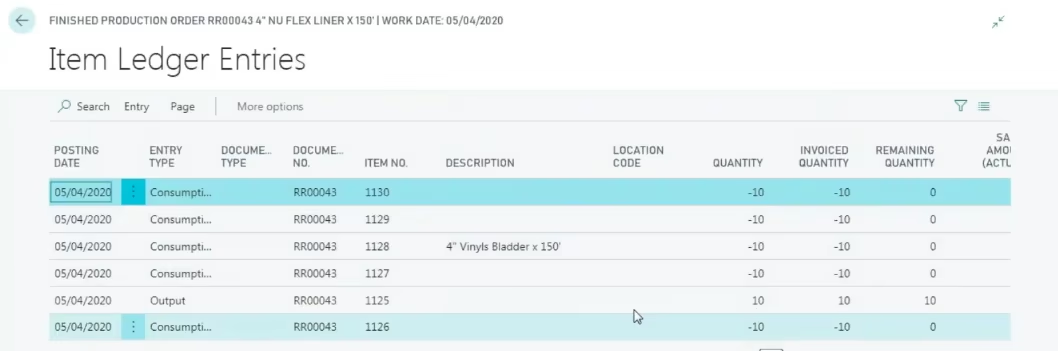
Step 7: Review ledger entries
Subcontracting charges appear primarily as capacity costs, which aligns with Business Central’s handling of outsourced operations as vendor-performed work steps. Users can inspect:
- Item Ledger Entries
- Capacity Ledger Entries
- General Ledger Entries
Posting groups ensure subcontracting costs are recorded to the appropriate accounts for reporting and analysis.
Advanced subcontracting scenarios in Business Central
Manufacturers often face complex subcontracting workflows, and Business Central supports these effectively through several scenarios below:
Scenario 1: Tracking freight costs
Shipping materials to or from a subcontractor may generate freight costs. Manufacturers can create additional routing steps, such as “Freight Out” or “Return Freight,” assign them to a vendor, and allow Business Central to generate subcontracting POs for these costs. If the service and freight come from the same vendor, Business Central may combine them on a single PO.
Scenario 2: Replenishing inventory at the vendor site
Manufacturers who frequently ship components to a vendor site can automate replenishment using:
- SKUs with Min/Max policies
- Reorder points
- MRP planning suggestions
This prevents delays caused by insufficient materials at the vendor’s location.
Scenario 3: Purchasing components directly to the vendor location
Instead of receiving materials at the manufacturer’s warehouse and transferring them to the vendor, Business Central allows direct purchasing into the vendor’s location. The manufacturer still maintains inventory ownership, even though the items never physically entered their facility.
This is particularly useful when dealing with:
- Drop shipping
- Long lead time parts
- Global vendor relationships
This allows manufacturers to manage real-world subcontracting scenarios without losing visibility or control.
Key benefits of subcontracting in Business Central
Subcontracting in Business Central provides manufacturers with a structured, integrated way to manage outsourced operations. The system ensures:
- Accurate costing tied directly to production orders
- Clear visibility into inventory at vendor locations
- Automated purchase order creation
- Support for additional component requirements
- Flexible handling of freight, replenishment, and vendor-specific workflows
- End-to-end operational traceability
Because subcontracting is embedded into routing and production orders, manufacturers maintain operational continuity while leveraging external capacity.
Business Central subcontracting explained
This video walks you through the entire process from setup to execution, with real examples and expert insights. Learn how to streamline your outsourced operations.
Next steps
Subcontracting can significantly improve manufacturing flexibility and operational efficiency when managed correctly in Business Central. Rand Group provides comprehensive implementation, training, and support services to help manufacturers build, refine, and optimize subcontracting processes across all stages of the production life cycle. Their expert guidance ensures seamless integration of vendor operations and automated workflows, enhancing transparency and control. By leveraging Rand Group’s solutions, manufacturers can confidently expand capacity while maintaining end-to-end traceability and continuity in their operations. Contact Rand Group to learn how we can support your subcontracting and manufacturing transformation.