
 Dynamics 365
 Power Platform
 Dynamics
 Cloud & Productivity
Enhance productivity with Outlook Contact Insights in Dynamics 365 Business Central

For many businesses, Outlook is the hub of daily operations. Employees communicate with customers, manage vendor relationships, and coordinate projects all through their inbox. The challenge arises when information stored in your ERP system is needed to answer a question or resolve an issue. Traditionally, this meant switching between Outlook and Business Central, searching for records, and piecing together data a process that slows down response times and introduces inefficiencies.
With Outlook Contact Insights in Microsoft Dynamics 365 Business Central, those challenges disappear. Users gain real-time visibility into customer and vendor information without ever leaving Outlook. By embedding ERP insights directly into the tools your team already uses, Microsoft enables your employees to respond faster, make more informed decisions, and strengthen business relationships.
Connecting Outlook and Business Central
Once Outlook integration is configured, a Business Central icon appears in the Outlook Home tab. If you are setting up the integration for the first time, this guide on how to install and set up the Outlook add-in for Dynamics 365 Business Central walks through the process step by step. When an email is selected, the system automatically detects the sender’s address and links it to the corresponding contact record in Business Central. This functionality ensures users always have context when interacting with customers or vendors, without needing to leave their email environment.
The benefits go beyond simple convenience. By keeping critical ERP data within reach, employees can act on information in real time. For example, a customer service agent can respond to questions about overdue invoices or open orders while staying in the flow of communication. A procurement professional can review pending purchase orders from a vendor email without opening Business Central separately.
This seamless connection between email and ERP reduces wasted time, eliminates duplicate work, and ensures that all interactions are informed by accurate, up-to-date data. It also improves employee adoption of Business Central, as staff can see the practical value of the system directly in the tools they use every day.

Customer contact insights
For customer-related emails, the Contact Insights pane in Outlook delivers a comprehensive view of account information, giving employees a complete picture at their fingertips. Users can access:
- Account balances and overdue amounts: Quickly understand the financial status of a customer and anticipate potential challenges.
- Open sales orders and ongoing transactions: Stay informed about pending deliveries and recently posted activity.
- Receivables dashboards and charts: Visualize key metrics to assess performance and identify areas needing attention.
- Shipment and invoicing details: Confirm what has been shipped, invoiced, or remains outstanding.
Users with the appropriate permissions can drill down into individual transactions, including sales order numbers, invoice amounts, and historical records. Imagine a sales representative taking a call from a customer inquiring about a late order. Instead of pausing to log into Business Central, the representative can pull up the order history instantly within Outlook, provide accurate updates, and resolve concerns during the call.
The result is a more responsive, customer-centric approach to business communication. By equipping employees with real-time insights, businesses can increase satisfaction, build trust, and reduce the risk of errors caused by delayed or incomplete information.

Vendor contact insights
The same functionality extends to vendor communications, giving procurement and finance teams the visibility they need to manage supplier relationships effectively. From within Outlook, users can review:
- Outstanding purchase orders and items not yet received: Quickly track pending deliveries and anticipate inventory needs.
- Open payables and financial obligations: Ensure invoices are reconciled and payments are processed on time.
- Attached documents, notes, and linked SharePoint files: Access reference materials, agreements, or updates without leaving Outlook.
This functionality is particularly valuable in high-volume procurement environments or when managing complex supply chains. Employees can make faster, more informed decisions, avoid missed deadlines, and maintain positive vendor relationships. The integration also reduces the risk of duplicated work or miscommunication, as all relevant data is centralized and accessible within a single interface.
By combining financial visibility with contextual communication, organizations can ensure that their teams are fully prepared to respond to vendor inquiries, reconcile discrepancies, or make purchasing decisions with confidence.


Transform your business with Dynamics 365 Business Central
Streamline your operations, gain real-time insights, and empower your team to make smarter decisions. Dynamics 365 Business Central helps businesses of all sizes manage finance, sales, supply chain, and operations from a single, connected platform. Discover how our experts can help you leverage Business Central to drive efficiency, growth, and long-term success.
Why Outlook integration matters
The strategic value of integrating Outlook with Business Central extends far beyond convenience. It directly impacts productivity, customer satisfaction, and operational efficiency. Organizations benefit in several ways:
- Reduce context switching: Minimize time spent moving between systems, allowing employees to focus on high-value tasks.
- Improve response times and accuracy: Provide instant answers based on up-to-date ERP data, enhancing credibility and customer trust.
- Align teams with real-time insights: Ensure that finance, sales, and procurement teams are all operating from the same information.
- Support compliance and security: Role-based access ensures sensitive data is only visible to authorized users, maintaining privacy and regulatory compliance.
By embedding ERP insights directly into a tool employees use daily, Microsoft delivers a connected ecosystem that empowers staff, reduces administrative overhead, and strengthens both customer and vendor relationships.
Microsoft’s commitment to integration
Outlook Contact Insights exemplifies Microsoft’s larger vision of a unified productivity and business application ecosystem. By tightly integrating Office 365 tools with Dynamics 365 Business Central, Microsoft allows organizations to streamline workflows, reduce inefficiencies, and unlock the full potential of their ERP investment.
This integration ensures that data is not only accessible but actionable, providing employees with the context and insights they need to make better decisions faster. Whether your goal is to improve operational efficiency, enhance customer service, or strengthen vendor relationships, Outlook integration with Business Central enables organizations to achieve these outcomes consistently and reliably.
Featured Video:
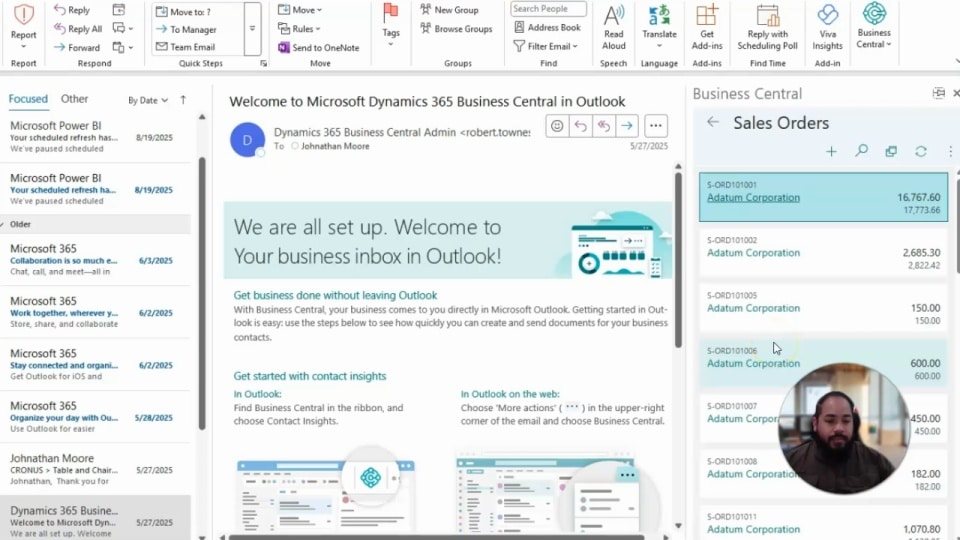
Outlook Contact Insights in Dynamics 365 Business Central
Discover how Outlook Contact Insights brings real-time customer and vendor information directly into your inbox. Learn how Microsoft Dynamics 365 Business Central integration helps your team respond faster, make informed decisions, and enhance productivity all without leaving Outlook.
Next steps
Outlook Contact Insights empowers businesses to eliminate inefficiencies, strengthen relationships, and provide a higher level of service all from the comfort of the inbox.
At Rand Group, we have been helping organizations transform with ERP solutions for over 20 years. Whether you are looking to enhance productivity, strengthen customer and vendor relationships we can guide you every step of the way.
If you would like to learn how this functionality can support your business, contact us today to speak with an experienced consultant. Together, we can explore how Business Central and Outlook integration can streamline your operations and position your organization for long-term success.



Subscribe to our Insights
