Dynamics 365
 Power Platform
 Dynamics
 Cloud & Productivity
Better decisions: Reporting with Dynamics 365 Customer Engagement and Power BI

Organizations today are collecting more customer and operational data than ever before. Yet many struggle to turn this data into actionable insights that improve decision-making and service outcomes. Dynamics 365 Customer Engagement (D365 CE) provides a strong foundation for managing sales, service, and customer information, but its out-of-the-box dashboards have limitations when it comes to contextual reporting and integrating data from multiple sources. By combining D365 CE with Power BI, businesses can go beyond standard dashboards to create rich, interactive reports that provide a 360-degree view of customer interactions and service performance.
In this article, we explore how embedding Power BI reports within D365 CE can enhance your analytics capabilities, offer real-time insights, and help your teams make informed, data-driven decisions. We also share practical guidance for implementing these solutions and examples of real-world use cases where this approach has delivered measurable value.
What is Dynamics 365 Customer Engagement?
Dynamics 365 Customer Engagement (D365 CE) is Microsoft’s suite of customer-facing business applications designed to help organizations manage relationships across the entire customer lifecycle. Built on Microsoft Dataverse, D365 CE centralizes customer data and processes so sales, service, and support teams can work from a shared, consistent view of customers, interactions, and outcomes. While D365 CE provides strong operational capabilities and out-of-the-box reporting, it is often paired with Power BI to deliver deeper analytics and cross-system insights.
D365 CE includes several core applications, each supporting a specific customer-facing function:
- Dynamics 365 Sales: Helps sales teams manage leads, opportunities, accounts, and pipelines efficiently. By leveraging AI and integrating with Microsoft 365 and LinkedIn, it reduces administrative work, enabling sales reps to focus on building relationships and closing deals.
- Dynamics 365 Customer Service: Provides tools for managing cases, SLAs, queues, and omnichannel support. It equips support teams with insights and recommendations, giving a complete view of each customer interaction to resolve issues effectively and improve overall satisfaction.
- Dynamics 365 Field Service: Designed for organizations that deliver services on-site, this application combines scheduling, work order management, asset tracking, and mobile capabilities. By using IoT data and analytics, teams can optimize routes, improve first-time fix rates, and provide proactive service.
- Dynamics 365 Project Operations: Offers a unified solution for managing projects from planning and resource allocation to time tracking and financial oversight. It helps project-based businesses ensure projects are completed on schedule and within budget while keeping all stakeholders aligned.
- Dynamics 365 Customer Insights: A customer data platform that consolidates information from multiple sources to support personalized marketing and engagement. Formerly part of Dynamics 365 Marketing, it enables organizations to run targeted campaigns and nurture leads across the entire buyer journey.
Together, these applications form a flexible, extensible platform for managing customer relationships. When combined with Power BI, Dynamics 365 Customer Engagement becomes a powerful foundation for data-driven decision-making across sales, service, and support functions.
Why combine Dynamics 365 Customer Engagement with Power BI?
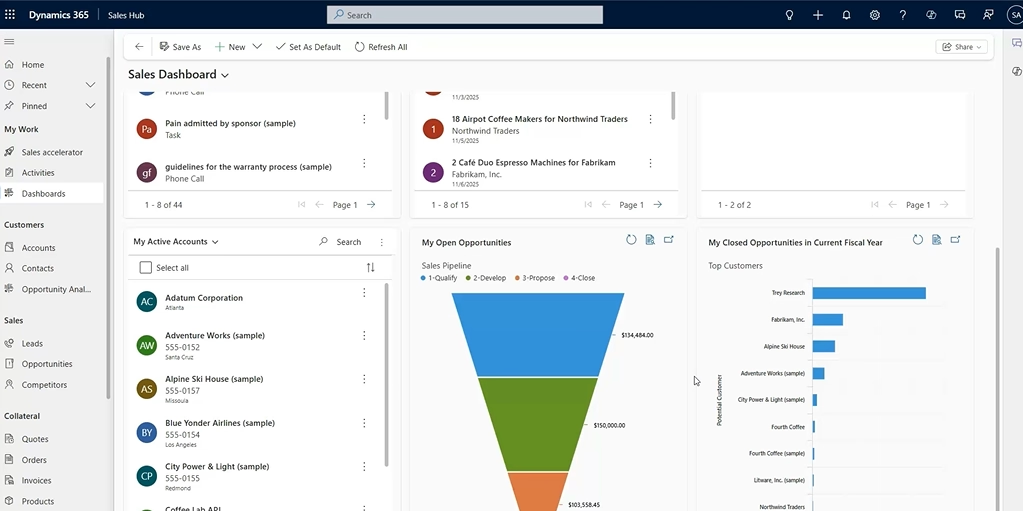
D365 CE includes dashboards that allow users to visualize internal data through charts, lists, and timelines. While these dashboards are useful for quick views into sales pipelines or active cases, they are limited to data stored within D365 CE. External information—such as ERP data, marketing metrics, or customer feedback from other systems—is not easily incorporated.
Power BI addresses this limitation by allowing organizations to unify data from multiple sources and present it in a single report. By integrating D365 CE with Power BI, teams gain:
- Comprehensive insights: Combine CRM, ERP, and external data to provide richer context about customers, orders, and service history.
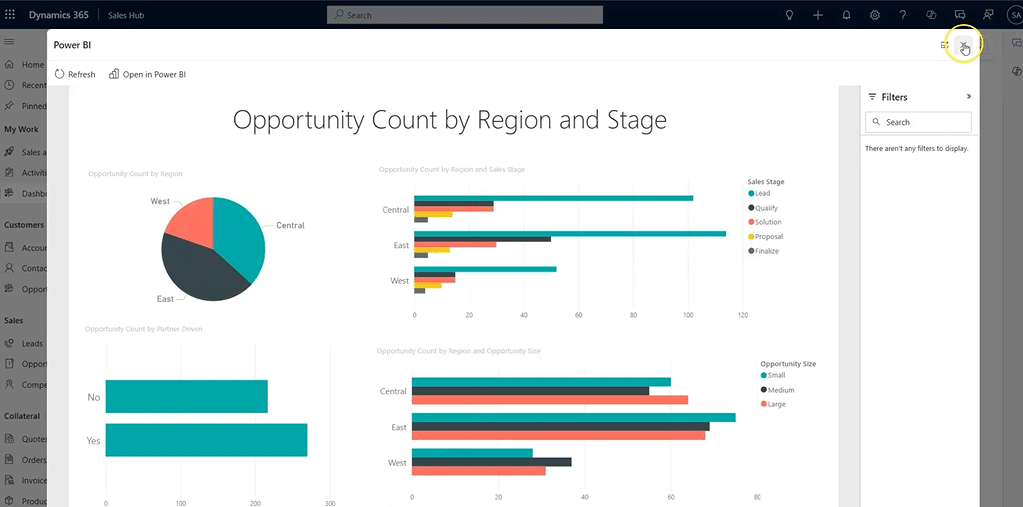
- Embedded dashboards: Users can access interactive Power BI reports directly within D365 CE, reducing the need to switch between platforms.
- Cost-effective scalability: Power BI can store and process large datasets using its own storage, reducing reliance on D365 CE storage and improving performance.
For example, customer service agents can view case history alongside purchase data from an ERP system or feedback collected via Microsoft Forms or SurveyMonkey, all in a single dashboard. This consolidated view helps agents respond faster and provide more informed service.
Better decisions: Reporting with Dynamics 365 Customer Engagement and Power BI
Unlock the full value of Dynamics 365 Customer Engagement data with Power BI to deliver embedded, interactive insights that enhance visibility, streamline workflows, and drive smarter decisions.
Understanding D365 CE dashboards versus Power BI dashboards
D365 CE dashboards come in two main forms: standard dashboards and interactive dashboards. Standard dashboards are made up of tiles that display charts, list views, or timelines, while interactive dashboards are limited to a single table but provide visual filters for basic analytics. Both types are security-trimmed, ensuring users only see the data they are authorized to access.
Power BI dashboards, on the other hand, allow far greater flexibility. They can:
- Pull data from multiple sources, including Dynamics 365 Customer Engagement, ERP systems, and external platforms.
- Include advanced visualizations, slicers, and filters that support interactive exploration.
- Be embedded directly within D365 CE dashboards, with the full functionality of Power BI available to users.
This means managers and agents can access complex reports, analyze trends, and view customer-specific dashboards without leaving the D365 CE environment.

Get more value from Dynamics 365 Customer Engagement
Dynamics 365 Customer Engagement becomes even more powerful when paired with the right strategy, configuration, and reporting approach. Whether you’re looking to improve sales visibility, enhance customer service performance, or unlock deeper insights with Power BI, Rand Group can help you design and optimize a D365 CE solution that supports smarter, data-driven decisions.
Connecting Power BI to Dynamics 365 Customer Engagement
Setting up Power BI for D365 CE reporting involves several key steps:
- Licensing: Choose the appropriate Power BI license. Power BI Pro typically supports most use cases, while capacity-based licensing may be more cost-effective for large datasets or broader distribution.
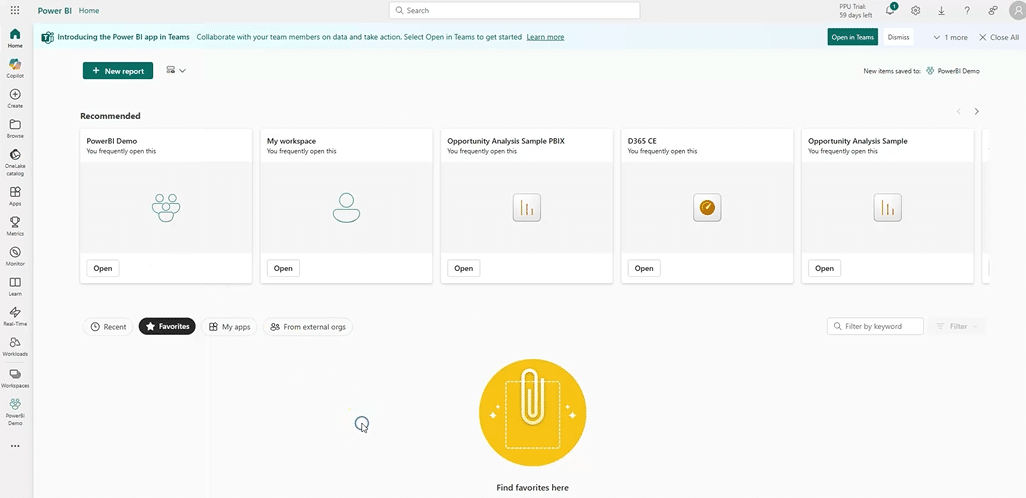
- Workspace creation: Establish a dedicated Power BI workspace for D365 CE reports. This centralizes content, simplifies deployment, and ensures proper access control.
- Data connection: Use Power BI Desktop to connect to D365 CE data via Dataverse. Decide between direct query for real-time updates or import mode for scheduled refreshes, balancing performance and data currency.
- Report creation: Build your visuals in Power BI Desktop, incorporating multiple data sources, dimension tables, and relationships to support cross-filtering and complex analysis.
- Publishing and embedding: Publish reports to your workspace and embed them in D365 CE dashboards. Use role-based security to control access and ensure users see only the data they are authorized to view.
Following this process allows organizations to deliver powerful, interactive dashboards without overloading D365 CE or creating complex integrations.
Real-world use cases
Combining Dynamics 365 Customer Engagement (D365 CE) with Power BI allows organizations to gain actionable insights that improve internal operations and enhance customer experiences. Here are some practical examples:
- Sales and service adoption tracking: A sales and service organization used Power BI dashboards to monitor user adoption and platform engagement. Metrics like time spent in the system, feature usage, and workflow completion rates helped identify bottlenecks and areas needing support. Dashboards also highlighted sales performance trends, enabling the organization to optimize processes, improve adoption, and maximize ROI from D365 CE.
- Field service analytics for external customers: A field service company integrated Power BI dashboards into their Power Pages portal to provide customers with real-time insights into work orders, scheduled services, and historical estimates. Row-level security ensured each customer only accessed relevant data, enhancing transparency, reducing repetitive inquiries, and improving service team efficiency.
- Internal and external value: These examples demonstrate how D365 CE and Power BI deliver value for both internal teams and external stakeholders. Internally, organizations can optimize workflows, drive adoption, and make data-driven decisions. Externally, customers gain visibility and confidence in service delivery, fostering stronger relationships and more efficient interactions.
Tips and best practices for successful reporting
- Start simple and role-based: Identify key analytics needs and build focused dashboards for specific roles. Expand functionality as adoption grows.
- Use the right data connection method: For large datasets, import mode is generally preferred to maintain performance. Schedule refreshes to ensure users receive up-to-date information.
- Implement security thoughtfully: Ensure row-level security is configured for imported data to maintain compliance with D365 CE access controls.
- Publish regularly: Always publish updates from Power BI Desktop to the service so dashboards reflect the latest data.
- Monitor performance: Use Power BI monitoring tools and logs to track report performance and identify issues proactively.
- Leverage expert guidance: Partner with experienced consultants like Rand Group to optimize report design, deployment, and adoption.
Frequently asked questions
How does Power BI work with Dynamics 365 Customer Engagement?
Power BI integrates with Dynamics 365 Customer Engagement by connecting directly to Dataverse data and combining it with information from other systems such as ERP, marketing platforms, and surveys. Power BI reports can be embedded within D365 CE, allowing users to access advanced analytics and interactive dashboards without leaving the application.
Why should organizations combine Dynamics 365 Customer Engagement with Power BI?
Combining Dynamics 365 Customer Engagement with Power BI allows organizations to move beyond basic reporting and gain deeper, cross-system insights. Power BI enables advanced visualizations, historical trend analysis, and unified reporting across CRM, ERP, and external data sources, helping teams make more informed, data-driven decisions.
Can Power BI reports be embedded directly inside Dynamics 365 Customer Engagement?
Yes, Power BI reports can be embedded directly within Dynamics 365 Customer Engagement dashboards and forms. This allows users to view interactive reports in context, improving adoption and reducing the need to switch between systems while maintaining role-based security.
How secure is Power BI reporting with Dynamics 365 Customer Engagement?
Power BI supports enterprise-grade security, including row-level security and role-based access. When properly configured, Power BI security can align with Dynamics 365 Customer Engagement permissions to ensure users only see the data they are authorized to access.
What roles typically use Power BI dashboards in Dynamics 365 Customer Engagement?
Power BI dashboards in Dynamics 365 Customer Engagement are commonly used by sales managers, service managers, executives, and frontline users. Each role can access tailored dashboards that focus on relevant metrics, trends, and performance indicators.
Next steps
Combining Dynamics 365 Customer Engagement with Power BI empowers organizations to turn data into actionable insights, improve service outcomes, and deliver better visibility into customer satisfaction. Whether for internal teams or external customers, embedded dashboards provide rich, interactive analytics without requiring users to leave the D365 CE environment.
Rand Group is a trusted Microsoft partner with deep expertise in Dynamics 365 and Power BI. We can help your organization design, implement, and optimize reporting solutions that maximize ROI and drive measurable business impact. Contact us today to schedule an assessment or consultation and start unlocking the full value of your Dynamics 365 data.