Dynamics 365
 Power Platform
 Dynamics
 Cloud & Productivity
Exploring Dynamics 365 Customer Service and Dynamics 365 Customer Insights 2026 release wave 1

The 2026 release wave 1 for Dynamics 365 Customer Service and Dynamics 365 Customer Insights brings a range of updates designed to help service and marketing teams work smarter. These features will roll out between April 2026 and September 2026. This release focuses on improving how agents support customers, how marketers target the right audiences, and how AI tools work with your data. This blog doesn’t cover every change in the release. Instead, it highlights the updates we think will have the most impact for Customer Service and Customer Insights users.
Dynamics 365 Customer Service
The Dynamics 365 Customer Service 2026 release wave 1 adds tools that give admins more control over how recordings are managed. It also gives agents a faster way to understand how a customer is feeling. These updates are designed to help service teams work more efficiently and respond to customers with greater confidence.
Greater admin control over screen recording
Contact centers often rely on screen recordings for coaching, compliance, and case reviews. Until now, recording controls were mostly limited to voice calls. This update changes that.
Admins can now enable recording in non-voice channels such as chat and case-focused workflows. As a result, agents can start and stop recordings directly from the interface. This is helpful when an automatic trigger isn’t the right fit for the situation.
Access is managed by role. You decide which supervisors, auditors, and agents can view or download recordings. This makes it easier to meet compliance requirements without opening recordings to everyone.
When a recording isn’t tied to a voice call, admins can manually attach it to the correct case or conversation. This keeps case records accurate and cuts down on time spent during investigations. In addition, the system handles failed uploads more reliably. If the recording app closes unexpectedly, it detects the problem and cleans up the incomplete upload automatically.
All of these controls are turned off by default. This gives teams time to review policies before going live.
Sentiment signals visible directly on a case
Understanding how a customer feels about an ongoing issue usually means reading through past emails or reviewing conversation notes. This feature brings that information to the surface automatically.
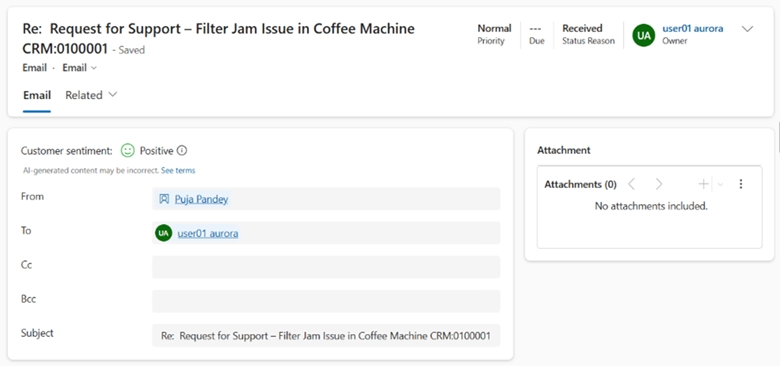
A sentiment score appears directly on the case form, the Active Cases grid, and the agent inbox card. It draws from email, chat, and voice interactions. It also weighs recent activity more heavily. As new interactions come in, the score updates on its own.
This gives agents a quick read on a customer’s emotional state without any extra digging. Furthermore, supervisors can use it to spot cases that may be heading toward escalation and step in early. Overall, it supports faster decisions and better service outcomes.
Admins turn this on in the Case settings area and set how much weight each channel carries. They can also add the sentiment field to agent profiles and inbox views.

Make the most of Dynamics 365 Customer Service and Customer Insights
The 2026 release wave 1 introduces powerful new tools for customer service and marketing teams. However, knowing which features to prioritize and how to roll them out effectively makes all the difference. Our Dynamics 365 experts can help you cut through the noise and focus on what matters most for your business.
Dynamics 365 Customer Insights – Data
Dynamics 365 Customer Insights – Data helps organizations unify customer data from multiple sources and turn it into actionable profiles. The wave 1 updates focus on putting campaign behavior data to work. They also give AI tools access to richer customer context.
Using past campaign behavior to sharpen future audiences
Most marketing teams already track how customers respond to their campaigns. Opens, clicks, and non-responses all tell a story. The challenge, however, has been getting that behavioral data into a place where it can inform the next campaign. This feature removes that barrier.
Interaction data from Customer Insights – Journeys, such as which emails a customer opened or which links they clicked, is now automatically available inside Customer Insights – Data. You don’t need to build custom data flows or wait for exports. As a result, the data is simply there to use when you need it.
This opens up more precise segmentation. For example, you can build a group of customers who engaged with a campaign but stopped short of converting. You can then follow up with a more targeted message. Similarly, you can identify customers who didn’t respond at all and push them to an external channel like social media for a different approach.
If a customer appears in your system under more than one contact record, the unification process identifies the primary record. This way, you’re always seeing the full customer picture rather than fragmented data.
Giving Copilot agents a fuller picture of the customer
AI agents can automate a lot of work for sales, marketing, and service teams. However, if they’re only working from data inside Dataverse, they’re missing a significant part of the customer story. This update gives agents access to a much broader set of customer insights.
Using the Customer Insights MCP server, agents built in Microsoft Copilot Studio can now pull in data that lives outside of Dataverse. This includes things like purchase history, rewards balances, and other information stored in external systems. It also includes AI-generated scores such as customer lifetime value and churn risk.
For a seller, this could mean discovering mid-conversation that a prospect is already a high-value customer in another system. That kind of context makes a real difference in how the conversation goes. In addition, agents can quickly identify the authoritative contact when duplicate records exist. They can also surface which customer segments that individual belongs to.
Dynamics 365 Customer Insights – Journeys
The Journeys module helps marketing teams design and run personalized customer journeys across email, text, and other channels. The 2026 wave 1 updates focus on keeping email content accurate at scale. They also make text messaging a more useful two-way channel.
Keeping shared email content up to date automatically
Marketing teams often reuse the same blocks of content across many email campaigns. Legal disclaimers, company statistics, award mentions, and boilerplate footer text are all common examples. However, updating that content manually across every active email is tedious and easy to get wrong.
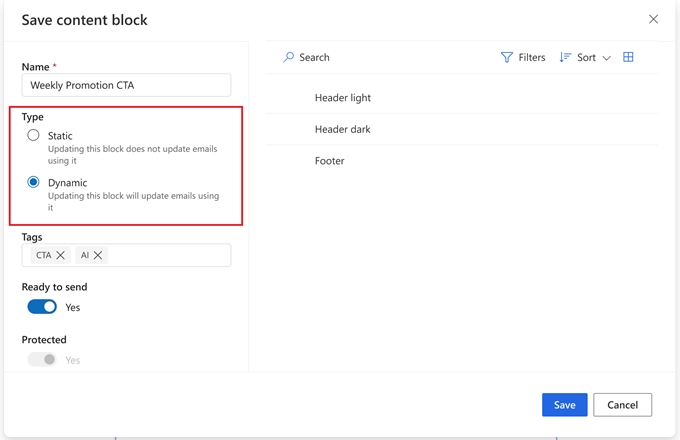
This update introduces a way to store shared content as a reusable block. When that block is updated, every email using it is refreshed automatically. As a result, you no longer need to track down each campaign and make the same edit multiple times.
The blocks can also include personalized content. For instance, you can set up conditional text that changes based on the customer’s industry or account type. You can also mark a block as protected if you don’t want it modified within individual emails.
Two-way text conversations powered by Copilot Studio
Text messaging is already one of the highest-engagement channels available to marketers. But the experience has traditionally been one-sided. Customers reply with a single word, and that’s about as far as it goes.
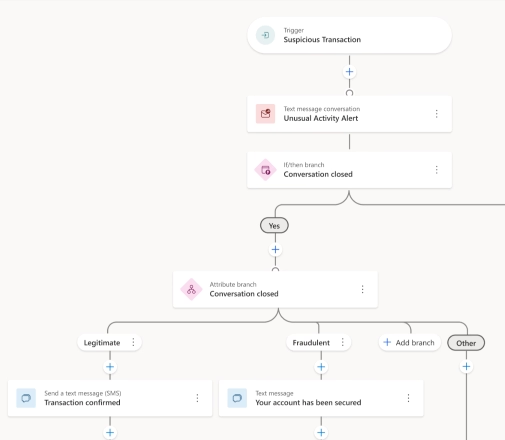
This update allows for real back-and-forth SMS conversations. A Copilot Studio agent handles the exchange and understands varied replies. As a result, it can guide customers through a meaningful interaction. The customer isn’t limited to preset keywords. Instead, they can respond naturally, and the agent adapts accordingly.
A practical example would be a financial institution alerting a customer about unusual account activity. Rather than a simple confirm or deny, the customer can describe the situation and ask questions. From there, the agent can provide guidance on next steps, all through a text conversation.
Marketers can include these conversational text steps inside their existing journeys. Engagement data, including outcomes and conversation results, flows into reporting automatically. Moreover, all interaction data is available for custom reporting through Microsoft Fabric. This feature requires Dynamics 365 Contact Center integration.
Frequently asked questions
When will the Dynamics 365 Customer Service 2026 release wave 1 and Customer Insights 2026 release wave 1 features be available?
The Dynamics 365 Customer Service 2026 release wave 1 and Customer Insights 2026 release wave 1 features will roll out between April 2026 and September 2026. Not all features become available at the same time. Some are already in public preview, while others are still on their way. It is worth reviewing the Microsoft release plan regularly for Customer Service, Customer Insights Data, and Customer Insights Journeys to stay up to date on specific rollout dates for each feature.
Do I need any additional products or licenses to use the Dynamics 365 Customer Service and Customer Insights 2026 release wave 1 features?
It depends on the feature. Most of the updates are part of the existing Dynamics 365 Customer Service and Customer Insights applications. However, the Copilot-powered conversational text messaging feature in the Customer Insights 2026 release wave 1 requires Dynamics 365 Contact Center integration. If you are unsure whether your current licenses cover a specific feature, a Rand Group expert can help you review your options and make sure you have the right setup in place.
Will these features in the 2026 release wave 1 be turned on automatically in my environment?
Not necessarily. Some features are enabled automatically, while others require an admin to turn them on manually. For example, the enhanced screen recording controls are turned off by default and need to be enabled through settings. It is a good idea to review each feature before it rolls out so your team is prepared and any necessary configurations are in place.
What is the Customer Insights MCP server and how does it work?
The Customer Insights MCP server is a connection point that allows AI agents built in Microsoft Copilot Studio to access data from Dynamics 365 Customer Insights – Data. It pulls in customer information that lives outside of Dataverse, such as purchase history, rewards balances, and AI-generated scores like customer lifetime value and churn risk. This is one of the standout additions in the Dynamics 365 Customer Insights 2026 release wave 1. It gives agents a much fuller picture of the customer during sales, service, and marketing interactions. If you are unsure how to set this up in your environment, contact Rand Group, and our experts can walk you through the process.
Next steps
The Dynamics 365 Customer Service 2026 release wave 1 and Dynamics 365 Customer Insights 2026 release wave 1 introduce meaningful updates across service management, audience targeting, AI grounding, and marketing automation. The features covered here highlight some of the most impactful changes, but they are just part of a broader set of updates being rolled out over the release cycle.
As these capabilities become available, it’s worth taking a closer look at how they align with your current processes and where they can deliver the most value. Whether you’re looking to improve how your agents handle cases, sharpen your campaign targeting, or put AI to work with better customer data, a thoughtful approach to adoption can make a significant difference.
If you’re evaluating how these updates fit into your environment or planning your next steps, contact Rand Group to connect with a Dynamics 365 expert and discuss the best path forward.