Dynamics 365
 Power Platform
 Dynamics
 Cloud & Productivity
Dynamics 365 Project Operations vs. Microsoft Project: What’s the difference?

Project-based organizations often start with a simple question: how do we keep projects on schedule? Over time, that question usually becomes more complex. Leaders also need to know whether the right people are available, whether projects are profitable, whether time and expenses are being captured accurately, and whether billing reflects what was sold to the customer.
That is where the difference between Microsoft Project and Dynamics 365 Project Operations becomes important.
Both solutions support project planning, but they are not designed to solve the same business problem. Microsoft Project is primarily a project and work management tool. It helps teams organize tasks, manage schedules, assign work, and track progress. Dynamics 365 Project Operations is a broader business application for organizations that sell, deliver, resource, bill, and analyze project-based work.
For B2B organizations evaluating Microsoft solutions, the right choice depends on the operational problem they are trying to solve. If the challenge is planning work and improving schedule visibility, Microsoft Project may be the practical fit. If the challenge is managing projects from sales through delivery and finance, Dynamics 365 Project Operations may provide a broader foundation.
The core difference between Microsoft Project and Dynamics 365 Project Operations
The simplest distinction is this: Microsoft Project helps teams manage project work, while Dynamics 365 Project Operations helps organizations manage the business of project delivery.
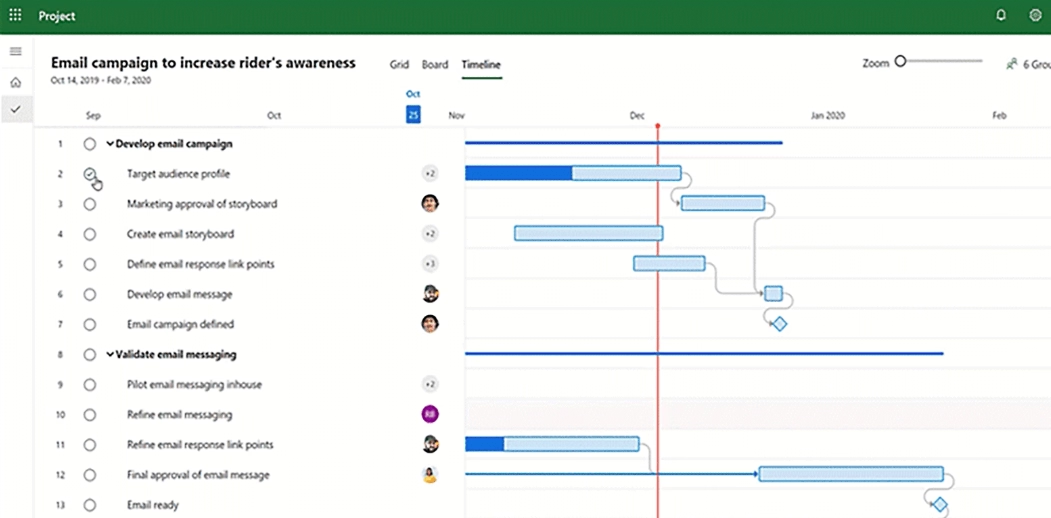
Microsoft Project is commonly used by project managers, team leads, and PMO teams that need a structured way to plan work. It supports project schedules, task assignments, dependencies, timelines, and progress tracking. For many organizations, especially those managing internal projects or departmental initiatives, those capabilities are sufficient.
Dynamics 365 Project Operations extends beyond the project plan. It supports the project lifecycle across sales, estimating, quoting, resource planning, project delivery, time and expense, billing, and financial visibility. It is designed for organizations where projects are directly connected to revenue, resource utilization, customer commitments, and profitability.
This difference has practical implications. Microsoft Project helps answer questions such as “What needs to be done, who owns it, and when is it due?” Dynamics 365 Project Operations also supports delivery planning, but it adds questions such as “What did we sell, which resources are available, what will the project cost, how will we bill the customer, and what margin are we achieving?”
That broader visibility is valuable for project-based businesses because many project issues do not begin as scheduling issues. They begin with inaccurate estimates, limited resource visibility, disconnected time entry, delayed billing, or incomplete financial reporting.
Dynamics 365 Project Operations vs. Microsoft Project comparison
The table below summarizes the major differences between Microsoft Project and Dynamics 365 Project Operations. While both solutions support project-related work, they are designed for different levels of operational complexity.
This comparison is a useful starting point, but it should not replace a requirements assessment. The right choice depends on how your organization sells, staffs, delivers, bills, and reports on project-based work.
What is Microsoft Project used for?
Microsoft Project is designed to help organizations bring structure to project planning and execution. It is most useful when teams need a clearer way to define work, assign ownership, manage dependencies, and track progress against a schedule. Depending on the organization’s needs, Microsoft Project may be used through Project for the web, Project Online, or the Project desktop client.
In practice, Microsoft Project is often a strong fit for teams that need better project discipline but do not need project financials, billing, or quote-to-cash processes in the same system. For example, an IT department may use it to coordinate a systems upgrade, a marketing team may use it to manage a campaign launch, or a PMO may use it to create a more consistent planning framework across internal initiatives.
Common use cases for Microsoft Project include:
- Building project schedules with tasks, milestones, dates, and dependencies
- Assigning work to team members and monitoring progress
- Managing timelines for internal projects, operational initiatives, or client-facing work
- Supporting project managers who need structured planning tools and Gantt chart capabilities
- Improving stakeholder visibility into project status, ownership, and deadlines
- Standardizing project planning practices across teams or departments
Microsoft Project works well when the project plan is the center of the process. It helps teams move away from informal task tracking and into a more structured project management approach.
However, it is not intended to replace systems for project accounting, customer relationship management, billing, or enterprise financial reporting. If project information needs to flow directly into estimates, contracts, staffing plans, time entry, invoicing, or margin analysis, the organization may need a broader project operations platform.

What is Dynamics 365 Project Operations used for?
Dynamics 365 Project Operations is designed for companies that manage project-based work as a core part of their business model. This includes professional services firms, consulting organizations, engineering services companies, technology service providers, and other businesses that sell and deliver projects to customers.
Where Microsoft Project focuses primarily on planning and execution, Dynamics 365 Project Operations connects project delivery to the commercial and financial activities around it. It helps organizations manage how work is estimated, sold, staffed, delivered, billed, and measured. For a deeper look at the application’s core components, read our guide to Microsoft Dynamics 365 Project Operations modules and functionality.
A consulting firm, for example, may need to estimate services during the sales process, quote the work based on roles and rates, confirm consultant availability, deliver the project, approve time and expenses, invoice the customer, and review project profitability. If each step happens in a separate system, leaders may struggle to identify issues early or trust the data they are using to make decisions.
Dynamics 365 Project Operations is intended to reduce those gaps by giving teams a more connected data model and process. Sales, delivery, resource management, and finance can work from a shared view of project information instead of relying on separate spreadsheets, project plans, and financial systems.
Typical capabilities include:
- Project-based opportunities, estimates, quotes, and contracts
- Resource planning based on skills, roles, availability, and demand
- Project budgets, forecasts, actuals, and delivery progress
- Time and expense entry, review, and approval
- Billing support and project cost visibility
- Reporting across utilization, revenue, delivery performance, and project margins
The key point is that Dynamics 365 Project Operations is not simply a more advanced version of Microsoft Project. It is a broader business application for organizations that need to manage the operational and financial lifecycle of project work.

How the user experience differs in Microsoft Project and Dynamics 365 Project Operations
Microsoft Project is usually centered around the project manager and the project schedule. The user experience focuses on tasks, timelines, dependencies, assignments, and progress. It works well for users who think primarily in terms of project plans and work breakdown structures.
Dynamics 365 Project Operations supports a broader set of roles because project delivery touches more than the project manager. A salesperson may work with project opportunities and quotes. A resource manager may evaluate demand and assign available resources. A project manager may manage scope, schedule, budget, and delivery. Team members may submit time and expenses. Finance teams may review transactions, billing milestones, project actuals, and revenue impact.
That broader user experience is valuable, but it also creates a more complex implementation. Organizations evaluating Dynamics 365 Project Operations should expect to define how different departments will use the system. They should also clarify ownership of master data, approval processes, billing rules, reporting requirements, and integrations with finance or other business applications.
This is one of the most important evaluation points. Microsoft Project can often be deployed as a focused project management tool. Dynamics 365 Project Operations should be treated as a business application implementation because it affects multiple teams and processes.
When Microsoft Project may be the right choice
Microsoft Project may be the right choice when the primary goal is better planning, schedule management, and work visibility. It is especially useful for organizations that need structure but do not need a full project accounting or quote-to-cash solution.
For example, a company managing internal transformation initiatives may need project managers to define tasks, assign owners, and report progress to leadership. A department coordinating cross-functional work may need dependencies and milestones to be visible in one place. A PMO may need a consistent way to manage timelines across multiple projects.
In these cases, Microsoft Project can provide meaningful value without introducing unnecessary complexity. Teams can improve planning discipline, standardize schedules, and create clearer accountability around work execution.
However, Microsoft Project may not be enough if project plans need to drive downstream financial processes. If the organization needs to connect estimates to contracts, contracts to staffing plans, staffing plans to approved time, and approved time to invoices, Dynamics 365 Project Operations may be more appropriate.
The decision should not be based only on the size of the organization. A large enterprise may still use Microsoft Project for certain internal initiatives, while a smaller services firm may need Dynamics 365 Project Operations because every project affects revenue, billing, and margins.
When Dynamics 365 Project Operations may be the right choice
Dynamics 365 Project Operations may be the right choice when projects are central to how the organization sells, delivers, bills, and measures its work. It is particularly relevant when project data must be shared across sales, delivery, resource management, and finance.
Common signs that your organization may need Dynamics 365 Project Operations include:
- Project estimates are built in spreadsheets and do not flow into delivery plans
- Sales teams sell work without clear visibility into delivery capacity
- Resource managers struggle to match available people to project demand
- Project managers cannot easily compare budgets, forecasts, actuals, and margins
- Time and expenses require manual review, re-entry, or reconciliation
- Billing depends on disconnected project records or offline calculations
- Executives lack consistent reporting on utilization, revenue, backlog, and profitability
These problems often become more expensive as the organization grows. Manual workarounds may be manageable with a small number of projects, but they can create delays, reporting gaps, and margin risk as project volume increases. For organizations focused on improving financial visibility, our article on controlling project profitability in real time with Dynamics 365 Project Operations provides additional context on how connected project data can support better margin management.
Dynamics 365 Project Operations is most valuable when the organization is ready to standardize processes across departments. That includes defining how projects are estimated, how roles and rates are managed, how resources are assigned, how time and expenses are approved, and how project financials are reported.


Understand Dynamics 365 Project Operations pricing
Understand what goes into Dynamics 365 Project Operations pricing before you make a licensing or implementation decision. This guide explains user types, licensing options, deployment considerations, and key cost factors so your organization can plan with greater confidence.
Dynamics 365 Project Operations and Microsoft Project implementation considerations
A successful solution decision requires more than comparing product names. Organizations should consider implementation effort, process maturity, data quality, integrations, reporting expectations, and user adoption.
Microsoft Project is usually more focused in scope. Implementation may involve configuring templates, permissions, reporting, governance, and training. The main adoption challenge is often getting project managers and teams to use a consistent planning approach.
Dynamics 365 Project Operations requires a broader implementation strategy. Because it connects multiple functions, stakeholders from sales, delivery, finance, resource management, IT, and leadership should be involved early. Important design decisions may include:
- How project estimates and quotes are created
- How roles, rates, costs, and pricing are defined
- How resource requests and assignments are managed
- How project budgets, forecasts, and actuals are tracked
- How time and expenses are submitted, approved, and corrected
- How billing rules are structured for different contract types
- How reporting should support project managers, finance, and executives
Organizations should also evaluate licensing and cost considerations as part of the implementation planning process. Project Operations decisions often involve more than user licenses; they may also include implementation scope, integrations, reporting requirements, process design, data migration, and long-term support needs. For more detail, review our guide to Dynamics 365 Project Operations pricing.
Organizations should also consider the surrounding Microsoft ecosystem. Dynamics 365 Project Operations can work alongside other Microsoft business applications such as Dynamics 365 Sales, Dynamics 365 Finance, Power BI, Power Automate, Microsoft Teams, and the Power Platform. These connections can be valuable, but they should be designed intentionally.
The implementation approach should reflect the level of business change involved. A company deploying Microsoft Project may be improving project management practices. A company deploying Dynamics 365 Project Operations is often redesigning how project-based work moves across the organization.
How to make a confident decision
The most reliable way to choose between Microsoft Project and Dynamics 365 Project Operations is to start with business requirements, not product preference. The right system should match the complexity of your project lifecycle and the decisions your teams need to make.
A practical evaluation should include questions such as:
- Are we primarily trying to improve project schedules and task visibility?
- Do our projects directly drive customer revenue?
- Do we need to connect sales estimates to project delivery and billing?
- Are resource availability, skills, and utilization major constraints?
- Do project managers need reliable visibility into budgets, costs, and margins?
- Are time, expenses, billing, and accounting handled in disconnected systems?
- Do executives need consistent reporting across revenue, utilization, backlog, and profitability?
- Are we ready to standardize cross-functional project processes?
If most of the answers point to schedule control and task management, Microsoft Project may be the right fit. If the answers point to sales, resourcing, billing, project accounting, and financial performance, Dynamics 365 Project Operations should be considered.
It is also important to be realistic about readiness. Dynamics 365 Project Operations can provide broader operational control, but it requires process alignment. Organizations should be prepared to make decisions about data ownership, approval workflows, reporting standards, and integrations before implementation begins.
A well-scoped assessment can help clarify the path forward. It can also prevent two common mistakes: implementing a planning tool when the business needs operational integration, or implementing a larger platform before the organization has defined the processes it wants to support.

Find the right Microsoft project solution for your business
Choosing between Microsoft Project and Dynamics 365 Project Operations depends on how your organization plans work, manages resources, tracks financials, and supports project delivery. Rand Group can help you assess your current processes, clarify requirements, and determine which Microsoft solution aligns with your operational and financial goals.
Turning project management decisions into business outcomes
Choosing between Microsoft Project and Dynamics 365 Project Operations is not only a software decision. It is also a process decision that affects how your organization plans work, manages resources, captures time, bills customers, and reports on project performance. The right approach depends on your current systems, project management maturity, financial processes, and long-term business goals.
Rand Group helps organizations evaluate Microsoft solutions through both a technical and operational lens. Our consultants work with project-based businesses to understand how projects move from sales through delivery and finance, identify where data or process gaps exist, and recommend a solution approach that supports practical business outcomes.
Organizations work with Rand Group for support across areas such as:
- Assessing whether Microsoft Project, Dynamics 365 Project Operations, or another Microsoft solution is the right fit
- Mapping current project, resource management, time entry, billing, and reporting processes
- Defining requirements across sales, delivery, finance, resource management, and leadership teams
- Designing a scalable Microsoft solution that aligns with existing systems and future growth plans
- Implementing and configuring Dynamics 365, Microsoft Project, Power BI, Power Automate, and related Microsoft technologies
- Supporting user adoption through training, documentation, governance, and post-go-live optimization
Because Rand Group works across Microsoft business applications, our team can help organizations look beyond a single tool and consider how project operations connect with CRM, ERP, reporting, automation, and collaboration. That broader perspective is especially important for companies evaluating Dynamics 365 Project Operations, where implementation success depends on both system configuration and cross-functional process alignment.
Whether your organization needs better project scheduling, stronger resource visibility, more connected billing processes, or improved project profitability reporting, Rand Group can help you define the right path forward and implement a solution that supports how your teams actually work.
Frequently asked questions about Dynamics 365 Project Operations and Microsoft Project
What is the main difference between Dynamics 365 Project Operations and Microsoft Project?
The main difference between Dynamics 365 Project Operations and Microsoft Project is that Microsoft Project is primarily used for project planning, scheduling, task management, and progress tracking, while Dynamics 365 Project Operations is used to manage the broader lifecycle of project-based work, including sales, estimating, resource planning, time and expense, billing, project financials, and profitability reporting.
Is Dynamics 365 Project Operations replacing Microsoft Project?
Dynamics 365 Project Operations is not a direct replacement for Microsoft Project because the two solutions are designed for different business needs. Microsoft Project is focused on helping teams plan and manage project work, while Dynamics 365 Project Operations is designed for organizations that need to connect project delivery with sales, resource management, billing, and financial performance.
When should a company use Microsoft Project instead of Dynamics 365 Project Operations?
A company should use Microsoft Project instead of Dynamics 365 Project Operations when the primary need is to create project schedules, assign tasks, manage dependencies, track progress, and improve visibility into project work. Microsoft Project is often a good fit for internal projects, departmental initiatives, PMO planning, and teams that do not need project billing, quote-to-cash processes, or project financial management in the same system.
When should a company use Dynamics 365 Project Operations instead of Microsoft Project?
A company should use Dynamics 365 Project Operations instead of Microsoft Project when project work is directly tied to revenue, staffing, billing, and profitability. Dynamics 365 Project Operations is often a better fit for professional services firms, consulting organizations, engineering services companies, and other project-based businesses that need to manage project sales, estimates, resource utilization, time and expense, invoicing, costs, forecasts, and margins in a connected Microsoft business application.
Can Microsoft Project and Dynamics 365 Project Operations be used together?
Microsoft Project and Dynamics 365 Project Operations can be used together in some organizations, depending on project planning, operational, and reporting requirements. Microsoft Project may support detailed scheduling and work management, while Dynamics 365 Project Operations may manage the broader project business lifecycle across sales, resourcing, delivery, time and expense, billing, and financial reporting.
Does Rand Group implement Dynamics 365 Project Operations?
Yes. Rand Group implements, configures, integrates, and supports Dynamics 365 Project Operations for project-based organizations that need to connect project sales, estimating, resource management, project delivery, time and expense, billing, reporting, and financial visibility. Rand Group also helps organizations assess whether Dynamics 365 Project Operations is the right fit based on their project operations, resource planning, billing, and profitability requirements.
Does Rand Group implement Microsoft Project?
No. Rand Group does not implement standalone Microsoft Project. Microsoft Project can be a good fit for organizations that primarily need project scheduling, task management, timelines, dependencies, and progress tracking. Rand Group focuses on Dynamics 365 Project Operations and connected Microsoft business applications for organizations that need broader project operations capabilities, including resource management, time and expense, billing, project financials, reporting, and profitability visibility.
Next steps
Microsoft Project and Dynamics 365 Project Operations both support project-based work, but they serve different purposes. Microsoft Project helps teams plan, schedule, and track work. Dynamics 365 Project Operations helps organizations connect project sales, resourcing, delivery, time and expense, billing, and financial performance.
For organizations evaluating Microsoft solutions, the most important step is to define the business outcome. If your priority is better schedule management, Microsoft Project may provide the right level of structure. If your priority is connecting the full project lifecycle from quote to cash, Dynamics 365 Project Operations may be a stronger strategic fit.
If your organization is comparing Dynamics 365 Project Operations and Microsoft Project, Rand Group can help you assess your current processes, clarify requirements, and determine which solution aligns with your project management maturity, financial processes, resource model, and long-term business goals. Contact Rand Group to start a conversation about your project operations requirements.