Dynamics 365
 Power Platform
 Dynamics
 Cloud & Productivity
Dynamics 365 Sales reporting: KPIs every sales leaders should know

When organizations implement a CRM like Dynamics 365 Sales, they gain access to a wealth of data on every opportunity, lead, and customer interaction. Yet having data alone doesn’t automatically translate into actionable insights. Without the right tools to aggregate, visualize, and interpret that information, sales teams often find themselves making decisions based on incomplete or fragmented reports—or relying on spreadsheets that are manually updated and quickly outdated.
This is where dashboards and key performance indicators (KPIs) become essential. By capturing critical metrics and presenting them in intuitive, role-based visualizations, Dynamics 365 enables sales leaders to see the full picture: which deals are progressing, where pipeline risks exist, and which opportunities offer the greatest growth potential. With the right dashboards in place, organizations can identify bottlenecks, forecast revenue more accurately, and align sales and marketing teams around shared goals.
In this blog, we’ll explore how Dynamics 365 Sales dashboards and KPIs help organizations transform raw CRM data into actionable insights. You’ll learn how to monitor pipeline health, drive better sales performance, and empower teams to build a more predictable, scalable, and high-performing sales process.
Why pipeline health matters
A healthy sales pipeline is about more than just the number of deals in motion—it’s about predictable, efficient, and measurable progress through each stage, from lead generation to closing. Without visibility into the pipeline, organizations risk relying on incomplete information, anecdotal reports, or outdated spreadsheets, which can lead to missed opportunities, stalled deals, and unpredictable revenue.
Dynamics 365 captures deal‑level data in a structured format, including opportunity stage, expected close date, lead source, deal size, and more. On its own, this data is valuable—but it can remain buried in individual records, inaccessible for strategic decision-making. That’s where dashboards and KPIs come in. By aggregating and visualizing key metrics, dashboards transform raw data into actionable insight, giving leaders the ability to:
- See deal progression in real time: Identify which opportunities are moving, which are stalled, and where intervention is needed.
- Monitor pipeline duration and velocity: Understand how long deals spend in each stage and detect slow-moving opportunities before they impact revenue.
- Assess team performance and alignment: Compare results across reps, teams, or territories to uncover high-performing behaviors and areas for improvement.
- Spot risks and opportunities: Detect potential revenue gaps, over-reliance on a few large deals, or emerging cross-sell and upsell opportunities.
With dashboards and KPIs in place, sales leaders can replace manual reporting and guesswork with a clear, data-driven view of pipeline health. This enables more informed decision-making, faster responses to changing market conditions, and ultimately a more predictable and scalable sales process.
Featured Video
Dynamics 365 Sales pipeline health check: Dashboards and KPIs that matter
Discover how to turn raw CRM data into meaningful insight with this in-depth walkthrough of Dynamics 365 Sales pipeline dashboards and KPIs. This video explains why pipeline health matters and how dashboards transform scattered information into clear visibility.

How Dynamics 365 Sales dashboards bring your pipeline to life
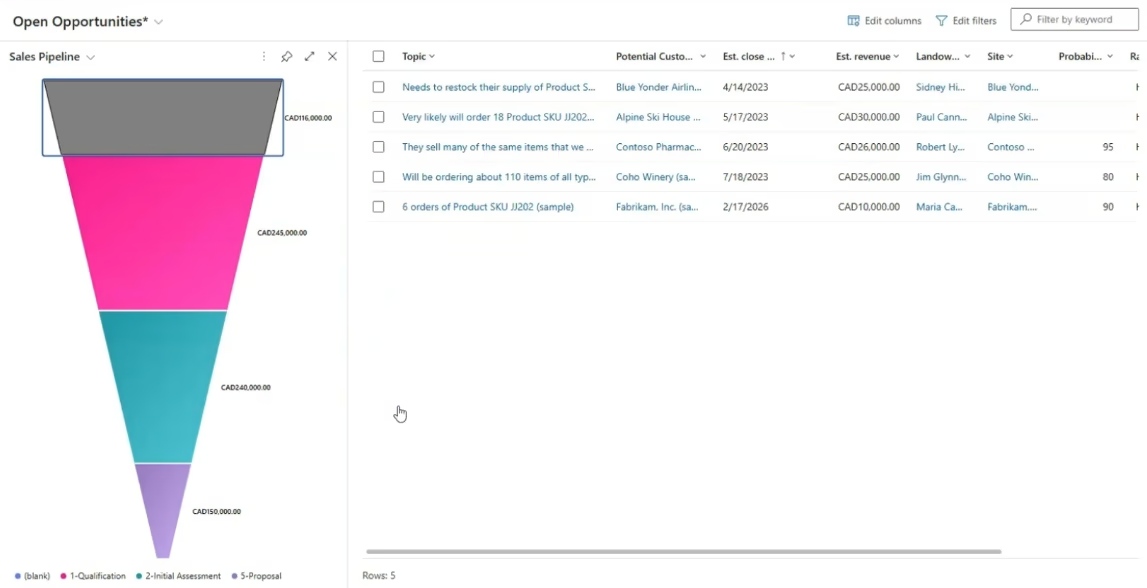
Dynamics 365 Sales provides a suite of dashboards that transform raw CRM data into actionable insights, giving sales teams and leaders a clear view of pipeline health at every level. These dashboards make it easy to monitor performance, identify bottlenecks, and take informed action to drive results. Key dashboards include:
- Pipeline by stage dashboards: Show the distribution of deals across each stage of the pipeline, helping managers and reps quickly identify stalled opportunities and potential risks before they impact revenue.
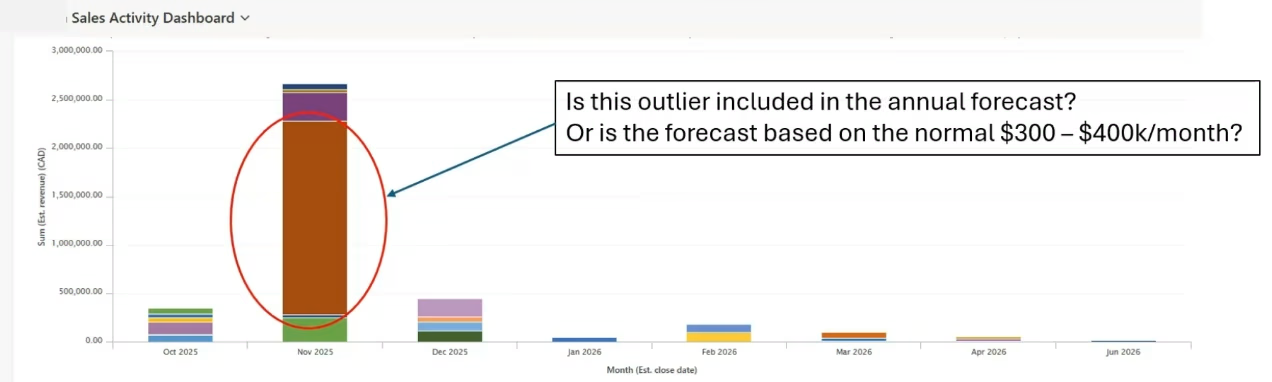
- Forecast dashboards: Predict future revenue over specific periods, allowing teams to align resources, plan for capacity, and make more accurate sales projections.
- Lead source performance dashboards: Track which marketing channels deliver the most qualified leads, enabling better allocation of marketing resources and alignment between marketing and sales.
- Sales funnel views: Highlight conversion rates and stage drop-offs, offering insights into where opportunities may be lost and how processes can be improved.
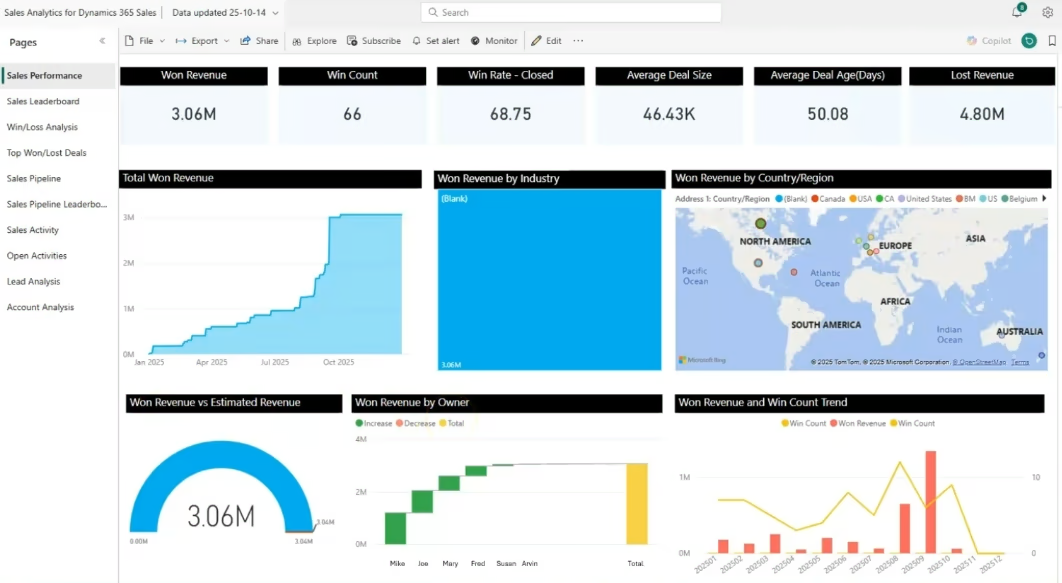
One of the most powerful aspects of Dynamics 365 dashboards is customization by role. Sales reps can focus on their individual opportunities, managers can monitor team performance, and executives can gain a high-level view of the organization’s overall pipeline health. For even deeper analysis, Power BI integration allows advanced visualizations, trend analysis, and executive-ready reporting—providing a unified view of sales performance across the business.
KPIs that drive better sales decisions
With dashboards and KPIs in place, sales leaders can move beyond reactive reporting and begin proactively managing pipeline health. Visual insights from Dynamics 365 Sales make it easy to:
- Monitor Win Rate: Evaluate the effectiveness of closing deals and identify areas for improvement.
- Track Sales Velocity: See how quickly deals are moving through the pipeline and spot stalled opportunities.
- Measure Average Deal Size: Forecast revenue potential and prioritize high-value deals.
- Assess Pipeline Coverage: Ensure there is enough volume in the pipeline to meet targets.
- Evaluate Lead-to-Opportunity Ratio: Understand lead quality and alignment with sales efforts.
These KPIs allow leaders to detect stalled deals, uncover low conversion rates between stages, highlight over-reliance on a few large deals, and surface high-performing lead sources or upsell opportunities. They improve weekly pipeline reviews, support coaching conversations, and enable strategic alignment across teams—helping leaders make smarter decisions and build a predictable, high-performing sales pipeline.

Unlock the full potential of your sales pipeline
Take control of your sales process with Dynamics 365 Sales. Visualize your pipeline, track KPIs, forecast revenue, and turn CRM data into actionable insights—all in one platform. Empower your team to close deals faster and build a more predictable, scalable sales engine.
Spotting risk and uncovering opportunity in Dynamics 365 Sales
With dashboards and KPIs in place, sales leaders can move beyond reactive reporting and begin proactively managing pipeline health. Visual insights make it easy to:
- Detect deals that are stalled in late stages before they threaten revenue goals.
- Identify low conversion rates between stages, revealing opportunities for process improvement.
- Highlight over-reliance on a few large deals that could impact revenue if lost.
- Surface high-performing lead sources, fast-moving deals, and cross-sell or upsell potential.
These insights not only improve weekly pipeline reviews but also support coaching conversations with sales reps and strategic alignment across teams. By understanding where risks and opportunities exist, leaders can make smarter decisions, guide their teams effectively, and build a more predictable, high-performing sales pipeline.
Best practices for pipeline health monitoring in Dynamics 365 Sales
Capturing pipeline data is only the first step. To truly improve sales performance, organizations must actively monitor, interpret, and act on the information. Dynamics 365 Sales dashboards and KPIs provide the tools — but following best practices ensures the data drives meaningful outcomes.
- Conduct weekly pipeline reviews focused on key KPIs: Regular pipeline reviews give sales leaders and teams the opportunity to assess performance, uncover risks, and take corrective action. Focusing on meaningful KPIs — such as win rates, sales velocity, and pipeline coverage — ensures discussions are strategic rather than purely transactional. These meetings help align priorities, surface potential issues, and keep the team accountable.
- Benchmark performance by team, territory, and role: Comparing performance across teams, regions, or roles highlights strengths and opportunities for improvement. Benchmarks provide context for individual and group performance, enabling managers to recognize top performers, identify gaps, and replicate successful strategies across the organization.
- Use dashboards to coach, not just report: Dashboards are most powerful when they support coaching conversations. Instead of simply reviewing numbers, managers can use insights to guide reps on improving conversion rates, accelerating deal progression, or targeting high-value opportunities. This approach transforms dashboards from static reporting tools into dynamic coaching resources.
- Automate reporting for consistency and efficiency: Scheduled Power BI exports or dashboard subscriptions eliminate the need for manual report preparation. Automation ensures the right stakeholders receive timely, accurate information, making pipeline monitoring consistent across the organization and freeing teams to focus on action rather than data gathering.
By adopting these best practices, organizations move from reactive sales management to structured, data-driven execution. Teams gain the confidence to make decisions based on real-time insights, reduce reliance on guesswork, and build a more predictable and high-performing sales pipeline.
Next steps
A healthy, predictable sales pipeline starts with the right tools and guidance. Dynamics 365 Sales provides everything you need to track deals, monitor KPIs, and turn raw data into actionable insights. But implementing a solution like this effectively requires expertise—from setting up dashboards and KPIs to integrating Power BI and coaching your team to use the data strategically.
That’s where Rand Group comes in. As a trusted Microsoft partner, we help organizations implement Dynamics 365 sales, optimize pipeline visibility, and build processes that drive predictable revenue. Our team can guide you through setup, training, and ongoing support, ensuring your dashboards and KPIs deliver maximum value.
Ready to take control of your sales pipeline? Contact Rand Group today to learn how we can help you implement Dynamics 365 Sales and transform your sales process with actionable insights.