Dynamics 365
 Power Platform
 Dynamics
 Cloud & Productivity
Exploring Dynamics 365 Sales and Customer Insights 2025 release wave 2

The Dynamics 365 Sales and Customer Insights 2025 Release Wave 2 delivers on Microsoft’s vision of a modern, AI-powered CRM platform that supports sellers, marketers, and customer service teams across the entire customer lifecycle. This blog highlights updates to Dynamics 365 Sales, Dynamics 365 Customer Insights, and explores how these changes can improve productivity, personalization, and strategic planning.
Smarter sales experiences in Dynamics 365 Sales
Get embedded experience for Copilot summaries
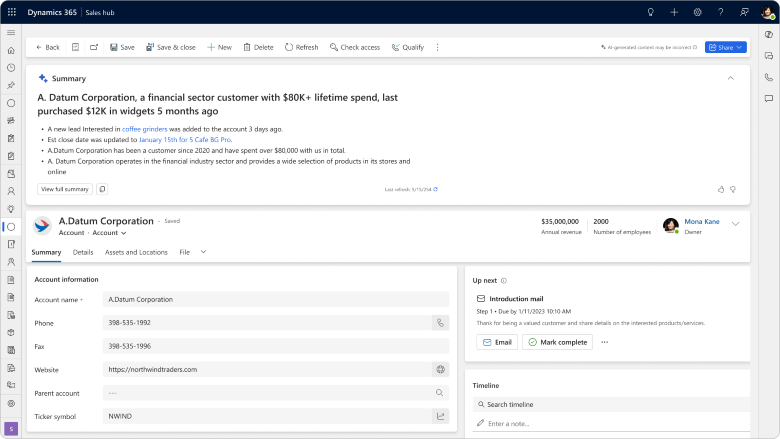
The embedded Copilot summary for Opportunities, Leads, and Accounts now gives sellers instant, AI-generated insights at the top of their records. Instead of opening a separate Copilot side pane, they see a clear in-form banner that delivers key context immediately.
As a result, sellers save time by avoiding extra clicks and context-switching. They can quickly get up to speed on a deal, review the customer’s history, and spot next steps without searching through data. This leads to faster preparation, smoother conversations, and more productive engagements.
When opening a Lead, Opportunity, or Account record, Copilot automatically creates a concise overview. In addition, sellers can choose to view a detailed summary for more context.
With this update sellers can also:
- Copy summaries directly into emails or notes.
- Rate the quality with thumbs-up or thumbs-down feedback.
- Use Copilot chat to generate a fresh summary for any record.
The summarization features remain the same. However, the delivery is now inline and visible immediately, keeping sellers in the flow of work.
Boost pipeline via sales qualification agent
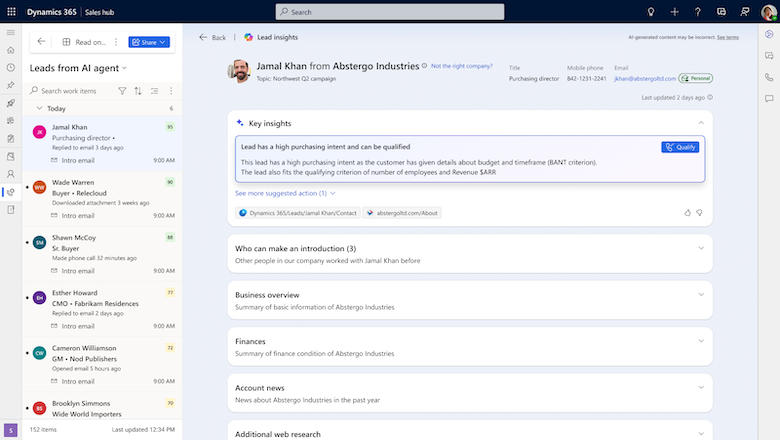
The 2025 release wave 2 further improves the Sales Qualification Agent in Dynamics 365 Sales. This agent is an AI-powered assistant that autonomously researches leads, scores them against your ideal customer profile, and generates personalized outreach emails—all without the manual grind of switching between tools or sifting through fragmented data.
Traditionally, building a healthy pipeline requires maintaining two to three times your target quota in qualified opportunities. However, that often means hours of research, mass email sends, and low conversion rates. With the Sales Qualification Agent, this process becomes faster and more targeted by surfacing only the most promising leads and providing ready-to-send, highly relevant emails. As a result, sellers can spend more time with buyers who are likely to convert and less time chasing dead ends.
The agent actually combines three specialized AI agents working seamlessly together:
- Research agent – Gathers insights from Dynamics 365 Sales and public web sources to deliver:
- Lead and account summaries for a 360-degree view.
- Email verification for valid contacts.
- Relationship insights showing coworkers connected to the lead.
- Company context such as financial health and priorities.
- Suggestions for other relevant contacts.
- Existing opportunity data tied to the record.
- A personalized draft email with talking points.
- Prioritization agent – Scores leads against your ideal customer profile using CRM data and public sources. Sellers can filter by “strong fit” to focus on the best opportunities.
- Outreach agent – Builds a tailored engagement email, incorporating all research insights to boost response rates.
Furthermore, admins can:
- Assign the agent to specific sellers or roles via security groups.
- Define ideal customer profile criteria (e.g., industry codes, job roles).
- Add public websites as research sources.
- Provide value propositions for email talking points.
- Display custom insights such as whether a company operates remotely or in-office.
Accelerate data entry using form fill assist toolbar
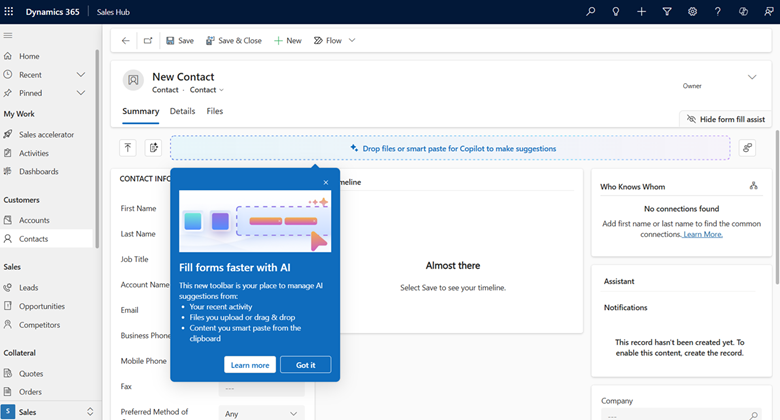
New in Dynamics 365 Sales, the form fill assist toolbar is part of Copilot’s data entry automation features. It uses AI to pull details such as names, addresses, phone numbers, and company information from uploaded files, emails, or images, and automatically maps them to the correct fields in your sales forms.
Manually keying in contact and lead information from business cards, web forms, or scanned documents is tedious, error-prone, and takes valuable time away from selling. By letting AI handle data extraction and mapping, sellers can reduce administrative burden, minimize mistakes, and focus on building customer relationships and closing deals.
From within a lead or contact form, sellers can:
- Upload files in supported formats (
.txt, .docx, .csv, .pdf, .png, .jpg, .jpeg, .bmp) using drag-and-drop or the file selector. - See inline suggestions for each field based on the file’s content, with the ability to hover over the file’s source tag to understand where the suggestion came from.
- Accept all suggestions at once with the Accept All button, or clear them individually or entirely with Clear and Clear All.
- Control the toolbar visibility and access the Smart Paste button for additional paste assistance.
- Provide feedback on suggestions using the More Actions menu, helping refine the AI’s accuracy over time.
Additional key updates:
- Natural language smart grid: Users can now find, filter, and sort data in grids using natural language queries. This makes it easier and faster to access relevant information without complex filters.
- AI agents connect via Model Context Protocol server: AI agents now communicate through a standardized protocol. This improves integration, performance, and scalability across Dynamics 365 Sales tools.
- Add custom web sources to improve agent research relevance: Admins can add specific websites as trusted research sources for AI agents. This enhances the quality and context of lead and account insights.
- Visualize hierarchical data from multiple tables: Users can better understand complex relationships by visualizing hierarchical data across multiple tables directly within the Sales interface.
Improved Data Unification in Dynamics 365 Customer Insights – Data
Export segment audiences and insights to ad platforms
This new export functionality in Dynamics 365 Customer Insights – Data allows organizations to seamlessly push customer segments and insights directly to popular advertising platforms like Google Ads, Facebook Ads, LinkedIn Ads, or via Secure FTP (SFTP) to other activation systems.
By enabling easy, direct activation of segmented customer data on advertising platforms, marketers can run more targeted campaigns that improve engagement and optimize ad spend. Instead of manually exporting and formatting data, teams save time and reduce errors, while ensuring the right audiences are reached consistently across channels. Exporting data to Azure Data Lake also opens doors for advanced analytics and integration with broader business processes.
Marketers create unified customer segments in Customer Insights – Data. When ready, they export these segments using built-in connectors to major ad platforms or SFTP endpoints. This export supports:
- Direct activation of audiences in ad campaigns for personalized targeting.
- Export to Azure Data Lake for custom reporting and analytics with Power BI and other tools.
- Secure file transfer via SFTP to downstream systems.
Delta lake format accelerates time to insights
Dynamics 365 Customer Insights – Data now supports the Delta Lake data format natively, enabling incremental data processing that tracks and applies only changes instead of reprocessing entire datasets.
Customer data is ever-growing and constantly changing, with signals coming from online activity, mobile interactions, and more. Reprocessing the full dataset daily can cause delays, resulting in stale insights that slow your ability to react to customer behavior shifts. With Delta Lake incremental updates, data refreshes happen faster and more efficiently, ensuring your teams get the most current, actionable insights without waiting for lengthy processing cycles.
Delta Lake format tracks changes in source data over time. Customer Insights processes only these incremental changes rather than the full dataset when unifying customer profiles. Since customer profile data typically changes only slightly day to day, this approach saves significant processing time and accelerates insight delivery. The update requires no additional setup once your tables use the Delta format.
Microsoft plans to extend this incremental processing to segments, measures, activities, and predictions in upcoming updates, further boosting performance and responsiveness.

Discover what’s possible with Microsoft Dynamics 365
See how the latest Sales and Customer Insights updates can boost productivity and improve decision-making. Our team can help you deliver improved customer experiences.
Copilot chat responses grounded in customer insights
This new feature brings unified customer insights such as predicted lifetime value, propensity to buy, recent transactions, and engagement history directly into Copilot chat within Dynamics 365. Sellers, service agents, and chatbots can instantly query and receive relevant, personalized customer data without leaving their workflow. This feature is slated for public preview in March 2026.
Having easy access to rich, actionable customer insights within the flow of work empowers teams to engage more meaningfully. Instead of guessing or manually searching for data, sales and service professionals get a 360-degree view of each customer’s behavior and value in seconds. This not only enhances personalized engagement but also improves operational efficiency and helps build long-term loyalty through tailored experiences.
Users ask Copilot questions about specific customers, such as “What is Mark’s predicted lifetime value and propensity to buy?” Copilot fetches insights from Customer Insights – Data and returns the information immediately within the chat interface. This seamless access includes recent purchases, interactions, and risk signals (like churn risk), enabling users to adjust their engagement strategies on the spot.
Additional key updates:
- Filter rows from source data to reduce processing load: Improve performance by filtering source data before processing, which reduces the volume of data and speeds up insights generation.
- Use Microsoft OneLake as a data source: Enable integration with Microsoft OneLake to unify and access customer data across multiple platforms.
- OneLake unified profiles and insights access: Access consolidated customer profiles and insights through OneLake, providing a more comprehensive and connected view of your customers.
- Target audiences based on prior campaign signals: Leverage data from previous campaigns to better segment and target audiences for future marketing efforts.
Smarter orchestration in Dynamics 365 Customer Insights – Journeys
Create journeys using Copilot descriptions
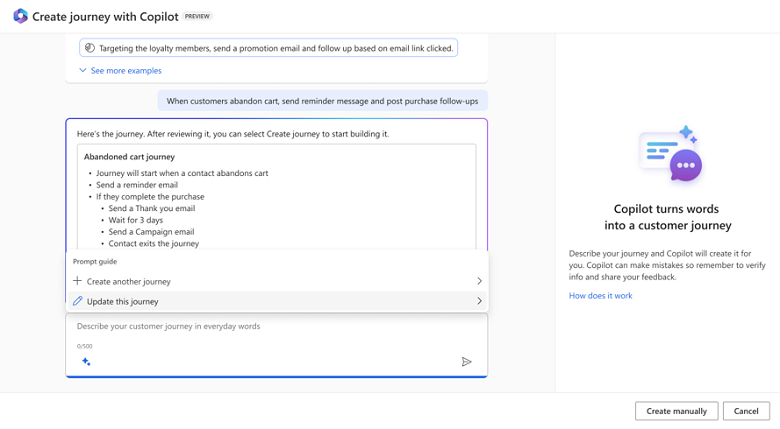
Dynamics 365 Customer Insights – Journeys now includes a Copilot-powered journey creator that lets users design complete customer journeys simply by describing their goals in everyday language. No prior journey-building experience is required; generative AI takes your prompt and builds a tailored customer journey automatically.
Traditionally, creating customer journeys requires technical knowledge and manual configuration, which can slow time to market and create barriers for marketing teams. With this AI-driven journey creator, teams can quickly align on customer experience ideas and launch personalized campaigns faster. This capability reduces friction, accelerates collaboration, and allows organizations to deliver highly relevant experiences that drive customer engagement and loyalty.
An administrator enables the journey Copilot feature switch. When users open the journey Copilot window, they are presented with six suggested prompts to spark ideas or can type their own natural language description.
Copilot then:
- Analyzes the prompt and automatically detects the relevant customer segment.
- Suggests the full sequence of journey steps based on best practices.
- Provides a preview and detailed summary of the journey before creation.
Users can review, tweak, and finalize the journey, which is then created automatically ready for content addition and execution.
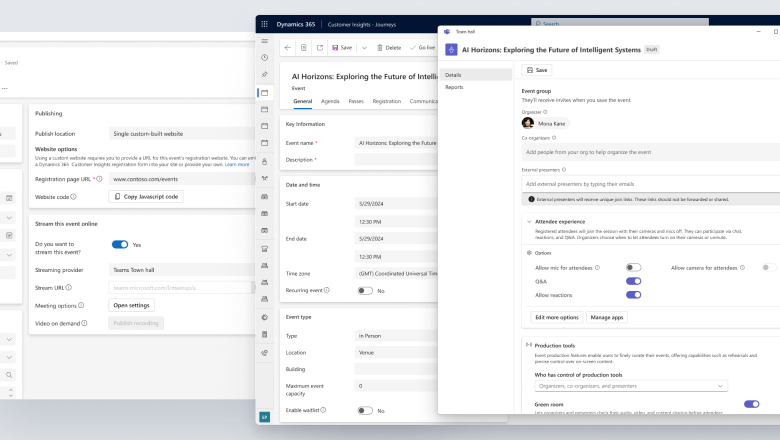
Host large-scale online events with Teams Town Hall
This new feature integrates Microsoft Teams Town Hall directly into Dynamics 365 Customer Insights – Journeys, allowing organizations to schedule, manage, and execute online events for up to 10,000 attendees as part of their customer journey campaigns.
Combining event management with customer insights creates a seamless, data-driven approach to event marketing. Personalized invitations are automatically triggered based on customer behavior and data, increasing attendance and engagement. Tracking participation within Customer Insights helps marketers segment audiences and tailor follow-up actions, improving event ROI and customer experience. This integration also reduces manual effort and tool switching by centralizing event workflows. The ability to publish video-on-demand content extends event value beyond the live session for those who couldn’t attend.
Marketers create and manage Teams Town Hall events within Customer Insights – Journeys.
- They can schedule online events with up to 10,000 attendees.
- Personalized invitations are sent automatically based on customer data and behavioral triggers.
- Attendance and engagement metrics are tracked inside Customer Insights for post-event follow-up segmentation.
- Video-on-demand content can be published after the event to re-engage attendees and those who missed it.
To enable this, admins must connect Microsoft Teams in the Event Management settings of Customer Insights – Journeys.
Automate journey creation via API
The new real-time journeys API in Dynamics 365 Customer Insights – Journeys enables organizations to automate the creation of customer journeys at scale using templates, segments, and message assets.
For global or large organizations, manually building multiple journey variants for different languages, regions, or customer segments is time-consuming and prone to inconsistency. Automating journey creation reduces manual work, ensures consistency, and speeds up time-to-market. It empowers teams to deliver timely, relevant communications tailored to diverse audiences without increasing headcount.
Using the journey API, teams can programmatically:
- Generate many localized journey variations that adjust language, time zone, audience segment, and messaging automatically.
- Launch segment-based journeys triggered by specific events, such as posting lottery results or other business milestones.
- Automate the creation of multi-touch event lifecycle journeys, including invitations, reminders, and confirmations.
Additional key updates:
- Copilot-powered voice conversations: Enable natural, AI-driven voice interactions within customer journeys to enhance engagement and support.
- Export sent emails for record keeping: Automatically export emails sent during journeys for compliance and auditing purposes.
- Set message expirations to keep content relevant: Define expiration dates for messages to ensure customers only receive timely and relevant communications.
- Simplify forms by filtering answers based on prior choices: Improve form completion rates by dynamically filtering questions based on previous answers.
- Paid registration and payment integration with set registration periods: Manage event registrations with integrated payment processing and control registration windows.
Next Steps
The 2025 Release Wave 2 introduces a range of AI-driven enhancements across Dynamics 365 Sales and Customer Insights. From intelligent lead qualification to cross-channel marketing orchestration. These updates are designed to help organizations deepen customer engagement, improve internal efficiency, and drive better outcomes. At Rand Group, we help organizations turn new features into real business outcomes. Whether you’re exploring AI-powered sales tools or planning cross-channel customer journeys, our team can work with you to:
- Prioritize the features that align with your strategic goals.
- Guide your teams through configuration, adoption, and training.
- Maximize the long-term value of your Microsoft investment.
Contact us today to schedule a one-on-one session and start planning your next steps with confidence.
Subscribe to our Insights
Related Blogs

How LinkedIn Sales Navigator enhances Dynamics 365 Sales
Sales organizations are under increasing pressure to do more than manage pipelines—they are expected to build meaningful relationships, identify buying signals early, and engage the right stakeholders at the right time. While platforms like Dynamics 365 Sales provide...

Dynamics 365 CE Tip of the Month: Gain control of your sales process with Opportunity Pipelines
Many sales teams struggle with pipeline visibility. Opportunities sit in stages too long, forecasts become unreliable, and managers often rely on manual updates or gut instinct to understand what is really happening in the business. Without a clearly defined and...

Dynamics 365 Sales 2026 release wave 1: A closer look at the top new features
Microsoft releases updates to Dynamics 365 Sales twice a year through its release wave program. The Dynamics 365 Sales 2026 release wave 1 focuses heavily on AI-powered selling, smarter automation, and tools that help sellers spend less time on admin work and more...