Dynamics 365
 Power Platform
 Dynamics
 Cloud & Productivity
Dynamics 365 pricing guide: Costs, licensing, and implementation explained

Understanding how Dynamics 365 pricing works is key to planning your investment and building a system that fits your business. Dynamics 365 offers flexible, per-user licensing with multiple applications that cover both ERP and CRM functionality. The total cost depends on the applications you choose, how many users you have, and the services needed for implementation and support.
This guide breaks down everything you need to know about Dynamics 365 pricing, from licensing models and subscription terms to total cost of ownership and implementation considerations. Whether you’re evaluating a single app or planning a full suite rollout, the sections below will help you make an informed decision:
What is Dynamics 365?
Microsoft Dynamics 365 is a comprehensive suite of business applications that brings together enterprise resource planning (ERP) and customer relationship management (CRM) under one unified platform. Unlike traditional software, Dynamics 365 uses a modular approach, allowing organizations to select only the applications they need. Each app is designed to connect seamlessly with the others, enabling businesses to streamline operations, improve productivity, and make data-driven decisions. Whether your focus is managing customers, finances, or operations, Dynamics 365 offers a flexible foundation that scales with your business.
Dynamics 365 CRM applications
Dynamics 365 includes several CRM applications built to strengthen customer relationships, optimize sales, and enhance service delivery. These tools empower teams to manage leads, automate workflows, and deliver personalized experiences at every stage of the customer journey. The following CRM applications are part of the Dynamics 365 suite:
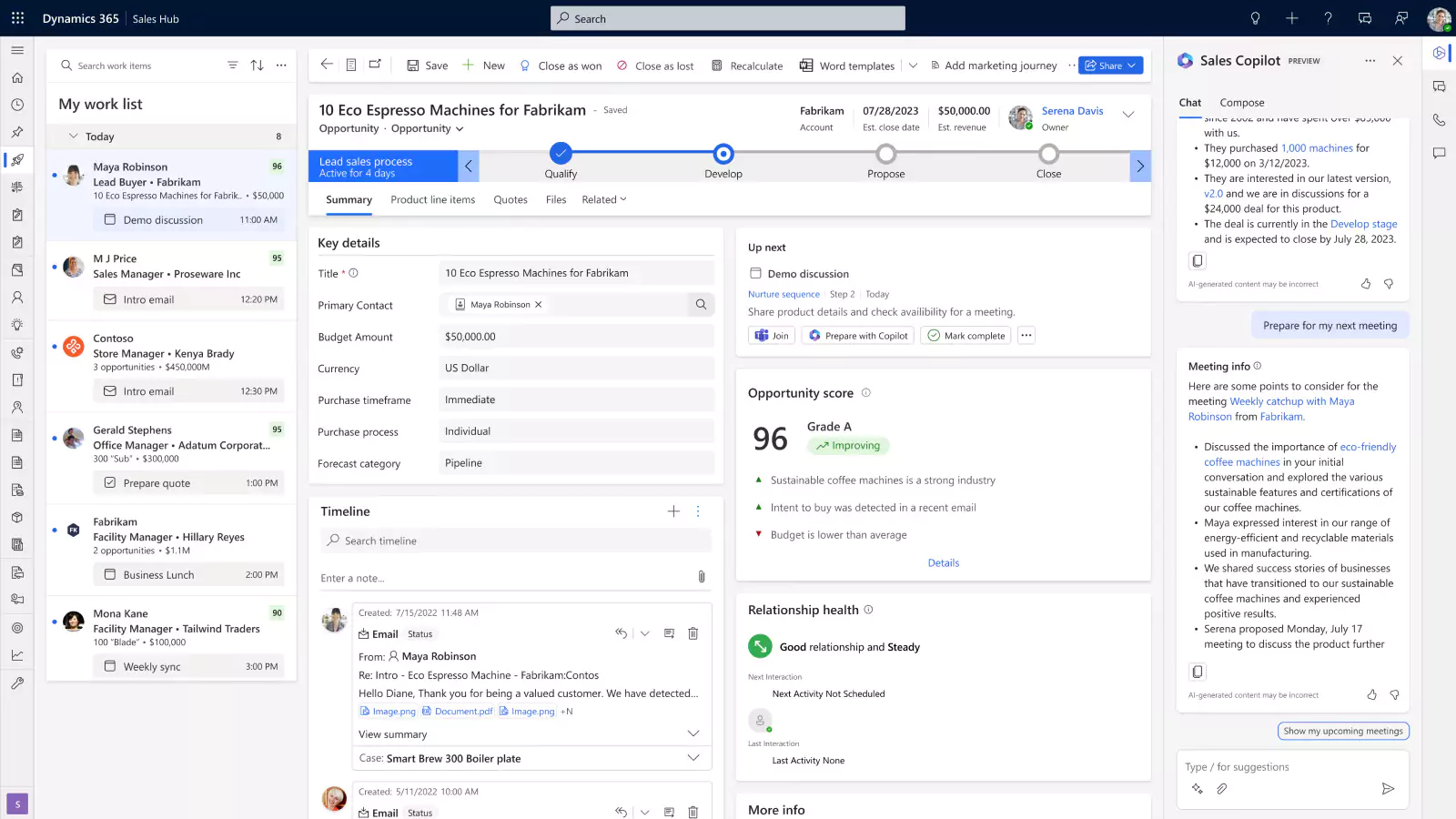
- Dynamics 365 Sales: Dynamics 365 Sales is a powerful sales management solution that integrates AI, Microsoft 365, and LinkedIn to automate tasks, identify opportunities, and help sales teams close deals faster.
- Dynamics 365 Customer Insights: Dynamics 365 Customer Insights (formerly Dynamics 365 Marketing) enables marketing teams to unify customer data, design targeted campaigns, and nurture leads through the entire buyer journey.
- Dynamics 365 Field Service: Dynamics 365 Field Service uses IoT, AI, and mixed reality to connect field teams, optimize resource scheduling, and enhance customer satisfaction with proactive service.
- Dynamics 365 Customer Service: Dynamics 365 Customer Service leverages automation, AI, and knowledge management to help support teams resolve cases faster and deliver personalized, consistent experiences that drive customer loyalty.
- Dynamics 365 Project Operations: Dynamics 365 Project Operations is an all-in-one ERP solution for project-centric businesses that unifies project planning, resourcing, execution, and billing to maximize profitability and efficiency.

Find the right Dynamics 365 solution for you
Not sure which Dynamics 365 applications are the best fit for your business? Our experts will help you evaluate your goals, compare options, and design the right mix of ERP and CRM apps to maximize value and performance.
Dynamics 365 ERP applications
Dynamics 365 also includes several ERP applications built to unify financial, operational, and project-based processes. These solutions give organizations greater visibility, efficiency, and control over their business operations. The following ERP applications are available in the Dynamics 365 suite:
- Dynamics 365 Business Central: Dynamics 365 Business Central is a comprehensive business management solution for small and mid-size companies that unifies finance, sales, supply chain, projects, and operations in one connected system.
- Dynamics 365 Finance & Operations: Dynamics 365 Finance & Operations is an enterprise-grade ERP solution for medium to large organizations. It consists of Dynamics 365 Finance and Dynamics 365 Supply Chain Management (SCM), offering advanced capabilities for financial management, production planning, inventory control, and global supply chain visibility, all powered by automation, analytics, and AI.

How is Dynamics 365 licensed?
Microsoft Dynamics 365 uses a per-user, subscription-based licensing model. Each individual who needs access to the system must have their own named user license. Licenses cannot be shared among multiple employees, but can be reassigned if a user leaves the organization. This approach ensures secure, personalized access while giving businesses the flexibility to scale as their workforce grows or changes.
Dynamics 365 pricing is based on the applications you choose and the specific roles that need access. You can mix and match licenses across ERP and CRM applications, allowing departments to use only what they need. For example, your accounting team might use Business Central or D365 Finance & Operations, while your sales and service teams use D365 Sales or D365 Customer Service.
Microsoft offers multiple subscription term options to fit different operational and budgeting needs:
- Monthly term: The monthly term offers maximum flexibility, letting you add or remove users as staffing levels change. This option is ideal for organizations with fluctuating workloads or seasonal employees. However, monthly subscriptions generally cost about 20% more than annual plans.
- Annual term: Most businesses choose the annual term for its balance of flexibility and predictable pricing. You can add users at any point during the year at a prorated rate, though license reductions typically must wait until renewal.
- Multi-year term: For long-term stability, Microsoft also provides multi-year commitments, often over three years. These plans lock in your Dynamics 365 pricing, shielding you from future increases while providing consistent, predictable costs.
Regardless of the term, each user license grants access to specific applications and capabilities depending on the chosen plan. There is no concurrent user licensing model, so if 15 employees need access, you will need 15 user licenses.
This flexible subscription model makes Dynamics 365 pricing scalable and cost-effective. It allows organizations to align technology investments directly with their operational requirements while maintaining predictable expenses over time.
How much does Dynamics 365 cost?
Dynamics 365 pricing is structured around a per-user model, where costs vary depending on user type and application. Microsoft sells licenses by user type, User Licenses, Team Member Licenses, and Device Licenses, so organizations can scale access based on individual needs and roles.
Dynamics 365 license types:
- User license: A Dynamics 365 User License grants full access to a specific application, such as Dynamics 365 Sales, Customer Service, or Business Central. Pricing varies by application and edition. Some apps offer multiple editions of the full user license (for example, Essentials or Premium) depending on the level of functionality required. These licenses are ideal for employees who actively manage daily operations, such as sales teams, accountants, or project managers.
- Team members license: A Dynamics 365 Team Members License costs $8 per user per month and is designed for light or occasional users. It provides read-only access across most of the system, along with limited write permissions for actions such as approving workflows, entering timesheets, or updating personal details. Team Members cannot post transactions or create master records. This license is well-suited for executives, department heads, or support staff who only need to view or approve data periodically.
- Device license: A Dynamics 365 Device License is priced per device, not per person, and varies by application. It is ideal for shared environments like warehouse kiosks, manufacturing stations, or retail registers. Multiple users can access Dynamics 365 through a single licensed device, with permissions defined by their security roles. For organizations with shift-based work or shared terminals, this option provides a cost-effective way to maintain secure access.
Base & Attach licensing options
Microsoft uses a modular approach called the Base and Attach licensing model to make Dynamics 365 pricing more flexible and cost-efficient. This model allows organizations to purchase a primary application (the Base License) and then add related apps (the Attach Licenses) at discounted rates. It’s designed to support businesses that want to expand functionality across sales, service, marketing, and operations without paying full price for each application.
- Base license: The Base License is the first full-price application you purchase. It includes all core capabilities required to run your primary business processes, whether it’s managing financials in Dynamics 365 Business Central, running projects in Dynamics 365 Project Operations, or handling customer interactions in Dynamics 365 Sales.
- Attach license: Once you’ve purchased a Base License, you can add Attach Licenses for other Dynamics 365 applications at a discounted price. This allows you to integrate additional solutions while optimizing costs and maintaining unified data across your organization.
It’s important to note that only certain Dynamics 365 applications qualify as Base Licenses, and the more expensive license must always be chosen as the base. Contact us today to determine the best combination and pricing strategy for your organization.
The table below summarizes Dynamics 365 pricing for each application under Microsoft’s Base and Attach licensing structure. Prices shown are per user, per month, in USD.

White Paper:
Get the full pricing breakdown
Want a complete overview of Dynamics 365 license types, pricing, and what’s included? Download our Dynamics 365 pricing & licensing guide for a detailed comparison, including costs, user roles, and module access.
Dynamics 365 pricing scenarios
Because Dynamics 365 licensing is modular, pricing can vary based on application mix, user roles, and subscription terms. The examples below illustrate how different organizations might structure their licenses and what typical monthly costs may look like. These scenarios are for planning purposes only, your final pricing will depend on discounts, subscription terms, and your exact license mix.
Scenario 1: Small professional services firm using Business Central + light CRM
Company profile:
A 25-person consulting firm replacing QuickBooks and spreadsheets. Core needs include financials, project accounting, time entry, and basic customer tracking.
License mix:
- 8 Business Central Essentials users — $80 each
- 12 Team Member users — $8 each
- 5 Sales Professional Attach licenses — $20 each
Estimated monthly subscription cost:
- Business Central Essentials: 8 × $80 = $640
- Team Members: 12 × $8 = $96
- Sales Professional Attach: 5 × $20 = $100
Total monthly cost: $836
Why this is common:
Growing firms often use Business Central as their ERP system and add low-cost sales licensing to give account managers access to key CRM functions.
Scenario 2: Mid-size distributor using Finance & Operations + warehouse devices
Company profile:
A 120-employee distribution company with multiple warehouses, barcode scanning, and advanced inventory requirements.
License mix:
- 25 Dynamics 365 Finance full users at base price — $210 each
- 15 Dynamics 365 Supply Chain Management full users at attach price — $30 each
- 40 Device licenses for warehouse scanners — $85 each
- 40 Team Member users — $8 each
Estimated monthly subscription cost:
- Finance users: 25 × $210 = $5,250
- SCM users: 15 × $30 = $450
- Device licenses (example): 40 × $85 = $3,400
- Team Members: 40 × $8 = $320
Total monthly cost: ~ $9,420
Why this is common:
Warehouse operations often depend heavily on shared devices like scanners or kiosks. Using Device licenses keeps costs efficient while still supporting high-volume, shift-based environments. The D365 Finance + SCM Base/Attach configuration also produces meaningful savings compared to purchasing each application at full price.
How much does a Dynamics 365 implementation cost?
In addition to subscription fees, every organization should plan for a one-time implementation cost of Dynamics 365. This investment encompasses essential services, including process evaluation, requirements gathering, software configuration, customization, system integration, historical data migration, user training, and go-live support. The cost of a Dynamics 365 implementation can vary widely depending on the application, complexity, and scope of work.
How much does a Dynamics 365 implementation cost? On average, implementations range from $25,000 to over $250,000. The exception is Dynamics 365 Finance & Operations where implementations are far more complex and typically range from $25,000 to over $1,000,000. Smaller projects, such as implementing Dynamics 365 Sales or Customer Service, tend to be on the lower end, while large-scale deployments of Dynamics 365 Finance & Operations or multi-application rollouts fall at the higher end of the spectrum.
Several factors have the greatest impact on total implementation cost:
- Complexity of operations: Businesses with multiple entities, locations, currencies, or complex industry-specific workflows require more advanced configuration and testing.
- Data migration: Transferring and cleaning historical data from legacy systems can range from straightforward to highly intricate, depending on the data’s quality and structure.
- Customization needs: Adding custom fields, workflows, dashboards, or extensions increases development effort and testing requirements.
- System integrations: Connecting Dynamics 365 to third-party applications like e-commerce platforms, CRMs, or manufacturing systems often requires API development or middleware, adding to the overall cost.
- Training and user adoption: A successful implementation depends on user readiness. Comprehensive training, documentation, and change management support all influence project success.
While low-cost implementation offers may seem attractive, many rely on offshore teams unfamiliar with U.S. accounting standards, compliance regulations, and localization requirements. Time zone differences and communication challenges can lead to misalignment or delayed go-lives.
Many businesses that pursue low-cost implementations end up with underperforming systems that never fully support their operations. Others find themselves dealing with failed deployments that require a complete rework. Fixing a failed implementation can cost twice as much as doing it right the first time. For most companies, the smarter investment is a well-executed, properly supported implementation tailored to their specific needs.
Dynamics 365 total cost of ownership (TCO)
When evaluating Dynamics 365 pricing, it’s important to look beyond monthly license fees and subscription costs. The total cost of ownership (TCO) provides a complete picture by factoring in all the direct and indirect expenses associated with deploying and maintaining the system over time. Understanding TCO helps you build a more realistic budget and ensures your investment supports long-term growth, scalability, and efficiency.
Microsoft Dynamics 365 follows a cloud-based software-as-a-service (SaaS) model that delivers a significantly lower TCO compared to traditional on-premises ERP and CRM systems. With on-premise software, businesses must purchase and maintain physical servers, network hardware, data backups, and security tools, plus the internal IT staff required to manage them. These hidden expenses can quickly exceed the initial software investment.
In contrast, Dynamics 365 runs entirely in the cloud, hosted on Microsoft Azure. Microsoft manages hosting, updates, patches, uptime, and performance monitoring. This eliminates the need for dedicated servers, storage, and backup systems, while removing the cost of database administration and system maintenance. The result is lower infrastructure costs, simplified IT operations, and predictable monthly spending.
The subscription model also makes Dynamics 365 pricing more flexible and scalable. As your business grows, you can add or remove users, integrate new modules, or expand into additional Dynamics 365 applications without expensive upgrades or hardware changes. Software updates are automatic and included in your subscription, ensuring continuous access to the latest features, AI capabilities, and security enhancements.
By shifting from capital-intensive hardware and maintenance to Microsoft’s managed cloud environment, organizations can lower operational overhead, reduce risk, and achieve faster ROI. Over time, this cloud-based approach delivers a lower total cost of ownership and a more agile, future-ready business platform.

Upfront Licensing Cost
On-premises software has high upfront cost for purchasing the software
Infrastructure Investments
Requires significant investment in hardware, servers, networking, and infrastructure
SQL Server Licenses
Additional cost for SQL Server licenses for on-premises deployment
Database Maintenance
Ongoing costs for database management and updates
Annual Maintenance Fees
Annual fee for maintaining the software
Costly Upgrades
High costs and time investment for upgrading the solution
Monthly Subscription Cost
Monthly cost for the software that encompasses license subscription, upgrades, and maintenance
How to purchase Dynamics 365
Microsoft sells Dynamics 365 through its network of certified partners. These partners are more than resellers; they are implementation specialists with deep product expertise and industry experience. Choosing the right partner is one of the most important steps in ensuring your system is deployed correctly, optimized for performance, and configured to meet your business goals.
Microsoft partners play a critical role in every stage of the process. They help assess your organization’s requirements, evaluate which Dynamics 365 applications best fit your needs, and develop an implementation plan that aligns with your operations and budget. Whether you require a single solution like Dynamics 365 Sales or Business Central or a combination of ERP and CRM applications, a qualified partner can design a cohesive environment that maximizes functionality while managing Dynamics 365 pricing efficiently.
A certified Microsoft Partner also supports your business long after go-live. From ongoing maintenance, updates, and user training to change management and process optimization, they ensure your system continues to evolve alongside your organization. Their expertise reduces risk, accelerates adoption, and helps you take advantage of new capabilities as Microsoft releases them.
At Rand Group, we are a trusted Microsoft Solutions Partner with decades of experience implementing Dynamics 365 for clients across a range of industries, including energy, manufacturing, distribution, and professional services. We work closely with your team to evaluate your needs, select the right Dynamics 365 applications, and deliver an implementation plan that drives long-term results.
Ready to explore Dynamics 365? Contact us to speak with a certified Microsoft expert and learn how we can help you choose the right combination of applications and licensing options to fit your business strategy and budget.

Get Dynamics 365 today
Ready to take the next step with Dynamics 365? Rand Group will help you evaluate your options, choose the right license mix, and design a deployment strategy tailored to your business. From selecting the right applications to managing implementation and support, we ensure your Dynamics 365 pricing aligns with your goals and budget.
Licensing tips and best practices
Licensing Dynamics 365 is about more than just choosing a plan, it’s about making strategic decisions that align costs with usage and long-term growth. The right approach can significantly reduce your total spend and ensure your system scales smoothly as your business evolves. Below are key tips to help you get the most value from your investment and manage Dynamics 365 pricing effectively:
- Map out user roles before purchasing: Not everyone in your organization needs a full Dynamics 365 license. Identify who requires complete access to manage daily transactions versus those who only need to view data, approve tasks, or enter time. Assign full user licenses for core users and Team Member or Device licenses for light users. This ensures you only pay for the access each role truly needs.
- Plan ahead for growth and scalability: Consider how your organization might change over the next several years. If you expect to add users, new divisions, or additional Dynamics 365 applications, build flexibility into your licensing strategy. Longer subscription terms or modular licensing models can help you lock in predictable Dynamics 365 pricing while keeping room to expand.
- Evaluate subscription terms carefully: Microsoft offers monthly, annual, and multi-year options. Monthly terms offer flexibility but carry a higher per-user cost. Annual and multi-year commitments lock in lower rates and provide better cost stability. Choose the term that best fits your budget and projected staffing plans.
- Regularly review license usage: Business needs evolve. Employees change roles, departments reorganize, and new functionality is introduced. Review your license assignments at least once a year, ideally before renewal, to ensure you’re not paying for unused seats or over-provisioned access. Adjust license types or reassign users as needed.
- Work with a certified Microsoft Partner: Dynamics 365 licensing can be complex, especially when mixing ERP and CRM applications. A trusted partner can help you navigate licensing rules, optimize your mix of Base and Attach licenses, and ensure compliance. They’ll also provide ongoing guidance to help you manage renewals, scaling, and evolving Dynamics 365 pricing structures.
Dynamics 365 pricing FAQs
Below are answers to common questions businesses ask when evaluating Dynamics 365 pricing.
- How much does Dynamics 365 cost?
Dynamics 365 pricing varies by application, license type, and subscription term. Full-user licenses range from $50 to $300 per user per month, depending on the product. Lighter-use options, such as Team Member licenses, are available for $8 per user per month, while device-based licenses vary by application. - What should I budget for Dynamics 365 implementation?
Implementation costs are separate from software subscriptions and depend on the application, number of users, and level of customization required. Most Dynamics 365 implementations range from $25,000 to $250,000 or more. The exception is Dynamics 365 Finance & Operations, which can range from $25,000 to over $1,000,000, driven by factors such as multi-entity structures, extensive integrations, advanced financial or supply chain requirements, and large-scale data migration. Costs include business process evaluation, software configuration, integrations, data migration, training, and go-live support. To avoid unexpected expenses, it’s best to work with a certified Microsoft Partner who can provide a tailored estimate based on your scope and goals. - How do I buy Dynamics 365?
Microsoft sells Dynamics 365 through certified partners. These partners assess your business needs, recommend the right combination of applications, and help you optimize Dynamics 365 pricing based on user count and functionality. Partners like Rand Group manage everything from licensing and configuration to deployment, training, and ongoing support, ensuring your investment is properly aligned with your business strategy. - Can I switch or upgrade license types after?
Yes. You can move users from Team Member to full user or switch between editions like Sales Premium and Sales Enterprise. However, downgrades or license removals generally must wait until your renewal period. A qualified partner can help you plan license adjustments to stay compliant and control costs. - Are there discounts for multiple applications?
Microsoft’s Base and Attach licensing model provides discounted pricing when you license more than one Dynamics 365 application. Once you purchase a full-price Base License you can add apps as Attach Licenses for as little as $20-30 per user per month. This model makes it easier to expand your capabilities without paying for each product at full cost. - Are any other discounts available?
Yes. Microsoft offers discounted pricing for nonprofit organizations, and there is also a 40% transition discount available for companies migrating from older versions of Dynamics—such as Dynamics GP, NAV, or AX—into the cloud-based Dynamics 365 suite. Contact us today to learn more.
Next steps
Understanding Dynamics 365 pricing and the factors that influence total cost is essential to making a well-informed investment. From user license types and subscription terms to implementation services and total cost of ownership, every component affects both your budget and the long-term value of your system. Taking the time to evaluate your requirements, plan strategically, and partner with the right experts ensures a smoother deployment and a solution that grows with your business.
At Rand Group, we help mid-market and enterprise organizations navigate the full Dynamics 365 journey, from selecting the right applications and licenses to implementation, integration, and optimization. Whether you’re exploring options or ready to move forward, our team will help you design a licensing and deployment strategy that fits your goals, operations, and budget.
Contact us today to speak with a certified Microsoft expert and learn how to make the most of your Dynamics 365 pricing strategy.

Enhancing productivity with AI in Microsoft 365
Microsoft 365 is no longer just a suite of productivity tools. It now includes advanced AI capabilities that help users create content, automate tasks, and boost productivity across apps, including Word, Excel, PowerPoint, Outlook, and Microsoft Teams. At the heart of...

Best ERP software for family offices
Managing a family office involves far more complexity than traditional financial operations. From multi-entity accounting and consolidated reporting to investment tracking and multi-generational wealth oversight, family offices must manage diverse assets, entities,...

What are AI Agents in Dynamics 365 Business Central?
Artificial intelligence is becoming more practical inside ERP systems, and Dynamics 365 Business Central is no exception. Microsoft is introducing AI agents to help organizations manage growing transaction volumes, reduce manual work, and improve consistency across...
Subscribe to our Insights