Dynamics 365
 Power Platform
 Dynamics
 Cloud & Productivity
How to use Copilot for financial close and reporting in Dynamics 365 Finance

Financial close and reporting require accurate data, clear explanations, and consistent processes. In enterprise ERP systems, these activities involve multiple steps across general ledger, subledgers, and reporting tools. Dynamics 365 Finance includes built-in Copilot capabilities and AI agents designed specifically for finance and operations workloads. Copilot in Dynamics 365 Finance helps finance teams review data, surface insights, and generate explanations using natural language, directly within the ERP.
This blog explains how to use Copilot for financial close in Dynamics 365 Finance, including where it fits in the close process, how it supports reporting, and what finance teams should know before getting started.
What is Dynamics 365 Finance?
Dynamics 365 Finance is Microsoft’s enterprise resource planning (ERP) system for financial management and is part of the Dynamics 365 Finance & Operations suite. It supports core finance processes such as general ledger, accounts payable, accounts receivable, budgeting, project accounting, fixed assets, and compliance. These areas form the foundation of the financial close and reporting process.
Dynamics 365 Finance acts as the system of record for an organization’s financial data. It consolidates transactions across entities, currencies, and business units to support executive reporting and regulatory requirements. Because all financial data lives in one ERP, tools like Copilot for financial close in Dynamics 365 Finance can analyze information directly at the source, helping finance teams close periods and report results more efficiently.
What is Copilot?
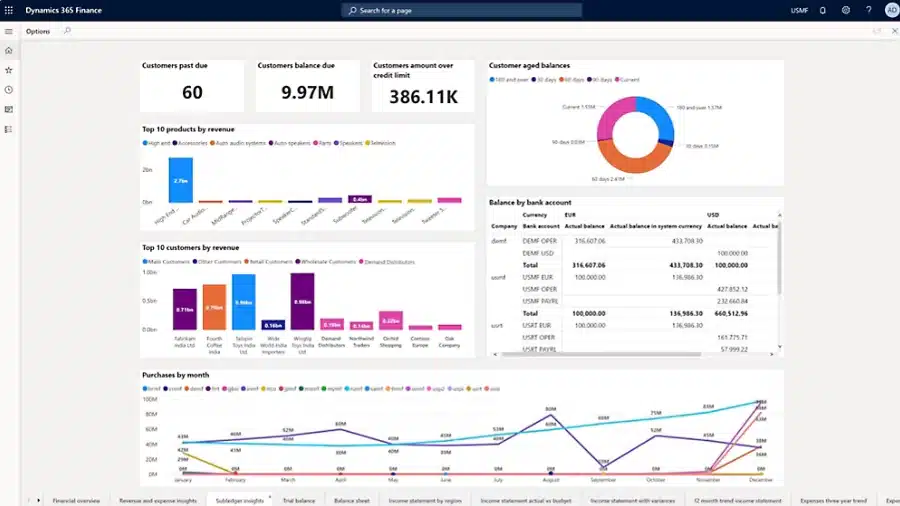
Copilot in Dynamics 365 Finance is an AI-powered assistant built directly into the ERP to support finance processes such as financial close, reporting, and analysis. It uses natural language and AI models to help users review data, identify issues, and generate explanations based on the system’s financial records. Copilot operates within existing security roles, meaning users only see data they are authorized to access.
Copilot supports users through prompts and suggestions, helping speed up analysis and documentation while keeping finance teams in control of review and approval. In addition to user-driven assistance, Copilot works alongside AI agents in Dynamics 365 Finance, which are intelligent, task-oriented capabilities that analyze data, make decisions within defined boundaries, and take action with limited human intervention. Together, these capabilities reduce manual effort while maintaining system controls.
Copilot helps finance teams by:
- Answering questions about financial data using natural language
- Identifying variances, trends, and unusual activity during close
- Generating plain-language explanations for financial results
- Supporting journal entries, reconciliations, and account reviews
- Summarizing financial statements and reporting outputs
- Reducing reliance on spreadsheets and manual analysis
Copilot in Dynamics 365 Finance helps streamline the financial close and reporting process by turning ERP data into clear insights and explanations. It supports finance teams during close activities while keeping users in control of review and approval.

Ready to unlock the power of AI?
See where Copilot and AI agents can reduce effort in financial close and reporting—based on your Dynamics 365 Finance processes, data, and controls. Rand Group’s Copilot Readiness Workshop walks your team through practical, real-world use cases and delivers a prioritized action plan you can apply immediately.
How Copilot fits into the financial close process
The financial close process typically moves through three phases: preparation, execution, and review. Copilot in Dynamics 365 Finance can support each phase by reducing manual effort and helping finance teams focus on review and decision-making.
- Preparation: During preparation, Copilot helps finance teams identify missing activity and potential issues before close begins. It can highlight unusual transactions, incomplete postings, or subledger balances that need attention. This allows teams to address problems earlier and reduce last-minute surprises.
- Execution: During execution, Copilot supports journal entries and reconciliations. It can suggest journal entry details, support reconciliation activities, and flag discrepancies for review. Routine matching and analysis are handled by AI, while finance teams focus on exceptions and approvals.
- Review: During review, Copilot helps explain financial results. It performs variance analysis, summarizes key changes, and generates plain-language explanations for financial statements. This shortens review cycles and supports management and audit discussions.
Copilot accelerates the close by supporting each phase without replacing human control. Finance teams remain responsible for approvals and final decisions, while Copilot and AI agents reduce repetitive work and surface insights earlier in the process.
Using Copilot to support journal entries and reconciliations
Journal entries and account reconciliations are core components of the financial close and often consume significant time during period-end. Copilot in Dynamics 365 Finance helps reduce this effort by supporting documentation, surfacing context, and highlighting issues that require review, while keeping finance teams fully in control of posting and approvals.
Rather than replacing accounting judgment, Copilot assists with summarization, explanation, and review. This helps improve consistency, reduce manual documentation, and focus attention on exceptions instead of routine activity.
Copilot supports journal entry review and documentation by:
- Summarizing journal activity: Copilot can summarize groups of journal entries posted during close, helping finance teams quickly understand what adjustments were made. This supports management review and reduces the need for manual write-ups.
- Generating plain-language explanations: Copilot can help draft clear, business-friendly explanations for journal entries based on transaction context. These explanations support audit documentation and improve consistency across close cycles.
- Providing historical context: Copilot can surface relevant historical patterns or similar prior entries to support accurate posting decisions. This helps users validate account usage without manually searching prior periods.
- Highlighting unusual activity: Copilot can flag unexpected balances or activity that falls outside normal patterns, helping teams identify potential misposts earlier in the close process.
Example prompt:
“Summarize the journal entries I posted for month-end close.”
Example response:
“You recorded a $50,000 utilities accrual and reclassified $20,000 from accrued expenses to accounts payable as part of month-end adjustments.”
Account reconciliation agent in Dynamics 365 Finance
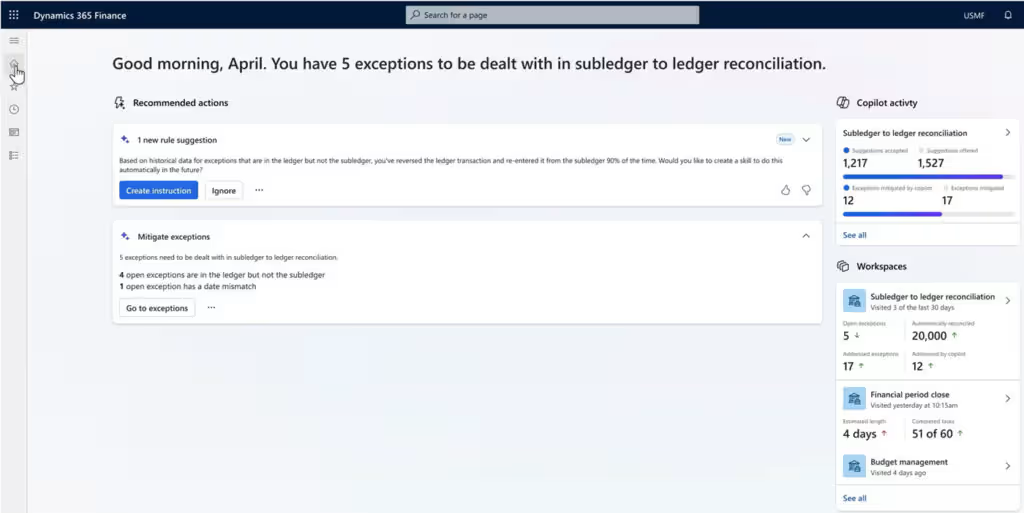
Dynamics 365 Finance includes an Account Reconciliation Agent designed to automate and streamline reconciliations for high-volume accounts. The agent works directly within Finance & Operations to analyze transactions, match entries, and surface discrepancies that require review, reducing manual effort while maintaining auditability and control.
The account reconciliation agent supports close activities by:
- Matching transactions at scale: Automatically matches transactions across accounts using predefined logic and learned patterns. This significantly reduces time spent on repetitive, line-by-line matching.
- Flagging exceptions for review: Identifies unmatched items and reconciliation differences that require investigation. Finance teams focus on exceptions instead of routine matches.
- Improving close consistency: Applies consistent matching logic across periods, supporting more standardized and auditable reconciliation processes.
- Reducing spreadsheet dependency: Minimizes reliance on manual reconciliation spreadsheets by keeping reconciliation activity inside Dynamics 365 Finance.
By combining Copilot-assisted review and documentation with the Account Reconciliation Agent’s automation, finance teams can complete reconciliations faster while preserving approval workflows, audit trails, and financial controls.
Using Copilot for variance analysis and explanations
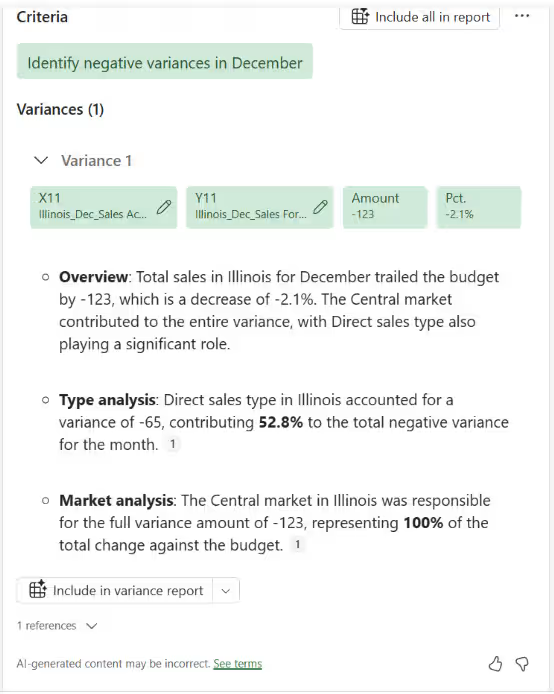
After transactions are posted and accounts are reconciled, finance teams must explain what changed and why. Variance analysis is often one of the most time-consuming steps in the financial close. Copilot in Dynamics 365 Finance helps streamline this work by analyzing ERP data, identifying material changes, and surfacing data-backed explanations that finance teams can review and finalize.
Copilot supports variance analysis by comparing results across periods or against budget, highlighting significant movements, and providing context based on underlying transactions and balances. This reduces manual analysis while helping finance teams focus on the drivers that matter most during close and review.
Copilot supports variance analysis by:
- Period-over-period and budget comparisons: Copilot compares actuals to prior periods or budget and highlights material variances that require attention. This helps finance teams quickly identify where results changed without manually building comparison reports.
- Driver identification using ERP data: Copilot analyzes transaction-level and balance data to surface likely contributors to a variance. This provides context behind the numbers and helps teams move from detection to explanation faster.
- Draft variance explanations: Copilot can generate plain-language summaries of favorable and unfavorable variances that finance teams review and refine for management reporting. This improves consistency across reporting periods while reducing time spent writing commentary.
- Reduced manual analysis effort: By automating variance identification and explanation, Copilot reduces reliance on spreadsheet-based analysis. Finance teams can move more quickly into validation, review, and decision-making.
- Audit and management review support: Copilot-generated explanations are grounded in Dynamics 365 Finance data and can be traced back to transactions and balances. This makes it easier to support management questions and audit requests without recreating analysis.
Example output:
“Marketing expenses were $20,000 above budget due to an unplanned advertising campaign, while travel costs decreased 15% as more meetings were held virtually.”
Using Copilot for financial reporting
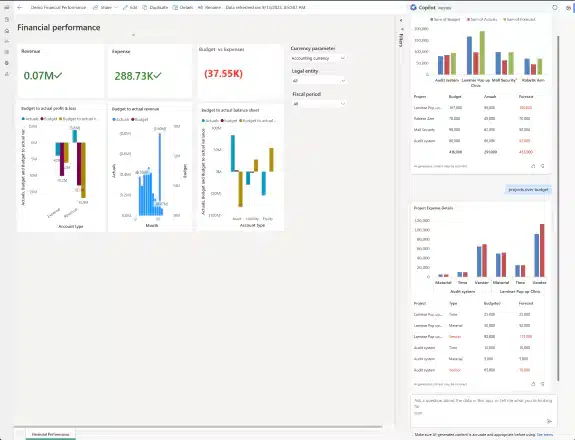
Copilot supports ongoing financial reporting in Dynamics 365 Finance by making ERP data easier to access and explain. Instead of relying only on scheduled reports, finance teams can use Copilot to answer questions, summarize results, and support leadership with timely insights throughout the period.
Copilot allows users to ask natural language questions, generate summaries of financial statements, and follow up with deeper analysis when needed. This makes reporting more responsive without replacing formal financial reports or dashboards.
Copilot supports financial reporting by:
- Answering natural language questions about revenue, expenses, and balances
- Comparing results across periods, entities, or business units
- Summarizing financial statements and key trends
- Providing narrative explanations alongside financial data
- Supporting ad hoc reporting requests from leadership
Example prompt:
“What was total revenue for the Consumer Division last month, and how does it compare to the prior month?”
Example response:
“Consumer Division revenue was $5.2M in August, up 5% from July due to increased sales of Product X.”
Getting started with Copilot in Dynamics 365 Finance
Copilot is included with Dynamics 365 Finance and is available to support financial close and reporting without requiring a separate add-on for the ERP itself. Getting started is primarily about preparing your finance team and processes to take advantage of AI-driven assistance. Copilot works best when finance teams understand where it fits into close and reporting workflows and apply it consistently with proper review and controls.
- Licensing and access: Copilot capabilities are included with Dynamics 365 Finance, and users must have appropriate security roles to access financial data.
- Finance team readiness: Ensure data structures such as chart of accounts, dimensions, and journal descriptions are consistent and well maintained.
- Training: Show users how to ask effective questions, review Copilot outputs, and apply results during close and reporting.
- Change management: Set expectations that Copilot assists with analysis and documentation but does not replace review or approvals.
- Governance and controls: Continue using existing approval workflows, audit trails, and role-based security when using Copilot outputs.
When used intentionally, Copilot becomes a natural extension of financial close and reporting workflows in Dynamics 365 Finance, helping teams reduce manual effort while maintaining accuracy and control.
How Rand Group helps organizations use Copilot effectively
Rand Group is a Microsoft partner with deep experience in Dynamics 365 Finance and financial close processes. We help organizations apply Copilot in practical, controlled ways that improve close and reporting without disrupting existing controls. Our focus is on aligning Copilot to real finance workflows so teams see value quickly and sustainably.
Rand Group supports Copilot adoption through:
- Copilot and AI strategy: We help organizations understand how Copilot fits into their broader finance and AI strategy. This includes identifying where Copilot delivers the most value in financial close and reporting, and when AI agents may be appropriate for background automation.
- Aligning Copilot with the financial close process: Our team maps Copilot capabilities to your specific close activities, such as reconciliations, variance analysis, and reporting. We ensure Copilot is used at the right points in the close cycle to reduce effort without weakening controls.
- Implementation and configuration: Rand Group configures Copilot within Dynamics 365 Finance to align with your data structures, security roles, and reporting needs. This ensures Copilot insights are accurate, relevant, and based on your system of record.
- Training and enablement: We provide role-based training to help finance teams use Copilot effectively during close and reporting. This includes guidance on prompting, reviewing outputs, and incorporating Copilot into daily finance workflows.
- Ongoing support and optimization: After go-live, Rand Group continues to support and refine Copilot usage as needs evolve. We help organizations adapt to new Copilot capabilities, optimize usage, and maintain governance over time.
Frequently asked questions (FAQs)
Is Copilot included with Dynamics 365 Finance?
Yes. Copilot is included with Dynamics 365 Finance and is built directly into the ERP. Users access Copilot based on their existing security roles and permissions.
What can Copilot do during the financial close process?
Copilot helps with journal entries, reconciliations, variance analysis, and financial explanations. It analyzes ERP data to surface issues, summarize results, and support review without replacing approvals.
Can Copilot replace accountants or automate the entire close?
No. Copilot assists with analysis and documentation but does not replace accountants or fully automate financial close. Finance teams remain responsible for judgment, review, and approvals.
How do you get started with Copilot in Dynamics 365 Finance?
Copilot is available within Dynamics 365 Finance with no separate ERP add-on required. Finance teams should focus on training users, maintaining clean data, and aligning Copilot to financial close and reporting workflows. Many organizations choose to work with a partner like Rand Group to ensure Copilot is applied effectively and governed properly.
Next steps
Copilot helps finance teams work more efficiently during financial close and reporting in Dynamics 365 Finance. By supporting journal entries, reconciliations, variance analysis, and reporting explanations, Copilot reduces manual effort while keeping finance teams in control of review and approvals.
To get the most value from Copilot for financial close in Dynamics 365 Finance, organizations should align it to real finance workflows and ensure proper training and governance. Contact Rand Group today to learn how we can help you use Copilot effectively and improve your close and reporting processes.